> For the complete documentation index, see [llms.txt](https://docs.tryterra.co/llms.txt). Markdown versions of documentation pages are available by appending `.md` to page URLs; this page is available as [Markdown](https://docs.tryterra.co/unified-api/getting-started.md).

# Overview

One API for health data from 500+ wearables and apps, delivered to you as it arrives.

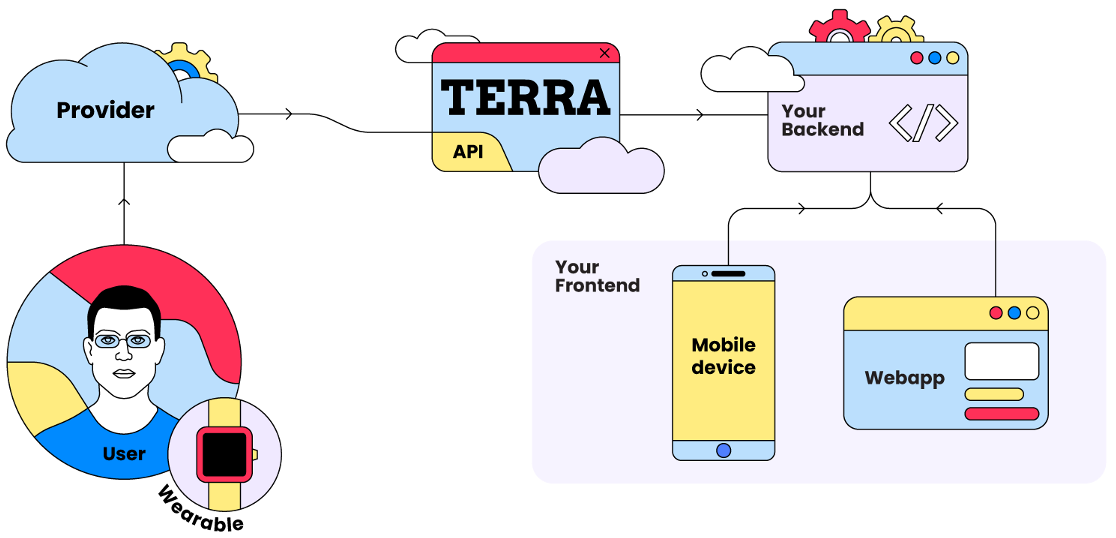
The Unified API connects your app to your users' wearables, sensors, and health apps through one integration. Terra handles each provider's authentication, API, and data model, normalises the data into one schema, and pushes it to your backend as it arrives. You integrate once and get Garmin, Fitbit, Oura, Apple Health, and 500+ other sources.

<figure><img src="https://464213908-files.gitbook.io/~/files/v0/b/gitbook-x-prod.appspot.com/o/spaces%2FVGMJVuZnZyOtvV4b53cY%2Fuploads%2Fgit-blob-e50ceaf6229172c5da05658cc12ea8cb917e9380%2Funified-api-data-flow.png?alt=media" alt="A user&#x27;s wearable syncs to its provider, Terra fetches and normalises the data, and sends it to your backend, which serves your mobile and web frontends" width="563"><figcaption><p>Data flows from the provider through Terra to your backend</p></figcaption></figure>

## How it works

1. **A user connects a source.** Your app opens the Terra widget, an embeddable flow where the user picks their provider and logs in. Terra returns a `user_id` for that connection and keeps the provider tokens refreshed from then on.
2. **Terra normalises the data.** Whatever the provider's format, you receive the same JSON schema for every source, so you code against one set of models.
3. **Terra pushes it to your destination.** As soon as the provider makes new data available, Terra sends it backend to backend to the destination you configured: a webhook, a SQL database, MongoDB, Firestore, cloud storage on S3, GCS, or Azure, or a queue on SQS or Kafka.

The API is event based, so you do not poll for updates. You request data in one case: to backfill history from before the user connected, for example to establish baselines or train a model on a new user's past months. See [Requesting historical data](/unified-api/managing-user-health-data/requesting-historical-data.md).

### Delivery and security

Data is encrypted in transit, and every webhook is signed so you can check it came from Terra. If your server is down, Terra retries, and you can see every delivery attempt in the dashboard. See [Webhooks](/unified-api/integration-setup/setting-up-data-destinations/webhooks.md).

## What you receive

| Data type    | What it covers                                                                                      |
| ------------ | --------------------------------------------------------------------------------------------------- |
| Activity     | A workout: heart rate, distance, route, pace, power, calories, and strength sets.                   |
| Sleep        | A night's sleep or a nap: stages, heart rate, HRV, breathing, and sleep scores.                     |
| Daily        | The day so far: steps, calories, active minutes, stress, and daily scores. Updated through the day. |
| Body         | Body readings: weight, body fat, blood pressure, glucose, ECG, and temperature.                     |
| Nutrition    | Meals and drinks logged, with calories, macros, and micronutrients.                                 |
| Menstruation | Cycle tracking: phase, day in cycle, flow, and fertility window.                                    |
| Hormone      | Hormone levels from at-home tests: LH, E3G, PdG, hCG, and FSH.                                      |
| Athlete      | The user's profile at the provider: name, sex, date of birth, and location.                         |

Every field is listed in the [data models reference](https://docs.tryterra.co/reference/health-and-fitness-api/data-models) and the [OpenAPI spec](https://github.com/tryterra/openapi). All fields are nullable: a field the provider does not supply is `null`, so the shape is the same for every source.

## Web sources and mobile-only sources

| Source type | Examples                                                                                                                                          | How it connects                                                                                                                                                 |
| ----------- | ------------------------------------------------------------------------------------------------------------------------------------------------- | --------------------------------------------------------------------------------------------------------------------------------------------------------------- |
| Web         | Garmin, Fitbit, Oura, Strava, and [500+ more](https://docs.tryterra.co/reference/health-and-fitness-api/supported-integrations#integrations-list) | Terra reads the provider's cloud API. Nothing extra to build.                                                                                                   |
| Mobile-only | Apple Health, Samsung Health, Health Connect                                                                                                      | These have no cloud API for third parties, so your mobile app reads them with the [Terra SDK](/unified-api/mobile-only-sources.md) and sends the data to Terra. |

Either way, the data reaches your destination in the same format. Only add the SDK if you need one of those three sources.

Terra has no rate limits of its own. Providers do, and Terra handles retries and backoff for you.

## Next steps

<table data-view="cards"><thead><tr><th></th><th></th><th data-hidden data-card-target data-type="content-ref"></th></tr></thead><tbody><tr><td><strong>Quickstart</strong></td><td>Connect a wearable and see its data arrive, in four steps from the dashboard.</td><td><a href="/unified-api/quickstart.md">Quickstart</a></td></tr><tr><td><strong>Integration setup</strong></td><td>Enable sources, add destinations, and understand environments.</td><td><a href="/unified-api/integration-setup.md">Integration setup</a></td></tr><tr><td><strong>User authentication</strong></td><td>Open the widget from your app and handle the events it produces.</td><td><a href="/unified-api/user-authentication.md">User authentication</a></td></tr><tr><td><strong>Managing user health data</strong></td><td>Receive events, request history, and write data back to providers.</td><td><a href="/unified-api/managing-user-health-data.md">Managing user health data</a></td></tr><tr><td><strong>Mobile-only sources</strong></td><td>Apple Health, Samsung Health, and Health Connect through the mobile SDK.</td><td><a href="/unified-api/mobile-only-sources.md">Mobile-only sources</a></td></tr></tbody></table>
