# What is Terra API?

Terra is the **Health OS for connected health data**.

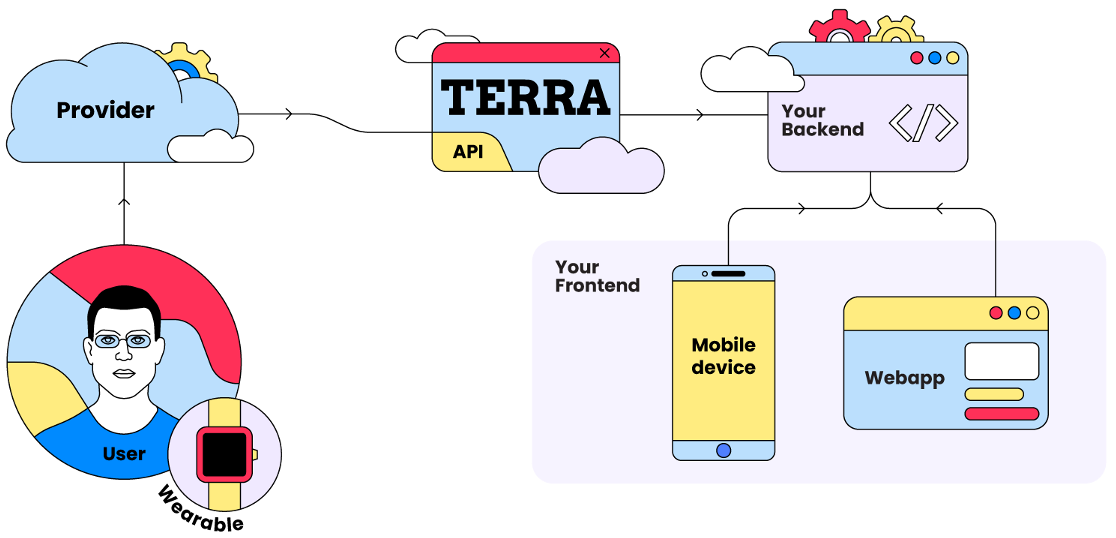
We give developers one platform to access, standardise, and act on data from the entire health and wearable ecosystem, from fitness trackers and smartwatches to medical devices and lab diagnostics, without building or maintaining a single integration.

## Why Terra?

### The problem we solve

Health data is fragmented. Every device, platform, and lab (like Garmin, Fitbit, Apple Health, Oura, and hundreds more) has its own API, data format, and authentication method.

### Our solution

Terra is the layer that sits between your application and that fragmentation. We handle the **infrastructure**:

* Integrating with hundreds of providers.
* Normalising diverse data formats into one schema.
* Managing different authentication methods.

So you can focus on **building the future of health**.

***

## Terra products

Terra is built around the **Unified API**, our flagship product, with a suite of specialised products for real-time streaming, team performance, lab diagnostics, and user engagement. Each links to its own documentation section for a deeper dive.

### Start here

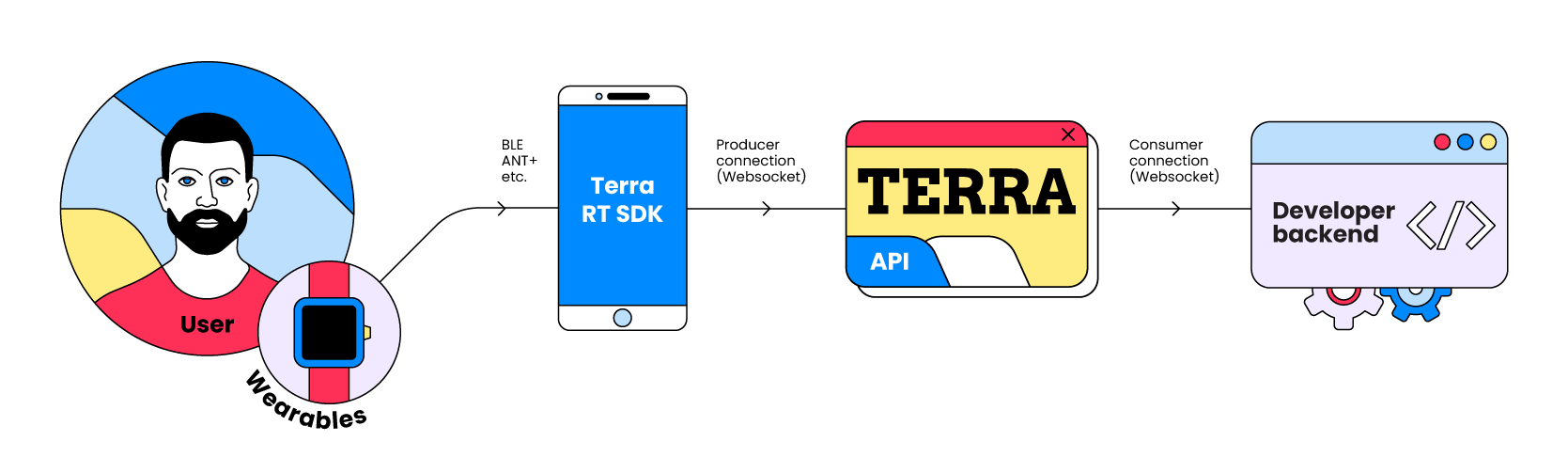
The **Unified API** integrates 500+ health data sources (including Oura, Garmin, Withings, and more) and standardises access to varied data such as activity, sleep, heart rate, and readiness.

<table data-card-size="large" data-view="cards"><thead><tr><th></th><th></th><th></th><th></th><th data-hidden data-card-target data-type="content-ref"></th><th data-hidden data-card-cover data-type="files"></th></tr></thead><tbody><tr><td><strong>Unified API</strong></td><td><strong>What it is:</strong> Access rich current and historical user health data like activity, sleep, and workouts.</td><td><strong>Use for:</strong> Comprehensive wellness insights, user trend analysis.</td><td><em>Supports: Garmin, Fitbit, Oura, Apple Health, Google Fit, and 500+ more.</em></td><td><a href="/pages/qbVlof1gkimTh2hlNhHi">/pages/qbVlof1gkimTh2hlNhHi</a></td><td><a href="/files/OA6ebOIMvjybLZB2Z22R">/files/OA6ebOIMvjybLZB2Z22R</a></td></tr></tbody></table>

### Explore the platform

<table data-view="cards"><thead><tr><th></th><th></th><th></th><th data-hidden data-card-target data-type="content-ref"></th></tr></thead><tbody><tr><td><strong>Streaming API</strong></td><td><strong>What it is:</strong> Get live, real-time raw sensor data such as heart rate and distance from specific BLE &#x26; ANT+ devices to your websocket listener.</td><td><strong>Use for:</strong> Live workout feedback, real-time monitoring, interactive experiences.</td><td><a href="/pages/ZMFBA4vB0mGf8EyPns0Q">/pages/ZMFBA4vB0mGf8EyPns0Q</a></td></tr><tr><td><strong>Teams API [BETA]</strong></td><td><strong>What it is:</strong> Aggregate and analyse data for groups or teams across matches and individual athlete tests.</td><td><strong>Use for:</strong> Athlete performance tracking, team wellness dashboards.</td><td><a href="/pages/R9oaJl5IDE0h5gGDhQjZ">/pages/R9oaJl5IDE0h5gGDhQjZ</a></td></tr><tr><td><strong>Lab Reports</strong></td><td><strong>What it is:</strong> Convert lab report PDFs into structured, standardised biomarker data.</td><td><strong>Use for:</strong> Diagnostics, blood biomarker tracking, health assessments.</td><td><a href="/pages/aW1anNgx114LO2OUExsT">/pages/aW1anNgx114LO2OUExsT</a></td></tr><tr><td><strong>Vantage API</strong></td><td><strong>What it is:</strong> Order blood and DNA test kits, track fulfilment, and receive lab results in FHIR format.</td><td><strong>Use for:</strong> At-home and in-lab diagnostic testing, white-labelled biomarker panels.</td><td><a href="https://docs.tryterra.co/vantage-api-docs">https://docs.tryterra.co/vantage-api-docs</a></td></tr><tr><td><strong>Health Scores</strong></td><td><strong>What it is:</strong> Embed adaptive health and fitness scores computed from connected user data.</td><td><strong>Use for:</strong> Engagement, personalised insights, in-app scoring.</td><td><a href="/pages/RHQKaA5cuMyFsmKGWjW6">/pages/RHQKaA5cuMyFsmKGWjW6</a></td></tr><tr><td><strong>Planned Workouts API [PRE-RELEASE]</strong></td><td><strong>What it is:</strong> Push structured, planned workouts to users' devices and training platforms.</td><td><strong>Use for:</strong> Coaching apps, training plans, guided sessions.</td><td><a href="/pages/yiw2pwEE03hqah6IhAH2">/pages/yiw2pwEE03hqah6IhAH2</a></td></tr><tr><td><strong>Routes API [PRE-RELEASE]</strong></td><td><strong>What it is:</strong> Access GPS routes and course data from connected activities and providers.</td><td><strong>Use for:</strong> Mapping, route analysis, course planning.</td><td><a href="/pages/almQOFqJHSHdikOfnmnV">/pages/almQOFqJHSHdikOfnmnV</a></td></tr></tbody></table>

## Ready to build the future?

You've got the overview. Now, you can:

* Proceed to [**Account setup & API keys**](/introduction/account-setup-and-api-keys) to get your credentials.
* We suggest you start with the **Unified API** and connecting one user.
* We also recommend exploring our [**Core Concepts**](/introduction/core-concepts) to understand how Terra works.


# Account setup and API keys

This guide walks you through creating your Terra account and obtaining the API keys necessary to start integrating with our services.

{% stepper %}
{% step %}

#### Create your Terra API account

* **Sign Up:** Create an account at the Terra API [Registration Page](https://dashboard.tryterra.co/user/signup).
* **Onboarding:** Follow the Terra the onboarding flow and fill in the required information (email, password, company details, etc.) when prompted.
  {% endstep %}

{% step %}

#### Select plan

* **Setup:** During onboarding you'll be prompted to select your plan and enter billing details. Select the plan that best fits your requirements.
* **Manage plan:** Once signed up, you can manage view your current plan and billing details within the *Terra Dashboard* under *Settings.* Ensure your account and subscription are active to maintain uninterrupted API access.
  {% endstep %}

{% step %}

#### Obtain API keys

* **Get keys from dashboard:** Once your account is setup, go to the [Terra Dashboard](https://dashboard.tryterra.co/dashboard/) and click on *API Keys* in the Navbar. Here you can copy your *Developer ID* and *API Keys*.
* **Credentials per environment:** Terra maintains separate credentials for *testing*, *staging*, and *production* environments. There is a [user cap](/unified-api/integration-setup/understanding-terra-environments) on *testing* and *staging*.

<figure><img src="/files/CWg03J4HMwVacOdZ0sKb" alt=""><figcaption></figcaption></figure>
{% endstep %}

{% step %}

#### Start using Terra API!

* **Follow API Docs**: You're now all set to use Terra API. We recommend that you start with the [**Unified API.**](/unified-api/getting-started)
* **Keep secret:** Never share your x-api-key publicly or embed it directly in client-side code (e.g., mobile apps, frontend JavaScript).
* **Backend Use:** API keys requiring this level of access (like your main x-api-key) should typically be used only from your secure backend server.
  {% endstep %}
  {% endstepper %}


# Core concepts

Understand the fundamental terms and concepts used throughout the Terra API ecosystem. Grasping these will help you integrate Terra more effectively.

## Terra credentials

### Developer ID

* **What it is:** Your Developer ID `dev-id` is your unique identifier as a developer on the Terra platform. Think of it like your username.
* **Its role:** Terra uses this to identify you and associate connected [Users](#user) and their data back to your account.
* **Security:** Not sensitive; can be publicly available.
* **Where to find it:** [Credentials section](/introduction/account-setup-and-api-keys) of your Terra Dashboard.

{% hint style="info" %}
Think of your dev ID like your username

It does not constitute sensitive information. Making it publicly available is not a security concern.
{% endhint %}

### API Key

* **What is is:** Your API key is your secret access token for the API. Think of it like your password.
* **Its role:** Authenticates your application's requests, verifying you're the legitimate developer behind the `dev-id`.
* **Security:** Highly sensitive; treat it like a password and never expose it publicly or in client-side code.
* **Where to find it:** [Credentials section](/introduction/account-setup-and-api-keys) of your Terra Dashboard.

{% hint style="info" %}
Think of your API Key like your **password**

It constitutes sensitive information. Making it publicly available is a big security risk
{% endhint %}

***

## Data flow & Connections

### Source (Provider/Integration)

* **What it is:** A **Source** (also referred to as a **Provider,** or **Integration**) is the origin of health and fitness data (e.g., Fitbit, Garmin, Apple Health).
* **Management:** You can enable or disable Sources via your [Terra Dashboard](https://dashboard.tryterra.co/dashboard/connections), controlling the flow of data.
* **List of sources:** You can view a list of all available health data sources [here](https://app.gitbook.com/s/eJJpVMsUARUJq9lYmL6t/unified-api/supported-integrations#integrations-list).

### Destination

* **What it is:** Where Terra sends the processed data (e.g., your server via Webhook, SQL database, Azure Blob storage, Amazon SQS queue).
* **Customisation:** Configure your active Destination in the [Terra Dashboard](https://dashboard.tryterra.co/dashboard/connections).
* **List of destinations:** You can view a list of all available destinations [here](https://app.gitbook.com/s/eJJpVMsUARUJq9lYmL6t/unified-api/destinations).

### User (Terra user)

* **What it is:** Represents a connection made through Terra to a specific fitness wearable account (e.g., one Fitbit account, one Garmin account).
* **Key point:** A single [End User](#end-user-the-person) (a real person) might have multiple Terra Users if they connect different wearable accounts (e.g., both their Fitbit and their Garmin). Each connection creates a new Terra User ID.
* **For reference:** Throughout this documentation, a connection made to one fitness wearable account (e.g. one Fitbit account, or one Garmin account) will be referred to as "one User".

### End User (The person)

* **What it is:** The actual individual who owns the wearable devices and whose data is being accessed. An End User can be associated with multiple [Terra Users](#user-terra-user).

### Reference ID

* **What it is:** An identifier you provide to link a [Terra User](#user-terra-user) back to an [End User](#end-user-the-person) in your own system.
* **Purpose:** The `reference_id` should be the identifier of the End User on your systems. This could be the End User's username, their email address, or any way in which you identify them.
* **How you use it:** When creating a User, you will have the option of passing in a `reference_id` to conveniently link it back to an End User
* **Multiple connections:** An End User can have multiple Terra Users under the same `reference_id` (e.g. one Fitbit connection and one Apple Health connection). Re-authenticating the same provider with the same `reference_id` will replace the previous connection, generating a new `user_id` and deactivating the old one.

***

## Data & events

### Event

* **What it is:** A piece of data, typically a JSON object, sent to your [Destination](#destination).
* **Types:** Can be specific [Data Types](#data-types) (like an activity or sleep session) or a metadata event (e.g., authentication success).

### Data types

* **Concept:** Categories of health and fitness information Terra processes. Each has a defined structure.
* **Examples:**
  * **Activity:** A completed workout session (not currently active or planned) by the user, with a **defined start and end time**. For example, this corresponds to when a user would press "start workout" on their Garmin smartwatch, go for a run, then press "end workout".
  * **Sleep:** A sleep session completed by the [user](#end-user-the-person). The start time and end time can be representative of the time that the user got in bed instead of the time that they fell asleep at, if tracked by the wearable device - potentially including time in bed vs. time asleep.
  * **Daily:** A summary of the total activity completed by a user for a given 24 hour period, defined by the start and end time of the payload.
    * These payloads will be sent multiple times throughout a given day, as a user moves around, and will be a total of their activity up until that point in the day.
    * When ingesting Daily events, always overwrite data for a given date with the latest one sent to your Destination.
  * **Body:** This represents the various Body metrics for a user for a given 24 hour period, defined by the start and end time of the payload.
    * These payloads will be sent multiple times throughout a given day, as a user generates more body-related metrics (weigh-ins, blood glucose measurements etc), and will be a total up until that point in the day.
    * When ingesting Body events, always overwrite data for a given date with the latest one sent to your Destination.
  * **Menstruation:** This represents a day in the user's menstrual cycle, and includes information about that day within the context of their overall monthly cycle, such as current phase, and any metadata associated with that day (bleeding level, feelings of nausea, etc).
  * **Nutrition:** This represents the various food logged by a user for a given 24 hour period, defined by the start and end time of the payload.
    * This will be data logged in Food Diary apps such as MyFitnessPal, Fitbit or MacrosFirst. Each meal represents a given food item logged within that day.

### Large Request

* **What it is:** A [data](#data-types) request spanning more than 28 days (unless defined otherwise).
* **Processing:** This type of request will **always** be processed asynchronously, and sent to your [destinations](#destination) in chunks of at most 10MB each.

***

## Integration mechanisms

### Event-driven integrations

* **How it works:** Integrations that are **Event-Driven** allow for the fastest data retrieval speeds. As soon as new data is synced from the user's wearable's app (e.g. the Fitbit app) to the[ Provider's](#source-provider-integration) cloud, a notification (or **event**) gets sent to Terra with the newest data, following which Terra sends you a [payload](#payload) to your [Destination](#destinations) with the latest available data.

### Polled integrations

* **How it works:** Integrations that are **Polled** do not have an event-sending system, and require Terra to periodically check for data updates by **polling** their servers. This will be done as often as **every 5 minutes**.

***

## API Versions

Terra API is versioned to manage changes and improvements.

### Major API versions

* **Indication:** Significant architectural changes to API endpoints and infrastructure. These API versions are **very infrequent**.
* **Identification:** You will identify these with the base URL (i.e. `api.tryterra.co/v2`**,** `api.tryterra.co/v1`, and `access.tryterra.co` are 3 separate major versions)

### Minor API versions

* **Indication:** Smaller updates, often non-breaking.
* **Identification:** You can identify these by the `version` included in every payload you receive from Terra, and will be versioned by date.
  * For example, at the time of writing, the latest API version is `2022-03-16`. The version prior to it was `2022-03-02`.
  * Only breaking changes to the API are versioned. Any non breaking changes will be continuously developed, tested, and deployed.


# AI coding agents

Set up your AI coding agent to build with Terra using agent skills and the docs MCP server, so it works from accurate, up-to-date information instead of outdated training data.

Terra provides two ways to give AI coding agents like Claude Code, Cursor, Codex, and GitHub Copilot accurate knowledge of the Terra API:

* **Agent skills**: best-practice guides your agent applies automatically as you code
* **Docs MCP server**: lets your agent search the live Terra documentation while it works

You can use either on its own, but they work best together. Skills teach your agent how to build with Terra correctly, and the MCP server lets it look up exact endpoints, fields, and guides on demand.

## Agent skills

[Terra agent skills](https://github.com/tryterra/agent-skills) follow the [Agent Skills](https://agentskills.io) open standard and work with any agent that supports it, including Claude Code, Cursor, GitHub Copilot, and Gemini CLI.

To install them, paste this into your terminal:

```bash
npx skills add tryterra/agent-skills
```

The command detects your installed tools and configures the skills for each of them. No further setup is needed.

### Included skills

| Skill                    | What it covers                                                                                                     |
| ------------------------ | ------------------------------------------------------------------------------------------------------------------ |
| `terra-api`              | API best practices: webhooks and signature verification, data idempotency, connection lifecycle, and testing       |
| `terra-mobile-sdk`       | Mobile integration for Apple Health, Samsung Health, and Health Connect on iOS, Android, React Native, and Flutter |
| `terra-streaming`        | Realtime websocket data and the Live Sensor SDK                                                                    |
| `terra-planned-workouts` | Pushing structured interval workouts to wearables (pre-release)                                                    |
| `terra-routes`           | Pushing GPS courses with waypoints to devices like Garmin, COROS, and Wahoo (pre-release)                          |
| `terra-lab-reports`      | Parsing lab report PDFs into standardised biomarkers (pre-release)                                                 |
| `terra-vantage`          | Blood and DNA test kit ordering with FHIR result delivery                                                          |

To install a single skill instead of the full set:

```bash
npx skills add tryterra/agent-skills --skill terra-api
```

{% hint style="info" %}
Claude Code users can alternatively install the skills as a plugin:

```
/plugin marketplace add tryterra/agent-skills
/plugin install terra@terra-agent-skills
```

{% endhint %}

## Docs MCP server

The Terra docs MCP server connects your agent to the live documentation, including integration guides, API references, SDKs, and schemas. Your agent can search it directly instead of relying on training data that may be out of date.

The server is available at:

```
https://docs.tryterra.co/~gitbook/mcp
```

### Installation

{% tabs %}
{% tab title="Claude Code" %}
Paste this into your terminal:

```bash
claude mcp add terra-docs --scope user --transport http https://docs.tryterra.co/~gitbook/mcp
```

{% endtab %}

{% tab title="Codex" %}
Paste this into your terminal:

```bash
codex mcp add terra-docs --url https://docs.tryterra.co/~gitbook/mcp
```

{% endtab %}

{% tab title="VS Code" %}
Click to [install in VS Code](vscode:mcp/install?%7B%22name%22%3A%22Terra%20Docs%22%2C%22url%22%3A%22https%3A%2F%2Fdocs.tryterra.co%2F~gitbook%2Fmcp%22%7D), or add the server to your `mcp.json` manually:

```json
{
  "servers": {
    "terra-docs": {
      "url": "https://docs.tryterra.co/~gitbook/mcp"
    }
  }
}
```

{% endtab %}

{% tab title="Cursor" %}
Click to [install in Cursor](cursor://anysphere.cursor-deeplink/mcp/install?name=terra-docs\&config=eyJ1cmwiOiJodHRwczovL2RvY3MudHJ5dGVycmEuY28vfmdpdGJvb2svbWNwIn0=), or add the server to your `mcp.json` manually:

```json
{
  "mcpServers": {
    "terra-docs": {
      "url": "https://docs.tryterra.co/~gitbook/mcp"
    }
  }
}
```

{% endtab %}
{% endtabs %}

Once connected, your agent can query the docs whenever it needs to check an endpoint, payload field, or setup step.


# Examples

Example apps built on Terra. Clone one with a single command, deploy it to your own infrastructure, and build on top of it.

Complete, runnable apps that show how the pieces of a Terra integration fit together. Each one is a full working project you can scaffold with a single command, deploy to your own infrastructure, and use as a starting point for your own app.

```bash
npm create tryterra-app
```

Prefer to let an AI coding agent do it? Paste this into Claude Code (or Cursor, Copilot, and similar tools) and it will scaffold, configure, and deploy an example for you:

```
Set up the Terra Basecamp example app for me:
npx --yes create-tryterra-app@latest terra-basecamp --template unified-api-web-app --yes --json
Then read the generated AGENTS.md and follow it to fill in .env and deploy with npm run setup. Ask me for any credentials (Cloudflare, Neon, Terra) you need.
```

The examples live in the [`terra-examples`](https://github.com/tryterra/terra-examples) repository.

<table data-card-size="large" data-view="cards"><thead><tr><th></th><th></th><th></th><th data-hidden data-card-cover data-type="files"></th><th data-hidden data-card-target data-type="content-ref"></th></tr></thead><tbody><tr><td><strong>Terra Basecamp</strong></td><td><strong>What it is:</strong> A full health data platform: wearable connections, webhook ingestion, multi-device deduplication, a unified dashboard, and an AI health assistant.</td><td><strong>Stack:</strong> React 19, Hono on Cloudflare Workers, Neon Postgres, and an LLM assistant using Durable Objects.</td><td><a href="/files/ERaSMRricn6EIyn1UaIi">/files/ERaSMRricn6EIyn1UaIi</a></td><td><a href="/pages/Lmqe2xKJp2sNwcUjWiG9">/pages/Lmqe2xKJp2sNwcUjWiG9</a></td></tr></tbody></table>


# Terra Basecamp

A complete Terra integration you can run yourself: wearable connections, webhook ingestion, multi-device deduplication, a live dashboard, and an AI health assistant.

Terra Basecamp is a complete health data platform built on Terra, and the first app in the [`terra-examples`](https://github.com/tryterra/terra-examples) repository. Users connect their wearables (Garmin, WHOOP, Oura, and more) and the app merges their data into a daily dashboard, with an AI assistant on top.

Scaffold your own copy with one command, deploy it, and use it as a starting point for your own app:

```bash
npm create tryterra-app
```

## What it demonstrates

* [User authentication](/unified-api/user-authentication/implementation-custom-ui) from a custom UI, with `reference_id` linking
* [Webhook ingestion](/unified-api/integration-setup/setting-up-data-destinations/webhooks) with signature verification and deduplication
* [Authentication event handling](/unified-api/user-authentication/handling-authentication-events): auth, deauth, reauth, and permission changes
* [Historical backfill](/unified-api/managing-user-health-data/requesting-historical-data): 30 days of history when a device connects
* Multi-device deduplication by provider priority
* Scheduled reconciliation every 6 hours via cron
* An AI health assistant built on Terra's MCP tools

<figure><img src="/files/ERaSMRricn6EIyn1UaIi" alt="The Terra Basecamp health dashboard showing daily sleep and stress scores, AI-generated insights, and an ask-about-your-health input"><figcaption><p>The dashboard summarises daily scores and insights across every connected device</p></figcaption></figure>

<figure><img src="/files/qXbW56scqVyiGel7d1NN" alt="The AI health assistant fetching health data, running analysis, and rendering an inline steps and calories chart"><figcaption><p>The AI assistant queries health data through Terra's MCP tools, runs analysis, and renders inline charts</p></figcaption></figure>

<figure><img src="/files/Li21jAJNq3rznIeB5gGb" alt="The Terra Basecamp Trends page charting sleep duration over a month with a 7 hour 32 minute average"><figcaption><p>The Trends page charts changes in your biomarkers over time</p></figcaption></figure>

## Tech stack

The whole app runs as a single Cloudflare Worker, with end-to-end type safety from Hono RPC.

| Layer        | Technology                                                         |
| ------------ | ------------------------------------------------------------------ |
| Frontend     | React 19, Vite 7, TanStack Router, TanStack Query, TanStack Store  |
| UI           | React Aria Components, Tailwind CSS v4, tailwind-variants          |
| Backend      | Hono on Cloudflare Workers                                         |
| Database     | Neon Postgres, Drizzle ORM                                         |
| Auth         | BetterAuth (email OTP)                                             |
| AI           | LLM assistant using Cloudflare Durable Objects (via Vercel AI SDK) |
| Provisioning | wrangler + neonctl (Cloudflare & Neon CLIs)                        |

## Run it yourself

Run the app end to end: deploy your own copy, connect a wearable, and see health data flow from the provider to the dashboard and the AI assistant.

{% stepper %}
{% step %}

#### Set up and deploy

Scaffold the app and run the setup wizard:

```bash
npm create tryterra-app
cd my-app
npm run setup
```

`npm run setup` signs you in to Cloudflare and Neon through your browser, prompts for your Terra credentials, provisions a Neon database, a Cloudflare Worker, and an R2 bucket, runs migrations, and deploys the app. When it finishes, it prints your **App URL**. Keep that handy for the next step. Re-running it is idempotent, so it only asks for what's missing.

{% hint style="info" %}
**Prerequisites:** [Node.js](https://nodejs.org/) v20+, a free [Neon](https://neon.tech/) account, and a free [Cloudflare](https://cloudflare.com/) account with [R2 enabled](https://dash.cloudflare.com/). Setup signs you in to both through your browser, so there are no keys to copy. It also asks for your Terra `dev-id`, API key, and webhook signing secret from the [dashboard](https://dashboard.tryterra.co/) (the signing secret lives on your webhook destination under **Connections**). The AI assistant is optional: it needs an [Anthropic](https://console.anthropic.com/) API key and the Cloudflare Workers Paid plan; without them the rest of the app runs on the free plan. [SendGrid](https://sendgrid.com/) is optional too (without it, OTP codes are logged to the console). The [repository README](https://github.com/tryterra/terra-examples/blob/main/packages/cli/templates/unified-api-web-app/README.md) covers every environment variable.
{% endhint %}
{% endstep %}

{% step %}

#### Point Terra webhooks at your app

In the Terra dashboard, set your [webhook destination](/unified-api/integration-setup/setting-up-data-destinations/webhooks) URL to your deployed Worker:

```
https://<your-app-url>/api/terra/webhook
```

Terra now delivers authentication events and health data straight to your copy of the app.
{% endstep %}

{% step %}

#### Sign in

Open your App URL in a browser and sign in with your email address.

{% hint style="info" %}
If you didn't configure SendGrid, the one-time code isn't emailed. Stream the Worker logs (for example with `npx wrangler tail` from your project) and read the code there.
{% endhint %}
{% endstep %}

{% step %}

#### Connect a wearable

Open the **Connectors** page, pick your provider (Garmin, WHOOP, Oura, Fitbit, and more), and complete the provider's sign-in flow. When you're redirected back, Terra sends an `auth` webhook, the app links the connection to your account, and a 30-day historical backfill starts automatically.

<figure><img src="/files/w7Mn5b6FSDumZzuPyfQj" alt="The Terra Basecamp Connectors page showing a connected Fitbit account and a searchable list of providers to connect"><figcaption><p>Pick a provider on the Connectors page and complete its sign-in flow</p></figcaption></figure>
{% endstep %}

{% step %}

#### Watch your data arrive

Open the **Dashboard**. As Terra delivers the backfill and new updates, your steps, heart rate, HRV, sleep, and stress fill in. Delivery timing varies by provider. If you connect a second device, overlapping data is merged by provider priority.

<figure><img src="/files/vxFbgjky7N9iYgevnAwq" alt="A connector detail page showing the Fitbit connection status, enabled scopes, and recent sync events for daily, activity, and body data"><figcaption><p>Each connector's detail page lists enabled scopes and recent sync events as Terra delivers your data</p></figcaption></figure>
{% endstep %}

{% step %}

#### Ask the AI assistant

Open **Chat** and ask about your data. Try "How did I sleep this week?" or "Chart my steps for the last 30 days". The assistant queries your data through Terra's MCP tools and renders inline charts.

{% hint style="info" %}
Chat needs an `ANTHROPIC_API_KEY` (added during setup) and the Cloudflare Workers Paid plan. Without it, the rest of the app still works.
{% endhint %}
{% endstep %}
{% endstepper %}

Develop locally with `npm run dev` (it runs against a separate dev database branch, so you can't break your deployed data), and ship changes with `npm run deploy`.

## How the Terra integration works

Two pieces are worth calling out. First, the webhook endpoint verifies Terra's signature against the raw request body **before** parsing JSON, then returns `200` immediately and processes the event asynchronously to stay inside Terra's webhook timeout.

```typescript
import { verifyTerraWebhookSignature } from "terra-api";

const terraWebhook = new Hono<{ Bindings: Env }>().post("/", async (c) => {
  // Raw body required: verify the signature before JSON parsing
  const rawBody = await c.req.text();
  const signature = c.req.header("terra-signature");

  try {
    await verifyTerraWebhookSignature(rawBody, signature, c.env.TERRA_WEBHOOK_SECRET);
  } catch {
    return c.json({ error: "Invalid signature" }, 401);
  }

  // Return 200 immediately; process async to stay within Terra's timeout
  c.executionCtx.waitUntil(processWebhookEvent(c.env, rawBody));
  return c.json({ success: true });
});
```

Second, the AI assistant connects to the [Terra MCP server](/unified-api/managing-user-health-data/receiving-data-updates) that Terra exposes per connection, then hands those tools straight to the model alongside its own chart-rendering tool, so the LLM can fetch a user's data and visualise it in one turn.

```typescript
// Terra exposes an MCP server per connection
const url = `https://access.tryterra.co/api/v2/mcp/${terraUserId}`;
await this.addMcpServer("terra", url, {
  transport: { headers: { "dev-id": env.TERRA_DEV_ID, "x-api-key": env.TERRA_API_KEY } },
});

const result = streamText({
  model: anthropic(CHAT_MODEL),
  messages: modelMessages,
  tools: { render_chart: renderChartTool, ...this.mcp.getAITools() },
});
```

## Explore the code

The [full source is on GitHub](https://github.com/tryterra/terra-examples/tree/main/packages/cli/templates/unified-api-web-app), including tests alongside the webhook, sync, and backfill modules. The repository also ships its own guides:

| Guide                                                                                                                                                          | What it covers                                                |
| -------------------------------------------------------------------------------------------------------------------------------------------------------------- | ------------------------------------------------------------- |
| [Terra webhooks](https://github.com/tryterra/terra-examples/blob/main/packages/cli/templates/unified-api-web-app/docs/terra-webhooks.md)                       | Webhook ingestion pipeline, archiving, and idempotency        |
| [Auth & reconciliation](https://github.com/tryterra/terra-examples/blob/main/packages/cli/templates/unified-api-web-app/docs/terra-auth-and-reconciliation.md) | Connection lifecycle and the 6-hourly reconciliation cron     |
| [Multi-device data](https://github.com/tryterra/terra-examples/blob/main/packages/cli/templates/unified-api-web-app/docs/terra-multi-device.md)                | Provider priority and deduplication strategy                  |
| [AI health assistant](https://github.com/tryterra/terra-examples/blob/main/packages/cli/templates/unified-api-web-app/docs/health-assistant.md)                | Chat agent architecture, Terra MCP tools, and inline charting |
| [Infrastructure](https://github.com/tryterra/terra-examples/blob/main/packages/cli/templates/unified-api-web-app/docs/infrastructure.md)                       | Provisioning and the one-command deployment pipeline          |


# Overview

Discover the capabilities of Terra's Unified API, enabling you to access historical and current user health data from a multitude of health data sources.

## What is Unified API?

Terra's Unified API is your primary gateway to accessing comprehensive health data in your app from your users' wearables, devices, health apps, and medical devices.

* It **standardises** endpoints for authentication, requests, and data models across 500+ data sources.
* It's **event-based**: user health and fitness data is automatically pushed to your destination (e.g., webhook) after authentication. API requests are therefore only needed for historical data.

<figure><img src="https://files.readme.io/f6a8853-web_api_cropped.png" alt="" width="563"><figcaption><p>Diagram showing the flow of data through Terra's Health &#x26; Fitness API</p></figcaption></figure>

***

## Key features

### 🎣 Automatic payloads for new data (via Webhook)

* **Mechanism:** Receive automated, near real-time data updates via HTTP POST requests (Webhooks) to your specified Destination endpoint.
* **Trigger:** Webhooks are typically triggered when new data is synced from a user's wearable or app to the provider's cloud service and subsequently processed by Terra.
* **Content:** Payloads include standardised JSON representing new or updated user data (e.g., a completed workout, daily summary, new sleep session).
* **Use Case:** Keep your application's data for users current without needing to poll for changes. Ideal for timely insights and responsive features.

**Example payload:**

{% code expandable="true" %}

```json
Activity Payload (JSON)
{
  "metadata": {
    "timestamp_localization": 1,
    "start_time": "2026-01-19T10:48:51",
    "name": "Softball",
    "summary_id": 45209947591,
    "type": 93,
    "upload_type": 5,
    "end_time": "2026-01-19T12:01:51"
  },
  "position_data": {
    "start_pos_lat_lng_deg": ["..."],
    "position_samples": ["..."],
    "center_pos_lat_lng_deg": ["..."],
    "end_pos_lat_lng_deg": ["..."]
  },
  "distance_data": {
    "summary": { "...": "..." },
    "detailed": { "...": "..." }
  },
  "heart_rate_data": {
    "summary": { "...": "..." },
    "detailed": { "...": "..." }
  },
  "calories_data": {
    "total_burned_calories": 1285.6,
    "net_activity_calories": 189.95
  },
  "movement_data": {
    "speed_samples": ["..."],
    "max_speed_meters_per_second": 8.72,
    "avg_speed_meters_per_second": 9.05,
    "max_cadence_rpm": 35.74,
    "avg_cadence_rpm": 37.74
  },
  "device_data": {
    "manufacturer": "Terra",
    "name": "Random device name",
    "serial_number": 547901
  },
  "power_data": {
    "avg_watts": 14.21,
    "power_samples": ["..."],
    "max_watts": 24.86
  },
  "active_durations_data": {
    "activity_seconds": 981.86
  }
}
```

{% endcode %}

Garmin example [here](https://tryterra.co/integrations/garmin).

### 🗄️ Historical data retrieval (via GET requests)

* **Mechanism:** Make synchronous or asynchronous `GET` requests to specific Terra API endpoints to fetch data for a user over a defined date range.
* **Scope:** Access data from the point a user first connected their account to Terra, subject to provider limitations.
* **Use Case:** Populate user profiles, establish baselines, perform trend analysis, or backfill data.
* **Considerations:** For large data ranges (e.g., >28 days), requests are often processed asynchronously, with data delivered in chunks via Webhooks or to a specified data store.

### 🔑 User authentication

* **Mechanism:** Terra provides tools (e.g., Terra Widget, or APIs to build your own UI) to facilitate the user authentication process, where users grant your application permission to access their health data via Terra.
* **User Identity:** Terra manages user connections and provides unique identifiers for each connected data source account.

### 🧩 Standardised data model

* **Mechanism:** All data retrieved from various providers is transformed by Terra into consistent, predefined JSON schemas.
* **Benefit:** Simplifies integration by providing a uniform data structure, regardless of the original source's format. You code against one set of models.
* **Scope:** Applies to all data types (Activity, Sleep, Body, Daily, Nutrition, etc.). Detailed schemas are available in the [Data Models](https://app.gitbook.com/s/eJJpVMsUARUJq9lYmL6t/unified-api/data-models).

### ✏️ Writing data

* **Mechanism:** Send data from your application to Terra via specific POST API endpoints, which then attempts to write this data to the connected user's account on the source provider's platform.
* **Supported Operations (Examples):**
  * **Planned Workouts:** Upload structured workout plans that users can access and follow on their wearable devices.
* **Provider Dependency:** Only certain providers are supported - this depends on the features supported by the end provider's API. Not all data types or providers support write operations.

***

## How Terra Accesses Data: Cloud APIs vs Mobile SDKs

Understanding how Terra connects to different data sources is crucial.

<table data-full-width="true"><thead><tr><th valign="middle">Type of data source</th><th width="247.24609375">Integrations</th><th>Integration Platform</th></tr></thead><tbody><tr><td valign="middle">Web-based source</td><td><ul><li>Garmin</li><li>Fitbit</li><li>Oura</li><li>Strava</li></ul><p><em>500+ other sources</em></p></td><td>Backend Server (using the Health &#x26; Fitness API)</td></tr><tr><td valign="middle">Mobile-only source</td><td><ul><li>Apple Health</li><li>Samsung Health</li><li>Google Fit</li><li>Health Connect</li></ul><p><em>No other sources</em></p></td><td>Mobile App (using the Terra Mobile SDK)</td></tr></tbody></table>

### Web-based sources

**The majority of Terra integrations are web-based providers (e.g., Garmin, Fitbit, Oura, Strava)**

* For most providers, Terra integrates directly with their Web APIs.
* Whether you are building a web app or mobile app, you should integrate the API in your backend.
* Once a user authenticates via the API, Terra can fetch data and send **payloads** (e.g. to a webhook endpoint).

### Mobile-only **sources**

**The only mobile-only sources are: Apple Health, Samsung Health, and Health Connect.**

* These sources do not offer Web APIs for third-party developer access.
* They require a **mobile app** with a **Terra's** **Mobile SDK** on the user's device to fetch the data.
* Your mobile app, equipped with Terra's Mobile SDK, will facilitate the connection to the on-device health data store (e.g., HealthKit on iOS, Health Connect on Android).
* The Mobile SDK then securely transmits this data to Terra for processing and delivery of **payloads** to your configured Destination (e.g. to a webhook endpoints).

{% hint style="danger" %}

### Only use the Mobile SDK if you need to

The **vast majority** of Unified API **work via Terra's Web API** (e.g., Garmin, Fitbit, Oura, Strava)**.**

**You do&#x20;*****NOT*****&#x20;need** to use the **Mobile SDK for them.**

***

**Only use the** [**Mobile SDK**](/unified-api/mobile-only-sources) if you want to integrate **with the following providers:**

<img src="/files/HWBv7PWMxBEc0WMNdWrW" alt="" data-size="line"> **Apple Health**

<img src="/files/qO7xuPhRY1YEKm096Aq2" alt="" data-size="line"> **Samsung Health**

<img src="/files/zhkGsxfmF1M2jUWRUXRA" alt="" data-size="line"> **Health Connect**
{% endhint %}

### Rate Limits

* Terra **never** imposes any rate limits. Downstream providers often have their own rate limits (for example Fitbit limits developers to 150 requests/hour per user), but Terra manages everything for you, including retries with appropriate backoffs, to ensure you always get consistent data.

***

## Next steps

{% stepper %}
{% step %}

#### [Quickstart](/unified-api/quickstart)

Get health data from your first user via a web-based source (e.g., Garmin, Fitbit, Oura).
{% endstep %}

{% step %}

#### [Integration setup](/unified-api/integration-setup)

Learn how to setup and configure the Unified API to receive your users' data to your preferred destination (e.g. webhook, DB, etc). This includes enabling data sources, setting up data destinations, managing API access, and understanding environments.
{% endstep %}

{% step %}

#### [User authentication](/unified-api/user-authentication)

Learn how to securely authenticate your users' health data sources (e.g., Fitbit, Garmin) to your application via Terra, including handling authentication flows and user IDs.
{% endstep %}

{% step %}

#### [**Accessing & Managing User Health Data**](/unified-api/managing-user-health-data)

Learn how to receive automatic data updates as events, request historical information, and write data (like planned workouts) back to users' connected services.
{% endstep %}

{% step %}

#### [Using SDKs for mobile-only sources](/unified-api/mobile-only-sources)

Essential reading if you need to integrate Apple Health, Samsung Health, or Google Fit/Health Connect.
{% endstep %}
{% endstepper %}


# Quickstart

Learn how to receive data events in just 3 steps

{% embed url="<https://www.youtube.com/watch?v=rkvKe4xefwY>" %}
2 minute video walkthrough of Quickstart
{% endembed %}

## Key steps to setup Unified API

Follow this short tutorial to set up event-based health data delivery via Webhooks. Learn how Terra manages user authentication and can automatically send new user data, simplifying your integration. (Other methods, like requesting historical data, are covered in the detailed guides.

{% stepper %}
{% step %}

#### Integration Setup

**A. Add Data Sources from your Terra Dashboard**

* First you need to select your data sources on your Terra dashboard. This determines:
  * (a) What data sources are available for end-users to chose on the Terra auth widget.
  * What data sources are automatically synced to your data destination via events.

<figure><img src="/files/tkRcrBcYVE0eNyoyf3Wz" alt=""><figcaption></figcaption></figure>

**B. Add a Data Destination in your Terra Dashboard**

* The Unified API is **event**-**based**, so the **Data** **Destinations** are where you will receive **payload events:**
  * (a) New health data updates
  * (b) Authentication events, de-auth events, etc.

<figure><img src="/files/5zkVGlQvNQc81wmvW3Hg" alt=""><figcaption></figcaption></figure>

{% hint style="info" %}

### How to setup a Webhook destination?

**Webhook.site**

* Using [**webhook.site**](https://webhook.site/) you can generate a temporary webhook destinations for testing.
* Copy *Your unique URL* that is automatically generated when you enter the site.

<img src="/files/jZUXaQmFJBI2ySL5hWVt" alt="" data-size="original">

***

**Your own Webhook endpoint on your local machine**

* First create a web server that runs locally on your computer (see code block).
* Then, expose your server to the internet with a tool such as [ngrok](https://ngrok.com/) and start receiving payloads.
* If you are using ngrok, running `ngrok http {PORT_NUMBER}` will expose your server to the internet and return its URL.

{% code fullWidth="true" %}

```python
import flask

app = flask.Flask(__name__)
if __name__ == "__main__":
    app.run(host="localhost", port=8080)
```

{% endcode %}
{% endhint %}

**C. Obtain your API Key & Dev-ID from your Terra Dashboard**

<figure><img src="/files/CWg03J4HMwVacOdZ0sKb" alt=""><figcaption><p>Screenshot of the Terra dashboard with a red box highlighting the button to obtain API credentials</p></figcaption></figure>

{% hint style="info" %}
**Core concept: \`user\_id\`**

All data is linked back to a `user_id` on Terra's side. This uniquely identifies a wearable account connection through the API and allows you to retrieve data for that wearable account. This is what Terra calls a [Core concepts](/introduction/core-concepts#user-terra-user).

**You will use this `user_id` in all your data-related interactions with Terra**
{% endhint %}

{% hint style="info" %}
**Core concept: \`reference\_id\`**

You can link a `user_id` to an entity on your end using a `reference_id`. This is a custom identifying metadata you can define on the Terra User object to link them back to a user on your app.
{% endhint %}
{% endstep %}

{% step %}

#### **User Authentication**

* Next you need to authenticate a user via the API to a data source (e.g. to Oura, Fitbit, Withings).
* Terra simplifies this by allowing you to generate a pre-built authentication widget session (by running the following code).
* Copy/Paste the widget session `url` into web browser. To test the authentication flow, you can choose a data sources (e.g. Fitbit), and complete the flow.

{% tabs %}
{% tab title="Python" %}

```python
# pip install terra-python
from terra import Terra

client = Terra(
    dev_id="<YOUR-DEV-ID>",
    api_key="<YOUR-API-KEY>",
)

response = client.authentication.generatewidgetsession(
    reference_id="my_first_connection",
    auth_success_redirect_url="https://example.com/success",
    auth_failure_redirect_url="https://example.com/failure",
)

widget_url = response.url  # e.g. "https://widget.tryterra.co/session/344d475f-296a-489a-a88c-54183671dafd"
print(widget_url)
```

{% endtab %}

{% tab title="Node.js" %}

<pre class="language-javascript"><code class="lang-javascript"><strong>// npm i -s terra-api
</strong><strong>import { TerraClient } from "terra-api";
</strong>
const client = new TerraClient({
    apiKey: "YOUR_API_KEY",
    devId: "YOUR_DEV_ID"
});

async function generateWidgetSession() {
    try {
        const response = await client.authentication.generatewidgetsession({
            reference_id: "my_first_connection",
            auth_success_redirect_url: "https://example.com/success",
            auth_failure_redirect_url: "https://example.com/failure"
        });
        console.log("Widget URL:", response.url);
    } catch (error) {
        console.error("Error generating widget session:", error.response?.data || error.message);
    }
}

generateWidgetSession();
</code></pre>

{% endtab %}

{% tab title="cURL" %}
{% code title="CLI" %}

```bash
curl --request POST --url https://api.tryterra.co/v2/auth/generateWidgetSession \
  --header 'dev-id: <YOUR-DEV-ID>' \
  --header 'x-api-key: <YOUR-API-KEY>' \
  --header 'Content-Type: application/json' \
  --data '{
      "language": "en",
      "reference_id": "my_first_connection",
      "auth_success_redirect_url": "https://example.com/success",
      "auth_failure_redirect_url": "https://example.com/failure",
  }'
```

{% endcode %}
{% endtab %}
{% endtabs %}
{% endstep %}

{% step %}

#### **Receive data updates**

* Terra automatically sends new data to your **server (e.g. webhook endpoint)** when it becomes available from your users' wearables.
* If you're using your own Webhook destination, the following code is an example of how you can handle Webhooks.

{% tabs %}
{% tab title="Python" %}
{% code title="python" %}

```python
import logging

import flask
from flask import request

logging.basicConfig(level=logging.INFO)
_LOGGER = logging.getLogger("app")

app = flask.Flask(__name__)


@app.route("/consumeTerraWebhook", methods=["POST"])
def consume_terra_webhook() -> flask.Response:
    data = request.get_json()
    _LOGGER.info(
        "Received webhook for user %s of type %s",
        data.get("user", {}).get("user_id"),
        data["type"]
    )
    # you can now use the incoming data in your app
    # handleData(data)


if __name__ == "__main__":
    app.run(host="localhost", port=8000)
```

{% endcode %}
{% endtab %}

{% tab title="Node.js" %}
{% code title="javascript" %}

```javascript
const express = require("express");
const bodyParser = require("body-parser");

const app = express();

// Parse raw JSON bodies
app.use(
    bodyParser.raw({
        inflate: true,
        limit: "4000kb",
        type: "application/json",
    })
);

// Webhook endpoint
app.post("/consumeTerraWebhook", (req, res) => {
    res.sendStatus(200); // Respond to Terra immediately

    try {
        const data = JSON.parse(req.body.toString("utf8"));
        console.log("Received Terra Webhook Data:");
        console.log(JSON.stringify(data, null, 2));
    } catch (err) {
        console.error("Failed to parse webhook payload:", err.message);
    }
});

// Start server
const port = 3000;
app.listen(port, () => {
    console.log(`Server started on port ${port}`);
})
```

{% endcode %}
{% endtab %}
{% endtabs %}
{% endstep %}

{% step %}

{% endstep %}
{% endstepper %}

## Example payloads

{% tabs %}
{% tab title="Activity" %}

```json

{
  "calories_data": {
    "total_burned_calories": 201.64948069082567,
    "net_activity_calories": 699.1220687609259,
    "calorie_samples": [],
    "net_intake_calories": 36.29916049628912,
    "BMR_calories": 1185.749074044957
  },
  "data_enrichment": {
    "total_stress_score": null,
    "cardiovascular_contributors": null,
    "respiratory_contributors": null,
    "respiratory_score": null,
    "stress_contributors": null,
    "start_time": null,
    "immune_index": null,
    "immune_contributors": null,
    "readiness_score": null,
    "cardiovascular_score": null,
    "readiness_contributors": null
  },
  "metadata": {
    "timestamp_localization": 1,
    "start_time": "2026-01-12T15:15:33.569000+00:00",
    "upload_type": 0,
    "end_time": "2026-01-12T15:58:33.569000+00:00"
  },
  "stress_data": {
    "medium_stress_duration_seconds": 6.349667550340612,
    "max_stress_level": 9.210017873757996,
    "stress_duration_seconds": 9.188461255789646,
    "stress_rating": null,
    "rest_stress_duration_seconds": 19.087716697774244,
    "activity_stress_duration_seconds": 17.692276279869738,
    "avg_stress_level": 5.423064674407496,
    "body_battery_samples": [],
    "low_stress_duration_seconds": 9.16660083749294,
    "high_stress_duration_seconds": 16.284780394560798,
    "samples": [
      {
        "level": 9.722553038898797,
        "timestamp": "2026-01-12T15:15:33.569000+00:00"
      },
      {
        "level": 5.607069716919538,
        "timestamp": "2026-01-12T15:27:33.569000+00:00"
      },
      {
        "level": 10.18828379497692,
        "timestamp": "2026-01-12T15:39:33.569000+00:00"
      },
      {
        "level": 11.682798631709282,
        "timestamp": "2026-01-12T15:51:33.569000+00:00"
      }
    ]
  },
  "scores": {
    "biological_age": null,
    "recovery": null,
    "activity": null,
    "sleep": null
  },
  "device_data": {
    "manufacturer": null,
    "hardware_version": null,
    "other_devices": [],
    "software_version": null,
    "name": null,
    "activation_timestamp": null,
    "serial_number": null,
    "data_provided": [],
    "last_upload_date": null
  },
  "strain_data": {
    "strain_level": null
  },
  "MET_data": {
    "avg_level": null,
    "num_low_intensity_minutes": null,
    "MET_samples": [],
    "num_high_intensity_minutes": null,
    "num_inactive_minutes": null,
    "num_moderate_intensity_minutes": null
  },
  "tag_data": {
    "tags": []
  },
  "active_durations_data": {
    "standing_hours_count": null,
    "vigorous_intensity_seconds": 2146.912371935673,
    "activity_levels_samples": [],
    "rest_seconds": null,
    "standing_seconds": null,
    "low_intensity_seconds": null,
    "moderate_intensity_seconds": 2425.139891985638,
    "num_continuous_inactive_periods": null,
    "inactivity_seconds": 941.5119531235803,
    "activity_seconds": 1372.8110512769454
  },
  "oxygen_data": {
    "saturation_samples": [
      {
        "percentage": 80.01528099248304,
        "type": 0,
        "timestamp": "2026-01-12T15:15:33.569000+00:00"
      },
      {
        "percentage": 89.02423522918154,
        "type": 0,
        "timestamp": "2026-01-12T15:27:33.569000+00:00"
      },
      {
        "percentage": 97.62789203583579,
        "type": 0,
        "timestamp": "2026-01-12T15:39:33.569000+00:00"
      },
      {
        "percentage": 88.66506651767715,
        "type": 0,
        "timestamp": "2026-01-12T15:51:33.569000+00:00"
      }
    ],
    "vo2_samples": [],
    "avg_saturation_percentage": 89.09072682796142,
    "vo2max_ml_per_min_per_kg": null
  },
  "distance_data": {
    "distance_meters": 16885.341964876527,
    "elevation": {
      "gain_planned_meters": null,
      "min_meters": null,
      "avg_meters": null,
      "gain_actual_meters": null,
      "loss_actual_meters": null,
      "max_meters": null
    },
    "floors_climbed": 45,
    "steps": 19906,
    "swimming": {
      "num_strokes": null,
      "num_laps": null,
      "pool_length_meters": null
    },
    "detailed": {
      "floors_climbed_samples": [],
      "step_samples": [
        {
          "timer_duration_seconds": 0,
          "timestamp": "2026-01-12T15:15:33.569000+00:00",
          "steps": 69
        },
        {
          "timer_duration_seconds": 12,
          "timestamp": "2026-01-12T15:27:33.569000+00:00",
          "steps": 252
        },
        {
          "timer_duration_seconds": 24,
          "timestamp": "2026-01-12T15:39:33.569000+00:00",
          "steps": 581
        },
        {
          "timer_duration_seconds": 36,
          "timestamp": "2026-01-12T15:51:33.569000+00:00",
          "steps": 1073
        }
      ],
      "distance_samples": [
        {
          "distance_meters": 11.596938389705349,
          "timer_duration_seconds": 0,
          "timestamp": "2026-01-12T15:15:33.569000+00:00"
        },
        {
          "distance_meters": 38.1556198632113,
          "timer_duration_seconds": 12,
          "timestamp": "2026-01-12T15:27:33.569000+00:00"
        },
        {
          "distance_meters": 79.80821244048354,
          "timer_duration_seconds": 24,
          "timestamp": "2026-01-12T15:39:33.569000+00:00"
        },
        {
          "distance_meters": 90.70677061556792,
          "timer_duration_seconds": 36,
          "timestamp": "2026-01-12T15:51:33.569000+00:00"
        }
      ],
      "elevation_samples": []
    }
  },
  "heart_rate_data": {
    "summary": {
      "resting_hr_bpm": 61.36617472975378,
      "avg_hrv_rmssd": null,
      "hr_zone_data": [],
      "avg_hr_bpm": 104.67539173542949,
      "min_hr_bpm": 109.02337832771033,
      "avg_hrv_sdnn": null,
      "max_hr_bpm": 52.89773898819859,
      "user_max_hr_bpm": null
    },
    "detailed": {
      "hrv_samples_rmssd": [],
      "hrv_samples_sdnn": [],
      "hr_samples": [
        {
          "bpm": 94,
          "context": 0,
          "timer_duration_seconds": null,
          "timestamp": "2026-01-12T15:15:33.569000+00:00"
        },
        {
          "bpm": 82,
          "context": 0,
          "timer_duration_seconds": null,
          "timestamp": "2026-01-12T15:27:33.569000+00:00"
        },
        {
          "bpm": 133,
          "context": 0,
          "timer_duration_seconds": null,
          "timestamp": "2026-01-12T15:39:33.569000+00:00"
        },
        {
          "bpm": 111,
          "context": 0,
          "timer_duration_seconds": null,
          "timestamp": "2026-01-12T15:51:33.569000+00:00"
        }
      ]
    }
  }
}
```

{% endtab %}

{% tab title="Daily" %}

```json
{
    "MET_data":
    {
        "num_high_intensity_minutes": null,
        "num_inactive_minutes": null,
        "avg_level": null,
        "num_low_intensity_minutes": null,
        "MET_samples": [],
        "num_moderate_intensity_minutes": null
    },
    "oxygen_data":
    {
        "saturation_samples": [
        {
            "type": 0,
            "percentage": 92.71897169968557,
            "timestamp": "2026-01-12T15:17:24.946000+00:00"
        },
        {
            "type": 0,
            "percentage": 93.48002536123029,
            "timestamp": "2026-01-12T15:28:24.946000+00:00"
        },
        {
            "type": 0,
            "percentage": 91.1865484069052,
            "timestamp": "2026-01-12T15:39:24.946000+00:00"
        },
        {
            "type": 0,
            "percentage": 98.56181571992339,
            "timestamp": "2026-01-12T15:50:24.946000+00:00"
        },
        {
            "type": 0,
            "percentage": 96.73982424934387,
            "timestamp": "2026-01-12T16:01:24.946000+00:00"
        }],
        "vo2max_ml_per_min_per_kg": null,
        "avg_saturation_percentage": 85.74075219533049,
        "vo2_samples": []
    },
    "scores":
    {
        "sleep": null,
        "activity": null,
        "biological_age": null,
        "recovery": null
    },
    "device_data":
    {
        "hardware_version": null,
        "serial_number": null,
        "activation_timestamp": null,
        "other_devices": [],
        "software_version": null,
        "data_provided": [],
        "last_upload_date": null,
        "name": null,
        "manufacturer": null
    },
    "heart_rate_data":
    {
        "summary":
        {
            "resting_hr_bpm": 40.27773380616422,
            "avg_hr_bpm": 145.57619562270028,
            "hr_zone_data": [],
            "max_hr_bpm": 62.76590801535406,
            "user_max_hr_bpm": null,
            "avg_hrv_rmssd": null,
            "avg_hrv_sdnn": null,
            "min_hr_bpm": 88.04361787772406
        },
        "detailed":
        {
            "hrv_samples_sdnn": [],
            "hrv_samples_rmssd": [],
            "hr_samples": [
            {
                "context": 0,
                "timer_duration_seconds": null,
                "bpm": 88,
                "timestamp": "2026-01-12T15:17:24.946000+00:00"
            },
            {
                "context": 0,
                "timer_duration_seconds": null,
                "bpm": 161,
                "timestamp": "2026-01-12T15:28:24.946000+00:00"
            },
            {
                "context": 0,
                "timer_duration_seconds": null,
                "bpm": 145,
                "timestamp": "2026-01-12T15:39:24.946000+00:00"
            },
            {
                "context": 0,
                "timer_duration_seconds": null,
                "bpm": 114,
                "timestamp": "2026-01-12T15:50:24.946000+00:00"
            },
            {
                "context": 0,
                "timer_duration_seconds": null,
                "bpm": 148,
                "timestamp": "2026-01-12T16:01:24.946000+00:00"
            }]
        }
    },
    "strain_data":
    {
        "strain_level": null
    },
    "active_durations_data":
    {
        "low_intensity_seconds": null,
        "activity_seconds": 292.1944505275938,
        "standing_hours_count": null,
        "vigorous_intensity_seconds": 1629.9213866369444,
        "num_continuous_inactive_periods": null,
        "activity_levels_samples": [],
        "standing_seconds": null,
        "inactivity_seconds": 356.94645537788244,
        "moderate_intensity_seconds": 2549.030844567316,
        "rest_seconds": null
    },
    "data_enrichment":
    {
        "total_stress_score": null,
        "immune_contributors": null,
        "stress_contributors": null,
        "respiratory_contributors": null,
        "respiratory_score": null,
        "cardiovascular_contributors": null,
        "immune_index": null,
        "readiness_score": null,
        "cardiovascular_score": null,
        "start_time": null,
        "readiness_contributors": null
    },
    "metadata":
    {
        "timestamp_localization": 1,
        "upload_type": 0,
        "end_time": "2026-01-12T16:06:24.946000+00:00",
        "start_time": "2026-01-12T15:17:24.946000+00:00"
    },
    "stress_data":
    {
        "low_stress_duration_seconds": 19.313615693723424,
        "max_stress_level": 0.4783574112515465,
        "body_battery_samples": [],
        "medium_stress_duration_seconds": 27.176295626275646,
        "high_stress_duration_seconds": 1.253318481875761,
        "rest_stress_duration_seconds": 30.944456595746683,
        "samples": [
        {
            "level": 0.8367534906275448,
            "timestamp": "2026-01-12T15:17:24.946000+00:00"
        },
        {
            "level": 9.015457752116914,
            "timestamp": "2026-01-12T15:28:24.946000+00:00"
        },
        {
            "level": 7.542179332824672,
            "timestamp": "2026-01-12T15:39:24.946000+00:00"
        },
        {
            "level": 0.7267409467304642,
            "timestamp": "2026-01-12T15:50:24.946000+00:00"
        },
        {
            "level": 13.339626251306429,
            "timestamp": "2026-01-12T16:01:24.946000+00:00"
        }],
        "stress_rating": null,
        "stress_duration_seconds": 30.171079973169284,
        "avg_stress_level": 0.9281102170234745,
        "activity_stress_duration_seconds": 5.485342085200179
    },
    "tag_data":
    {
        "tags": []
    },
    "calories_data":
    {
        "BMR_calories": 1801.1426192553054,
        "total_burned_calories": 265.51092094691603,
        "net_activity_calories": 481.3419040726358,
        "calorie_samples": [],
        "net_intake_calories": 145.58311256774806
    },
    "distance_data":
    {
        "steps": 7708,
        "floors_climbed": 20,
        "detailed":
        {
            "step_samples": [
            {
                "steps": 297,
                "timer_duration_seconds": 0,
                "timestamp": "2026-01-12T15:17:24.946000+00:00"
            },
            {
                "steps": 726,
                "timer_duration_seconds": 11,
                "timestamp": "2026-01-12T15:28:24.946000+00:00"
            },
            {
                "steps": 1091,
                "timer_duration_seconds": 22,
                "timestamp": "2026-01-12T15:39:24.946000+00:00"
            },
            {
                "steps": 1305,
                "timer_duration_seconds": 33,
                "timestamp": "2026-01-12T15:50:24.946000+00:00"
            },
            {
                "steps": 1659,
                "timer_duration_seconds": 44,
                "timestamp": "2026-01-12T16:01:24.946000+00:00"
            }],
            "elevation_samples": [],
            "floors_climbed_samples": [],
            "distance_samples": [
            {
                "distance_meters": 32.233222569064836,
                "timer_duration_seconds": 0,
                "timestamp": "2026-01-12T15:17:24.946000+00:00"
            },
            {
                "distance_meters": 87.88385373215999,
                "timer_duration_seconds": 11,
                "timestamp": "2026-01-12T15:28:24.946000+00:00"
            },
            {
                "distance_meters": 113.28706293967684,
                "timer_duration_seconds": 22,
                "timestamp": "2026-01-12T15:39:24.946000+00:00"
            },
            {
                "distance_meters": 136.35507455273805,
                "timer_duration_seconds": 33,
                "timestamp": "2026-01-12T15:50:24.946000+00:00"
            },
            {
                "distance_meters": 175.40270599823873,
                "timer_duration_seconds": 44,
                "timestamp": "2026-01-12T16:01:24.946000+00:00"
            }]
        },
        "distance_meters": 14034.070754043652,
        "elevation":
        {
            "avg_meters": null,
            "min_meters": null,
            "gain_planned_meters": null,
            "gain_actual_meters": null,
            "max_meters": null,
            "loss_actual_meters": null
        },
        "swimming":
        {
            "num_laps": null,
            "pool_length_meters": null,
            "num_strokes": null
        }
    }
}
```

{% endtab %}

{% tab title="Sleep" %}

```json
{
    "data_enrichment":
    {
        "sleep_score": null,
        "sleep_contributors": null
    },
    "heart_rate_data":
    {
        "summary":
        {
            "user_max_hr_bpm": null,
            "avg_hr_bpm": 41,
            "max_hr_bpm": 71,
            "avg_hrv_rmssd": 116,
            "min_hr_bpm": 60,
            "resting_hr_bpm": 65,
            "avg_hrv_sdnn": null
        },
        "detailed":
        {
            "hrv_samples_rmssd": [
            {
                "timestamp": "2026-01-12T15:18:04.316000+00:00",
                "hrv_rmssd": 57
            },
            {
                "timestamp": "2026-01-12T15:30:04.316000+00:00",
                "hrv_rmssd": 71
            },
            {
                "timestamp": "2026-01-12T15:42:04.316000+00:00",
                "hrv_rmssd": 54
            },
            {
                "timestamp": "2026-01-12T15:54:04.316000+00:00",
                "hrv_rmssd": 101
            },
            {
                "timestamp": "2026-01-12T16:06:04.316000+00:00",
                "hrv_rmssd": 43
            },
            {
                "timestamp": "2026-01-12T16:18:04.316000+00:00",
                "hrv_rmssd": 78
            },
            {
                "timestamp": "2026-01-12T16:30:04.316000+00:00",
                "hrv_rmssd": 91
            },
            {
                "timestamp": "2026-01-12T16:42:04.316000+00:00",
                "hrv_rmssd": 77
            },
            {
                "timestamp": "2026-01-12T16:54:04.316000+00:00",
                "hrv_rmssd": 89
            }],
            "hrv_samples_sdnn": [],
            "hr_samples": [
            {
                "context": 0,
                "timestamp": "2026-01-12T15:18:04.316000+00:00",
                "bpm": 87,
                "timer_duration_seconds": null
            },
            {
                "context": 0,
                "timestamp": "2026-01-12T15:30:04.316000+00:00",
                "bpm": 84,
                "timer_duration_seconds": null
            },
            {
                "context": 0,
                "timestamp": "2026-01-12T15:42:04.316000+00:00",
                "bpm": 135,
                "timer_duration_seconds": null
            },
            {
                "context": 0,
                "timestamp": "2026-01-12T15:54:04.316000+00:00",
                "bpm": 163,
                "timer_duration_seconds": null
            },
            {
                "context": 0,
                "timestamp": "2026-01-12T16:06:04.316000+00:00",
                "bpm": 168,
                "timer_duration_seconds": null
            },
            {
                "context": 0,
                "timestamp": "2026-01-12T16:18:04.316000+00:00",
                "bpm": 159,
                "timer_duration_seconds": null
            },
            {
                "context": 0,
                "timestamp": "2026-01-12T16:30:04.316000+00:00",
                "bpm": 170,
                "timer_duration_seconds": null
            },
            {
                "context": 0,
                "timestamp": "2026-01-12T16:42:04.316000+00:00",
                "bpm": 119,
                "timer_duration_seconds": null
            },
            {
                "context": 0,
                "timestamp": "2026-01-12T16:54:04.316000+00:00",
                "bpm": 163,
                "timer_duration_seconds": null
            }]
        }
    },
    "device_data":
    {
        "activation_timestamp": null,
        "last_upload_date": null,
        "software_version": null,
        "serial_number": null,
        "data_provided": [],
        "hardware_version": null,
        "other_devices": [],
        "manufacturer": null,
        "name": null
    },
    "sleep_durations_data":
    {
        "awake":
        {
            "num_wakeup_events": null,
            "duration_long_interruption_seconds": null,
            "duration_awake_state_seconds": 422.440743038517,
            "sleep_latency_seconds": 75.3128264600394,
            "duration_short_interruption_seconds": null,
            "wake_up_latency_seconds": 409.7986863235109,
            "num_out_of_bed_events": null
        },
        "hypnogram_samples": [
        {
            "level": 4,
            "timestamp": "2026-01-12T15:18:04.316000+00:00"
        },
        {
            "level": 5,
            "timestamp": "2026-01-12T15:30:04.316000+00:00"
        },
        {
            "level": 2,
            "timestamp": "2026-01-12T15:42:04.316000+00:00"
        },
        {
            "level": 6,
            "timestamp": "2026-01-12T15:54:04.316000+00:00"
        },
        {
            "level": 0,
            "timestamp": "2026-01-12T16:06:04.316000+00:00"
        },
        {
            "level": 4,
            "timestamp": "2026-01-12T16:18:04.316000+00:00"
        },
        {
            "level": 6,
            "timestamp": "2026-01-12T16:30:04.316000+00:00"
        },
        {
            "level": 6,
            "timestamp": "2026-01-12T16:42:04.316000+00:00"
        },
        {
            "level": 6,
            "timestamp": "2026-01-12T16:54:04.316000+00:00"
        }],
        "asleep":
        {
            "num_REM_events": null,
            "duration_deep_sleep_state_seconds": 235.6767638816588,
            "duration_REM_sleep_state_seconds": 366.2891680639711,
            "duration_light_sleep_state_seconds": 79.73794929949709,
            "duration_asleep_state_seconds": 154.94272052544733
        },
        "sleep_efficiency": 20.45276477924687,
        "other":
        {
            "duration_in_bed_seconds": 372.64335780777157,
            "duration_unmeasurable_sleep_seconds": null
        }
    },
    "respiration_data":
    {
        "oxygen_saturation_data":
        {
            "avg_saturation_percentage": 90,
            "start_time": "2026-01-12T16:54:04.316000+00:00",
            "end_time": "2026-01-12T16:54:04.316000+00:00",
            "samples": [
            {
                "timestamp": "2026-01-12T15:18:04.316000+00:00",
                "percentage": 91,
                "type": 0
            },
            {
                "timestamp": "2026-01-12T15:30:04.316000+00:00",
                "percentage": 93,
                "type": 0
            },
            {
                "timestamp": "2026-01-12T15:42:04.316000+00:00",
                "percentage": 92,
                "type": 0
            },
            {
                "timestamp": "2026-01-12T15:54:04.316000+00:00",
                "percentage": 98,
                "type": 0
            },
            {
                "timestamp": "2026-01-12T16:06:04.316000+00:00",
                "percentage": 99,
                "type": 0
            },
            {
                "timestamp": "2026-01-12T16:18:04.316000+00:00",
                "percentage": 94,
                "type": 0
            },
            {
                "timestamp": "2026-01-12T16:30:04.316000+00:00",
                "percentage": 93,
                "type": 0
            },
            {
                "timestamp": "2026-01-12T16:42:04.316000+00:00",
                "percentage": 92,
                "type": 0
            },
            {
                "timestamp": "2026-01-12T16:54:04.316000+00:00",
                "percentage": 94,
                "type": 0
            }]
        },
        "breaths_data":
        {
            "avg_breaths_per_min": 15,
            "start_time": "2026-01-12T16:54:04.316000+00:00",
            "on_demand_reading": null,
            "end_time": "2026-01-12T16:54:04.316000+00:00",
            "samples": [
            {
                "breaths_per_min": 13,
                "timestamp": "2026-01-12T15:18:04.316000+00:00"
            },
            {
                "breaths_per_min": 12,
                "timestamp": "2026-01-12T15:30:04.316000+00:00"
            },
            {
                "breaths_per_min": 12,
                "timestamp": "2026-01-12T15:42:04.316000+00:00"
            },
            {
                "breaths_per_min": 12,
                "timestamp": "2026-01-12T15:54:04.316000+00:00"
            },
            {
                "breaths_per_min": 12,
                "timestamp": "2026-01-12T16:06:04.316000+00:00"
            },
            {
                "breaths_per_min": 12,
                "timestamp": "2026-01-12T16:18:04.316000+00:00"
            },
            {
                "breaths_per_min": 10,
                "timestamp": "2026-01-12T16:30:04.316000+00:00"
            },
            {
                "breaths_per_min": 12,
                "timestamp": "2026-01-12T16:42:04.316000+00:00"
            },
            {
                "breaths_per_min": 15,
                "timestamp": "2026-01-12T16:54:04.316000+00:00"
            }],
            "max_breaths_per_min": 17,
            "min_breaths_per_min": 18
        },
        "snoring_data":
        {
            "num_snoring_events": null,
            "total_snoring_duration_seconds": null,
            "start_time": "2026-01-12T16:54:04.316000+00:00",
            "end_time": "2026-01-12T16:54:04.316000+00:00",
            "samples": [
            {
                "timestamp": "2026-01-12T15:18:04.316000+00:00",
                "duration_seconds": 43
            },
            {
                "timestamp": "2026-01-12T15:30:04.316000+00:00",
                "duration_seconds": 3
            },
            {
                "timestamp": "2026-01-12T15:42:04.316000+00:00",
                "duration_seconds": 84
            },
            {
                "timestamp": "2026-01-12T15:54:04.316000+00:00",
                "duration_seconds": 98
            },
            {
                "timestamp": "2026-01-12T16:06:04.316000+00:00",
                "duration_seconds": 95
            },
            {
                "timestamp": "2026-01-12T16:18:04.316000+00:00",
                "duration_seconds": 34
            },
            {
                "timestamp": "2026-01-12T16:30:04.316000+00:00",
                "duration_seconds": 83
            },
            {
                "timestamp": "2026-01-12T16:42:04.316000+00:00",
                "duration_seconds": 34
            },
            {
                "timestamp": "2026-01-12T16:54:04.316000+00:00",
                "duration_seconds": 63
            }]
        }
    },
    "scores":
    {
        "sleep": null
    },
    "temperature_data":
    {
        "delta": null
    },
    "metadata":
    {
        "is_nap": false,
        "summary_id": null,
        "start_time": "2026-01-12T15:18:04.316000+00:00",
        "timestamp_localization": 1,
        "end_time": "2026-01-12T22:59:04.316000+00:00",
        "upload_type": 0
    },
    "readiness_data":
    {
        "recovery_level": 0,
        "readiness": null
    }
}
```

{% endtab %}
{% endtabs %}

## Next steps

Now that you understand the basics, move onto onto our [**guides**](https://docs.tryterra.co/unified-api/integration-setup) for detailed documentation on the Unified API


# Integration setup

Configure Terra API to receive your users' health & fitness data to your preferred destination (e.g. webhook, DB, etc).

This section guides you through the essential configurations required to connect Terra to your application, define data sources, specify data destinations, and manage your integration settings.

Proper setup is crucial for receiving user data effectively. Navigate through the guides below to configure each aspect of your Terra integration.

***

## Implementation guides

{% stepper %}
{% step %}
[**Understanding sources and destinations**](/unified-api/integration-setup/understanding-sources-and-destinations)

Understand the fundamental concepts of how Terra ingests data from providers and delivers it to your system.
{% endstep %}

{% step %}
[**Setting up data sources**](/unified-api/integration-setup/setting-up-data-sources)

Learn how to select and activate the health platforms (e.g., Garmin, Fitbit) your users can connect
{% endstep %}

{% step %}
[**Setting up data destinations**](/unified-api/integration-setup/setting-up-data-destinations)

Detailed instructions for setting up where Terra will send processed user data (Webhooks, databases, cloud storage, etc.).
{% endstep %}
{% endstepper %}

***

## Configuration

[**Customising data types**](/unified-api/integration-setup/customising-data-types)

* Customise the specific health and fitness metrics and permission scopes for your integration.

[**Dedicated data source API keys**](/unified-api/integration-setup/dedicated-data-source-api-keys)

* Instructions for configuring dedicated API keys for specific data providers.

[**Understanding Terra environments**](/unified-api/integration-setup/understanding-terra-environments)

* Learn about Terra's testing, staging, and production environments and their respective limits.


# Understanding sources and destinations

To integrate with Terra, you must define **Data Sources** where user data originates (e.g. Fitbit, Garmin, etc.) and **Data Destinations** where Terra sends this data (e.g. Webhook, MongoDB, etc.)

Once that is done, Terra’s Unified API pushes all user health payloads via **events** directly to your **data** **destination** (e.g. webhook). This removes the need to request data via the API.

## Data sources

Data Sources are the external health and fitness platforms your users authorize to share data with Terra. These include wearables (e.g., Fitbit, Garmin, Oura), fitness applications, and medical devices. Terra standardises data from these diverse sources into a uniform format.

Refer to [**Setting up data sources**](/unified-api/integration-setup/setting-up-data-sources) for setup instructions.

## Data Destinations

Data Destinations specify where Terra should deliver processed user data. Supported destinations include Webhooks, SQL databases (PostgreSQL, MySQL), cloud storage (AWS S3, GCP GCS, Azure Blob), and message queuing services (AWS SQS, Kafka).

Refer to [**Setting up data destinations**](/unified-api/integration-setup/setting-up-data-destinations) for setup instructions.

## Automatic data delivery

Terra's Unified API operates on an event-driven model. Once Data Sources are enabled, a Data Destination is configured, and a user successfully authenticates:

1. New data becomes available from the user's connected Data Source.
2. Terra retrieves and processes this data, creating a standardised event payload.
3. This payload is **automatically pushed** to your configured Data Destination.

This automatic push mechanism means you receive new data as it becomes available, without needing to poll the API. For example, if using a Webhook destination, Terra will send an HTTP POST request to your server with the new data payload.

## Summary of steps

The typical process for setting up your integrations involves:

1. Add data [**sources**](https://app.gitbook.com/s/eJJpVMsUARUJq9lYmL6t/unified-api/core-concepts#source-provider-integration) with one click (e.g. Fitbit, Oura, Garmin)
2. Add a data [**destination**](https://app.gitbook.com/s/eJJpVMsUARUJq9lYmL6t/unified-api/core-concepts#destinations) of choice (e.g. Webhook, MongoDB, PostgreSQL, AWS S3, etc.)

{% @storylane/embed subdomain="app" url="<https://app.storylane.io/share/8qriif1vn3mf>" linkValue="8qriif1vn3mf" %}


# Setting up data sources

## **Setting up your Data Sources**

* Head to [your Terra Dashboard > Connections page](https://dashboard.tryterra.co/dashboard/connections).
* Click on "Add New", and select from 150+ integrations (wearables, devices..).
* Make sure to **toggle on** <img src="/files/RffUNQuavp1q4zQrrcAH" alt="" data-size="line"> these integration in order to activate them.

## List of Data Sources

{% hint style="success" %}

### Terra API's supported Data Sources

The Unified API supports over **150+** **Data Sources**. These are:

1. ⌚ **Wearables & Connected Devices** (Oura, Fitbit, Garmin, Withings...)
2. **🍎 Nutrition and Menstruation trackers** (MyFitnessPal, MacrosFirst...)
3. 🩺 **Medical** **devices** (Omron, Tenovi...)

For a **full list**, view the **integrations table** in the [Reference page](https://docs.tryterra.co/reference/unified-api/supported-integrations).
{% endhint %}

{% hint style="info" %}
**Data Sources requiring special processes**

Some providers require special processes before being able to start using them:

<img src="/files/9G6mYnNKK9173Ci0Iult" alt="" data-size="line"> [**WHOOP**](/unified-api/whoop)

<img src="/files/9s6A5N4sz0uKLzdGLkck" alt="" data-size="line"> [**Dexcom**](/unified-api/dexcom)

<img src="/files/zbvmpV6xCe6BjfMFpcny" alt="" data-size="line"> [**Huawei**](/unified-api/integration-setup/dedicated-data-source-api-keys#huawei)

[<img src="https://api.tryterra.co/v2/static/assets/img/app_icons/strava.webp" alt="" data-size="line">](/unified-api/integration-setup/dedicated-data-source-api-keys) [**Strava**](/unified-api/integration-setup/dedicated-data-source-api-keys#strava)

<img src="/files/NtpE3uXlSchfDgih0cuM" alt="" data-size="line"> [**Virtuagym**](/unified-api/integration-setup/dedicated-data-source-api-keys#virtuagym)
{% endhint %}

{% hint style="danger" %}

## Important Note

The Unified API **CANNOT** be used to connect to the following integrations by itself:

<img src="/files/HWBv7PWMxBEc0WMNdWrW" alt="" data-size="line"> **Apple Health**

<img src="/files/qO7xuPhRY1YEKm096Aq2" alt="" data-size="line"> **Samsung Health**

<img src="/files/zhkGsxfmF1M2jUWRUXRA" alt="" data-size="line"> **Health Connect**

***

These integrations are **mobile-based integrations.** This means that:

* They require a **mobile app** with a **Mobile SDK integration** on the user's device to fetch the data.
* They not offer any sort of web API or web-based data retrieval.

To connect to **Apple Health, Google Health,** **Samsung Health,** please refer to [the Terra **Mobile SDK**](/unified-api/mobile-only-sources)

To connect any other **data source (e.g. Oura, Fitbit, Garmin),** please use Terra's **Web** **API** from your backend.
{% endhint %}

Some of the supported Data Sources are developed on agreements subject to be updated by them. Their APIs can be modified without notifying Terra or 3rd parties, which could cause disruption in the service beyond our control. Those integrations are any of the ones with **"Integration Credentials"** marked as **N/A** in the [Supported Integrations table in the API Reference](https://docs.tryterra.co/reference/unified-api/supported-integrations).


# Setting up data destinations

## Overview

Terra’s Unified API is **event-based;** meaning it pushes all user health payloads via **events** directly to your **data** **destination** and removes the need to request data via the API.

Therefore, setting up data destinations is a core step in your integration process.

Terra API provides many options for **data destinations** such as webhooks, SQL databases, Supabase, and buckets.

In this section, you'll learn how to set up your preferred destination in your Terra Dashboard.

***

## **Set up Data Destination**

* Head to [your Terra Dashboard > Connections page](https://dashboard.tryterra.co/dashboard/connections).
* Click on "Add New", and select from 10 data destinations: Webhook, Database, Bucket and other.
* Add the necessary details and click on "Apply".

{% hint style="info" %}
**You don't have a data destination yet?**

No worries! If you are just starting off building your product and want to test how Terra works, you can use [https://webhook.site](https://webhook.site/#!/) to set up a temporary destination for Webhooks.

For further information about each destination, please see [https://app.gitbook.com/s/eJJpVMsUARUJq9lYmL6t/unified-api/destinations](https://app.gitbook.com/s/eJJpVMsUARUJq9lYmL6t/unified-api/destinations "mention") in the Reference page.
{% endhint %}

***

## IP Whitelisting

Terra sends data to your destinations from a fixed set of IP addresses. If your infrastructure uses a firewall or IP access list, add the following IPs to ensure Terra can reach your destination:

* **18.133.218.210**
* **18.169.82.189**
* **18.132.162.19**
* **18.130.218.186**
* **13.43.183.154**
* **3.11.208.36**
* **35.214.201.105**
* **35.214.230.71**
* **35.214.252.53**

{% hint style="warning" %}
These IPs apply to **all** data destinations — webhooks, databases, queues, and storage buckets. Ensure they are whitelisted wherever you accept connections from Terra.
{% endhint %}

***

## Destination-specific steps

Terra API supports various data destinations, some require additional steps to setup correctly. Click each for further information and detailed setup instructions:

[**Webhooks**](/unified-api/integration-setup/setting-up-data-destinations/webhooks)

* The most basic destination. Terra makes a POST request to your specified URL with new data events.

[**SQL database (Postgres, MySQL)**](/unified-api/integration-setup/setting-up-data-destinations/sql-database-postgres-mysql)

* Store structured data directly into your PostgreSQL or MySQL databases. Terra manages table creation and inserts download links for full payloads.

[**Supabase**](/unified-api/integration-setup/setting-up-data-destinations/supabase)

* Combines Postgres tables and S3-compatible storage in one platform. Terra provisions everything automatically via OAuth.

[**Cloud Storage (AWS S3, GCS, Azure Blob)**](/unified-api/integration-setup/setting-up-data-destinations/cloud-storage-s3-gcp)

* Dump raw data payloads directly into your preferred cloud storage bucket. Suitable for archival, batch processing, or data lake strategies.

[**Queuing services (AWS SQS, Kafka)**](/unified-api/integration-setup/setting-up-data-destinations/queuing-services-sqs-kafka)

* Integrate with managed message queues for resilient, scalable, and asynchronous data ingestion.

[**MongoDB**](/unified-api/integration-setup/setting-up-data-destinations/mongodb)

* Store full data payloads directly in your MongoDB collections with automatic indexing.

[**Firestore**](/unified-api/integration-setup/setting-up-data-destinations/firestore)

* Store full data payloads as documents in your Google Cloud Firestore database.


# Webhooks

## Webhook

Webhooks are the most basic [Destination](broken://pages/LKWyfkQuiVmbM97s6zEi#destinations) to set up, and involve Terra making a POST request to a predefined callback URL you pass in when setting up the Webhook.

They are automated messages sent from apps when something happens.

Terra uses webhooks to notify you whenever new data is made available for any of your users. New data, such as activity, sleep, etc will be normalised and sent to your webhook endpoint URL where you can process it however you see fit.

After a user authenticates with your service through Terra, you will automatically begin receiving webhook messages containing data from their wearable..

### Security

Exposing a URL on your server can pose a number of security risks, allowing a potential attacker to

* **Launch denial of service (DoS) attacks** to overload your server.
* **Tamper with data** by sending malicious payloads.
* **Replay legitimate requests** to cause duplicated actions.

among other exploits.

In order to secure your URL, Terra offers two separate methods of securing your URL endpoint

### Payload signing

Every webhook sent by Terra includes an HMAC-based signature header `terra-signature`, which takes the form:

```
t=1723808700,v1=a5ee9dba96b4f65aeff6c841aa50121b1f73ec7990d28d53b201523776d4eb00
```

In order to verify the payload, you may use one of Terra's SDKs as follows:

{% hint style="warning" %}
Terra requires the **raw, unaltered** body of the request to perform signature verification. If you’re using a framework, make sure it doesn’t manipulate the raw body (many frameworks do by default)

**Any** manipulation to the raw body of the request causes the verification to fail.
{% endhint %}

{% tabs %}
{% tab title="Python SDK" %}

```python
import os

from flask import Flask, jsonify, request
from terra.utils.verify_signature import verify_terra_webhook_signature

app = Flask(__name__)

signing_secret = os.getenv('SIGNING_SECRET')  # Your signing secret from Terra


@app.route('/webhook', methods=['POST'])
def handle_webhook():
    signature = request.headers.get('terra-signature')
    body = request.get_data(as_text=True)

    if signature is None:
        return jsonify({"error": "terra-signature header missing"}), 400

    try:
        is_valid = verify_terra_webhook_signature(
            payload=body, signature_header=signature, signing_secret=signing_secret
        )
        if not is_valid:
            return jsonify({"error": "Invalid signature"}), 400

        # Process the webhook data here
        webhook_data = request.get_json()
        print(f"Received valid webhook data: {webhook_data}")

        return jsonify({"message": "Webhook received successfully"}), 200

    except Exception as e:
        return jsonify({"error": str(e)}), 500


if __name__ == '__main__':
    app.run(port=8000)
```

{% endtab %}

{% tab title="Javascript SDK" %}

```javascript
const express = require("express");
const { verifyTerraWebhookSignature } = require("terra-api");

const app = express();

// Use the built-in Express middleware to parse raw JSON bodies.
// This must be placed before the webhook endpoint.
app.use(
    express.raw({
        inflate: true,
        limit: "4000kb", // Set a limit appropriate for your use case
        type: "application/json",
    })
);

// Make the route handler function async
app.post("/consumeTerraWebhook", async (req, res) => {
    try {
        const signature = req.headers["terra-signature"];
        const secret = process.env.TERRA_SECRET;

        // First, verify the signature. The function will throw an error if verification fails.
        // The req.body is a Buffer, which is the expected format.
        await verifyTerraWebhookSignature(req.body, signature, secret);

        // If verification is successful, send a 200 OK response immediately.
        res.sendStatus(200);

        // Process the data *after* responding to prevent timeouts.
        const data = JSON.parse(req.body.toString("utf8"));
        console.log("Received & Verified Terra Webhook Data:");
        console.log(JSON.stringify(data, null, 2));

    } catch (error) {
        // If verifyTerraWebhookSignature throws an error, catch it here.
        console.error("Webhook verification failed:", error.message);
        return res.sendStatus(401); // Respond with Unauthorized
    }
});

const port = process.env.PORT || 3000;
app.listen(port, () => {
    console.log(`Server started on http://localhost:${port}`);
});
```

{% endtab %}

{% tab title="Java SDK" %}

```java
import co.tryterra.terraclient.WebhookHandlerUtility;

// Using the Spark framework (http://sparkjava.com)
public Object handle(Request request, Response response) {
    String payload = request.body();
    String sigHeader = request.headers("terra-signature");

    // Find your secret on https://dashboard.tryterra.co/dashboard/connections
    WebhookHandlerUtility handlerUtility = new WebhookHandlerUtility("SIGNING_SECRET");

    boolean validSignature = handlerUtility.verifySignature(sigHeader, payload);

    if (!validSignature) {
        response.status(401);
        return "";
    }

    // Deserialize the object inside the event & handle the event
    // ...
    response.status(200);
    return "";
}
```

{% endtab %}

{% tab title="Manual verification" %}
We recommend that you use our official libraries to verify webhook event signatures. You can however create a custom solution by following this section.

The `terra-signature` header included in each signed event contains **a timestamp** and **one or more signatures** that you must verify.

* the timestamp is prefixed by `t=`
* each signature is prefixed by a ***scheme***. Schemes start with `v`, followed by an integer. (e.g. `v1`)

```
terra-signature:
t=1492774577,
v1=5257a869e7ecebeda32affa62cdca3fa51cad7e77a0e56ff536d0ce8e108d8bd,
v0=6ffbb59b2300aae63f272406069a9788598b792a944a07aba816edb039989a39
```

Terra generates signatures using a hash-based message authentication code ([HMAC](https://en.wikipedia.org/wiki/Hash-based_message_authentication_code)) with [SHA-256](https://en.wikipedia.org/wiki/SHA-2). To prevent [downgrade attacks](https://en.wikipedia.org/wiki/Downgrade_attack), ignore all schemes that aren’t `v1`

To create a manual solution for verifying signatures, you must complete the following steps:<br>

**Step 1: Extract the timestamp and signatures from the header**

Split the header using the `,` character as the separator to get a list of elements. Then split each element using the `=` character as the separator to get a prefix and value pair.

The value for the prefix `t` corresponds to the timestamp, and `v1` corresponds to the signature (or signatures). You can discard all other elements.

**Step 2: Prepare the `signed_payload`string**

The `signed_payload` string is created by concatenating:

* The timestamp (as a string)
* The character `.`
* The actual JSON payload (that is, the request body)

**Step 3: Determine the expected signature**

Compute an HMAC with the SHA256 hash function. Use the endpoint’s signing secret as the key, and use the `signed_payload` string as the message.

**Step 4: Compare the signatures**

Compare the signature (or signatures) in the header to the expected signature. For an equality match, compute the difference between the current timestamp and the received timestamp, then decide if the difference is within your tolerance.

To protect against timing attacks, use a constant-time-string comparison to compare the expected signature to each of the received signatures.
{% endtab %}
{% endtabs %}

### IP Whitelisting

IP Whitelisting allows you to only allow requests from a preset list of allowed IPs. An attacker trying to reach your URL from an IP outside this list will have their request rejected.

Terra sends all outbound requests (webhooks, database connections, etc.) from the same set of IPs. See the [full IP list on the data destinations overview page](/unified-api/integration-setup/setting-up-data-destinations#ip-whitelisting).

### **Retries**

If your server fails to respond with a 2XX code (either due to timing out, or responding with a 3XX, 4XX or 5XX HTTP code), Terra retries the delivery up to **10 times** with **exponential backoff**, starting at **30 seconds** between the first and second attempt and approximately doubling between each subsequent attempt. The cumulative window across all retries is **\~8 hours**.

After the retry budget is exhausted, the event is dropped. There is no notification when this happens, so it's important to monitor your endpoint's health to avoid silent data loss.

### **Timeout and circuit breaker**

Terra waits **8 seconds** for your server to respond before considering the request timed out.

When a destination shows a sustained high failure rate, Terra activates a **per-destination circuit breaker** that briefly pauses delivery. This protects your server from continued load while it's clearly unhealthy and protects Terra's delivery pipeline from spending capacity on requests that are unlikely to succeed.

**What trips the circuit:**

* Client-side **timeouts** (your server didn't respond within 8 seconds).
* HTTP **5xx** responses from your server.
* HTTP **4xx** responses that persist past the third delivery attempt on the same event (`retries >= 2`). The first two attempts of any event still treat 4xx as a per-message issue — only sustained 4xx across retries is taken as evidence that the destination itself is misconfigured.

The breaker only fires on **unambiguous meltdowns** — a destination that is failing the vast majority of recent attempts over a meaningful sample. A handful of failures or a mild degradation (e.g. occasional timeouts) does not trip the circuit; the rest of your traffic flows normally.

**While the circuit is open:**

* Data events for that destination are held back, not attempted, and re-queued with the same exponential backoff used for normal retries.
* Each re-queue counts toward the event's 10-retry limit, even though no delivery was attempted. If the destination remains broken across all 10 cycles, the event is dropped without ever reaching your server.
* **Authentication and de-authentication events still flow during a circuit break.** These control-plane events bypass the breaker so your auth/connection lifecycle is never delayed by data-path issues.

**Recovery:**

The breaker is short-lived and recovers automatically. After a brief pause, Terra cautiously tests the destination with a single request. If your server responds successfully, normal traffic resumes immediately. If it still fails, the pause re-engages. There is no manual action required — the circuit cycles until your destination is healthy or until the events have exhausted their retry budget.

{% hint style="warning" %}
**Respond within 8 seconds.** If you need more time to process the data, accept the webhook immediately (return 200) and process it asynchronously. A brief timeout episode can cascade into dropped events if the circuit breaker stays open through all 10 retry cycles.
{% endhint %}

{% hint style="info" %}
**4xx responses on first attempts are safe.** Validation errors on a single bad payload (e.g. an unexpected field) are treated as per-message issues. Terra will not penalize your destination for an occasional 4xx — only for **persistent** 4xx across retries on the same event, which suggests the URL itself is misconfigured.
{% endhint %}

{% hint style="warning" %}
**Monitor for sustained outages.** If your destination is down long enough that all 10 retry attempts for a given event are exhausted (\~8 hours cumulative), that event is dropped — there's no notification. New events generated after recovery will be delivered normally, but events generated during the outage window can be permanently lost. We recommend setting up endpoint health monitoring on your side to catch extended outages early.
{% endhint %}

### **Ping mode (S3 payload delivery)**

For high-volume integrations or large payloads, Terra supports a **ping mode** that keeps webhook payloads small. Instead of sending the full data payload in the POST body, Terra uploads it to cloud storage and sends a lightweight summary with a pre-signed download URL.

When ping mode is enabled, your webhook receives:

```json
{
  "status": "success",
  "type": "s3_payload",
  "url": "https://presigned-download-url.example.com/...",
  "expires_in": 300
}
```

* `url` — A pre-signed link to the full data payload, hosted on Terra's infrastructure. Download it with a `GET` request.
* `expires_in` — URL validity in seconds (300 = 5 minutes).

**How to process ping mode payloads:**

1. Receive the webhook POST as usual and verify the signature.
2. Check if the `type` field is `"s3_payload"`.
3. Download the full payload from the `url` field using a `GET` request.
4. Process the downloaded JSON as you would a normal webhook payload.

```python
@app.route('/webhook', methods=['POST'])
def handle_webhook():
    data = request.get_json()

    if data.get("type") == "s3_payload":
        # Ping mode — download the full payload from the URL
        response = requests.get(data["url"])
        payload = response.json()
    else:
        # Normal mode — the full payload is in the POST body
        payload = data

    # Process payload as usual
    process(payload)
    return "", 200
```

{% hint style="info" %}
**Authentication and connection events** (auth success, deauth, etc.) are always delivered inline in the POST body, even when ping mode is enabled. Only data payloads use the S3 URL delivery.
{% endhint %}

{% hint style="info" %}
**To enable ping mode**, open your webhook destination on the [Connections page](https://dashboard.tryterra.co/dashboard/connections), set **Delivery mode** to **Ping**, and save. It is configured per destination and does not require any changes to your webhook URL. If you do not see a Delivery mode option, contact Terra support and we'll enable it for you.
{% endhint %}


# SQL database (Postgres, MySQL)

SQL databases are easy to set up and often the go-to choices for less abstracted storage solutions. Terra currently supports **Postgres & MySQL**.

### Setup

You will need to ensure your SQL database is reachable from Terra's servers.

{% hint style="warning" %}
**Security:** Do not open your database to the entire internet. Restrict inbound connections to Terra's IP addresses listed on the [data destinations overview page](/unified-api/integration-setup/setting-up-data-destinations#ip-whitelisting), and use a strong, unique password for the database user.
{% endhint %}

Next, create a user with enough permissions to create tables and have read & write access within those tables. You can execute the scripts below based on your database:

{% tabs %}
{% tab title="Postgres" %}
Terra creates tables under a dedicated `terra` schema. Your database user needs the following permissions:

```sql
CREATE USER terra_user WITH PASSWORD 'your_password';
GRANT CONNECT ON DATABASE your_database_name TO terra_user;
CREATE SCHEMA IF NOT EXISTS terra;
GRANT USAGE ON SCHEMA terra TO terra_user;
GRANT CREATE ON SCHEMA terra TO terra_user;
ALTER DEFAULT PRIVILEGES IN SCHEMA terra
GRANT SELECT, INSERT, UPDATE, DELETE ON TABLES TO terra_user;
```

{% endtab %}

{% tab title="MySQL" %}

```sql
CREATE USER 'terra_user'@'%' IDENTIFIED BY 'your_password';
GRANT CREATE, SELECT, INSERT, UPDATE, DELETE ON your_database_name.* TO 'terra_user'@'%';
```

{% endtab %}
{% endtabs %}

Enter your database host, port, database name, username, and password in the Terra Dashboard when adding the SQL destination.

### Data Structure

Terra creates three tables in your database:

{% tabs %}
{% tab title="Postgres" %}
All tables are created under the `terra` schema (e.g. `terra.terra_users`).

```sql
CREATE TABLE terra.terra_users (
    user_id VARCHAR(36) PRIMARY KEY,
    reference_id TEXT DEFAULT NULL,
    created_at TEXT NOT NULL,
    granted_scopes TEXT DEFAULT NULL,
    provider TEXT NOT NULL
);

CREATE TABLE terra.terra_data_payloads (
    payload_id VARCHAR(255) PRIMARY KEY,
    user_id VARCHAR(36) NOT NULL,
    data_type TEXT NOT NULL,
    created_at TEXT NOT NULL,
    payload_url TEXT NOT NULL,
    start_time TEXT DEFAULT NULL,
    end_time TEXT DEFAULT NULL,
    FOREIGN KEY (user_id) REFERENCES terra.terra_users(user_id)
        ON DELETE CASCADE ON UPDATE CASCADE
);

CREATE TABLE terra.terra_other_payloads (
    user_id VARCHAR(36) NOT NULL,
    payload_type TEXT DEFAULT NULL,
    created_at TEXT NOT NULL,
    payload_url TEXT NOT NULL,
    FOREIGN KEY (user_id) REFERENCES terra.terra_users(user_id)
        ON DELETE CASCADE ON UPDATE CASCADE
);
```

{% endtab %}

{% tab title="MySQL" %}
Tables are created in the database you specify (no schema prefix).

```sql
CREATE TABLE terra_users (
    user_id VARCHAR(36) PRIMARY KEY,
    reference_id TEXT DEFAULT NULL,
    created_at TEXT NOT NULL,
    granted_scopes TEXT DEFAULT NULL,
    provider TEXT NOT NULL
);

CREATE TABLE terra_data_payloads (
    payload_id VARCHAR(255) PRIMARY KEY,
    user_id VARCHAR(36) NOT NULL,
    data_type TEXT NOT NULL,
    created_at TEXT NOT NULL,
    payload_url TEXT NOT NULL,
    start_time TEXT DEFAULT NULL,
    end_time TEXT DEFAULT NULL,
    FOREIGN KEY (user_id) REFERENCES terra_users(user_id)
        ON DELETE CASCADE ON UPDATE CASCADE
);

CREATE TABLE terra_other_payloads (
    user_id VARCHAR(36) NOT NULL,
    payload_type TEXT DEFAULT NULL,
    created_at TEXT NOT NULL,
    payload_url TEXT NOT NULL,
    FOREIGN KEY (user_id) REFERENCES terra_users(user_id)
        ON DELETE CASCADE ON UPDATE CASCADE
);
```

{% endtab %}
{% endtabs %}

**How it works:**

* **`terra_users`** — A row is created (or updated) for each user on `auth_success` events.
* **`terra_data_payloads`** — Each data event (activity, sleep, body, etc.) gets a row. The actual data payload is stored in a Terra-managed bucket, and the `payload_url` column contains a pre-signed download link.
* **`terra_other_payloads`** — All non-data events (deauth, access revoked, etc.) get a row, with the full event payload available via `payload_url`.

{% hint style="warning" %}
The `payload_url` links are **pre-signed URLs that expire after 10 minutes**. Download the payload promptly after it is inserted. If you need to re-fetch expired data, use the [REST API](/unified-api/managing-user-health-data/requesting-historical-data) to request it again.
{% endhint %}


# Supabase

[Supabase](https://supabase.com/) offers the best of both worlds — [storage buckets](https://supabase.com/docs/guides/storage) for raw payloads and [Postgres tables](https://supabase.com/docs/guides/database/tables) for structured metadata, all within the same platform.

### Setup

Terra integrates with Supabase via OAuth. Everything is provisioned automatically:

1. In the [Terra Dashboard > Connections page](https://dashboard.tryterra.co/dashboard/connections), click "Add New" and select **Supabase**.
2. You'll be redirected to Supabase to authorize Terra.
3. Select an existing project or create a new one.
4. Terra automatically provisions the following in your project:
   * A **`terra-payloads`** storage bucket for raw data files
   * Access via your project's **service role key** for secure write operations
   * Three database tables (see [Data Structure](#data-structure) below)

No manual setup is required.

### Data Structure

#### Database tables

Terra creates three tables in your Supabase project's Postgres database:

```sql
CREATE TABLE terra_users (
    user_id TEXT PRIMARY KEY,
    reference_id TEXT,
    created_at TIMESTAMPTZ,
    granted_scopes TEXT,
    provider TEXT,
    state TEXT
);

CREATE TABLE terra_data_payloads (
    payload_id TEXT PRIMARY KEY,
    user_id TEXT NOT NULL,
    data_type TEXT,
    created_at TIMESTAMPTZ,
    start_time TIMESTAMPTZ,
    end_time TIMESTAMPTZ,
    FOREIGN KEY (user_id) REFERENCES terra_users(user_id)
        ON DELETE CASCADE ON UPDATE CASCADE
);

CREATE TABLE terra_misc_payloads (
    payload_id TEXT PRIMARY KEY,
    user_id TEXT NOT NULL,
    data_type TEXT,
    payload_type TEXT,
    created_at TIMESTAMPTZ,
    FOREIGN KEY (user_id) REFERENCES terra_users(user_id)
        ON DELETE CASCADE ON UPDATE CASCADE
);
```

* **`terra_users`** — Created/updated on authentication events. The `state` column tracks the user's lifecycle (`active`, `deauth`, `user_reauth`, etc.).
* **`terra_data_payloads`** — One row per data event (activity, sleep, body, etc.). Same-day data for the same user and data type is deduplicated (last write wins).
* **`terra_misc_payloads`** — Non-data events (deauth, access revoked, etc.).

Foreign keys use `ON DELETE CASCADE` and `ON UPDATE CASCADE`, so deleting or updating a user automatically propagates to their payloads.

#### Storage bucket

Raw JSON payloads are uploaded to the `terra-payloads` bucket with the path:

```
{data_type}/{payload_id}.json
```

For example: `activity/3a4b5c6d7e8f9012.json`

### Row Level Security (RLS)

RLS is **disabled** on the Terra tables by default. This is intentional:

* Terra writes data using a **service role key**, which bypasses RLS regardless.
* Enabling RLS without policies would block your client-side reads (Supabase defaults to deny-all when RLS is on with no policies).

You're free to enable RLS and add your own policies to control how your frontend or users access the data. Terra's writes will continue to work regardless.

### User lifecycle handling

Terra automatically manages user state transitions in your Supabase tables:

* **Re-authentication** — When a user re-authenticates, Terra migrates their existing payloads to the new user ID and updates all foreign key references.
* **Deauthentication** — When a user disconnects, Terra deletes their record from `terra_users` (cascading to all payload rows) and removes their files from the storage bucket.


# Cloud storage (S3, GCS, Azure Blob)

Terra can dump raw data payloads directly into your cloud storage bucket. Supported providers: **AWS S3**, **Google Cloud Storage (GCS)**, and **Azure Blob Storage**.

## Authentication

{% tabs %}
{% tab title="AWS S3" %}
[Create an IAM user](https://docs.aws.amazon.com/IAM/latest/UserGuide/id_users_create.html) with write access to your target bucket. [Attach a policy](https://docs.aws.amazon.com/IAM/latest/UserGuide/id_users_change-permissions.html) granting at minimum `s3:PutObject` on your bucket.

Enter the **bucket name**, **region**, **Access Key ID**, and **Secret Access Key** in the Terra Dashboard when adding the S3 destination.
{% endtab %}

{% tab title="GCS" %}
[Create a service account](https://developers.google.com/workspace/guides/create-credentials#service-account) and grant it the **Storage Object Admin** role (`roles/storage.objectAdmin`) on your target bucket. This role is required because Terra overwrites existing files on redelivery, which needs both `storage.objects.create` and `storage.objects.delete` permissions. Download the JSON credentials file.

You can grant the role via the console or with:

```bash
gsutil iam ch serviceAccount:YOUR_SA@YOUR_PROJECT.iam.gserviceaccount.com:objectAdmin gs://YOUR_BUCKET
```

Enter the **bucket name** and upload the credentials JSON in the Terra Dashboard when adding the GCS destination.
{% endtab %}

{% tab title="Azure Blob" %}
Generate a [SAS URL](https://learn.microsoft.com/en-us/azure/storage/common/storage-sas-overview) for your storage account that grants write access to your target container.

Enter the **SAS URL** and **container name** in the Terra Dashboard when adding the Azure Blob destination.
{% endtab %}
{% endtabs %}

## Data Structure

All cloud storage destinations use the same folder structure:

```
2022-03-16/
  {event_type}/
    {user_id}-{timestamp}.json       # Auth/misc events
  {data_type}/
    {user_id}-{start_time}.json      # Data events (activity, sleep, etc.)
```

**Examples:**

```
2022-03-16/auth/abc123-2026-03-12T14:30:00Z.json
2022-03-16/activity/abc123-2026-03-12T06:00:00Z.json
2022-03-16/sleep/abc123-2026-03-11T22:00:00Z.json
```

* **Data events** (activity, sleep, body, etc.) are placed under a folder named after the data type, with each file named `{user_id}-{start_time}.json`.
* **Auth and other events** are placed under a folder named after the event type, with each file named `{user_id}-{timestamp}.json`.
* The `2022-03-16` prefix corresponds to the API version.

{% hint style="info" %}
**FIT files (S3 only):** For activity data that includes raw FIT files, Terra uploads both the JSON payload and the original `.fit` file alongside it (e.g. `2022-03-16/activity/abc123-2026-03-12T06:00:00Z.fit`).
{% endhint %}


# Queuing services (SQS, Kafka)

## AWS SQS (Simple Queue Service)

[AWS SQS](https://aws.amazon.com/sqs/) is a managed queuing system that lets Terra deliver events straight into your existing queue, minimising disruptions when ingesting data into your server.

### Authentication

[Create an IAM user](https://docs.aws.amazon.com/IAM/latest/UserGuide/id_users_create.html) with permissions to send messages to your queue. Attach a policy granting at minimum:

```json
{
  "Version": "2012-10-17",
  "Statement": [
    {
      "Effect": "Allow",
      "Action": [
        "sqs:SendMessage",
        "sqs:GetQueueUrl"
      ],
      "Resource": "arn:aws:sqs:your-region:your-account-id:your-queue-name"
    }
  ]
}
```

Enter the **queue URL**, **Access Key ID**, **Secret Access Key**, and **region** in the Terra Dashboard when adding the SQS destination.

### Message format

Each SQS message is a JSON payload containing a pre-signed download URL:

```json
{
  "status": "success",
  "type": "s3_payload",
  "url": "https://presigned-download-url.example.com/...",
  "expires_in": 600,
  "user_id": "0d09d3a4-f6e8-4f1c-9a3e-2b6c1d5e7f80",
  "reference_id": "your-user-ref-123"
}
```

* `url` — A pre-signed link to the full data payload, hosted on Terra's infrastructure. Download it with a `GET` request.
* `expires_in` — URL validity in seconds (600 = 10 minutes).
* `user_id` — The Terra user ID the payload belongs to.
* `reference_id` — The `reference_id` you set when connecting the user (empty if none was set).

This approach keeps message sizes small. The actual data payload must be fetched from the URL. `user_id` and `reference_id` are included on the message itself so you can identify and re-request a payload even if its `url` expires before your consumer fetches it.

{% hint style="info" %}
Terra can optionally upload payloads to **your own S3 bucket** instead of Terra's storage, so the URL points to your bucket. Contact Terra support to set this up.
{% endhint %}

***

## Kafka

[Apache Kafka](https://kafka.apache.org/) lets Terra publish events to a topic in your Kafka cluster.

### Authentication

Terra connects to Kafka using **SASL PLAIN** authentication over **TLS**. You'll need to provide:

* **Broker host and port**
* **Username and password** (SASL credentials)
* **Topic name** — Terra will auto-create the topic if it doesn't exist (requires `auto.create.topics.enable=true` on the broker; if disabled, create the topic manually first)

Enter these details in the Terra Dashboard when adding the Kafka destination.

### Message format

Kafka messages use the same format as SQS:

```json
{
  "status": "success",
  "type": "s3_payload",
  "url": "https://presigned-download-url.example.com/...",
  "expires_in": 600,
  "user_id": "0d09d3a4-f6e8-4f1c-9a3e-2b6c1d5e7f80",
  "reference_id": "your-user-ref-123"
}
```

Messages are published without a partition key (distributed across partitions by least-bytes balancing). The `url` field contains a pre-signed link (10 minute expiry) to the full data payload. As with SQS, `user_id` and `reference_id` identify the user the payload belongs to, so you can re-request it if the `url` expires before you fetch it.


# MongoDB

Terra can store health data directly in your [MongoDB](https://www.mongodb.com/) database, with full payloads stored inline (no external URLs to fetch).

## Setup

You'll need a MongoDB instance reachable from Terra's servers. Terra supports both `mongodb://` and `mongodb+srv://` connection schemes.

{% hint style="warning" %}
**Security:** Restrict inbound connections to Terra's IP addresses listed on the [data destinations overview page](/unified-api/integration-setup/setting-up-data-destinations#ip-whitelisting). If using MongoDB Atlas, add these IPs to your [IP Access List](https://www.mongodb.com/docs/atlas/security/ip-access-list/). Use a strong, unique password and require TLS for connections.
{% endhint %}

Create a database user with read/write access to your target database. Enter the following in the Terra Dashboard when adding the MongoDB destination:

* **Host** (e.g. `cluster0.abc123.mongodb.net`)
* **Database name**
* **Username and password**
* **Connection scheme** (`mongodb` or `mongodb+srv`)

## Data Structure

Terra creates collections automatically and adds indices on first write.

#### Collections

| Collection     | Contents                                                 | Document ID             |
| -------------- | -------------------------------------------------------- | ----------------------- |
| `user_events`  | Auth events (auth success, deauth, access revoked, etc.) | `{user_id, event_time}` |
| `athlete`      | Athlete profile data                                     | `user_id`               |
| `activity`     | Activity data                                            | `{user_id, start_time}` |
| `body`         | Body metrics                                             | `{user_id, start_time}` |
| `daily`        | Daily summary data                                       | `{user_id, start_time}` |
| `sleep`        | Sleep data                                               | `{user_id, start_time}` |
| `nutrition`    | Nutrition data                                           | `{user_id, start_time}` |
| `menstruation` | Menstruation data                                        | `{user_id, start_time}` |

#### Indices

Terra creates the following indices automatically:

* **`user_events` and `athlete`:** `user.user_id` (ascending), `user.reference_id` (ascending)
* **Data collections** (activity, body, daily, sleep, nutrition, menstruation): `metadata.start_time` (descending), `metadata.end_time` (descending)

#### Document format

All documents include the full data payload inline — there are no external URLs to download. Each document includes a `user` object with the user's details.

**Data event example:**

```json
{
  "_id": { "user_id": "abc123", "start_time": "2026-03-12T06:00:00Z" },
  "user": { "user_id": "abc123", "reference_id": "your-ref", "provider": "FITBIT" },
  "metadata": { "start_time": "2026-03-12T06:00:00Z", "end_time": "2026-03-12T07:00:00Z" },
  "duration_seconds": 3600,
  "active_duration_seconds": 1800
}
```

Documents are upserted — if a document with the same ID already exists, it is replaced with the latest data.


# Firestore

Terra can store health data directly in your [Google Cloud Firestore](https://cloud.google.com/firestore) database, with full payloads stored inline as documents.

## Setup

[Create a service account](https://developers.google.com/workspace/guides/create-credentials#service-account) with Firestore read/write access to your project. Download the JSON credentials file.

Enter the following in the Terra Dashboard when adding the Firestore destination:

* **GCP Project ID**
* **Service account credentials** (JSON file upload)

## Data Structure

Terra organises documents in a hierarchical collection structure under a `terra/2022-03-16` base path.

#### Collections

| Collection path                 | Contents                                 | Document name                 |
| ------------------------------- | ---------------------------------------- | ----------------------------- |
| `terra/2022-03-16/user_events`  | Auth events (auth success, deauth, etc.) | `{user_id}-{timestamp}.json`  |
| `terra/2022-03-16/activity`     | Activity data                            | `{user_id}-{start_time}.json` |
| `terra/2022-03-16/body`         | Body metrics                             | `{user_id}-{start_time}.json` |
| `terra/2022-03-16/daily`        | Daily summary data                       | `{user_id}-{start_time}.json` |
| `terra/2022-03-16/sleep`        | Sleep data                               | `{user_id}-{start_time}.json` |
| `terra/2022-03-16/nutrition`    | Nutrition data                           | `{user_id}-{start_time}.json` |
| `terra/2022-03-16/menstruation` | Menstruation data                        | `{user_id}-{start_time}.json` |

#### Document format

All documents contain the full data payload inline — there are no external URLs to download. Data event documents include the `user` object alongside the data fields.

Documents are overwritten if a document with the same name already exists (last write wins).


# Customising data types

Customise the types of data events you wish to receive from your users (activity, sleep, etc).

## Overview

When a [User](https://app.gitbook.com/s/eJJpVMsUARUJq9lYmL6t/unified-api/core-concepts#user) authenticates via Terra, you'll start receiving data like activity, sleep, and daily metrics. You can customize settings to receive only the data you need.

You can configure this via [your Terra Dashboard](https://dashboard.tryterra.co/dashboard):

1. Across all data sources
2. For selected data sources only

***

## **1.** Across all data sources

Choose the Data Types you wish to receive to your **Destination**.

1. **🏃🏽‍♀️ Activity**
2. **👷🏼 Daily**
3. **🩺 Body**
4. **💤 Sleep**
5. **🍱 Nutrition**
6. 📆 **Menstruation**

Including **Samples** will provide granular data (a list of readings at specific timestamps).

<figure><img src="/files/AKTUczt5xsFZSaTRwkVc" alt=""><figcaption><p>Without "Samples"</p></figcaption></figure>

<figure><img src="/files/POLxdScmrFWjQQENG7fg" alt=""><figcaption><p>With "Samples"</p></figcaption></figure>

## **2.** For selected data sources only

Some data sources allow you to restrict the data scopes that you want to request from your end-user.

You can configure scopes for each [Data Source](https://app.gitbook.com/s/eJJpVMsUARUJq9lYmL6t/unified-api/core-concepts#source-provider-integration) (integration) as follows:

1. Go to your Terra Dashboard account > Connections
2. Select the Data Source you wish to edit
3. Choose the "Edit" option
4. Click on the "Edit Permissions" tab and choose your scopes.

{% @supademo/embed url="<https://app.supademo.com/demo/clzviqwur09rmo0qpurjz6y3l>" demoId="clzviqwur09rmo0qpurjz6y3l" %}


# Dedicated data source API keys

## Overview

Terra manages API Keys of data sources, meaning you can connect users without having to apply for each API Key.

For some Data Sources, you may choose to have your own access keys for different reasons:

1. **Required by the provider:** the provider **requires** it in there terms that you use dedicated access keys.
2. **Preferred by you:** you simply wish to avoid rate limits and separate your environment from the managed Terra keys.

You can find the list of providers that support this in the [**integrations table**](#integrations-list) marked as `Managed`**.** We also included their appropriate developer dashboard in the table.

***

## How to Setup Dedicated Access Keys?

### Strava

1. Log in to <https://strava.com/settings/api>
2. Create an application
3. Set the Authorization callback domain to `access.tryterra.co`, and save the client ID and client secret obtained
4. In your Terra dashboard, add Strava to your connections under API > Connections > Add more
5. Fill in the obtained client\_id and client secret on that connection's settings

{% hint style="info" %}
**Callback domain hostname:** use `access.tryterra.co` for `dev_id`s created on our current API. Older `dev_id`s may instead require `api.tryterra.co`. If Strava returns `{"field":"redirect_uri","code":"invalid"}` when a user tries to connect, switch to the other hostname and save.
{% endhint %}

***

### Virtuagym

* Request an API key from <https://virtuagym.com/public-api>
* In you Terra dashboard, add Virtuagym to your connections under API > Connections > Add more
* After adding Virtuagym, go the Virtuagym options
* Fill your portal name in the client id, and your API Key in the client secret

***

### Huawei

1. **Create a Huawei ID:** This can be achieved by following the [Registration & Verification guide](https://developer.huawei.com/consumer/en/doc/start/registration-and-verification-0000001053628148)

{% hint style="info" %}
**📘 Identity verification**

Through the Huawei ID Registration process, you will be asked to verify your identity.

* If you own a business, please follow the guide for [DUNS number verification](https://developer.huawei.com/consumer/en/doc/start/atpopb-0000001062836624) or the guide [using a Business License](https://developer.huawei.com/consumer/en/doc/start/mracoei-0000001062678404)
* If you are an individual developer, follow [this guide](https://developer.huawei.com/consumer/en/doc/start/ibca-0000001062388135) using your personal documents
  {% endhint %}

2. **Apply for the&#x20;*****HUAWEI ID Service***

This is separate from the Huawei ID registration - the *service* is what will allow you to then access various Huawei APIs). Follow the guide [here](https://developer.huawei.com/consumer/en/doc/development/HMSCore-Guides/apply-id-0000001050069756) for a step-by-step explanation on how to achieve that

* **Important parameters**

<table><thead><tr><th width="181.591796875">Name</th><th width="490.4951171875">Value</th></tr></thead><tbody><tr><td><strong>Redirect URL</strong></td><td><a href="https://api.tryterra.co/v2/auth/huawei/oauth2">https://api.tryterra.co/v2/auth/huawei/oauth2</a></td></tr><tr><td><strong>App access URL</strong></td><td><a href="https://api.tryterra.co/">https://api.tryterra.co/</a></td></tr><tr><td><strong>Callback address</strong></td><td><a href="https://api.tryterra.co/v2/auth/huawei/oauth2">https://api.tryterra.co/v2/auth/huawei/oauth2</a></td></tr></tbody></table>

3. **Apply for Huawei Health Kit access**
   1. Please follow the guide Health Kit access [here](https://developer.huawei.com/consumer/en/doc/development/HMSCore-Guides/apply-kitservice-0000001050071707) for an in-depth explanation of how to gain access to users' health data through Huawei Health Kit.
   2. Make sure to register for notifications (webhooks) by following [these steps](https://developer.huawei.com/consumer/en/doc/development/HMSCore-Guides/subscription-0000001078496860#section38652513104):

![](https://files.readme.io/c6f3b5d-image.png)

***

### Samsung Health - Direct Connection Route

As **privileged** **partners** of **Samsung** thanks to their investment in **Terra**, we have been granted access to their SDK for accessing Samsung Health directly — no Health Connect intermediary needed.

#### Why use the direct route?

The direct Samsung Health route is recommended over Health Connect for Samsung devices because:

* **More reliable** — reads data directly from Samsung Health, bypassing Health Connect platform bugs
* **No HC dependency** — does not require the Health Connect app to be installed or configured
* **Same API** — uses the same Terra SDK functions (`initConnection`, `getDaily`, etc.) — switching from Health Connect to Samsung direct is just a version bump with no code changes

#### How to get access

1. Submit your application through the [Samsung Health partnership portal](https://developer.samsung.com/SHealth/business-partner/m48wvqi1mt9w2w4c)
2. While waiting for approval, you can start development using the Health Connect route immediately
3. After approval, switch to the Samsung-tagged SDK version — see the setup guide for your framework: [Android (Kotlin)](/unified-api/mobile-only-sources/android-kotlin), [React Native](/unified-api/mobile-only-sources/react-native), or [Flutter](/unified-api/mobile-only-sources/flutter)


# Understanding Terra environments

You have access to three environments:

* **Testing**: you'll have access to 50 [users](https://docs.tryterra.co/reference/unified-api/core-concepts#user)
* **Staging**: you'll have access to 50 [users](https://docs.tryterra.co/reference/unified-api/core-concepts#user)
* **Production**: unlimited

You can configure each environment separately on your [Terra Dashboard.](https://dashboard.tryterra.co/)

{% hint style="info" %}
**User limits**

Note that for testing & staging, there is a user limit of 50 users on each environment.

These are additional test users provided by Terra that are part of any plan!

If you reach the user limit, you should deregister the testing accounts you no longer need using the [https://app.gitbook.com/s/eJJpVMsUARUJq9lYmL6t/unified-api/readme#auth-deauthenticateuser](https://app.gitbook.com/s/eJJpVMsUARUJq9lYmL6t/unified-api/readme#auth-deauthenticateuser "mention") endpoint.
{% endhint %}

{% hint style="info" %}

### Rate limits

Terra ***does not impose any rate limits*** on the REST API. Note that API requests are generally not necessary unless backfilling historical data
{% endhint %}


# Per-user OAuth apps

Some providers let each of your end-users connect through their own OAuth app, instead of through a shared app you manage. This is useful when your users are themselves developers — they register their own app with the provider, and they bring its credentials when they connect through Terra.

You enable this per-(provider, dev\_id) from your dashboard: open the connection's settings and turn on **Per-user apps**. Once it's on, every new connection for that provider goes through a Terra-hosted page where the user enters their own `client_id` and `client_secret`. Those credentials are pinned to that one connection and aren't shared.

This page lists what each user needs to do at the provider's developer portal. Share the relevant link with your users.

{% hint style="info" %}
**Existing connections aren't affected.** Turning the toggle on changes the routing only for connections created from that point on. Users already connected through your previous setup keep working.
{% endhint %}

***

### Strava <a href="#strava" id="strava"></a>

Each user registers their own Strava OAuth app and enters its credentials on the Terra-hosted connect page.

1. Sign in to <https://www.strava.com/settings/api>.
2. Create an application. The **Application Name**, **Website**, and **Application Description** can be anything.
3. Set the **Authorization Callback Domain** to:

   ```
   access.tryterra.co
   ```
4. Save the application. Copy the **Client ID** and **Client Secret**.
5. When prompted on the Terra-hosted connect page, paste the **Client ID** and **Client Secret** to complete the connection.

{% hint style="info" %}
**Callback domain only — no path.** Strava's field accepts a domain, not a full URL. Use exactly `access.tryterra.co`.
{% endhint %}

***

### Oura <a href="#oura" id="oura"></a>

Each user registers their own Oura OAuth application and enters its credentials on the Terra-hosted connect page.

1. Sign in to <https://cloud.ouraring.com/oauth/applications>.
2. Create a new application. The **Application Name** and **Application Description** can be anything.
3. Set the **Redirect URI** to:

   ```
   https://access.tryterra.co/api/v3/auth/oura/oauth2
   ```
4. Make sure the application is allowed the scopes Terra requests: `email`, `personal`, `daily`, `heartrate`, `workout`, `tag`, `session`, `spo2Daily`.
5. Save the application. Copy the **Client ID** and **Client Secret**.
6. When prompted on the Terra-hosted connect page, paste the **Client ID** and **Client Secret** to complete the connection.

***

### WHOOP <a href="#whoop" id="whoop"></a>

Each user registers their own WHOOP OAuth application and enters its credentials on the Terra-hosted connect page.

1. Sign in to <https://developer-dashboard.whoop.com/> (a WHOOP account is required).
2. Create a new application.
3. Set the **Redirect URL** to:

   ```
   https://access.tryterra.co/api/v3/auth/whoop/oauth2
   ```
4. Set the **Webhook URL** to:

   ```
   https://api.tryterra.co/v2/hooks/whoop/push
   ```
5. Save the application. Copy the **Client ID** and **Client Secret**.
6. When prompted on the Terra-hosted connect page, paste the **Client ID** and **Client Secret** to complete the connection.

{% hint style="info" %}
**Webhook URL is required.** Without it, real-time updates from WHOOP won't reach Terra and the user's data will only refresh on poll.
{% endhint %}


# User authentication

Securely connect your users' health data sources to your application via Terra.

User authentication allows Terra to accessing your users' health and fitness data and is essential to using the Unified API.

Authentication allows your end-users to grant your application permission to retrieve data from their wearables or fitness platforms (like Fitbit, Garmin, Oura, etc.). Once a user is successfully authenticated, Terra automatically pushes their health data events to your configured destination.

***

## Implementation guides

{% stepper %}
{% step %}
[**Authentication flow overview**](/unified-api/user-authentication/authentication-flow)

Get an overview of the user authentication process, from the initial user action in your app to receiving their Terra User ID.
{% endstep %}

{% step %}
[**Authenticating with the Terra widget**](/unified-api/user-authentication/implementation-terra-widget)

The quickest way to get started. Learn how to integrate Terra's pre-built, customisable UI to handle the provider selection and authentication process with a single API call.
{% endstep %}

{% step %}
[**Handling authentication events**](/unified-api/user-authentication/handling-authentication-events)

Understand the different types of authentication events Terra sends (success, failure, deauthorisation) and how to process their payloads effectively.
{% endstep %}
{% endstepper %}

***

## Configuration

[**Customising authentication redirects**](/unified-api/user-authentication/customising-authentication-redirects)

* Learn how to customise the <mark style="color:green;">success</mark> or <mark style="color:red;">failure</mark> screen that users see after they complete the authentication flow but before they are redirected back to your app.

[**Authenticating with your own UI**](/unified-api/user-authentication/implementation-custom-ui)

* For maximum control over the user experience. This guide details how to build your own device connection screen and use Terra's API to authenticate users with specific providers.

{% hint style="info" %}
💡 **Pro-Tip:** Start with the widget because it’s the:

1. **Fastest way to go live:** no need to build or maintain your own auth UI
2. **Easiest to implement:** just one backend call to generate the link
3. **Optimized UX:** designed and tested for high end-user completion rates across devices and platforms
   {% endhint %}

***

## ✅ Checklist

{% hint style="success" %}

### Implementing the User Authentication in your App

1. **API**:
   1. **Credentials:** Did you find your Terra API Keys and Dev-ID in your Terra Dashboard?
   2. **Endpoint**: Did you make a **successful** **request** from your backend to one of the /auth endpoints?
      1. <mark style="color:orange;">`POST`</mark> `/auth/generateWidgetSession`
      2. <mark style="color:orange;">`POST`</mark> `/auth/authenticateUser?resource=oura`
   3. **Response**: Did you get a **200 response** and parse the authentication url? Either:
      1. `"url"`: the widget screen (via the widget endpoint)
      2. `"auth_url"` : the provider's login screen (via the authenticateUser endpoint)
   4. **End-user:** Was your end-user redirected to an **Auth** **Success** **Screen**?
2. **Event**: Did you receive an **Success "Authentication Event"** to your destination?
3. **Database**: Did you save this user in your Database using `user_id` ?
   {% endhint %}


# Authentication flow

## Overview

Authenticating a user via Terra is the **first** and **most** **essential** **step** to begin receiving their health and fitness data from their wearable or fitness platform.

A **user authentication** is the process of allowing your end-user to connect their health data (e.g., Fitbit, Garmin, Oura) to you via Terra API. Once authenticated, Terra will start automatically pushing health data **events** from that user's account to your chosen data destination, with no polling or manual requests required.<br>

{% hint style="success" %}

### **Prerequisites**

To connect a [User](https://app.gitbook.com/s/eJJpVMsUARUJq9lYmL6t/unified-api/core-concepts#user), you need to have completed the following steps:

1. [**API Key & dev-id:**](https://dashboard.tryterra.co/) Obtain your **API** **Key** and **dev-id** from your Terra Dashboard
2. [**Destination Configured:**](/unified-api/integration-setup#set-up-your-data-sources-and-destinations) Set up a Data Destination where Terra will send **events** and **data** **updates**.
3. [**Data Sources Activated**:](/unified-api/integration-setup#set-up-your-data-sources-and-destinations) Enable the data **sources** (e.g. oura).
   {% endhint %}

***

## The Authentication Flow

The ideal authentication flow for your end-users:

* User clicks "Connect Device" in your mobile app or web app.
* Your frontend requests your backend for a widget URL.
* Your backend generates a widget URL by calling the `/auth/generateWidgetSession` endpoint.
* Redirect the user to the widget URL in your frontend (or open in-app browser for mobile apps).
* User authenticates their data source.
* Widget redirects to your success/failure URL with the `user_id` and `reference_id`.

The health and fitness data of your end-users will be sent to your destination automatically thereafter!

You **don't** **need** to manage **auth** **tokens** or **refresh** **tokens**; we manage this on our end on your behalf.

***

## Test the Authentication

For internal demonstration purposes, if this is your first time authenticating a [User](https://app.gitbook.com/s/eJJpVMsUARUJq9lYmL6t/unified-api/core-concepts#user), you may connect your own data source using the [Terra Dashboard](https://dashboard.tryterra.co/) as below.

Your end-users won't use this pathway to connect their wearables; to connect live users you need to use the API. However, this will help you understand the auth flow without making any API calls yourself!

{% @supademo/embed url="<https://app.supademo.com/demo/clzvfyvwy08lmo0qpw5yadcf8>" demoId="clzvfyvwy08lmo0qpw5yadcf8" %}


# Implementation (Terra widget)

## 1. Make an API Request

Make an API Request to the [`/auth/generateWidgetSession`](https://app.gitbook.com/s/eJJpVMsUARUJq9lYmL6t/unified-api/readme#post-auth-generatewidgetsession) endpoint from your backend.

{% code title="Command Line" %}

```bash
curl --request POST --url https://api.tryterra.co/v2/auth/generateWidgetSession \
  --header 'dev-id: <YOUR-DEV-ID>' \
  --header 'x-api-key: <YOUR-API-KEY> \
  --header 'Content-Type: application/json' \
  --data '{
      "language": "en",
      "reference_id": "my_first_connection",
      "auth_success_redirect_url": "text",
      "auth_failure_redirect_url": "text",
  }'
```

{% endcode %}

{% hint style="info" %}
**Pro** **tip**: Use <mark style="color:green;">`reference_id`</mark> in your request Body to pass in your own end user's ID on your system.

This will simplify reconciling the Terra [User](https://app.gitbook.com/s/eJJpVMsUARUJq9lYmL6t/unified-api/core-concepts#user) with your end user.
{% endhint %}

***

## 2. Parse the Widget URL from the JSON Response

The endpoint will generate a **widget url** in the response. Retrieve it by parsing <mark style="color:purple;">`"url"`</mark> .

{% code title="JSON" lineNumbers="true" %}

```json
{
   "session_id": "23dc2540-7139-44c6-8158-f81196e2cf2e",
   "url": "https://widget.tryterra.co/session/344d475f-296a-489a-a88c-54183671dafd",
   "status": "success",
   "expires_in": 900
}
```

{% endcode %}

***

## 3. Open The Widget URL

Pass the retrieved <mark style="color:purple;">`"url"`</mark> to your client side, and open it either in:

* an **in-app browser**, if using a mobile app,
* or a **new tab,** if using a web app

This will take your [end user](https://app.gitbook.com/s/eJJpVMsUARUJq9lYmL6t/unified-api/core-concepts#end-user) to the provider selection screen, the Terra authentication widget.

<div><figure><img src="/files/Y7VsQDKmFJLkdtMGyl8Q" alt="" width="188"><figcaption><p><strong>Device</strong> S<strong>election</strong> screen<br>(Terra authentication widget)</p></figcaption></figure> <figure><img src="/files/kDNgVeRmHRBVL5j1ikqD" alt="" width="182"><figcaption><p><strong>Login</strong> Screen<br>(example: Oura)</p></figcaption></figure> <figure><img src="/files/sN42qNBteZftnMTJQhKz" alt="" width="182"><figcaption><p><strong>Permission</strong> screen<br>(example: Oura)</p></figcaption></figure></div>

{% hint style="info" %}
The permissions list can be [customised through your Terra Dashboard](/unified-api/integration-setup/customising-data-types)
{% endhint %}

You can find a list of all your **authenticated** **users** in:

* Your [Terra Dashboard > Users](https://dashboard.tryterra.co/dashboard/users)
* Or by using [the /subscriptions endpoints](https://docs.tryterra.co/reference/)

***

## ❌ Common Mistakes

{% hint style="danger" %}

### Common Mistakes and Best Practices

* Do not expose your API credentials. Instead, always call the [`/auth`](https://docs.tryterra.co/reference/) endpoints from your **backend.**
* Do not call the API from your **frontend**, as this will lead to a **CORS error.**
* Do not use **WebView** or **iFrame** for the authentication flow. Using them poses security risks due to the invisible URL bar, meaning that the user cannot know the domain onto which they are entering their username & password. Providers may completely block authentication leading to an error during the flow. Instead, use a **new tab** or an **in-app browser** to open the URL returned by the `/auth` endpoints.
  {% endhint %}


# Implementation (Custom UI)

## 1. Build your UI

First, create a **button** for each data source that a user might want to connect. (e.g. a "Connect to Fitbit" button). You may take inspiration from the Terra Widget when creating your own UI.

You may use the [/integrations/detailed](https://app.gitbook.com/s/eJJpVMsUARUJq9lYmL6t/unified-api/readme#integrations-detailed) endpoint to fetch metadata for each source available through Terra when creating your UI. This enables you to dynamically retrieve the sources you’ve [activated in your Dashboard](/unified-api/integration-setup) (using the `enabled` boolean parameter in the response), along with their associated metadata, such as available **data** **types**, **display** **names**, and **logos**.

***

## 2. Make an API Request

From your backend, call the [`/auth/authenticateUser`](https://app.gitbook.com/s/eJJpVMsUARUJq9lYmL6t/unified-api/readme#auth-authenticateuser) to generate an authentication link

Use the parameter `resource` to pass a source name (e.g. `"oura"` , `"withings"` ..)

{% code title="Command Line" %}

```bash
curl --request POST --url https://api.tryterra.co/v2/auth/authenticateUser?resource=oura \
  --header 'dev-id: <YOUR-DEV-ID>' \
  --header 'x-api-key: <YOUR-API-KEY> \
  --header 'Content-Type: application/json' \
  --data '{
      "language": "en",
      "reference_id": "my_first_connection",
      "auth_success_redirect_url": "text",
      "auth_failure_redirect_url": "text"
  }'
```

{% endcode %}

See details in the [API Reference Page.](https://docs.tryterra.co/reference#auth-generatewidgetsession)

{% hint style="info" %}
**Pro** **tip**: Use <mark style="color:green;">`reference_id`</mark> in your request Body to pass in your own end user's ID on your system.

This will simplify reconciling the terra [User](https://app.gitbook.com/s/eJJpVMsUARUJq9lYmL6t/unified-api/core-concepts#user) with your end user.
{% endhint %}

***

## 3. Parse the Auth URL from the JSON Response

The endpoint will generate an **authentication url** in the response. Retrieve it by parsing <mark style="color:purple;">`"auth_url"`</mark> .

{% code title="JSON" lineNumbers="true" %}

```json
{
  "status": "success",
  "user_id": "23dc2540-7139-44c6-8158-f81196e2cf2e",
  "auth_url": "https://cloud.ouraring.com/oauth/authorize?response_type=code&client_id=...&redirect_uri=https%3A%2F%2Fapi.tryterra.co%2Fv2%2Fauth%2Foura%2Foauth2&scope=email+spo2+session+heartrate+personal+daily+workout+tag.."
}
```

{% endcode %}

***

## 4. Open The Auth URL

Pass the retrieved <mark style="color:purple;">`"auth_url"`</mark> to your client side, and open it either in:

* an **in-app browser**, if using a mobile app,
* or a **new tab,** if using a web app

This will take the user straight to the [data source's](https://app.gitbook.com/s/eJJpVMsUARUJq9lYmL6t/unified-api/core-concepts#source-provider-integration) login screen so they can connect it.

<div><figure><img src="/files/kDNgVeRmHRBVL5j1ikqD" alt="" width="182"><figcaption><p><strong>Login</strong> Screen<br>(example: Oura)</p></figcaption></figure> <figure><img src="/files/sN42qNBteZftnMTJQhKz" alt="" width="182"><figcaption><p><strong>Permission</strong> screen<br>(example: Oura)</p></figcaption></figure></div>

{% hint style="info" %}
The permissions list can be [customised through your Terra Dashboard](/unified-api/integration-setup/customising-data-types)
{% endhint %}

***

## ❌ Common Mistakes

{% hint style="danger" %}

### Common Mistakes and Best Practices

* Do not expose your API credentials. Instead, always call the [`/auth`](https://docs.tryterra.co/reference/) endpoints from your **backend.**
* Do not call the API from your **frontend**, as this will lead to a **CORS error.**
* Do not use **WebView** or **iFrame** for the authentication flow. Using them poses security risks due to the invisible URL bar, meaning that the user cannot know the domain onto which they are entering their username & password. Providers may completely block authentication leading to an error during the flow. Instead, use a **new tab** or an **in-app browser** to open the URL returned by the `/auth` endpoints.
  {% endhint %}


# Handling authentication events

## 1. Handle authentication events

Terra pushes a [Authentication Events ](https://docs.tryterra.co/reference/unified-api/event-types#authentication)to your data destination (e.g. Webhook) any time a user has **connected**, **disconnected**, **failed** to **connect**, **reconnected**, or their **access** **was** **revoked**.

These event payloads contain important details such as: `user_id` , auth `status` , and `message`.

Here is an example of a successful `auth` event:

<pre class="language-json" data-title="auth_success" data-line-numbers><code class="lang-json"><strong>{
</strong>    "type": "auth",
    "status": "success",
    "widget_session_id": "a9a0c7a4-c05e-4550-a973-f87a31a7c558",
    "user": {
        "scopes": "COURSE_IMPORT,WORKOUT_IMPORT,ACTIVITY_EXPORT,HEALTH_EXPORT",
        "active": true,
        "last_webhook_update": null,
        "created_at": "2024-10-07T03:45:00.000000+00:00",
        "user_id": "4735eac4-31a2-47ef-8b11-51e98d84c680",
        "reference_id": "tony_stark",
        "provider": "GARMIN"
    },
    "reference_id": "tony_stark",
    "message": "User has successfully authenticated",
    "version": "2022-03-16"
}
</code></pre>

To correctly parse the payloads, review the full list of event formats under [Reference Page > Event Types > Authentication](https://docs.tryterra.co/reference/unified-api/event-types#authentication).

You can find **all your received events (payloads)** in:

* Your [Terra Dashboard > Payload History](https://dashboard.tryterra.co/dashboard/debug).

***

## 2. Retrieve User ID

Once your end-user has authenticated their data source, you will receive an [Authentication Event](https://docs.tryterra.co/reference/unified-api/event-types#authentication).

Your goal is to obtain a `user_id` from the [Authentication Event](https://docs.tryterra.co/reference/unified-api/event-types#authentication) in order to map incoming health data to the correct user in your system. You should save this retrieved `user_id` in your **Database.**

Without this step, you won't be able to associate data events (like activity or sleep) with the right user.

{% hint style="info" %}
The `user_id` will also be in query parameters the final URL of the authentication flow.

The final redirection URL will take the form:

**\`{auth\_success\_redirect\_url}?user\_id=...\&reference\_id=...\&resource=...\`**
{% endhint %}

{% hint style="info" %}

### Does `user_id` change after a re-auth?

Yes. Connecting the same provider a second time with the same `reference_id` and `dev_id` will delete the previous `user` record for that account and yield a new `user_id`. This is per-provider — re-authenticating Fitbit won't affect an Apple Health connection under the same `reference_id`.

The old `user_id` will no longer appear in the Users tab on your Dashboard, though Payload History will still show data that was previously sent to it. When this happens, Terra sends a `user_reauth` event containing both the old and new `user_id`. Make sure you handle this event to update the stored `user_id` in your database, otherwise incoming data won't match your records.
{% endhint %}


# Customising authentication redirects

## Overview

After the end-user completes the authentication flow, they will be redirected to a **default** **final** **url** that's either a **success** or **failure** **screen** before they go back to your app.

These urls can be customized when you're calling one of the `/auth` endpoints.

***

## Authentication Flow Final URL

When the user authenticates a health account (e.g. Oura), before they go back to your app, they see a final URL (screen) of the authentication flow is either a <mark style="color:green;">success</mark> or <mark style="color:red;">failure</mark> screen.

<div align="center"><figure><img src="/files/z5I15wYPokjERL6HTMl7" alt="" width="188"><figcaption><p>Default <strong>Success</strong> Redirect URL</p></figcaption></figure> <figure><img src="/files/x41QV3qxwE6lFafx9jvL" alt="" width="188"><figcaption><p>Default <strong>Failure</strong> Redirect URL</p></figcaption></figure></div>

The final url will append the following parameters:

* <mark style="color:orange;">`user_id`</mark> (not Null)
* `resource` (not Null)
* `reference_id` (can be Null - if you did not pass it in the auth endpoint).

<pre class="language-url" data-title="Success Auth URL (Example)"><code class="lang-url"><strong>https://widget.tryterra.co/session/demo/success?user_id=bc205b50-dabe-4680-9d35-38517b915dc1&#x26;resource=GOOGLE&#x26;reference_id=null 
</strong></code></pre>

***

## **How to Customize the Redirect URLs?**

Terra provides these urls by default, and they can also be customized in the `/auth` endpoints. They can be specified in the **body** of the authentication request as:

* <mark style="color:green;">`auth_success_redirect_url`</mark>
* <mark style="color:red;">`auth_failure_redirect_url`</mark>

***

## **Different ways to Customize the Auth Result URL**

You can redirect to a:

* **Web Page:** A specific page on your web application, including any useful query parameters.
  * Example: `https://somereallycoolcompany.com?terra_auth_success=true`
* **Deep Link:** A **deep** **link** into your mobile application.
  * Example: `reallycoolapp://success`

{% hint style="warning" %}

### Mobile-based integrations

* When using the widget, when the user selects one of the [Mobile SDK-based integrations](/unified-api/mobile-only-sources) (e.g. Apple Health, Samsung Health, Health Connect), they will by default be redirected to the <mark style="color:green;">`auth_success_redirect_url`</mark> with a **null** <mark style="color:orange;">`user_id`</mark> <mark style="color:orange;">.</mark>
* This Redirect URL can be used to redirect your end-user to your mobile app instead so that they complete the connection flow to the Mobile-only integrations using **Deep Links.**
  {% endhint %}


# Managing user health data

Access user health and fitness information from Terra and, where supported, write data back to connected services.

Once your integrations are setup and you're successfully authenticating users, the next step is to interact with their health and fitness data. This section covers the methods for accessing the data Terra collects and the procedures for sending data back to supported providers.

***

## Retrieving user data

[**Receiving data events (automatic updates)**](/unified-api/managing-user-health-data/receiving-data-updates)

* Learn how Terra automatically pushes new health and fitness data as events to your configured destination whenever it becomes available from a user's connected source (e.g. via Webhooks). This is the primary method for receiving ongoing user data.

[**Requesting historical data**](/unified-api/managing-user-health-data/requesting-historical-data)

* Understand how to make API requests to fetch batches of past data for a user. This is useful for initial data backfills, analytics, or ad-hoc data retrieval.

***

## Writing data

[**Writing data to user accounts (e.g. planned workouts)**](/unified-api/managing-user-health-data/write-data)

* Understand how to use Terra to send data, such as planned workouts, from your application back to a user's account on their fitness platform.


# Receiving health data updates (events)

Learn how to receive data update events to your app as soon as the user's data syncs to the cloud

Terra API simplifies health & fitness data syncing: once you connect a user, Terra automatically manages **token** **refreshes**, **authentication** **updates**, and delivers all **health** **and** **fitness** **data** directly to your Webhook/DB as soon as it’s available.

Requesting data is not required unless you need to backfill historical data, to debug, or as a fallback. This lets you focus on your app while Terra handles the data flow and reliability.

In this section, you will learn about:

1. [**Health Data Events**](#data-events)**:** sent to your destination when new data is available on the user's account.
2. [**How to test your Destination**](https://dashboard.tryterra.co/dashboard/generate)**:** Terra sends [events](/introduction/core-concepts#event) to your [destination](/introduction/core-concepts#destination), learn how to test this.
3. [**Common errors and troubleshooting**](#common-errors-and-troubleshooting)**:** when not receiving expected data.

{% hint style="success" %}

### **Prerequisites**

In order to receive Data as **Events**, you'll need to:

1. [**API Key**:](https://dashboard.tryterra.co/) Obtain your API Key from your Terra Dashboard
2. [**Destination Configured**:](/unified-api/integration-setup#set-up-your-data-sources-and-destinations) Set up a data destination where Terra will send event and data updates.
3. [**Data Sources Enabled**:](/unified-api/integration-setup#set-up-your-data-sources-and-destinations) Enable the specific data sources your app requires (e.g., oura, garmin, etc).
4. **Connected at least a user.**
   1. If not, then no worries, you can use the [Payload Simulator](https://dashboard.tryterra.co/dashboard/generate) to test sending data to your destination!
   2. However, make sure to familiarize yourself with [Authentication Events](broken://pages/j6nBtfGYuTZY8Spl4Abk).
      {% endhint %}

***

## 1. Types of Health Data Events

Whenever a [User](https://app.gitbook.com/s/eJJpVMsUARUJq9lYmL6t/unified-api/core-concepts#user) has new data available on the respective platform they use, Terra will send a Data Event to your **Data** **Destination**.

Data Events fall under one of the following categories:

<details>

<summary>(1) Activity: A tracked workout, with a defined start and end time.</summary>

Unique identifier (per [User](https://app.gitbook.com/s/eJJpVMsUARUJq9lYmL6t/unified-api/core-concepts#user)): `metadata.summary_id`

For example, an [End User](https://github.com/tryterra/gitbook-docs/tree/master/unified-api/broken-reference/README.md) pressing **"start run"** on their watch, going for a 5k run, and pressing **"end run"**

See [GET activity](https://app.gitbook.com/s/eJJpVMsUARUJq9lYmL6t/unified-api/readme#activity) for the full Schema & descriptions of each field

</details>

<details>

<summary>(2) Daily: the total daily summary of the user's activity up to the point in time of the event</summary>

Unique identifier (per [User](https://app.gitbook.com/s/eJJpVMsUARUJq9lYmL6t/unified-api/core-concepts#user)): `metadata.start_time`

This can be the cumulative number of steps, calories burned, etc. `daily` payloads are always relevant to a given 24 hour period, defined by the `start_time` and `end_time` of the `metadata` key. When parsing, only consider the **date** part of the field, and ignore the time.

See [GET daily](https://app.gitbook.com/s/eJJpVMsUARUJq9lYmL6t/unified-api/readme#daily) for the full Schema & descriptions of each field

</details>

<details>

<summary>(3) Body: the recorded body metrics for the user for a given day</summary>

Unique identifier (per [User](https://app.gitbook.com/s/eJJpVMsUARUJq9lYmL6t/unified-api/core-concepts#user)): `metadata.start_time`

`body` payloads are always relevant to a given 24 hour period, defined by the `start_time` and `end_time` of the `metadata` key.

See [GET body](https://app.gitbook.com/s/eJJpVMsUARUJq9lYmL6t/unified-api/readme#body) for the full Schema & descriptions of each field

</details>

<details>

<summary>(4) <strong>Sleep: a</strong> tracked sleep session, with a defined <strong>start</strong> and <strong>end</strong> time.</summary>

Unique identifier (per [User](https://app.gitbook.com/s/eJJpVMsUARUJq9lYmL6t/unified-api/core-concepts#user)): `metadata.summary_id`

This can include time spent in bed while awake, if recorded by the wearable.

See [GET sleep](https://app.gitbook.com/s/eJJpVMsUARUJq9lYmL6t/unified-api/readme#sleep) for the full Schema, example, & descriptions of each field

</details>

<details>

<summary>(5) Menstruation: menstrual metrics for the user for a given day</summary>

Unique identifier (per [User](https://app.gitbook.com/s/eJJpVMsUARUJq9lYmL6t/unified-api/core-concepts#user)): `metadata.start_time`

E.g. the phase they're currently on, their blood flow for the day, etc. `menstruation` payloads are always relevant to a given 24 hour period, defined by the `start_time` and `end_time` of the `metadata` key.

See [GET menstruation](https://app.gitbook.com/s/eJJpVMsUARUJq9lYmL6t/unified-api/readme#menstruation) for the full Schema, example, & descriptions of each field

</details>

<details>

<summary>(6) Planned Workout: a step by step workout plan for the <a href="https://app.gitbook.com/s/eJJpVMsUARUJq9lYmL6t/unified-api/core-concepts#end-user">end user</a></summary>

Unique identifier (per [User](https://app.gitbook.com/s/eJJpVMsUARUJq9lYmL6t/unified-api/core-concepts#user)): `metadata.summary_id`

A planned workout, with a defined set of steps/reps/sets to be followed. For example, 15 min running at 7:00 pace, followed by 3x repetitions of 100m sprints with 45s jog at 8:00 min pace in between. See [here](/unified-api/managing-user-health-data/write-data#writing-planned-workouts) for more info

</details>

You can find more details about these **Data Events** in the [Event Type](https://app.gitbook.com/s/eJJpVMsUARUJq9lYmL6t/unified-api/event-types) reference.

You can find all your received events (payloads) in:

* Your [Terra Dashboard > Payload History](https://dashboard.tryterra.co/dashboard/debug).

{% hint style="warning" %}
**Overwriting/Updating data**

* Whenever you receive an event for a [User](https://app.gitbook.com/s/eJJpVMsUARUJq9lYmL6t/unified-api/core-concepts#user) which constitutes a duplicate, based on the data type's unique identifier (detailed in each section below), the received data will always be a **superset** of any previous data received.
* This means you should always **overwrite** data stored on your end with the most up-to-date version.
* Depending on the event type, use the **unique** **identifier** for each payload to overwrite data appropriately upon receiving an update (e.g. `metadata.start_date`, `metadata.summary_id`, etc). These **unique** **identifiers** are found in the category descriptions listed above.
  {% endhint %}

#### **Example of a Health & Fitness Payload**

Data Events will take the following form:

{% code title="ActivityPayload.json" lineNumbers="true" %}

```json
{
    "type": "activity",
    "data": [
        {
          "metadata": {
                "type": 45,
                "start_time": "2024-10-03T18:17:45.000000+08:00",
                "city": null,
                "name": "MEDITATION",
                "state": null,
                "upload_type": 1,
                "country": null,
                "summary_id": "f09554ca56fde426de5d7f9c34fc0e1e3ff015c2ae253b39",
                "end_time": "2024-10-03T18:38:39.000000+08:00"
          },
          ..... ommitted for brevity
        }
    ],
    "user": {
        "reference_id": "2397",
        "active": true,
        "user_id": "9d5dc9eb-3e02-4b37-9a7b-b14b5a5a2b93",
        "last_webhook_update": "2024-10-03T11:13:43.360227+00:00",
        "created_at": null,
        "scopes": "fitness.sleep.read,fitness.body.read,fitness.body_temperature.read,fitness.activity.read,fitness.blood_pressure.read,fitness.location.read,calendar.settings.readonly,fitness.reproductive_health.read,userinfo.email,user.birthday.read,user.gender.read,fitness.oxygen_saturation.read,fitness.heart_rate.read,userinfo.profile,fitness.nutrition.read,fitness.blood_glucose.read",
        "provider": "GOOGLE"
    },
    "version": "2022-03-16"
}
```

{% endcode %}

## 2. How to test your Destination?

For testing out the different event types mentioned above, you may also use [the payload simulator](https://dashboard.tryterra.co/dashboard/generate) in the Terra Dashboard. See the tutorial below for a step by step guide.

{% embed url="<https://app.arcade.software/share/U79B7Z7lfR85jSKUIIVF>" %}

## 3. FAQ: Common errors & troubleshooting

Found in [**Debugging FAQ.**](https://app.gitbook.com/o/FSHKsjH8Q1Ejnax0ajY6/s/VGMJVuZnZyOtvV4b53cY/~/changes/96/debugging-faq)

***

## ✅ Checklist

{% hint style="success" %}

### Receiving data Updates

1. **Set-up**: Have you tested that your destination can receive data payloads from Terra?
2. **Connect a User**: Have you connect a user via Terra? Have you received an Authentication Event?
3. **Receiving** **Data**: After completing an event (e.g. activity), did you receive a Data Event "Activity"?

If you didn't receive an expected payload after a long time, please refer to our [**Debugging FAQ**](https://app.gitbook.com/o/FSHKsjH8Q1Ejnax0ajY6/s/VGMJVuZnZyOtvV4b53cY/~/changes/96/debugging-faq) to ensure the user's data is synced properly.
{% endhint %}


# Requesting historical health data (REST API requests)

Learn how to request for historical data to be sent to your destination through the REST API

## Overview

Terra API is **event-based**, meaning **you** ***don’t*****&#x20;need to manually request data via the API.**

For **new** and **ongoing** **data** **updates**, Terra API automatically sends them to your configured Data Destination (e.g. Webhook, Database, or cloud storage bucket).

If you need **historical** **user** **data**, you can request it using the **Unified API endpoints** by specifying the user ID, data type, and time range. This allows you to request past records on demand.

In this guide you will learn:

1. When are historical data requests useful?
2. How to use the **Terra Dashboard** to make a historical data request?
3. How to use the **Terra's Unified API** to make a historical data request?
4. Request Parameters (e.g. send to destination and include samples)
5. How to handle requests of very long time ranges ?

{% hint style="success" %}

### **Prerequisites**

In order to receive Data as Events, you'll need to:

1. [**API Key & dev-id**:](https://dashboard.tryterra.co/) Obtain your Terra API Key and dev-id from your Terra Dashboard
2. [**Destination Configured**:](/unified-api/integration-setup#set-up-your-data-sources-and-destinations) Set up a Data Destination where Terra will send event and data updates.
3. [**Data Sources Enabled**:](/unified-api/integration-setup#set-up-your-data-sources-and-destinations) Enable the specific data sources your app requires (e.g., activity, sleep).
4. **Connected at least a user. Requests are done using a** <mark style="color:orange;">`user_id`</mark> **and at least a date.**
   1. The [User](https://app.gitbook.com/s/eJJpVMsUARUJq9lYmL6t/unified-api/core-concepts#user) must be connected via Terra's Unified API.
   2. The <mark style="color:orange;">`user_id`</mark> is needed to make requests for historical data
      {% endhint %}

***

## 1. When to request historical data?

### a. Upon creating a New User

When an end user first connects an account (e.g. wearable, device, health app), you will by default only receive data from that point onwards.

If you would like to **build a historical health & fitness profile of the user,** to establish **baselines** for statistics, or for any other calculations, you can make a request to Terra for data from prior to the user's authentication.

{% hint style="info" %}
**Time Range limits in Historical Data Requests**

Some [providers](https://github.com/tryterra/gitbook-docs/tree/master/unified-api/broken-reference/README.md) impose limits on how far back a developer can request data. Those are:

* **Garmin**: 5 years into the past, from the current point in time. This is subject to Garmin's backfill limits.
* **Polar**: 30 days into the past, but not prior to the moment the user granted permission.
* **Coros:** 3 months into the past, from the current point in time, or 24 hours prior to the user's authentication. Whichever of the two limits gets hit first gets applied
* **Health Connect**: 30 days into the past, but not prior to the moment the user granted permission.
  {% endhint %}

### b. As a "pull down to refresh" functionality

As a **fallback**, you should implement a "pull down to refresh" functionality or alternative (like a sync now button, etc...).

Hitting this button should trigger a data pull of the last e.g. 14 days of data for the user, for all the data types you ingest.

***

## 2. Request Data via the Dashboard

You may want your customer support team to use the Terra dashboard to debug by re-sending data, or verifying whether or not Terra fetches the data correctly. See the guide below for a step by step tutorial on how to do so.

{% embed url="<https://app.guideflow.com/player/dr96elwaor>" %}

***

## 3. Request Data via the API

To request historical data from your **Backend,** you need to call one of the [Data Retrieval Endpoints](https://docs.tryterra.co/reference#historical-data-retrieval). Refer to the [API endpoints](https://app.gitbook.com/s/eJJpVMsUARUJq9lYmL6t/unified-api/readme) section for further details on usage.

### Request Usage

Refer to the [API endpoints](https://app.gitbook.com/s/eJJpVMsUARUJq9lYmL6t/unified-api/readme) section for further details on usage.

#### **1. Required Parameters:**

To request historical data, the following request parameters are required:

* <mark style="color:orange;">`user_id`</mark> <mark style="color:orange;">(required)</mark>
* <mark style="color:green;">`start_date`</mark> <mark style="color:green;">(required)</mark>

#### **2. Optional Parameters**

Terra's Data Retrieval endpoints include many other useful and important parameters.

1. `with_samples` must be set to `true` to receive granular data (refer to[Integration setup](/unified-api/integration-setup))
2. `to_webhook` must be set to `true` if you want to receive data asynchronously to your Destination. For synchronous data retrieval (if your use case is time-sensitive), just set this parameter to `false`.

{% hint style="info" %}

#### **to\_webhook** will always be defaulted to `true` if not provided

{% endhint %}

{% hint style="warning" %}
**Handling Asynchronous Data Retrievals**

* When making a `to_webhook=true` request, keep track of the value of the `terra-reference` header.
* When the event is eventually sent to your Data Destination, the event's `terra-signature` will match that of the initial request, allowing you to mark off the data transfer as successfully completed.
  {% endhint %}

### API Request Example (Python)

Taking **Python FastAPI** as an example framework, you may set up your server code to look like the following:

{% code title="Python" lineNumbers="true" %}

```python
@app.post("/webhook")
async def webhook_handler(request: Request):
    payload = await request.json()
    
    if payload.get("type") == "auth" and payload.get("status") == "success":
        # Calculate date range, to get data from 28 days ago to today
        start_date = (datetime.utcnow() - timedelta(days=28)).strftime('%Y-%m-%d')
        end_date = (datetime.utcnow() + timedelta(days=1)).strftime('%Y-%m-%d')
        headers = {
            "x-api-key": os.getenv("TERRA_API_KEY"), 
            "dev-id": os.getenv("TERRA_DEVELOPER_ID")
        }
        endpoints = [
            "/activity", 
            "/daily", 
            "/sleep", 
            "/body"
        ]

        # Fetch data from each endpoint
        results = {}
        for endpoint in endpoints:
            try:
                response = requests.get(
                    f"{TERRA_API_URL}{endpoint}", 
                    headers=headers, 
                    params={
                        "start_date": start_date, 
                        "end_date": end_date,
                        "to_webhook": True
                        }
                    )
                response.raise_for_status()
                results[endpoint] = response.json()
            except requests.HTTPError as e:
                raise HTTPException(status_code=response.status_code, detail=f"Error fetching data from {endpoint}")

        return {"message": "Data fetched successfully", "data": results}
    
    return {"message": "Webhook type or status did not match criteria"}
```

{% endcode %}

{% hint style="info" %}
**Handling asynchronous data retrievals**

When making a `to_webhook=true` request, keep track of the value of the `terra-reference` header. When the event is eventually sent to your webhook, the event's `terra-reference` will match that of the initial request, allowing you to mark off the data transfer as successfully completed
{% endhint %}

### Request longer time ranges

Following a large request, you will receive the following:

#### **1. "Large Request Processing" Event**

You will immediately receive a [https://app.gitbook.com/s/eJJpVMsUARUJq9lYmL6t/unified-api/event-types#large-request-processing](https://app.gitbook.com/s/eJJpVMsUARUJq9lYmL6t/unified-api/event-types#large-request-processing "mention") event.

This indicates that Terra has acknowledged the large request and is currently processing the data retrieval from the [Provider](https://app.gitbook.com/s/eJJpVMsUARUJq9lYmL6t/unified-api/core-concepts#provider).

#### **2. "Large Request Sending" Event**

Once data retrieval has finished, Terra will organise the data into <mark style="color:orange;">**chunks**</mark>, and send a [https://app.gitbook.com/s/eJJpVMsUARUJq9lYmL6t/unified-api/event-types#large-request-sending](https://app.gitbook.com/s/eJJpVMsUARUJq9lYmL6t/unified-api/event-types#large-request-sending "mention") payload, indicating **the number of payloads to expect.**

#### **3. Chunks**

When a large request is made, Terra will send the data to you in chunks of at most 10MB each.

#### **4. Header**

**ALL** <mark style="color:orange;">**chunks**</mark> will contain the **same** `terra-reference` header value.

Once the number of payloads indicated with the same `terra-reference` header value have been received, you can consider the data transfer request complete.

{% hint style="info" %}

### Requests with >28 days Time Ranges

For time ranges longer than 28 days, Terra will default to sending the data **asynchronously, even if `to_webhook` is set to `false`**.

This is due to the large amounts of data being transferred, which would hang the request making/handling process for >30 seconds.
{% endhint %}


# Writing data

Learn how to write data back to providers, and create a bi-directional data stream between your app and the various integrations you connect to

Terra allows you to write data back to a user's account, wherever supported by the respective [Provider](https://app.gitbook.com/s/eJJpVMsUARUJq9lYmL6t/unified-api/core-concepts#source-provider-integration).

## Writing Planned Workouts

### Overview

Writing planned workouts allows you to create a workout plan for the user (such as those [commonly used with Zwift](https://whatsonzwift.com/workouts))

This will typically look like the following example:

<figure><img src="/files/RjJERGU50sP84fdW0jCv" alt=""><figcaption><p>Example workout from <a href="https://whatsonzwift.com/workouts/baby-on-board">https://whatsonzwift.com/workouts/baby-on-board</a></p></figcaption></figure>

Planned workouts consist of a **series of steps**. Each step has:

* **Completion criteria** (called **duration** for all intents and purposes). For example:
  * distance (keep going until you cover 500m),
  * energy expenditure (keep going until you burn 200 kcal)
  * heart rate threshold (keep going until your heart rate reaches above 150 bpm)
  * etc..
* One or more **targets** to be maintained
  * heart rate (maintain heart rate between certain bounds)
  * speed (maintain speed between certain bounds)
  * grade (inclination above a certain threshold)
  * etc...
* An associated **intensity** label
  * Warmup
  * Active
  * Cooldown
  * etc..
* An **exercise type**
  * Running
  * Cycling
  * Deadlifting
  * etc...
* A series of sub-steps

These modalities allow any workout to be described in a series of defined steps for each of its segments.

Once written, a planned workout will be available in the user's library of workouts on the respective platform, and the user will then be able to follow the workout step by step on their wearable device

## Writing Planned Workouts

### Supported providers

Currently supported [providers](https://app.gitbook.com/s/eJJpVMsUARUJq9lYmL6t/unified-api/supported-integrations) are:

* Garmin
* Hammerhead
* Coros
* TodaysPlan

See the [https://app.gitbook.com/s/eJJpVMsUARUJq9lYmL6t/unified-api/supported-integrations](https://app.gitbook.com/s/eJJpVMsUARUJq9lYmL6t/unified-api/supported-integrations "mention") page for a full list of supported data types per [Provider](https://app.gitbook.com/s/eJJpVMsUARUJq9lYmL6t/unified-api/core-concepts#source-provider-integration)

### Usage

In order to write a planned workout to the user's device, you may use the following endpoint

{% openapi src="<https://raw.githubusercontent.com/tryterra/openapi/refs/heads/master/dist/v2-bundled.yaml>" path="/plannedWorkout" method="post" %}
<https://raw.githubusercontent.com/tryterra/openapi/refs/heads/master/dist/v2-bundled.yaml>
{% endopenapi %}

The response will include `log_ids` which will be a list of the identifiers for the uploaded workout plans. You may use those identifiers to identify the workout plan later on in the [https://app.gitbook.com/s/eJJpVMsUARUJq9lYmL6t/unified-api/readme#get-plannedworkout](https://app.gitbook.com/s/eJJpVMsUARUJq9lYmL6t/unified-api/readme#get-plannedworkout "mention")endpoint, or to delete them using the [https://app.gitbook.com/s/eJJpVMsUARUJq9lYmL6t/unified-api/readme#delete-plannedworkout](https://app.gitbook.com/s/eJJpVMsUARUJq9lYmL6t/unified-api/readme#delete-plannedworkout "mention")

### Enum values

The `steps`, `durations`, and `targets` objects use integer enums. The accepted values are below. Not every provider supports every value. Garmin accepts `target_type` values 0, 1, 2, 3, 4, 8, 11, 13, 14 and 15 only; a step whose targets fall entirely outside that set is rejected.

**Step `type`**

| Value | Meaning     |
| ----- | ----------- |
| 0     | Step        |
| 1     | Repeat step |

**Step `intensity`**

| Value | Meaning   |
| ----- | --------- |
| 0     | Rest      |
| 1     | Warm up   |
| 2     | Cool down |
| 3     | Recovery  |
| 4     | Interval  |
| 5     | Active    |

**`duration_type`**

| Value | Meaning           |
| ----- | ----------------- |
| 0     | Time              |
| 1     | Distance (metres) |
| 2     | Heart rate below  |
| 3     | Heart rate above  |
| 4     | Calories          |
| 5     | Open              |
| 6     | Power below       |
| 7     | Power above       |
| 8     | Repetition time   |
| 9     | Reps              |
| 10    | Fixed rest        |
| 11    | Time at valid CdA |
| 12    | Steps             |

**`target_type`**

| Value | Meaning                |
| ----- | ---------------------- |
| 0     | Speed                  |
| 1     | Heart rate             |
| 2     | Open                   |
| 3     | Cadence                |
| 4     | Power                  |
| 5     | Grade                  |
| 6     | Resistance             |
| 7     | Power lap              |
| 8     | Swim stroke            |
| 9     | Speed lap              |
| 10    | Heart rate lap         |
| 11    | Pace                   |
| 12    | Heart rate threshold % |
| 13    | Heart rate max %       |
| 14    | Speed %                |
| 15    | Power %                |
| 16    | Repetition             |
| 17    | TSS                    |
| 18    | IF                     |
| 19    | RPE                    |

### Examples

#### Aerobic fitness test

The aerobic fitness test begins with a 5 minute warm-up.

After warming up, the intensity will ramp up over the duration of 5 minutes, reaching a 91% max HR intensity.

Once you are done with the all out effort, you will spend 2 minutes in a recovery step, before spending 5 minutes cooling down

{% tabs %}
{% tab title="General" %}

```json5
{
    "data": [
        {
            "steps": [
                {
                    "type": 1,
                    "order": 0,
                    "description": "Warm Up BASIC",
                    "durations": [
                        {
                            "duration_type": 9,
                            "reps": 1
                        }
                    ],
                    "steps": [
                        {
                            "type": 0,
                            "order": 0,
                            "intensity": 5,
                            "description": "Warm Up",
                            "durations": [
                                {
                                    "duration_type": 0,
                                    "seconds": 300
                                }
                            ],
                            "targets": [
                                {
                                    "target_type": 13,
                                    "hr_percentage_high": 70.0,
                                    "hr_percentage_low": 60.0,
                                    "hr_percentage": null
                                }
                            ]
                        }
                    ]
                },
                {
                    "type": 1,
                    "order": 0,
                    "description": "Warm Up RAMP_UP",
                    "durations": [
                        {
                            "duration_type": 9,
                            "reps": 1
                        }
                    ],
                    "steps": [
                        {
                            "type": 0,
                            "order": 0,
                            "intensity": 5,
                            "description": "Ramp Up 1",
                            "durations": [
                                {
                                    "duration_type": 0,
                                    "seconds": 60
                                }
                            ],
                            "targets": [
                                {
                                    "target_type": 12,
                                    "hr_percentage_high": 79.5,
                                    "hr_percentage_low": 79.5,
                                    "hr_percentage": 79.5
                                },
                                {
                                    "target_type": 13,
                                    "hr_percentage_high": 70.0,
                                    "hr_percentage_low": 70.0,
                                    "hr_percentage": 70.0
                                },
                                {
                                    "target_type": 15,
                                    "power_percentage_high": 65,
                                    "power_percentage_low": 65,
                                    "power_percentage": 65
                                },
                                {
                                    "target_type": 3,
                                    "cadence_high": 95.0,
                                    "cadence_low": 85.0,
                                    "cadence": null
                                }
                            ]
                        },
                        {
                            "type": 0,
                            "order": 0,
                            "intensity": 5,
                            "description": "Ramp Up 2",
                            "durations": [
                                {
                                    "duration_type": 0,
                                    "seconds": 60
                                }
                            ],
                            "targets": [
                                {
                                    "target_type": 12,
                                    "hr_percentage_high": 85.8,
                                    "hr_percentage_low": 85.8,
                                    "hr_percentage": 85.8
                                },
                                {
                                    "target_type": 13,
                                    "hr_percentage_high": 76.0,
                                    "hr_percentage_low": 76.0,
                                    "hr_percentage": 76.0
                                },
                                {
                                    "target_type": 15,
                                    "power_percentage_high": 75,
                                    "power_percentage_low": 75,
                                    "power_percentage": 75
                                },
                                {
                                    "target_type": 3,
                                    "cadence_high": 95.0,
                                    "cadence_low": 85.0,
                                    "cadence": null
                                }
                            ]
                        },
                        {
                            "type": 0,
                            "order": 0,
                            "intensity": 5,
                            "description": "Ramp Up 3",
                            "durations": [
                                {
                                    "duration_type": 0,
                                    "seconds": 60
                                }
                            ],
                            "targets": [
                                {
                                    "target_type": 12,
                                    "hr_percentage_high": 91.6,
                                    "hr_percentage_low": 91.6,
                                    "hr_percentage": 91.6
                                },
                                {
                                    "target_type": 13,
                                    "hr_percentage_high": 82.0,
                                    "hr_percentage_low": 82.0,
                                    "hr_percentage": 82.0
                                },
                                {
                                    "target_type": 15,
                                    "power_percentage_high": 85,
                                    "power_percentage_low": 85,
                                    "power_percentage": 85
                                },
                                {
                                    "target_type": 3,
                                    "cadence_high": 95.0,
                                    "cadence_low": 85.0,
                                    "cadence": null
                                }
                            ]
                        },
                        {
                            "type": 0,
                            "order": 0,
                            "intensity": 5,
                            "description": "Ramp Up 4",
                            "durations": [
                                {
                                    "duration_type": 0,
                                    "seconds": 60
                                }
                            ],
                            "targets": [
                                {
                                    "target_type": 12,
                                    "hr_percentage_high": 96.7,
                                    "hr_percentage_low": 96.7,
                                    "hr_percentage": 96.7
                                },
                                {
                                    "target_type": 13,
                                    "hr_percentage_high": 87.0,
                                    "hr_percentage_low": 87.0,
                                    "hr_percentage": 87.0
                                },
                                {
                                    "target_type": 15,
                                    "power_percentage_high": 95,
                                    "power_percentage_low": 95,
                                    "power_percentage": 95
                                },
                                {
                                    "target_type": 3,
                                    "cadence_high": 95.0,
                                    "cadence_low": 85.0,
                                    "cadence": null
                                }
                            ]
                        },
                        {
                            "type": 0,
                            "order": 0,
                            "intensity": 5,
                            "description": "Ramp Up 5",
                            "durations": [
                                {
                                    "duration_type": 0,
                                    "seconds": 60
                                }
                            ],
                            "targets": [
                                {
                                    "target_type": 12,
                                    "hr_percentage_high": 101.4,
                                    "hr_percentage_low": 101.4,
                                    "hr_percentage": 101.4
                                },
                                {
                                    "target_type": 13,
                                    "hr_percentage_high": 91.0,
                                    "hr_percentage_low": 91.0,
                                    "hr_percentage": 91.0
                                },
                                {
                                    "target_type": 15,
                                    "power_percentage_high": 105,
                                    "power_percentage_low": 105,
                                    "power_percentage": 105
                                },
                                {
                                    "target_type": 3,
                                    "cadence_high": 95.0,
                                    "cadence_low": 85.0,
                                    "cadence": null
                                }
                            ]
                        }
                    ]
                },
                {
                    "type": 1,
                    "order": 0,
                    "description": "Recovery BASIC",
                    "durations": [
                        {
                            "duration_type": 9,
                            "reps": 1
                        }
                    ],
                    "steps": [
                        {
                            "type": 0,
                            "order": 0,
                            "intensity": 5,
                            "description": "Recovery",
                            "durations": [
                                {
                                    "duration_type": 0,
                                    "seconds": 120
                                }
                            ],
                            "targets": [
                                {
                                    "target_type": 12,
                                    "hr_percentage_high": 76.0,
                                    "hr_percentage_low": 69.0,
                                    "hr_percentage": null
                                },
                                {
                                    "target_type": 13,
                                    "hr_percentage_high": 67.0,
                                    "hr_percentage_low": 60.0,
                                    "hr_percentage": null
                                },
                                {
                                    "target_type": 15,
                                    "power_percentage_high": 60,
                                    "power_percentage_low": 50,
                                    "power_percentage": null
                                }
                            ]
                        }
                    ]
                },
                {
                    "type": 1,
                    "order": 0,
                    "description": "Main Session BASIC",
                    "durations": [
                        {
                            "duration_type": 9,
                            "reps": 1
                        }
                    ],
                    "steps": [
                        {
                            "type": 0,
                            "order": 0,
                            "intensity": 5,
                            "description": "Sprint",
                            "durations": [
                                {
                                    "duration_type": 0,
                                    "seconds": 8
                                }
                            ],
                            "targets": [
                                {
                                    "target_type": 12,
                                    "hr_percentage_high": null,
                                    "hr_percentage_low": 106.0,
                                    "hr_percentage": null
                                },
                                {
                                    "target_type": 13,
                                    "hr_percentage_high": null,
                                    "hr_percentage_low": 98.5,
                                    "hr_percentage": null
                                },
                                {
                                    "target_type": 15,
                                    "power_percentage_high": null,
                                    "power_percentage_low": 200,
                                    "power_percentage": null
                                },
                                {
                                    "target_type": 3,
                                    "cadence_high": 120.0,
                                    "cadence_low": 100.0,
                                    "cadence": null
                                }
                            ]
                        }
                    ]
                },
                {
                    "type": 1,
                    "order": 0,
                    "description": "Recovery BASIC",
                    "durations": [
                        {
                            "duration_type": 9,
                            "reps": 1
                        }
                    ],
                    "steps": [
                        {
                            "type": 0,
                            "order": 0,
                            "intensity": 5,
                            "description": "Recovery",
                            "durations": [
                                {
                                    "duration_type": 0,
                                    "seconds": 180
                                }
                            ],
                            "targets": [
                                {
                                    "target_type": 12,
                                    "hr_percentage_high": 73.0,
                                    "hr_percentage_low": 65.0,
                                    "hr_percentage": null
                                },
                                {
                                    "target_type": 13,
                                    "hr_percentage_high": 63.0,
                                    "hr_percentage_low": 57.0,
                                    "hr_percentage": null
                                },
                                {
                                    "target_type": 15,
                                    "power_percentage_high": 55,
                                    "power_percentage_low": 45,
                                    "power_percentage": null
                                }
                            ]
                        }
                    ]
                },
                {
                    "type": 1,
                    "order": 0,
                    "description": "Main Session BASIC",
                    "durations": [
                        {
                            "duration_type": 9,
                            "reps": 1
                        }
                    ],
                    "steps": [
                        {
                            "type": 0,
                            "order": 0,
                            "intensity": 5,
                            "description": "Sprint",
                            "durations": [
                                {
                                    "duration_type": 0,
                                    "seconds": 8
                                }
                            ],
                            "targets": [
                                {
                                    "target_type": 12,
                                    "hr_percentage_high": null,
                                    "hr_percentage_low": 106.0,
                                    "hr_percentage": null
                                },
                                {
                                    "target_type": 13,
                                    "hr_percentage_high": null,
                                    "hr_percentage_low": 98.5,
                                    "hr_percentage": null
                                },
                                {
                                    "target_type": 15,
                                    "power_percentage_high": null,
                                    "power_percentage_low": 200,
                                    "power_percentage": null
                                },
                                {
                                    "target_type": 3,
                                    "cadence_high": 120.0,
                                    "cadence_low": 100.0,
                                    "cadence": null
                                }
                            ]
                        }
                    ]
                },
                {
                    "type": 1,
                    "order": 0,
                    "description": "Recovery BASIC",
                    "durations": [
                        {
                            "duration_type": 9,
                            "reps": 1
                        }
                    ],
                    "steps": [
                        {
                            "type": 0,
                            "order": 0,
                            "intensity": 5,
                            "description": "Recovery",
                            "durations": [
                                {
                                    "duration_type": 0,
                                    "seconds": 300
                                }
                            ],
                            "targets": [
                                {
                                    "target_type": 12,
                                    "hr_percentage_high": 73.0,
                                    "hr_percentage_low": 65.0,
                                    "hr_percentage": null
                                },
                                {
                                    "target_type": 13,
                                    "hr_percentage_high": 63.0,
                                    "hr_percentage_low": 57.0,
                                    "hr_percentage": null
                                },
                                {
                                    "target_type": 15,
                                    "power_percentage_high": 55,
                                    "power_percentage_low": 45,
                                    "power_percentage": null
                                }
                            ]
                        }
                    ]
                },
                {
                    "type": 1,
                    "order": 0,
                    "description": "Main Session BASIC",
                    "durations": [
                        {
                            "duration_type": 9,
                            "reps": 1
                        }
                    ],
                    "steps": [
                        {
                            "type": 0,
                            "order": 0,
                            "intensity": 5,
                            "description": "Aerobic Test",
                            "durations": [
                                {
                                    "duration_type": 0,
                                    "seconds": 480
                                }
                            ],
                            "targets": [
                                {
                                    "target_type": 12,
                                    "hr_percentage_high": null,
                                    "hr_percentage_low": 106.0,
                                    "hr_percentage": null
                                },
                                {
                                    "target_type": 13,
                                    "hr_percentage_high": null,
                                    "hr_percentage_low": 98.5,
                                    "hr_percentage": null
                                },
                                {
                                    "target_type": 15,
                                    "power_percentage_high": null,
                                    "power_percentage_low": 98,
                                    "power_percentage": null
                                },
                                {
                                    "target_type": 3,
                                    "cadence_high": 110.0,
                                    "cadence_low": 90.0,
                                    "cadence": null
                                }
                            ]
                        }
                    ]
                },
                {
                    "type": 1,
                    "order": 0,
                    "description": "Recovery BASIC",
                    "durations": [
                        {
                            "duration_type": 9,
                            "reps": 1
                        }
                    ],
                    "steps": [
                        {
                            "type": 0,
                            "order": 0,
                            "intensity": 5,
                            "description": "Recovery",
                            "durations": [
                                {
                                    "duration_type": 0,
                                    "seconds": 120
                                }
                            ],
                            "targets": [
                                {
                                    "target_type": 12,
                                    "hr_percentage_high": 73.0,
                                    "hr_percentage_low": 65.0,
                                    "hr_percentage": null
                                },
                                {
                                    "target_type": 13,
                                    "hr_percentage_high": 63.0,
                                    "hr_percentage_low": 57.0,
                                    "hr_percentage": null
                                },
                                {
                                    "target_type": 15,
                                    "power_percentage_high": 55,
                                    "power_percentage_low": 45,
                                    "power_percentage": null
                                }
                            ]
                        }
                    ]
                },
                {
                    "type": 1,
                    "order": 0,
                    "description": "Cool Down BASIC",
                    "durations": [
                        {
                            "duration_type": 9,
                            "reps": 1
                        }
                    ],
                    "steps": [
                        {
                            "type": 0,
                            "order": 0,
                            "intensity": 5,
                            "description": "Cool Down",
                            "durations": [
                                {
                                    "duration_type": 0,
                                    "seconds": 300
                                }
                            ],
                            "targets": [
                                {
                                    "target_type": 12,
                                    "hr_percentage_high": 73.0,
                                    "hr_percentage_low": 69.0,
                                    "hr_percentage": null
                                },
                                {
                                    "target_type": 13,
                                    "hr_percentage_high": 63.0,
                                    "hr_percentage_low": 60.0,
                                    "hr_percentage": null
                                },
                                {
                                    "target_type": 15,
                                    "power_percentage_high": 55,
                                    "power_percentage_low": 50,
                                    "power_percentage": null
                                }
                            ]
                        }
                    ]
                }
            ],
            "metadata": {
                "type": 1,
                "name": "Aerobic Fitness Test",
                "description": "The aerobic fitness test begins with a warm-up. After warming up, you will be required to complete two maximal sprints. Once you are done with the sprints, you will have to undergo a 9-minute all-out test. During the test, it is important to pace yourself and give your best effort, sustaining it for the entire duration of 8 minutes.",
                "provider": "COROS",
                "planned_date": "2025-01-29",
                "estimated_duration_seconds": 2100
            }
        }
    ]
}
```

{% endtab %}

{% tab title="Adapted to Garmin" %}

```json
{
    "data": [
        {
            "steps": [
                {
                    "type": 1,
                    "order": 0,
                    "description": "Warm Up BASIC",
                    "durations": [
                        {
                            "duration_type": 9,
                            "reps": 1
                        }
                    ],
                    "steps": [
                        {
                            "type": 0,
                            "order": 0,
                            "intensity": 5,
                            "description": "Warm Up",
                            "durations": [
                                {
                                    "duration_type": 0,
                                    "seconds": 300
                                }
                            ],
                            "targets": [
                                {
                                    "target_type": 13,
                                    "hr_percentage_high": 70,
                                    "hr_percentage_low": 60,
                                    "hr_percentage": null
                                }
                            ]
                        }
                    ]
                },
                {
                    "type": 1,
                    "order": 0,
                    "description": "Warm Up RAMP_UP",
                    "durations": [
                        {
                            "duration_type": 9,
                            "reps": 1
                        }
                    ],
                    "steps": [
                        {
                            "type": 0,
                            "order": 0,
                            "intensity": 5,
                            "description": "Ramp Up 1",
                            "durations": [
                                {
                                    "duration_type": 0,
                                    "seconds": 60
                                }
                            ],
                            "targets": [
                                {
                                    "target_type": 13,
                                    "hr_percentage_high": 70,
                                    "hr_percentage_low": 70,
                                    "hr_percentage": 70
                                }
                            ]
                        },
                        {
                            "type": 0,
                            "order": 0,
                            "intensity": 5,
                            "description": "Ramp Up 2",
                            "durations": [
                                {
                                    "duration_type": 0,
                                    "seconds": 60
                                }
                            ],
                            "targets": [
                                {
                                    "target_type": 13,
                                    "hr_percentage_high": 76,
                                    "hr_percentage_low": 76,
                                    "hr_percentage": 76
                                }
                            ]
                        },
                        {
                            "type": 0,
                            "order": 0,
                            "intensity": 5,
                            "description": "Ramp Up 3",
                            "durations": [
                                {
                                    "duration_type": 0,
                                    "seconds": 60
                                }
                            ],
                            "targets": [
                                {
                                    "target_type": 13,
                                    "hr_percentage_high": 82,
                                    "hr_percentage_low": 82,
                                    "hr_percentage": 82
                                }
                            ]
                        },
                        {
                            "type": 0,
                            "order": 0,
                            "intensity": 5,
                            "description": "Ramp Up 4",
                            "durations": [
                                {
                                    "duration_type": 0,
                                    "seconds": 60
                                }
                            ],
                            "targets": [
                                {
                                    "target_type": 13,
                                    "hr_percentage_high": 87,
                                    "hr_percentage_low": 87,
                                    "hr_percentage": 87
                                }
                            ]
                        }
                    ]
                },
                {
                    "type": 1,
                    "order": 0,
                    "description": "Recovery BASIC",
                    "durations": [
                        {
                            "duration_type": 9,
                            "reps": 1
                        }
                    ],
                    "steps": [
                        {
                            "type": 0,
                            "order": 0,
                            "intensity": 5,
                            "description": "Recovery",
                            "durations": [
                                {
                                    "duration_type": 0,
                                    "seconds": 120
                                }
                            ],
                            "targets": [
                                {
                                    "target_type": 13,
                                    "hr_percentage_high": 67,
                                    "hr_percentage_low": 60,
                                    "hr_percentage": null
                                }
                            ]
                        }
                    ]
                },
                {
                    "type": 1,
                    "order": 0,
                    "description": "Main Session BASIC",
                    "durations": [
                        {
                            "duration_type": 9,
                            "reps": 1
                        }
                    ],
                    "steps": [
                        {
                            "type": 0,
                            "order": 0,
                            "intensity": 5,
                            "description": "Sprint",
                            "durations": [
                                {
                                    "duration_type": 0,
                                    "seconds": 8
                                }
                            ],
                            "targets": [
                                {
                                    "target_type": 13,
                                    "hr_percentage_high": null,
                                    "hr_percentage_low": 98.5,
                                    "hr_percentage": null
                                }
                            ]
                        }
                    ]
                },
                {
                    "type": 1,
                    "order": 0,
                    "description": "Recovery BASIC",
                    "durations": [
                        {
                            "duration_type": 9,
                            "reps": 1
                        }
                    ],
                    "steps": [
                        {
                            "type": 0,
                            "order": 0,
                            "intensity": 5,
                            "description": "Recovery",
                            "durations": [
                                {
                                    "duration_type": 0,
                                    "seconds": 180
                                }
                            ],
                            "targets": [
                                {
                                    "target_type": 13,
                                    "hr_percentage_high": 63,
                                    "hr_percentage_low": 57,
                                    "hr_percentage": null
                                }
                            ]
                        }
                    ]
                },
                {
                    "type": 1,
                    "order": 0,
                    "description": "Main Session BASIC",
                    "durations": [
                        {
                            "duration_type": 9,
                            "reps": 1
                        }
                    ],
                    "steps": [
                        {
                            "type": 0,
                            "order": 0,
                            "intensity": 5,
                            "description": "Sprint",
                            "durations": [
                                {
                                    "duration_type": 0,
                                    "seconds": 8
                                }
                            ],
                            "targets": [
                                {
                                    "target_type": 13,
                                    "hr_percentage_high": null,
                                    "hr_percentage_low": 98.5,
                                    "hr_percentage": null
                                }
                            ]
                        }
                    ]
                },
                {
                    "type": 1,
                    "order": 0,
                    "description": "Recovery BASIC",
                    "durations": [
                        {
                            "duration_type": 9,
                            "reps": 1
                        }
                    ],
                    "steps": [
                        {
                            "type": 0,
                            "order": 0,
                            "intensity": 5,
                            "description": "Recovery",
                            "durations": [
                                {
                                    "duration_type": 0,
                                    "seconds": 300
                                }
                            ],
                            "targets": [
                                {
                                    "target_type": 13,
                                    "hr_percentage_high": 63,
                                    "hr_percentage_low": 57,
                                    "hr_percentage": null
                                }
                            ]
                        }
                    ]
                },
                {
                    "type": 1,
                    "order": 0,
                    "description": "Main Session BASIC",
                    "durations": [
                        {
                            "duration_type": 9,
                            "reps": 1
                        }
                    ],
                    "steps": [
                        {
                            "type": 0,
                            "order": 0,
                            "intensity": 5,
                            "description": "Aerobic Test",
                            "durations": [
                                {
                                    "duration_type": 0,
                                    "seconds": 480
                                }
                            ],
                            "targets": [
                                {
                                    "target_type": 13,
                                    "hr_percentage_high": null,
                                    "hr_percentage_low": 98.5,
                                    "hr_percentage": null
                                }
                            ]
                        }
                    ]
                },
                {
                    "type": 1,
                    "order": 0,
                    "description": "Recovery BASIC",
                    "durations": [
                        {
                            "duration_type": 9,
                            "reps": 1
                        }
                    ],
                    "steps": [
                        {
                            "type": 0,
                            "order": 0,
                            "intensity": 5,
                            "description": "Recovery",
                            "durations": [
                                {
                                    "duration_type": 0,
                                    "seconds": 120
                                }
                            ],
                            "targets": [
                                {
                                    "target_type": 13,
                                    "hr_percentage_high": 63,
                                    "hr_percentage_low": 57,
                                    "hr_percentage": null
                                }
                            ]
                        }
                    ]
                },
                {
                    "type": 1,
                    "order": 0,
                    "description": "Cool Down BASIC",
                    "durations": [
                        {
                            "duration_type": 9,
                            "reps": 1
                        }
                    ],
                    "steps": [
                        {
                            "type": 0,
                            "order": 0,
                            "intensity": 5,
                            "description": "Cool Down",
                            "durations": [
                                {
                                    "duration_type": 0,
                                    "seconds": 300
                                }
                            ],
                            "targets": [
                                {
                                    "target_type": 13,
                                    "hr_percentage_high": 73,
                                    "hr_percentage_low": 69,
                                    "hr_percentage": null
                                }
                            ]
                        }
                    ]
                }
            ],
            "metadata": {
                "type": 1,
                "name": "Aerobic Fitness Test",
                "description": "The aerobic fitness test begins with a warm-up. After warming up, you will be required to complete two maximal sprints. Once you are done with the sprints, you will have to undergo a 9-minute all-out test. During the test, it is important to pace yourself and give your best effort, sustaining it for the entire duration of 8 minutes.",
                "provider": "GARMIN",
                "planned_date": "2025-01-29",
                "estimated_duration_seconds": 2100
            }
        }
    ]
}
```

{% endtab %}
{% endtabs %}


# Mobile-only sources

Learn how to connect mobile-based integrations: Apple Health, Samsung Health, Google Fit

## Overview

The primary use of the mobile SDKs is to allow you to access data from providers **that do not have a Web API.**

{% hint style="warning" %}

## Data Sources requiring the Terra **Mobile-SDK**

The **Mobile SDK** is <mark style="color:red;">**ONLY**</mark> used to connect to the following integrations:

1. <img src="/files/HWBv7PWMxBEc0WMNdWrW" alt="" data-size="line">**Apple Health -** iOS
2. <img src="/files/qO7xuPhRY1YEKm096Aq2" alt="" data-size="line"> **Samsung Health -** Android
3. <img src="/files/zhkGsxfmF1M2jUWRUXRA" alt="" data-size="line"> **Google Fit & Health Connect**- Android.

Note: the [Unified API](broken://pages/u4aCTkJiebhGE1aqPS8y) is the preferred way to connect to Google Fit due to better reliability.

For **ALL** other integrations, please refer to Integration Setup the [Unified API](broken://pages/u4aCTkJiebhGE1aqPS8y).
{% endhint %}

<figure><img src="/files/3mVa8deoet2J8AKPB3Xc" alt="" width="563"><figcaption><p>Data flow diagram for data from Apple Health/Samsung Health/Google Fit.</p></figcaption></figure>

Implementation details will vary based on your development framework/platform.

Please refer to your framework's respective guide below:

<table data-card-size="large" data-view="cards" data-full-width="true"><thead><tr><th align="center"></th><th data-hidden data-card-cover data-type="files"></th><th data-hidden data-card-target data-type="content-ref"></th></tr></thead><tbody><tr><td align="center"><strong>iOS (Swift)</strong></td><td><a href="/files/2SSNj8BbxY1wXGb0bb5t">/files/2SSNj8BbxY1wXGb0bb5t</a></td><td><a href="/pages/wd1sbQ8DVmAwEBBp3kwI">/pages/wd1sbQ8DVmAwEBBp3kwI</a></td></tr><tr><td align="center"><strong>Android (Kotlin)</strong></td><td><a href="/files/z1isCcxok5wJOCp43oYT">/files/z1isCcxok5wJOCp43oYT</a></td><td><a href="/pages/UWmb8FNMddQXf1IBRBVV">/pages/UWmb8FNMddQXf1IBRBVV</a></td></tr><tr><td align="center"><strong>React Native</strong></td><td><a href="/files/peuLR3GSYF3poTt8EsZi">/files/peuLR3GSYF3poTt8EsZi</a></td><td><a href="/pages/00rWmZtXElU1B61nb1Ks">/pages/00rWmZtXElU1B61nb1Ks</a></td></tr><tr><td align="center"><strong>Flutter</strong></td><td><a href="/files/4o4qz2w0v2AtpaI0UfFt">/files/4o4qz2w0v2AtpaI0UfFt</a></td><td><a href="/pages/rywkiNhyWtGQMiha9gBb">/pages/rywkiNhyWtGQMiha9gBb</a></td></tr></tbody></table>


# iOS (Swift)

The iOS SDK allows you to seamlessly send data from iOS to your backend or to your app directly!

## Overview

This guide will walk you through the necessary steps to integrate the Terra Mobile SDK with Apple Health in your iOS app. It covers everything from SDK initialization, user connection, permission handling, and background data updates.

The `TerraiOS` SDK supports the following integrations:

* Apple Health

## 1. Install the SDK

{% @supademo/embed url="<https://app.supademo.com/demo/cm23anelu2a4c13b3fg1gd9pu>" demoId="cm23anelu2a4c13b3fg1gd9pu" %}

1. Add `https://github.com/tryterra/TerraiOS` as a package dependency to your Xcode project.
2. **Add&#x20;*****Capabilities*****:**
   1. Healthkit > Healthkit Background Delivery
   2. Background Modes > Background processing
   3. Background modes > Background fetch
3. **In your&#x20;*****info.plist,*****&#x20;add the following:**

<table><thead><tr><th width="348.9085693359375">Key</th><th width="371.258056640625">Value</th></tr></thead><tbody><tr><td>Privacy - Health Share Usage Description</td><td><p>Description of how Health data is used</p><p><strong>(Min 3 words)</strong></p></td></tr><tr><td>Privacy - Health Records Usage Description</td><td><p>Description of how Health data is used</p><p><strong>(Min 3 words)</strong></p></td></tr><tr><td>Privacy - Health Update Usage Description</td><td><p>Description of how Health data is used</p><p><strong>(Min 3 words)</strong></p></td></tr><tr><td>Permitted background task scheduler</td><td><code>co.tryterra.data.post.request</code></td></tr></tbody></table>

***

## 2. Initialize the SDK

The first step is to initialize the Terra SDK. This is done by creating a `TerraManager` instance which allows you to interact with the Terra SDK.

The initialization only needs to be done **once** **on** **app** **start**, (e.g. in your `ContentView.swift` or an equivalent file), and **ideally**, whenever the app is brought into the foreground. This ensures that the SDK is properly set up and ready to be used.

#### **Step 1: Import TerraiOS**

In your Xcode project, you should now be able to import Terra SDK

{% code title="ContentView\.swift" lineNumbers="true" %}

```swift
import TerraiOS
```

{% endcode %}

#### **Step 2: Get a `TerraManager` Instance**

In order to interact with the SDK, you need a **`TerraManager`** instance.

Call `Terra.instance()` with the following arguments:

* `devId`: Your **Developer ID** provided by Terra.
* `referenceId`: An **ID of your choice** to identify your app user.
* `requestPermissions` **(optional, defaults to `true`)**: Whether to automatically trigger the HealthKit permission popup when an existing Apple Health user is reconnected on launch. Set to `false` if you want returning users to be recognized silently and want the popup to be deferred to an explicit user action — see [Controlling when the HealthKit popup appears](#controlling-when-the-healthkit-popup-appears) below.
* `completion` : Callback with a `TerraManager` or an instance `TerraError`

Find more details in the SDK Reference: [Terra manager initialization function](https://app.gitbook.com/s/eJJpVMsUARUJq9lYmL6t/unified-api/sdk-references/ios-swift#initialization-of-terra-manager)

{% code title="ContentView\.swift" lineNumbers="true" %}

```swift
import TerraiOS

var terra: TerraManager?

Terra.instance(devId: "<YOUR_DEV_ID>", referenceId: "<REFERENCE_ID>") { manager, error in
    guard let manager = manager, error == nil else {
        fatalError("🤯: \(error?.localizedDescription ?? "unknown error")")
    }

    // TerraManager instance to access the SDK functions
    terra = manager
}
```

{% endcode %}

The `TerraManager` instance is thereafter ready to be used to call SDK functions!

(**N.B** This call is asynchronous, please ensure this is complete before using the manager).

***

## 3. Connect an Apple Health user

Once you’ve initialized the SDK, you can connect the Apple Health user. This is done by calling the [`initConnection()`](https://app.gitbook.com/s/eJJpVMsUARUJq9lYmL6t/unified-api/sdk-references/ios-swift#initconnection) method provided by the `TerraManager` instance that you created above.

#### 1. Call [`initConnection()`](https://app.gitbook.com/s/eJJpVMsUARUJq9lYmL6t/unified-api/sdk-references/ios-swift#initconnection)

This method triggers the **Apple Health permission popup** and establishes the connection.

From `TerraManager`, call [`initConnection()`](https://app.gitbook.com/s/eJJpVMsUARUJq9lYmL6t/unified-api/sdk-references/ios-swift#initconnection) with the following arguments:

* `type`: Specify the connection type as `.APPLE_HEALTH` to connect the Apple Health account.
* `token`: A **one-time authentication token** generated from your **backend** server using the /auth/generateAuthToken endpoint. This ensures secure communication between your app and the Terra servers.
* `customReadTypes`: A **set of permissions** that define what data you want to request from Apple Health (e.g., heart rate, steps). If empty, it defaults to all available permissions. See [Permissions mapping](https://app.gitbook.com/s/eJJpVMsUARUJq9lYmL6t/unified-api/sdk-references/permissions-mapping) for every value and the Apple Health type it requests.
* `schedulerOn`: This parameter has no effect. Background delivery is controlled by calling `Terra.setUpBackgroundDelivery()` in your AppDelegate — see [Step 5](#id-5.-enable-background-delivery) below.

To learn more about these parameters and their different options, check the [iOS SDK Reference.](https://app.gitbook.com/s/eJJpVMsUARUJq9lYmL6t/unified-api/sdk-references/ios-swift)

{% code title="UserConnectionManager.swift" lineNumbers="true" %}

```swift
// Prepare the arguments
let token = "<AUTH_TOKEN>" // replace with the token generated from your backend with Terra
let customPermissions: Set<CustomPermissions> = [] // customize permissions if needed
let schedulerOn = true // no effect on iOS — see setUpBackgroundDelivery() below

// Start a connection to Apple Health
terra.initConnection(
    type: .APPLE_HEALTH,
    token: token,
    customReadTypes: customPermissions,
    schedulerOn: schedulerOn
) { success, error in
    guard success, error == nil else {
        fatalError("🤯: \(error?.localizedDescription ?? "unknown error")")
    }
    // Connection successful — Apple Health permission popup was shown
}
```

{% endcode %}

After a successful call of `initConnection()` with a valid token, an Apple Permission screen will pop up!

{% hint style="info" %}

### Apple Health Kit Permission Screen: `initConnection()`

Apple Health only shows the permission popup **once**, so calling `initConnection()` multiple times won’t trigger the popup again unless:

a. you call initConnection with **an expanded set of** `customPermissions`

b. the **app is deleted & reinstalled.**
{% endhint %}

{% hint style="info" %}

### **Apple Health Kit Permission Screen: WebViews** 🚧

* Apple HealthKit implements the permissions popup as a WebView.
* If your app is also based on a WebView, you will need to interrupt your WebView, call `initConnection`, then upon completion re-open your WebView.
  {% endhint %}

To be able to call the `initConnection()` method, you need to pass a `token` as an argument.

This `token` is a **single-use token** created to ensure the authentication endpoint for creating a connection (and connecting the SDK to Terra's servers) does not get abused.

Generate the token with this endpoint <mark style="color:orange;">`POST`</mark>`https://api.tryterra.co/v2/auth/generateAuthToken` . Make sure to call it with your Terra `x-api-key` and `dev-id` in the headers from **your backend server.** After you generate the token, provide the response to your client side using your own logic.

{% code title="CLI" %}

```bash
curl --request POST \
  --url https://api.tryterra.co/v2/auth/generateAuthToken \
  --header 'dev-id: <YOUR-DEV-ID>' \
  --header 'x-api-key: <YOUR-API-KEY>'
```

{% endcode %}

Go to the **SDK Reference** to find more details on the [Generate the Mobile SDK Auth Token **API Endpoint**](https://app.gitbook.com/s/eJJpVMsUARUJq9lYmL6t/unified-api/sdk-references)**.**

{% hint style="warning" %}

* During the development phase, it it acceptable to place this call on the **client** side, exposing your API key in your mobile app.
* For a production implementation, **DO NOT** expose your API key this way, and make sure to **only** make this call from your **backend.**
  {% endhint %}

## Controlling when the HealthKit popup appears

By default, the HealthKit permission popup is triggered in two situations:

1. When your app calls [`initConnection()`](https://app.gitbook.com/s/eJJpVMsUARUJq9lYmL6t/unified-api/sdk-references/ios-swift#initconnection) to establish a new connection.
2. When `Terra.instance(...)` reconnects a returning Apple Health user **and** iOS has no stored authorization for your app (for example: the app was reinstalled and iOS cleared the authorization, or the user revoked permissions in Settings).

For most integrations this is the desired behavior. However, some apps want the popup to appear **only** in response to an explicit user action — e.g. the user tapping "Connect Apple Health" inside your app UI. Two common reasons:

* **Multi-device:** the same user opens your app on a second device (e.g. an iPad) where they have not yet opted into HealthKit. You don't want the popup to appear on that device until they actively choose to connect.
* **Reinstall:** the user previously granted HealthKit in a prior install, deleted the app, and reinstalled. You don't want the popup to appear the moment they relaunch; you want it gated on their explicit action.

### Deferred prompting pattern

Pass `requestPermissions: false` to `Terra.instance(...)` so that returning users are recognized silently without triggering the popup. Then call `requestHealthKitPermissions(...)` when the user explicitly opts in.

{% code title="DeferredPrompt.swift" lineNumbers="true" %}

```swift
// On app launch — recognize the returning user silently; no popup.
Terra.instance(devId: "<DEV_ID>", referenceId: "<REFERENCE_ID>", requestPermissions: false) { manager, error in
    guard let manager = manager, error == nil else { return }
    self.terra = manager
    // `manager` is ready. If this referenceId already had an Apple Health connection,
    // it's reconnected silently. No HealthKit popup has been shown.
}

// Later, when the user taps "Connect Apple Health" in your UI:
func userTappedConnectAppleHealth() {
    terra?.requestHealthKitPermissions { success, error in
        // If iOS hasn't already determined permissions for this install, the popup
        // is shown here. If it has (e.g. the user previously granted and the install
        // hasn't changed), the call returns synchronously with success.
    }
}
```

{% endcode %}

{% hint style="info" %}
`requestPermissions: false` only materially changes behavior when `Terra.instance` finds an existing Apple Health connection for this device + `referenceId` that needs re-authorization. For a first-time user, a new device, or a reinstall where the device identifier changed, `Terra.instance` does not auto-prompt regardless of the flag — the popup is only ever triggered by your `initConnection()` or `requestHealthKitPermissions()` call.
{% endhint %}

## Cross-device and reinstall behavior

If the same user (same `referenceId`) connects Apple Health from multiple devices, or reconnects after a reinstall that reset the device's vendor identifier, **each device produces a distinct Terra `user_id`**. The Terra backend keys Apple Health connections on the tuple `(deviceId, devId, referenceId)` — if the device identifier changes, a new connection is created.

### Scenario matrix

| Scenario                                                                                                                      | HealthKit popup on launch?                                                                                                                                                                      | Resulting Terra `user_id`                          | What you should do                                                                                                                                                                                                                    |
| ----------------------------------------------------------------------------------------------------------------------------- | ----------------------------------------------------------------------------------------------------------------------------------------------------------------------------------------------- | -------------------------------------------------- | ------------------------------------------------------------------------------------------------------------------------------------------------------------------------------------------------------------------------------------- |
| Returning user, same device and `referenceId` (vendor ID unchanged)                                                           | Only if iOS cleared authorization — e.g. the user revoked permissions in Settings, or a reinstall where the vendor ID persisted because another app from your App Store team is still installed | Same as before                                     | Nothing — `Terra.instance` handles it. If you want to suppress that edge-case popup on launch, see [Controlling when the HealthKit popup appears](#controlling-when-the-healthkit-popup-appears) and use `requestPermissions: false`. |
| Same device, different `referenceId` (e.g. user logout/login on the same device)                                              | No                                                                                                                                                                                              | A **new** `user_id` when you call `initConnection` | Call `initConnection` when the new user opts in                                                                                                                                                                                       |
| Different device (e.g. iPhone → iPad), same `referenceId`                                                                     | No                                                                                                                                                                                              | A **new** `user_id` when you call `initConnection` | Dedupe webhooks on `reference_id`, or gate `initConnection` to a single primary device per user                                                                                                                                       |
| Reinstall where the vendor ID changed (the common case — user deleted every app from your App Store team before reinstalling) | No                                                                                                                                                                                              | A **new** `user_id` when you call `initConnection` | Treat as a new connection; dedupe on `reference_id`                                                                                                                                                                                   |

{% hint style="info" %}
Apple generates a new `identifierForVendor` for your app only when the user deletes **every** app from your App Store team from the device and then reinstalls one. If your team only ships one app, a reinstall almost always resets the vendor ID — producing a new Terra `user_id`. If your team ships multiple apps that users tend to keep installed, the vendor ID often persists across reinstalls of any one of them.
{% endhint %}

### Webhook payload example

This means data from the same real person can arrive at your webhook under **different `user_id`s** sharing the **same `reference_id`**:

```json
// From iPhone connection
{ "user": { "user_id": "<uid-A>", "reference_id": "user-42" }, ... }

// From iPad connection (same person, same reference_id)
{ "user": { "user_id": "<uid-B>", "reference_id": "user-42" }, ... }
```

### Guidance

* Deduplicate data on your side by grouping webhook events on `reference_id`.
* Terra does not automatically link Apple Health connections that share a `reference_id` but differ on device identifier — this is a deliberate design decision because HealthKit data is device-local and may legitimately differ per device.
* If you only want one device to be the data source, gate your `initConnection()` call on your own app's "primary device" logic and do not call it on other devices for the same user.

## 4. Validate the Connection

To ensure a connection is still valid on the client side, make sure to use the [`getUserid()`](https://app.gitbook.com/s/eJJpVMsUARUJq9lYmL6t/unified-api/sdk-references/ios-swift#getuserid) from `TerraManager` **every** **time** **you** **reinitialize** **the** **SDK.** This function is synchronous and returns a `user_id` right away if a user is connected or nil if none exists.

{% hint style="info" %}

## Always validate the connection before using the SDK

Check if a `user_id` exists right after **initializing the Terra SDK** to see if the connection still exists.

1. **Check if the User is Connected**
   1. If the function returns a user ID, the user is still connected, 🎉 keep vibing along!
   2. If the function returns <mark style="color:red;">`nil`</mark>, the user needs to reconnect.
2. **Re-connect if Needed**\
   If the connection is lost, you can call `terra.initConnection()` again to re-establish the connection.

Calling `terra.initConnection()` when the user is already connected or just needs a reconnection will not trigger any permission screens from Apple Health, and the user flow will remain uninterrupted. The connection will be re-established if necessary.
{% endhint %}

***

## 5. Enable Background Delivery

1. Go to your **AppDelegate**'s `didFinishLaunchingWithOptions` function.
2. Add [`Terra.setUpBackgroundDelivery()`](https://app.gitbook.com/s/eJJpVMsUARUJq9lYmL6t/unified-api/sdk-references/ios-swift#setupbackgrounddelivery)

This will ensure you get updates for the user's Apple Health data automatically sent to your destination.

{% code title="AppDelegate.swift" lineNumbers="true" %}

```swift
import UIKit
import TerraiOS

@main
class AppDelegate: UIResponder, UIApplicationDelegate {
    func application(
      _ application: UIApplication, 
      didFinishLaunchingWithOptions launchOptions: [UIApplication.LaunchOptionsKey: Any]?
    ) -> Bool {
        Terra.setUpBackgroundDelivery()
        return true
    }
}
```

{% endcode %}

{% hint style="success" %}

## iOS Background Delivery Behaviour:

* Data will still be triggered if the **app** **is** **killed** (with much lower frequency)
* Data will only be triggered when **phone** **is** **unlocked**
* Data can only be triggered where there is **network connection**
* Only enabled **Data** **Types** from [the Terra Dashboard](https://dashboard.tryterra.co) will be triggered by background delivery.
* If you are using **CustomPermissions,** please ensure the following permissions are enabled for Background Delivery to work correctly:
  * For **Daily: CustomPermissions.STEPS**
  * For **Sleep: CustomPermissions.SLEEP\_ANALYSIS**
  * For **Body: CustomPermissions.BMI, CustomPermissions.HEART\_RATE**
  * For **Activity: CustomPermissions.WORKOUT\_TYPE**
  * For **Nutrition: CustomPermissions.NUTRITION\_CALORIES**
    {% endhint %}

***

## 6. Filtering by source app (optional)

Apple Health aggregates data from every health app on the user's device. If a user has both a cloud-based Terra connection (e.g. WHOOP, Garmin) and the same provider's companion app syncing into Apple Health, you'll receive duplicate data — once from the cloud API and once from the Apple Health SDK.

Use `setIgnoredSources` to tell the SDK to skip data from specific apps in HealthKit. Call this **once on every app launch**, after `Terra.instance()` completes. It is not persisted across app restarts.

```swift
// After Terra.instance() completes:
Terra.setIgnoredSources(["com.whoop.app", "com.garmin.connect.mobile"])
```

Common bundle identifiers:

| App            | Bundle identifier           |
| -------------- | --------------------------- |
| WHOOP          | `com.whoop.app`             |
| Garmin Connect | `com.garmin.connect.mobile` |
| Fitbit         | `com.fitbit.FitbitMobile`   |
| Oura           | `com.ouraring.oura`         |

{% hint style="info" %}
To find a specific app's bundle identifier, have the user check **Settings → Health → Data Access & Devices** on their iPhone.
{% endhint %}

***

Now you'll start receiving health data events **automatically** to your Data Destination (e.g. webhook)!

You can also request historical data to backfill, to verify that data exists, or as a fallback.

Check out the [iOS SDK reference](https://app.gitbook.com/s/eJJpVMsUARUJq9lYmL6t/unified-api/sdk-references/ios-swift) for details about all the functions in the SDK.

***

## 📱 App Example

1. Go to the main entry point of your app, and initialize the TerraiOS SDK.

{% code title="ContentView\.swift" lineNumbers="true" %}

```swift
import SwiftUI
import TerraiOS

// Main entry point for the app
struct ContentView: View {
    
    @State private var terra: TerraManager?

    // Function to initialise the Terra SDK once here for the whole project (async)
    private func initializeTerraSDK(_ completion: @escaping () -> Void) {
        Terra.instance(devId: "YOUR_DEV_ID", referenceId: "<YOUR REFERENCE ID>") { manager, error in
            guard let manager = manager, error == nil  else {
                fatalError("Error initialising Terra SDK: \(error?.localizedDescription)")
            }
            terra = manager   // TerraManager initialised!
            completion() 
        }
    }

    // Function to ensure the user is connected to Apple Health or restablish it.
    private func ensureUserConnection() {
        guard let terra = terra else { return }
        connectUser(terra, "AUTH TOKEN") {
            // User connection ensured!
            // Continue here if more processing needed...
        }
    }

    var body: some View {
        Text("Welcome to my App!")
            .onAppear {
                // initialise SDK and ensure user is connected
                initializeTerraSDK(ensureUserConnection)
            }
    }
}
```

{% endcode %}

2. Define the core functions of the SDK that you need to use, e.g. `getUserId()`, `intiConnection()`

{% code title="UserConnectionManager.swift" lineNumbers="true" %}

```swift
import TerraiOS

// connect the user to Apple Health (triggers permission popup if not already connected)
func connectUser(_ terra: TerraManager, _ token: String, _ completion: @escaping () -> Void) {
    // check if the user is already connected (synchronous)
    guard terra.getUserId(type: .APPLE_HEALTH) == nil else {
        // User is connected, we can move forward
        completion()
        return
    }
    
    // trigger the permission screen if user is not connected (asynchronous)
    terra.initConnection(type: .APPLE_HEALTH, token: token) {success, error in
        guard success && error == nil else {
            fatalError("🤯: \(error?.localizedDescription)")
        }
        // Apple Health user connected!
        completion()
    }
}
```

{% endcode %}

***

## Disconnecting a user

In order to disconnect an Apple Health user, you may use [the same endpoint as for Web API-based integrations](https://app.gitbook.com/s/eJJpVMsUARUJq9lYmL6t/unified-api/readme#delete-auth-deauthenticateuser), called from your **backend**.

***

You can request for historical data using one of the [data retrieval functions](https://app.gitbook.com/s/eJJpVMsUARUJq9lYmL6t/unified-api/sdk-references/ios-swift#data-retrieval). You may set `toWebhook` to false if you wish for the callback function to return the data payload on the client side.

{% code title="Swift" lineNumbers="true" %}

```swift
terra.getDaily(type: .APPLE_HEALTH, startDate: startDate, endDate: endDate, toWebhook: false) {
    success, payload, err in
    guard success, err == nil else {
        fatalError("🤯: \(err?.localizedDescription ?? "unknown error")")
    }
    // Data is stored in `payload`
    print(payload)
}
```

{% endcode %}

The getter functions are asynchronous, so include a callback as in the example above.

***

## Writing Data

* [postActivity](https://app.gitbook.com/s/eJJpVMsUARUJq9lYmL6t/unified-api/sdk-references/ios-swift#postactivity): allows you to write a **completed** **activity** to a user's Apple Health
* [postNutrition](https://app.gitbook.com/s/eJJpVMsUARUJq9lYmL6t/unified-api/sdk-references/ios-swift#postnutrition): allows you to write a **nutrition** **log** to a user's Apple Health
* [postBody](https://app.gitbook.com/s/eJJpVMsUARUJq9lYmL6t/unified-api/sdk-references/ios-swift#postbody): allows you to write a **body measurement** to a user's Apple Health

{% tabs %}
{% tab title="postActivity" %}
In order to write a **completed** **activity** to a user's Apple Health, use the [postActivity](https://app.gitbook.com/s/eJJpVMsUARUJq9lYmL6t/unified-api/sdk-references/ios-swift#postactivity) function as below.

{% hint style="warning" %}
`device_data` must be passed in for postActivity to succeed. Requires iOS 14+.
{% endhint %}

{% code title="Swift" lineNumbers="true" %}

```swift
import TerraiOS

func postActivityData(terra: TerraManager) {
    let activityData = TerraActivityData(
        heart_rate_data: TerraHeartRateData(
            summary: TerraHeartRateSummaryData(avg_hr_bpm: 140.0, max_hr_bpm: 180.0)
        ),
        metadata: TerraActivityMetaData(
            type: TerraActivityType.RUNNING.rawValue,
            end_time: Date().terraString,
            start_time: Date().addingTimeInterval(-3600).terraString,
            name: "Morning Run"
        ),
        device_data: TerraDeviceData(name: "Terra"),
        distance_data: TerraActivityDistanceData(
            summary: TerraDistanceSummaryData(distance_meters: 5000.0)
        ),
        calories_data: TerraCaloriesData(total_burned_calories: 600.0)
    )

    terra.postActivity(type: .APPLE_HEALTH, payload: activityData) { success, error in
        guard success, error == nil else {
            print("Error: \(error?.localizedDescription ?? "unknown")")
            return
        }
        print("Activity posted successfully!")
    }
}
```

{% endcode %}
{% endtab %}

{% tab title="postBody" %}
In order to write **Body Measurement** **data** to a user's Apple Health, use the [postBody](https://app.gitbook.com/s/eJJpVMsUARUJq9lYmL6t/unified-api/sdk-references/ios-swift#postbody) function as below.

{% code title="Swift" lineNumbers="true" %}

```swift
import TerraiOS

func postBodyData(terra: TerraManager) {
    let bodyData = TerraBodyData(
        metadata: TerraBodyMetaData(
            start_time: Date().terraString,
            end_time: Date().terraString
        ),
        oxygen_data: TerraOxygenData(avg_saturation_percentage: 98.0),
        glucose_data: TerraGlucoseData(day_avg_blood_glucose_mg_per_dL: 90.0),
        heart_data: TerraBodyHeartData(
            heart_rate_data: TerraHeartRateData(summary: TerraHeartRateSummaryData(
                avg_hr_bpm: 70, resting_hr_bpm: 60
            ))
        ),
        hydration_data: TerraHydrationData(day_total_water_consumption_ml: 2500),
        measurements_data: TerraMeasurementData(measurements: [
            MeasurementDataSample(weight_kg: 70.0)
        ])
    )

    terra.postBody(type: .APPLE_HEALTH, payload: bodyData) { success in
        guard success else {
            print("Error posting body data")
            return
        }
        print("Body data posted successfully!")
    }
}
```

{% endcode %}
{% endtab %}

{% tab title="postNutrition" %}
In order to write **Nutrition** **data** to a user's Apple Health, use the [postNutrition](https://app.gitbook.com/s/eJJpVMsUARUJq9lYmL6t/unified-api/sdk-references/ios-swift#postnutrition) function as below.

{% code title="Swift" lineNumbers="true" %}

```swift
import TerraiOS

func postNutritionData(terra: TerraManager) {
    let meal = TerraMealData(
        quantity: TerraQuantityModel(unit: 0, amount: 1.0),
        name: "Breakfast Cereal",
        macros: TerraMacrosModel(protein_g: 30.0, carbohydrates_g: 50.0, fat_g: 15.0, calories: 450.0),
        micros: TerraMicrosModel(vitamin_C_mg: 60.0, iron_mg: 8.0)
    )

    let nutritionData = TerraNutritionData(
        meals: [meal],
        summary: TerraNutritonSummary(
            macros: TerraMacrosModel(protein_g: 100.0, carbohydrates_g: 300.0, fat_g: 50.0, calories: 2500.0),
            water_ml: 2000.0
        )
    )

    terra.postNutrition(type: .APPLE_HEALTH, payload: nutritionData) { success in
        guard success else {
            print("Error posting nutrition data")
            return
        }
        print("Nutrition data posted successfully!")
    }
}
```

{% endcode %}
{% endtab %}
{% endtabs %}

***

### Planned Workout Sync

* `enablePlannedWorkoutBackendSync`: enables or disables automatic syncing of planned workouts from Terra's backend to Apple Watch via WorkoutKit.
* `syncPlannedWorkoutsFromBackend`: manually triggers a sync of all pending planned workout actions.
* `isPlannedWorkoutBackendSyncEnabled`: returns whether automatic planned workout syncing is currently enabled.

Planned workouts must first be created using [Terra's REST API ](/planned-workouts-api/overview)on your backend. Once created, the iOS SDK automatically fetches and syncs them to Apple Watch via WorkoutKit.

To automatically sync planned workouts from Terra to Apple Watch, call `enablePlannedWorkoutBackendSync` after successfully connecting Apple Health.

```
import TerraiOS
import Foundation

func enablePlannedWorkoutSync(terra: TerraManager) {
    guard #available(iOS 17, *) else {
        print("Planned workouts require iOS 17 or later.")
        return
    }

    terra.enablePlannedWorkoutBackendSync(enabled: true)
    print("Planned workout sync enabled!")
}

func syncPlannedWorkouts(terra: TerraManager) {
    guard #available(iOS 17, *) else {
        print("Planned workouts require iOS 17 or later.")
        return
    }

    terra.syncPlannedWorkoutsFromBackend(type: .APPLE_HEALTH)
}

func observePlannedWorkoutSync() {
    NotificationCenter.default.addObserver(
        forName: .terraPlannedWorkoutSynced,
        object: nil,
        queue: .main
    ) { notification in
        guard #available(iOS 17, *),
              let event = notification.object as? WorkoutSyncEvent else {
            return
        }

        print("Synced workout: \(event.displayName ?? "Workout")")
        print("Action: \(event.actionType)")
    }

    NotificationCenter.default.addObserver(
        forName: .terraPlannedWorkoutSyncCompleted,
        object: nil,
        queue: .main
    ) { notification in
        guard #available(iOS 17, *),
              let result = notification.object as? PlannedWorkoutSyncResult else {
            return
        }

        print("Sync complete.")
        print("Successfully synced: \(result.syncedCount)")
        print("Failed: \(result.failedCount)")
    }
}
```

***

{% hint style="warning" %}

## Data Sources requiring the Terra **Mobile-SDK**

The **Mobile SDK** is <mark style="color:red;">**ONLY**</mark> used to connect to the following integrations:

1. <img src="/files/HWBv7PWMxBEc0WMNdWrW" alt="" data-size="line">**Apple Health -** iOS
2. <img src="/files/qO7xuPhRY1YEKm096Aq2" alt="" data-size="line"> **Samsung Health -** Android
3. <img src="/files/zhkGsxfmF1M2jUWRUXRA" alt="" data-size="line"> **Google Fit & Health Connect**- Android.

Note: the [Unified API](broken://pages/u4aCTkJiebhGE1aqPS8y) is the preferred way to connect to Google Fit due to better reliability.

For **ALL** other integrations, please refer to Integration Setup the [Unified API](broken://pages/u4aCTkJiebhGE1aqPS8y).
{% endhint %}


# Android (Kotlin)

How to use the TerraAndroid SDK to connect mobile-based integrations?

## Overview

This guide will walk you through the necessary steps to use the Terra SDK with Android-based integrations in your Android app. It covers everything from SDK initialization, user connection, permission handling, and background data updates.

The TerraAndroid SDK supports the following integrations:

* Samsung Health
* Health Connect

## 1. Install the SDK

#### **1. Install Terra in `build.gradle`**

* Inside the dependencies section of your `build.gradle` file, add the following line of code.

<pre class="language-gradle" data-title="build.gradle"><code class="lang-gradle"><strong>implementation 'co.tryterra:terra-android:{VERSION_NUMBER}'
</strong></code></pre>

* You can find the latest version number on [Maven Central](https://central.sonatype.com/artifact/co.tryterra/terra-android/).

#### 2. Sync your project with **`build.gradle`**

Sync your project with Gradle by clicking on the "**Sync Project with Gradle Files**" button in the toolbar. This will download the **TerraAndroid SDK** and make it available to your project.

{% hint style="info" %}

#### Requirements

* Your app build config must be for **Android 28 (minSDK 28)** and above.
* The device must have the required app installed, e.g. Health Connect or Samsung Health
  {% endhint %}

#### 3. Configure Health Permissions

{% tabs %}
{% tab title="Apply to use Samsung Health" %}
Terra has a privileged partnership with Samsung that gives you direct access to the Samsung Health SDK — no Health Connect intermediary needed. This is the recommended route for Samsung devices.

**1. Apply for Samsung Health access**

Submit your application through the [Samsung Health partnership portal](https://developer.samsung.com/SHealth/business-partner/m48wvqi1mt9w2w4c).

{% hint style="info" %}
While waiting for approval, you can start development immediately using the **Health Connect** route (see the other tab). Switching to Samsung direct later only changes the dependency you pull — no code changes needed.
{% endhint %}

**2. Install the Samsung-direct SDK**

After approval, replace `co.tryterra:terra-android` with the separate Samsung-direct artifact:

```gradle
implementation 'co.tryterra:android-sdk:{VERSION_NUMBER}'
```

Find the latest version on [Maven Central](https://central.sonatype.com/artifact/co.tryterra/android-sdk). Note that this is a separate artifact, not a tagged version of `terra-android` — your `initConnection(Connections.SAMSUNG, ...)` call and the rest of your code stay exactly the same.

**3. Add ProGuard rule (required for release builds)**

Add this to your `proguard-rules.pro`:

```proguard
-keep class com.samsung.android.** { *; }
```

Without this, R8 minification will strip Samsung SDK classes and cause runtime crashes in production.

**4. Requirements**

* **Samsung Health** app must be installed on the device
* **Android 28 (minSDK 28)** and above
* Enable **Developer Mode** in Samsung Health on test devices (Settings > About Samsung Health > tap version number repeatedly)
* No additional manifest or Gradle changes needed — the Terra SDK handles everything
  {% endtab %}

{% tab title="Apply to use Health Connect" %}
**1. In the Health Connect app**

Give all permissions between the apps you wish to read from (e.g. **Samsung Health, Google Fit, etc**) & Health Connect.

**2. Add Health Connect capability to your app**

Include the permission tags under the Activity you wish to link the user to when they click the **privacy policy** link in the Health Connect permission screen. Here are the steps:

1. Go to your Android App's `AndroidManifest.xml`
2. Go to your **Privacy Policy** <mark style="color:purple;">`<activity>`</mark> and include the following tags under this <mark style="color:purple;">`<activity>`</mark> tag.

"Your Android manifest needs to have an Activity that displays your app's **privacy policy**, which is your app's rationale of the requested permissions, describing how the user's data is used and handled." — Health Connect.

<pre class="language-xml" data-title="AndroidManifest.xml" data-line-numbers><code class="lang-xml"><strong>&#x3C;intent-filter>
</strong>  &#x3C;action android:name="androidx.health.ACTION_SHOW_PERMISSIONS_RATIONALE" />
 &#x3C;/intent-filter>
  
&#x3C;intent-filter>
   &#x3C;action android:name="android.intent.action.VIEW_PERMISSION_USAGE"/>
  &#x3C;category android:name="android.intent.category.HEALTH_PERMISSIONS"/>
&#x3C;/intent-filter>
</code></pre>

{% hint style="warning" %}

#### Apply for Health Connect access

Before going **live** (release), you will need to apply for permissions to access the Health Connect API with Google.

1. Use this [application form](https://developer.android.com/health-and-fitness/guides/health-connect/publish/declare-access#explain-use-data-types).
2. For each permission which you are ***not*** using, please add the following lines to your AndroidManifest.xml

```xml
<uses-permission android:name="android.permission.health.READ_HEART_RATE" tools:node="remove"/>
```

with `android.permission.health.XXX` for each permission you aren't using
{% endhint %}
{% endtab %}
{% endtabs %}

***

## 2. Initialize the SDK

The initialization only needs to be done **once** **on** **app** **start**, (e.g. in your `MainActivity` file or equivalent), **and** **every time** the app is brought into the foreground. This ensures that the SDK is properly set up and ready to be used.

{% hint style="warning" %}
The SDK should be initialized every time your app is started.

This is a necessary prerequisite for other SDK functions to run as expected
{% endhint %}

#### **Step 1: Import `Terra` and `TerraManager`**

In your Android Studio project, you should now be able to import classes from the Terra SDK.

{% code title="MainActivity.kt" lineNumbers="true" %}

```kotlin
import co.tryterra.terra.Terra
import co.tryterra.terra.TerraManager
```

{% endcode %}

#### **Step 2: Get a `TerraManager` Instance**

To do this, run the [Terra manager initialization function](https://app.gitbook.com/s/eJJpVMsUARUJq9lYmL6t/unified-api/sdk-references/android-kotlin#initialization-of-terra-manager) as below:

{% code title="MainActivity.kt" lineNumbers="true" %}

```kotlin
import co.tryterra.terra.Terra
import co.tryterra.terra.TerraManager

import java.lang.IllegalStateException

class MainActivity : AppCompatActivity() {
    private lateinit var terra: TerraManager

    public override fun onCreate(savedInstanceState: Bundle?) {
        super.onCreate(savedInstanceState)
        
        Terra.instance("YOUR DEV ID", "REFERENCE ID", this) { manager, error ->
            error?.let {
                throw IllegalStateException("🤯: Error initialising terra ${it.message}")
            }
            terra = manager
        }
    }
}
```

{% endcode %}

(**N.B** This call is asynchronous, please ensure this is complete before using the manager).

***

## 3. Connect to a User

Once Terra is initialized, you can create a connection (e.g. Samsung Health or Health Connect).

Call [`terra.initConnection`](https://app.gitbook.com/s/eJJpVMsUARUJq9lYmL6t/unified-api/sdk-references/android-kotlin#initconnection) from the `TerraManager` instance you've created above to have the corresponding permission screen pop up.

#### 1. Call [`initConnection()`](https://app.gitbook.com/s/eJJpVMsUARUJq9lYmL6t/unified-api/sdk-references/android-kotlin#initconnection)

This method triggers a permission popup and establishes the connection.

From the `TerraManager` instance, call [`initConnection()`](https://app.gitbook.com/s/eJJpVMsUARUJq9lYmL6t/unified-api/sdk-references/android-kotlin#initconnection) with the following arguments:

* `type`: Specify the connection type — `Connections.SAMSUNG` for Samsung Health or `Connections.HEALTH_CONNECT` for Health Connect
* `token`: A **one-time authentication token** generated from your **backend** **server** using Terra API. This ensures secure communication between your app and the Terra servers.
* `customPermissions`: A **set of permissions** that define what data you want to request (e.g., heart rate, steps). If empty, it defaults to all available permissions. See [Permissions mapping](https://app.gitbook.com/s/eJJpVMsUARUJq9lYmL6t/unified-api/sdk-references/permissions-mapping) for every value and the Health Connect (or Samsung) data type it requests.
* `schedulerOn`: To allow Terra to make scheduled requests whenever the app is in the foreground.

To learn more about these parameters and their different options, check the [Android SDK Reference.](https://app.gitbook.com/s/eJJpVMsUARUJq9lYmL6t/unified-api/sdk-references/android-kotlin)

{% tabs %}
{% tab title="Samsung Health" %}
{% code title="MainActivity.kt" lineNumbers="true" %}

```kotlin
import androidx.appcompat.app.AppCompatActivity
import android.os.Bundle
import android.util.Log

import co.tryterra.terra.Terra
import co.tryterra.terra.TerraManager
import co.tryterra.terra.enums.Connections

import java.lang.IllegalStateException

class MainActivity : AppCompatActivity() {
    private lateinit var terra: TerraManager

    override fun onCreate(savedInstanceState: Bundle?) {
        // Creation of Terra Manager as in Step 2!
    }

    fun initialiseUserConnection() {
        if (!this::terra.isInitialized){
            throw IllegalStateException("🤯: Terra Manager not initialised yet")
        }
        val token = "your_generated_token_from_backend"

        terra.initConnection(
            connection = Connections.SAMSUNG,
            token = token,
            context = this,
            customPermissions = setOf(),
            schedulerOn = true,
            startIntent = null
        ) { success, error ->
            error?.let {
                throw IllegalStateException("🤯: ${it.message}")
            }
            Log.i("MainActivity", "Auth Success status: $success")
        }
    }
}
```

{% endcode %}
{% endtab %}

{% tab title="Health Connect" %}
{% code title="MainActivity.kt" lineNumbers="true" %}

```kotlin
import androidx.appcompat.app.AppCompatActivity
import android.os.Bundle
import android.util.Log

import co.tryterra.terra.Terra
import co.tryterra.terra.TerraManager
import co.tryterra.terra.enums.Connections

import java.lang.IllegalStateException

class MainActivity : AppCompatActivity() {
    private lateinit var terra: TerraManager

    override fun onCreate(savedInstanceState: Bundle?) {
        // Creation of Terra Manager as in Step 2!
    }

    fun initialiseUserConnection() {
        if (!this::terra.isInitialized){
            throw IllegalStateException("🤯: Terra Manager not initialised yet")
        }
        val token = "your_generated_token_from_backend"

        terra.initConnection(
            connection = Connections.HEALTH_CONNECT,
            token = token,
            context = this,
            customPermissions = setOf(),
            schedulerOn = true,
            startIntent = null
        ) { success, error ->
            error?.let {
                throw IllegalStateException("🤯: ${it.message}")
            }
            Log.i("MainActivity", "Auth Success status: $success")
        }
    }
}
```

{% endcode %}
{% endtab %}
{% endtabs %}

{% hint style="info" %}
**`initConnection` only needs to be called a single time.**

**Health Connect** prohibits the permission popup to appear more than once for any given permission, so calling `initConnection` more than once will result in no action at all

The only case where it would re-appear is if:

a. you call initConnection with **an expanded set of `customPermissions`**

b. the **app is deleted & reinstalled.**

c. **a permission that was not granted to use on release by Google has been requested by the app**
{% endhint %}

To be able to call the `initConnection()` method, you need to pass a `token` as an argument.

This `token` is a **single-use token** created to ensure the authentication endpoint for creating a connection (and connecting the SDK to Terra's servers) does not get abused.

Generate the token with this endpoint <mark style="color:orange;">`POST`</mark>`https://api.tryterra.co/v2/auth/generateAuthToken` . Make sure to call it with your Terra `x-api-key` and `dev-id` in the headers from **your backend server.** After you generate the token, provide the response to your client side using your own logic.

{% code title="CLI" %}

```bash
curl --request POST \
  --url https://api.tryterra.co/v2/auth/generateAuthToken \
  --header 'dev-id: <YOUR-DEV-ID>' \
  --header 'x-api-key: <YOUR-API-KEY>'
```

{% endcode %}

Go to the **SDK Reference** to find more details on the [Generate the Mobile SDK Auth Token **API Endpoint**](https://app.gitbook.com/s/eJJpVMsUARUJq9lYmL6t/unified-api/sdk-references)**.**

{% hint style="warning" %}

* During the development phase, it it acceptable to place this call on the **client** side, exposing your API key in your mobile app.
* For a production implementation, **DO NOT** expose your API key this way, and make sure to **only** make this call from your **backend.**
  {% endhint %}

***

## 4. Validate the Connection

To ensure a connection is still valid on the client side, use the [`terra.getUserId()`](https://app.gitbook.com/s/eJJpVMsUARUJq9lYmL6t/unified-api/sdk-references/android-kotlin#getuserid) method. This function is synchronous and returns the `user_id` right away or null if none exists.

{% hint style="info" %}

## Always validate the connection before using the SDK

Check if a `user_id` exists right after **initializing the Terra SDK** to see if the connection still exists.

1. **Check if the User is Connected**
   1. If the function returns a user ID, the user is still connected, 🎉 keep vibing along!
   2. If the function returns <mark style="color:red;">`nil`</mark>, the user needs to reconnect.
2. **Re-connect if Needed**\
   If the connection is lost, you can call `terra.initConnection()` again to re-establish the connection.

Calling `terra.initConnection()` when the user is already connected or just needs a reconnection will not trigger any permission screens from Apple Health, and the user flow will remain uninterrupted. The connection will be re-established if necessary.
{% endhint %}

***

Now you'll start receiving health data events **automatically** to your Data Destination (e.g. webhook)!

You can also request historical data to backfill, to verify that data exists, or as a fallback.

Check out the [Android SDK reference](/unified-api/mobile-only-sources/android-kotlin) for details about all the functions in the SDK.

***

## 📱 App Example

{% code title="MainActivity.kt" lineNumbers="true" %}

```kotlin
import androidx.appcompat.app.AppCompatActivity
import android.os.Bundle
import android.util.Log

import co.tryterra.terra.Terra
import co.tryterra.terra.TerraManager
import co.tryterra.terra.enums.Connections

import java.lang.IllegalStateException

class MainActivity : AppCompatActivity() {
    private lateinit var terra: TerraManager

    public override fun onCreate(savedInstanceState: Bundle?) {
        super.onCreate(savedInstanceState)
        
        Terra.instance("YOUR DEV ID", "REFERENCE ID", this) { manager, error ->
            error?.let{it -> 
                throw IllegalStateException("🤯: Error initialising terra ${it.message}")
            }
            terra = manager
            this.initialiseUserConnection()
        }
    }

    fun initialiseUserConnection() {
        if (!this::terra.isInitialized){
            throw IllegalStateException("🤯: Terra Manager not initialised yet")
        }
        
        if (terra.getUserId(Connections.SAMSUNG) != null){
            // User already connected
            return
        }
        
        // Initialize the connection to Samsung Health
        terra.initConnection(
            connection = Connections.SAMSUNG,   // Connecting to Samsung Health
            token = "AUTH TOKEN",                      // Token passed from backend
            context = this,                  // The activity context
            customPermissions = setOf(),  // Custom permissions set (empty set defaults to all permissions)
            schedulerOn = true,                 // Background scheduler on
            startIntent = null                  // Deprecated - always set to null
        ) { success, error ->
            error?.let {
                throw IllegalStateException("🤯: ${it.message}")
            }
            // Connection successful!
            Log.i("MainActivity", "Auth Success status: $success")
        }
    }
}
```

{% endcode %}

***

## Disconnecting a user

In order to disconnect an SDK user, you may use [the same endpoint as for Web API-based integrations](https://app.gitbook.com/s/eJJpVMsUARUJq9lYmL6t/unified-api/readme#auth-deauthenticateuser), called from your backend.

***

## Historical Data retrieval

You can request for historical data using one of the [data retrieval functions](https://app.gitbook.com/s/eJJpVMsUARUJq9lYmL6t/unified-api/sdk-references/android-kotlin#data-retrieval).

You may set `toWebhook` to false if you wish for the callback function to return the data payload on the client side.

{% code title="MainActivity.kt" lineNumbers="true" %}

```kotlin
import co.tryterra.terra.enums.Connections
import java.time.Instant
import java.time.temporal.ChronoUnit
import java.util.*

fun requestData() {
    val startDate = Date.from(Instant.now().minus(1, ChronoUnit.DAYS))
    val endDate = Date()

    // Request for yesterday and today's data
    terra.getDaily(
        type = Connections.SAMSUNG,
        startDate = startDate,
        endDate = endDate,
        toWebhook = false 
    ) { success, payload, error ->
        error?.let{
            throw IllegalStateException("🤯: Error requesting data ${it.message}")    
        }
        // Process payload here
    }
}
```

{% endcode %}

{% hint style="warning" %}

## Data Sources requiring the Terra **Mobile-SDK**

The **Mobile SDK** is <mark style="color:red;">**ONLY**</mark> used to connect to the following integrations:

1. <img src="/files/HWBv7PWMxBEc0WMNdWrW" alt="" data-size="line">**Apple Health -** iOS
2. <img src="/files/qO7xuPhRY1YEKm096Aq2" alt="" data-size="line"> **Samsung Health -** Android
3. <img src="/files/zhkGsxfmF1M2jUWRUXRA" alt="" data-size="line"> **Google Fit & Health Connect**- Android.

Note: the [Unified API](broken://pages/u4aCTkJiebhGE1aqPS8y) is the preferred way to connect to Google Fit due to better reliability.

For **ALL** other integrations, please refer to Integration Setup the [Unified API](broken://pages/u4aCTkJiebhGE1aqPS8y).
{% endhint %}


# React Native

## 1. Install and Setup the Terra React Native Plugin

1. Install the [`terra-react` package](https://www.npmjs.com/package/terra-react) using npm (`npm install terra-react`).
2. Complete the following iOS and/or Android setup.

{% tabs %}
{% tab title="iOS Setup" %}

1. In your terminal, cd to your `/ios` folder, and run `pod install` to install all the dependencies.
2. **Add Capabilities:**
   1. Healthkit > Healthkit Background Delivery
   2. Background Modes > Background processing
   3. Background modes > Background fetch
3. **Add the following keys to your info.plist:**

#### **Method 1: Using XCode**

* 1\) Go to the `/ios` directory of your project, open the `.xcworkspace` in XCode.
* 2\) Go to ***info.plist,*** and add the following keys and values:

<table><thead><tr><th width="370.9501953125">Key</th><th>Value</th></tr></thead><tbody><tr><td>Privacy - Health Share Usage Description</td><td><p>Description of how Health data is used</p><p><strong>(Min 3 words)</strong></p></td></tr><tr><td>Privacy - Health Records Usage Description</td><td><p>Description of how Health data is used</p><p><strong>(Min 3 words)</strong></p></td></tr><tr><td>Privacy - Health Update Usage Description</td><td><p>Description of how Health data is used</p><p><strong>(Min 3 words)</strong></p></td></tr><tr><td>Permitted background task scheduler</td><td><code>co.tryterra.data.post.request</code></td></tr></tbody></table>

#### **Method 2: Directly editing info.plist**

* 1\) In your app project, go to your `/ios` folder
* 2\) Go to ***info.plist,*** and add the following tags:

{% code title="info.plist" lineNumbers="true" %}

```xml
<key>BGTaskSchedulerPermittedIdentifiers</key>
<array>
  <string>co.tryterra.data.post.request</string>
</array>
  
<key>NSHealthClinicalHealthRecordsShareUsageDescription</key>
<string>Using TerraiOS to gather health data</string>

<key>NSHealthShareUsageDescription</key>
<string>Using TerraiOS as a mean of getting Health Data</string>

<key>NSHealthUpdateUsageDescription</key>
<string>Allow writing data to health kit</string>
```

{% endcode %}
{% endtab %}

{% tab title="Android Setup" %}

## Access Samsung Health

Terra has a privileged partnership with Samsung that gives you direct access to the Samsung Health SDK — no Health Connect intermediary needed. This is the recommended route for Samsung devices.

**1. Apply for Samsung Health access**

Submit your application through the [Samsung Health partnership portal](https://developer.samsung.com/SHealth/business-partner/m48wvqi1mt9w2w4c).

{% hint style="info" %}
While waiting for approval, you can start development immediately using the **Health Connect** route below. Switching to Samsung direct later is just a version bump — no code changes needed.
{% endhint %}

**2. Install the Samsung-tagged SDK**

After approval, install the Samsung-tagged version of the Terra SDK:

* **React Native:** `npm install terra-react@<samsung-version>` — find Samsung-tagged versions on the [npm versions page](https://www.npmjs.com/package/terra-react?activeTab=versions)
* **Flutter:** Use the Samsung-tagged version of `terra_flutter_bridge` — find versions on [pub.dev](https://pub.dev/packages/terra_flutter_bridge/versions)

**3. Add ProGuard rule (required for release builds)**

In your `android/app/proguard-rules.pro`, add:

```proguard
-keep class com.samsung.android.** { *; }
```

Without this, R8 minification will strip Samsung SDK classes and cause runtime crashes in production.

**4. Requirements**

* **Samsung Health** app must be installed on the device
* **Android 28 (minSDK 28)** and above
* Enable **Developer Mode** in Samsung Health on test devices (Settings > About Samsung Health > tap version number repeatedly)
* No additional manifest or Gradle changes needed — the Terra SDK handles everything

***

## Access Health Connect

#### **1. In the Health Connect app**

Give all permissions between the apps you wish to read from (e.g. **Samsung Health, Google Fit, etc**) & Health Connect.

#### **2. Add Health Connect capability to your app**

In your app project, go to the `/android` folder.

Include the permission tags under the Activity you wish to link the user to when they click the **privacy policy** link in the Health Connect permission screen. Here are the steps:

1. Go to your Android App's `AndroidManifest.xml`
2. Go to your **Privacy Policy** <mark style="color:purple;">`<activity>`</mark> and include the following tags under this <mark style="color:purple;">`<activity>`</mark> tag.

"Your Android manifest needs to have an Activity that displays your app's **privacy policy**, which is your app's rationale of the requested permissions, describing how the user's data is used and handled." — Health Connect.

<pre class="language-xml" data-title="AndroidManifest.xml" data-line-numbers><code class="lang-xml"><strong>&#x3C;intent-filter>
</strong>  &#x3C;action android:name="androidx.health.ACTION_SHOW_PERMISSIONS_RATIONALE"/>
 &#x3C;/intent-filter>
  
&#x3C;intent-filter>
   &#x3C;action android:name="android.intent.action.VIEW_PERMISSION_USAGE"/>
  &#x3C;category android:name="android.intent.category.HEALTH_PERMISSIONS"/>
&#x3C;/intent-filter>
</code></pre>

{% hint style="warning" %}

### Apply for Health Connect access

Before going **live** (release), you will need to apply for permissions to access the Health Connect API with Google.

1. Use this [application form](https://developer.android.com/health-and-fitness/guides/health-connect/publish/declare-access#explain-use-data-types).
2. For each permission which you are ***not*** using, please add the following lines to your AndroidManifest.xml

{% code title="AndroidManifest.xml" overflow="wrap" %}

```xml
<uses-permission android:name="android.permission.health.READ_HEART_RATE" tools:node="remove"/>
```

{% endcode %}

with `android.permission.health.XXX` for each permission you aren't using
{% endhint %}
{% endtab %}
{% endtabs %}

***

## 2. Initialize the SDK

The first step is to **initialize the Terra SDK.**

The initialization only needs to be done **once** **on** **app** **start**, (e.g. in your `app.tsx` or an equivalent file), and ideally, **and** **everytime** the app is brought into the foreground. This ensures that the SDK is properly set up and ready to be used.

{% hint style="warning" %}
The SDK should be initialized every time your app is opened.

This is a necessary prerequisite for other SDK functions to run as expected
{% endhint %}

#### **Step 1: Import the Terra Plugin**

In your project, you should now be able to import function from the Terra Plugin. Here is an example:

{% code title="app.tsx" lineNumbers="true" %}

```tsx
import { initTerra } from 'terra-react';
```

{% endcode %}

#### **Step 2: Initialize the Terra SDK**

In order to interact with the SDK, you need to call `initTerra` first.

Call `initTerra()` with the following arguments:

* `devId`: Your **Developer ID** provided by Terra.
* `referenceId`: An **ID of your choice** to identify your app user.

Find more details in the SDK Reference: [Terra manager initialization function](https://github.com/tryterra/gitbook-docs/tree/master/broken/pages/5ndyWIp3sQqelSRzXmZM/README.md#terra.instance)

{% code title="app.tsx" lineNumbers="true" %}

```typescript
import React, { useEffect, useState } from 'react';
import { View, Text } from 'react-native';
import { initTerra } from 'terra-react';

const App = () => {
  const [initialized, setInitialized] = useState<boolean>(false);
  
  useEffect(() => {
    const initializeTerra = async () => {
      try {
        const devID = 'YOUR_DEV_ID';
        const referenceId = 'YOUR_REFERENCE_ID';
        
        const successMessage = await initTerra(devID, referenceId);
        if (successMessage.error !== null) {
          throw new Error("Terra manager failed to initialise");
        }
        // Can proceed with other Terra plugin methods
        setInitialized(true);
      } catch (error) {
        console.error('Failed to initialize Terra:', error);
      }
    };

    initializeTerra();
  }, []);

  return (
    <View>
      <Text>Welcome to the App using Terra</Text>
    </View>
  );
};

export default App;
```

{% endcode %}

(**N.B** This call is asynchronous, please ensure this is complete before using other SDK functions).

***

## 3. Connect a User

Once Terra is initialized, you can create a connection by calling the function `initConnection()` to trigger a permission screen pop up.

#### 1. Call [`initConnection()`](https://app.gitbook.com/s/eJJpVMsUARUJq9lYmL6t/unified-api/sdk-references/ios-swift#initconnection)

From `terra-react`, import `initConnection` and call the function with the following arguments:

* `type`: Specify the connection type — `Connections.APPLE_HEALTH`, `Connections.SAMSUNG`, or `Connections.HEALTH_CONNECT`
* `token`: A **one-time authentication token** generated from your backend server. This ensures secure communication between your app and the Terra servers.
* `schedulerOn`:
  * **iOS**: This parameter has no effect. Background delivery is controlled by calling `Terra.setUpBackgroundDelivery()` in your AppDelegate — see [Step 5](#id-5.-background-delivery-setup-ios-only) below.
  * **Android**: To allow Terra to make scheduled requests whenever the app is in the foreground.
* `customPermissions`: A **set of permissions** that define what data you want to request (e.g., heart rate, steps). If empty, it defaults to all available permissions. See [Permissions mapping](https://app.gitbook.com/s/eJJpVMsUARUJq9lYmL6t/unified-api/sdk-references/permissions-mapping) for every value and what it requests on each platform.

{% tabs %}
{% tab title="Apple Health (iOS)" %}
{% code title="app.tsx" lineNumbers="true" %}

```tsx
import { Connections, initConnection } from 'terra-react';

const initializeConnection = async () => {
  try {
    const token = 'example_token';

    const successMessage = await initConnection(
      Connections.APPLE_HEALTH,
      token,
      true,   // schedulerOn — no effect on iOS, see setUpBackgroundDelivery() below
      [],     // customPermissions — empty defaults to all
    );
    if (successMessage.error !== null) {
      throw new Error("Error initialising a connection");
    }
  } catch (error) {
    console.error('Connection failed:', error);
  }
}
```

{% endcode %}
{% endtab %}

{% tab title="Samsung Health (Android)" %}
{% code title="app.tsx" lineNumbers="true" %}

```tsx
import { Connections, initConnection } from 'terra-react';

const initializeConnection = async () => {
  try {
    const token = 'example_token';

    const successMessage = await initConnection(
      Connections.SAMSUNG,
      token,
      true,   // schedulerOn — enables foreground scheduler
      [],     // customPermissions — empty defaults to all
    );
    if (successMessage.error !== null) {
      throw new Error("Error initialising a connection");
    }
  } catch (error) {
    console.error('Connection failed:', error);
  }
}
```

{% endcode %}
{% endtab %}

{% tab title="Health Connect (Android)" %}
{% code title="app.tsx" lineNumbers="true" %}

```tsx
import { Connections, initConnection } from 'terra-react';

const initializeConnection = async () => {
  try {
    const token = 'example_token';

    const successMessage = await initConnection(
      Connections.HEALTH_CONNECT,
      token,
      true,   // schedulerOn — enables foreground scheduler
      [],     // customPermissions — empty defaults to all
    );
    if (successMessage.error !== null) {
      throw new Error("Error initialising a connection");
    }
  } catch (error) {
    console.error('Connection failed:', error);
  }
}
```

{% endcode %}
{% endtab %}
{% endtabs %}

{% hint style="info" %}

### Apple Health Kit Permission Screen: `initConnection()`

**Apple Health** only shows the permission popup **once**, so calling `initConnection()` multiple times won’t trigger the popup again unless:

a. you call initConnection with **an expanded set of** `customPermissions`

b. the **app is deleted & reinstalled.**
{% endhint %}

{% hint style="info" %}

### **`initConnection` only needs to be called a single time.**

**Health Connect** prohibits the permission popup to appear more than once for any given permission, so calling `initConnection` more than once will result in no action at all

The only case where it would re-appear is if:

* you call initConnection with **an expanded set of `customPermissions`**
* the **app is deleted & reinstalled.**
* **A permission that was not granted to use on release by Google has been requested by the app**
  {% endhint %}

{% hint style="info" %}

### **Apple Health Kit Permission Screen: WebViews** 🚧

* Apple HealthKit implements the permissions popup as a **WebView.**
* If your app is also based on a **WebView**, you will need to interrupt your **WebView**, call `initConnection`, then upon completion re-open your **WebView.**
  {% endhint %}

To be able to call the `initConnection()` method, you need to pass a `token` as an argument.

This `token` is a **single-use token** created to ensure the authentication endpoint for creating a connection (and connecting the SDK to Terra's servers) does not get abused.

Generate the token with this endpoint <mark style="color:orange;">`POST`</mark>`https://api.tryterra.co/v2/auth/generateAuthToken` . Make sure to call it with your Terra `x-api-key` and `dev-id` in the headers from **your backend server.** After you generate the token, provide the response to your client side using your own logic.

{% code title="CLI" %}

```bash
curl --request POST \
  --url https://api.tryterra.co/v2/auth/generateAuthToken \
  --header 'dev-id: <YOUR-DEV-ID>' \
  --header 'x-api-key: <YOUR-API-KEY>'
```

{% endcode %}

Go to the **SDK Reference** to find more details on the [Generate the Mobile SDK Auth Token **API Endpoint**](https://app.gitbook.com/s/eJJpVMsUARUJq9lYmL6t/unified-api/sdk-references)**.**

{% hint style="warning" %}

* During the development phase, it it acceptable to place this call on the **client** side, exposing your API key in your mobile app.
* For a production implementation, **DO NOT** expose your API key this way, and make sure to **only** make this call from your **backend.**
  {% endhint %}

***

## 4. Validate the Connection

To ensure a connection is still valid on the client side, use the [`getUserId`](https://app.gitbook.com/s/eJJpVMsUARUJq9lYmL6t/unified-api/sdk-references/react-native#getuserid) method. This function returns the `user_id` for the connection or null if none exists.

{% hint style="info" %}

## Always validate the connection before using the SDK

Check if a `user_id` exists right after **initializing the Terra SDK** to see if the connection still exists.

1. **Check if the User is Connected**
   1. If the function returns a user ID, the user is still connected, 🎉 keep vibing along!
   2. If the function returns <mark style="color:red;">`nil`</mark>, the user needs to reconnect.
2. **Re-connect if Needed**\
   If the connection is lost, you can call `terra.initConnection()` again to re-establish the connection.

Calling `terra.initConnection()` when the user is already connected or just needs a reconnection will not trigger any permission screens from Apple Health, and the user flow will remain uninterrupted. The connection will be re-established if necessary.
{% endhint %}

***

## 5. Background Delivery setup (iOS only)

For Apple apps, you can enable background delivery settings to allow data to be synced even when your app is not brought to the foreground.

{% tabs %}
{% tab title="Apple Health" %}

1. Go to your `/ios` folder in the **React** **Native** **project**
2. Call the function `setUpBackgroundDelivery` in your AppDelegate's `didFinishLaunchingWithOptions` function

This will ensure you get updates for the user's Apple Health data automatically sent to your destination.

<pre class="language-objectivec" data-title="AppDelegate.m" data-line-numbers><code class="lang-objectivec">#import "AppDelegate.h"

#import &#x3C;React/RCTBundleURLProvider.h>
#import &#x3C;TerraiOS/TerraiOS-Swift.h>

@implementation AppDelegate

- (BOOL)application:(UIApplication *)application didFinishLaunchingWithOptions:(NSDictionary *)launchOptions
{
  self.moduleName = @"AwesomeProject";
  // You can add your custom initial props in the dictionary below.
  // They will be passed down to the ViewController used by React Native.
  self.initialProps = @{};
  [Terra setUpBackgroundDelivery];
  return [super application:application didFinishLaunchingWithOptions:launchOptions];
<strong>}
</strong></code></pre>

{% hint style="success" %}

## iOS Background Delivery Behaviour:

* Data will still be triggered if the **app** **is** **killed** (with much lower frequency)
* Data will only be triggered when **phone** **is** **unlocked**
* Data can only be triggered where there is **network connection**
* Only enabled **Data** **Types** from [the Terra Dashboard](https://dashboard.tryterra.co) will be triggered by background delivery.
* If you are using **CustomPermissions,** please ensure the following permissions are enabled for Background Delivery to work correctly:
  * For **Daily: CustomPermissions.STEPS**
  * For **Sleep: CustomPermissions.SLEEP\_ANALYSIS**
  * For **Body: CustomPermissions.BMI, CustomPermissions.HEART\_RATE**
  * For **Activity: CustomPermissions.WORKOUT\_TYPE**
  * For **Nutrition: CustomPermissions.NUTRITION\_CALORIES**
    {% endhint %}
    {% endtab %}
    {% endtabs %}

***

## 6. Filtering by source app (iOS, optional)

Apple Health aggregates data from every health app on the user's device. If a user has both a cloud-based Terra connection (e.g. WHOOP, Garmin) and the same provider's companion app syncing into Apple Health, you'll receive duplicate data — once from the cloud API and once from the Apple Health SDK.

Use `setIgnoredSources` to tell the SDK to skip data from specific apps in HealthKit. Call this **once on every app launch**, after `initTerra()` completes. It is not persisted across app restarts. On Android, this function is a no-op.

```typescript
import { setIgnoredSources } from 'terra-react';

// After initTerra() completes:
setIgnoredSources(["com.whoop.app", "com.garmin.connect.mobile"]);
```

Common bundle identifiers:

| App            | Bundle identifier           |
| -------------- | --------------------------- |
| WHOOP          | `com.whoop.app`             |
| Garmin Connect | `com.garmin.connect.mobile` |
| Fitbit         | `com.fitbit.FitbitMobile`   |
| Oura           | `com.ouraring.oura`         |

{% hint style="info" %}
To find a specific app's bundle identifier, have the user check **Settings → Health → Data Access & Devices** on their iPhone.
{% endhint %}

***

Now you'll start receiving health data events **automatically** to your Data Destination (e.g. webhook)!

You can also request historical data to backfill, to verify that data exists, or as a fallback.

Check out the [React Native SDK reference](/unified-api/mobile-only-sources/react-native) for details about all the functions in the SDK.

***

## Disconnecting a user

In order to disconnect an SDK user, you may use [the same endpoint as for Web API-based integrations](https://app.gitbook.com/s/eJJpVMsUARUJq9lYmL6t/unified-api/readme#auth-deauthenticateuser), called from your backend.

***

## Historical Data retrieval

You can request for historical data using one of the [data retrieval functions.](https://app.gitbook.com/s/eJJpVMsUARUJq9lYmL6t/unified-api/sdk-references/react-native#data-retrieval)

You may set `toWebhook` to false if you wish for the callback function to return the data payload on the client side.

{% code lineNumbers="true" %}

```tsx
import { Connections, getDaily } from 'terra-react';

const requestData = async () => {
  try {
    const connection = Connections.APPLE_HEALTH;
    const endDate = new Date();
    const startDate = new Date(endDate);
    startDate.setDate(startDate.getDate() - 1);

    const dataMessage = await getDaily(connection, startDate, endDate, false);
  
    if (dataMessage.error !== null) {
      throw new Error("Failed to get data for user");
    }
    if (dataMessage.success) {
      // process data here
      console.log('Daily data:', dataMessage.data);
    }
  
  } catch (error) {
    // Handle failure (network error, etc.)
    console.error('Failed to get daily data:', error);
  }
}
```

{% endcode %}

Check out the [React Native SDK reference](https://app.gitbook.com/s/eJJpVMsUARUJq9lYmL6t/unified-api/sdk-references/react-native) for details about all the functions in the SDK

***

## Writing data

You may write data into Apple Health (Health Connect not yet supported) through one of the helper functions in the SDK

* [postActivity](https://app.gitbook.com/s/eJJpVMsUARUJq9lYmL6t/unified-api/sdk-references/react-native)

{% tabs %}
{% tab title="postActivity" %}
{% hint style="warning" %}
`device_data` must be passed in for postActivity to succeed.
{% endhint %}

{% code lineNumbers="true" %}

```typescript
import { Activity, postActivity, Connections } from 'terra-react';

const postActivityToAppleHealth = async () => {
  const activityPayload: Activity = {
    metadata: {
      name: 'Morning Run',
      start_time: '2024-11-01T07:30:00.000000+00:00',
      end_time: '2024-11-01T08:30:00.000000+00:00',
      type: 8, // RUNNING — see ActivityType enum in terra-react for all values
    },
    device_data: {
      name: 'Terra',
    },
    distance_data: {
      summary: { distance_meters: 5000 },
    },
    calories_data: {
      total_burned_calories: 400,
    },
  };

  const resp = await postActivity(Connections.APPLE_HEALTH, activityPayload);
  if (resp.error !== null) {
    throw new Error('Failed to post activity to Apple Health');
  }
}
```

{% endcode %}
{% endtab %}
{% endtabs %}

{% hint style="warning" %}

## Data Sources requiring the Terra **Mobile-SDK**

The **Mobile SDK** is <mark style="color:red;">**ONLY**</mark> used to connect to the following integrations:

1. <img src="/files/HWBv7PWMxBEc0WMNdWrW" alt="" data-size="line">**Apple Health -** iOS
2. <img src="/files/qO7xuPhRY1YEKm096Aq2" alt="" data-size="line"> **Samsung Health -** Android
3. <img src="/files/zhkGsxfmF1M2jUWRUXRA" alt="" data-size="line"> **Google Fit & Health Connect**- Android.

Note: the [Unified API](broken://pages/u4aCTkJiebhGE1aqPS8y) is the preferred way to connect to Google Fit due to better reliability.

For **ALL** other integrations, please refer to Integration Setup the [Unified API](broken://pages/u4aCTkJiebhGE1aqPS8y).
{% endhint %}


# Flutter

## Overview

This guide will walk you through the necessary steps to use the Terra Flutter Plugin with Android and Apple-based integrations. It covers everything from SDK initialization, user connection, permission handling, and background data updates.

The Terra Flutter Plugin supports the following integrations:

* Samsung Health (Android)
* Health Connect (Android)
* Apple Health (iOS)

***

## 1. Install and Setup Terra Flutter

1. Install the terra flutter package using `flutter pub get terra_flutter_bridge`
2. Complete the following iOS and/or Android Setup

{% tabs %}
{% tab title="iOS Setup" %}

1. In your terminal, cd to your `/ios` folder, and run `pod install` to install all the dependencies.
2. **Add Capabilities:**
   1. Healthkit > Healthkit Background Delivery
   2. Background Modes > Background processing
   3. Background modes > Background fetch
3. **Add the following keys to your info.plist:**

#### **Method 1: Using XCode**

* 1\) Go to the `/ios` directory of your project, open the `.xcworkspace` in XCode.
* 2\) Go to ***info.plist,*** and add the following keys and values:

<table><thead><tr><th width="370.9501953125">Key</th><th>Value</th></tr></thead><tbody><tr><td>Privacy - Health Share Usage Description</td><td><p>Description of how Health data is used</p><p><strong>(Min 3 words)</strong></p></td></tr><tr><td>Privacy - Health Records Usage Description</td><td><p>Description of how Health data is used</p><p><strong>(Min 3 words)</strong></p></td></tr><tr><td>Privacy - Health Update Usage Description</td><td><p>Description of how Health data is used</p><p><strong>(Min 3 words)</strong></p></td></tr><tr><td>Permitted background task scheduler</td><td><code>co.tryterra.data.post.request</code></td></tr></tbody></table>

#### **Method 2: Directly editing info.plist**

* 1\) In your app project, go to your `/ios` folder
* 2\) Go to ***info.plist,*** and add the following tags:

{% code title="info.plist" lineNumbers="true" %}

```xml
<key>BGTaskSchedulerPermittedIdentifiers</key>
<array>
  <string>co.tryterra.data.post.request</string>
</array>
  
<key>NSHealthClinicalHealthRecordsShareUsageDescription</key>
<string>Using TerraiOS to gather health data</string>

<key>NSHealthShareUsageDescription</key>
<string>Using TerraiOS as a mean of getting Health Data</string>

<key>NSHealthUpdateUsageDescription</key>
<string>Allow writing data to health kit</string>
```

{% endcode %}
{% endtab %}

{% tab title="Android Setup" %}

## Access Samsung Health

Terra has a privileged partnership with Samsung that gives you direct access to the Samsung Health SDK — no Health Connect intermediary needed. This is the recommended route for Samsung devices.

**1. Apply for Samsung Health access**

Submit your application through the [Samsung Health partnership portal](https://developer.samsung.com/SHealth/business-partner/m48wvqi1mt9w2w4c).

{% hint style="info" %}
While waiting for approval, you can start development immediately using the **Health Connect** route below. Switching to Samsung direct later is just a version bump — no code changes needed.
{% endhint %}

**2. Install the Samsung-tagged SDK**

After approval, install the Samsung-tagged version of the Terra SDK:

* **React Native:** `npm install terra-react@<samsung-version>` — find Samsung-tagged versions on the [npm versions page](https://www.npmjs.com/package/terra-react?activeTab=versions)
* **Flutter:** Use the Samsung-tagged version of `terra_flutter_bridge` — find versions on [pub.dev](https://pub.dev/packages/terra_flutter_bridge/versions)

**3. Add ProGuard rule (required for release builds)**

In your `android/app/proguard-rules.pro`, add:

```proguard
-keep class com.samsung.android.** { *; }
```

Without this, R8 minification will strip Samsung SDK classes and cause runtime crashes in production.

**4. Requirements**

* **Samsung Health** app must be installed on the device
* **Android 28 (minSDK 28)** and above
* Enable **Developer Mode** in Samsung Health on test devices (Settings > About Samsung Health > tap version number repeatedly)
* No additional manifest or Gradle changes needed — the Terra SDK handles everything

***

## Access Health Connect

#### **1. In the Health Connect app**

Give all permissions between the apps you wish to read from (e.g. **Samsung Health, Google Fit, etc**) & Health Connect.

#### **2. Add Health Connect capability to your app**

In your app project, go to the `/android` folder.

Include the permission tags under the Activity you wish to link the user to when they click the **privacy policy** link in the Health Connect permission screen. Here are the steps:

1. Go to your Android App's `AndroidManifest.xml`
2. Go to your **Privacy Policy** <mark style="color:purple;">`<activity>`</mark> and include the following tags under this <mark style="color:purple;">`<activity>`</mark> tag.

"Your Android manifest needs to have an Activity that displays your app's **privacy policy**, which is your app's rationale of the requested permissions, describing how the user's data is used and handled." — Health Connect.

<pre class="language-xml" data-title="AndroidManifest.xml" data-line-numbers><code class="lang-xml"><strong>&#x3C;intent-filter>
</strong>  &#x3C;action android:name="androidx.health.ACTION_SHOW_PERMISSIONS_RATIONALE"/>
 &#x3C;/intent-filter>
  
&#x3C;intent-filter>
   &#x3C;action android:name="android.intent.action.VIEW_PERMISSION_USAGE"/>
  &#x3C;category android:name="android.intent.category.HEALTH_PERMISSIONS"/>
&#x3C;/intent-filter>
</code></pre>

{% hint style="warning" %}

### Apply for Health Connect access

Before going **live** (release), you will need to apply for permissions to access the Health Connect API with Google.

1. Use this [application form](https://developer.android.com/health-and-fitness/guides/health-connect/publish/declare-access#explain-use-data-types).
2. For each permission which you are ***not*** using, please add the following lines to your AndroidManifest.xml

{% code title="AndroidManifest.xml" overflow="wrap" %}

```xml
<uses-permission android:name="android.permission.health.READ_HEART_RATE" tools:node="remove"/>
```

{% endcode %}

with `android.permission.health.XXX` for each permission you aren't using
{% endhint %}
{% endtab %}
{% endtabs %}

***

## 2. Initialize the SDK

The first step is to **initialize the Terra SDK.**

The initialization only needs to be **done once on app start**, (e.g. in your <mark style="color:red;">`main.dart`</mark> or an equivalent file), **and** **every time** the app is brought into the foreground. This ensures that the SDK is properly set up and ready to be used.

{% hint style="warning" %}
The SDK should be initialized every time your app is opened.

This is a necessary prerequisite for other SDK functions to run as expected.
{% endhint %}

#### **Step 1: Import the Terra Plugin**

In your project, you should now be able to import function from the Terra Plugin. Here is an example:

{% code lineNumbers="true" %}

```dart
import 'package:terra_flutter_bridge/terra_flutter_bridge.dart';
```

{% endcode %}

#### **Step 2: Initialize the Terra SDK**

In order to interact with the SDK, you need to call `initTerra` first.

Call `initTerra()` with the following arguments:

* `devId`: Your **Developer ID** provided by Terra.
* `referenceId`: An **ID of your choice** to identify your app user.

Hereis an example:

{% code title="initializeTerra.dart" lineNumbers="true" %}

```dart
import 'package:flutter/material.dart';
import 'package:terra_flutter_bridge/terra_flutter_bridge.dart';
import 'package:terra_flutter_bridge/models/enums.dart';
import 'package:terra_flutter_bridge/models/responses.dart';

void main() async {
  // Ensure that Flutter bindings are initialized
  WidgetsFlutterBinding.ensureInitialized();

  // Initialize Terra once when the app starts
  await _initializeTerra();

  // Launch your app thereafter
  runApp(Container());  // Empty container or basic widget if needed
}

Future<void> _initializeTerra() async {
  String devID = 'YOUR_DEV_ID';
  String referenceID = 'YOUR_REFERENCE_ID';

  SuccessMessage? result = await TerraFlutter.initTerra(devID, referenceID);

  if (result?.error != null) {
    throw Exception('Failed to initialise Terra ${result?.error}');
  }
  // Successfully initialised Terra!
}
```

{% endcode %}

(**N.B** This call is asynchronous, please ensure this is complete before using other SDK functions).

***

## 3. Connect a User

#### 1. Call [`initConnection()`](https://app.gitbook.com/s/eJJpVMsUARUJq9lYmL6t/unified-api/sdk-references/ios-swift#initconnection)

Import `initConnection` and call the function with the following arguments:

* `type`: Specify the connection type — `Connection.appleHealth`, `Connection.samsung`, or `Connection.healthConnect`
* `token`: A **one-time authentication token** generated from your backend server. This ensures secure communication between your app and the Terra servers.
* `customPermissions`: A **set of permissions** that define what data you want to request (e.g., heart rate, steps). If empty, it defaults to all available permissions. See [Permissions mapping](https://app.gitbook.com/s/eJJpVMsUARUJq9lYmL6t/unified-api/sdk-references/permissions-mapping) for every value and what it requests on each platform.
* `schedulerOn`:
  * **iOS**: This parameter has no effect. Background delivery is controlled by calling `Terra.setUpBackgroundDelivery()` in your AppDelegate — see [Step 5](#id-5.-background-delivery-setup-ios-only) below.
  * **Android**: To allow Terra to make scheduled requests whenever the app is in the foreground.

{% tabs %}
{% tab title="Apple Health (iOS)" %}
{% code title="initialiseConnection.dart" lineNumbers="true" %}

```dart
import 'package:terra_flutter_bridge/terra_flutter_bridge.dart';
import 'package:terra_flutter_bridge/models/enums.dart';
import 'package:terra_flutter_bridge/models/responses.dart';

Future<void> _initialiseConnection() async {
  String token = 'example_token';

  SuccessMessage? result = await TerraFlutter.initConnection(
    Connection.appleHealth,
    token,
    true,   // schedulerOn — no effect on iOS, see setUpBackgroundDelivery() below
    [],     // customPermissions — empty defaults to all
  );

  if (result?.error != null) {
    throw Exception('Failed to initialise connection ${result?.error}');
  }
}
```

{% endcode %}
{% endtab %}

{% tab title="Samsung Health (Android)" %}
{% code title="initialiseConnection.dart" lineNumbers="true" %}

```dart
import 'package:terra_flutter_bridge/terra_flutter_bridge.dart';
import 'package:terra_flutter_bridge/models/enums.dart';
import 'package:terra_flutter_bridge/models/responses.dart';

Future<void> _initialiseConnection() async {
  String token = 'example_token';

  SuccessMessage? result = await TerraFlutter.initConnection(
    Connection.samsung,
    token,
    true,   // schedulerOn — enables foreground scheduler
    [],     // customPermissions — empty defaults to all
  );

  if (result?.error != null) {
    throw Exception('Failed to initialise connection ${result?.error}');
  }
}
```

{% endcode %}
{% endtab %}

{% tab title="Health Connect (Android)" %}
{% code title="initialiseConnection.dart" lineNumbers="true" %}

```dart
import 'package:terra_flutter_bridge/terra_flutter_bridge.dart';
import 'package:terra_flutter_bridge/models/enums.dart';
import 'package:terra_flutter_bridge/models/responses.dart';

Future<void> _initialiseConnection() async {
  String token = 'example_token';

  SuccessMessage? result = await TerraFlutter.initConnection(
    Connection.healthConnect,
    token,
    true,   // schedulerOn — enables foreground scheduler
    [],     // customPermissions — empty defaults to all
  );

  if (result?.error != null) {
    throw Exception('Failed to initialise connection ${result?.error}');
  }
}
```

{% endcode %}
{% endtab %}
{% endtabs %}

{% hint style="info" %}

### Apple Health Kit Permission Screen: `initConnection()`

**Apple Health** only shows the permission popup **once**, so calling `initConnection()` multiple times won’t trigger the popup again unless:

a. you call initConnection with **an expanded set of** `customPermissions`

b. the **app is deleted & reinstalled.**
{% endhint %}

{% hint style="info" %}

### **`initConnection` only needs to be called a single time.**

**Health Connect** prohibits the permission popup to appear more than once for any given permission, so calling `initConnection` more than once will result in no action at all

The only case where it would re-appear is if:

* you call initConnection with **an expanded set of `customPermissions`**
* the **app is deleted & reinstalled.**
* **A permission that was not granted to use on release by Google has been requested by the app**
  {% endhint %}

{% hint style="info" %}

### **Apple Health Kit Permission Screen: WebViews** 🚧

* Apple HealthKit implements the permissions popup as a **WebView.**
* If your app is also based on a **WebView**, you will need to interrupt your **WebView**, call `initConnection`, then upon completion re-open your **WebView.**
  {% endhint %}

To be able to call the `initConnection()` method, you need to pass a `token` as an argument.

This `token` is a **single-use token** created to ensure the authentication endpoint for creating a connection (and connecting the SDK to Terra's servers) does not get abused.

Generate the token with this endpoint <mark style="color:orange;">`POST`</mark>`https://api.tryterra.co/v2/auth/generateAuthToken` . Make sure to call it with your Terra `x-api-key` and `dev-id` in the headers from **your backend server.** After you generate the token, provide the response to your client side using your own logic.

{% code title="CLI" %}

```bash
curl --request POST \
  --url https://api.tryterra.co/v2/auth/generateAuthToken \
  --header 'dev-id: <YOUR-DEV-ID>' \
  --header 'x-api-key: <YOUR-API-KEY>'
```

{% endcode %}

Go to the **SDK Reference** to find more details on the [Generate the Mobile SDK Auth Token **API Endpoint**](https://app.gitbook.com/s/eJJpVMsUARUJq9lYmL6t/unified-api/sdk-references)**.**

{% hint style="warning" %}

* During the development phase, it it acceptable to place this call on the **client** side, exposing your API key in your mobile app.
* For a production implementation, **DO NOT** expose your API key this way, and make sure to **only** make this call from your **backend.**
  {% endhint %}

***

## 4. Validate the Connection

{% hint style="info" %}

## Always validate the connection before using the SDK

Check if a `user_id` exists right after **initializing the Terra SDK** to see if the connection still exists.

1. **Check if the User is Connected**
   1. If the function returns a user ID, the user is still connected, 🎉 keep vibing along!
   2. If the function returns <mark style="color:red;">`nil`</mark>, the user needs to reconnect.
2. **Re-connect if Needed**\
   If the connection is lost, you can call `terra.initConnection()` again to re-establish the connection.

Calling `terra.initConnection()` when the user is already connected or just needs a reconnection will not trigger any permission screens from Apple Health, and the user flow will remain uninterrupted. The connection will be re-established if necessary.
{% endhint %}

***

## 5. Background Delivery setup (iOS only)

For Apple apps, you can enable background delivery settings to allow data to be synced even when your app is not brought to the foreground.

{% tabs %}
{% tab title="Apple Health" %}

1. Go to your `/ios` folder in the **Flutter** **project**
2. Call the function `setUpBackgroundDelivery` in your AppDelegate's `didFinishLaunchingWithOptions` function

This will ensure you get updates for the user's Apple Health data automatically sent to your destination.

{% code title="AppDelegate.swift" lineNumbers="true" %}

```swift
import UIKit
import Flutter
import TerraiOS

@main
@objc class AppDelegate: FlutterAppDelegate {
  override func application(
    _ application: UIApplication,
    didFinishLaunchingWithOptions launchOptions: [UIApplication.LaunchOptionsKey: Any]?
  ) -> Bool {
    GeneratedPluginRegistrant.register(with: self)
      Terra.setUpBackgroundDelivery()
    return super.application(application, didFinishLaunchingWithOptions: launchOptions)
  }
}
```

{% endcode %}

{% hint style="success" %}

## iOS Background Delivery Behaviour:

* Data will still be triggered if the **app** **is** **killed** (with much lower frequency)
* Data will only be triggered when **phone** **is** **unlocked**
* Data can only be triggered where there is **network connection**
* Only enabled **Data** **Types** from [the Terra Dashboard](https://dashboard.tryterra.co) will be triggered by background delivery.
* If you are using **CustomPermissions,** please ensure the following permissions are enabled for Background Delivery to work correctly:
  * For **Daily: CustomPermissions.STEPS**
  * For **Sleep: CustomPermissions.SLEEP\_ANALYSIS**
  * For **Body: CustomPermissions.BMI, CustomPermissions.HEART\_RATE**
  * For **Activity: CustomPermissions.WORKOUT\_TYPE**
  * For **Nutrition: CustomPermissions.NUTRITION\_CALORIES**
    {% endhint %}
    {% endtab %}
    {% endtabs %}

***

## 6. Filtering by source app (iOS, optional)

Apple Health aggregates data from every health app on the user's device. If a user has both a cloud-based Terra connection (e.g. WHOOP, Garmin) and the same provider's companion app syncing into Apple Health, you'll receive duplicate data — once from the cloud API and once from the Apple Health SDK.

Use `setIgnoredSources` to tell the SDK to skip data from specific apps in HealthKit. Call this **once on every app launch**, after `TerraFlutter.initTerra()` completes. It is not persisted across app restarts. On Android, this function is a no-op.

```dart
import 'package:terra_flutter_bridge/terra_flutter_bridge.dart';

// After TerraFlutter.initTerra() completes:
await TerraFlutter.setIgnoredSources(["com.whoop.app", "com.garmin.connect.mobile"]);
```

Common bundle identifiers:

| App            | Bundle identifier           |
| -------------- | --------------------------- |
| WHOOP          | `com.whoop.app`             |
| Garmin Connect | `com.garmin.connect.mobile` |
| Fitbit         | `com.fitbit.FitbitMobile`   |
| Oura           | `com.ouraring.oura`         |

{% hint style="info" %}
To find a specific app's bundle identifier, have the user check **Settings → Health → Data Access & Devices** on their iPhone.
{% endhint %}

***

Now you'll start receiving health data events **automatically** to your Data Destination (e.g. webhook)!

You can also request historical data to backfill, to verify that data exists, or as a fallback.

Check out the [Flutter SDK reference](/unified-api/mobile-only-sources/flutter) for details about all the functions in the SDK.

***

## Disconnecting a user

In order to disconnect an SDK user, you may use the [same endpoint as for Web API-based integrations](https://app.gitbook.com/s/eJJpVMsUARUJq9lYmL6t/unified-api/readme#delete-auth-deauthenticateuser), called from your **backend**.

***

{% code title="pollDaily.dart" lineNumbers="true" %}

```dart
import 'package:terra_flutter_bridge/terra_flutter_bridge.dart';
import 'package:terra_flutter_bridge/models/enums.dart';
import 'package:terra_flutter_bridge/models/responses.dart';

Future<void> getData() async {
  // Example connection type and dates
  Connection connection = Connection.appleHealth;  // Assuming Connection is an enum with APPLE
  DateTime startDate = DateTime.now().subtract(Duration(days: 1));  // Replace with actual start date
  DateTime endDate = DateTime.now();                                // Replace with actual end date
  
  // Optionally, send data to webhook or not
  bool toWebhook = false;  // Set to false to receive the data in the response

  // Call the getDaily function
  DataMessage? dataMessage = await TerraFlutter.getDaily(connection, startDate, endDate, toWebhook: toWebhook);

  // Handle the response based on the structure of DataMessage
  if (dataMessage?.error != null) {
    throw Exception("Error getting data ${dataMessage?.error}");
  }
  
  // Process data here: `dataMessage?.data`
}
```

{% endcode %}

Check out the [Flutter SDK reference](https://app.gitbook.com/s/eJJpVMsUARUJq9lYmL6t/unified-api/sdk-references/flutter) for details about all the functions in the SDK

***

{% hint style="warning" %}

## Data Sources requiring the Terra **Mobile-SDK**

The **Mobile SDK** is <mark style="color:red;">**ONLY**</mark> used to connect to the following integrations:

1. <img src="/files/HWBv7PWMxBEc0WMNdWrW" alt="" data-size="line">**Apple Health -** iOS
2. <img src="/files/qO7xuPhRY1YEKm096Aq2" alt="" data-size="line"> **Samsung Health -** Android
3. <img src="/files/zhkGsxfmF1M2jUWRUXRA" alt="" data-size="line"> **Google Fit & Health Connect**- Android.

Note: the [Unified API](broken://pages/u4aCTkJiebhGE1aqPS8y) is the preferred way to connect to Google Fit due to better reliability.

For **ALL** other integrations, please refer to Integration Setup the [Unified API](broken://pages/u4aCTkJiebhGE1aqPS8y).
{% endhint %}


# Activity Types Reference

The `metadata.type` field on activity payloads is an integer that indicates the type of activity. The table below lists all recognised values.

Unknown or unmapped activity types are returned as `108` (Other).

| Value | Activity                |
| ----- | ----------------------- |
| 0     | In vehicle              |
| 1     | Biking                  |
| 3     | Still                   |
| 4     | Unknown                 |
| 5     | Tilting                 |
| 7     | Walking                 |
| 8     | Running                 |
| 9     | Aerobics                |
| 10    | Badminton               |
| 11    | Baseball                |
| 12    | Basketball              |
| 13    | Biathlon                |
| 14    | Handbiking              |
| 15    | Mountain biking         |
| 16    | Road biking             |
| 17    | Spinning                |
| 18    | Stationary biking       |
| 19    | Utility biking          |
| 20    | Boxing                  |
| 21    | Calisthenics            |
| 22    | Circuit training        |
| 23    | Cricket                 |
| 24    | Dancing                 |
| 25    | Elliptical              |
| 26    | Fencing                 |
| 27    | American football       |
| 28    | Australian football     |
| 29    | Football (soccer)       |
| 30    | Frisbee                 |
| 31    | Gardening               |
| 32    | Golf                    |
| 33    | Gymnastics              |
| 34    | Handball                |
| 35    | Hiking                  |
| 36    | Hockey                  |
| 37    | Horseback riding        |
| 38    | Housework               |
| 39    | Jumping rope            |
| 40    | Kayaking                |
| 41    | Kettlebell training     |
| 42    | Kickboxing              |
| 43    | Kitesurfing             |
| 44    | Martial arts            |
| 45    | Meditation              |
| 46    | Mixed martial arts      |
| 47    | P90X exercises          |
| 48    | Paragliding             |
| 49    | Pilates                 |
| 50    | Polo                    |
| 51    | Racquetball             |
| 52    | Rock climbing           |
| 53    | Rowing                  |
| 54    | Rowing machine          |
| 55    | Rugby                   |
| 56    | Jogging                 |
| 57    | Running on sand         |
| 58    | Treadmill running       |
| 59    | Sailing                 |
| 60    | Scuba diving            |
| 61    | Skateboarding           |
| 62    | Skating                 |
| 63    | Cross skating           |
| 64    | Indoor rollerblading    |
| 65    | Skiing                  |
| 66    | Back-country skiing     |
| 67    | Cross-country skiing    |
| 68    | Downhill skiing         |
| 69    | Kite skiing             |
| 70    | Roller skiing           |
| 71    | Sledding                |
| 73    | Snowboarding            |
| 74    | Snowmobile              |
| 75    | Snowshoeing             |
| 76    | Squash                  |
| 77    | Stair climbing          |
| 78    | Stair climbing machine  |
| 79    | Stand-up paddleboarding |
| 80    | Strength training       |
| 81    | Surfing                 |
| 82    | Swimming                |
| 83    | Swimming (pool)         |
| 84    | Swimming (open water)   |
| 85    | Table tennis            |
| 86    | Team sports             |
| 87    | Tennis                  |
| 88    | Treadmill               |
| 89    | Volleyball              |
| 90    | Volleyball (beach)      |
| 91    | Volleyball (indoor)     |
| 92    | Wakeboarding            |
| 93    | Walking (fitness)       |
| 94    | Nordic walking          |
| 95    | Walking (treadmill)     |
| 96    | Water polo              |
| 97    | Weightlifting           |
| 98    | Wheelchair              |
| 99    | Windsurfing             |
| 100   | Yoga                    |
| 101   | Zumba                   |
| 102   | Diving                  |
| 103   | Ergometer               |
| 104   | Ice skating             |
| 105   | Indoor skating          |
| 106   | Curling                 |
| 108   | Other                   |
| 113   | CrossFit                |
| 114   | HIIT                    |
| 115   | Interval training       |
| 116   | Walking (stroller)      |
| 117   | Elevator                |
| 118   | Escalator               |
| 119   | Archery                 |
| 120   | Softball                |
| 122   | Guided breathing        |
| 123   | Cardio training         |
| 124   | Lacrosse                |
| 125   | Stretching              |
| 126   | Triathlon               |
| 127   | Inline skating          |
| 128   | Skydiving               |
| 129   | Paddling                |
| 130   | Mountaineering          |
| 131   | Fishing                 |
| 132   | Water skiing            |
| 133   | Indoor running          |
| 134   | Padel tennis            |
| 135   | Driving                 |
| 136   | Off-road driving        |
| 137   | Motorbiking             |
| 138   | Motor racing            |
| 139   | Enduro                  |
| 140   | Canoeing                |
| 141   | Orienteering            |
| 142   | Hang gliding            |
| 143   | Flying                  |
| 144   | Hot air ballooning      |
| 145   | Jet skiing              |
| 146   | Power boating           |
| 147   | Gaelic football         |
| 148   | Hurling                 |
| 149   | Trail running           |
| 150   | Gravel cycling          |


# Troubleshooting

Some users may inquire about missing data, and you may not be sure what's going on.

Here are a few common issues & debugging steps.

{% hint style="info" %}

### No Data Events: Common Reasons

Terra sends data automatically as soon as it is available on a data source's cloud. Here are a few potential reasons why you're not receiving Data Events:

1. If the user has connected to the wrong account.
2. If the wearable hasn't synced to the respective app on the end user's phone, or if the app has not synced to the cloud, Terra will be unable to retrieve that data.
3. If you have not completed additional destination configurations (e.g. to [integrations requiring dedicated credentials](/unified-api/integration-setup)).
4. If your Destination is incorrectly configured. If this is the case, you can see 400 or 500 errors on your [Terra Dashboard > Payload History](https://dashboard.tryterra.co/dashboard/debug).
   {% endhint %}

{% hint style="success" %}

### **No Data EVENTS: Possible Solutions**

* Wait a bit longer to rule out regular data delays from the data sources.
* Try to **force** **a** **sync** (using a "pull down to sync" feature or equivalent available in most apps)
* In order to verify if the data has synced to the respective cloud, you may instruct the **user** to go on their **web** **dashboard** for their device using a browser to verify the data is present.
* Submit a **Support** **Ticket** via your **Terra** **Dashboard** if you are unsure.
  {% endhint %}

## 1. User has logged in with the wrong account

#### (This happens more often than you'd think)

Some users may have logged in with the wrong account. In order to verify the account that they're using matches with the Terra user ID that they've generated, you may follow the following procedure for the integrations below.

#### Getting the account's user ID on the provider's end

Terra always provides a `user_id` for each connection. To get the user ID that the provider (e.g. Garmin, Fitbit etc) uses, you can use the [https://app.gitbook.com/s/eJJpVMsUARUJq9lYmL6t/unified-api/readme#athlete](https://app.gitbook.com/s/eJJpVMsUARUJq9lYmL6t/unified-api/readme#athlete "mention") endpoint in order to retrieve that, which will be under the field `provider_user_id`. Once you have obtained that, follow the guidelines below for each provider.

### Fitbit

Launch your Fitbit app (make sure you're using the latest Fitbit app version), click your Fitbit avatar in the top left corner, then click your Fitbit display name to view your profile. Then Click "Personal" and go to the next page, your Fitbit User ID is located at the bottom.

![](https://files.readme.io/369b62f-image.png)

Check to make sure your user's Fitbit user ID matches the one retrieved by the [https://app.gitbook.com/s/eJJpVMsUARUJq9lYmL6t/unified-api/readme#athlete](https://app.gitbook.com/s/eJJpVMsUARUJq9lYmL6t/unified-api/readme#athlete "mention") endpoint

### MyFitnessPal

Using the `provider_user_id` obtained above, navigate to [https://www.myfitnesspal.com/food/diary/{provider\_user\_id}](https://www.myfitnesspal.com/food/diary/%7Bprovider_user_id%7D) .

#### 1. Invalid username

Seeing a page like this:

![](https://files.readme.io/b2e0cc6-image.png)

indicates that the username entered by the end user is invalid. In the case above, the user accidentally entered **their email** instead of **their username**. Have them log in once more, following the "how-to" guide presented in the login screen

#### 2. Disabled diary sharing

The page below:

![](https://files.readme.io/9e78b18-image.png)

Indicates the user failed to enable diary sharing/disabled it since they authenticated through Terra. In order to remediate this, have the user re-enable diary sharing with the same password used during initial authentication, or have them re-authenticate after having enabled diary sharing as per the "how-to" guide in the login screen

## 2. User needs to follow additional steps

In those cases the first step is always to ensure that the data is showing up in the partner app (e.g. Garmin Connect, Fitbit, etc..).

Next would be to check if the data is correctly synchronized with the partner cloud, by using their web portal.

### Garmin

Ensure that the data is showing up in [the Garmin connect web dashboard](https://connect.garmin.com/modern/). If not, then pull down from the top in the Garmin connect mobile app, and hit the circle arrow until everything refreshes. If the data shows up in the web dashboard for Garmin Connect, but not through the API after 1-2 minutes, please contact support.

![](https://files.readme.io/3efde45-ezgif.com-optimize.gif)

### Apple Health

The most likely culprit would be background app refresh being turned on/background updates not working as expected. In order to verify this, first request a backfill (requires TerraiOS >= 1.6.12) through your Terra Dashboard, in Tools > Debug > Users for that specific `user_id`.

If data does come through, this means that background delivery is not operating as expected. To Troubleshoot, follow the steps below.

#### Culprit 1: Battery saving mode is on

For this, have the user go to Settings > Battery, and make sure "Low Power Mode" is turned **OFF**

#### Culprit 2: Background app refresh is turned off for your app

For this, have the user visit Settings > General > Background App Refresh, and verify that your app is toggled on

\
![](https://files.readme.io/27bfad6-RPReplay_Final1719410146-ezgif.com-optimize.gif)

### Google Fit

Go inside the Google Fit app, and ensure that your data is up to date on the display. Thereafter, pull down from the top of the screen to synchronize with the cloud. Please note that even after that, there can be some delay for Google to make the data available through their API. You should be able to see that data after at most 30-60 minutes in most cases.

![](https://files.readme.io/28c7b76-RPReplay_Final1719407216-ezgif.com-optimize.gif)

#### iOS-specific

Ensure background app refresh is turned on for Google Fit

![](https://files.readme.io/27bfad6-RPReplay_Final1719410146-ezgif.com-optimize.gif)

## 3. Mobile SDK Known Issues

### Health Connect-based integrations (Google Fit, Samsung Health via HC)

{% hint style="warning" %}
This section applies when using `Connections.HEALTH_CONNECT` — i.e. reading Samsung Health or Google Fit data **through** Health Connect. If you are using the **Samsung Health direct route** (`Connections.SAMSUNG`), see the next section instead.
{% endhint %}

Currently these integrations go through the Health Connect platform, which is an on-device storage system developed by Google. This platform comes with a number of known issues.

{% hint style="danger" %}
**Health Connect known issues**

We have seen numerous cases of apps not being able to sync into Health Connect due to bugs in the Health Connect platform itself. This could be, for example, Samsung Health not being able to send **steps** into HC.

We've also seen cases where HC data simply could not be accessed, for no apparent reason, leading to limited or no syncing of data possible.

Before going LIVE (release), you will ALSO need to apply for permissions to access the Health Connect API with Google. Use [this application form](https://docs.google.com/forms/d/1LFjbq1MOCZySpP5eIVkoyzXTanpcGTYQH26lKcrQUJo/viewform?edit_requested=true).

In the form, you will need to specify which data types you intend to read from Health Connect.
{% endhint %}

### Samsung Health direct SDK issues

This section applies when using `Connections.SAMSUNG` — the direct Samsung Health SDK route.

{% hint style="info" %}
**Samsung Health permission dialog not appearing**

If the Samsung Health permission dialog does not appear when calling `initConnection()`:

1. **Verify Samsung Health is installed** on the device and updated to the latest version
2. **Check Logcat** for errors with the tag `SamsungHealthStoreManager` — this will show any SDK initialization failures
3. **Enable Developer Mode** in Samsung Health: go to Settings > About Samsung Health > tap the version number repeatedly
4. **Verify your Samsung partnership approval** — the direct SDK route requires prior approval from Samsung
   {% endhint %}

{% hint style="warning" %}
**App crashes in production (release builds)**

If your app works in debug but crashes when using Samsung Health in a release build, you are likely missing the ProGuard keep rule. Add to your `proguard-rules.pro`:

```proguard
-keep class com.samsung.android.** { *; }
```

R8 minification strips Samsung SDK classes by default, causing `ClassNotFoundException` at runtime.
{% endhint %}


# Pricing

This page outlines pricing for the Unified API on the Quick Start plan.

Terra’s Unified API uses transparent, usage-based pricing powered by credits. This page explains how it works.

{% hint style="success" %}

### At a glance

✅ 100,000 included credits that reset monthly\
🪜 Tiered pricing + discounts that rewards user growth\
💸 If your project blows-up over night, we’ll have your back\
🧘 You're likely never paying extra until you're ready to scale, see details below
{% endhint %}

* [How do credits work?](#how-do-credits-work)
* [How much does a credit cost?](#terras-pricing-scales-with-your-business)
* [How are credits consumed?](#how-credits-are-consumed)

***

## Understanding credits

1. **Monthly allowance:** Your subscription gives you 100,000 free credits each month.
2. **Usage:** Unified API usage consumes credits, based on connected users and events.
3. **Monthly reset:** Credits reset to 100,000 each billing period and do not roll over.x
4. **Scaling:** Only pay for credits beyond your 100,000 monthly allowance. Additional usage is billed monthly.
5. **Volume Discount:** The more credits you use, the cheaper each one gets (tiered pricing).

***

### Terra’s pricing scales with your business

Your Terra subscription includes 100,000 monthly credits - covering the needs of most startups during their initial launch and growth phases. Tiered pricing applies beyond this:

| **Total Monthly Credits Consumed** | **Cost per Additional Credit** |
| ---------------------------------- | ------------------------------ |
| 0 - 100,000                        | $0 (Included in subscription)  |
| 100,001 - 1,000,000                | $0.005                         |
| 1,000,001+                         | $0.003                         |

{% hint style="success" %}

### Unexpected usage spike led to a surprise bill?

**Usage Spike Protection has your back.**

* We understand that rapid growth (especially for startups) or testing errors can cause unforeseen costs. That's why our **Usage Spike Protection** is here to ensure you're not penalised.
* If you receive an **unexpectedly large bill** in your **initial 6 months** due to a significant spike from rapid user growth or a testing/integration error, you may be eligible for a **one-time refund**. (Specific criteria apply, such as bill threshold or usage increase).
* Simply reach out to our support team. We'll review your situation, work towards refunding the unexpected amount, and help you optimise future usage.
* **We believe in growing** with our developers **for the long term**, and that means supporting you when things take off faster than planned, or when something simply goes wrong.
  {% endhint %}

***

## How credits are consumed

Credits are consumed by usage of Terra's Unified API. The number of credits consumed monthly scales with your number of users (active authentications) and events.

### Unified API credits

<table><thead><tr><th>About</th><th valign="top">Active authentications</th><th>Events</th></tr></thead><tbody><tr><td><strong>What it is</strong></td><td valign="top">An active authentication represents an end-user's wearable, sensor, or fitness app that has been authenticated with Terra</td><td><p>Data payloads and notifications sent by Terra to your backend. This includes:</p><ul><li><em>Data Sync Events:</em> Health, activity, sleep, workout data, etc.</li><li><em>Authentication Events:</em> User authentication status or permission updates.</li></ul></td></tr><tr><td><strong>How it's measured</strong></td><td valign="top"><p>An active authentication represents a health data source that both:</p><ol><li>Has been authenticated by an end user</li><li>Has not been deauthenticated</li></ol></td><td><p>Each individual event transmission is counted.</p><ul><li>Example: A webhook sending a Daily payload for one end-user is one event</li><li><p>Free tier: 400 events per active authentication</p><ul><li><em>95% of customers are never charged for events</em></li></ul></li></ul></td></tr><tr><td><strong>Cost</strong></td><td valign="top">200 credits per active authentication per month</td><td><p>The first 400 events per active authentication are free.</p><p>0.5 credits per event beyond this.</p></td></tr></tbody></table>

### Blood Report API credits

<table><thead><tr><th>About</th><th valign="top">Biomarker</th></tr></thead><tbody><tr><td><strong>What it is</strong></td><td valign="top">A biomarker represents a single standardized clinical measurement extracted, normalized, and structured from a lab report (e.g. LDL-C, HbA1c, CRP). Biomarkers may originate from different labs but are returned in a consistent, machine-readable format.</td></tr><tr><td><strong>How it's measured</strong></td><td valign="top">Each biomarker parsed counts toward usage. Multiple biomarkers can be extracted from a single lab report.</td></tr><tr><td><strong>Cost</strong></td><td valign="top"><p>The first 3500 biomarkers are included.</p><p>30 credits per biomarker beyond this.</p></td></tr></tbody></table>

### Models credits

<table><thead><tr><th>About</th><th valign="top">Model run</th></tr></thead><tbody><tr><td><strong>What it is</strong></td><td valign="top">A model run applies one of Terra's health models (e.g. Sleep Window, Health Terrain) to a single user's data for a date range, returning a ready-to-use insight.</td></tr><tr><td><strong>How it's measured</strong></td><td valign="top">Each run counts as one, regardless of how much data the date range covers. Running two models — or the same model on two users — is two runs.</td></tr><tr><td><strong>Cost</strong></td><td valign="top">1 credit per model run ($0.01 per credit).</td></tr></tbody></table>


# WHOOP

1. Follow the following steps and save the values of the the “Host” or “Name” field that you use in step **d** for later use:

a) Access Your DNS Provider: Log in to the control panel of your domain's DNS provider. This is typically where you purchased your domain name (e.g., GoDaddy, Namecheap, Cloudflare, etc.).

b) Navigate to DNS Management: Look for a section called "DNS Management," "Name Server Management," "Advanced Settings," or something similar.

c) Locate the DNS Records Section: Within the DNS management area, find the section where you can view and edit your DNS records.

d) Add a New CNAME Record:\
i. Look for an option to "Add" or "Create" a new record.\
ii. Select "CNAME" as the type of record you want to create.\
iii. In the "Host" or "Name" field, enter the subdomain you want to use e.g “whoop.yourcompanyname.co”\
iv. In the "Value" or "Points to" field, enter the following value: FdJ930Xal-1994597418.eu-west-2.elb.amazonaws.com

2. Save the Record: Save the new CNAME record. Look for a "Save," "Add Record," or "Update" button.
3. Wait for Propagation: DNS changes can take some time to propagate across the internet. This can be anywhere from a few minutes to 48 hours, depending on the TTL and the specific DNS provider.
4. Make a WHOOP account with an email and password of your choice on the WHOOP app, then log in to <https://external-developer-portal.whoop.com/>
5. Make a team with your company details and name.
6. Make an app with your details and in the URL fields (Webhook and Redirect URL) use the URL that you noted and in step 2 as such:
   1. <https://whoop.yourcompanyname.com/auth/whoop/oauth2>
   2. <https://whoop.yourcompanyname.com/hooks/whoop/push>
7. Ensure that you have ticked the boxes for all the scopes presented to you in the app's settings:

   <figure><img src="/files/SHP8BbHtRnjDCWtdwq2Z" alt=""><figcaption></figcaption></figure>
8. Raise a [support ticket in your Terra dashboard](https://dashboard.tryterra.co/dashboard/support), letting us know the value of `whoop.yourcompanyname.com` so we can issue a certificate for the subdomain, and instruct you to add a new CNAME records for validation
9. When ready, feel free to apply for production! Let us know when WHOOP contacts you for help when providing them with the necessary info, for us to help speed up the process.
10. Enter the Client ID and Client secret, as well as the redirect URL ("[https://YOURURL.com/auth/whoop/oauth2](https://yoururl.com/auth/whoop/oauth2)") in your dashboard Connections page, in the WHOOP connection settings:

<figure><img src="/files/xF26gJg8UCsF63pzo1Dg" alt=""><figcaption></figcaption></figure>


# Dexcom

1. Follow the following steps and save the values of the the “Host” or “Name” field that you use in step **d** for later use:

a) Access Your DNS Provider: Log in to the control panel of your domain's DNS provider. This is typically where you purchased your domain name (e.g., GoDaddy, Namecheap, Cloudflare, etc.).

b) Navigate to DNS Management: Look for a section called "DNS Management," "Name Server Management," "Advanced Settings," or something similar.

c) Locate the DNS Records Section: Within the DNS management area, find the section where you can view and edit your DNS records.

d) Add a New CNAME Record:\
i Look for an option to "Add" or "Create" a new record.\
ii Select "CNAME" as the type of record you want to create.\
iii In the "Host" or "Name" field, enter the subdomain you want to use (e.g., www or app). Do not include your main domain here. e.g “dexcom.yourcompanyname.co”\
iv In the "Value" or "Points to" field, enter the following value: FdJ930Xal-1994597418.eu-west-2.elb.amazonaws.com.

2. Save the Record: Save the new CNAME record. Look for a "Save," "Add Record," or "Update" button.
3. Wait for Propagation: DNS changes can take some time to propagate across the internet. This can be anywhere from a few minutes to 48 hours, depending on the TTL and the specific DNS provider.
4. Make a Dexcom developer account with an email and password of your choice by logging in to <https://developer.dexcom.com/account/apps>
5. Make an app with your company details and name.
6. Make an app with your details and in the URL fields (Redirect URL) use the URL that you noted and in step 2 as such:[\<https://YOURURL.com/auth/dexcom/oauth2>](https://yoururl.com/auth/dexcom/oauth2)
7. Let us know the value of `dexcom.yourcompanyname.com` so we can issue a certificate for the subdomain, and instruct you to add a new CNAME records for validation.
8. When ready, feel free to apply for a production upgrade! Let us know when Dexcom contacts you for help when providing them with the necessary info, for us to help speed up the process.

{% hint style="info" %}

#### Discussing a production upgrade with Dexcom

When discussing the production upgrade with Dexcom, the relationship being set forward is entirely between your company and Dexcom, and Terra should not be mentioned in the process, as a third party building with the integration for you.
{% endhint %}

9. Enter the Client ID and Client secret, as well as the redirect URL ("[https://YOURURL.com/auth/dexcom/oauth2](https://yoururl.com/auth/dexcom/oauth2)") in your dashboard Connections page, in the DEXCOM connection settings:

<figure><img src="/files/pkljuVy0zhVA6v5a29Z7" alt=""><figcaption></figcaption></figure>


# Overview

Run Terra's health models over your users' data to turn raw metrics into ready-to-use wellness insights.

## Overview

**Models** run Terra's health models over a user's data and return ready-to-use insights — no extra data collection, no model to host yourself. You call one endpoint with a `user_id` and a date range, and Terra returns the result.

Every model is a **wellness indicator, not a medical or diagnostic tool.**

You can run models two ways, and they behave identically:

* **From the API** — call the endpoint below with your API key. This is the same request the dashboard makes.
* **From the Terra Dashboard** — open **Models**, pick a model and a user, and click **Run**.

{% hint style="success" %}

### Prerequisites

1. **API Key & dev-id** — obtain both from your [Terra Dashboard](https://dashboard.tryterra.co/).
2. **A connected user** — models run over a connected user's data, so you need at least one connected `user_id`.
   {% endhint %}

***

## Available models

Two models are generally available today; more are in active development.

| Model              | `model` id       | What it returns                                                                                                                                                                                       |
| ------------------ | ---------------- | ----------------------------------------------------------------------------------------------------------------------------------------------------------------------------------------------------- |
| **Sleep Window**   | `sleep_window`   | A steady, personalised sleep schedule (recommended bed and wake times) to help keep a user's sleep timing consistent. More regular sleep timing is associated with better recovery and sleep quality. |
| **Health Terrain** | `health_terrain` | How a user's body shifted over the last week across 15 broad health areas, relative to their own recent baseline — a glanceable surface of what flared up and what stayed flat.                       |

***

## List available models

Returns the models you can run.

```bash
curl --request GET 'https://api.tryterra.co/v2/models' \
  --header 'x-api-key: YOUR_API_KEY' \
  --header 'dev-id: YOUR_DEV_ID'
```

```json
{
  "status": "success",
  "models": [
    { "id": "sleep_window", "name": "Sleep Window", "description": "…", "data_type": "sleep" },
    { "id": "health_terrain", "name": "Health Terrain", "description": "…", "data_type": "daily" }
  ]
}
```

***

## Run a model

Runs the chosen model over one user's data for a date range and returns its result. It is read-only and does not trigger a new data pull from the provider.

**`GET https://api.tryterra.co/v2/models/run`**

| Parameter    | In     | Description                           |
| ------------ | ------ | ------------------------------------- |
| `x-api-key`  | header | Your Terra API key.                   |
| `dev-id`     | header | Your developer id.                    |
| `model`      | query  | The model id, e.g. `sleep_window`.    |
| `user_id`    | query  | The Terra user to run the model over. |
| `start_time` | query  | Start of the window (ISO 8601).       |
| `end_time`   | query  | End of the window (ISO 8601).         |

```bash
curl --request GET \
  'https://api.tryterra.co/v2/models/run?model=sleep_window&user_id=USER_ID&start_time=2026-04-01T00:00:00Z&end_time=2026-07-01T00:00:00Z' \
  --header 'x-api-key: YOUR_API_KEY' \
  --header 'dev-id: YOUR_DEV_ID'
```

**Sleep Window** returns a recommended schedule:

```json
{
  "status": "success",
  "model": "sleep_window",
  "user_id": "USER_ID",
  "window": {
    "recommended_bed": "23:04",
    "recommended_wake": "07:06",
    "in_bed_h": 8.0,
    "approximate": false
  }
}
```

`approximate` is `true` when the schedule is estimated from limited history.

**Health Terrain** returns one entry per health area:

```json
{
  "status": "success",
  "model": "health_terrain",
  "user_id": "USER_ID",
  "areas": [
    {
      "name": "Sleep Trouble",
      "explainer": "This body looked like it slept more soundly than usual.",
      "sigma": -1.07,
      "week_activation": 0.02
    }
  ]
}
```

`sigma` is the week's shift for that area relative to the user's own baseline (negative = below baseline, positive = above). Each area also carries `x`/`y` layout coordinates you can use to plot the areas as a map.

{% hint style="warning" %}

### Supported devices & data

Each model needs the right kind of data. If a user's device isn't supported, or there isn't enough history yet, the response returns `unsupported: true` (with an `unsupported_reason` and the list of supported devices) or an empty result rather than an error — so you can message the user accordingly.
{% endhint %}

***

## Pricing

Model runs are **usage-based: 1 credit per run, and each credit costs $0.01**, drawn from your plan's monthly credit allowance — see [Pricing](/unified-api/pricing). A run over one user for one date range is one credit, regardless of how much data it covers.


# Health Scores

Learn how to embed adaptive health scores in your app

## Overview

The **Terra Health Scores** product provides **14 proprietary, science-backed scores** designed to give your users a deeper understanding of their health, recovery, and training load. Scores are organized by which payload they enrich:

* **Daily summary** scores: Immunity Index, Strain Index, Resilience, Respiratory Health, Training Stress (V1 & V2)
* **Sleep** scores: Sleep Score (V1 & V2), Readiness, Respiratory Health V2
* **Activity** scores: Activity Strain, Activity Efficiency, Activity RCRS, Activity TRIMP

Each score is powered by Terra’s proprietary models and translates complex physiological data into a single, interpretable health signal.

The scores are:

* **Device agnostic:** They work across all supported wearable sources as long as the underlying metrics (HRV, sleep stages, respiratory rate, heart rate, etc.) are collected.
* **Turnkey:** No additional backend setup is needed.
* **Continuously generated:** Once a user is connected, scores appear automatically in the `daily`, `sleep`, or `activity` payloads.

***

## How It Works

As soon as your users connect their wearables and data begins syncing, Terra will enrich your payloads with the following scores under the `data_enrichment` field.

### Daily payload

<table><thead><tr><th width="220">Score</th><th width="180">JSON field</th><th>Frequency</th><th>Source Data Needed</th></tr></thead><tbody><tr><td>🛡️ <strong>Immunity Index</strong></td><td><code>immune_index</code></td><td>With every new daily payload</td><td>HRV, respiratory rate, body temperature</td></tr><tr><td>💪🏻 <strong>Strain Index</strong></td><td><code>strain_index</code></td><td>With every new daily payload</td><td>HRV (7-day and 28-day baselines), average heart rate</td></tr><tr><td>🌱 <strong>Resilience</strong></td><td><code>resilience_score</code></td><td>With every new daily payload</td><td>Body temperature, respiratory rate, RHR, HRV, oxygen saturation (with 30-day baselines)</td></tr><tr><td>🫁 <strong>Respiratory Health</strong></td><td><code>respiratory_score</code></td><td>With every new daily payload</td><td>Oxygen saturation, respiratory rate (30-day baseline)</td></tr><tr><td>🏋️‍♀️ <strong>Training Stress</strong></td><td><code>total_stress_score</code></td><td>With every new daily payload</td><td>Sleep score, step count (7-day), activity duration in light / moderate / vigorous intensity zones</td></tr><tr><td>🏋️‍♂️ <strong>Training Stress V2</strong></td><td><code>total_stress_score_v2</code></td><td>With every new daily payload</td><td>Sleep score V2, step count (7-day), heart rate zones (7-day)</td></tr></tbody></table>

### Sleep payload

<table><thead><tr><th width="220">Score</th><th width="180">JSON field</th><th>Frequency</th><th>Source Data Needed</th></tr></thead><tbody><tr><td>💤 <strong>Sleep Score</strong></td><td><code>sleep_score</code></td><td>With every new sleep payload</td><td>Sleep stages (REM, deep, light, total), RHR, HRV, body temperature, SpO₂</td></tr><tr><td>💤 <strong>Sleep Score V2</strong></td><td><code>sleep_score_v2</code></td><td>With every new sleep payload</td><td>Sleep stages, average HR, body temperature, HRV (14-day baseline)</td></tr><tr><td>🌅 <strong>Readiness</strong></td><td><code>readiness_score</code></td><td>With every new sleep payload</td><td>Sleep stages, RHR (30-day), HRV (30-day), body temperature, respiratory rate, SpO₂</td></tr><tr><td>🫁 <strong>Respiratory Health V2</strong></td><td><code>respiratory_score_v2</code></td><td>With every new sleep payload</td><td>SpO₂, respiratory rate (14-day baseline)</td></tr></tbody></table>

### Activity payload

<table><thead><tr><th width="220">Score</th><th width="180">JSON field</th><th>Frequency</th><th>Source Data Needed</th></tr></thead><tbody><tr><td>🔥 <strong>Activity Strain</strong></td><td><code>strain_score</code></td><td>With every new activity payload</td><td>Average heart rate, activity duration, 14-day max HR</td></tr><tr><td>⚡ <strong>Activity Efficiency</strong></td><td><code>efficiency_score</code></td><td>With every new activity payload</td><td>Average speed, average heart rate, 14-day max HR</td></tr><tr><td>❤️ <strong>Activity RCRS</strong></td><td><code>rcrs_score</code></td><td>With every new activity payload</td><td>Average heart rate, activity duration, 30-day max HR</td></tr><tr><td>📈 <strong>Activity TRIMP</strong></td><td><code>trimp_score</code></td><td>With every new activity payload</td><td>Average heart rate, activity duration, 30-day max HR</td></tr></tbody></table>

> **Note**: Terra scores appear under the `data_enrichment` field inside each relevant payload (daily, sleep, or activity).

RHR, HRV, body temperature, and respiratory rate metrics are provided by most wearables if worn overnight during sleep.

***

## How to Enable Health Scores

Some scores must be toggled on manually in the dashboard:

1. Log into your Terra Dashboard
2. Go to the **Health Scores** tab
3. Toggle the scores you want to receive to “Enabled”
4. Save settings

Enabled scores will then appear in the relevant payloads for users with eligible data.

***

## How to Receive Health Scores

You do **not** need to implement separate API calls, database logic, or webhook triggers to receive health scores. To receive Terra’s scores, the following conditions must be met:

1. **Active connection:** Your users have authorized their wearable (via Terra API). See Connect a User for specifics.
2. **Wearables sync necessary metrics:** The required metrics (e.g., HRV, respiratory rate, sleep stages) are available — see **Score Eligibility Criteria** below.
3. **The user wears the device (overnight):** Metrics like HRV, resting HR, and sleep stages depend on the user wearing the wearable during sleep.
4. **Baseline values are available:** The user has to wear their device for at least 4 days initially for our proprietary models to calibrate and generate baseline values. Some scores use longer baselines (14-day or 30-day) — those will continue to refine over time.
5. **Sufficient data is available:** After a user's baseline is established, the user has to wear their device at least once in the last 2 weeks.

If users are disconnected, you will not receive new data or scores.

***

## Score Eligibility Criteria

Terra’s health scores are automatically calculated only if sufficient data is available. The following input signals are required to ensure each score is accurate and meaningful.

If any of the **must-have metrics** are missing for a user on a given day, that score will not be generated or may return as `null`.

### Requirements Per Score

#### **💤 Sleep Score** / **💤 Sleep Score V2**

| Requirement          | Details                                                                 |
| -------------------- | ----------------------------------------------------------------------- |
| **Any sleep metric** | REM, deep sleep, light sleep, total duration                            |
| **Optional**         | HRV, resting heart rate, SpO₂, body temperature enhance score precision |

> At minimum, a valid sleep session with at least one stage or duration is required.

#### **🌅 Readiness**

| Requirement              | Details                                                                                 |
| ------------------------ | --------------------------------------------------------------------------------------- |
| **Sleep stages and HRV** | Required REM, deep and total sleep, plus daily HRV (RMSSD or SDNN) with 30-day baseline |
| **Optional**             | RHR, body temperature, SpO₂, respiratory rate refine the score                          |

> Readiness requires at least \~3 hours of recorded sleep; sessions shorter than that produce a 0 sleep contributor.

#### **🫁 Respiratory Health** / **🫁 Respiratory Health V2**

| Requirement                   | Details                                                                     |
| ----------------------------- | --------------------------------------------------------------------------- |
| **SpO₂ and respiratory rate** | Blood oxygen saturation and respiratory rate measured in breaths per minute |
| **Optional**                  | Training activity to adjust score sensitivity post exercise                 |

> If SpO₂ or respiratory rate is missing, the respiratory health score will be null. V2 is computed on the sleep payload; the legacy version still appears on the daily payload.

#### **🏋️ Training Stress** / **🏋️ Training Stress V2**

| Requirement       | Details                                                                                                                                                                                                       |
| ----------------- | ------------------------------------------------------------------------------------------------------------------------------------------------------------------------------------------------------------- |
| **HRV and sleep** | Required daily HRV (e.g., RMSSD or SDNN) and a valid sleep score                                                                                                                                              |
| Optional          | Steps (7-day history) refine training calibration. Activity duration in light, moderate, and vigorous intensity zones (when provided by the wearable in the daily payload) sharpens the training-load signal. |

> If sleep data or HRV is missing, the training stress score will be null. If intensity-zone duration is not provided by the wearable, the training contributor falls back to zero rather than estimating from heart-rate samples.

#### **🛡️ Immunity Index**

| Requirement                  | Details                                                                               |
| ---------------------------- | ------------------------------------------------------------------------------------- |
| **HRV and respiratory rate** | Required daily HRV (e.g., RMSSD or SDNN) and respiratory rate, with a 30-day baseline |
| **Optional**                 | Body temperature enhances score precision                                             |

> If HRV or respiratory rate data is missing, the immunity index will be null.

#### **💪🏻 Strain Index**

| Requirement    | Details                                                                                          |
| -------------- | ------------------------------------------------------------------------------------------------ |
| **HRV and HR** | Required daily HRV (e.g., RMSSD or SDNN) and average heart rate, with 7-day and 28-day baselines |

> If HRV or HR data is missing, the strain index will be null.

#### **🌱 Resilience**

| Requirement                | Details                                                                             |
| -------------------------- | ----------------------------------------------------------------------------------- |
| **HRV, RHR and resp rate** | Required daily HRV, resting heart rate, and respiratory rate, with 30-day baselines |
| **Optional**               | Body temperature and SpO₂ refine the score                                          |

> Resilience is generated once enough history exists to compute 30-day baselines for the must-have metrics.

#### **🔥 Activity Strain / ⚡ Activity Efficiency**

| Requirement            | Details                                                                                      |
| ---------------------- | -------------------------------------------------------------------------------------------- |
| **HR during activity** | Activity must include average heart rate; HR range (max − min) must exceed 30 bpm            |
| **For Efficiency**     | Activity must additionally include average speed                                             |
| **Baseline**           | A 14-day rolling window of max HR is used; new users will see scores stabilize after 2 weeks |

> Activities without valid heart-rate data (e.g., flat-line HR or HR range below 30 bpm) will not produce a score.

#### **❤️ Activity RCRS / 📈 Activity TRIMP**

| Requirement            | Details                                                                                        |
| ---------------------- | ---------------------------------------------------------------------------------------------- |
| **HR during activity** | Average heart rate and activity duration are required; HR range (max − min) must exceed 30 bpm |
| **Baseline**           | A 30-day rolling window of max HR is used                                                      |

> RCRS and TRIMP are physiological load metrics — they are not normalized to a 0–100 range, so values scale with workout intensity and duration.

***

## Understanding Health Score Outputs

Each health score is generated using multiple physiological signals (e.g., HRV, sleep stages, respiration), which are transformed and combined using Terra’s proprietary models.

### 🔢 Score Ranges

| Score                 | Range          | Interpretation                                                      |
| --------------------- | -------------- | ------------------------------------------------------------------- |
| Sleep Score           | 0–100          | Higher = better sleep quality                                       |
| Sleep Score V2        | 0–100          | Higher = better sleep quality (revised algorithm)                   |
| Readiness             | 0–100          | Higher = better readiness for the day                               |
| Respiratory Health    | 0–100          | Higher = better respiratory health                                  |
| Respiratory Health V2 | 0–100          | Higher = better respiratory health (revised algorithm)              |
| Training Stress       | 0–100          | Higher = higher signs of stress                                     |
| Training Stress V2    | 0–100          | Higher = higher signs of stress (revised algorithm)                 |
| Immunity Index        | 0–5            | Higher = weakened immunity                                          |
| Strain Index          | −50 to 50      | Positive = recovery, negative = strain (see traffic light)          |
| Resilience            | 0–100          | Higher = greater resilience and recovery capacity                   |
| Activity Strain       | 0–100          | Higher = more strain during the workout                             |
| Activity Efficiency   | 0–100          | Higher = better cardiovascular efficiency for the workout           |
| Activity RCRS         | 0+ (unbounded) | Relative cardiovascular response — scales with intensity × duration |
| Activity TRIMP        | 0+ (unbounded) | Training impulse — scales with intensity × duration                 |

### How to Read Contributor Values

Each score has contributors, the underlying physiological metrics that influenced the score. These **do not reflect raw sensor values** (like BPM or °C). Instead, each contributor is:

* Normalized and scaled based on its contribution to the final score
* Weighted according to the model's proprietary algorithm, and adaptive to each individual’s baseline
* Transformed for interpretability and sensitivity

This allows a uniform scoring system across diverse devices and users.

#### Sleep Score Example

```json
"data_enrichment": {
  "sleep_contributors": {
    "rem": 40.34,
    "light": 100,
    "deep": 44.77,
    "total": 96.17,
    "rhr": 100,
    "hrv": 100,
    "temp": 100,
    "oxy": null
  },
  "sleep_score": 79.13
}
```

**Explanation:**

* `sleep_score`: Final normalized score (0–100)
* `sleep_contributors`: Each value is a transformed signal indicating how much that metric supports healthy sleep. 100 = strong positive influence.

> Note: If a contributor is null, the data was missing or not provided by the device.

#### Readiness Example

```json
"data_enrichment": {
  "readiness_contributors": {
    "sleep_score": 78.5,
    "hrv_score": 82.1,
    "rhr_score": 91.4,
    "temp_score": 100,
    "resp_score": 95.0,
    "oxy_score": 100
  },
  "readiness_score": 87.9
}
```

**Explanation:**

* `readiness_score`: Final normalized score (0–100). Higher = better recovery for the day.
* `readiness_contributors`: Six normalized inputs blended into the final score — sleep quality, HRV, resting HR, body temperature, respiratory rate, and SpO₂.

#### Immunity Index Example

```json
"data_enrichment": {
  "start_time": "2025-05-20T00:00:00.000000+01:00",
  "immune_contributors": {
    "hrv": 200,
    "respiration": 0,
    "temp": 0
  },
  "immune_index": 0.67
}
```

**Explanation:**

* `immune_index`: Value from **0 to 5**
  * `0` = No sign of immune system weakening
  * `5` = Strong signal of weakened immunity
* Contributor values like `hrv: 200` are **not raw HRV values**, but transformed indicators used by Terra’s model.

> A higher immune index means there are stronger biomarkers of physiological strain that may reflect a stressed or weakened immune system.

#### Strain Index Example

```json
"data_enrichment": {
  "start_time": "2025-05-20T00:00:00.000000+01:00",
  "strain_contributors": {
    "acute": 0.5,
    "momentum": -0.2,
    "z_slow": 1.3,
    "zcv": -0.8
  },
  "strain_index": 12.4,
  "strain_traffic_light": "GREEN"
}
```

**Explanation:**

* `strain_index`: Value from **−50 to 50**
  * `≥ 0` = Recovery and parasympathetic dominance (**GREEN**)
  * `−25` to `< 0` = Mild strain (**AMBER**)
  * `< −25` = Strong physiological strain (**RED**)
* `momentum`**:** 7-day trend of HRV vs HR
* `z_slow`**:** Deviation from 28-day baseline
* `zcv`**:** Stability or instability of HRV variability
* `acute`**:** Short-term (24h) HRV change

> The `strain_traffic_light` tag (“GREEN”, “AMBER”, “RED”) provides an easy-to-interpret summary derived from `strain_index`.

***

## Provider vs Terra Scores

Several wearables (e.g., Oura, Fitbit) offer their own native scores. To avoid confusion:

* **Terra Scores** live under `data_enrichment` in the payload.
* **Provider Scores** (like "Stress" or "Sleep" scores) appear under the `scores` section but are **not generated by Terra**.

| Location          | Score Source      |
| ----------------- | ----------------- |
| `data_enrichment` | Terra             |
| `scores`          | Native device/app |

***


# Overview

> ⚠️ **Pre-Release / Under Construction**
>
> This page is currently **under active development** and is provided in a **pre-release state**.
>
> Content may be **incomplete, outdated, or inaccurate**, and details may changewithout notice as the implementation evolves.
>
> Please use this documentation for **early reference only**, and avoid relying on it for production-critical decisions until the page is marked as stable.

## Terra Planned Workouts API

Push structured workouts directly to your users' fitness devices.

### Documentation

1. Introduction & Quick Start - Get started in 5 minutes
2. Core Concepts - Workout structure, blocks, steps, targets
3. Athlete Parameters - Personalizing workouts per user
4. Sport-Specific Examples - Running, cycling, swimming, strength
5. Provider Compatibility - What works where
6. Coercion Warnings - Handling feature limitations
7. Exercise Reference - Garmin exercise names

### Quick Links

* OpenAPI Specification (to be added soon)
* Garmin Exercise Names reference

### API Endpoints

| Method | Endpoint                          | Description                                                         |
| ------ | --------------------------------- | ------------------------------------------------------------------- |
| POST   | `/workouts`                       | Create workout template                                             |
| GET    | `/workouts`                       | List all templates                                                  |
| GET    | `/workouts/{id}`                  | Get template details                                                |
| DELETE | `/workouts/{id}`                  | Delete template                                                     |
| POST   | `/workouts/{id}/plan?user_id=X`   | Schedule workout to user                                            |
| GET    | `/plannedWorkouts/{id}`           | Get a planned workout created through Terra                         |
| GET    | `/plannedWorkouts?user_id=X`      | List user's scheduled workouts (optional: `start_date`, `end_date`) |
| PATCH  | `/plannedWorkouts/{id}?user_id=X` | Update scheduled date (only `planned_date`, not athlete params)     |
| DELETE | `/plannedWorkouts/{id}?user_id=X` | Remove scheduled workout                                            |

{% hint style="warning" %}

#### Deleting a workout template cascades to all scheduled workouts

When you call `DELETE /workouts/{id}`, Terra automatically removes all planned workouts linked to that template from every connected provider (e.g. Garmin, Suunto, Wahoo) before deleting the template itself. This cannot be undone. If you only want to unschedule a workout for a specific user, use `DELETE /plannedWorkouts/{id}` instead.
{% endhint %}

### Reading scheduled workouts

`GET /plannedWorkouts?user_id=X` returns everything on the user's calendar, from both origins:

* **Workouts you scheduled through Terra** — identified by a `planned_workout_id`. Use it with the `GET`/`PATCH`/`DELETE /plannedWorkouts/{id}` endpoints; the full workout definition lives on the template (`GET /workouts/{workout_id}`).
* **Workouts created on the provider's side** (e.g. by a coach on TrainingPeaks) — marked `is_external: true`. These are fetched live from the provider and are read-only: they have no `planned_workout_id` and cannot be addressed by id. Instead, each one carries its full body inline under `details` — title, description, planned TSS and Intensity Factor, planned duration/distance, and the structured steps with targets. Use `provider_workout_id` as their stable identifier; a completed workout's activity carries the same id in `summary_id`.

External workouts appear only for providers whose API supports retrieving them — see the **Retrieve** row in [Provider Compatibility](/planned-workouts-api/provider-compatibility). For providers without retrieve support, only Terra-scheduled workouts are listed.

```json
{
  "planned_date": "2026-07-15",
  "provider_workout_id": "3841172642",
  "is_external": true,
  "details": {
    "metadata": {
      "name": "threshold",
      "planned_date": "2026-07-15",
      "estimated_tss": 65.4,
      "estimated_if": 0.75,
      "estimated_duration_seconds": 3816
    },
    "steps": [
      {
        "order": 0,
        "description": "Warm up",
        "intensity": 1,
        "durations": [{ "duration_type": 0, "seconds": 900 }],
        "targets": [{ "target_type": 13, "hr_percentage_low": 40, "hr_percentage_high": 50 }]
      }
    ]
  }
}
```

{% hint style="info" %}

#### Pass a date window to see upcoming workouts

Without `start_date`/`end_date`, provider-side workouts default to the **trailing 30 days** — so upcoming workouts won't appear. Pass an explicit window (e.g. today through next week) to list what's ahead. Providers also limit how far ahead they expose planned workouts (TrainingPeaks: about 7 days).

A planned workout the user has **completed** leaves this list and is delivered as a completed activity instead.
{% endhint %}


# Introduction

> ⚠️ **Pre-Release / Under Construction**
>
> This page is currently **under active development** and is provided in a **pre-release state**.
>
> Content may be **incomplete, outdated, or inaccurate**, and details may changewithout notice as the implementation evolves.
>
> Please use this documentation for **early reference only**, and avoid relying on it for production-critical decisions until the page is marked as stable.

## Introduction & Quick Start

### What Are Planned Workouts?

Planned workouts let you push structured training sessions directly to your users' fitness devices. Instead of users manually creating workouts on their watch or bike computer, your app can:

1. **Create reusable workout templates** - Define the structure once
2. **Schedule to any user** - Apply athlete-specific parameters at scheduling time
3. **Sync to device** - Workout appears on user's Garmin, COROS, Wahoo, etc.

Planned Workouts is a paid add-on to your Terra plan — see [Pricing & Access](/planned-workouts-api/pricing).

### Two-Phase Workflow

```
┌─────────────────────────────────────────────────────────────────┐
│  Phase 1: Create Template (once)                                │
│  POST /workouts                                                 │
│  → Returns workout_id                                           │
└─────────────────────────────────────────────────────────────────┘
                              │
                              ▼
┌─────────────────────────────────────────────────────────────────┐
│  Phase 2: Schedule to User (per athlete)                        │
│  POST /workouts/{workout_id}/plan?user_id=X                     │
│  → Applies athlete's max HR, FTP, etc.                          │
│  → Pushes to user's connected device                            │
└─────────────────────────────────────────────────────────────────┘
```

### Quick Start Example

#### Step 1: Create a Workout Template

Create a simple 20-minute interval run: 5min warmup → 3x(3min fast, 2min easy) → 5min cooldown

```bash
curl -X POST "https://access.tryterra.co/api/v2/workouts" \
  -H "Content-Type: application/json" \
  -H "dev-id: YOUR_DEV_ID" \
  -H "x-api-key: YOUR_API_KEY" \
  -d '{
    "name": "20min Interval Run",
    "sport": "running",
    "description": "Warmup, 3x intervals, cooldown",
    "step_blocks": [
      {
        "steps": [{
          "completion_condition": { "type": "time", "value": 300 },
          "intensity_type": "warmup"
        }]
      },
      {
        "completion_condition": { "type": "reps", "value": 3 },
        "steps": [
          {
            "completion_condition": { "type": "time", "value": 180 },
            "intensity_type": "active",
            "intensity_targets": [{
              "target_type": "heart_rate_max_percentage",
              "value_low": 85,
              "value_high": 90
            }]
          },
          {
            "completion_condition": { "type": "time", "value": 120 },
            "intensity_type": "rest"
          }
        ]
      },
      {
        "steps": [{
          "completion_condition": { "type": "time", "value": 300 },
          "intensity_type": "cooldown"
        }]
      }
    ]
  }'
```

**Response:**

```json
{
  "status": "success",
  "workout_id": "12345"
}
```

#### Step 2: Schedule to a User

Push the workout to a specific user for tomorrow, with their max heart rate:

```bash
curl -X POST "https://access.tryterra.co/api/v2/workouts/12345/plan?user_id=USER_ID" \
  -H "Content-Type: application/json" \
  -H "dev-id: YOUR_DEV_ID" \
  -H "x-api-key: YOUR_API_KEY" \
  -d '{
    "planned_date": "2026-02-05",
    "max_heart_rate": 185
  }'
```

**Response:**

```json
{
  "status": "success",
  "planned_workout_id": 67890,
  "provider_workout_id": "abc123"
}
```

The workout now appears on the user's device, with the 85-90% HR targets converted to 157-167 BPM based on their max HR of 185.

### Authentication

All requests require two headers:

| Header      | Description             |
| ----------- | ----------------------- |
| `dev-id`    | Your Terra developer ID |
| `x-api-key` | Your Terra API key      |

### Supported Providers

| Provider      | Running | Cycling | Swimming | Strength |
| ------------- | ------- | ------- | -------- | -------- |
| Garmin        | ✓       | ✓       | ✓        | ✓        |
| COROS         | ✓       | ✓       | ✓        | ✓        |
| Wahoo         | ✓       | ✓       | —        | —        |
| Suunto        | ✓       | ✓       | ✓        | ✓        |
| TrainingPeaks | ✓       | ✓       | ✓        | ✓        |
| Huawei        | ✓       | —       | —        | —        |
| Zepp          | ✓       | ✓       | ✓        | —        |
| Hevy          | —       | —       | —        | ✓        |
| Apple         | ✓       | ✓       | ✓        | ✓        |

Not all providers support all operations (update, retrieve, delete). See Provider Compatibility for detailed feature and operations support.

### Next Steps

* Core Concepts - Understand workout structure
* Athlete Parameters - Personalize for each user
* Sport-Specific Examples - Copy-paste examples


# Pricing & Access

Planned Workouts is a paid add-on to your Terra plan, with usage measured in credits.

## The add-on

Planned Workouts is available as an add-on to any Terra base plan for **$99/month**. Activate it from the dashboard — either on the Planned Workouts page itself, or under **Settings → Plans → Additional Products**.

Without the add-on active:

* Pushing or rescheduling a workout returns `403 Forbidden`.
* `GET /plannedWorkouts` returns only workouts already stored with Terra — it does not read live from the user's device or provider.
* Reading, deleting, and managing workout templates remain available, so you keep access to everything you previously pushed.

## Credits

Usage is measured in **credits**. Your subscription includes **20,000 credits per month** — beyond that, credits are billed at **$0.005 each** (10 credits = $0.05) at the end of each billing cycle, with volume discounts at high usage.

| Action                                                                                                     | Credits            |
| ---------------------------------------------------------------------------------------------------------- | ------------------ |
| **Push** — `POST /workouts/{workout_id}/plan` (sync a workout to a user's device)                          | 10 credits ($0.05) |
| **Push** — `PATCH /plannedWorkouts/{planned_workout_id}` (reschedule, re-syncs to the device)              | 10 credits ($0.05) |
| **Pull** — `GET /plannedWorkouts?user_id=...` (live read of the user's plan from their device or provider) | 1 credit           |
| Reads of Terra-stored workouts, deletes, template management, SDK sync polling                             | Free               |

The 20,000 included credits cover 2,000 pushes per month, or any mix of pushes and pulls.

{% hint style="info" %}
Only successful operations are billed. A push the provider rejects, or a pull that falls back to Terra-stored data, costs nothing.
{% endhint %}


# Core Concepts

> ⚠️ **Pre-Release / Under Construction**
>
> This page is currently **under active development** and is provided in a **pre-release state**.
>
> Content may be **incomplete, outdated, or inaccurate**, and details may changewithout notice as the implementation evolves.
>
> Please use this documentation for **early reference only**, and avoid relying on it for production-critical decisions until the page is marked as stable.

### Workout Structure

A workout template is a hierarchy of blocks and steps:

```
WorkoutTemplate
├── name: "FTP Intervals"
├── sport: "cycling"
├── environment: "outdoor" (optional — indoor, outdoor, pool)
├── description: "Build threshold power"
├── pool_length_meters: null (only for swimming)
│
└── step_blocks: [
      StepBlock {
        completion_condition: { type: "reps", value: 4 }  ← Repeat 4 times
        steps: [
          WorkoutStep { ... },  ← Do this
          WorkoutStep { ... }   ← Then this
        ]
      }
    ]
```

### Step Blocks

A step block groups one or more steps that execute together. The block's `completion_condition` controls repetition:

| Block Completion                        | Behavior                      |
| --------------------------------------- | ----------------------------- |
| `{ "type": "reps", "value": 4 }`        | Repeat all steps 4 times      |
| `{ "type": "time", "value": 1200 }`     | Repeat until 20 minutes total |
| `{ "type": "distance", "value": 5000 }` | Repeat until 5km total        |
| `{ "type": "open" }` or omitted         | Execute once (no repeat)      |

#### Example: 4x400m Intervals

```json
{
  "step_blocks": [{
    "completion_condition": { "type": "reps", "value": 4 },
    "steps": [
      {
        "completion_condition": { "type": "distance", "value": 400 },
        "intensity_type": "active"
      },
      {
        "completion_condition": { "type": "distance", "value": 200 },
        "intensity_type": "rest"
      }
    ]
  }]
}
```

This creates: 400m fast → 200m easy → 400m fast → 200m easy → 400m fast → 200m easy → 400m fast → 200m easy

### Workout Steps

Each step defines:

| Field                  | Required | Description                            |
| ---------------------- | -------- | -------------------------------------- |
| `completion_condition` | Yes      | When this step ends                    |
| `intensity_type`       | Yes      | How hard (warmup/active/rest/cooldown) |
| `intensity_targets`    | No       | Target metrics (HR, power, pace, etc.) |
| `notes`                | No       | Text shown to athlete                  |
| `strength`             | No       | Exercise details for strength training |
| `swimming`             | No       | Stroke/equipment for swimming          |

### Completion Conditions

How a step (or block) ends:

| Type                 | Value   | Description                                |
| -------------------- | ------- | ------------------------------------------ |
| `time`               | Seconds | End after duration (e.g., 300 = 5 minutes) |
| `distance`           | Meters  | End after distance (e.g., 1000 = 1km)      |
| `reps`               | Count   | End after N repetitions                    |
| `calories`           | kcal    | End after calories burned                  |
| `open`               | —       | Manual end (lap button)                    |
| `hr_less_than`       | BPM     | End when HR drops below                    |
| `hr_greater_than`    | BPM     | End when HR rises above                    |
| `power_less_than`    | Watts   | End when power drops below                 |
| `power_greater_than` | Watts   | End when power rises above                 |

#### Example: Recovery Until HR Drops

```json
{
  "completion_condition": {
    "type": "hr_less_than",
    "value": 120
  },
  "intensity_type": "rest"
}
```

### Intensity Types

| Type       | Display         | Use For                       |
| ---------- | --------------- | ----------------------------- |
| `warmup`   | Warmup          | Gradual start                 |
| `active`   | Work / Interval | Main effort                   |
| `rest`     | Rest            | Full stop between intervals   |
| `recovery` | Recovery        | Easy effort between intervals |
| `cooldown` | Cooldown        | Gradual end                   |

### Intensity Targets

Targets define the goal metric for a step. You can have multiple targets per step (provider-dependent).

#### Target Types

**Absolute Targets:**

| Target Type  | Value Unit | Example                       | Provider Support          |
| ------------ | ---------- | ----------------------------- | ------------------------- |
| `heart_rate` | BPM        | 150-160 BPM                   | All providers             |
| `power`      | Watts      | 250-280W                      | All except Huawei         |
| `speed`      | m/s        | 4.0-4.5 m/s                   | All providers             |
| `pace`       | sec/km     | 270-300 sec/km (4:30-5:00/km) | All providers             |
| `cadence`    | rpm or spm | 170-180 spm                   | All providers             |
| `rpe`        | 1-10       | 7-8 RPE                       | Wahoo, TrainingPeaks only |

**Percentage Targets** (require athlete parameters at scheduling):

| Target Type                       | Requires               | Example                  |
| --------------------------------- | ---------------------- | ------------------------ |
| `heart_rate_max_percentage`       | `max_heart_rate`       | 80-85% of max HR         |
| `heart_rate_threshold_percentage` | `threshold_heart_rate` | 95-100% of threshold     |
| `power_percentage`                | `ftp`                  | 90-95% of FTP            |
| `speed_percentage`                | `threshold_speed`      | 85-90% of threshold pace |

**Zone Targets** (device-configured zones):

| Target Type       | Value | Provider Support                                                                                                          |
| ----------------- | ----- | ------------------------------------------------------------------------------------------------------------------------- |
| `heart_rate_zone` | 1-5   | All providers (Garmin native, others convert to BPM or %). Uses threshold HR (COROS, Zepp) or max HR (others) as baseline |
| `power_zone`      | 1-7   | All except Huawei (Garmin native, others convert to % FTP or watts)                                                       |

#### Target Value Formats

Targets support single values or ranges:

```json
// Range (recommended)
{
  "target_type": "power_percentage",
  "value_low": 90,
  "value_high": 95
}

// Single value (Terra expands to ±5% range automatically, except RPE which stays as a point value)
{
  "target_type": "heart_rate",
  "value": 155
}
```

### Sport Types

| Sport                | Description               | Provider Support                                  |
| -------------------- | ------------------------- | ------------------------------------------------- |
| `running`            | Running                   | All providers                                     |
| `cycling`            | Cycling                   | All except Huawei                                 |
| `swimming`           | Swimming                  | Garmin, COROS, Suunto, TrainingPeaks, Zepp, Apple |
| `strength`           | Weight training           | Garmin, COROS, Suunto, TrainingPeaks, Apple, Hevy |
| `rowing`             | Rowing                    | Garmin, Apple                                     |
| `yoga`               | Yoga                      | Garmin, Apple                                     |
| `pilates`            | Pilates                   | Garmin only                                       |
| `cardio`             | General cardio            | Garmin only                                       |
| `trail_running`      | Trail running             | Garmin, COROS, Wahoo, Suunto, Zepp                |
| `mountain_biking`    | Mountain biking           | Garmin, Wahoo, Suunto, TrainingPeaks              |
| `backcountry_skiing` | Backcountry / ski touring | Garmin, Suunto                                    |

Unsupported sport types are coerced to the provider's default (usually running) with a coercion warning. See Provider Compatibility for details.

### Environment (Optional)

Use the `environment` field to distinguish indoor/outdoor variants:

| Environment | Description                               |
| ----------- | ----------------------------------------- |
| `indoor`    | Indoor (treadmill, stationary bike, etc.) |
| `outdoor`   | Outdoor                                   |
| `pool`      | Pool swimming                             |

If omitted, the provider uses its default. Examples:

```json
{ "sport": "running", "environment": "indoor" }    // Treadmill
{ "sport": "cycling", "environment": "indoor" }    // Stationary bike
{ "sport": "swimming", "environment": "pool" }     // Lap swimming
{ "sport": "swimming", "environment": "outdoor" }  // Open water swimming
{ "sport": "running" }                              // Default (outdoor)
```

### Complete Example

A 30-minute cycling workout with warmup, FTP intervals, and cooldown:

```json
{
  "name": "30min FTP Builder",
  "sport": "cycling",
  "description": "4x4min @ 95-100% FTP with 2min recovery",
  "step_blocks": [
    {
      "steps": [{
        "completion_condition": { "type": "time", "value": 300 },
        "intensity_type": "warmup",
        "intensity_targets": [{
          "target_type": "power_percentage",
          "value_low": 50,
          "value_high": 60
        }]
      }]
    },
    {
      "completion_condition": { "type": "reps", "value": 4 },
      "steps": [
        {
          "completion_condition": { "type": "time", "value": 240 },
          "intensity_type": "active",
          "intensity_targets": [{
            "target_type": "power_percentage",
            "value_low": 95,
            "value_high": 100
          }]
        },
        {
          "completion_condition": { "type": "time", "value": 120 },
          "intensity_type": "rest",
          "intensity_targets": [{
            "target_type": "power_percentage",
            "value_low": 40,
            "value_high": 50
          }]
        }
      ]
    },
    {
      "steps": [{
        "completion_condition": { "type": "time", "value": 300 },
        "intensity_type": "cooldown",
        "intensity_targets": [{
          "target_type": "power_percentage",
          "value_low": 40,
          "value_high": 50
        }]
      }]
    }
  ]
}
```

### Validation Rules

Templates are validated when created. Key rules:

| Field                      | Requirement                                                                                                                        |
| -------------------------- | ---------------------------------------------------------------------------------------------------------------------------------- |
| `name`                     | Required, non-empty                                                                                                                |
| `sport`                    | Required, must be a valid sport type                                                                                               |
| `step_blocks`              | At least one block required                                                                                                        |
| Each block                 | At least one step required                                                                                                         |
| Each step                  | `intensity_type` required (`warmup`, `active`, `rest`, `recovery`, `cooldown`)                                                     |
| Each step                  | `completion_condition` defaults to `open` if omitted                                                                               |
| `pool_length_meters`       | Only allowed for swimming workouts                                                                                                 |
| `value_low` / `value_high` | Cannot use both `value` and `value_low`/`value_high` on the same target                                                            |
| Range targets              | `value_low` must be strictly less than `value_high`                                                                                |
| Athlete metrics            | All values must be positive if provided (`ftp`, `max_heart_rate`, `threshold_heart_rate`, `threshold_speed`, `pool_length_meters`) |
| `planned_date`             | Format: `YYYY-MM-DD`                                                                                                               |

**Target value sanity checks** (warnings, not hard rejections for most):

| Target Type        | Valid Range |
| ------------------ | ----------- |
| Heart rate (BPM)   | 30–250      |
| Power (watts)      | 1–2000      |
| Speed (m/s)        | 0–15        |
| Pace (sec/km)      | 1–7200      |
| Cadence (rpm/spm)  | 1–300       |
| RPE                | 1–10        |
| Percentage targets | 0–200%      |


# Sport-Specific Examples

Complete, copy-paste examples for each sport type.

> ⚠️ **Pre-Release / Under Construction**
>
> This page is currently **under active development** and is provided in a **pre-release state**.
>
> Content may be **incomplete, outdated, or inaccurate**, and details may changewithout notice as the implementation evolves.
>
> Please use this documentation for **early reference only**, and avoid relying on it for production-critical decisions until the page is marked as stable.

### Running

#### Interval Run with HR Targets

5min warmup → 5x(3min @ 85-90% max HR, 2min easy) → 5min cooldown

```json
{
  "name": "5x3min HR Intervals",
  "sport": "running",
  "step_blocks": [
    {
      "steps": [{
        "completion_condition": { "type": "time", "value": 300 },
        "intensity_type": "warmup"
      }]
    },
    {
      "completion_condition": { "type": "reps", "value": 5 },
      "steps": [
        {
          "completion_condition": { "type": "time", "value": 180 },
          "intensity_type": "active",
          "intensity_targets": [{
            "target_type": "heart_rate_max_percentage",
            "value_low": 85,
            "value_high": 90
          }]
        },
        {
          "completion_condition": { "type": "time", "value": 120 },
          "intensity_type": "rest"
        }
      ]
    },
    {
      "steps": [{
        "completion_condition": { "type": "time", "value": 300 },
        "intensity_type": "cooldown"
      }]
    }
  ]
}
```

Schedule with: `POST /workouts/X/plan?user_id=Y` body: `{ "planned_date": "2026-02-10", "max_heart_rate": 185 }`

#### Tempo Run with Pace Target

20min @ 4:30-4:45/km pace (270-285 sec/km)

```json
{
  "name": "20min Tempo",
  "sport": "running",
  "step_blocks": [
    {
      "steps": [{
        "completion_condition": { "type": "time", "value": 300 },
        "intensity_type": "warmup"
      }]
    },
    {
      "steps": [{
        "completion_condition": { "type": "time", "value": 1200 },
        "intensity_type": "active",
        "intensity_targets": [{
          "target_type": "pace",
          "value_low": 270,
          "value_high": 285
        }]
      }]
    },
    {
      "steps": [{
        "completion_condition": { "type": "time", "value": 300 },
        "intensity_type": "cooldown"
      }]
    }
  ]
}
```

***

### Cycling

#### FTP Intervals

4x8min @ 95-100% FTP with 4min recovery

```json
{
  "name": "4x8min FTP",
  "sport": "cycling",
  "step_blocks": [
    {
      "steps": [{
        "completion_condition": { "type": "time", "value": 600 },
        "intensity_type": "warmup",
        "intensity_targets": [{
          "target_type": "power_percentage",
          "value_low": 50,
          "value_high": 60
        }]
      }]
    },
    {
      "completion_condition": { "type": "reps", "value": 4 },
      "steps": [
        {
          "completion_condition": { "type": "time", "value": 480 },
          "intensity_type": "active",
          "intensity_targets": [{
            "target_type": "power_percentage",
            "value_low": 95,
            "value_high": 100
          }]
        },
        {
          "completion_condition": { "type": "time", "value": 240 },
          "intensity_type": "rest",
          "intensity_targets": [{
            "target_type": "power_percentage",
            "value_low": 40,
            "value_high": 50
          }]
        }
      ]
    },
    {
      "steps": [{
        "completion_condition": { "type": "time", "value": 600 },
        "intensity_type": "cooldown"
      }]
    }
  ]
}
```

Schedule with: `POST /workouts/X/plan?user_id=Y` body: `{ "planned_date": "2026-02-10", "ftp": 280 }`

#### Indoor Cycling with Cadence

Stationary bike workout with cadence targets

```json
{
  "name": "Cadence Drills",
  "sport": "cycling",
  "environment": "indoor",
  "step_blocks": [
    {
      "completion_condition": { "type": "reps", "value": 3 },
      "steps": [
        {
          "completion_condition": { "type": "time", "value": 120 },
          "intensity_type": "active",
          "intensity_targets": [
            {
              "target_type": "power_percentage",
              "value_low": 70,
              "value_high": 80
            },
            {
              "target_type": "cadence",
              "value_low": 100,
              "value_high": 110
            }
          ],
          "notes": "High cadence"
        },
        {
          "completion_condition": { "type": "time", "value": 120 },
          "intensity_type": "active",
          "intensity_targets": [
            {
              "target_type": "power_percentage",
              "value_low": 70,
              "value_high": 80
            },
            {
              "target_type": "cadence",
              "value_low": 60,
              "value_high": 70
            }
          ],
          "notes": "Low cadence / strength"
        }
      ]
    }
  ]
}
```

***

### Swimming

#### Lap Swimming with Strokes

Pool workout with stroke-specific intervals

```json
{
  "name": "Mixed Stroke Workout",
  "sport": "swimming",
  "environment": "pool",
  "pool_length_meters": 25,
  "step_blocks": [
    {
      "steps": [{
        "completion_condition": { "type": "distance", "value": 200 },
        "intensity_type": "warmup",
        "swimming": { "stroke_type": "freestyle" }
      }]
    },
    {
      "completion_condition": { "type": "reps", "value": 4 },
      "steps": [
        {
          "completion_condition": { "type": "distance", "value": 50 },
          "intensity_type": "active",
          "swimming": { "stroke_type": "butterfly" }
        },
        {
          "completion_condition": { "type": "distance", "value": 50 },
          "intensity_type": "rest",
          "swimming": { "stroke_type": "backstroke" }
        }
      ]
    },
    {
      "steps": [{
        "completion_condition": { "type": "distance", "value": 200 },
        "intensity_type": "cooldown",
        "swimming": { "stroke_type": "freestyle" }
      }]
    }
  ]
}
```

#### Swimming with Equipment

```json
{
  "completion_condition": { "type": "distance", "value": 100 },
  "intensity_type": "active",
  "swimming": {
    "stroke_type": "freestyle",
    "equipment": ["swim_paddles", "swim_pull_buoy"]
  }
}
```

**Available strokes:** `freestyle`, `backstroke`, `breaststroke`, `butterfly`, `mixed`, `drill`, `im`

**Available equipment:** `swim_kickboard`, `swim_paddles`, `swim_pull_buoy`, `swim_fins`, `swim_snorkel`

***

### Strength Training

#### Basic Strength Workout

3 sets of 3 exercises

```json
{
  "name": "Upper Body",
  "sport": "strength",
  "step_blocks": [
    {
      "completion_condition": { "type": "reps", "value": 3 },
      "steps": [{
        "completion_condition": { "type": "reps", "value": 10 },
        "intensity_type": "active",
        "notes": "Bench Press",
        "strength": {
          "exercise_name": "BARBELL_BENCH_PRESS",
          "weight": 60,
          "weight_display_unit": "kg"
        }
      }]
    },
    {
      "completion_condition": { "type": "reps", "value": 3 },
      "steps": [{
        "completion_condition": { "type": "reps", "value": 12 },
        "intensity_type": "active",
        "notes": "Rows",
        "strength": {
          "exercise_name": "BENT_OVER_ROW",
          "weight": 50,
          "weight_display_unit": "kg"
        }
      }]
    },
    {
      "completion_condition": { "type": "reps", "value": 3 },
      "steps": [{
        "completion_condition": { "type": "reps", "value": 10 },
        "intensity_type": "active",
        "notes": "Shoulder Press",
        "strength": {
          "exercise_name": "OVERHEAD_PRESS",
          "weight": 40,
          "weight_display_unit": "kg"
        }
      }]
    }
  ]
}
```

#### Exercise Name Flexibility

Garmin exercise names are flexible:

```json
// All of these work:
{ "exercise_name": "BARBELL_BENCH_PRESS" }
{ "exercise_name": "barbell_bench_press" }
{ "exercise_name": "Barbell Bench Press" }
{ "exercise_name": "barbell bench press" }
```

See Exercise Reference for full list.

***

### Multi-Sport (Triathlon)

For triathlon or brick workouts, create separate templates for each sport and schedule them on the same day:

```bash
# Bike portion
POST /workouts/bike_intervals/plan?user_id=X
{ "planned_date": "2026-02-10", "ftp": 250 }

# Run portion
POST /workouts/brick_run/plan?user_id=X
{ "planned_date": "2026-02-10", "max_heart_rate": 180 }
```


# Athlete Parameters

> ⚠️ **Pre-Release / Under Construction**
>
> This page is currently **under active development** and is provided in a **pre-release state**.
>
> Content may be **incomplete, outdated, or inaccurate**, and details may changewithout notice as the implementation evolves.
>
> Please use this documentation for **early reference only**, and avoid relying on it for production-critical decisions until the page is marked as stable.

### Overview

Athlete parameters are provided when scheduling a workout to a specific user. They convert percentage-based targets to absolute values that the device can display.

**Key concept:** Templates are generic. Athlete parameters are applied at scheduling time.

### Parameters

| Parameter              | Unit   | Used By                                   |
| ---------------------- | ------ | ----------------------------------------- |
| `max_heart_rate`       | BPM    | `heart_rate_max_percentage` targets       |
| `threshold_heart_rate` | BPM    | `heart_rate_threshold_percentage` targets |
| `ftp`                  | Watts  | `power_percentage` targets                |
| `threshold_speed`      | m/s    | `speed_percentage` targets                |
| `pool_length_meters`   | Meters | Swimming workouts (overrides template)    |

### When Parameters Are Required

| Target Type                       | Required Parameter     | What Happens Without It                    |
| --------------------------------- | ---------------------- | ------------------------------------------ |
| `heart_rate_max_percentage`       | `max_heart_rate`       | Coercion warning, may use provider default |
| `heart_rate_threshold_percentage` | `threshold_heart_rate` | Coercion warning, may use provider default |
| `power_percentage`                | `ftp`                  | Coercion warning, may use provider default |
| `speed_percentage`                | `threshold_speed`      | Coercion warning, may use provider default |

### Example: One Template, Two Athletes

#### Create Template (once)

```json
POST /workouts
{
  "name": "Threshold Intervals",
  "sport": "cycling",
  "step_blocks": [{
    "completion_condition": { "type": "reps", "value": 3 },
    "steps": [{
      "completion_condition": { "type": "time", "value": 600 },
      "intensity_type": "active",
      "intensity_targets": [{
        "target_type": "power_percentage",
        "value_low": 95,
        "value_high": 100
      }]
    }]
  }]
}
```

Response: `{ "status": "success", "workout_id": "123" }`

#### Schedule to Athlete A (FTP: 200W)

```json
POST /workouts/123/plan?user_id=athlete_a
{
  "planned_date": "2026-02-10",
  "ftp": 200
}
```

**Result on device:** 3x10min @ 190-200W

#### Schedule to Athlete B (FTP: 300W)

```json
POST /workouts/123/plan?user_id=athlete_b
{
  "planned_date": "2026-02-10",
  "ftp": 300
}
```

**Result on device:** 3x10min @ 285-300W

### Conversion Formulas

```
Absolute HR = Percentage × max_heart_rate / 100
Absolute Power = Percentage × ftp / 100
Absolute Speed = Percentage × threshold_speed / 100
```

#### Example Conversion

Template target: `heart_rate_max_percentage` @ 80-85% Athlete's `max_heart_rate`: 190 BPM

```
Low:  80% × 190 = 152 BPM
High: 85% × 190 = 162 BPM
```

Device shows: 152-162 BPM

### Heart Rate Zones vs Percentages

| Approach                          | When to Use                      |
| --------------------------------- | -------------------------------- |
| `heart_rate_zone` (1-5)           | Device has preconfigured zones   |
| `heart_rate_max_percentage`       | You know user's max HR           |
| `heart_rate_threshold_percentage` | You know user's threshold HR     |
| `heart_rate` (absolute BPM)       | You've pre-calculated the values |

### Pool Length

For swimming workouts, `pool_length_meters` can be set in either:

1. **Template** - Default pool length for the workout
2. **Schedule request** - Override for specific user/pool

```json
// Template with default pool length
POST /workouts
{
  "name": "Swim Intervals",
  "sport": "swimming",
  "environment": "pool",
  "pool_length_meters": 25,
  "step_blocks": [...]
}

// Override for 50m pool
POST /workouts/456/plan?user_id=X
{
  "planned_date": "2026-02-10",
  "pool_length_meters": 50
}
```

### Best Practices

1. **Always provide required parameters** - Prevents coercion warnings
2. **Store athlete parameters in your app** - Fetch max HR, FTP from user profile
3. **Use percentage targets for personalization** - Same template works for all fitness levels
4. **Use absolute targets for fixed workouts** - When everyone should hit the same number


# Provider compatibility

> ⚠️ **Pre-Release / Under Construction**
>
> This page is currently **under active development** and is provided in a **pre-release state**.
>
> Content may be **incomplete, outdated, or inaccurate**, and details may changewithout notice as the implementation evolves.
>
> Please use this documentation for **early reference only**, and avoid relying on it for production-critical decisions until the page is marked as stable.

## Provider Compatibility

Not all providers support all features. This guide helps you understand what works where.

### Handling Unsupported Features

When a feature isn't supported, Terra returns a **coercion warning** but still creates the workout:

```json
{
  "status": "success",
  "planned_workout_id": 12345,
  "coercion_warnings": [
    {
      "path": "step_blocks[0].steps[0].intensity_targets",
      "message": "Secondary targets not supported for this sport"
    }
  ]
}
```

See Coercion Warnings for details.

### Operations Support

Not all providers support all operations. The table below shows what each provider supports for creating, updating, retrieving, and deleting planned workouts.

| Operation    | Garmin | COROS | Wahoo | Suunto | TrainingPeaks | Huawei | Zepp | Hevy | Apple |
| ------------ | ------ | ----- | ----- | ------ | ------------- | ------ | ---- | ---- | ----- |
| **Create**   | ✓      | ✓     | ✓     | ✓      | ✓             | ✓      | ✓    | ✓    | ✓     |
| **Update**   | ✓      | ✓\*   | ✓     | ✓      | ✓             | —†     | ✓§   | —    | ✓     |
| **Retrieve** | ✓‡     | —     | ✓     | ✓      | ✓             | —      | —    | ✓    | —     |
| **Delete**   | ✓      | ✓     | ✓     | ✓      | ✓             | —      | ✓    | —    | ✓     |

\*COROS does not support in-place updates. Updates are performed by deleting the old workout and creating a new one.

†Huawei does not support updating workout content on the device. When you update a Huawei planned workout, only the planned date is updated in Terra's database — the workout on the device remains unchanged.

‡Garmin only returns workouts that were created by your application's API credentials. Workouts created by other apps or directly on the device will not appear.

§Zepp uses a 7-day sync window. Updates replace all workouts within the current window on the device.

**When an operation is not supported**, the API still returns a success response. For deletes, the workout is removed from Terra's database but remains on the user's device. For retrieves, only workouts stored in Terra's database are returned (not workouts from the provider).

### Quick Reference

<table><thead><tr><th width="128">Feature</th><th align="center">Garmin</th><th align="center">COROS</th><th align="center">Wahoo</th><th align="center">Suunto</th><th align="center">TrainingPeaks</th><th align="center">Huawei</th><th align="center">Zepp</th><th>Hevy</th><th>Apple</th></tr></thead><tbody><tr><td><strong>Sports</strong></td><td align="center"></td><td align="center"></td><td align="center"></td><td align="center"></td><td align="center"></td><td align="center"></td><td align="center"></td><td></td><td></td></tr><tr><td>Running</td><td align="center">✓</td><td align="center">✓</td><td align="center">✓</td><td align="center">✓</td><td align="center">✓</td><td align="center">✓</td><td align="center">✓</td><td>—</td><td>✓</td></tr><tr><td>Cycling</td><td align="center">✓</td><td align="center">✓</td><td align="center">✓</td><td align="center">✓</td><td align="center">✓</td><td align="center">—</td><td align="center">✓</td><td>—</td><td>✓</td></tr><tr><td>Swimming</td><td align="center">✓</td><td align="center">✓</td><td align="center">—</td><td align="center">✓</td><td align="center">✓</td><td align="center">—</td><td align="center">✓</td><td>—</td><td>✓</td></tr><tr><td>Strength</td><td align="center">✓</td><td align="center">✓</td><td align="center">—</td><td align="center">✓</td><td align="center">✓</td><td align="center">—</td><td align="center">—</td><td>✓</td><td>✓</td></tr><tr><td>Trail Running</td><td align="center">✓</td><td align="center">✓</td><td align="center">✓</td><td align="center">✓</td><td align="center">—</td><td align="center">—</td><td align="center">✓</td><td>—</td><td>—</td></tr><tr><td>Mountain Biking</td><td align="center">✓</td><td align="center">—</td><td align="center">✓</td><td align="center">✓</td><td align="center">✓</td><td align="center">—</td><td align="center">—</td><td>—</td><td>—</td></tr><tr><td>Backcountry Skiing</td><td align="center">✓</td><td align="center">—</td><td align="center">—</td><td align="center">✓</td><td align="center">—</td><td align="center">—</td><td align="center">—</td><td>—</td><td>—</td></tr><tr><td><strong>Targets</strong></td><td align="center"></td><td align="center"></td><td align="center"></td><td align="center"></td><td align="center"></td><td align="center"></td><td align="center"></td><td></td><td></td></tr><tr><td>Heart Rate (BPM)</td><td align="center">✓</td><td align="center">✓</td><td align="center">✓</td><td align="center">✓</td><td align="center">✓*</td><td align="center">✓</td><td align="center">✓</td><td>—</td><td>✓</td></tr><tr><td>HR % of Max</td><td align="center">✓</td><td align="center">✓</td><td align="center">✓</td><td align="center">✓*</td><td align="center">✓</td><td align="center">✓*</td><td align="center">✓*</td><td>—</td><td>✓</td></tr><tr><td>HR % of Threshold</td><td align="center">✓</td><td align="center">✓</td><td align="center">✓</td><td align="center">✓*</td><td align="center">✓</td><td align="center">✓*</td><td align="center">✓*</td><td>—</td><td>✓</td></tr><tr><td>HR Zones</td><td align="center">✓</td><td align="center">✓†</td><td align="center">✓†</td><td align="center">✓†</td><td align="center">✓†</td><td align="center">✓†</td><td align="center">✓†</td><td>—</td><td>✓</td></tr><tr><td>Power (Watts)</td><td align="center">✓</td><td align="center">✓</td><td align="center">✓</td><td align="center">✓</td><td align="center">✓*</td><td align="center">—</td><td align="center">✓</td><td>—</td><td>✓</td></tr><tr><td>Power % FTP</td><td align="center">✓</td><td align="center">✓</td><td align="center">✓</td><td align="center">✓*</td><td align="center">✓</td><td align="center">—</td><td align="center">✓*</td><td>—</td><td>✓</td></tr><tr><td>Power Zones</td><td align="center">✓</td><td align="center">✓†</td><td align="center">✓†</td><td align="center">✓†</td><td align="center">✓†</td><td align="center">—</td><td align="center">✓†</td><td>—</td><td>✓</td></tr><tr><td>Pace</td><td align="center">✓</td><td align="center">✓</td><td align="center">✓</td><td align="center">✓</td><td align="center">✓*</td><td align="center">✓</td><td align="center">✓</td><td>—</td><td>✓</td></tr><tr><td>Speed</td><td align="center">✓</td><td align="center">✓</td><td align="center">✓</td><td align="center">✓</td><td align="center">✓*</td><td align="center">✓</td><td align="center">✓</td><td>—</td><td>✓</td></tr><tr><td>Cadence</td><td align="center">✓</td><td align="center">✓</td><td align="center">✓</td><td align="center">✓</td><td align="center">✓</td><td align="center">✓</td><td align="center">✓¶</td><td>—</td><td>✓</td></tr><tr><td>RPE</td><td align="center">—</td><td align="center">—</td><td align="center">✓</td><td align="center">—</td><td align="center">✓</td><td align="center">—</td><td align="center">—</td><td>—</td><td>—</td></tr><tr><td><strong>Completion</strong></td><td align="center"></td><td align="center"></td><td align="center"></td><td align="center"></td><td align="center"></td><td align="center"></td><td align="center"></td><td></td><td></td></tr><tr><td>Time</td><td align="center">✓</td><td align="center">✓</td><td align="center">✓</td><td align="center">✓</td><td align="center">✓</td><td align="center">✓</td><td align="center">✓</td><td>✓</td><td>✓</td></tr><tr><td>Distance</td><td align="center">✓</td><td align="center">✓</td><td align="center">✓</td><td align="center">✓</td><td align="center">✓</td><td align="center">✓</td><td align="center">✓</td><td>✓</td><td>✓</td></tr><tr><td>Reps</td><td align="center">✓</td><td align="center">✓</td><td align="center">—</td><td align="center">—</td><td align="center">✓</td><td align="center">✓</td><td align="center">✓</td><td>✓</td><td>—</td></tr><tr><td>Calories</td><td align="center">✓</td><td align="center">—</td><td align="center">—</td><td align="center">—</td><td align="center">—</td><td align="center">✓</td><td align="center">—</td><td>—</td><td>✓</td></tr><tr><td>HR Trigger</td><td align="center">✓</td><td align="center">—</td><td align="center">—</td><td align="center">—</td><td align="center">—</td><td align="center">—</td><td align="center">—</td><td>—</td><td>—</td></tr><tr><td>Power Trigger</td><td align="center">✓</td><td align="center">—</td><td align="center">—</td><td align="center">—</td><td align="center">—</td><td align="center">—</td><td align="center">—</td><td>—</td><td>—</td></tr><tr><td><strong>Structure</strong></td><td align="center"></td><td align="center"></td><td align="center"></td><td align="center"></td><td align="center"></td><td align="center"></td><td align="center"></td><td></td><td></td></tr><tr><td>Multiple targets/step</td><td align="center">✓ (2, cycling/swimming)</td><td align="center">—</td><td align="center">✓</td><td align="center">—</td><td align="center">—</td><td align="center">—</td><td align="center">✓ (1+cadence)</td><td>—</td><td>—</td></tr><tr><td>Block repeats</td><td align="center">✓</td><td align="center">✓</td><td align="center">✓</td><td align="center">✓</td><td align="center">✓</td><td align="center">✓</td><td align="center">✓</td><td>—</td><td>✓</td></tr><tr><td>Exercise names</td><td align="center">✓</td><td align="center">✓</td><td align="center">—</td><td align="center">✓</td><td align="center">✓</td><td align="center">—</td><td align="center">—</td><td>✓</td><td>—</td></tr><tr><td>Swim strokes</td><td align="center">✓</td><td align="center">✓</td><td align="center">—</td><td align="center">✓</td><td align="center">—</td><td align="center">—</td><td align="center">—</td><td>—</td><td>—</td></tr></tbody></table>

\*Converted by Terra: TrainingPeaks converts absolute values to percentages using athlete profile. Suunto, Huawei, and Zepp convert percentage targets to absolute values using provided athlete parameters or defaults.

†Zone targets converted by Terra: HR zones (1-5) and power zones (1-7) are converted to each provider's native format. HR zones use **threshold HR** as baseline for COROS and Zepp, and **max HR** for Wahoo, TrainingPeaks, Suunto, and Huawei. Power zones use FTP for all providers that support them. Output format varies: percentage (COROS, Wahoo, TrainingPeaks) or absolute BPM/watts (Suunto, Huawei, Zepp).

¶Cadence only supported as a secondary target on Zepp. Must be paired with a primary target (heart rate, power, pace, or speed).

### Provider Details

#### Garmin

**Most complete support.** Garmin devices handle nearly all workout features. Supports create, update, retrieve, and delete.

**Strengths:**

* Full strength training with exercise categories
* Swimming with stroke types and equipment
* Up to 2 targets per step (cycling/swimming)
* HR and power trigger completions
* All completion condition types

**Limitations:**

* Time-based steps inside time-based repeat blocks get unwrapped
* Exercise names must match Garmin's catalog (see Exercise Reference)
* Only one equipment item per swimming step — if multiple are provided, the first is used and a coercion warning is returned
* **Retrieve only returns workouts created by your app** — workouts created by other apps or directly on the device will not appear

**Special behaviors:**

* Single values get ±5% range applied
* HR threshold percentage converts to max HR percentage with warning
* Pool length defaults to 25m if not provided

***

#### COROS

**Good support for endurance sports.** Supports create, update (via delete + recreate), and delete. Does not support retrieve.

**Strengths:**

* Running, cycling, swimming, strength
* HR and power percentage targets
* Equipment encoded in step names

**Limitations:**

* Single target per step only (extras ignored)
* Block completion only supports REPS
* No HR/power trigger completions
* Drill stroke type not supported
* **No retrieve support** — the COROS API does not provide an endpoint to fetch existing workouts

**Special behaviors:**

* Single values get ±5% range applied
* Weight converted to grams internally
* Stroke/equipment added to step name in brackets
* Updates delete the old workout and create a new one (the provider\_workout\_id will change)

***

#### Wahoo

**Focused on cycling and running.**

**Strengths:**

* Excellent power zone support
* RPE targets
* Multiple targets per step
* Grade control for smart trainers

**Limitations:**

* No swimming support
* No strength training

**Special behaviors:**

* Percentage targets divided by 100 for API
* Single values expanded ±5%
* Steps without intensity targets get RPE fallback coercion

***

#### Suunto

**Solid multi-sport support.**

**Strengths:**

* Wide sport type support
* Swimming with stroke metadata
* Strength with exercise text
* Percentage targets converted to absolute values using athlete parameters

**Limitations:**

* Single target per step
* No controls support
* Step names truncated to 13 characters
  * Descriptions truncated to 23 characters

**Special behaviors:**

* Cadence converted from RPM to Hz (÷60)
* Manual lap trigger for open/reps completion
* Percentage targets (HR %, power %, speed %) resolved to absolute values using provided athlete parameters or defaults

***

#### TrainingPeaks

**Training platform integration.**

**Strengths:**

* RPE support
* All sports including triathlon
* Integrates with athlete profile for conversions

**Limitations:**

* Single target per step
* No stroke type support

**Special behaviors:**

* Absolute HR converted to % using athlete's max HR from request, then TrainingPeaks profile, then defaults
* Absolute power converted to % using athlete's FTP from request, then TrainingPeaks profile, then defaults
* Reps estimated as 4 sec/rep (minimum 30 sec)
* Missing profile data falls back to defaults with coercion warning

***

#### Huawei

**Running workouts only.** Supports create only. Does not support update, retrieve, or delete on the device.

**Strengths:**

* Heart rate targets (absolute BPM, max %, threshold %, zones)
* Pace and speed targets (converted to milliseconds per kilometer)
* Cadence targets (as "steps rate")
* Calorie-based completion conditions
* Block repeats via ActionCombine

**Limitations:**

* Running only — other sports get a coercion warning and appear as a run
* No power targets (running-only device)
* Single target per step (first prioritized target used)
* No strength or swimming support
* **No retrieve support** — the Huawei API does not provide an endpoint to fetch existing workouts
* **No delete support** — the Huawei API does not provide a delete endpoint. Deleting from Terra removes the record from the database but the workout remains on the user's device
* **No update support** — updates only change the planned date in Terra's database. The workout on the device is not modified
* **No planned date support** — Huawei does not support scheduling workouts for a specific date. The workout will be available on the device immediately regardless of the `planned_date` value. A coercion warning is always returned noting this.

**Special behaviors:**

* Pace stored as milliseconds per kilometer internally
* HR zones converted to absolute BPM via max HR
* Cooldown and Recovery both map to Huawei's "Relax" action with coercion warning
* Single values expanded ±5%
* Step-level reps converted to separate repeating ActionCombine blocks
* Huawei enforces unique workout names per user — duplicate names return a 400 error
* Huawei may return a 500 "createWorkout error" but still create the workout. When this happens, `provider_workout_id` will be empty and a coercion warning is returned

***

#### Zepp

**Endurance sports with a sync window constraint.** Supports create, update, and delete. Does not support retrieve.

**Strengths:**

* Running, cycling, and swimming support
* Full heart rate and power target coverage including zones and percentages
* Cadence as a secondary target alongside a primary target
* Block repeats
* Pace targets automatically converted from sec/km to m/s

**Limitations:**

* No strength training
* No swim stroke types (ignored with coercion warning)
* No equipment weight targets (ignored with coercion warning)
* No controls support
* **No retrieve support** — the Zepp API does not provide an endpoint to fetch existing workouts
* **7-day sync window** — workouts only appear on the device when scheduled within the next 7 days (today to today + 6 days). Workouts outside this window are stored in Terra but are NOT automatically pushed to the device. They will only be synced when a subsequent write or delete operation for that user triggers a window refresh. To ensure delivery, schedule workouts within the window or trigger a sync by writing/deleting any workout for the user once the date falls within range

**Special behaviors:**

* Full window replacement: every write or delete re-syncs the entire 7-day window to Zepp
* Out-of-window workouts return a coercion warning but are still stored in Terra's database
* Unsupported sports default to RUNNING with coercion warning
* Missing completion conditions default to 60 seconds
* Cadence only supported as a secondary target — if provided as the only target, a warning is returned
* Step-level reps are wrapped in repeat blocks
* Single values expanded ±5%

***

**Hevy**

Strength training routines only. Supports create and retrieve. Does not support update or delete on the provider.

**Strengths:**

* Full exercise name resolution — Garmin UPPER\_CASE names, Hevy display names, and short aliases all resolve to built-in Hevy template IDs
* Exercise metadata enrichment — custom exercises get correct muscle group, equipment category, and exercise type inferred from the shared exercise metadata registry
* Weight unit conversion (lbs to kg)
* Duration-based and distance-based sets alongside standard weight/reps

**Limitations:**

* Strength only — other sports are accepted but produce a coercion warning; the exercises are still pushed as a routine
* No heart rate, power, pace, speed, or cadence targets (not applicable to strength routines)
* No RPE support — RPE targets are silently dropped with a coercion warning
* No block repeats — each StepBlock maps to one exercise, each WorkoutStep to one set
* No planned date support — Hevy routines are not scheduled for a specific date. The routine appears in the user's library immediately regardless of planned\_date
* No delete support — -- Deleting from Terra removes the record from the database but the routine remains in the user's Hevy account
* No update support —Since routines aren't tied to a planned date, the "update planned date" operation has no effect on the provider side

**Special behaviors:**

* If the user's Hevy account hits the custom exercise limit, a 403 is returned per exercise with a coercion warning — the routine is still created with the remaining exercises
* Muscle group for custom exercises is inferred from the exercise name via the Garmin exercise→category mapping (e.g. "Bench Press" → BENCH\_PRESS → chest)

***

**Apple**

Workouts are synced via the Terra iOS SDK — the server queues actions in Redis and the SDK polls, pushes to WorkoutKit, and reports back

**Strengths:**

* Heart rate targets (absolute BPM, % of max, % of threshold, zones)
* Power targets (absolute watts, % of FTP, zones)
* Pace and speed targets
* Cadence targets
* Calorie-based completion conditions
* Block repeats via IntervalBlock iterations

**Limitations:**

* Single target per step — if multiple intensity targets are provided, only the first is used and a coercion warning is returned
* Single warmup and single cooldown per workout — Apple WorkoutKit only supports one of each. Additional warmup or cooldown blocks are dropped with a coercion warning
* No exercise names — WorkoutKit steps are defined by goals and alerts, not exercise names. Strength workouts are limited to timed interval blocks, not structured sets/reps
* No swim stroke types
* No RPE targets
* No multiple targets per step
* No retrieve support — Apple does not expose a server-side API to read scheduled workouts from WorkoutKit

**Special behaviors:**

* The SDK reports back the WorkoutKit UUID via POST /v2/plannedWorkouts/{id}/synced, stored as the provider\_workout\_id — until the SDK syncs, provider\_workout\_id will be null
* Unsupported sports (pilates, cardio, trail running, mountain biking, backcountry skiing) are mapped to the closest Apple activity with a coercion warning

***

### Best Practices

1. **Design for Garmin first** - Most complete support
2. **Use percentage targets** - Better cross-provider compatibility
3. **Check coercion warnings** - Know what was modified
4. **Test on target devices** - Verify appearance
5. **Keep step names short** - Some providers truncate


# Coercion Warnings

> ⚠️ **Pre-Release / Under Construction**
>
> This page is currently **under active development** and is provided in a **pre-release state**.
>
> Content may be **incomplete, outdated, or inaccurate**, and details may changewithout notice as the implementation evolves.
>
> Please use this documentation for **early reference only**, and avoid relying on it for production-critical decisions until the page is marked as stable.

### What Are Coercion Warnings?

When a workout feature can't be fully represented on a provider's platform, Terra makes adjustments and returns **coercion warnings**. The workout is still created, but some details may differ from what you requested.

### Response Format

```json
{
  "status": "success",
  "planned_workout_id": 12345,
  "provider_workout_id": "garmin_abc123",
  "coercion_warnings": [
    {
      "path": "workout.sport",
      "message": "Unsupported sport type: yoga. Defaulting to OTHER."
    },
    {
      "path": "workout.step_blocks[1].steps[0].intensity_targets[1]",
      "message": "Secondary targets only supported for cycling and swimming. Target ignored."
    }
  ]
}
```

### Common Warning Scenarios

#### Missing Athlete Parameters

**Cause:** Workout uses percentage targets but required parameter wasn't provided.

```json
{
  "path": "threshold_heart_rate",
  "message": "heart_rate_threshold_percentage target requires threshold_heart_rate parameter. Using provider default."
}
```

**Fix:** Include the required parameter in your schedule request:

```json
POST /workouts/123/plan?user_id=X
{
  "planned_date": "2026-02-10",
  "threshold_heart_rate": 165
}
```

#### Unsupported Sport Type

**Cause:** Provider doesn't support the workout's sport.

```json
{
  "path": "workout.sport",
  "message": "Unsupported sport type: strength. Defaulting to OTHER."
}
```

**Impact:** Workout created but may display incorrectly on device.

#### Too Many Targets

**Cause:** Step has more targets than provider supports.

```json
{
  "path": "workout.step_blocks[0].steps[0].intensity_targets",
  "message": "Provider supports max 1 target per step. Using first target, ignoring 2 additional targets."
}
```

**Fix:** Prioritize your most important target as the first one.

#### Unsupported Target Type

**Cause:** Provider doesn't support the target type.

```json
{
  "path": "workout.step_blocks[0].steps[0].intensity_targets[0].target_type",
  "message": "cadence targets not supported. Target ignored."
}
```

#### Swimming Pool Length Missing

**Cause:** Swimming workout without pool length.

```json
{
  "path": "workout.pool_length_meters",
  "message": "Pool length not provided for swimming workout. Defaulting to 25 meters."
}
```

**Fix:** Set `pool_length_meters` in template or schedule request.

#### Unrecognized Exercise Name

**Cause:** Strength exercise name doesn't match Garmin's catalog.

```json
{
  "path": "workout.step_blocks[0].steps[0].strength.exercise_name",
  "message": "Exercise 'CUSTOM_EXERCISE' not found in Garmin catalog. Exercise name and category will be omitted."
}
```

**Impact:** Step still created, weight preserved, but exercise name/category not shown.

**Fix:** Use a recognized exercise name.

#### Block Completion Coercion

**Cause:** Provider doesn't support the block completion type.

```json
{
  "path": "workout.step_blocks[1].completion_condition",
  "message": "Time-based block completion not supported. Block will execute once."
}
```

#### Intensity Type Coercion

**Cause:** Provider doesn't support the intensity type.

```json
{
  "path": "workout.step_blocks[0].steps[0].intensity_type",
  "message": "RECOVERY intensity coerced to ACTIVE."
}
```

#### Sync Window (Zepp)

**Cause:** Workout scheduled outside the provider's sync window.

```json
{
  "path": "planned_date",
  "message": "workout date is outside Zepp's 7-day sync window; it will not appear on the device until it falls within range"
}
```

**Impact:** Workout is stored in Terra's database but won't appear on the device until it enters the 7-day window (today to today + 6 days). It will only be pushed to the device when a subsequent write or delete operation for that user triggers a window refresh — there is no automatic background sync.

#### Unsupported Sport (Zepp)

**Cause:** Sport type not natively supported by Zepp.

```json
{
  "path": "workout.sport",
  "message": "sport 'strength' not supported by Zepp, defaulting to 'RUNNING'. Supported sports: RUNNING, CYCLING, SWIMMING"
}
```

**Impact:** Workout is created but displays as a running workout on the device.

#### Cadence as Primary Target (Zepp)

**Cause:** Cadence provided as the only target without a primary target.

```json
{
  "path": "workout.step_blocks[0].steps[0].intensity_targets[0].target_type",
  "message": "cadence is only supported as a secondary target on Zepp; provide a primary target (pace, power, heart_rate) alongside it"
}
```

**Fix:** Add a primary target (heart rate, power, pace, or speed) and use cadence as a secondary target.

#### Swim Stroke Ignored (Zepp)

**Cause:** Zepp does not support stroke type metadata.

```json
{
  "path": "workout.step_blocks[0].steps[0].swimming.stroke_type",
  "message": "Zepp does not support stroke types, 'butterfly' will be ignored"
}
```

**Impact:** Swimming workout is created but stroke type is not displayed on the device.

### Handling Warnings in Your App

#### Log for Debugging

```python
response = create_planned_workout(workout_id, user_id, date, params)

if response.get('coercion_warnings'):
    for warning in response['coercion_warnings']:
        logger.warning(f"Workout coercion: {warning['path']} - {warning['message']}")
```

#### Show to Users (Optional)

For user-facing apps, you might surface relevant warnings:

```javascript
if (response.coercion_warnings?.length > 0) {
  showNotification({
    type: 'info',
    message: 'Some workout features were adjusted for your device.',
    details: response.coercion_warnings.map(w => w.message)
  });
}
```

#### Ignore If Acceptable

Many warnings are informational. If the workout still works for your use case, you can safely ignore them.

### Preventing Warnings

1. **Check Provider Compatibility** before building workouts
2. **Always provide athlete parameters** for percentage-based targets
3. **Use single targets** for maximum compatibility
4. **Use recognized exercise names** for strength training
5. **Set pool length** for swimming workouts
6. **Stick to common intensity types**: warmup, active, rest, cooldown


# Exercise Reference

> ⚠️ **Pre-Release / Under Construction**
>
> This page is currently **under active development** and is provided in a **pre-release state**.
>
> Content may be **incomplete, outdated, or inaccurate**, and details may changewithout notice as the implementation evolves.
>
> Please use this documentation for **early reference only**, and avoid relying on it for production-critical decisions until the page is marked as stable.

### Overview

For strength training workouts on Garmin, exercise names are matched against Garmin's catalog of 1,600+ exercises. This enables proper categorization and display on the device.

For all other devices where custom names are supported, exercise names:

1. Are title cased
2. Get underscores "\_" converted to spaces " "

### Name Flexibility

Garmin exercise name lookup is **flexible**. All of these work:

| Input                   | Normalized              | Garmin             | Hevy                              |
| ----------------------- | ----------------------- | ------------------ | --------------------------------- |
| "BARBELL\_BENCH\_PRESS" | BARBELL\_BENCH\_PRESS   | ✓ Found            | ✓ Bench Press (Barbell)           |
| "barbell\_bench\_press" | BARBELL\_BENCH\_PRESS   | ✓ Found            | ✓ Bench Press (Barbell)           |
| "Barbell Bench Press"   | BARBELL\_BENCH\_PRESS   | ✓ Found            | ✓ Bench Press (Barbell)           |
| "barbell bench press"   | BARBELL\_BENCH\_PRESS   | ✓ Found            | ✓ Bench Press (Barbell)           |
| "Bench Press (Barbell)" | BENCH\_PRESS\_(BARBELL) | ✗ Not found        | ✓ Bench Press (Barbell)           |
| "Bench Press"           | BENCH\_PRESS            | ✓ Found (category) | ✓ Bench Press (Barbell) via alias |
| "My Custom Exercise"    | MY\_CUSTOM\_EXERCISE    | ✗ Not found        | ✗ → Custom exercise created       |

**Normalization process:**

1. Replace spaces with underscores
2. Convert to UPPERCASE
3. Look up in exercise catalog

Hevy has an additional lookup path:

1. Exact Hevy display name (e.g. Squat (Barbell))
2. Short name alias (e.g. Bench Press → Bench Press (Barbell))
3. Garmin-style normalized name via shared metadata registry

### What Happens If Not Found

Garmin:

* ⚠️ Coercion warning returned
* Exercise name and category omitted from Garmin workout
* Weight data preserved
* Step still created

Hevy:

* Custom exercise template created automatically on the user's Hevy account
* Muscle group and equipment inferred from the name where possible
* ⚠️ Coercion warning returned only if the user's custom exercise limit is reached

For non-Garmin/Hevy providers, exercise names are displayed as Title Case With Spaces Instead Of Underscores regardless of input format.

### Common Exercises by Category

#### BENCH\_PRESS

```
BARBELL_BENCH_PRESS
DUMBBELL_BENCH_PRESS
INCLINE_BARBELL_BENCH_PRESS
INCLINE_DUMBBELL_BENCH_PRESS
DECLINE_BARBELL_BENCH_PRESS
CLOSE_GRIP_BARBELL_BENCH_PRESS
```

#### SQUAT

```
BARBELL_SQUAT
FRONT_SQUAT
GOBLET_SQUAT
DUMBBELL_SQUAT
SUMO_SQUAT
BULGARIAN_SPLIT_SQUAT
```

#### DEADLIFT

```
BARBELL_DEADLIFT
ROMANIAN_DEADLIFT
SUMO_DEADLIFT
SINGLE_LEG_DEADLIFT
DUMBBELL_DEADLIFT
```

#### ROW

```
BENT_OVER_ROW
BARBELL_ROW
DUMBBELL_ROW
SINGLE_ARM_DUMBBELL_ROW
CABLE_ROW
SEATED_CABLE_ROW
```

#### SHOULDER\_PRESS

```
OVERHEAD_PRESS
BARBELL_SHOULDER_PRESS
DUMBBELL_SHOULDER_PRESS
ARNOLD_PRESS
MILITARY_PRESS
PUSH_PRESS
```

#### CURL

```
BARBELL_CURL
DUMBBELL_CURL
HAMMER_CURL
PREACHER_CURL
CONCENTRATION_CURL
CABLE_CURL
```

#### TRICEPS\_EXTENSION

```
TRICEPS_PUSHDOWN
SKULL_CRUSHER
OVERHEAD_TRICEPS_EXTENSION
DUMBBELL_TRICEPS_EXTENSION
CABLE_TRICEPS_EXTENSION
```

#### PLANK

```
PLANK
SIDE_PLANK
PLANK_WITH_ARM_RAISE
PLANK_WITH_LEG_RAISE
WEIGHTED_PLANK
```

#### LUNGE

```
LUNGE
WALKING_LUNGE
REVERSE_LUNGE
LATERAL_LUNGE
DUMBBELL_LUNGE
BARBELL_LUNGE
```

#### PULL\_UP

```
PULL_UP
CHIN_UP
WIDE_GRIP_PULL_UP
CLOSE_GRIP_PULL_UP
ASSISTED_PULL_UP
WEIGHTED_PULL_UP
```

### Full Reference

For the complete list of 1,600+ exercises organized by category, see the full reference in the next section

### Usage Example

```json
{
  "name": "Push Day",
  "sport": "strength",
  "step_blocks": [
    {
      "name": "Bench Press",
      "completion_condition": { "type": "reps", "value": 4 },
      "steps": [{
        "completion_condition": { "type": "reps", "value": 8 },
        "intensity_type": "active",
        "strength": {
          "exercise_name": "barbell bench press",
          "weight": 80,
          "weight_display_unit": "kg"
        }
      }]
    },
    {
      "name": "Shoulder Press",
      "completion_condition": { "type": "reps", "value": 3 },
      "steps": [{
        "completion_condition": { "type": "reps", "value": 10 },
        "intensity_type": "active",
        "strength": {
          "exercise_name": "DUMBBELL_SHOULDER_PRESS",
          "weight": 25,
          "weight_display_unit": "kg"
        }
      }]
    }
  ]
}
```

### Tips

1. **Search the full reference** - Use Ctrl+F to find exercises
2. **Try common variations** - If one name fails, try another
3. **Check coercion warnings** - They tell you if lookup failed
4. **Use descriptive fallbacks** - Non-Garmin providers show your text as-is


# Garmin & Hevy exercise reference

## Garmin Exercise Names Reference

This reference lists all supported Garmin exercise names, grouped by category.

If you're already using Garmin exercise names, they work for Hevy too. The same normalization (spaces → underscores, UPPERCASE) resolves to Hevy template IDs, refer to the reference below.

### Exercise Name Lookup Rules

Terra's exercise name lookup is **flexible**:

| Input                   | Normalized To         | Result  |
| ----------------------- | --------------------- | ------- |
| `"BARBELL_BENCH_PRESS"` | `BARBELL_BENCH_PRESS` | ✓ Found |
| `"barbell_bench_press"` | `BARBELL_BENCH_PRESS` | ✓ Found |
| `"Barbell Bench Press"` | `BARBELL_BENCH_PRESS` | ✓ Found |
| `"barbell bench press"` | `BARBELL_BENCH_PRESS` | ✓ Found |
| `"BARBELL BENCH PRESS"` | `BARBELL_BENCH_PRESS` | ✓ Found |

**Normalization process:**

1. Replace all spaces with underscores
2. Convert to UPPERCASE
3. Look up in the exercise map

**If the exercise is not found:**

* Exercise name and category are dropped from Garmin workouts
* Weight data is preserved
* A coercion warning is returned
* Other providers display the name as-is (in Title Case)

***

### Categories (49 total)

* BANDED\_EXERCISES (44)
* BATTLE\_ROPE (28)
* BENCH\_PRESS (27)
* BIKE\_OUTDOOR (1)
* CALF\_RAISE (21)
* CARDIO (21)
* CARRY (9)
* CHOP (23)
* CORE (87)
* CRUNCH (84)
* CURL (47)
* DEADLIFT (23)
* ELLIPTICAL (1)
* FLOOR\_CLIMB (1)
* FLYE (11)
* HIP\_RAISE (48)
* HIP\_STABILITY (35)
* HIP\_SWING (4)
* HYPEREXTENSION (39)
* INDOOR\_BIKE (3)
* LADDER (2)
* LATERAL\_RAISE (36)
* LEG\_CURL (14)
* LEG\_RAISE (22)
* LUNGE (90)
* MOVE (64)
* OLYMPIC\_LIFT (28)
* PLANK (134)
* PLYO (38)
* POSE (85)
* PULL\_UP (46)
* PUSH\_UP (90)
* ROW (50)
* RUN (5)
* RUN\_INDOOR (2)
* SANDBAG (12)
* SHOULDER\_PRESS (28)
* SHOULDER\_STABILITY (36)
* SHRUG (19)
* SIT\_UP (41)
* SLED (5)
* SLEDGE\_HAMMER (2)
* SQUAT (90)
* STAIR\_STEPPER (9)
* SUSPENSION (18)
* TIRE (1)
* TOTAL\_BODY (18)
* TRICEPS\_EXTENSION (43)
* WARM\_UP (39)

***

### BANDED\_EXERCISES

**44 exercises**

```
AB_TWIST
BACK_EXTENSION
BICYCLE_CRUNCH
CALF_RAISES
CLAM_SHELLS
CURL
DEADBUG
DEADLIFT
DONKEY_KICK
EXTERNAL_ROTATION
EXTERNAL_ROTATION_AT_90_DEGREE_ABDUCTION
FIRE_HYDRANT
FLY
FRONT_RAISE
GLUTE_BRIDGE
HAMSTRING_CURLS
HIGH_PLANK_LEG_LIFTS
HIP_EXTENSION
INTERNAL_ROTATION
JUMPING_JACK
KNEELING_CRUNCH
LATERAL_BAND_WALKS
LATERAL_RAISE
LATPULL
LEG_ABDUCTION
LEG_ADDUCTION
LEG_EXTENSION
LUNGE
PLANK
PULL_APART
PUSH_UPS
REVERSE_CRUNCH
ROW
SHOULDER_ABDUCTION
SHOULDER_EXTENSION
SHOULDER_EXTERNAL_ROTATION
SHOULDER_FLEXION_TO_90_DEGREES
SIDE_PLANK_LEG_LIFTS
SQUAT
SQUAT_TO_PRESS
TRICEP_EXTENSION
TRICEP_KICKBACK
UPRIGHT_ROW
WALL_CRAWL_WITH_EXTERNAL_ROTATION
```

### BATTLE\_ROPE

**28 exercises**

```
ALTERNATING_FIGURE_EIGHT
ALTERNATING_JUMP_WAVE
ALTERNATING_KNEELING_TO_STANDING_WAVE
ALTERNATING_LUNGE_WAVE
ALTERNATING_SQUAT_WAVE
ALTERNATING_WAVE
ALTERNATING_WAVE_WITH_LATERAL_SHUFFLE
CLAP_WAVE
DOUBLE_ARM_FIGURE_EIGHT
DOUBLE_ARM_SIDE_TO_SIDE_SNAKE
DOUBLE_ARM_SIDE_WAVE
DOUBLE_ARM_SLAM
DOUBLE_ARM_WAVE
GRAPPLER_TOSS
HIP_TOSS
INSIDE_CIRCLE
IN_AND_OUT_WAVE
JUMPING_JACKS
OUTSIDE_CIRCLE
RAINBOW
SIDEWINDER
SIDE_PLANK_WAVE
SITTING_RUSSIAN_TWIST
SNAKE_WAVE
SPLIT_JACK
STAGE_COACH
ULTIMATE_WARRIOR
UPPER_CUTS
```

### BENCH\_PRESS

**27 exercises**

```
ALTERNATING_DUMBBELL_CHEST_PRESS
ALTERNATING_DUMBBELL_CHEST_PRESS_ON_SWISS_BALL
BARBELL_BENCH_PRESS
BARBELL_BOARD_BENCH_PRESS
BARBELL_FLOOR_PRESS
CLOSE_GRIP_BARBELL_BENCH_PRESS
DECLINE_DUMBBELL_BENCH_PRESS
DUMBBELL_BENCH_PRESS
DUMBBELL_FLOOR_PRESS
INCLINE_BARBELL_BENCH_PRESS
INCLINE_DUMBBELL_BENCH_PRESS
INCLINE_SMITH_MACHINE_BENCH_PRESS
ISOMETRIC_BARBELL_BENCH_PRESS
KETTLEBELL_CHEST_PRESS
NEUTRAL_GRIP_DUMBBELL_BENCH_PRESS
NEUTRAL_GRIP_DUMBBELL_INCLINE_BENCH_PRESS
ONE_ARM_FLOOR_PRESS
PARTIAL_LOCKOUT
REVERSE_GRIP_BARBELL_BENCH_PRESS
REVERSE_GRIP_INCLINE_BENCH_PRESS
SINGLE_ARM_CABLE_CHEST_PRESS
SINGLE_ARM_DUMBBELL_BENCH_PRESS
SMITH_MACHINE_BENCH_PRESS
SWISS_BALL_DUMBBELL_CHEST_PRESS
TRIPLE_STOP_BARBELL_BENCH_PRESS
WEIGHTED_ONE_ARM_FLOOR_PRESS
WIDE_GRIP_BARBELL_BENCH_PRESS
```

### BIKE\_OUTDOOR

**1 exercises**

```
BIKE
```

### CALF\_RAISE

**21 exercises**

```
DONKEY_CALF_RAISE
SEATED_CALF_RAISE
SEATED_DUMBBELL_TOE_RAISE
SINGLE_LEG_BENT_KNEE_CALF_RAISE
SINGLE_LEG_DECLINE_PUSH_UP
SINGLE_LEG_DONKEY_CALF_RAISE
SINGLE_LEG_HIP_RAISE_WITH_KNEE_HOLD
SINGLE_LEG_STANDING_CALF_RAISE
SINGLE_LEG_STANDING_DUMBBELL_CALF_RAISE
STANDING_BARBELL_CALF_RAISE
STANDING_CALF_RAISE
STANDING_DUMBBELL_CALF_RAISE
WEIGHTED_DONKEY_CALF_RAISE
WEIGHTED_SEATED_CALF_RAISE
WEIGHTED_SINGLE_LEG_BENT_KNEE_CALF_RAISE
WEIGHTED_SINGLE_LEG_DONKEY_CALF_RAISE
WEIGHTED_STANDING_CALF_RAISE
_3_WAY_CALF_RAISE
_3_WAY_SINGLE_LEG_CALF_RAISE
_3_WAY_WEIGHTED_CALF_RAISE
_3_WAY_WEIGHTED_SINGLE_LEG_CALF_RAISE
```

### CARDIO

**21 exercises**

```
BOB_AND_WEAVE_CIRCLE
CARDIO_CORE_CRAWL
DOUBLE_UNDER
JUMP_ROPE
JUMP_ROPE_CROSSOVER
JUMP_ROPE_JOG
SKI_MOGULS
SPLIT_JACKS
SQUAT_JACKS
TRIPLE_UNDER
WEIGHTED_BOB_AND_WEAVE_CIRCLE
WEIGHTED_CARDIO_CORE_CRAWL
WEIGHTED_DOUBLE_UNDER
WEIGHTED_JUMPING_JACKS
WEIGHTED_JUMP_ROPE
WEIGHTED_JUMP_ROPE_CROSSOVER
WEIGHTED_JUMP_ROPE_JOG
WEIGHTED_SKI_MOGULS
WEIGHTED_SPLIT_JACKS
WEIGHTED_SQUAT_JACKS
WEIGHTED_TRIPLE_UNDER
```

### CARRY

**9 exercises**

```
BAR_HOLDS
DUMBBELL_WAITER_CARRY
FARMERS_CARRY
FARMERS_CARRY_ON_TOES
FARMERS_CARRY_WALK_LUNGE
FARMERS_WALK
FARMERS_WALK_ON_TOES
HEX_DUMBBELL_HOLD
OVERHEAD_CARRY
```

### CHOP

**23 exercises**

```
CABLE_PULL_THROUGH
CABLE_ROTATIONAL_LIFT
CABLE_WOODCHOP
CROSS_CHOP_TO_KNEE
DUMBBELL_CHOP
HALF_KNEELING_ROTATION
HALF_KNEELING_ROTATIONAL_CHOP
HALF_KNEELING_ROTATIONAL_REVERSE_CHOP
HALF_KNEELING_STABILITY_CHOP
HALF_KNEELING_STABILITY_REVERSE_CHOP
KNEELING_ROTATIONAL_CHOP
KNEELING_ROTATIONAL_REVERSE_CHOP
KNEELING_STABILITY_CHOP
KNEELING_WOODCHOPPER
MEDICINE_BALL_WOOD_CHOPS
POWER_SQUAT_CHOPS
STANDING_ROTATIONAL_CHOP
STANDING_SPLIT_ROTATIONAL_CHOP
STANDING_SPLIT_ROTATIONAL_REVERSE_CHOP
STANDING_STABILITY_REVERSE_CHOP
WEIGHTED_CROSS_CHOP_TO_KNEE
WEIGHTED_HALF_KNEELING_ROTATION
WEIGHTED_POWER_SQUAT_CHOPS
```

### CORE

**87 exercises**

```
ABS_JABS
ALTERNATING_PLATE_REACH
ALTERNATING_SLIDE_OUT
ARM_AND_LEG_EXTENSION_ON_KNEES
BARBELL_ROLLOUT
BICEP_CURL_WITH_LEG_EXTENSION
BICEP_CURL_WITH_LEG_EXTENSION_WITH_WEIGHTS
BICYCLE
BODY_BAR_OBLIQUE_TWIST
CABLE_CORE_PRESS
CABLE_SIDE_BEND
CAT_COW
CORKSCREW
CRESCENT_CIRCLE
CRISS_CROSS
CYCLING_RUSSIAN_TWIST
DOUBLE_LEG_STRETCH
ELEVATED_FEET_RUSSIAN_TWIST
GHD_BACK_EXTENSIONS
HALF_TURKISH_GET_UP
HANGING_L_SIT
INCHWORM
KETTLEBELL_WINDMILL
KNEELING_AB_WHEEL
KNEE_FOLDS
LOWER_LIFT
LOWER_LIFT_WITH_WEIGHTS
L_SIT
MODIFIED_FRONT_LEVER
NECK_PULL
OPEN_KNEE_TUCKS
OVERHEAD_WALK
PELVIC_CLOCKS
RING_L_SIT
ROLLING
ROLL_OVER
ROLL_UP
ROWING_1
ROWING_1_WITH_WEIGHTS
ROWING_2
ROWING_2_WITH_WEIGHTS
RUSSIAN_TWIST
SCISSORS
SCISSORS_WITH_WEIGHTS
SIDE_ABS_LEG_LIFT
SIDE_BEND
SINGLE_LEG_CIRCLES
SINGLE_LEG_STRETCH
SINGLE_LEG_STRETCH_WITH_WEIGHTS
SWAN
SWIMMING
SWISS_BALL_JACKKNIFE
SWISS_BALL_PIKE
SWISS_BALL_ROLLOUT
TEASER
THE_HUNDRED
TOES_TO_ELBOWS
TRIANGLE_HIP_PRESS
TRX_SUSPENDED_JACKKNIFE
TURKISH_GET_UP
U_BOAT
WEIGHTED_ABS_JABS
WEIGHTED_ALTERNATING_SLIDE_OUT
WEIGHTED_BARBELL_ROLLOUT
WEIGHTED_CRESCENT_CIRCLE
WEIGHTED_CRISS_CROSS
WEIGHTED_CYCLING_RUSSIAN_TWIST
WEIGHTED_DOUBLE_LEG_STRETCH
WEIGHTED_ELEVATED_FEET_RUSSIAN_TWIST
WEIGHTED_GHD_BACK_EXTENSIONS
WEIGHTED_HANGING_L_SIT
WEIGHTED_KNEELING_AB_WHEEL
WEIGHTED_L_SIT
WEIGHTED_MODIFIED_FRONT_LEVER
WEIGHTED_OPEN_KNEE_TUCKS
WEIGHTED_RING_L_SIT
WEIGHTED_SIDE_ABS_LEG_LIFT
WEIGHTED_SIDE_BEND
WEIGHTED_SWISS_BALL_JACKKNIFE
WEIGHTED_SWISS_BALL_PIKE
WEIGHTED_SWISS_BALL_ROLLOUT
WEIGHTED_THE_HUNDRED
WEIGHTED_TRIANGLE_HIP_PRESS
WEIGHTED_TRX_SUSPENDED_JACKKNIFE
WEIGHTED_U_BOAT
WEIGHTED_WINDMILL_SWITCHES
WINDMILL_SWITCHES
```

### CRUNCH

**84 exercises**

```
CABLE_CRUNCH
CIRCULAR_ARM_CRUNCH
CROSSED_ARMS_CRUNCH
CROSS_LEG_REVERSE_CRUNCH
CRUNCH
CRUNCH_CHOP
DOUBLE_CRUNCH
ELBOW_TO_KNEE_CRUNCH
FLUTTER_KICKS
FOAM_ROLLER_REVERSE_CRUNCH_ON_BENCH
FOAM_ROLLER_REVERSE_CRUNCH_WITH_DUMBBELL
FOAM_ROLLER_REVERSE_CRUNCH_WITH_MEDICINE_BALL
FROG_PRESS
HANGING_KNEE_RAISE_OBLIQUE_CRUNCH
HIP_CROSSOVER
HOLLOW_ROCK
INCLINE_REVERSE_CRUNCH
KNEELING_CABLE_CRUNCH
KNEELING_CROSS_CRUNCH
KNEELING_OBLIQUE_CABLE_CRUNCH
KNEES_TO_ELBOW
LEG_CLIMB_CRUNCH
LEG_EXTENSIONS
LEG_LEVERS
MCGILL_CURL_UP
MODIFIED_PILATES_ROLL_UP_WITH_BALL
PILATES_CRUNCH
PILATES_ROLL_UP_WITH_BALL
RAISED_LEGS_CRUNCH
REVERSE_CRUNCH_ON_A_BENCH
REVERSE_CURL_AND_LIFT
ROTATIONAL_LIFT
SEATED_ALTERNATING_REVERSE_CRUNCH
SEATED_LEG_U
SIDE_TO_SIDE_CRUNCH_AND_WEAVE
SINGLE_LEG_REVERSE_CRUNCH
SKATER_CRUNCH_CROSS
STANDING_CABLE_CRUNCH
STANDING_SIDE_CRUNCH
STEP_CLIMB
STRAIGHT_LEG_CRUNCH_WITH_BALL
SWISS_BALL_CRUNCH
SWISS_BALL_REVERSE_CRUNCH
SWISS_BALL_RUSSIAN_TWIST
SWISS_BALL_SIDE_CRUNCH
THORACIC_CRUNCHES_ON_FOAM_ROLLER
TOES_TO_BAR
TRICEPS_CRUNCH
WEIGHTED_BICYCLE_CRUNCH
WEIGHTED_CROSSED_ARMS_CRUNCH
WEIGHTED_CROSS_LEG_REVERSE_CRUNCH
WEIGHTED_CRUNCH
WEIGHTED_CRUNCH_CHOP
WEIGHTED_DOUBLE_CRUNCH
WEIGHTED_ELBOW_TO_KNEE_CRUNCH
WEIGHTED_FLUTTER_KICKS
WEIGHTED_FOAM_ROLLER_REVERSE_CRUNCH_ON_BENCH
WEIGHTED_HANGING_KNEE_RAISE_OBLIQUE_CRUNCH
WEIGHTED_HIP_CROSSOVER
WEIGHTED_HOLLOW_ROCK
WEIGHTED_INCLINE_REVERSE_CRUNCH
WEIGHTED_KNEELING_CROSS_CRUNCH
WEIGHTED_LEG_EXTENSIONS
WEIGHTED_MCGILL_CURL_UP
WEIGHTED_MODIFIED_PILATES_ROLL_UP_WITH_BALL
WEIGHTED_PILATES_CRUNCH
WEIGHTED_PILATES_ROLL_UP_WITH_BALL
WEIGHTED_RAISED_LEGS_CRUNCH
WEIGHTED_REVERSE_CRUNCH
WEIGHTED_REVERSE_CRUNCH_ON_A_BENCH
WEIGHTED_REVERSE_CURL_AND_LIFT
WEIGHTED_ROTATIONAL_LIFT
WEIGHTED_SEATED_ALTERNATING_REVERSE_CRUNCH
WEIGHTED_SEATED_LEG_U
WEIGHTED_SIDE_TO_SIDE_CRUNCH_AND_WEAVE
WEIGHTED_SINGLE_LEG_REVERSE_CRUNCH
WEIGHTED_SKATER_CRUNCH_CROSS
WEIGHTED_STEP_CLIMB
WEIGHTED_SWISS_BALL_CRUNCH
WEIGHTED_SWISS_BALL_REVERSE_CRUNCH
WEIGHTED_SWISS_BALL_RUSSIAN_TWIST
WEIGHTED_SWISS_BALL_SIDE_CRUNCH
WEIGHTED_THORACIC_CRUNCHES_ON_FOAM_ROLLER
WEIGHTED_TOES_TO_BAR
```

### CURL

**47 exercises**

```
ALTERNATING_DUMBBELL_BICEPS_CURL
ALTERNATING_DUMBBELL_BICEPS_CURL_ON_SWISS_BALL
ALTERNATING_INCLINE_DUMBBELL_BICEPS_CURL
BARBELL_BICEPS_CURL
BARBELL_REVERSE_WRIST_CURL
BARBELL_WRIST_CURL
BEHIND_THE_BACK_BARBELL_REVERSE_WRIST_CURL
BEHIND_THE_BACK_ONE_ARM_CABLE_CURL
CABLE_BICEPS_CURL
CABLE_HAMMER_CURL
CHEATING_BARBELL_BICEPS_CURL
CLOSE_GRIP_EZ_BAR_BICEPS_CURL
CROSS_BODY_DUMBBELL_HAMMER_CURL
DEAD_HANG_BICEPS_CURL
DECLINE_HAMMER_CURL
DUMBBELL_BICEPS_CURL
DUMBBELL_BICEPS_CURL_WITH_STATIC_HOLD
DUMBBELL_HAMMER_CURL
DUMBBELL_REVERSE_WRIST_CURL
DUMBBELL_WRIST_CURL
EZ_BAR_PREACHER_CURL
FORWARD_BEND_BICEPS_CURL
HAMMER_CURL_TO_PRESS
INCLINE_DUMBBELL_BICEPS_CURL
INCLINE_OFFSET_THUMB_DUMBBELL_CURL
KETTLEBELL_BICEPS_CURL
LYING_CONCENTRATION_CABLE_CURL
ONE_ARM_CONCENTRATION_CURL
ONE_ARM_PREACHER_CURL
PLATE_PINCH_CURL
PREACHER_CURL_WITH_CABLE
REVERSE_EZ_BAR_CURL
REVERSE_GRIP_BARBELL_BICEPS_CURL
REVERSE_GRIP_WRIST_CURL
SEATED_ALTERNATING_DUMBBELL_BICEPS_CURL
SEATED_DUMBBELL_BICEPS_CURL
SEATED_REVERSE_DUMBBELL_CURL
SPLIT_STANCE_OFFSET_PINKY_DUMBBELL_CURL
STANDING_ALTERNATING_DUMBBELL_CURLS
STANDING_DUMBBELL_BICEPS_CURL
STANDING_EZ_BAR_BICEPS_CURL
STANDING_ZOTTMAN_BICEPS_CURL
STATIC_CURL
SWISS_BALL_DUMBBELL_OVERHEAD_TRICEPS_EXTENSION
SWISS_BALL_EZ_BAR_PREACHER_CURL
TWISTING_STANDING_DUMBBELL_BICEPS_CURL
WIDE_GRIP_EZ_BAR_BICEPS_CURL
```

### DEADLIFT

**23 exercises**

```
BARBELL_DEADLIFT
BARBELL_STRAIGHT_LEG_DEADLIFT
DUMBBELL_DEADLIFT
DUMBBELL_SINGLE_LEG_DEADLIFT_TO_ROW
DUMBBELL_STRAIGHT_LEG_DEADLIFT
KETTLEBELL_DEADLIFT
KETTLEBELL_FLOOR_TO_SHELF
KETTLEBELL_SUMO_DEADLIFT
ONE_ARM_ONE_LEG_DEADLIFT
RACK_PULL
ROMANIAN_DEADLIFT
ROTATIONAL_DUMBBELL_STRAIGHT_LEG_DEADLIFT
SINGLE_ARM_DEADLIFT
SINGLE_LEG_BARBELL_DEADLIFT
SINGLE_LEG_BARBELL_STRAIGHT_LEG_DEADLIFT
SINGLE_LEG_DEADLIFT_WITH_BARBELL
SINGLE_LEG_RDL_CIRCUIT
SINGLE_LEG_ROMANIAN_DEADLIFT_CIRCUIT
SINGLE_LEG_ROMANIAN_DEADLIFT_WITH_DUMBBELL
SUMO_DEADLIFT
SUMO_DEADLIFT_HIGH_PULL
TRAP_BAR_DEADLIFT
WIDE_GRIP_BARBELL_DEADLIFT
```

### ELLIPTICAL

**1 exercises**

```
ELLIPTICAL
```

### FLOOR\_CLIMB

**1 exercises**

```
FLOOR_CLIMB
```

### FLYE

**11 exercises**

```
ARM_ROTATIONS
CABLE_CROSSOVER
DECLINE_DUMBBELL_FLYE
DUMBBELL_FLYE
HUG_A_TREE
INCLINE_DUMBBELL_FLYE
INCLINE_REVERSE_FLYE
KETTLEBELL_FLYE
KNEELING_REAR_FLYE
SINGLE_ARM_STANDING_CABLE_REVERSE_FLYE
SWISS_BALL_DUMBBELL_FLYE
```

### HIP\_RAISE

**48 exercises**

```
BARBELL_HIP_THRUST_ON_FLOOR
BARBELL_HIP_THRUST_WITH_BENCH
BENT_KNEE_SWISS_BALL_REVERSE_HIP_RAISE
BRIDGE_WITH_LEG_EXTENSION
CLAMS
CLAM_BRIDGE
FRONT_KICK_TABLETOP
HIP_EXTENSION_AND_CROSS
HIP_RAISE
HIP_RAISE_WITH_FEET_ON_SWISS_BALL
HIP_RAISE_WITH_HEAD_ON_BOSU_BALL
HIP_RAISE_WITH_HEAD_ON_SWISS_BALL
HIP_RAISE_WITH_KNEE_SQUEEZE
INCLINE_REAR_LEG_EXTENSION
KETTLEBELL_SWING
LEG_CIRCLES
LEG_LIFT
LEG_LIFT_IN_EXTERNAL_ROTATION
MARCHING_HIP_RAISE
MARCHING_HIP_RAISE_WITH_FEET_ON_A_SWISS_BALL
REVERSE_HIP_RAISE
SINGLE_LEG_HIP_RAISE
SINGLE_LEG_HIP_RAISE_WITH_FOOT_ON_BENCH
SINGLE_LEG_HIP_RAISE_WITH_FOOT_ON_BOSU_BALL
SINGLE_LEG_HIP_RAISE_WITH_FOOT_ON_FOAM_ROLLER
SINGLE_LEG_HIP_RAISE_WITH_FOOT_ON_MEDICINE_BALL
SINGLE_LEG_HIP_RAISE_WITH_HEAD_ON_BOSU_BALL
SINGLE_LEG_SWISS_BALL_HIP_RAISE_AND_LEG_CURL
WEIGHTED_BENT_KNEE_SWISS_BALL_REVERSE_HIP_RAISE
WEIGHTED_BRIDGE_WITH_LEG_EXTENSION
WEIGHTED_CLAM_BRIDGE
WEIGHTED_FRONT_KICK_TABLETOP
WEIGHTED_HIP_EXTENSION_AND_CROSS
WEIGHTED_HIP_RAISE
WEIGHTED_HIP_RAISE_WITH_FEET_ON_SWISS_BALL
WEIGHTED_HIP_RAISE_WITH_HEAD_ON_BOSU_BALL
WEIGHTED_HIP_RAISE_WITH_HEAD_ON_SWISS_BALL
WEIGHTED_HIP_RAISE_WITH_KNEE_SQUEEZE
WEIGHTED_INCLINE_REAR_LEG_EXTENSION
WEIGHTED_MARCHING_HIP_RAISE
WEIGHTED_MARCHING_HIP_RAISE_WITH_FEET_ON_A_SWISS_BALL
WEIGHTED_REVERSE_HIP_RAISE
WEIGHTED_SINGLE_LEG_HIP_RAISE
WEIGHTED_SINGLE_LEG_HIP_RAISE_WITH_FOOT_ON_BENCH
WEIGHTED_SINGLE_LEG_HIP_RAISE_WITH_FOOT_ON_BOSU_BALL
WEIGHTED_SINGLE_LEG_HIP_RAISE_WITH_FOOT_ON_FOAM_ROLLER
WEIGHTED_SINGLE_LEG_HIP_RAISE_WITH_FOOT_ON_MEDICINE_BALL
WEIGHTED_SINGLE_LEG_HIP_RAISE_WITH_HEAD_ON_BOSU_BALL
```

### HIP\_STABILITY

**35 exercises**

```
BAND_SIDE_LYING_LEG_RAISE
DEAD_BUG
EXTERNAL_HIP_RAISE
FIRE_HYDRANT_KICKS
HIP_CIRCLES
INNER_THIGH_LIFT
LATERAL_WALKS_WITH_BAND_AT_ANKLES
LYING_ABDUCTION_STRETCH
PRETZEL_SIDE_KICK
PRONE_HIP_INTERNAL_ROTATION
QUADRUPED
QUADRUPED_HIP_EXTENSION
QUADRUPED_WITH_LEG_LIFT
SIDE_LYING_LEG_RAISE
SLIDING_HIP_ADDUCTION
STANDING_ADDUCTION
STANDING_CABLE_HIP_ABDUCTION
STANDING_HIP_ABDUCTION
STANDING_REAR_LEG_RAISE
SUPINE_HIP_INTERNAL_ROTATION
WEIGHTED_DEAD_BUG
WEIGHTED_EXTERNAL_HIP_RAISE
WEIGHTED_FIRE_HYDRANT_KICKS
WEIGHTED_HIP_CIRCLES
WEIGHTED_INNER_THIGH_LIFT
WEIGHTED_PRETZEL_SIDE_KICK
WEIGHTED_PRONE_HIP_INTERNAL_ROTATION
WEIGHTED_QUADRUPED_HIP_EXTENSION
WEIGHTED_QUADRUPED_WITH_LEG_LIFT
WEIGHTED_SIDE_LYING_LEG_RAISE
WEIGHTED_SLIDING_HIP_ADDUCTION
WEIGHTED_STANDING_ADDUCTION
WEIGHTED_STANDING_HIP_ABDUCTION
WEIGHTED_STANDING_REAR_LEG_RAISE
WEIGHTED_SUPINE_HIP_INTERNAL_ROTATION
```

### HIP\_SWING

**4 exercises**

```
ONE_ARM_SWING
SINGLE_ARM_DUMBBELL_SWING
SINGLE_ARM_KETTLEBELL_SWING
STEP_OUT_SWING
```

### HYPEREXTENSION

**39 exercises**

```
BACK_EXTENSION_WITH_OPPOSITE_ARM_AND_LEG_REACH
BASE_ROTATIONS
BENT_KNEE_REVERSE_HYPEREXTENSION
COBRA
HOLLOW_HOLD_AND_ROLL
KICKS
KNEELING_SUPERMAN
KNEE_RAISES
LAT_PULL_DOWN_WITH_ROW
MEDICINE_BALL_DEADLIFT_TO_REACH
ONE_ARM_ONE_LEG_ROW
ONE_ARM_ROW_WITH_BAND
OVERHEAD_LUNGE_WITH_MEDICINE_BALL
PLANK_KNEE_TUCKS
SIDE_STEP
SINGLE_LEG_BACK_EXTENSION
SPINE_EXTENSION
STATIC_BACK_EXTENSION
SUPERMAN_FROM_FLOOR
SUPERMAN_ON_SWISS_BALL
SWISS_BALL_BACK_EXTENSION
SWISS_BALL_HYPEREXTENSION
SWISS_BALL_OPPOSITE_ARM_AND_LEG_LIFT
WEIGHTED_BACK_EXTENSION_WITH_OPPOSITE_ARM_AND_LEG_REACH
WEIGHTED_BASE_ROTATIONS
WEIGHTED_BENT_KNEE_REVERSE_HYPEREXTENSION
WEIGHTED_HOLLOW_HOLD_AND_ROLL
WEIGHTED_KICKS
WEIGHTED_KNEELING_SUPERMAN
WEIGHTED_KNEE_RAISES
WEIGHTED_PLANK_KNEE_TUCKS
WEIGHTED_SIDE_STEP
WEIGHTED_SINGLE_LEG_BACK_EXTENSION
WEIGHTED_SPINE_EXTENSION
WEIGHTED_STATIC_BACK_EXTENSION
WEIGHTED_SUPERMAN_FROM_FLOOR
WEIGHTED_SWISS_BALL_BACK_EXTENSION
WEIGHTED_SWISS_BALL_HYPEREXTENSION
WEIGHTED_SWISS_BALL_OPPOSITE_ARM_AND_LEG_LIFT
```

### INDOOR\_BIKE

**3 exercises**

```
AIR_BIKE
ASSAULT_BIKE
STATIONARY_BIKE
```

### LADDER

**2 exercises**

```
AGILITY
SPEED
```

### LATERAL\_RAISE

**36 exercises**

```
ALTERNATING_LATERAL_RAISE_WITH_STATIC_HOLD
ARM_CIRCLES
BAR_MUSCLE_UP
BENT_OVER_LATERAL_RAISE
CABLE_DIAGONAL_RAISE
CABLE_FRONT_RAISE
CALORIE_ROW
COMBO_SHOULDER_RAISE
DUMBBELL_DIAGONAL_RAISE
DUMBBELL_LATERAL_RAISE
DUMBBELL_V_RAISE
LEANING_DUMBBELL_LATERAL_RAISE
LYING_DUMBBELL_RAISE
MUSCLE_UP
ONE_ARM_CABLE_LATERAL_RAISE
OVERHAND_GRIP_REAR_LATERAL_RAISE
PLATE_RAISES
RING_DIP
RING_DIP_KIPPING
RING_MUSCLE_UP
ROPE_CLIMB
SCAPTION
SEATED_LATERAL_RAISE
SEATED_REAR_LATERAL_RAISE
SHAVING_THE_HEAD
SIDE_LYING_LATERAL_RAISE
STANDING_LIFT
SUSPENDED_ROW
UNDERHAND_GRIP_REAR_LATERAL_RAISE
WALL_SLIDE
WALL_WALK
WEIGHTED_RING_DIP
WEIGHTED_RING_MUSCLE_UP
WEIGHTED_ROPE_CLIMB
WEIGHTED_WALL_SLIDE
_45_DEGREE_CABLE_EXTERNAL_ROTATION
```

### LEG\_CURL

**14 exercises**

```
BAND_GOOD_MORNING
BAR_GOOD_MORNING
GOOD_MORNING
LEG_CURL
SEATED_BARBELL_GOOD_MORNING
SINGLE_LEG_BARBELL_GOOD_MORNING
SINGLE_LEG_SLIDING_LEG_CURL
SLIDING_LEG_CURL
SPLIT_BARBELL_GOOD_MORNING
SPLIT_STANCE_EXTENSION
STAGGERED_STANCE_GOOD_MORNING
SWISS_BALL_HIP_RAISE_AND_LEG_CURL
WEIGHTED_LEG_CURL
ZERCHER_GOOD_MORNING
```

### LEG\_RAISE

**22 exercises**

```
HANGING_KNEE_RAISE
HANGING_LEG_RAISE
HANGING_SINGLE_LEG_RAISE
KETTLEBELL_LEG_RAISES
LATERAL_STEPOVER
LEG_LOWERING_DRILL
LYING_STRAIGHT_LEG_RAISE
MEDICINE_BALL_LEG_DROPS
QUADRUPED_LEG_RAISE
REVERSE_LEG_RAISE
REVERSE_LEG_RAISE_ON_SWISS_BALL
SINGLE_LEG_LOWERING_DRILL
WEIGHTED_HANGING_KNEE_RAISE
WEIGHTED_HANGING_LEG_RAISE
WEIGHTED_HANGING_SINGLE_LEG_RAISE
WEIGHTED_LATERAL_STEPOVER
WEIGHTED_LEG_LOWERING_DRILL
WEIGHTED_LYING_STRAIGHT_LEG_RAISE
WEIGHTED_QUADRUPED_LEG_RAISE
WEIGHTED_REVERSE_LEG_RAISE
WEIGHTED_REVERSE_LEG_RAISE_ON_SWISS_BALL
WEIGHTED_SINGLE_LEG_LOWERING_DRILL
```

### LUNGE

**90 exercises**

```
ALTERNATING_BARBELL_FORWARD_LUNGE
ALTERNATING_DUMBBELL_LUNGE
ALTERNATING_DUMBBELL_LUNGE_WITH_REACH
BACK_FOOT_ELEVATED_DUMBBELL_SPLIT_SQUAT
BARBELL_BOX_LUNGE
BARBELL_BULGARIAN_SPLIT_SQUAT
BARBELL_CROSSOVER_LUNGE
BARBELL_FRONT_SPLIT_SQUAT
BARBELL_LUNGE
BARBELL_REVERSE_LUNGE
BARBELL_SIDE_LUNGE
BARBELL_SPLIT_SQUAT
CORE_CONTROL_REAR_LUNGE
CURTSY_LUNGE
DIAGONAL_LUNGE
DROP_LUNGE
DUMBBELL_BOX_LUNGE
DUMBBELL_BULGARIAN_SPLIT_SQUAT
DUMBBELL_CROSSOVER_LUNGE
DUMBBELL_DIAGONAL_LUNGE
DUMBBELL_LUNGE
DUMBBELL_LUNGE_AND_ROTATION
DUMBBELL_OVERHEAD_BULGARIAN_SPLIT_SQUAT
DUMBBELL_OVERHEAD_WALKING_LUNGE
DUMBBELL_REVERSE_LUNGE
DUMBBELL_REVERSE_LUNGE_TO_HIGH_KNEE_AND_PRESS
DUMBBELL_SIDE_LUNGE
ELEVATED_FRONT_FOOT_BARBELL_SPLIT_SQUAT
FRONT_FOOT_ELEVATED_DUMBBELL_SPLIT_SQUAT
GUNSLINGER_LUNGE
LAWNMOWER_LUNGE
LOW_LUNGE_WITH_ISOMETRIC_ADDUCTION
LOW_SIDE_TO_SIDE_LUNGE
LUNGE_MATRIX
LUNGE_WITH_ARM_REACH
LUNGE_WITH_DIAGONAL_REACH
LUNGE_WITH_SIDE_BEND
OFFSET_DUMBBELL_LUNGE
OFFSET_DUMBBELL_REVERSE_LUNGE
OVERHEAD_BULGARIAN_SPLIT_SQUAT
OVERHEAD_DUMBBELL_LUNGE
OVERHEAD_DUMBBELL_REVERSE_LUNGE
OVERHEAD_DUMBBELL_SPLIT_SQUAT
OVERHEAD_LUNGE
OVERHEAD_LUNGE_WITH_ROTATION
REVERSE_BARBELL_BOX_LUNGE
REVERSE_BOX_LUNGE
REVERSE_DUMBBELL_BOX_LUNGE
REVERSE_DUMBBELL_CROSSOVER_LUNGE
REVERSE_DUMBBELL_DIAGONAL_LUNGE
REVERSE_LUNGE_WITH_REACH_BACK
REVERSE_LUNGE_WITH_TWIST_AND_OVERHEAD_REACH
REVERSE_SLIDING_BOX_LUNGE
REVERSE_SLIDING_LUNGE
RUNNERS_LUNGE_TO_BALANCE
SCISSOR_POWER_SWITCH
SHIFTING_SIDE_LUNGE
SIDE_AND_CROSSOVER_LUNGE
SIDE_LUNGE
SIDE_LUNGE_AND_PRESS
SIDE_LUNGE_JUMP_OFF
SIDE_LUNGE_SWEEP
SIDE_LUNGE_TO_CROSSOVER_TAP
SIDE_TO_SIDE_LUNGE_CHOPS
SIFF_JUMP_LUNGE
SINGLE_ARM_REVERSE_LUNGE_AND_PRESS
SLIDING_LATERAL_LUNGE
WALKING_BARBELL_LUNGE
WALKING_DUMBBELL_LUNGE
WALKING_LUNGE
WEIGHTED_CURTSY_LUNGE
WEIGHTED_LUNGE
WEIGHTED_LUNGE_MATRIX
WEIGHTED_REVERSE_LUNGE_WITH_REACH_BACK
WEIGHTED_REVERSE_LUNGE_WITH_TWIST_AND_OVERHEAD_REACH
WEIGHTED_REVERSE_SLIDING_BOX_LUNGE
WEIGHTED_REVERSE_SLIDING_LUNGE
WEIGHTED_RUNNERS_LUNGE_TO_BALANCE
WEIGHTED_SHIFTING_SIDE_LUNGE
WEIGHTED_SIDE_AND_CROSSOVER_LUNGE
WEIGHTED_SIDE_LUNGE
WEIGHTED_SIDE_LUNGE_AND_PRESS
WEIGHTED_SIDE_LUNGE_JUMP_OFF
WEIGHTED_SIDE_LUNGE_SWEEP
WEIGHTED_SIDE_LUNGE_TO_CROSSOVER_TAP
WEIGHTED_SIDE_TO_SIDE_LUNGE_CHOPS
WEIGHTED_SIFF_JUMP_LUNGE
WEIGHTED_SLIDING_LATERAL_LUNGE
WEIGHTED_WALKING_LUNGE
WIDE_GRIP_OVERHEAD_BARBELL_SPLIT_SQUAT
```

### MOVE

**64 exercises**

```
ARCH_AND_CURL
ARM_CIRCLES_WITH_BALL_BAND_AND_WEIGHT
ARM_STRETCH
BACK_MASSAGE
BELLY_BREATHING
BRIDGE_WITH_BALL
DIAMOND_LEG_CRUNCH
DIAMOND_LEG_LIFT
EIGHT_POINT_SHOULDER_OPENER
FOOTWORK
FOOTWORK_ON_DISC
FOOT_ROLLING
FORWARD_FOLD
FROG_WITH_BAND
HALF_ROLL_UP
HAMSTRING_STRETCH
HIP_STRETCH
HUG_A_TREE_WITH_BALL_BAND_AND_WEIGHT
KNEE_CIRCLES
KNEE_FOLDS_ON_DISC
LATERAL_FLEXION
LEG_STRETCH_WITH_BAND
LEG_STRETCH_WITH_LEG_CIRCLES
LOWER_LIFT_ON_DISC
LUNGES_WITH_KNEE_LIFT
LUNGE_SQUAT
MERMAID_STRETCH
NEUTRAL_PELVIC_POSITION
PELVIC_CLOCKS_ON_DISC
PILATES_PLIE_SQUATS_PARALLEL_TURNED_OUT_FLAT_AND_HEELS_WITH_CHAIR
PIRIFORMIS_STRETCH
PLANK_KNEE_CROSSES
PLANK_KNEE_PULLS
PLANK_UP_DOWNS
PRAYER_MUDRA
PSOAS_LUNGE_STRETCH
RIBCAGE_BREATHING
ROLL_DOWN
ROLL_UP_WITH_WEIGHT_AND_BAND
SAW
SCAPULAR_STABILIZATION
SCISSORS_ON_DISC
SEATED_HIP_STRETCHUP
SEATED_TWIST
SHAVING_THE_HEAD_WITH_BALL_BAND_AND_WEIGHT
SPINAL_TWIST
SPINAL_TWIST_STRETCH
SPINE_STRETCH_FORWARD
SQUATS_WITH_BALL
STANDING_SIDE_STRETCH
STANDING_SINGLE_LEG_FORWARD_BEND_WITH_IT_BAND_OPENER
STAND_AND_HANG
STRAIGHT_LEG_CRUNCH_WITH_LEGS_CROSSED
STRAIGHT_LEG_CRUNCH_WITH_LEGS_CROSSED_WITH_BALL
STRAIGHT_LEG_CRUNCH_WITH_LEG_LIFT
STRAIGHT_LEG_CRUNCH_WITH_LEG_LIFT_WITH_BALL
STRAIGHT_LEG_DIAGONAL_CRUNCH
STRAIGHT_LEG_DIAGONAL_CRUNCH_WITH_BALL
TAILBONE_CURL
THROAT_LOCK
TICK_TOCK_SIDE_ROLL
TWIST
V_LEG_CRUNCHES
V_SIT
```

### OLYMPIC\_LIFT

**28 exercises**

```
BARBELL_HANG_POWER_CLEAN
BARBELL_HANG_POWER_SNATCH
BARBELL_HANG_PULL
BARBELL_HANG_SQUAT_CLEAN
BARBELL_HIGH_PULL
BARBELL_POWER_CLEAN
BARBELL_POWER_SNATCH
BARBELL_SNATCH
BARBELL_SPLIT_JERK
BARBELL_SQUAT_CLEAN
CLEAN
CLEAN_AND_JERK
CLEAN_AND_PRESS
DUMBBELL_CLEAN
DUMBBELL_HANG_PULL
DUMBBELL_HANG_SNATCH
DUMBBELL_POWER_CLEAN_AND_JERK
DUMBBELL_POWER_CLEAN_AND_PUSH_PRESS
DUMBBELL_POWER_CLEAN_AND_STRICT_PRESS
DUMBBELL_SNATCH
MEDICINE_BALL_CLEAN
ONE_HAND_DUMBBELL_SPLIT_SNATCH
PUSH_JERK
SINGLE_ARM_DUMBBELL_SNATCH
SINGLE_ARM_HANG_SNATCH
SINGLE_ARM_KETTLEBELL_SNATCH
SPLIT_JERK
SQUAT_CLEAN_AND_JERK
```

### PLANK

**134 exercises**

```
BEAR_CRAWL
BRIDGE_ONE_LEG_BRIDGE
BRIDGE_WITH_GLUTE_LOWER_LIFT
CROSS_BODY_MOUNTAIN_CLIMBER
ELBOW_PLANK_PIKE_JACKS
ELEVATED_FEET_PLANK
ELEVATOR_ABS
EXTENDED_PLANK
FULL_PLANK_PASSE_TWIST
INCHING_ELBOW_PLANK
INCHWORM_TO_SIDE_PLANK
KNEELING_PLANK
KNEELING_SIDE_PLANK_WITH_LEG_LIFT
LATERAL_ROLL
LYING_REVERSE_PLANK
MEDICINE_BALL_MOUNTAIN_CLIMBER
MODIFIED_MOUNTAIN_CLIMBER_AND_EXTENSION
MOUNTAIN_CLIMBER
MOUNTAIN_CLIMBER_ON_SLIDING_DISCS
MOUNTAIN_CLIMBER_WITH_FEET_ON_BOSU_BALL
MOUNTAIN_CLIMBER_WITH_HANDS_ON_BENCH
MOUNTAIN_CLIMBER_WITH_HANDS_ON_SWISS_BALL
PLANK_JACKS_WITH_FEET_ON_SLIDING_DISCS
PLANK_KNEE_TWIST
PLANK_PIKES
PLANK_PIKE_JUMPS
PLANK_TO_STAND_UP
PLANK_WITH_ARM_RAISE
PLANK_WITH_ARM_VARIATIONS
PLANK_WITH_FEET_ON_SWISS_BALL
PLANK_WITH_KNEE_TO_ELBOW
PLANK_WITH_LEG_LIFT
PLANK_WITH_OBLIQUE_CRUNCH
PLYOMETRIC_SIDE_PLANK
REVERSE_PLANK_WITH_LEG_PULL
RING_PLANK_SPRAWLS
ROLLING_SIDE_PLANK
SIDE_KICK_PLANK
SIDE_PLANK
SIDE_PLANK_AND_ROW
SIDE_PLANK_LIFT
SIDE_PLANK_TO_PLANK_WITH_REACH_UNDER
SIDE_PLANK_WITH_ELBOW_ON_BOSU_BALL
SIDE_PLANK_WITH_FEET_ON_BENCH
SIDE_PLANK_WITH_KNEE_CIRCLE
SIDE_PLANK_WITH_KNEE_TUCK
SIDE_PLANK_WITH_LEG_LIFT
SIDE_PLANK_WITH_REACH_UNDER
SINGLE_LEG_ELEVATED_FEET_PLANK
SINGLE_LEG_FLEX_AND_EXTEND
SINGLE_LEG_SIDE_PLANK
SPIDERMAN_PLANK
STRAIGHT_ARM_PLANK
STRAIGHT_ARM_PLANK_WITH_SHOULDER_TOUCH
SWISS_BALL_PLANK
SWISS_BALL_PLANK_LEG_LIFT
SWISS_BALL_PLANK_LEG_LIFT_AND_HOLD
SWISS_BALL_PLANK_WITH_FEET_ON_BENCH
SWISS_BALL_PRONE_JACKKNIFE
SWISS_BALL_SIDE_PLANK
THREE_WAY_PLANK
TOWEL_PLANK_AND_KNEE_IN
TURKISH_GET_UP_TO_SIDE_PLANK
TWO_POINT_PLANK
T_STABILIZATION
WEIGHTED_45_DEGREE_PLANK
WEIGHTED_90_DEGREE_STATIC_HOLD
WEIGHTED_BEAR_CRAWL
WEIGHTED_CROSS_BODY_MOUNTAIN_CLIMBER
WEIGHTED_ELBOW_PLANK_PIKE_JACKS
WEIGHTED_ELEVATED_FEET_PLANK
WEIGHTED_ELEVATOR_ABS
WEIGHTED_EXTENDED_PLANK
WEIGHTED_FULL_PLANK_PASSE_TWIST
WEIGHTED_INCHING_ELBOW_PLANK
WEIGHTED_INCHWORM_TO_SIDE_PLANK
WEIGHTED_KNEELING_PLANK
WEIGHTED_KNEELING_SIDE_PLANK_WITH_LEG_LIFT
WEIGHTED_LATERAL_ROLL
WEIGHTED_LYING_REVERSE_PLANK
WEIGHTED_MEDICINE_BALL_MOUNTAIN_CLIMBER
WEIGHTED_MODIFIED_MOUNTAIN_CLIMBER_AND_EXTENSION
WEIGHTED_MOUNTAIN_CLIMBER
WEIGHTED_MOUNTAIN_CLIMBER_ON_SLIDING_DISCS
WEIGHTED_MOUNTAIN_CLIMBER_WITH_FEET_ON_BOSU_BALL
WEIGHTED_MOUNTAIN_CLIMBER_WITH_HANDS_ON_BENCH
WEIGHTED_MOUNTAIN_CLIMBER_WITH_HANDS_ON_SWISS_BALL
WEIGHTED_PLANK
WEIGHTED_PLANK_JACKS_WITH_FEET_ON_SLIDING_DISCS
WEIGHTED_PLANK_KNEE_TWIST
WEIGHTED_PLANK_PIKES
WEIGHTED_PLANK_PIKE_JUMPS
WEIGHTED_PLANK_TO_STAND_UP
WEIGHTED_PLANK_WITH_ARM_RAISE
WEIGHTED_PLANK_WITH_KNEE_TO_ELBOW
WEIGHTED_PLANK_WITH_OBLIQUE_CRUNCH
WEIGHTED_PLYOMETRIC_SIDE_PLANK
WEIGHTED_ROLLING_SIDE_PLANK
WEIGHTED_SIDE_KICK_PLANK
WEIGHTED_SIDE_PLANK
WEIGHTED_SIDE_PLANK_AND_ROW
WEIGHTED_SIDE_PLANK_LIFT
WEIGHTED_SIDE_PLANK_WITH_ELBOW_ON_BOSU_BALL
WEIGHTED_SIDE_PLANK_WITH_FEET_ON_BENCH
WEIGHTED_SIDE_PLANK_WITH_KNEE_CIRCLE
WEIGHTED_SIDE_PLANK_WITH_KNEE_TUCK
WEIGHTED_SIDE_PLANK_WITH_LEG_LIFT
WEIGHTED_SIDE_PLANK_WITH_REACH_UNDER
WEIGHTED_SINGLE_LEG_ELEVATED_FEET_PLANK
WEIGHTED_SINGLE_LEG_FLEX_AND_EXTEND
WEIGHTED_SINGLE_LEG_SIDE_PLANK
WEIGHTED_SPIDERMAN_PLANK
WEIGHTED_STRAIGHT_ARM_PLANK
WEIGHTED_STRAIGHT_ARM_PLANK_WITH_SHOULDER_TOUCH
WEIGHTED_SWISS_BALL_PLANK
WEIGHTED_SWISS_BALL_PLANK_LEG_LIFT
WEIGHTED_SWISS_BALL_PLANK_LEG_LIFT_AND_HOLD
WEIGHTED_SWISS_BALL_PLANK_WITH_FEET_ON_BENCH
WEIGHTED_SWISS_BALL_PRONE_JACKKNIFE
WEIGHTED_SWISS_BALL_SIDE_PLANK
WEIGHTED_THREE_WAY_PLANK
WEIGHTED_TOWEL_PLANK_AND_KNEE_IN
WEIGHTED_TURKISH_GET_UP_TO_SIDE_PLANK
WEIGHTED_TWO_POINT_PLANK
WEIGHTED_T_STABILIZATION
WEIGHTED_WIDE_STANCE_PLANK_WITH_DIAGONAL_ARM_LIFT
WEIGHTED_WIDE_STANCE_PLANK_WITH_DIAGONAL_LEG_LIFT
WEIGHTED_WIDE_STANCE_PLANK_WITH_LEG_LIFT
WIDE_STANCE_PLANK_WITH_DIAGONAL_ARM_LIFT
WIDE_STANCE_PLANK_WITH_DIAGONAL_LEG_LIFT
WIDE_STANCE_PLANK_WITH_LEG_LIFT
WIDE_STANCE_PLANK_WITH_OPPOSITE_ARM_AND_LEG_LIFT
_45_DEGREE_PLANK
_90_DEGREE_STATIC_HOLD
```

### PLYO

**38 exercises**

```
ALTERNATING_JUMP_LUNGE
BARBELL_JUMP_SQUAT
BODY_WEIGHT_JUMP_SQUAT
BOX_JUMP
BOX_JUMP_OVERS
BOX_JUMP_OVERS_OVER_THE_BOX
CROSS_KNEE_STRIKE
DEPTH_JUMP
DUMBBELL_JUMP_SQUAT
DUMBBELL_SPLIT_JUMP
FRONT_KNEE_STRIKE
HIGH_BOX_JUMP
ISOMETRIC_EXPLOSIVE_BODY_WEIGHT_JUMP_SQUAT
JUMP_SQUAT
LATERAL_LEAP_AND_HOP
LATERAL_PLYO_SQUATS
LATERAL_SLIDE
MEDICINE_BALL_OVERHEAD_THROWS
MEDICINE_BALL_SIDE_THROW
MEDICINE_BALL_SLAM
SIDE_TO_SIDE_MEDICINE_BALL_THROWS
SIDE_TO_SIDE_SHUFFLE_JUMP
SQUAT_JUMPS_IN_AND_OUT
SQUAT_JUMP_ONTO_BOX
STAR_JUMP_SQUATS
WEIGHTED_ALTERNATING_JUMP_LUNGE
WEIGHTED_CROSS_KNEE_STRIKE
WEIGHTED_DEPTH_JUMP
WEIGHTED_FRONT_KNEE_STRIKE
WEIGHTED_HIGH_BOX_JUMP
WEIGHTED_ISOMETRIC_EXPLOSIVE_JUMP_SQUAT
WEIGHTED_JUMP_SQUAT
WEIGHTED_LATERAL_LEAP_AND_HOP
WEIGHTED_LATERAL_PLYO_SQUATS
WEIGHTED_LATERAL_SLIDE
WEIGHTED_SIDE_TO_SIDE_SHUFFLE_JUMP
WEIGHTED_SQUAT_JUMPS_IN_AND_OUT
WEIGHTED_SQUAT_JUMP_ONTO_BOX
```

### POSE

**85 exercises**

```
ALL_FOURS
ANKLE_TO_KNEE
BABY_COBRA
BOAT
BOUND_ANGLE
BOUND_SEATED_SINGLE_LEG_FORWARD_BEND
BOW
BOWED_HALF_MOON
BRIDGE
CAT
CHAIR
CHILDS
CORPSE
COW
COW_FACE
DEVOTIONAL_WARRIOR
DOLPHIN
DOLPHIN_PLANK
DOWNWARD_FACING_DOG
DOWN_DOG_KNEE_TO_NOSE
DOWN_DOG_SPLIT
DOWN_DOG_SPLIT_OPEN_HIP_BENT_KNEE
EAGLE
EASY_SEATED
EXTENDED_PUPPY
EXTENDED_SIDE_ANGLE
FISH
FOUR_LIMBED_STAFF
FULL_SPLIT
GATE
HALF_CHAIR_HALF_ANKLE_TO_KNEE
HALF_MOON
HEAD_TO_KNEE
HERON
HEROS
HIGH_LUNGE
KNEES_CHEST_CHIN
LIZARD
LOCUST
LOW_LUNGE
LOW_LUNGE_TWIST
LOW_LUNGE_WITH_KNEE_DOWN
MERMAID
MOUNTAIN
ONE_LEGGED_DOWNWARD_FACING_POSE_OPEN_HIP_BENT_KNEE
ONE_LEGGED_PIGEON
PEACEFUL_WARRIOR
PLOW
RECLINED_HAND_TO_FOOT
REVOLVED_HALF_MOON
REVOLVED_HEAD_TO_KNEE
REVOLVED_TRIANGLE
RUNNERS_LUNGE
SEATED_EASY_SIDE_BEND
SEATED_EASY_TWIST
SEATED_LONG_LEG_FORWARD_BEND
SEATED_WIDE_LEG_FORWARD_BEND
SHOULDER_STAND
SIDE_BOAT
SPHINX
SQUAT_OPEN_ARM_TWIST
SQUAT_PALM_PRESS
STAFF
STANDING_ARMS_UP
STANDING_FORWARD_BEND
STANDING_FORWARD_BEND_HALFWAY_UP
STANDING_SIDE_OPENER
STANDING_SINGLE_LEG_FORWARD_BEND
STANDING_SPLIT
STANDING_WIDE_LEG_FORWARD_BEND
STANDING_WIDE_LEG_FORWARD_BEND_WITH_TWIST
SUPINE_SPINAL_TWIST
TABLE_TOP
THREAD_THE_NEEDLE
THUNDERBOLT
THUNDERBOLT_POSE_BOTH_SIDES_ARM_STRETCH
TREE
TRIANGLE
UPWARD_FACING_PLANK
UP_DOG
WARRIOR_ONE
WARRIOR_THREE
WARRIOR_TWO
WHEEL
WIDE_SIDE_LUNGE
```

### PULL\_UP

**46 exercises**

```
BANDED_PULL_UPS
BAND_ASSISTED_CHIN_UP
BAND_ASSISTED_PULL_UP
BURPEE_PULL_UP
CHIN_UP
CLOSE_GRIP_CHIN_UP
CLOSE_GRIP_LAT_PULLDOWN
CROSSOVER_CHIN_UP
EZ_BAR_PULLOVER
HANGING_HURDLE
JUMPING_PULL_UPS
KIPPING_PULL_UP
KNEELING_LAT_PULLDOWN
KNEELING_UNDERHAND_GRIP_LAT_PULLDOWN
LAT_PULLDOWN
L_PULL_UP
MIXED_GRIP_CHIN_UP
MIXED_GRIP_PULL_UP
NEUTRAL_GRIP_CHIN_UP
NEUTRAL_GRIP_PULL_UP
PULL_UP
REVERSE_GRIP_PULLDOWN
STANDING_CABLE_PULLOVER
STRAIGHT_ARM_PULLDOWN
SUSPENDED_CHIN_UP
SWISS_BALL_EZ_BAR_PULLOVER
TOWEL_PULL_UP
WEIGHTED_BURPEE_PULL_UP
WEIGHTED_CHIN_UP
WEIGHTED_CLOSE_GRIP_CHIN_UP
WEIGHTED_CROSSOVER_CHIN_UP
WEIGHTED_HANGING_HURDLE
WEIGHTED_JUMPING_PULL_UPS
WEIGHTED_KIPPING_PULL_UP
WEIGHTED_L_PULL_UP
WEIGHTED_MIXED_GRIP_CHIN_UP
WEIGHTED_MIXED_GRIP_PULL_UP
WEIGHTED_NEUTRAL_GRIP_CHIN_UP
WEIGHTED_NEUTRAL_GRIP_PULL_UP
WEIGHTED_PULL_UP
WEIGHTED_SUSPENDED_CHIN_UP
WEIGHTED_TOWEL_PULL_UP
WEIGHTED_WIDE_GRIP_PULL_UP
WIDE_GRIP_LAT_PULLDOWN
WIDE_GRIP_PULL_UP
_30_DEGREE_LAT_PULLDOWN
```

### PUSH\_UP

**90 exercises**

```
ALTERNATING_HANDS_MEDICINE_BALL_PUSH_UP
ALTERNATING_STAGGERED_PUSH_UP
BICEPS_PUSH_UP
BOSU_BALL_PUSH_UP
CHEST_PRESS_WITH_BAND
CLAPPING_PUSH_UP
CLOSE_GRIP_MEDICINE_BALL_PUSH_UP
CLOSE_HANDS_PUSH_UP
DECLINE_PUSH_UP
DIAMOND_PUSH_UP
DYNAMIC_PUSH_UP
EXPLOSIVE_CROSSOVER_PUSH_UP
EXPLOSIVE_PUSH_UP
FEET_ELEVATED_SIDE_TO_SIDE_PUSH_UP
HANDSTAND_PUSH_UP
HAND_RELEASE_PUSH_UP
HINDU_PUSH_UP
INCLINE_PUSH_UP
ISOMETRIC_EXPLOSIVE_PUSH_UP
JUDO_PUSH_UP
KIPPING_HANDSTAND_PUSH_UP
KIPPING_PARALLETTE_HANDSTAND_PUSH_UP
KNEELING_PUSH_UP
MEDICINE_BALL_CHEST_PASS
MEDICINE_BALL_PUSH_UP
ONE_ARM_PUSH_UP
PARALLETTE_HANDSTAND_PUSH_UP
PIKE_PUSH_UP
PILATES_PUSHUP
PUSH_UP
PUSH_UP_AND_ROW
PUSH_UP_PLUS
PUSH_UP_WITH_FEET_ON_SWISS_BALL
PUSH_UP_WITH_ONE_HAND_ON_MEDICINE_BALL
RING_HANDSTAND_PUSH_UP
RING_PUSH_UP
SHOULDER_PUSH_UP
SHOULDER_TAPPING_PUSH_UP
SINGLE_ARM_MEDICINE_BALL_PUSH_UP
SPIDERMAN_PUSH_UP
STACKED_FEET_PUSH_UP
STAGGERED_HANDS_PUSH_UP
SUSPENDED_PUSH_UP
SWISS_BALL_PUSH_UP
SWISS_BALL_PUSH_UP_PLUS
TRIPLE_STOP_PUSH_UP
T_PUSH_UP
WEIGHTED_ALTERNATING_HANDS_MEDICINE_BALL_PUSH_UP
WEIGHTED_ALTERNATING_STAGGERED_PUSH_UP
WEIGHTED_BICEPS_PUSH_UP
WEIGHTED_BOSU_BALL_PUSH_UP
WEIGHTED_CLAPPING_PUSH_UP
WEIGHTED_CLOSE_GRIP_MEDICINE_BALL_PUSH_UP
WEIGHTED_CLOSE_HANDS_PUSH_UP
WEIGHTED_DECLINE_PUSH_UP
WEIGHTED_DIAMOND_PUSH_UP
WEIGHTED_EXPLOSIVE_CROSSOVER_PUSH_UP
WEIGHTED_EXPLOSIVE_PUSH_UP
WEIGHTED_FEET_ELEVATED_SIDE_TO_SIDE_PUSH_UP
WEIGHTED_HANDSTAND_PUSH_UP
WEIGHTED_HAND_RELEASE_PUSH_UP
WEIGHTED_HINDU_PUSH_UP
WEIGHTED_INCLINE_PUSH_UP
WEIGHTED_ISOMETRIC_EXPLOSIVE_PUSH_UP
WEIGHTED_JUDO_PUSH_UP
WEIGHTED_KNEELING_PUSH_UP
WEIGHTED_MEDICINE_BALL_PUSH_UP
WEIGHTED_ONE_ARM_PUSH_UP
WEIGHTED_PARALLETTE_HANDSTAND_PUSH_UP
WEIGHTED_PIKE_PUSH_UP
WEIGHTED_PUSH_UP
WEIGHTED_PUSH_UP_AND_ROW
WEIGHTED_PUSH_UP_PLUS
WEIGHTED_PUSH_UP_WITH_FEET_ON_SWISS_BALL
WEIGHTED_PUSH_UP_WITH_ONE_HAND_ON_MEDICINE_BALL
WEIGHTED_RING_HANDSTAND_PUSH_UP
WEIGHTED_RING_PUSH_UP
WEIGHTED_SHOULDER_PUSH_UP
WEIGHTED_SINGLE_ARM_MEDICINE_BALL_PUSH_UP
WEIGHTED_SPIDERMAN_PUSH_UP
WEIGHTED_STACKED_FEET_PUSH_UP
WEIGHTED_STAGGERED_HANDS_PUSH_UP
WEIGHTED_SUSPENDED_PUSH_UP
WEIGHTED_SWISS_BALL_PUSH_UP
WEIGHTED_SWISS_BALL_PUSH_UP_PLUS
WEIGHTED_TRIPLE_STOP_PUSH_UP
WEIGHTED_T_PUSH_UP
WEIGHTED_WIDE_HANDS_PUSH_UP
WIDE_GRIP_PUSH_UP
WIDE_HANDS_PUSH_UP
```

### ROW

**50 exercises**

```
ALTERNATING_DUMBBELL_ROW
BANDED_FACE_PULLS
BARBELL_ROW
BARBELL_STRAIGHT_LEG_DEADLIFT_TO_ROW
BENT_OVER_ROW_WITH_BARBELL
BENT_OVER_ROW_WITH_DUMBELL
CABLE_ROW_STANDING
CHEST_SUPPORTED_DUMBBELL_ROW
DECLINE_RING_ROW
DUMBBELL_ROW
ELEVATED_FEET_INVERTED_ROW
ELEVATED_RING_ROW
FACE_PULL
FACE_PULL_WITH_EXTERNAL_ROTATION
INDOOR_ROW
INVERTED_ROW
INVERTED_ROW_WITH_FEET_ON_SWISS_BALL
KETTLEBELL_ROW
MODIFIED_INVERTED_ROW
NEUTRAL_GRIP_ALTERNATING_DUMBBELL_ROW
ONE_ARM_BENT_OVER_ROW
ONE_LEGGED_DUMBBELL_ROW
RENEGADE_ROW
REVERSE_GRIP_BARBELL_ROW
RING_ROW
ROPE_HANDLE_CABLE_ROW
SEATED_CABLE_ROW
SEATED_DUMBBELL_ROW
SEATED_UNDERHAND_GRIP_CABLE_ROW
SINGLE_ARM_CABLE_ROW
SINGLE_ARM_CABLE_ROW_AND_ROTATION
SINGLE_ARM_INVERTED_ROW
SINGLE_ARM_NEUTRAL_GRIP_DUMBBELL_ROW
SINGLE_ARM_NEUTRAL_GRIP_DUMBBELL_ROW_AND_ROTATION
SUSPENDED_INVERTED_ROW
TOWEL_GRIP_INVERTED_ROW
TRX_INVERTED_ROW
T_BAR_ROW
UNDERHAND_GRIP_CABLE_ROW
V_GRIP_CABLE_ROW
WEIGHTED_ELEVATED_FEET_INVERTED_ROW
WEIGHTED_INVERTED_ROW
WEIGHTED_INVERTED_ROW_WITH_FEET_ON_SWISS_BALL
WEIGHTED_MODIFIED_INVERTED_ROW
WEIGHTED_ROW
WEIGHTED_SINGLE_ARM_INVERTED_ROW
WEIGHTED_SUSPENDED_INVERTED_ROW
WEIGHTED_TOWEL_GRIP_INVERTED_ROW
WEIGHTED_TRX_INVERTED_ROW
WIDE_GRIP_SEATED_CABLE_ROW
```

### RUN

**5 exercises**

```
JOG
RUN
RUN_OR_WALK
SPRINT
WALK
```

### RUN\_INDOOR

**2 exercises**

```
INDOOR_TRACK_RUN
TREADMILL
```

### SANDBAG

**12 exercises**

```
AROUND_THE_WORLD
BACK_SQUAT
BEAR_CRAWL_PULL_THROUGH
BEAR_HUG_SQUAT
FRONT_CARRY
FRONT_SQUAT
OVERHEAD_PRESS
PLANK_PULL_THROUGH
ROTATIONAL_LUNGE
SHOULDERING
SHOVELING
ZERCHER_SQUAT
```

### SHOULDER\_PRESS

**28 exercises**

```
ALTERNATING_DUMBBELL_SHOULDER_PRESS
ARNOLD_PRESS
BARBELL_FRONT_SQUAT_TO_PUSH_PRESS
BARBELL_PUSH_PRESS
BARBELL_SHOULDER_PRESS
DEAD_CURL_PRESS
DUMBBELL_ALTERNATING_SHOULDER_PRESS_AND_TWIST
DUMBBELL_FRONT_RAISE
DUMBBELL_HAMMER_CURL_TO_LUNGE_TO_PRESS
DUMBBELL_PUSH_PRESS
DUMBBELL_SHOULDER_PRESS
FLOOR_INVERTED_SHOULDER_PRESS
INVERTED_SHOULDER_PRESS
MILITARY_PRESS
ONE_ARM_PUSH_PRESS
OVERHEAD_BARBELL_PRESS
OVERHEAD_DUMBBELL_PRESS
SEATED_BARBELL_SHOULDER_PRESS
SEATED_DUMBBELL_SHOULDER_PRESS
SINGLE_ARM_DUMBBELL_SHOULDER_PRESS
SINGLE_ARM_STEP_UP_AND_PRESS
SMITH_MACHINE_OVERHEAD_PRESS
SPLIT_STANCE_HAMMER_CURL_TO_PRESS
STRICT_PRESS
SWISS_BALL_DUMBBELL_SHOULDER_PRESS
WEIGHTED_FLOOR_INVERTED_SHOULDER_PRESS
WEIGHTED_INVERTED_SHOULDER_PRESS
WEIGHT_PLATE_FRONT_RAISE
```

### SHOULDER\_STABILITY

**36 exercises**

```
BAND_EXTERNAL_ROTATION
BAND_INTERNAL_ROTATION
BENT_ARM_LATERAL_RAISE_AND_EXTERNAL_ROTATION
CABLE_EXTERNAL_ROTATION
CABLE_INTERNAL_ROTATION
DUMBBELL_FACE_PULL_WITH_EXTERNAL_ROTATION
FLOOR_I_RAISE
FLOOR_T_RAISE
FLOOR_Y_RAISE
INCLINE_I_RAISE
INCLINE_L_RAISE
INCLINE_T_RAISE
INCLINE_W_RAISE
INCLINE_Y_RAISE
LYING_EXTERNAL_ROTATION
LYING_INTERNAL_ROTATION
SEATED_DUMBBELL_EXTERNAL_ROTATION
SEATED_DUMBBELL_INTERNAL_ROTATION
STANDING_L_RAISE
SWISS_BALL_I_RAISE
SWISS_BALL_T_RAISE
SWISS_BALL_W_RAISE
SWISS_BALL_Y_RAISE
WEIGHTED_FLOOR_I_RAISE
WEIGHTED_FLOOR_T_RAISE
WEIGHTED_FLOOR_Y_RAISE
WEIGHTED_INCLINE_I_RAISE
WEIGHTED_INCLINE_L_RAISE
WEIGHTED_INCLINE_T_RAISE
WEIGHTED_INCLINE_W_RAISE
WEIGHTED_INCLINE_Y_RAISE
WEIGHTED_SWISS_BALL_I_RAISE
WEIGHTED_SWISS_BALL_T_RAISE
WEIGHTED_SWISS_BALL_W_RAISE
WEIGHTED_SWISS_BALL_Y_RAISE
_90_DEGREE_CABLE_EXTERNAL_ROTATION
```

### SHRUG

**19 exercises**

```
BARBELL_JUMP_SHRUG
BARBELL_SHRUG
BARBELL_UPRIGHT_ROW
BEHIND_THE_BACK_SHRUG
BEHIND_THE_BACK_SMITH_MACHINE_SHRUG
DUMBBELL_JUMP_SHRUG
DUMBBELL_SHRUG
DUMBBELL_UPRIGHT_ROW
INCLINE_DUMBBELL_SHRUG
OVERHEAD_BARBELL_SHRUG
OVERHEAD_DUMBBELL_SHRUG
SCAPTION_AND_SHRUG
SCAPULAR_RETRACTION
SERRATUS_CHAIR_SHRUG
SERRATUS_SHRUG
WEIGHTED_SERRATUS_CHAIR_SHRUG
WEIGHTED_SERRATUS_SHRUG
WIDE_GRIP_BARBELL_SHRUG
WIDE_GRIP_JUMP_SHRUG
```

### SIT\_UP

**41 exercises**

```
ALTERNATING_SIT_UP
BENT_KNEE_V_UP
BUTTERFLY_SIT_UP
CROSSED_ARMS_SIT_UP
CROSS_PUNCH_ROLL_UP
GET_UP_SIT_UP
GHD_SIT_UPS
HOVERING_SIT_UP
KETTLEBELL_SIT_UP
MEDICINE_BALL_ALTERNATING_V_UP
MEDICINE_BALL_SIT_UP
MEDICINE_BALL_V_UP
MODIFIED_SIT_UP
NEGATIVE_SIT_UP
ONE_ARM_FULL_SIT_UP
RECLINING_CIRCLE
REVERSE_CURL_UP
RUSSIAN_TWIST_ON_SWISS_BALL
SINGLE_LEG_SWISS_BALL_JACKKNIFE
SIT_UP
SIT_UP_TURKISH_GET_UP
THE_TEASER
THE_TEASER_WEIGHTED
THREE_PART_ROLL_DOWN
V_UP
WEIGHTED_ALTERNATING_SIT_UP
WEIGHTED_BENT_KNEE_V_UP
WEIGHTED_BUTTERFLY_SITUP
WEIGHTED_CROSSED_ARMS_SIT_UP
WEIGHTED_CROSS_PUNCH_ROLL_UP
WEIGHTED_GET_UP_SIT_UP
WEIGHTED_HOVERING_SIT_UP
WEIGHTED_RECLINING_CIRCLE
WEIGHTED_REVERSE_CURL_UP
WEIGHTED_RUSSIAN_TWIST_ON_SWISS_BALL
WEIGHTED_SINGLE_LEG_SWISS_BALL_JACKKNIFE
WEIGHTED_SIT_UP
WEIGHTED_THREE_PART_ROLL_DOWN
WEIGHTED_V_UP
WEIGHTED_X_ABS
X_ABS
```

### SLED

**5 exercises**

```
BACKWARD_DRAG
CHEST_PRESS
FORWARD_DRAG
LOW_PUSH
PUSH
```

### SLEDGE\_HAMMER

**2 exercises**

```
HAMMER_SLAM
LATERAL_SWING
```

### SQUAT

**90 exercises**

```
AIR_SQUAT
BACK_SQUATS
BACK_SQUAT_WITH_BODY_BAR
BALANCING_SQUAT
BARBELL_BACK_SQUAT
BARBELL_BOX_SQUAT
BARBELL_FRONT_SQUAT
BARBELL_HACK_SQUAT
BARBELL_HANG_SQUAT_SNATCH
BARBELL_QUARTER_SQUAT
BARBELL_SIFF_SQUAT
BARBELL_SQUAT_SNATCH
BARBELL_SQUAT_WITH_HEELS_RAISED
BARBELL_STEPOVER
BENCH_SQUAT_WITH_ROTATIONAL_CHOP
BODY_WEIGHT_WALL_SQUAT
BOX_STEP_SQUAT
BRACED_SQUAT
CROSSED_ARM_BARBELL_FRONT_SQUAT
DUMBBELL_FRONT_SQUAT
DUMBBELL_OVERHEAD_SQUAT_SINGLE_ARM
DUMBBELL_SPLIT_SQUAT
DUMBBELL_SQUAT
DUMBBELL_SQUAT_CLEAN
DUMBBELL_SQUAT_SNATCH
DUMBBELL_STEPOVER
DUMBBELL_THRUSTERS
ELEVATED_SINGLE_LEG_SQUAT
FIGURE_FOUR_SQUATS
GOBLET_SQUAT
KETTLEBELL_SQUAT
KETTLEBELL_SWING_OVERHEAD
KETTLEBELL_SWING_WITH_FLIP_TO_SQUAT
LEG_PRESS
MEDICINE_BALL_SQUAT
ONE_LEGGED_SQUAT
OVERHEAD_BARBELL_SQUAT
OVERHEAD_DUMBBELL_SQUAT
OVERHEAD_SQUAT
PARTIAL_SINGLE_LEG_SQUAT
PILATES_PLIE_SQUATS_PARALLEL_TURNED_OUT_FLAT_AND_HEELS
PISTOL_SQUAT
PLIE_SLIDES
PLIE_SQUAT
PRISONER_SQUAT
RELEVE_STRAIGHT_LEG_AND_KNEE_BENT_WITH_ONE_LEG_VARIATION
SINGLE_LEG_BENCH_GET_UP
SINGLE_LEG_BENCH_SQUAT
SINGLE_LEG_SQUAT_ON_SWISS_BALL
SQUATS_WITH_BAND
SQUAT_AMERICAN_SWING
SQUAT_AND_SIDE_KICK
SQUAT_JUMPS_IN_N_OUT
STAGGERED_SQUAT
SUITCASE_SQUATS
SUMO_SQUAT
SUMO_SQUAT_SLIDE_IN
SUMO_SQUAT_TO_HIGH_PULL
SUMO_SQUAT_TO_STAND
SUMO_SQUAT_WITH_ROTATION
SWISS_BALL_BODY_WEIGHT_WALL_SQUAT
THRUSTERS
UNEVEN_SQUAT
WAIST_SLIMMING_SQUAT
WALL_BALL
WALL_BALL_SQUAT_AND_PRESS
WEIGHTED_BACK_SQUATS
WEIGHTED_BALANCING_SQUAT
WEIGHTED_BENCH_SQUAT_WITH_ROTATIONAL_CHOP
WEIGHTED_BOX_STEP_SQUAT
WEIGHTED_ELEVATED_SINGLE_LEG_SQUAT
WEIGHTED_FIGURE_FOUR_SQUATS
WEIGHTED_PARTIAL_SINGLE_LEG_SQUAT
WEIGHTED_PISTOL_SQUAT
WEIGHTED_PLIE_SLIDES
WEIGHTED_PLIE_SQUAT
WEIGHTED_PRISONER_SQUAT
WEIGHTED_SINGLE_LEG_BENCH_GET_UP
WEIGHTED_SINGLE_LEG_BENCH_SQUAT
WEIGHTED_SINGLE_LEG_SQUAT_ON_SWISS_BALL
WEIGHTED_SQUAT
WEIGHTED_STAGGERED_SQUAT
WEIGHTED_SUMO_SQUAT_SLIDE_IN
WEIGHTED_SUMO_SQUAT_TO_STAND
WEIGHTED_SUMO_SQUAT_WITH_ROTATION
WEIGHTED_SWISS_BALL_WALL_SQUAT
WEIGHTED_UNEVEN_SQUAT
WEIGHTED_WALL_SQUAT
WIDE_STANCE_BARBELL_SQUAT
WIDE_STANCE_GOBLET_SQUAT
```

### STAIR\_STEPPER

**9 exercises**

```
ALTERNATING_BOX_DUMBBELL_STEP_UPS
BARBELL_LATERAL_STEP_UP
BARBELL_STEP_UP
CROSSOVER_DUMBBELL_STEP_UP
DUMBBELL_STEP_UP
LATERAL_DUMBBELL_STEP_UP
STAIR_STEPPER
STEP_UP
WEIGHTED_STEP_UP
```

### SUSPENSION

**18 exercises**

```
CHEST_FLY
DIP
HAMSTRING_CURL
HIP_DROP
KNEE_DRIVE_JUMP
KNEE_TO_CHEST
LAT_PULLOVER
PENDULUM
PIKE
POWER_PULL
REVERSE_MOUNTAIN_CLIMBER
REVERSE_PLANK
ROLLOUT
SINGLE_LEG_DEADLIFT
SINGLE_LEG_SQUAT
SQUAT_JUMP
TRICEP_PRESS
Y_FLY
```

### TIRE

**1 exercises**

```
FLIP
```

### TOTAL\_BODY

**18 exercises**

```
BARBELL_BURPEE
BURPEE
BURPEE_BOX_JUMP
BURPEE_BOX_JUMP_OVER
BURPEE_BOX_JUMP_STEP_UP_OVER
HIGH_PULL_BURPEE
LATERAL_BARBELL_BURPEE
MAN_MAKERS
ONE_ARM_BURPEE
SQUAT_PLANK_PUSH_UP
SQUAT_THRUSTS
STANDING_T_ROTATION_BALANCE
TOTAL_BODY_BURPEE_OVER_BAR
WEIGHTED_BURPEE
WEIGHTED_BURPEE_BOX_JUMP
WEIGHTED_SQUAT_PLANK_PUSH_UP
WEIGHTED_SQUAT_THRUSTS
WEIGHTED_STANDING_T_ROTATION_BALANCE
```

### TRICEPS\_EXTENSION

**43 exercises**

```
ALTERNATING_DUMBBELL_LYING_TRICEPS_EXTENSION
BENCH_DIP
BODY_WEIGHT_DIP
CABLE_KICKBACK
CABLE_LYING_TRICEPS_EXTENSION
CABLE_OVERHEAD_TRICEPS_EXTENSION
DUMBBELL_KICKBACK
DUMBBELL_LYING_TRICEPS_EXTENSION
EZ_BAR_OVERHEAD_TRICEPS_EXTENSION
INCLINE_DIP
INCLINE_EZ_BAR_LYING_TRICEPS_EXTENSION
LYING_DUMBBELL_PULLOVER_TO_EXTENSION
LYING_EZ_BAR_TRICEPS_EXTENSION
LYING_TRICEPS_EXTENSION_TO_CLOSE_GRIP_BENCH_PRESS
OVERHEAD_DUMBBELL_TRICEPS_EXTENSION
RECLINING_TRICEPS_PRESS
REVERSE_GRIP_PRESSDOWN
REVERSE_GRIP_TRICEPS_PRESSDOWN
ROPE_PRESSDOWN
SEATED_BARBELL_OVERHEAD_TRICEPS_EXTENSION
SEATED_DUMBBELL_OVERHEAD_TRICEPS_EXTENSION
SEATED_EZ_BAR_OVERHEAD_TRICEPS_EXTENSION
SEATED_SINGLE_ARM_OVERHEAD_DUMBBELL_EXTENSION
SINGLE_ARM_DUMBBELL_OVERHEAD_TRICEPS_EXTENSION
SINGLE_DUMBBELL_SEATED_OVERHEAD_TRICEPS_EXTENSION
SINGLE_LEG_BENCH_DIP_AND_KICK
SINGLE_LEG_DIP
STATIC_LYING_TRICEPS_EXTENSION
SUSPENDED_DIP
SWISS_BALL_DUMBBELL_LYING_TRICEPS_EXTENSION
SWISS_BALL_EZ_BAR_LYING_TRICEPS_EXTENSION
SWISS_BALL_EZ_BAR_OVERHEAD_TRICEPS_EXTENSION
TABLETOP_DIP
TRICEPS_EXTENSION_ON_FLOOR
TRICEPS_PRESS
TRICEPS_PRESSDOWN
WEIGHTED_BENCH_DIP
WEIGHTED_DIP
WEIGHTED_INCLINE_DIP
WEIGHTED_SINGLE_LEG_BENCH_DIP_AND_KICK
WEIGHTED_SINGLE_LEG_DIP
WEIGHTED_SUSPENDED_DIP
WEIGHTED_TABLETOP_DIP
```

### WARM\_UP

**39 exercises**

```
NECK_ROTATIONS
STANDING_HAMSTRING_STRETCH
STRETCH_90_90
STRETCH_ABS
STRETCH_BUTTERFLY
STRETCH_CALF
STRETCH_CAT_COW
STRETCH_CHILDS_POSE
STRETCH_COBRA
STRETCH_FOREARMS
STRETCH_FORWARD_GLUTES
STRETCH_FRONT_SPLIT
STRETCH_HAMSTRING
STRETCH_HIP_FLEXOR_AND_QUAD
STRETCH_LAT
STRETCH_LEVATOR_SCAPULAE
STRETCH_LUNGE_WITH_SPINAL_TWIST
STRETCH_LUNGING_HIP_FLEXOR
STRETCH_LYING_ABDUCTION
STRETCH_LYING_IT_BAND
STRETCH_LYING_KNEE_TO_CHEST
STRETCH_LYING_PIRIFORMIS
STRETCH_LYING_SPINAL_TWIST
STRETCH_NECK
STRETCH_OBLIQUES
STRETCH_OVER_UNDER_SHOULDER
STRETCH_PECTORAL
STRETCH_PIGEON_POSE
STRETCH_PIRIFORMIS
STRETCH_QUAD
STRETCH_SCORPION
STRETCH_SHOULDER
STRETCH_SIDE
STRETCH_SIDE_LUNGE
STRETCH_SIDE_SPLIT
STRETCH_STANDING_IT_BAND
STRETCH_STRADDLE
STRETCH_TRICEPS
STRETCH_WALL_CHEST_AND_SHOULDER
```

***

### Summary

* **Total exercises:** 1624
* **Total categories:** 49


# Overview

{% hint style="info" %}
The Terra Streaming API delivers real-time metrics on a roughly per-second basis:

* Heart rate
* Steps
* Distance covered
* and more

For longer-span data such as **workouts, sleep, daily totals & more**, use the [Unified API](/unified-api/getting-started) instead.
{% endhint %}

The Streaming API is a **paid add-on** to your Terra plan — see [Pricing & Access](/streaming-api/pricing) for the $99/month add-on and how credits are measured.

The **Streaming API** gives access to wearables that broadcast over BLE (Bluetooth Low Energy), ANT+, or certain custom Bluetooth protocols, as well as phone sensors:

* Heart rate straps (Polar H10, Garmin HRM Pro, Wahoo TICKR FIT...)
* Certain smartwatches (Apple Watch, [Garmin Fenix 6 & up](https://support.garmin.com/en-US/?faq=Zj1947s6pqAHzBCAhLhrC9), Xiaomi Mi Band 5 & 6...)
* and more

<div data-full-width="true"><figure><img src="https://files.readme.io/51e8eaf-image.png" alt="" width="563"><figcaption><p>Data flow diagram for data streaming</p></figcaption></figure></div>

***

## How it works

Real-time streaming has **four parts**:

1. **Wearable device** — the heart-rate strap, watch, or sensor, broadcasting over BLE or ANT+.
2. **Producer** — your mobile app, running a Terra Real-Time (RT) SDK, which receives the wearable's data and forwards it to Terra.
3. **Terra WebSocket broker** — Terra's server, which routes the live stream. This is Terra's infrastructure; you don't run it.
4. **Consumer** — your backend, which connects to Terra and receives the stream.

You set up the **three connections** between them:

1. **Wearable → app:** the user pairs their wearable to your app over Bluetooth/ANT+ using a Terra RT SDK.
2. **App → Terra:** your app opens a *producer* connection to Terra's WebSocket and forwards the wearable's data.
3. **Terra → backend:** your backend opens a *consumer* connection to Terra's WebSocket and receives the data in real time.

***

## Before you begin

* **Get your credentials.** Grab your **Dev ID** and **API key** from the [Terra dashboard](https://dashboard.tryterra.co). Your backend uses these to generate the short-lived tokens each WebSocket connection needs — a *producer* token for your app and a *developer* token for your consumer.
* **Know your user IDs.** When your app connects a user with the RT SDK, you identify them by your own `reference_id`. Terra creates a Terra `user_id` for that user (no separate auth widget needed) — and that `user_id` is what your token endpoints take and what you'll see as the `uid` field on every streamed payload.

***

## Test without a wearable

You don't need physical hardware to build and verify your integration. From the **Streaming** page of the [Terra dashboard](https://dashboard.tryterra.co/dashboard/streaming), create a **test user** and Terra streams synthetic data (heart rate, steps, and more) through the live API — so you can stand up and validate your backend consumer end to end before connecting a real device.

***

## Next steps

Work through the three connections in order:

1. [**Wearable → Your app**](/streaming-api/connect-wearable-to-sdk) — pair a wearable to your mobile app with an RT SDK.
2. [**Your app → Terra**](/streaming-api/your-app-greater-than-terra) — stream the wearable's data from your app to Terra.
3. [**Terra → Your backend**](/streaming-api/terra-greater-than-your-backend) — consume the live stream on your backend.

Only building the backend consumer (e.g. you already have a producer, or you're testing with a synthetic test user)? Start with [**Terra → Your backend**](/streaming-api/terra-greater-than-your-backend), which documents the full WebSocket protocol — opcodes, payload shapes, and close codes.


# Pricing & Access

The Streaming API is a paid add-on to your Terra plan, with usage measured in credits.

## The add-on

The Streaming API is available as an add-on to any Terra base plan for **$99/month**. Activate it from the dashboard — either on the Streaming page itself, or under **Settings → Plans → Additional Products**.

Without the add-on active, all streaming authentication endpoints return `403 Forbidden` — no producer, consumer, or test-user tokens can be minted, so streaming (including the synthetic-data test mode) requires an active subscription.

## Credits

Usage is measured in **credits**. Your subscription includes **20,000 credits per month** — beyond that, credits are billed at **$0.005 each** at the end of each billing cycle, with volume discounts at high usage ($0.003 per credit past 1,000,000 credits in a month). Included credits reset each billing cycle and do not roll over. Overage is billed, never blocked — streams are not cut off mid-session.

| Usage                                                                                   | Credits                            |
| --------------------------------------------------------------------------------------- | ---------------------------------- |
| **Active streaming user** — a user who streams at least one event in the billing period | 1,000 credits ($5)                 |
| **Included events** — each active user's first 16,000 delivered events in the period    | Free                               |
| **Additional events** — each delivered event beyond a user's included 16,000            | 1/16 credit (16 events = 1 credit) |
| Synthetic test users (dashboard test mode)                                              | Free                               |

The included 20,000 credits cover **20 active streaming users per month** (each within their included events), or any mix of users and event overage.

{% hint style="info" %}
An **event** is one real-time message delivered to your consumer connection — typically about one per second per active stream. The per-user event allowance is applied per user: one heavy user cannot consume another user's unused headroom. Fractional credits round down in your favour, and duplicate deliveries are deduplicated before counting.
{% endhint %}

### What this looks like in practice

* At roughly one event per second, a user's included 16,000 events cover about **4.5 hours of live streaming per month**.
* Each additional hour of continuous per-second streaming is about 225 credits (**≈ $1.13/hour**).
* A team of 20 users doing weekly one-hour live sessions (≈ 4 hours each/month) fits entirely inside the included 20,000 credits: **$99/month total**.

## Access states

* **Add-on active** — full access: producer/consumer/SDK token minting, live streaming, replay, test mode.
* **Add-on not active** — token minting returns `403 Forbidden`. Existing sessions end when their tokens expire; nothing else about your Terra plan is affected.


# Wearable -> Your app

Learn how to use Terra's Real-Time (RT) SDKs to connect to a user's wearable device and receive live biometric data streams directly within your mobile application.

* [**iOS (Swift)**](/streaming-api/connect-wearable-to-sdk/ios-swift)
* [**Android**](/streaming-api/connect-wearable-to-sdk/android)
* [**React Native**](/streaming-api/connect-wearable-to-sdk/react-native)
* [**Flutter**](/streaming-api/connect-wearable-to-sdk/flutter)


# iOS (Swift)

## SDK Installation

{% hint style="danger" %}
**RealTime streaming on iOS is only available to those registered on the** [**Apple Developer Program**](https://developer.apple.com/programs/enroll/)
{% endhint %}

{% embed url="<https://app.arcade.software/share/FYXtrn9eKX2WqnmrTmNU>" %}

#### Summary:

1. Add <https://github.com/tryterra/TerraRTiOS> as a package dependency
2. In your info.plist, add:
   1. `Privacy - Bluetooth Always Usage Description`: Justification for BLE usage (shown to the user when requesting permission)
   2. `Privacy - Motion Usage Description`: Justification for phone motion sensor usage (shown to the user when requesting permission - only add if using phone sensors for streaming)

When the app is launched for the first time, these permissions will be requested from the user.

***

## **Connection setup/management**

The SDK revolves around the `TerraRT` class, which manages Bluetooth connections and real-time data streaming.

### SDK Initialization

{% hint style="info" %}
Always initialize the `TerraRT` class to begin using the SDK.

Do so every time the app is opened or brought into the foreground.
{% endhint %}

```swift
import TerraRTiOS

let developerId = "yourDeveloperId"
let referenceId: String? = "yourReferenceId"

let terraRT = TerraRT(devId: developerId, referenceId: referenceId) { success in
    if success {
        print("TerraRT initialization successful!")
    } else {
        print("TerraRT initialization failed.")
    }
}
```

### **Initializing a Connection**

Register the [phone](/reference/streaming-api/core-concepts#phone) by calling [`initConnection`](/reference/streaming-api/reference/ios-swift#initconnection).

This connects the [phone](/reference/streaming-api/core-concepts#phone) to Terra, allows you to use other SDK functions, and allows it to be a [producer](/reference/streaming-api/core-concepts#producer) once a [wearable](/reference/streaming-api/core-concepts#device) is connected later on.

```swift
let token = "yourAuthToken"  // Generated from your backend

terraRT.initConnection(token: token) { success in
    if success {
        print("Connection initialized successfully!")
    } else {
        print("Failed to initialize connection.")
    }
}
```

To generate the **token**, make the below call **from your backend**

{% openapi src="<https://raw.githubusercontent.com/tryterra/openapi/refs/heads/master/dist/core/v2-bundled.yaml>" path="/auth/generateAuthToken" method="post" %}
<https://raw.githubusercontent.com/tryterra/openapi/refs/heads/master/dist/core/v2-bundled.yaml>
{% endopenapi %}

### **Connecting a** [device](/reference/streaming-api/core-concepts#device)

iOS devices support connection via BLE or Apple Watch's WatchConnectivity protocol. For Apple Watch, refer to [the WatchOS integration guide below](#watchos-integration).

The [`startBluetoothScan`](/reference/streaming-api/reference/ios-swift#startbluetoothscan-with-built-in-ui) function returns a SwiftUI `TerraBLEWidget` view for device selection:

```swift
import SwiftUI
import TerraRTiOS

struct BluetoothScanView: View {
    @State private var scanWidget: TerraBLEWidget?
    @State private var connected = false

    var body: some View {
        VStack {
            if let widget = scanWidget {
                widget
            }

            if connected {
                Text("Device connected!")
                    .foregroundColor(.green)
            }

            Button("Start Bluetooth Scan") {
                scanWidget = terraRT.startBluetoothScan(type: .BLE) { success in
                    connected = success
                }
            }
        }
        .padding()
    }
}
```

***

## Streaming Real-Time Data

Once the [phone is registered](#initializing-a-connection) and you've [connected a wearable](#connecting-a-device), you can stream data from the wearable to your mobile app.

#### **Start Streaming**

Call [`startRealtime`](/reference/streaming-api/reference/ios-swift#startrealtime-local-only) to stream data to your app locally (without sending to Terra's server):

```swift
import TerraRTiOS

let connectionType: Connections = .BLE
let dataTypes: Set<DataTypes> = [.HEART_RATE, .STEPS]

terraRT.startRealtime(type: connectionType, dataType: dataTypes) { update in
    if let value = update.val {
        print("\(update.type ?? ""): \(value)")
    }
    if let dataArray = update.d {
        print("\(update.type ?? ""): \(dataArray)")
    }
}
```

To also send data to Terra's server, see the [Your App → Terra](/streaming-api/your-app-greater-than-terra/ios-swift) guide.

#### Stop streaming and disconnect

```swift
terraRT.stopRealtime(type: .BLE)
terraRT.disconnect(type: .BLE)
```

***

## WatchOS Integration

{% hint style="info" %}
To receive a data stream from an Apple Watch, the watch must be instructed to initiate a data stream to the iOS [phone](/reference/streaming-api/core-concepts#phone) it is paired with.

For that, you'll need to have a WatchOS companion app running on the watch, which runs [`startStream`](/reference/streaming-api/reference/ios-swift#startstream) or [`startExercise`](/reference/streaming-api/reference/ios-swift#startexercise)
{% endhint %}

#### Setup

1. Create a WatchOS target within your iOS project:

   File -> New -> Target -> Watch App for iOS App.
2. Enable **HealthKit** and **Background Modes** for the WatchOS app, and add the following privacy keys to your `Info.plist`:
   1. `Privacy - Health Share Usage Description`
   2. `Privacy - Health Update Usage Description`
   3. `Privacy - Health Records Usage Description`

### Start Streaming from WatchOS

{% hint style="info" %}
Outside of a workout session, data recording frequency may be reduced. In order to capture data at the highest possible frequency, you'll want to [start a workout session](#streaming-workouts-from-watchos)
{% endhint %}

On the iOS app, listen for updates from the WatchOS app using `startRealtime` with `.WATCH_OS`:

{% tabs %}
{% tab title="WatchOS app" %}

```swift
import WatchKit
import TerraRTiOS

class InterfaceController: WKInterfaceController {
    var terra: Terra?

    override func awake(withContext context: Any?) {
        super.awake(withContext: context)

        do {
            terra = try Terra()
            terra?.connect()
            print("Terra SDK initialized on watchOS")
            startStreamingData()
        } catch {
            print("Failed to initialize Terra SDK: \(error)")
        }
    }

    func startStreamingData() {
        let dataTypes: Set<ReadTypes> = [.HEART_RATE, .STEPS]
        terra?.startStream(forDataTypes: dataTypes) { success, error in
            if success {
                print("Streaming started")
            } else {
                print("Failed: \(error?.localizedDescription ?? "Unknown error")")
            }
        }
    }

    func stopStreamingData() {
        terra?.stopStream()
    }
}
```

{% endtab %}

{% tab title="iOS app" %}

```swift
import TerraRTiOS
import UIKit

class ViewController: UIViewController {
    var terraRT: TerraRT?

    override func viewDidLoad() {
        super.viewDidLoad()

        terraRT = TerraRT(devId: "your-dev-id", referenceId: "your-reference-id") { success in
            if success {
                print("Terra SDK initialized")
                self.setupWatchOSConnection()
            }
        }
    }

    func setupWatchOSConnection() {
        try? terraRT?.connectWithWatchOS()
        listenForDataFromWatch()
    }

    func listenForDataFromWatch() {
        let dataTypes: Set<DataTypes> = [.HEART_RATE, .STEPS]
        terraRT?.startRealtime(type: .WATCH_OS, dataType: dataTypes) { update in
            print("Watch update: \(update.type ?? ""): \(update.val ?? 0)")
        }
    }

    func stopRealtimeData() {
        terraRT?.stopRealtime(type: .WATCH_OS)
    }

    func disconnectWatchOS() {
        terraRT?.disconnect(type: .WATCH_OS)
    }

    override func viewWillDisappear(_ animated: Bool) {
        super.viewWillDisappear(animated)
        stopRealtimeData()
        disconnectWatchOS()
    }
}
```

{% endtab %}
{% endtabs %}

***

### Streaming Workouts from WatchOS

The Apple Watch app can also manage a workout session, during which recording frequency is enhanced.

From the Watch: [`startExercise`](/reference/streaming-api/reference/ios-swift#startexercise), [`stopExercise`](/reference/streaming-api/reference/ios-swift#stopexercise), [`pauseExercise`](/reference/streaming-api/reference/ios-swift#pauseexercise), [`resumeExercise`](/reference/streaming-api/reference/ios-swift#resumeexercise)

From the iOS app: [`pauseWatchOSWorkout`](/reference/streaming-api/reference/ios-swift#pausewatchosworkout--resumewatchosworkout--stopwatchosworkout), [`resumeWatchOSWorkout`](/reference/streaming-api/reference/ios-swift#pausewatchosworkout--resumewatchosworkout--stopwatchosworkout), [`stopWatchOSWorkout`](/reference/streaming-api/reference/ios-swift#pausewatchosworkout--resumewatchosworkout--stopwatchosworkout)

```swift
import WatchKit
import TerraRTiOS

class InterfaceController: WKInterfaceController {
    var terra: Terra?

    override func awake(withContext context: Any?) {
        super.awake(withContext: context)

        do {
            terra = try Terra()
            terra?.connect()
        } catch {
            print("Failed to initialize: \(error)")
        }
    }

    @IBAction func startExerciseTapped() {
        terra?.startExercise(forType: .RUNNING) { success, error in
            if success {
                print("Running exercise started")
            } else {
                print("Failed: \(error?.localizedDescription ?? "Unknown")")
            }
        }
    }

    @IBAction func pauseExerciseTapped() {
        terra?.pauseExercise()
    }

    @IBAction func resumeExerciseTapped() {
        terra?.resumeExercise()
    }

    @IBAction func stopExerciseTapped() {
        terra?.stopExercise { success, error in
            if success {
                print("Exercise stopped")
            } else {
                print("Failed: \(error?.localizedDescription ?? "Unknown")")
            }
        }
    }
}
```


# Android

## Prerequisites

Ensure you have the following before you begin:

1. **Android Studio**: The latest stable version.
2. **Terra Account**: Access to your Terra Developer account and API key.
3. **Gradle Dependency**: Ensure you include the TerraRT SDK in your project by adding the necessary dependencies.

   ```gradle
   implementation 'co.tryterra:terra-rtandroid:X.X.X'
   ```

   based on [the latest version on maven central](https://central.sonatype.com/artifact/co.tryterra/terra-rtandroid)

## SDK Initialization

{% hint style="info" %}
Always initialize the `TerraRT` class to begin using the SDK.

Do so every time the app is opened or brought into the foreground.
{% endhint %}

To do this, run the [TerraRT manager initialization function](/reference/streaming-api/reference/android-kotlin#terrart) as below:

```kotlin
import androidx.appcompat.app.AppCompatActivity
import android.os.Bundle
import co.tryterra.terrartandroid.TerraRT

class MainActivity : AppCompatActivity() {
    private lateinit var terraRT: TerraRT

    override fun onCreate(savedInstanceState: Bundle?) {
        super.onCreate(savedInstanceState)

        val developerId = "yourDeveloperId"
        val referenceId: String? = "yourReferenceId"

        terraRT = TerraRT(
            devId = developerId,
            context = this,
            referenceId = referenceId
        ) { success ->
            if (success) {
                println("TerraRT initialized successfully")
            } else {
                println("Failed to initialize TerraRT")
            }
        }
    }
}
```

## **Initializing a Connection**

Register the [phone](/reference/streaming-api/core-concepts#phone) by calling [`initConnection`](/reference/streaming-api/reference/android-kotlin#initconnection).

This connects the [phone](/reference/streaming-api/core-concepts#phone) to Terra, allows you to use other SDK functions, and allows it to be a [producer](/reference/streaming-api/core-concepts#producer) once a [device](/reference/streaming-api/core-concepts#device) is connected later on.

Use the [terraRT instance created above](#sdk-initialization) and call initConnection as below using an **authentication token**.

```kotlin
val token = "yourAuthToken"  // Generated from your backend

terraRT.initConnection(token) { success ->
    if (success) {
        println("Connection initialized successfully!")
    } else {
        println("Failed to initialize connection.")
    }
}
```

To generate the **token**, make the below call **from your backend**

{% openapi src="<https://raw.githubusercontent.com/tryterra/openapi/refs/heads/master/dist/core/v2-bundled.yaml>" path="/auth/generateAuthToken" method="post" %}
<https://raw.githubusercontent.com/tryterra/openapi/refs/heads/master/dist/core/v2-bundled.yaml>
{% endopenapi %}

## Device Connection Management

Once initialized, you can scan for devices and connect to them using the TerraRT SDK.

You can scan for devices using

* BLE
* ANT+ (if supported by the Android phone used)

#### Start Device Scan

You can start scanning for devices and allow the user to connect to a wearable device using [startDeviceScan](/reference/streaming-api/reference/android-kotlin#startdevicescan).

You can choose whether to use cached devices (ones you've connected to before) or show a connection widget if no cached device is found.

```kotlin
import co.tryterra.terrartandroid.enums.Connections

// Option 1: Widget-based scan with auto-connection
terraRT.startDeviceScan(
    type = Connections.BLE,
    useCache = false,
    showWidgetIfCacheNotFound = true
) { success ->
    if (success) {
        println("Device connected successfully!")
    } else {
        println("Failed to connect to the device.")
    }
}

// Option 2: Programmatic scan with device callback
terraRT.startDeviceScan(type = Connections.BLE) { device ->
    println("Found device: ${device.deviceName}")
    // Connect to the chosen device
    terraRT.connectDevice(device) { connected ->
        println("Device connected: $connected")
    }
}
```

### Real-Time Data Streaming

Once the device is connected, you can start streaming real-time data such as heart rate, steps, and more.

{% hint style="info" %}
Receiving a real time data stream depends on the [device](/reference/streaming-api/core-concepts#device) being configured to broadcast the data it is collecting through BLE or ANT+
{% endhint %}

#### Start Real-Time Streaming

```kotlin
import co.tryterra.terrartandroid.enums.DataTypes

val dataTypes: Set<DataTypes> = setOf(DataTypes.HEART_RATE, DataTypes.STEPS)

// Stream data locally (no server)
terraRT.startRealtime(type = Connections.BLE, dataTypes = dataTypes) { update ->
    println("${update.type}: ${update.`val`}")
}
```

#### Stop Real-Time Streaming

```kotlin
terraRT.stopRealtime(type = Connections.BLE)
```

#### Disconnect Device

```kotlin
terraRT.disconnect(type = Connections.BLE)
```

### Example Usage

#### Full Example: Managing a BLE Connection and Streaming Data

```kotlin
import androidx.appcompat.app.AppCompatActivity
import android.os.Bundle
import android.os.Handler
import android.os.Looper
import co.tryterra.terrartandroid.TerraRT
import co.tryterra.terrartandroid.enums.Connections
import co.tryterra.terrartandroid.enums.DataTypes
import co.tryterra.terrartandroid.models.Update

class MainActivity : AppCompatActivity() {
    private lateinit var terraRT: TerraRT

    override fun onCreate(savedInstanceState: Bundle?) {
        super.onCreate(savedInstanceState)

        terraRT = TerraRT(
            devId = "yourDeveloperId",
            context = this,
            referenceId = "yourReferenceId"
        ) { success ->
            if (success) {
                println("TerraRT initialized")
                connectAndStream()
            }
        }
    }

    private fun connectAndStream() {
        val token = "yourAuthToken"

        terraRT.initConnection(token) { success ->
            if (success) {
                // Scan and connect to a BLE device
                terraRT.startDeviceScan(
                    type = Connections.BLE,
                    useCache = false
                ) { scanSuccess ->
                    if (scanSuccess) {
                        // Start streaming heart rate data
                        val dataTypes = setOf(DataTypes.HEART_RATE, DataTypes.STEPS)
                        terraRT.startRealtime(
                            type = Connections.BLE,
                            dataTypes = dataTypes
                        ) { update ->
                            handleUpdate(update)
                        }
                    }
                }
            }
        }
    }

    private fun handleUpdate(update: Update) {
        println("${update.type}: ${update.`val`} at ${update.ts}")
    }

    override fun onDestroy() {
        super.onDestroy()
        terraRT.stopRealtime(type = Connections.BLE)
        terraRT.disconnect(type = Connections.BLE)
    }
}
```


# React Native

## Prerequisites

1. Install the [`react-native-terra-rt-react`](https://www.npmjs.com/package/react-native-terra-rt-react) package:

```bash
npm install react-native-terra-rt-react
```

2. **iOS:** In your `Info.plist`, add:
   * `Privacy - Bluetooth Always Usage Description`: Justification for BLE usage
   * `Privacy - Motion Usage Description`: Justification for motion sensor usage (required if streaming accelerometer, gyroscope, or step data from the phone's built-in sensors via `Connections.APPLE`)
3. **iOS:** Run `pod install` in your `/ios` directory.
4. **Android:** Permissions are requested automatically by the SDK on initialization.

## SDK Initialization

{% hint style="info" %}
Initialize the SDK every time the app is opened or brought into the foreground.
{% endhint %}

Set up event emitters for receiving data, then initialize:

```tsx
import { NativeEventEmitter, NativeModules, Platform } from 'react-native';
import {
  initTerra, initConnection, startDeviceScan, startRealtime,
  stopRealtime, disconnect, getUserId,
  Connections, DataTypes,
} from 'react-native-terra-rt-react';
import type { Update, Device, SuccessMessage } from 'react-native-terra-rt-react';

// Set up event listeners (do this once, e.g. in useEffect)
const updateEmitter = new NativeEventEmitter(NativeModules.UpdateHandler);
updateEmitter.addListener('Update', (update: Update) => {
  console.log(`${update.type}: ${update.val}`);
});

const deviceEmitter = new NativeEventEmitter(NativeModules.DeviceHandler);
deviceEmitter.addListener('Device', (device: Device) => {
  console.log(`Found device: ${device.name}`);
});

const connectionEmitter = new NativeEventEmitter(NativeModules.ConnectionHandler);
connectionEmitter.addListener('ConnectionUpdate', (connected: boolean) => {
  console.log(`Websocket connected: ${connected}`);
});

// Initialize the SDK
const result = await initTerra('YOUR_DEV_ID', 'YOUR_REFERENCE_ID');
if (!result.success) {
  console.error('Failed to initialize:', result.error);
}
```

## Initializing a Connection

Register the device with Terra using an authentication token generated **from your backend**:

```tsx
const token = 'yourAuthToken'; // Generated from your backend

const connResult = await initConnection(token);
if (connResult.success) {
  console.log('Connection initialized!');
}
```

To generate the **token**, make the below call **from your backend**:

{% openapi src="<https://raw.githubusercontent.com/tryterra/openapi/refs/heads/master/dist/core/v2-bundled.yaml>" path="/auth/generateAuthToken" method="post" %}
<https://raw.githubusercontent.com/tryterra/openapi/refs/heads/master/dist/core/v2-bundled.yaml>
{% endopenapi %}

## Device Scanning

BLE device scanning works differently on iOS and Android:

{% tabs %}
{% tab title="Android" %}
On Android, use `startDeviceScan` which shows a built-in device picker:

```tsx
const scanResult = await startDeviceScan(Connections.BLE);
if (scanResult.success) {
  console.log('Device connected!');
}
```

{% endtab %}

{% tab title="iOS" %}
On iOS, `startDeviceScan` is not supported. Instead, use the `BLWidget` native view component:

```tsx
import { requireNativeComponent } from 'react-native';

const BLWidget = requireNativeComponent('BLWidget');

// In your JSX:
<BLWidget
  style={{ flex: 1 }}
  withCache={false}
  onSuccessfulConnection={(event) => {
    console.log('Connected:', event.nativeEvent.success);
  }}
/>
```

Render this component when you want to show the BLE scanner. It displays a list of discovered devices and handles connection automatically.
{% endtab %}
{% endtabs %}

**Platform-conditional pattern:**

```tsx
const startScanning = () => {
  if (Platform.OS === 'android') {
    startDeviceScan(Connections.BLE).then((result) => {
      console.log('Connected:', result.success);
    });
  } else {
    // Show BLWidget in your UI (see iOS tab above)
  }
};
```

## Real-Time Data Streaming

Once a device is connected, start streaming data. Updates arrive via the `Update` event emitter you set up earlier.

```tsx
const dataTypes = [DataTypes.HEART_RATE, DataTypes.STEPS];

// Start streaming locally (no server)
await startRealtime(Connections.BLE, dataTypes);
```

To also stream to Terra's server, see [Your App → Terra](/streaming-api/your-app-greater-than-terra/react-native).

## Stop & Disconnect

```tsx
await stopRealtime(Connections.BLE);
await disconnect(Connections.BLE);
```

## WatchOS Integration

To stream data from an Apple Watch, call `connectWithWatchOS()` on the iOS companion app side, then start streaming with `Connections.WATCH_OS`:

```tsx
import { connectWithWatchOS } from 'react-native-terra-rt-react';

// Connect to paired Apple Watch (iOS only — rejects on Android)
await connectWithWatchOS();

// Start receiving watch data
await startRealtime(Connections.WATCH_OS, [DataTypes.HEART_RATE]);
```

{% hint style="info" %}
The watchOS app itself must be written in native Swift using the `Terra` class from the `TerraRTiOS` framework. See the [iOS WatchOS guide](/streaming-api/connect-wearable-to-sdk/ios-swift#watchos-integration) for the watch-side setup.
{% endhint %}


# Flutter

## Prerequisites

1. Add [`terra_flutter_rt`](https://pub.dev/packages/terra_flutter_rt) to your `pubspec.yaml`:

```yaml
dependencies:
  terra_flutter_rt: ^X.X.X
```

2. **iOS:** In your `Info.plist`, add:
   * `Privacy - Bluetooth Always Usage Description`: Justification for BLE usage
   * `Privacy - Motion Usage Description`: Justification for motion sensor usage (required if streaming accelerometer, gyroscope, or step data from the phone's built-in sensors via `Connection.apple`)
3. **Android:** Permissions are requested automatically by the SDK on initialization.

## SDK Initialization

{% hint style="info" %}
Initialize the SDK every time the app is opened or brought into the foreground.
{% endhint %}

```dart
import 'package:terra_flutter_rt/terra_flutter_rt.dart';
import 'package:terra_flutter_rt/types.dart';

await TerraFlutterRt.init('YOUR_DEV_ID', 'YOUR_REFERENCE_ID');
```

## Initializing a Connection

Register the device with Terra using an authentication token generated **from your backend**:

```dart
final token = 'yourAuthToken'; // Generated from your backend

await TerraFlutterRt.initConnection(token);
```

{% hint style="warning" %}
Call `initConnection` on every cold start, after `init` and before scanning. The connection lives for the current app session only and is not persisted, so a full app kill clears it. Skipping this after a restart (calling only `init`) leaves scanning with no active connection, which on iOS renders `iOSScanView` as a blank screen. Each call needs a fresh token, as auth tokens are single-use.
{% endhint %}

To generate the **token**, make the below call **from your backend**:

{% openapi src="<https://raw.githubusercontent.com/tryterra/openapi/refs/heads/master/dist/core/v2-bundled.yaml>" path="/auth/generateAuthToken" method="post" %}
<https://raw.githubusercontent.com/tryterra/openapi/refs/heads/master/dist/core/v2-bundled.yaml>
{% endopenapi %}

## Device Scanning

Two approaches depending on your needs:

### Option 1: Built-in scan widget

On Android, this shows a native device picker. On iOS, use the `iOSScanView` widget.

```dart
import 'package:terra_flutter_rt/ios_controller.dart';

// Android: shows native picker
await TerraFlutterRt.startDeviceScan(
  Connection.ble,
  connectionCallback: (connected) {
    print('Device connected: $connected');
  },
);

// iOS: embed the native BLE scanner view in your widget tree
// (renders empty Container on Android)
iOSScanView()
```

### Option 2: Programmatic scan with callback

Discover devices one by one and connect manually:

```dart
await TerraFlutterRt.startDeviceScanToCallback(
  Connection.ble,
  (Device device) async {
    print('Found: ${device.deviceName}');
    // Connect to this device
    await TerraFlutterRt.connectDevice(device);
  },
  connectionCallback: (connected) {
    print('Connection status: $connected');
  },
);
```

## Real-Time Data Streaming

Once a device is connected, start streaming data to your app via a callback:

```dart
void onUpdate(Update data) {
  print('${data.type.datatypeString}: ${data.val}');
}

await TerraFlutterRt.startRealtimeToApp(
  Connection.ble,
  [DataType.heartRate, DataType.steps],
  onUpdate,
);
```

To stream to Terra's server instead, see [Your App → Terra](/streaming-api/your-app-greater-than-terra/flutter).

## Stop & Disconnect

```dart
await TerraFlutterRt.stopRealtime(Connection.ble);
await TerraFlutterRt.disconnect(Connection.ble);
```

## WatchOS Integration

To stream data from an Apple Watch:

```dart
// Connect to paired Apple Watch (iOS only — returns false on Android)
final connected = await TerraFlutterRt.connectWatchOS();

if (connected) {
  // Start receiving watch data
  await TerraFlutterRt.startRealtimeToApp(
    Connection.watchOs,
    [DataType.heartRate],
    onUpdate,
  );
}
```

{% hint style="info" %}
The watchOS app itself must be written in native Swift using the `Terra` class from the `TerraRTiOS` framework. See the [iOS WatchOS guide](/streaming-api/connect-wearable-to-sdk/ios-swift#watchos-integration) for the watch-side setup.
{% endhint %}

You can also control workout sessions on the watch from your Flutter app:

```dart
await TerraFlutterRt.resumeWatchOSWorkout();
await TerraFlutterRt.pauseWatchOSWorkout();
await TerraFlutterRt.stopWatchOSWorkout();
```


# WearOS connection

## TerraWearOS Library

This library should be used in conjunction with [TerraRTAndroid](https://github.com/tryterra/TerraRTAndroid).\
It uses Bluetooth Connection to stream data to your android device and then from there streams to Terra through websockets!

**It is meant to be used for WearOS Apps!**

### Installation

You may add it as a dependency on your app gradle file as: `implementation 'co.tryterra:terra-wearos:X.X.X'`

{% hint style="info" %}
Please include the following in your AndroidManifest:

```xml
<queries>
    <package android:name="com.google.android.wearable.healthservices" />
</queries>
```

{% endhint %}

### Usage

You will need to instantiate the `Terra` class as follows:

```kotlin
terra = Terra(context: Context, streamDataSet: Set<StreamDataTypes>)
```

Upon initiating this class, you will be prompted with permissions for `Body Sensor`, `Location`, and `Activity Recognition`!

**Arguments**

* `context: Context` => The app context you are calling this class from
* `streamDataSet: Set<StreamDataTypes>` => The set of datatypes you wish to stream data for. Takes a set of `StreamDataTypes` enum.

#### Initialise Bluetooth Connection

To put your device in discovery mode, run

```kotlin
terra.startBluetoothDiscovery(callback: (Boolean) -> Unit)
```

You may now search for this device with the TerraRTAndroid package to initialise the connection!

The callback will be called when the connection is completed with either `true` (successful) or `false` (unsuccessful).

#### Stream Data

You may now streaming data to your device!

```kotlin
terra.startStream()
```

You can also stop streaming by

```kotlin
terra.stopStream()
```

#### Exercises

You may also perform exercises on the device, and have the data streamed to your phone.

You will first have to prepare the exercise by:

```kotlin
terra.prepareExercise(type: ExerciseTypes, dataTypes: Set<DataTypes>, shouldEnableGPS: Boolean, callback: (Boolean) -> Unit)
```

**This is only for warming up sensors!!**

**Arguments**

* `type: ExerciseTypes` => The type of exercise you wish to prepare for. Takes an `ExerciseTypes` enum.
* `dataTypes: Set<DataTypes>` => The datatypes from this exercise you wish to retrieve. Takes a set of `DataTypes` enum
* (Optional) `shouldEnableGPS: Boolean` => Default to false. Will determine if the location sensor needs to be warmed up or not ;)
* (Optional) `callback` => A callback function indicating when and if the preparation of the exercise is completed and successful **(RECOMMENDED)**

After preparation, you may then start an exercise:

```kotlin
terra!!.startExercise(
  type: ExerciseTypes,
  dataTypes: Set<DataTypes>,
  shouldEnableGPS: Boolean,
  shouldEnableAutoPauseAndResume: Boolean,
)
```

**Arguments**

* `type: ExerciseTypes` => The type of exercise you wish to prepare for. Takes an `ExerciseTypes` enum.
* `dataTypes: Set<DataTypes>` => The datatypes from this exercise you wish to retrieve. Takes a set of `DataTypes` enum
* (Optional) `shouldEnableGPS: Boolean` => Default to false. Allow for location data streaming
* (Optional) `shouldEnableAutoPauseAndResume: Boolean` => Defaults to false. Allow for the watch to automatic pause and resume exercise.

Doing so will automatically start streaming data to your device!

There is also the capability to pause, resume, and stop the exercise:

```kotlin
terra.stopExercise()
terra.resumeExercise()
terra.pauseExercise()
```

The data will arrive in your websocket server in the following format:

```json
{
  "op":5,
  "d":
    {
      "ts": <String> (In ISOFormat Date Form)
       "val": <Double>
       "d" <Array<Double>>
    },
    "uid": <String> (user ID)
    "seq": <Int>,
    "t": <String> (Datatype name: Exactly the same as the name of `DataTypes` enum)
}
```

`ts` is the timestamp of the record.

For Exercises, `t` will be a concatenation of the `ExerciseTypes` ENUM and `DataTypes` ENUM.\
For example, if you are performing a `RUNNING` exercise, while streaming `HEART_RATE` and `STEPS`, two different payloads will be streamed to your websocket connection with types: `RUNNING_HEART_RATE` and `RUNNING_STEPS`


# Your app -> Terra

Configure your mobile application (the "Producer") to forward the real-time data received from the wearable to Terra's WebSocket Broker using our RT SDKs.

* [**iOS (Swift)**](/streaming-api/your-app-greater-than-terra/ios-swift)
* [**Android**](/streaming-api/your-app-greater-than-terra/android)
* [**React Native**](/streaming-api/your-app-greater-than-terra/react-native)
* [**Flutter**](/streaming-api/your-app-greater-than-terra/flutter)


# iOS (Swift)

Once you've started receiving data from a [device](/reference/streaming-api/core-concepts#device) into your app, you can start sending this data to Terra's websocket server (the [broker](/reference/streaming-api/core-concepts#broker)).

This will later allow you to receive it on your backend, and process it as per your requirements.

{% hint style="info" %}

#### Prerequisite

Before following the steps below, make sure you've followed the guide to [stream data from a wearable device to your app](/streaming-api/connect-wearable-to-sdk/ios-swift)
{% endhint %}

## Setting up a connection

You'll have previously set up a local stream between a wearable [device](/reference/streaming-api/core-concepts#device) and your app [using the startRealtime function](/streaming-api/connect-wearable-to-sdk/ios-swift#streaming-real-time-data). In order to send this data to the [broker](/reference/streaming-api/core-concepts#broker), use the `startRealtime` overload that accepts a `token`:

```swift
import TerraRTiOS

// Assumes terraRT is already initialized and a device is connected
// (see the "Connect Wearable to SDK" guide)

let token = "yourStreamingToken"  // Generated from your backend (see below)
let dataTypes: Set<TerraRTiOS.DataTypes> = [.HEART_RATE, .STEPS]

// Stream to BOTH your app AND Terra's websocket server
terraRT.startRealtime(
    type: .BLE,
    dataType: dataTypes,
    token: token,
    callback: { update in
        print("\(update.type ?? ""): \(update.val ?? 0) at \(update.ts ?? "")")
    },
    connectionCallback: { connected in
        print("Websocket connected: \(connected)")
    }
)
```

Simply passing in a token from the following endpoint will allow you to stream the same data you were reading previously within your app, and have it sent to the broker.

{% openapi src="<https://raw.githubusercontent.com/tryterra/openapi/refs/heads/master/dist/core/rt-bundled.yaml>" path="/auth/user" method="post" %}
<https://raw.githubusercontent.com/tryterra/openapi/refs/heads/master/dist/core/rt-bundled.yaml>
{% endopenapi %}


# Android

Once you've started receiving data from a [device](/reference/streaming-api/core-concepts#device) into your app, you can start sending this data to Terra's websocket server (the [broker](/reference/streaming-api/core-concepts#broker)).

This will later allow you to receive it on your backend, and process it as per your requirements.

{% hint style="info" %}

#### Prerequisite

Before following the steps below, make sure you've followed the guide to [stream data from a wearable device to your app](/streaming-api/connect-wearable-to-sdk/android)
{% endhint %}

## Setting up a connection

You'll have previously set up a stream between a wearable [device](/reference/streaming-api/core-concepts#device) and your app [using the startRealtime function](/streaming-api/connect-wearable-to-sdk/android#start-real-time-streaming). In order to send this data to the [broker](/reference/streaming-api/core-concepts#broker), use the `startRealtime` overload that accepts a `token`:

```kotlin
import co.tryterra.terrartandroid.TerraRT
import co.tryterra.terrartandroid.enums.Connections
import co.tryterra.terrartandroid.enums.DataTypes
import co.tryterra.terrartandroid.models.Update

// Assumes terraRT is already initialized and a device is connected
// (see the "Connect Wearable to SDK" guide)

val token = "yourStreamingToken"  // Generated from your backend (see below)
val dataTypes = setOf(DataTypes.HEART_RATE, DataTypes.STEPS)

// Stream to BOTH your app AND Terra's websocket server
terraRT.startRealtime(
    type = Connections.BLE,
    dataTypes = dataTypes,
    token = token,
    updateHandler = { update ->
        println("${update.type}: ${update.`val`} at ${update.ts}")
    },
    connectionCallback = { connected ->
        println("Websocket connected: $connected")
    }
)
```

Simply passing in a token from the following endpoint will allow you to stream the same data you were reading previously within your app, and have it sent to the broker.

{% hint style="info" %}
Make sure to pass in the correct user ID in the `id` query parameter in the call below. You may retrieve that user ID using the [`getUserId`](/reference/streaming-api/reference/android-kotlin#getuserid) function in the SDK.
{% endhint %}

{% openapi src="<https://raw.githubusercontent.com/tryterra/openapi/refs/heads/master/dist/core/rt-bundled.yaml>" path="/auth/user" method="post" %}
<https://raw.githubusercontent.com/tryterra/openapi/refs/heads/master/dist/core/rt-bundled.yaml>
{% endopenapi %}


# React Native

Once you've started receiving data from a [device](/reference/streaming-api/core-concepts#device) into your app, you can start sending this data to Terra's websocket server.

{% hint style="info" %}

#### Prerequisite

Before following the steps below, make sure you've followed the guide to [stream data from a wearable device to your app](/streaming-api/connect-wearable-to-sdk/react-native)
{% endhint %}

## Streaming to Terra's Server

You'll have previously set up a local stream using `startRealtime` without a token. To also send data to Terra's server, pass a **streaming token** as the third argument:

```tsx
import { getUserId, startRealtime, Connections, DataTypes } from 'react-native-terra-rt-react';

const startServerStreaming = async () => {
  // 1. Get the Terra user ID
  const { userId } = await getUserId();
  if (!userId) return;

  // 2. Get a streaming token from your backend
  const tokenResponse = await fetch('YOUR_BACKEND_URL/streaming-token', {
    method: 'POST',
    body: JSON.stringify({ userId }),
  });
  const { token } = await tokenResponse.json();

  // 3. Start streaming with the token — data goes to BOTH your app and Terra's server
  const dataTypes = [DataTypes.HEART_RATE, DataTypes.STEPS];
  await startRealtime(Connections.BLE, dataTypes, token);
};
```

The `token` parameter is the only difference from local-only streaming. When provided, the SDK opens a websocket connection to Terra and relays data in real time.

Listen for websocket connection status via the `ConnectionUpdate` event:

```tsx
import { NativeEventEmitter, NativeModules } from 'react-native';

const connectionEmitter = new NativeEventEmitter(NativeModules.ConnectionHandler);
connectionEmitter.addListener('ConnectionUpdate', (connected: boolean) => {
  console.log('Websocket connected:', connected);
});
```

Your backend should generate the streaming token by calling:

{% openapi src="<https://raw.githubusercontent.com/tryterra/openapi/refs/heads/master/dist/core/rt-bundled.yaml>" path="/auth/user" method="post" %}
<https://raw.githubusercontent.com/tryterra/openapi/refs/heads/master/dist/core/rt-bundled.yaml>
{% endopenapi %}


# Flutter

Once you've started receiving data from a [device](/reference/streaming-api/core-concepts#device) into your app, you can start sending this data to Terra's websocket server.

{% hint style="info" %}

#### Prerequisite

Before following the steps below, make sure you've followed the guide to [stream data from a wearable device to your app](/streaming-api/connect-wearable-to-sdk/flutter)
{% endhint %}

## Streaming to Terra's Server

You'll have previously set up a local stream using `startRealtimeToApp`. To send data to Terra's server instead, use `startRealtimeToServer` with a **streaming token**:

```dart
import 'package:terra_flutter_rt/terra_flutter_rt.dart';
import 'package:terra_flutter_rt/types.dart';

Future<void> startServerStreaming() async {
  // 1. Get the Terra user ID
  final userId = await TerraFlutterRt.getUserId();
  if (userId == null) return;

  // 2. Get a streaming token from your backend
  final token = await fetchStreamingTokenFromBackend(userId);

  // 3. Start streaming to Terra's server
  await TerraFlutterRt.startRealtimeToServer(
    Connection.ble,
    [DataType.heartRate, DataType.steps],
    token,
  );
}
```

{% hint style="info" %}
**Flutter has separate functions** for local vs server streaming:

* `startRealtimeToApp` — streams to a local callback only (no server)
* `startRealtimeToServer` — streams to Terra's websocket server only (no local callback)

To receive data both locally and on your server, call `startRealtimeToApp` for the local callback and have your backend consume from the [Terra websocket](/streaming-api/terra-greater-than-your-backend).
{% endhint %}

Your backend should generate the streaming token by calling:

{% openapi src="<https://raw.githubusercontent.com/tryterra/openapi/refs/heads/master/dist/core/rt-bundled.yaml>" path="/auth/user" method="post" %}
<https://raw.githubusercontent.com/tryterra/openapi/refs/heads/master/dist/core/rt-bundled.yaml>
{% endopenapi %}


# Terra -> Your backend

Set up and manage a consumer connection to the Terra WebSocket service to receive real-time health data.

This guide will walk you through the essential steps, from connecting and authenticating to managing heartbeats and receiving data.

## Setting up a Consumer Connection

A consumer connection delivers your developer ID's real-time data stream. To set up your consumer connection to the Terra WebSocket service, follow the steps below.

**WebSocket endpoint:** `wss://ws.tryterra.co/connect`

***

## Connecting to the WebSocket

Once you open a WebSocket connection to the server, you will immediately receive an `Op 2 HELLO` payload. This payload contains the `heartbeat_interval` value (in milliseconds), which the client will use to maintain the connection.

Example payload:

```json
{
  "op": 2,
  "d": {
    "heartbeat_interval": 40000
  }
}
```

After receiving this payload, the client must start sending heartbeat messages, as described below.

***

## Heartbeating

{% hint style="info" %}
To keep the WebSocket connection alive, the client **needs** to send regular heartbeats.

This lets the server know the connection is still active and waiting for data.
{% endhint %}

To send a heartbeat, send the following payload:

```json
{
  "op": 0
}
```

You'll always receive the following response (acknowledging your heartbeat):

```json
{
  "op": 1
}
```

{% hint style="danger" %}

* The first heartbeat should be sent after `heartbeat_interval * jitter` milliseconds, where jitter is a random value between 0 and 1.
* After the first heartbeat, continue sending heartbeats **at most** at the interval specified in the HELLO payload.
* If no `HEARTBEAT_ACK` is received, the client should close the connection and establish a new one.
* If the server does not receive a heartbeat for more than one `heartbeat_interval`, it will close the connection with code **4005**.
  {% endhint %}

***

## Authenticating the Connection

{% hint style="warning" %}
You must send an IDENTIFY payload **within 15 seconds** of connecting. If the server does not receive IDENTIFY in time, it will close the connection with code **4000**.
{% endhint %}

Once heartbeating is set up, the client must authenticate the connection by sending an `IDENTIFY` payload containing a token.

#### IDENTIFY payload:

```json
{
  "op": 3,
  "d": {
    "token": "your_developer_token_here",
    "type": 1
  }
}
```

The `type` field specifies the connection type:

| Type | Name      | Description                                                                                  |
| ---- | --------- | -------------------------------------------------------------------------------------------- |
| `0`  | USER      | Producer connection (mobile SDKs sending data). Uses a token from `POST /auth/user`.         |
| `1`  | DEVELOPER | Consumer connection (your backend receiving data). Uses a token from `POST /auth/developer`. |

For consumer connections (this guide), use `type: 1` with a developer token.

{% hint style="info" %}
**Tokens are single-use.** Each token is deleted from the server after a successful IDENTIFY. If your connection drops, you must generate a new token before reconnecting.
{% endhint %}

{% hint style="warning" %}
**Consumer session limit.** A per-developer cap limits concurrent consumer connections. During the current rollout the cap is **1**, so opening a second consumer connection closes that new connection with code **4002** — close the previous session first. The cap is a server-side setting and may be raised, so don't hard-code an assumption of exactly one consumer.
{% endhint %}

When authentication is successful, the server will respond with an `Op 4 READY` message:

```json
{
  "op": 4
}
```

***

## Listening for Data Updates

Once the connection is established and authenticated, data from your connected users will be streamed to you in real time.

When new data is available, an `Op 5 DISPATCH` payload is sent:

```json
{
  "op": 5,
  "d": {
    "ts": "2022-05-04T10:26:11.268507+01:00",
    "val": 95
  },
  "uid": "user_id_here",
  "seq": 73,
  "t": "HEART_RATE"
}
```

Each dispatch contains:

* `op`: Opcode `5` (DISPATCH).
* `uid`: The Terra user ID of the user whose device produced this data.
* `t`: The data type (e.g., `"HEART_RATE"`, `"STEPS"`, `"ACCELERATION"`, `"ECG"`, `"HRV"`, `"CALORIES"`, `"LOCATION"`, `"GYROSCOPE"`, etc.).
* `seq`: A **sparse**, time-ordered cursor — values generally increase over time, but gaps between consecutive values are normal and do **not** indicate lost data (treat it as a cursor, not a counter). Two readings produced in the same instant may arrive in either order. Use it to order DISPATCHes and as the `after` bound for [replay](#requesting-missed-data).
* `d`: The data payload:
  * `ts`: ISO 8601 timestamp of the reading.
  * `val`: Scalar value (e.g., heart rate BPM, step count). Present for single-value types.
  * `d`: Array of doubles (e.g., `[x, y, z]` for accelerometer/gyroscope, or `[lat, lng]` for location). Present for multi-axis types.

***

## Requesting missed Data

If your connection drops and you miss some data, you can request it using the REPLAY command once you reconnect.

To backfill the gap on reconnect:

1. Re-IDENTIFY, then wait for the first live DISPATCH and note its `seq` (call it `firstLive`).
2. Send a REPLAY with `after` = the last `seq` you processed before the drop, and `before` = `firstLive`.
3. Process the replayed DISPATCHes (they arrive as op 5 payloads), then resume handling live data.

If no live DISPATCH has arrived yet, there's nothing to backfill — REPLAY once one does.

**REPLAY Command (Op 7)**

```json
{
  "op": 7,
  "d": {
    "after": 28,
    "before": 43
  }
}
```

* `after` (required): Replay messages with sequence numbers **greater than** this value — typically the last `seq` you successfully processed before disconnecting.
* `before` (required): Replay messages with sequence numbers **less than** this value. Set it to the `seq` of the first live DISPATCH you receive after reconnecting, so you backfill exactly the gap. Both bounds are required — a REPLAY without `before` returns no messages.

{% hint style="info" %}
Bounds are **exclusive** — `after: 28, before: 43` replays sequence numbers 29 through 42.

Replayed messages arrive as standard DISPATCH (op 5) payloads.
{% endhint %}

{% hint style="info" %}
Replay reads from Terra's data warehouse, so a payload becomes replayable a few seconds after it is delivered live. If a REPLAY returns fewer messages than you expect, wait a moment and request it again. There is currently no retention limit on replayable data, though this may change in future.
{% endhint %}

***

## Error Close Codes

The server may close your WebSocket connection with one of the following custom close codes:

| Code     | Reason                                  | What to do                                                                                                          |
| -------- | --------------------------------------- | ------------------------------------------------------------------------------------------------------------------- |
| **4000** | Identify expected but was not received  | Send IDENTIFY within 15 seconds of connecting                                                                       |
| **4001** | Improper token has been passed          | Token is invalid or expired — generate a new one                                                                    |
| **4002** | Consumer session limit reached          | Another consumer session is already active for your developer ID (current cap) — close it first                     |
| **4003** | Multiple IDENTIFY payloads received     | Don't send IDENTIFY more than once per connection                                                                   |
| **4004** | Invalid opcode was received             | You sent an opcode the server doesn't recognize, or one not valid for your session type (e.g. SUBMIT on a consumer) |
| **4005** | Heartbeat expected but was not received | Send heartbeats within the `heartbeat_interval` window                                                              |

The server may also close with the standard WebSocket codes **1000** (normal closure), **1003** (a malformed frame was received), or **1011** (internal server error).

For reconnect logic: **4000**, **4003**, **4004**, and **1003** signal a client-side bug — fix your client rather than reconnecting, since a blind retry just loops on the same error. The rest are safe to reconnect after the remedy above (for **4001**, always mint a fresh token; for **4002**, close the other session first).

***

## Opcode Reference

| Opcode | Name           | Direction       | Description                                       |
| ------ | -------------- | --------------- | ------------------------------------------------- |
| 0      | HEARTBEAT      | Client → Server | Keep-alive ping                                   |
| 1      | HEARTBEAT\_ACK | Server → Client | Keep-alive acknowledgement                        |
| 2      | HELLO          | Server → Client | Sent on connection, contains `heartbeat_interval` |
| 3      | IDENTIFY       | Client → Server | Authentication with token and connection type     |
| 4      | READY          | Server → Client | Authentication successful                         |
| 5      | DISPATCH       | Server → Client | Real-time data payload                            |
| 6      | SUBMIT         | Client → Server | Data submission (producer connections only)       |
| 7      | REPLAY         | Client → Server | Request missed data by sequence range             |


# Getting Started

## Introduction

The Teams API allows developers to interact with team-based fitness tracking data used in sports training and monitoring. You can manage user accounts, retrieve performance metrics, and integrate with various fitness tracking providers.

### User Management

#### Coaches

Coaches are central to the Teams API, as they manage athletes and their associated data.

**Creating a Coach**

To begin using, you'll need to register a coach account.

This involves providing necessary credentials and integration specifics related to the provider you're integrating with (e.g., VALD, Catapult).

*Endpoint*: `POST /coaches`

*Description*: Registers a new coach with the specified provider.

**Required Fields**:

* `reference_id`: Your internal identifier for the coach.
* `provider`: The integration provider (e.g., `VALD`, `CATAPULT`).
* Provider-specific authentication fields (e.g., `client_id`, `client_secret`, `token`).

**Note**: After creating a coach, you'll receive a `coach_id` generated by the server, which you'll use for subsequent operations.

**Deleting a Coach**

If you need to remove a coach and all associated data, you can delete the coach account.

*Endpoint*: `DELETE /coaches/{coachId}`

*Description*: Deletes a coach and all associated athletes, activities, and tests.

**Required Parameter**:

* `coachId`: The unique identifier of the coach to be deleted.

**Warning**: This action is irreversible and will remove all data related to the coach.

#### Athletes

Athletes are managed under coaches and represent the individuals whose performance data you're tracking.

**Managing Athletes**

While athletes are typically synced from the provider's system, you can retrieve and update athlete information as needed.

*Endpoint to List Athletes*: `GET /coaches/{coachId}/athletes`

*Description*: Retrieves all athletes under a specific coach.

**Required Parameter**:

* `coachId`: The unique identifier of the coach whose athletes you want to list.

### Getting Data

#### Activities

Activities represent performance sessions or events recorded by athletes.

**Fetching Activities**

You can retrieve all activities recorded by athletes under a specific coach.

*Endpoint*: `GET /coaches/{coachId}/activities`

*Description*: Retrieves activities within a specified time range for all athletes under the coach.

**Required Parameter**:

* `coachId`: The unique identifier of the coach.

**Optional Query Parameters**:

* `start_time`: Start of the time range (ISO 8601 format).
* `end_time`: End of the time range (ISO 8601 format).

**Fetching Activity Schemas**

To understand the structure of activity metrics available, you can fetch the activity metrics schema.

*Endpoint*: `GET /coaches/{coachId}/activities/metrics/schema`

*Description*: Returns the schema of activity metrics for the specified coach.

**Required Parameter**:

* `coachId`: The unique identifier of the coach.

#### Tests

Tests are specific assessments or measurements conducted with athletes.

**Fetching Tests**

You can retrieve all tests conducted by athletes under a specific coach.

*Endpoint*: `GET /coaches/{coachId}/tests`

*Description*: Retrieves tests within a specified time range for all athletes under the coach.

**Required Parameter**:

* `coachId`: The unique identifier of the coach.

**Optional Query Parameters**:

* `start_time`: Start of the time range (ISO 8601 format).
* `end_time`: End of the time range (ISO 8601 format).

### Additional Features

#### Webhooks

Webhooks allow your application to receive real-time notifications when certain events occur, such as coach registration or athlete data updates.

**Available Webhooks**:

* `coach.registered`: Triggered when a new coach is registered.
* `athlete.registered`: Triggered when one or more athletes are registered.

**Setting Up Webhooks**:

You'll need to configure your endpoint to receive webhook events and handle them appropriately. Ensure your endpoint is secure and can process the data received.

#### Handling Enums

The API uses various enumerations (enums) to represent specific sets of values for certain fields, such as `Sport`, `Position`, `Movement`, etc.

**Examples of Enums**:

* `Sport`: Indicates the type of sport (e.g., `FOOTBALL`, `BASKETBALL`).
* `Side`: Indicates the side of the body (`LEFT`, `RIGHT`, `BOTH`).
* `MetricType`: Indicates the type of metric (`FORCE`, `VELOCITY`, `POWER`).

**Usage**:

When processing data from the API, you'll encounter integer values representing these enums. Refer to the enum definitions provided in the API documentation to interpret these values correctly.

#### Integrating with Providers

The Teams API supports integration with various fitness tracking providers. Each provider may have specific requirements for authentication and data retrieval.

**Fetching Provider Details**:

*Endpoint*: `GET /integrations/detailed`

*Description*: Returns detailed information about available providers, including required login fields and logos.

**Provider-Specific Fields**:

When creating a coach or integrating with a provider, you'll need to supply provider-specific authentication fields such as `client_id`, `client_secret`, or `token`.

**Example Providers**:

* **VALD**: May require `client_id` and `client_secret`.
* **Catapult**: May require an API `token`.

**Note**: Always refer to the provider's documentation for the most accurate and up-to-date integration requirements.

### Conclusion

This guide provides an overview of how to get started with the Teams API for managing coaches, athletes, and retrieving performance data. By following the endpoints and guidelines outlined above, you can effectively integrate the Teams API into your application.

For detailed information on each endpoint, including request and response formats, please refer to the API reference documentation.

If you have any questions or need further assistance, feel free to reach out to our support team.


# Overview

### What is a Terra Integration Partner?

<figure><img src="/files/yAaKz0zE39RA2GQvdMvs" alt="" width="375"><figcaption></figcaption></figure>

Integration partners are health platforms (like Garmin, Fitbit, or Strava) that have their APIs connected to Terra. This gives developers building on Terra access to 100+ platforms through a single integration on their side.

So if you become an integration partner, Terra sits between your API and the applications built on top of your data. It handles authentication, data retrieval, formatting, and delivery to developers. You configure the integration once. Terra keeps it running.

### Why become an Integration Partner?

**1 - Reach more developers without extra engineering work**

Any developer building on Terra can access your data without you having to build or maintain a direct integration with them. You provide your API configuration. Terra builds the integration and handles ongoing delivery. Your team is not responsible for maintaining it or handling individual developer requests.

**2 - Access to AI-powered health experiences**

Terra is the data layer for a growing number of AI health apps. If your data is on Terra, it is accessible to developers building AI-powered features in health, fitness, coaching, and research.

**3 - You control what is shared**

You decide which data types are accessible and under what conditions. Terra does not access data beyond what you configure.

**4 - Structured onboarding for sensitive data**

The integration process follows a defined flow designed for handling health data responsibly, including authentication, token management, and delivery.


# How the integration works

Setting up a Terra integration involves three things:

1. **Authentication**: how your users allow Terra to read their data
2. **API pull**: how Terra retrieves data from your platform (always required)
3. **Webhooks**: how your platform notifies Terra when new data is available (optional but highly recommended)

```
  ┌─────────────────────┐                    ┌─────────────────────┐
  │                     │  ─── API pull ───▶ │                     │
  │   YOUR PLATFORM     │                    │     TERRA API       │
  │                     │  ─── Webhooks ───▶ │                     │
  └─────────────────────┘                    └─────────────────────┘
```

### 1 - Authentication

When one of your users wants to connect their account to a Terra-powered app, they go through your platform's own login and consent screen. They approve what data to share. Terra never sees their password.

The result is a token: a secure key that Terra stores and uses to request data on that user's behalf. Terra handles renewing it automatically when it expires.

OAuth 2.0 is the recommended path. If your platform supports it, you can fast-track your application by filling in the form at [partner.tryterra.co](https://partner.tryterra.co/).

{% hint style="info" %}
**No API or not using OAuth 2.0?** You can still become a partner. Reach out to us at <providers@tryterra.co> and we'll work with you directly.
{% endhint %}

### 2 - API pull

Terra calls your API to retrieve user data. This always happens when a user first connects: Terra pulls their recent history so developers have data to work with immediately. After that, Terra continues to call your API on a regular schedule unless you support webhooks (see below).

What Terra needs from you:

* The endpoint URLs for each data type you support (sleep, activity, daily stats, etc.)
* How to authenticate the request
* How to pass a date range and user ID
* A full example of what your API returns

Terra takes care of transforming your response format into a standardised schema that developers can use.

### 3 - Webhooks (optional but highly recommended)

If your platform can send a notification to Terra each time a user syncs their device or logs data, Terra will use that instead of regularly polling your API. This means faster, real-time data delivery and less load on your API.

How it works: your system sends a POST request to Terra's endpoint each time an event occurs. Terra verifies the request, identifies the user, and processes the data.

What Terra needs from you:

* Confirmation that your system can POST to Terra's webhook endpoint
* A full example of the event payload you send
* Which field in the payload contains the `user_id` (so Terra can match the event to the right user)
* A shared secret for request verification (Terra uses HMAC)

You send data in your own format. Terra handles the mapping.


# Submitting an Application

{% hint style="info" %}
**Not using OAuth 2.0, or no traditional API?** You can still become a partner. Email us at <providers@tryterra.co> and we'll guide you through the right path.
{% endhint %}

If your platform supports OAuth 2.0, the fastest way to get started is through Terra's self-serve application form at [partner.tryterra.co](https://partner.tryterra.co/). It walks you through the configuration Terra needs to connect to your API, step by step.

#### **What you'll configure in the form**

**OAuth 2.0 URLs**

Your authorization endpoint (where users log in and approve access), your token endpoint (where Terra exchanges the code for a token), and optionally a refresh or revocation URL.

**Client credentials**

Your `client_id` and `client_secret`: the credentials Terra uses to identify itself when calling your OAuth endpoints. You generate these when you register Terra as an authorized app in your developer portal.

**User ID extraction**

After a user connects, Terra needs to know which user it's dealing with. You tell Terra where to find that ID: either directly in the token response, or by pointing to a user-info endpoint and the field to read from.

**Scopes**

Scopes are the permissions a user grants when they connect. You define which scopes Terra should request, which are required for each data type, and how granted scopes are returned in the response.

**Data endpoints**

For each data type your platform supports, you provide the endpoint URL, HTTP method, and the scopes required to access it.

#### **Before you start**

Make sure you have the following ready:

* [ ] OAuth 2.0 authorization and token endpoints
* [ ] Client credentials (`client_id` and `client_secret`) for your OAuth app
* [ ] A clear way to identify users after token exchange
* [ ] Your scope model documented
* [ ] Endpoint details for the data types you support

After you submit, Terra's team reviews your configuration and we'll get back to you shortly.

#### **Contacts and links**

* Support and questions: <providers@tryterra.co>
* [Integration Partners Terms of Service](https://tryterra.co/integration-partner-terms)


# Overview

Convert lab report PDFs into structured, standardized biomarker data via a simple REST API.

> ⚠️ **Pre-Release**
>
> This page is currently under active development and is provided in a pre-release state.
>
> Some content may evolve as we continue to iterate on the implementation based on your feedback, but the core concepts and functionality are expected to remain consistent.
>
> The page will be marked as general release in the near future

## Terra Lab Reports API

Upload a lab report and receive structured biomarker data — extracted, standardized, and delivered to your webhook or available via REST.

### Key Features

* **Multi-Format Upload** — Upload clinical lab reports as PDF, PNG, JPEG, GIF, or WebP (up to 20 MB)
* **Biomarker Standardization** — Results are fuzzy-matched against a 4,200+ biomarker reference dataset, producing a canonical `biomarker` slug and UCUM-compliant unit codes
* **Reference Ranges with Context** — Extracted ranges include demographic context (sex, age, pregnancy status, menstrual cycle phase)
* **Async Processing** — Upload returns immediately with a session ID; results arrive via webhook or polling
* **Webhook Delivery** — Full session payload is delivered automatically to your configured destination on completion
* **Flexible Querying** — List and filter sessions by reference ID, date range, limit, and offset

### API Endpoints

| Method | Endpoint                                 | Description              |
| ------ | ---------------------------------------- | ------------------------ |
| POST   | `/v2/lab-reports`                        | Upload a lab report      |
| GET    | `/v2/lab-reports`                        | List sessions            |
| GET    | `/v2/lab-reports/{session_id}`           | Retrieve session details |
| POST   | `/v2/lab-reports/{session_id}/reprocess` | Reprocess a session      |
| DELETE | `/v2/lab-reports/{session_id}`           | Delete a session         |

Base URL: `https://access.tryterra.co/api`

### Documentation

1. [Quick Start](/lab-reports/quickstart) — Upload, poll, and retrieve in 3 steps
2. [Core Concepts](/lab-reports/core-concepts) — Session lifecycle, data model, async processing
3. [API Reference](/lab-reports/api-reference) — Full endpoint specifications
4. [Webhook Payload](/lab-reports/webhook-payload) — Payload format and field specs
5. [Biomarker Reference](/lab-reports/biomarker-reference) — Standardization, UCUM codes, common biomarkers
6. [Best Practices](/lab-reports/best-practices) — Error handling, idempotency, rate limits


# Quick Start

Upload a lab report, check status, and retrieve structured biomarker data in three steps.

> ⚠️ **Pre-Release**
>
> This page is currently under active development and is provided in a pre-release state.
>
> Some content may evolve as we continue to iterate on the implementation based on your feedback, but the core concepts and functionality are expected to remain consistent.
>
> The page will be marked as general release in the near future

## Prerequisites

* A Terra developer account with a `dev-id` and `x-api-key` (get these from the [Terra Dashboard](https://dashboard.tryterra.co))
* A webhook destination configured in the dashboard (optional but recommended)
* A lab report file to upload (PDF, PNG, JPEG, GIF, or WebP)

## Step 1: Upload a Report

```bash
curl -X POST "https://access.tryterra.co/api/v2/lab-reports" \
  -H "dev-id: YOUR_DEV_ID" \
  -H "x-api-key: YOUR_API_KEY" \
  -F "file=@/path/to/blood-test.pdf"
```

You can optionally tag the upload with your own identifier:

```bash
curl -X POST "https://access.tryterra.co/api/v2/lab-reports?reference_id=patient_456" \
  -H "dev-id: YOUR_DEV_ID" \
  -H "x-api-key: YOUR_API_KEY" \
  -F "file=@/path/to/blood-test.pdf"
```

**Response (202 Accepted):**

```json
{
  "upload_id": "upl_4a2b8c1d",
  "current_status": "processing"
}
```

{% hint style="info" %}
The upload returns an `upload_id` — the durable handle for this upload. The `session_id`(s) are learned from the webhook events or via `GET /v2/lab-reports?upload_id=upl_4a2b8c1d`. Both IDs are strings; store snowflake `session_id`s as strings to avoid JavaScript integer precision issues.
{% endhint %}

## Step 2: Wait for Processing

The report moves through several statuses before results are ready:

```
processing -> processed -> standardizing -> standardized -> sending -> sent
```

**Option A: Webhook (recommended)** — Terra delivers a `lab_report.completed` event (with the report under `data`) to your configured webhook endpoint automatically when the session reaches `sent`. No polling needed.

{% hint style="info" %}
Lab reports can be delivered to any destination you've configured — not just webhooks, but also cloud storage, message queues, and databases. Delivery is opt-in per destination: add `"lab_report"` to a destination's `destination_event_types` to start receiving reports there. See [Delivery Destinations](/lab-reports/core-concepts#delivery-destinations).
{% endhint %}

**Option B: Poll the session** — Check status by retrieving the session:

```bash
curl "https://access.tryterra.co/api/v2/lab-reports/297405620317847552" \
  -H "dev-id: YOUR_DEV_ID" \
  -H "x-api-key: YOUR_API_KEY"
```

Processing typically takes 30 seconds to 2 minutes depending on report complexity.

## Step 3: Retrieve Results

Once the session status is `sent` (or `standardized` or later), the results are available:

```bash
curl "https://access.tryterra.co/api/v2/lab-reports/297405620317847552" \
  -H "dev-id: YOUR_DEV_ID" \
  -H "x-api-key: YOUR_API_KEY"
```

**Response (200 OK):**

```json
{
  "session_id": "297405620317847552",
  "upload_id": "upl_4a2b8c1d",
  "reference_id": "patient_456",
  "current_status": "sent",
  "report_type": "lab",
  "report_date": "2026-03-15",
  "uploaded_at": "2026-03-28T14:22:10Z",
  "updated_at": "2026-03-28T14:23:45Z",
  "report_locale": "en-US",
  "lab_name": "Quest Diagnostics",
  "patient_sex": "male",
  "patient_age_at_collection": 34,
  "results_count": 3,
  "file_count": 1,
  "status_history": [
    { "status": "processing",    "timestamp": "2026-03-28T14:22:10Z" },
    { "status": "processed",     "timestamp": "2026-03-28T14:22:38Z" },
    { "status": "standardizing", "timestamp": "2026-03-28T14:22:39Z" },
    { "status": "standardized",  "timestamp": "2026-03-28T14:23:02Z" },
    { "status": "sending",       "timestamp": "2026-03-28T14:23:44Z" },
    { "status": "sent",          "timestamp": "2026-03-28T14:23:45Z" }
  ],
  "report_notes": "Patient fasting for 12 hours prior to collection.",
  "panels": [
    { "id": 1, "name": "CBC", "key": "cbc" },
    { "id": 2, "name": "Hormones", "key": "hormones" }
  ],
  "results": [
    {
      "source": {
        "name": "Haemoglobin (Hb)",
        "panel": "CBC",
        "value": "14.2",
        "units": "g/dL",
        "flag": "H",
        "method": "Photometry",
        "reference_text": "13.0 - 17.0 (Male)"
      },
      "biomarker": {
        "key": "hemoglobin_blood",
        "display_name": "Hemoglobin",
        "loinc_code": "718-7",
        "panel_id": 1,
        "panel_key": "cbc",
        "specimen": "blood"
      },
      "measurement": {
        "type": "numeric",
        "numeric": 14.2,
        "units": "g/dL",
        "ucum_code": "g/dL"
      },
      "interpretation": {
        "flag": "high",
        "flag_raw": "H",
        "source": "report",
        "applied_range": { "lower": 13.0, "upper": 17.0 }
      },
      "reference_ranges": [
        {
          "lower": 13.0,
          "upper": 17.0,
          "type": "normal",
          "context": {
            "sex": "male",
            "age_lower": 18,
            "modifiers": ["fasting"]
          }
        }
      ]
    },
    {
      "source": {
        "name": "HIV 1/2 Antigen/Antibody",
        "value": "Non-Reactive",
        "method": "ECLIA"
      },
      "biomarker": {
        "key": "hiv_12_ag_per_ab_combo",
        "display_name": "HIV 1/2 Antigen/Antibody",
        "specimen": "blood"
      },
      "measurement": {
        "type": "qualitative",
        "qualitative": { "text": "Non-Reactive" }
      },
      "interpretation": {
        "flag": null,
        "source": "none"
      },
      "reference_ranges": []
    },
    {
      "source": {
        "name": "Free Testosterone",
        "panel": "Hormones",
        "value": "8.1",
        "units": "pg/mL",
        "flag": "L",
        "method": "Equilibrium Dialysis",
        "notes": "Below optimal range for age group",
        "reference_text": "9.3 - 26.5 (Male)"
      },
      "biomarker": {
        "key": "testosterone_free",
        "display_name": "Free Testosterone",
        "loinc_code": "2991-8",
        "panel_id": 2,
        "panel_key": "hormones",
        "specimen": "blood"
      },
      "measurement": {
        "type": "numeric",
        "numeric": 8.1,
        "units": "pg/mL",
        "ucum_code": "pg/mL"
      },
      "interpretation": {
        "flag": "low",
        "flag_raw": "L",
        "source": "report",
        "applied_range": { "lower": 9.3, "upper": 26.5 }
      },
      "reference_ranges": [
        {
          "lower": 9.3,
          "upper": 26.5,
          "type": "normal",
          "context": {
            "sex": "male",
            "age_lower": 20,
            "age_upper": 39
          }
        }
      ]
    }
  ]
}
```

## What's Next?

* [Core Concepts](/lab-reports/core-concepts) — Understand the full session lifecycle and data model
* [Webhook Payload](/lab-reports/webhook-payload) — Set up automatic delivery of results
* [Biomarker Reference](/lab-reports/biomarker-reference) — Browse the standardized biomarker catalog


# Core Concepts

Session lifecycle, data model, biomarker standardization, and async processing.

> ⚠️ **Pre-Release**
>
> This page is currently under active development and is provided in a pre-release state.
>
> Some content may evolve as we continue to iterate on the implementation based on your feedback, but the core concepts and functionality are expected to remain consistent.
>
> The page will be marked as general release in the near future

## Session Lifecycle

Every lab report upload creates a **session**. The session tracks the report through extraction, standardization, and delivery.

```
                          ┌──────────────────────────────┐
                          │         Upload File          │
                          │   POST /v2/lab-reports       │
                          └──────────────┬───────────────┘
                                         │
                                         ▼
                          ┌──────────────────────────────┐
                          │        processing            │
                          │  OCR + AI extraction of      │
                          │  biomarker data from file    │
                          └──────────────┬───────────────┘
                                         │
                                         ▼
                          ┌──────────────────────────────┐
                          │        processed             │
                          │  Raw results extracted       │
                          └──────────────┬───────────────┘
                                         │
                                         ▼
                          ┌──────────────────────────────┐
                          │      standardizing           │
                          │  Fuzzy matching biomarkers,  │
                          │  normalizing units & ranges  │
                          └──────────────┬───────────────┘
                                         │
                                         ▼
                          ┌──────────────────────────────┐
                          │      standardized            │
                          │  Results ready (queryable)   │
                          └──────────────┬───────────────┘
                                         │
                                         ▼
                          ┌──────────────────────────────┐
                          │        sending               │
                          │  Delivering to destinations  │
                          └──────────────┬───────────────┘
                                         │
                                         ▼
                          ┌──────────────────────────────┐
                          │          sent                 │
                          │  Delivered (terminal)        │
                          └──────────────────────────────┘

    At any point, a failure moves the session to:

                          ┌──────────────────────────────┐
                          │         failed               │
                          │  Error (terminal)            │
                          └──────────────────────────────┘
```

### Status Reference

| Status            | Description                                           | Terminal | Results Available |
| ----------------- | ----------------------------------------------------- | -------- | ----------------- |
| `processing`      | Extracting biomarker data from the file               | No       | No                |
| `processed`       | Extraction complete                                   | No       | No                |
| `standardizing`   | Matching biomarkers and normalizing units             | No       | No                |
| `standardized`    | Standardization complete, results queryable           | No       | Yes               |
| `sending`         | Delivering the report to your configured destinations | No       | Yes               |
| `sent`            | Delivered to all opted-in destinations                | Yes      | Yes               |
| `partially_sent`  | Delivered to at least one destination, failed others  | Yes      | Yes               |
| `failed`          | An error occurred (check status history for info)     | Yes      | Partial/No        |
| `retry_scheduled` | Retry has been scheduled                              | No       | Partial/No        |
| `retrying`        | Retry in progress                                     | No       | Partial/No        |
| `cancelled`       | Processing was cancelled                              | Yes      | Partial/No        |
| `deleted`         | Session has been deleted                              | Yes      | No                |

{% hint style="info" %}
Status values are clean lowercase strings like `"sent"`, `"processing"`, `"failed"` — not proto-style names like `"REPORT_STATUS_SENT"`.
{% endhint %}

## Data Model

The data model is a hierarchy: **Session -> Results -> Reference Ranges**. Each result is grouped into four layers — `source` (verbatim from the report), `biomarker` (normalized identity), `measurement` (one typed value), and `interpretation` (coded abnormality signal).

```
Session
├── session_id              (snowflake string)
├── upload_id               (the upload this report came from)
├── reference_id            (your external ID, omitted if not set)
├── current_status          (e.g. "sent", "processing")
├── report_type             (e.g. "lab")
├── report_date             (YYYY-MM-DD string)
├── report_time             (HH:MM 24-hour)
├── collection_date         (YYYY-MM-DD string)
├── collection_time         (HH:MM 24-hour)
├── uploaded_at             (ISO-8601)
├── updated_at              (ISO-8601)
├── report_locale           (e.g. "ja-JP", "pt-BR")
├── lab_name                (string)
├── patient_sex             ("male", "female", or omitted)
├── patient_age_at_collection (integer, omitted if unknown)
├── report_notes            (free-text)
├── status_history[]        (status + timestamp + note entries)
├── results_count           (integer)
├── file_count              (integer)
├── input_bytes             (integer)
├── output_bytes            (integer)
│
├── panels[]                (report-level groupings, omitted if no panels)
│   ├── id                  (report-local panel id, matches biomarker.panel_id)
│   ├── name                (verbatim panel header)
│   └── key                 (normalized dedup key, may be null)
│
└── results[]
    ├── source                          (what the report literally printed)
    │   ├── name                        (exact biomarker name from the report)
    │   ├── panel                       (verbatim panel header, omitted if none)
    │   ├── value                       (value exactly as printed)
    │   ├── units                       (units as printed)
    │   ├── flag                        (raw flag text: "H", "L", "↑", etc.)
    │   ├── method                      (lab methodology, omitted if none)
    │   ├── notes                       (additional lab comments, omitted if none)
    │   ├── reference_text              (human-readable printed range)
    │   ├── collection_date             (YYYY-MM-DD, omitted if none)
    │   └── collection_time             (HH:MM 24-hour, omitted if none)
    │
    ├── biomarker                       (normalized identity)
    │   ├── key                         (canonical slug, null if no match)
    │   ├── display_name                (standardized English name)
    │   ├── loinc_code                  (LOINC code, omitted if not mapped)
    │   ├── panel_id                    (references panels[].id, omitted if none)
    │   ├── panel_key                   (normalized panel key, omitted if none)
    │   └── specimen                    ("blood", "serum", "plasma", "urine", etc.)
    │
    ├── measurement                     (one typed value — read type, then the field)
    │   ├── type                        ("numeric", "bounded", "qualitative", "text", "absent")
    │   ├── numeric                     (number, when type is "numeric")
    │   ├── bounded                     ({ operator: "lt"|"gt", value: number }, when "bounded")
    │   ├── qualitative                 ({ text: string }, when "qualitative")
    │   ├── text                        (string, when type is "text")
    │   ├── absent_reason               (string, when type is "absent")
    │   ├── units                       (units of the numeric/bounded magnitude)
    │   └── ucum_code                   (UCUM-compliant unit code)
    │
    ├── interpretation                  (coded "is this abnormal" signal)
    │   ├── flag                        ("high", "low", "normal", "critical_high", ..., null)
    │   ├── flag_raw                    (the lab's verbatim flag text)
    │   ├── source                      ("report" or "none")
    │   └── applied_range               ({ lower, upper }, the range the flag was judged against)
    │
    └── reference_ranges[]
        ├── lower               (numeric, omitted for one-sided ranges)
        ├── upper               (numeric, omitted for one-sided ranges)
        ├── type                ("normal", "low", "high", etc.)
        │
        └── context
            ├── sex                     ("male", "female", or omitted)
            ├── age_lower               (years, omitted if not specified)
            ├── age_upper               (years, omitted if no upper limit)
            ├── pregnancy_status        ("trimester_1", "trimester_2", "trimester_3")
            ├── cycle_phase             (omitted if not applicable)
            ├── gestational_week_lower  (integer, omitted if not applicable)
            ├── gestational_week_upper  (integer, omitted if not applicable)
            ├── reference_population    (e.g. "nhanes_iii", omitted if not set)
            └── modifiers[]             (string array, e.g. ["fasting", "supine"])
```

### Session Object

| Field                       | Type      | Description                                                                                            |
| --------------------------- | --------- | ------------------------------------------------------------------------------------------------------ |
| `session_id`                | string    | Snowflake int64 ID (as string)                                                                         |
| `upload_id`                 | string    | The upload this report came from                                                                       |
| `reference_id`              | object?   | Your external identifier (from upload query param)                                                     |
| `current_status`            | string    | Current session status (e.g. `"sent"`)                                                                 |
| `report_type`               | string    | Report type (e.g. `"lab"`)                                                                             |
| `report_date`               | object?   | Date from the lab report (YYYY-MM-DD)                                                                  |
| `report_time`               | object?   | Time from the lab report (HH:MM 24-hour)                                                               |
| `collection_date`           | object?   | Specimen collection date (YYYY-MM-DD)                                                                  |
| `collection_time`           | object?   | Specimen collection time (HH:MM 24-hour)                                                               |
| `uploaded_at`               | object?   | Session creation time (ISO-8601)                                                                       |
| `updated_at`                | object?   | Last update time (ISO-8601)                                                                            |
| `report_locale`             | object?   | Locale of the report (e.g. `"ja-JP"`, `"pt-BR"`)                                                       |
| `lab_name`                  | object?   | Name of the laboratory                                                                                 |
| `patient_sex`               | string    | `"male"`, `"female"`, or omitted if unspecified                                                        |
| `patient_age_at_collection` | integer?  | Patient age in years at specimen collection                                                            |
| `report_notes`              | string    | Free-text notes extracted from the report                                                              |
| `status_history`            | object\[] | Array of status change entries                                                                         |
| `results_count`             | integer   | Number of biomarker results                                                                            |
| `file_count`                | integer   | Number of uploaded files                                                                               |
| `input_bytes`               | integer   | Size of uploaded file(s) in bytes                                                                      |
| `output_bytes`              | integer   | Size of output data in bytes                                                                           |
| `panels`                    | object\[] | Report-level panels that results reference by `panel_id` (omitted if the report has no panel grouping) |
| `results`                   | object\[] | Array of biomarker result objects                                                                      |

{% hint style="info" %}
`client_id` is intentionally omitted from the API response. The API authenticates by client identity, so echoing it back is redundant.
{% endhint %}

## Biomarker Standardization

When a lab report is processed, each extracted result goes through **biomarker standardization**:

1. **Fuzzy Matching** — The `source.name` from the report is matched against Terra's reference dataset of 4,200+ known biomarkers using fuzzy string matching.
2. **Key Assignment** — If a match is found, `biomarker.key` is set to a canonical slug (e.g., `"hemoglobin"`, `"glucose_fasting"`). If no confident match exists, `biomarker.key` is `null`.
3. **Display Name** — A standardized English `biomarker.display_name` is assigned from the matched biomarker.
4. **Unit Normalization** — The `source.units` (as printed on the report) are mapped to a UCUM-compliant `measurement.ucum_code` where possible.

{% hint style="warning" %}
`biomarker.key` can be `null` for uncommon or lab-specific tests. Always handle this case in your code — use `source.name` as a fallback for display.
{% endhint %}

See [Biomarker Reference](/lab-reports/biomarker-reference) for details on the matching system and a list of common biomarkers.

## UCUM Unit Codes

Terra maps lab report units to [UCUM (Unified Code for Units of Measure)](https://ucum.org/) codes wherever possible. This gives you a machine-readable, internationally standardized representation of the unit.

| Report Prints | `ucum_code` |
| ------------- | ----------- |
| g/dL          | `g/dL`      |
| mg/dL         | `mg/dL`     |
| mmol/L        | `mmol/L`    |
| 10^9/L        | `10*9/L`    |
| mIU/L         | `m[IU]/L`   |
| pg/mL         | `pg/mL`     |

When UCUM mapping is not possible (e.g., proprietary lab units), `measurement.ucum_code` is omitted and `source.units` still reflects what the report printed.

## Measurement Types

Every result carries a single `measurement` object. Read `measurement.type`, then read the matching field:

| `measurement.type` | Read this field             | Description                                                  | Example                       |
| ------------------ | --------------------------- | ------------------------------------------------------------ | ----------------------------- |
| `numeric`          | `measurement.numeric`       | A numeric measurement with optional units                    | Hemoglobin: 14.2 g/dL         |
| `bounded`          | `measurement.bounded`       | A one-sided bound: `{ operator: "lt"\|"gt", value: number }` | PSA: `<0.04`                  |
| `qualitative`      | `measurement.qualitative`   | A categorical outcome: `{ text: string }`                    | HIV screen: Non-Reactive      |
| `text`             | `measurement.text`          | Free-text observation                                        | Morphology: Normal appearance |
| `absent`           | `measurement.absent_reason` | No value could be extracted                                  | Value not reported            |

`measurement.units` and `measurement.ucum_code` describe the magnitude for `numeric`/`bounded` results. For a report showing `<0.01`, `measurement.type` is `"bounded"` and `measurement.bounded` is `{ "operator": "lt", "value": 0.01 }`; for `>5.0` it is `{ "operator": "gt", "value": 5.0 }`.

## Interpretation Flag

Each result's `interpretation` object carries the coded per-result abnormality signal. `interpretation.flag` is a **normalized** code (or `null` when there is no signal), while `interpretation.flag_raw` preserves the lab's verbatim flag text and `source.flag` carries that raw text on the source layer. `interpretation.source` is `"report"` when the flag was normalized from the printed flag, or `"none"` when there is no signal.

| `interpretation.flag` | Meaning                        | Common raw flag(s) |
| --------------------- | ------------------------------ | ------------------ |
| `normal`              | Not flagged                    | `"N"`              |
| `high`                | Above range                    | `"H"`, `"↑"`       |
| `low`                 | Below range                    | `"L"`, `"↓"`       |
| `critical_high`       | Critically high                | `"HH"`             |
| `critical_low`        | Critically low                 | `"LL"`             |
| `borderline_high`     | Borderline high                |                    |
| `borderline_low`      | Borderline low                 |                    |
| `abnormal`            | Flagged, direction unspecified | `"A"`, `"C"`       |

`interpretation.flag` is `null` when the lab did not flag that result. The raw lab string it was derived from is preserved in `interpretation.flag_raw` and `source.flag` — those are the lab's own text (e.g. `"H"`, `"↑"`, `"Négatif"`), **not** an enum.

## Async Processing Model

Lab report processing is **fully asynchronous**:

1. **Upload** — `POST /v2/lab-reports` returns `202 Accepted` immediately with a `session_id`.
2. **Processing** — Extraction and standardization happen in the background (typically 30 seconds to 2 minutes).
3. **Delivery** — Once complete, the full session payload is delivered to your webhook. You can also poll `GET /v2/lab-reports/{session_id}` at any time.

{% hint style="info" %}
Results become available on the GET endpoint as soon as the session reaches `standardized`, even before webhook delivery.
{% endhint %}

## Delivery Destinations

Lab reports are not webhook-only. A completed report can be delivered to **any** destination type you have configured — webhooks, cloud storage (S3, GCS, Azure Blob), message queues (SQS, Kafka), and databases (MongoDB, Firestore, SQL, Supabase).

### Opting a Destination In

Delivery is **opt-in per destination**. A destination receives lab reports only if its event-type allow-list explicitly includes lab reports — destinations that don't opt in are simply skipped (they aren't marked failed, and skipping one never affects the others).

Set the allow-list with the `destination_event_types` field when you create or update a destination, and include `"lab_report"` in it:

```json
{
  "destination_event_types": ["lab_report"]
}
```

A destination's `destination_event_types` may list more than one event type. Add `"lab_report"` to an existing destination's array to start sending lab reports there alongside whatever it already receives.

### Per-Destination Outcomes

Each destination's delivery is tracked **independently**. A report fanned out to several destinations records a separate outcome (`pending` → `delivered`/`failed`) for each one, so a failure to one destination never hides that the report reached the others — and never fails the report as a whole.

When some destinations succeed and others fail, the session ends in the `partially_sent` status (terminal). Retrieve the per-destination state — including the `destination_type`, `status`, `attempt_count`, and any `last_error` — from the [`/deliveries` sub-resource](/lab-reports/api-reference).

### How Each Type Receives the Report

* **Storage destinations** (S3, GCS, Azure Blob, Supabase) and **document databases** (MongoDB, Firestore) receive the **full report body**.
* **Row and message destinations** (SQL, SQS, Kafka) receive a **link to the report** (a time-limited URL) rather than the full body — fetch the report from that link, or from `GET /v2/lab-reports/{session_id}`.

## Timestamps and Serialization

All timestamps in responses are **ISO-8601 format** (e.g., `"2026-03-28T14:22:10Z"`).

All enum values are serialized as **clean lowercase strings**, not proto-style names or integer codes:

* Status: `"sent"` (not `"REPORT_STATUS_SENT"` or `6`)
* Measurement type: `"numeric"` (not `"LAB_REPORT_RESULT_TYPE_NUMERIC"`)
* Specimen: `"blood"` (not `"LAB_REPORT_SPECIMEN_TYPE_BLOOD"`)
* Reference range type: `"normal"` (not `"LAB_REPORT_RANGE_CLASSIFICATION_NORMAL"`)
* Interpretation flag: `"high"` (not `"LAB_REPORT_FLAG_HIGH"`)
* Biological sex: `"male"` (not `"BIOLOGICAL_SEX_MALE"`)

The raw lab flag on `source.flag` (and mirrored in `interpretation.flag_raw`) is the lab's own string (e.g., `"H"`, `"L"`), not an enum. The normalized `interpretation.flag` **is** an enum.

{% hint style="warning" %}
**Open enums:** All enum fields (`current_status`, `report_type`, `measurement.type`, `biomarker.specimen`, `reference_ranges[].type`, `interpretation.flag`, `patient_sex`) may receive **new values** in future updates without a major version change. Your code should handle unknown enum values gracefully — for example, by treating them as a default/unknown category rather than throwing an error.
{% endhint %}

Optional fields that are unset are **omitted** from the JSON response rather than appearing as `null`.

## Session IDs

Session IDs are **snowflake int64** values. In JSON they are serialized as **strings** to prevent precision loss in languages like JavaScript where `Number` cannot represent the full int64 range.

```json
{
  "session_id": "297405620317847552"
}
```

Always store and compare session IDs as strings.


# API Reference

Complete reference for all Lab Reports API endpoints.

> ⚠️ **Pre-Release**
>
> This page is currently under active development and is provided in a pre-release state.
>
> Some content may evolve as we continue to iterate on the implementation based on your feedback, but the core concepts and functionality are expected to remain consistent.
>
> The page will be marked as general release in the near future

**Base URL:** `https://access.tryterra.co/api`

All endpoints require the following headers:

| Header      | Type   | Required | Description             |
| ----------- | ------ | -------- | ----------------------- |
| `dev-id`    | string | Yes      | Your Terra developer ID |
| `x-api-key` | string | Yes      | Your Terra API key      |

***

## Upload a Lab Report

<mark style="color:green;">`POST`</mark> `/v2/lab-reports`

Upload a single lab report file for processing. The file is sent as multipart form data. Accepted formats: PDF, PNG, JPEG, GIF, WebP.

### Headers

| Header         | Value                 |
| -------------- | --------------------- |
| `dev-id`       | Your developer ID     |
| `x-api-key`    | Your API key          |
| `Content-Type` | `multipart/form-data` |

### Query Parameters

| Name           | Type   | Required | Description                                      |
| -------------- | ------ | -------- | ------------------------------------------------ |
| `reference_id` | string | No       | Your external identifier for this report/patient |

### Request Body (multipart)

| Field  | Type | Required | Description                                           |
| ------ | ---- | -------- | ----------------------------------------------------- |
| `file` | file | Yes      | File to upload (PDF, PNG, JPEG, GIF, WebP; max 20 MB) |

{% hint style="warning" %}
The form field name is `file` (singular). Currently only a single file per request is supported. Multi-file support is planned.
{% endhint %}

### Example

```bash
curl -X POST "https://access.tryterra.co/api/v2/lab-reports?reference_id=patient_456" \
  -H "dev-id: YOUR_DEV_ID" \
  -H "x-api-key: YOUR_API_KEY" \
  -F "file=@/path/to/report.pdf"
```

### Response — 202 Accepted

```json
{
  "upload_id": "upl_4a2b8c1d",
  "current_status": "processing"
}
```

{% hint style="info" %}
The upload returns an `upload_id`, not a `session_id`. A single upload can produce more than one report (e.g. a multi-report PDF), so the session id(s) aren't known at upload time. Learn the `session_id`(s) from the webhook events, or list them with `GET /v2/lab-reports?upload_id=upl_4a2b8c1d`. Every resulting session and webhook event carries the same `upload_id`. `session_id` still exists — it's the per-report identifier you use for `GET /v2/lab-reports/{session_id}` — it's just no longer the handle returned at upload.

The list is eventually consistent: immediately after upload the sessions may not all exist yet, so a `GET ?upload_id=…` right after the `202` can return an empty or partial list. Webhook events are the reliable signal that a report finished.
{% endhint %}

### Error Responses

| Code | Description                               |
| ---- | ----------------------------------------- |
| 400  | Missing file or unsupported format        |
| 401  | Invalid or missing `dev-id` / `x-api-key` |
| 413  | File exceeds 20 MB                        |
| 429  | Rate limit exceeded                       |
| 500  | Internal server error                     |

Error responses use [RFC 7807](https://www.rfc-editor.org/rfc/rfc7807) Problem JSON format:

```json
{
  "type": "about:blank",
  "title": "bad request",
  "detail": "missing file field",
  "instance": "/v2/lab-reports"
}
```

***

## List Sessions

<mark style="color:blue;">`GET`</mark> `/v2/lab-reports`

List lab report sessions for your account, with optional filters.

### Query Parameters

| Name               | Type   | Required | Description                                                         |
| ------------------ | ------ | -------- | ------------------------------------------------------------------- |
| `reference_id`     | string | No       | Filter by your external reference ID                                |
| `upload_id`        | string | No       | Filter by the upload handle — returns every report from that upload |
| `report_date_from` | string | No       | Lab report date lower bound (ISO-8601 `YYYY-MM-DD`)                 |
| `report_date_to`   | string | No       | Lab report date upper bound (ISO-8601 `YYYY-MM-DD`)                 |
| `uploaded_at_from` | string | No       | Upload date lower bound (ISO-8601 `YYYY-MM-DD`)                     |
| `uploaded_at_to`   | string | No       | Upload date upper bound (ISO-8601 `YYYY-MM-DD`)                     |

All date filters are inclusive and can be combined. For example, you can query "reports from January uploaded this week" by setting both `report_date_from`/`report_date_to` and `uploaded_at_from`/`uploaded_at_to`.

{% hint style="info" %}
Results are capped at 500 per request. Use date range filters to narrow results for accounts with many sessions.
{% endhint %}

### Example

```bash
curl "https://access.tryterra.co/api/v2/lab-reports?reference_id=patient_456&uploaded_at_from=2026-03-01" \
  -H "dev-id: YOUR_DEV_ID" \
  -H "x-api-key: YOUR_API_KEY"
```

### Response — 200 OK

```json
{
  "sessions": [
    {
      "session_id": "297405620317847552",
      "upload_id": "upl_4a2b8c1d",
      "reference_id": "patient_456",
      "report_type": "lab",
      "current_status": "sent",
      "report_date": "2026-03-15",
      "uploaded_at": "2026-03-28T14:22:10Z",
      "updated_at": "2026-03-28T14:23:45Z"
    },
    {
      "session_id": "297405620317847553",
      "reference_id": "patient_456",
      "report_type": "lab",
      "current_status": "processing",
      "uploaded_at": "2026-03-30T09:11:02Z",
      "updated_at": "2026-03-30T09:11:02Z"
    }
  ]
}
```

***

## Retrieve a Session

<mark style="color:blue;">`GET`</mark> `/v2/lab-reports/{session_id}`

Retrieve the report: metadata, results, reference ranges, and status history. This response is **immutable and cacheable** — it does not include presigned file URLs (which expire) or per-destination delivery state (which changes). Fetch those from the sub-resources below.

### Path Parameters

| Name         | Type   | Required | Description                |
| ------------ | ------ | -------- | -------------------------- |
| `session_id` | string | Yes      | The session's snowflake ID |

### Example

```bash
curl "https://access.tryterra.co/api/v2/lab-reports/297405620317847552" \
  -H "dev-id: YOUR_DEV_ID" \
  -H "x-api-key: YOUR_API_KEY"
```

### Response — 200 OK

See the [Quick Start](/lab-reports/quickstart) page for a complete example response. The session object is returned directly at the top level. Key fields include:

* `session_id` — Snowflake ID (string)
* `upload_id` — The upload this report came from (string)
* `reference_id` — Your external reference (omitted if not set)
* `current_status` — Current status as a clean lowercase string (e.g. `"sent"`, `"processing"`)
* `report_type` — Report type (e.g. `"lab"`)
* `report_date` — Date from the lab report (YYYY-MM-DD string, omitted if not extracted)
* `report_time` — Time from the lab report (HH:MM 24-hour, omitted if not extracted)
* `collection_date` — Specimen collection date (YYYY-MM-DD string, omitted if not extracted)
* `collection_time` — Specimen collection time (HH:MM 24-hour, omitted if not extracted)
* `uploaded_at` — Session creation timestamp (ISO-8601)
* `updated_at` — Last update timestamp (ISO-8601)
* `report_locale` — Locale of the report (e.g. `"ja-JP"`, `"pt-BR"`)
* `lab_name` — Name of the laboratory
* `patient_sex` — Clean lowercase string (e.g. `"male"`, `"female"`, omitted if unspecified)
* `patient_age_at_collection` — Patient age in years (integer, omitted if unknown)
* `report_notes` — Free-text notes extracted from the report
* `status_history[]` — Array of `{ status, timestamp, note }` entries
* `results_count` — Number of biomarker results
* `file_count` — Number of uploaded files
* `input_bytes` — Size of uploaded file(s) in bytes
* `output_bytes` — Size of output data in bytes
* `panels[]` — Report-level panels that results reference by `panel_id` (omitted if the report has no panel grouping)
* `results[]` — Array of biomarker results, each grouped into `source` / `biomarker` / `measurement` / `interpretation` layers (see [Core Concepts](/lab-reports/core-concepts) for field specs)

{% hint style="info" %}
`client_id` is intentionally omitted from the API response. The API authenticates by client identity, so echoing it back is redundant.
{% endhint %}

### Error Responses

| Code | Description                       |
| ---- | --------------------------------- |
| 401  | Invalid or missing authentication |
| 404  | Session not found                 |
| 500  | Internal server error             |

***

## List Deliveries

<mark style="color:blue;">`GET`</mark> `/v2/lab-reports/{session_id}/deliveries`

The per-destination delivery state for a report. A report is fanned out to every destination that has opted in to lab reports (see [Delivery Destinations](/lab-reports/core-concepts#delivery-destinations)), and each is tracked independently — so a failure to one never hides that the report reached the others. This is also why a session can be `partially_sent`. Delivery state is mutable (pending → delivered/failed/retrying), so it lives here rather than on the cacheable session.

### Response — 200 OK

```json
{
  "deliveries": [
    { "destination_id": "12", "destination_type": "webhook", "status": "delivered", "attempt_count": 0 },
    { "destination_id": "15", "destination_type": "s3", "status": "failed", "attempt_count": 3, "last_error": "access denied" }
  ]
}
```

| Field              | Type    | Description                                                   |
| ------------------ | ------- | ------------------------------------------------------------- |
| `destination_id`   | string  | The destination's ID                                          |
| `destination_type` | string  | The destination's type (e.g. `webhook`, `s3`)                 |
| `status`           | string  | `pending`, `delivered`, or `failed`                           |
| `attempt_count`    | integer | Retry count — `0` on the first attempt, incremented per retry |
| `last_error`       | string? | Most recent delivery error (omitted when delivered)           |

***

## List Files

<mark style="color:blue;">`GET`</mark> `/v2/lab-reports/{session_id}/files`

The uploaded input files and the report thumbnail, with **freshly minted** presigned download URLs. URLs are issued on demand because they expire — they are not embedded in the cacheable session or the webhook.

### Response — 200 OK

```json
{
  "files": [
    { "filename": "report.pdf", "presigned_url": "https://storage.googleapis.com/...signed-url..." }
  ],
  "thumbnail": { "filename": "thumbnail.png", "presigned_url": "https://storage.googleapis.com/...signed-thumbnail-url..." },
  "expires_at": "2026-03-28T15:22:10Z"
}
```

`expires_at` applies to every URL in the response. Fetch the endpoint again to mint fresh URLs.

***

## List Artifacts

<mark style="color:blue;">`GET`</mark> `/v2/lab-reports/{session_id}/artifacts`

Intermediate processing artifacts, with freshly minted presigned URLs. **Privileged keys only** — standard keys receive a 404. Same response shape as `/files` (an `artifacts[]` array plus `expires_at`).

***

## Reprocess a Session

<mark style="color:orange;">`POST`</mark> `/v2/lab-reports/{session_id}/reprocess`

Re-run extraction and standardization on an existing session. Useful if a session failed or if you want to pick up improvements in the processing pipeline.

### Path Parameters

| Name         | Type   | Required | Description                |
| ------------ | ------ | -------- | -------------------------- |
| `session_id` | string | Yes      | The session's snowflake ID |

### Example

```bash
curl -X POST "https://access.tryterra.co/api/v2/lab-reports/297405620317847552/reprocess" \
  -H "dev-id: YOUR_DEV_ID" \
  -H "x-api-key: YOUR_API_KEY"
```

### Response — 202 Accepted

```json
{
  "session_id": "297405620317847552",
  "current_status": "processing"
}
```

Includes a `Location` header pointing to the session. The session re-enters the `processing -> ... -> sent` flow. A new webhook delivery will occur on completion.

### Error Responses

| Code | Description                       |
| ---- | --------------------------------- |
| 401  | Invalid or missing authentication |
| 404  | Session not found                 |
| 500  | Internal server error             |

***

## Delete a Session

<mark style="color:red;">`DELETE`</mark> `/v2/lab-reports/{session_id}`

Soft-delete a session. The session is marked as deleted and a background process cleans up associated storage later.

### Path Parameters

| Name         | Type   | Required | Description                |
| ------------ | ------ | -------- | -------------------------- |
| `session_id` | string | Yes      | The session's snowflake ID |

### Example

```bash
curl -X DELETE "https://access.tryterra.co/api/v2/lab-reports/297405620317847552" \
  -H "dev-id: YOUR_DEV_ID" \
  -H "x-api-key: YOUR_API_KEY"
```

### Response — 204 No Content

No response body.

### Error Responses

| Code | Description                       |
| ---- | --------------------------------- |
| 401  | Invalid or missing authentication |
| 404  | Session not found                 |
| 500  | Internal server error             |


# Webhook Payload

Webhook delivery format, complete payload example, and field specifications.

> ⚠️ **Pre-Release**
>
> This page is currently under active development and is provided in a pre-release state.
>
> Some content may evolve as we continue to iterate on the implementation based on your feedback, but the core concepts and functionality are expected to remain consistent.
>
> The page will be marked as general release in the near future

How Webhooks Work

When a lab report session reaches the `sent` status, Terra delivers an **event** to your configured webhook destination.

1. Configure your webhook URL in the [Terra Dashboard](https://dashboard.tryterra.co)
2. Upload a lab report via the API
3. Terra processes the report and delivers the event via HTTP POST to your endpoint
4. Your endpoint should return a `2xx` status code to acknowledge receipt

Every webhook is an **event envelope**: event metadata (`type`, `event_id`, `occurred_at`, `upload_id`) wraps the report itself under `data`:

```json
{
  "type": "lab_report.completed",
  "event_id": "evt_9f1c…",
  "occurred_at": "2026-03-28T14:23:45Z",
  "upload_id": "upl_4a2b…",
  "data": { "session_id": "…", "panels": [ … ], "results": [ … ] }
}
```

* `type` is the event: `lab_report.completed` (success) or `lab_report.failed` (failure). Branch on it in your handler.
* `event_id` is unique per event — use it to deduplicate redeliveries.
* `upload_id` ties every event from the same upload together (one upload can yield more than one report).
* `data` is a focused event resource — the report's identity, metadata, `panels`, and standardized `results`. It is **not** the full session. For the full session (status history, file/byte counts, presigned files) call `GET /v2/lab-reports/{session_id}` and its sub-resources.

{% hint style="info" %}
**Result shape.** Each result is grouped into four layers: `source` (what the report literally printed), `biomarker` (the normalized identity, `key` is `null` when unmatched), `measurement` (one typed value — check `measurement.type` and read the matching field), and `interpretation` (the coded abnormality signal). This is identical between the webhook payload and the `GET` response, so a result parses the same either way.
{% endhint %}

{% hint style="info" %}
The webhook does **not** embed presigned file URLs or per-destination delivery state — those expire / change after delivery. Fetch them on demand from the [sub-resources](/lab-reports/api-reference) (`/files`, `/deliveries`) using the `session_id` from `data`.
{% endhint %}

## Terra-Reference Header

Webhook requests include a `Terra-Reference` header containing the session ID. You can use this for logging and deduplication before parsing the body.

```
Terra-Reference: 297405620317847552
```

## Complete Payload Example

```json
{
  "type": "lab_report.completed",
  "event_id": "evt_9f1c2d7a8b3e4f56",
  "occurred_at": "2026-03-28T14:23:45Z",
  "upload_id": "upl_4a2b8c1d",
  "data": {
    "session_id": "297405620317847552",
    "reference_id": "patient_456",
    "report_date": "2026-03-15",
    "report_time": "09:30",
    "report_locale": "en-US",
    "results_count": 4,
    "report_notes": "Patient fasting for 12 hours prior to collection.",
    "panels": [
      { "id": 1, "name": "CBC", "key": "cbc" },
      { "id": 2, "name": "Thyroid", "key": "thyroid" },
      { "id": 3, "name": "Tumor Markers", "key": "tumor markers" }
    ],
    "results": [
      {
        "source": {
          "name": "Haemoglobin (Hb)",
          "panel": "CBC",
          "value": "14.2",
          "units": "g/dL",
          "flag": "H",
          "method": "Photometry",
          "reference_text": "13.0 - 17.0 (Male)",
          "collection_date": "2026-03-15",
          "collection_time": "08:15"
        },
        "biomarker": {
          "key": "hemoglobin_blood",
          "display_name": "Hemoglobin",
          "loinc_code": "718-7",
          "panel_id": 1,
          "panel_key": "cbc",
          "specimen": "blood"
        },
        "measurement": {
          "type": "numeric",
          "numeric": 14.2,
          "units": "g/dL",
          "ucum_code": "g/dL"
        },
        "interpretation": {
          "flag": "high",
          "flag_raw": "H",
          "source": "report",
          "applied_range": { "lower": 13.0, "upper": 17.0 }
        },
        "reference_ranges": [
          {
            "lower": 13.0,
            "upper": 17.0,
            "type": "normal",
            "context": { "sex": "male", "age_lower": 18, "modifiers": ["fasting"] }
          }
        ]
      },
      {
        "source": {
          "name": "Thyroid Stimulating Hormone",
          "panel": "Thyroid",
          "value": "2.45",
          "units": "mIU/L"
        },
        "biomarker": {
          "key": "tsh",
          "display_name": "TSH",
          "loinc_code": "3016-3",
          "panel_id": 2,
          "panel_key": "thyroid",
          "specimen": "blood"
        },
        "measurement": {
          "type": "numeric",
          "numeric": 2.45,
          "units": "mIU/L",
          "ucum_code": "m[IU]/L"
        },
        "interpretation": {
          "flag": null,
          "source": "none"
        },
        "reference_ranges": [
          { "lower": 0.27, "upper": 4.2, "type": "normal", "context": { "age_lower": 18 } },
          {
            "lower": 0.2,
            "upper": 3.0,
            "type": "normal",
            "context": { "sex": "female", "age_lower": 18, "pregnancy_status": "trimester_1" }
          }
        ]
      },
      {
        "source": {
          "name": "Hepatitis B Surface Antigen",
          "value": "Negative",
          "method": "ECLIA"
        },
        "biomarker": {
          "key": "hepatitis_b_surface_antigen",
          "display_name": "Hepatitis B Surface Antigen",
          "loinc_code": null,
          "specimen": "blood"
        },
        "measurement": {
          "type": "qualitative",
          "qualitative": { "text": "Negative" }
        },
        "interpretation": {
          "flag": "normal",
          "flag_raw": "Negative",
          "source": "report"
        },
        "reference_ranges": []
      },
      {
        "source": {
          "name": "Prostate Specific Antigen",
          "panel": "Tumor Markers",
          "value": "<0.04",
          "units": "ng/mL",
          "reference_text": "0.0 - 4.0 (Male)"
        },
        "biomarker": {
          "key": "prostate_specific_antigen_total",
          "display_name": "PSA",
          "loinc_code": "2857-1",
          "panel_id": 3,
          "panel_key": "tumor markers",
          "specimen": "blood"
        },
        "measurement": {
          "type": "bounded",
          "bounded": { "operator": "lt", "value": 0.04 },
          "units": "ng/mL",
          "ucum_code": "ng/mL"
        },
        "interpretation": {
          "flag": null,
          "source": "none",
          "applied_range": { "lower": 0.0, "upper": 4.0 }
        },
        "reference_ranges": [
          {
            "lower": 0.0,
            "upper": 4.0,
            "type": "normal",
            "context": { "sex": "male", "age_lower": 40, "age_upper": 49 }
          }
        ]
      }
    ]
  }
}
```

## Failure Webhook

If a report can't be processed — an unreadable file, an extraction or standardization error, or an internal error — Terra delivers a **failure** webhook to the same destination(s) instead of the success payload, so you're notified rather than left waiting.

Success and failure are distinguished by the envelope `type`: `lab_report.completed` for a completed report, `lab_report.failed` for a failure. Branch on `type` in your handler. A failure event is the same envelope; its `data` carries the `session_id`, `reference_id`, and an `error` object.

```json
{
  "type": "lab_report.failed",
  "event_id": "evt_7b3e1a9c4d2f",
  "occurred_at": "2026-03-28T14:23:45Z",
  "upload_id": "upl_4a2b8c1d",
  "data": {
    "session_id": "297405620317847552",
    "reference_id": "patient_456",
    "error": {
      "code": "extraction_failed",
      "message": "Failed to extract biomarker data from the uploaded file.",
      "retriable": true
    }
  }
}
```

### Error Object

| Field       | Type    | Description                                                             |
| ----------- | ------- | ----------------------------------------------------------------------- |
| `code`      | string  | Machine-readable failure code (see below)                               |
| `message`   | string  | Human-readable description of the failure                               |
| `retriable` | boolean | `true` if re-uploading the same report may succeed; `false` if it won't |

### Error Codes

| Code                     | Retriable | Meaning                                                            |
| ------------------------ | --------- | ------------------------------------------------------------------ |
| `file_unreadable`        | `false`   | The uploaded file couldn't be read — upload a clearer scan/export. |
| `extraction_failed`      | `true`    | Biomarker extraction failed; a retry may succeed.                  |
| `standardization_failed` | `true`    | Biomarker standardization failed; a retry may succeed.             |
| `internal`               | `true`    | An internal error occurred; a retry may succeed.                   |

## Field Specifications

### Event Envelope

| Field         | Type   | Description                                                                  |
| ------------- | ------ | ---------------------------------------------------------------------------- |
| `type`        | string | `lab_report.completed` or `lab_report.failed`                                |
| `event_id`    | string | Unique per event — deduplicate redeliveries on it                            |
| `occurred_at` | string | When the event occurred (ISO-8601, UTC)                                      |
| `upload_id`   | string | Correlates every event produced from the same upload                         |
| `data`        | object | The report resource — the Data Object below (completed) or an error (failed) |

### Data Object

The `data` of a `lab_report.completed` event. This is a focused event resource — the report's identity, metadata, and standardized `results` — **not** the full session. For the full session (status history, file/byte counts, presigned files) call `GET /v2/lab-reports/{session_id}` and its sub-resources. Input files, the thumbnail, and per-destination delivery state are **not** here — fetch them on demand from the [`/files`, `/artifacts`, and `/deliveries` sub-resources](/lab-reports/api-reference).

| Field           | Type      | Description                                                                                            |
| --------------- | --------- | ------------------------------------------------------------------------------------------------------ |
| `session_id`    | string    | Snowflake int64 ID (as string) — always present                                                        |
| `reference_id`  | string    | Your external identifier (from upload query param)                                                     |
| `report_date`   | string    | Date from the lab report (YYYY-MM-DD)                                                                  |
| `report_time`   | string    | Time from the lab report (HH:MM 24-hour)                                                               |
| `report_locale` | string    | Locale of the report (e.g. `"ja-JP"`, `"pt-BR"`)                                                       |
| `results_count` | integer   | Number of biomarker results — always present                                                           |
| `panels`        | object\[] | Report-level panels that results reference by `panel_id` (omitted if the report has no panel grouping) |
| `results`       | object\[] | Array of biomarker result objects — always present                                                     |
| `report_notes`  | string    | Free-text notes extracted from the report                                                              |

{% hint style="info" %}
`client_id` is intentionally omitted from the API response. The API authenticates by client identity, so echoing it back is redundant.
{% endhint %}

### Panel Object

A panel is a report-level grouping (e.g. "CBC"). Results point at a panel by `panel_id`; join on it to group results under their panel.

| Field  | Type    | Description                                                              |
| ------ | ------- | ------------------------------------------------------------------------ |
| `id`   | integer | Report-local panel id — matches `biomarker.panel_id` on results          |
| `name` | string  | Verbatim panel header as printed on the report                           |
| `key`  | string? | Normalized dedup key for the panel (a stable text key, not a LOINC code) |

### Result Object

Each result is grouped into four layers plus its reference ranges. **`source`** is what the report literally printed, **`biomarker`** is the normalized identity, **`measurement`** is the single typed value, and **`interpretation`** is the coded abnormality signal.

**`source`** — verbatim provenance:

| Field             | Type    | Description                                                  |
| ----------------- | ------- | ------------------------------------------------------------ |
| `name`            | string  | Exact biomarker name as printed on the report                |
| `panel`           | string? | Verbatim panel header (omitted if the result isn't panelled) |
| `value`           | string? | The value exactly as printed on the report                   |
| `units`           | string? | Units as printed on the report                               |
| `flag`            | string? | Raw flag text as printed (e.g. `"H"`, `"↑"`, `"Négatif"`)    |
| `method`          | string? | Lab methodology (e.g. "ECLIA")                               |
| `notes`           | string? | Additional lab comments                                      |
| `reference_text`  | string? | Human-readable reconstruction of the printed reference range |
| `collection_date` | string? | Specimen collection date for this result (YYYY-MM-DD)        |
| `collection_time` | string? | Specimen collection time for this result (HH:MM 24-hour)     |

**`biomarker`** — normalized identity:

| Field          | Type           | Description                                                                      |
| -------------- | -------------- | -------------------------------------------------------------------------------- |
| `key`          | string \| null | Canonical biomarker slug; always present, **null** when unmatched                |
| `display_name` | string?        | Standardized English name                                                        |
| `loinc_code`   | string?        | LOINC code (omitted if not mapped)                                               |
| `panel_id`     | integer?       | References the `panels[].id` this result belongs to                              |
| `panel_key`    | string?        | Normalized panel key (see Panel Object)                                          |
| `specimen`     | string?        | `"blood"`, `"serum"`, `"plasma"`, `"urine"`, `"saliva"`, `"stool"`, or `"other"` |

**`measurement`** — one typed value. Read `type`, then the matching field:

| Field           | Type    | Description                                                                       |
| --------------- | ------- | --------------------------------------------------------------------------------- |
| `type`          | string  | `"numeric"`, `"bounded"`, `"qualitative"`, `"text"`, or `"absent"`                |
| `numeric`       | number? | Present when `type` is `"numeric"`                                                |
| `bounded`       | object? | Present when `type` is `"bounded"`: `{ "operator": "lt"\|"gt", "value": number }` |
| `qualitative`   | object? | Present when `type` is `"qualitative"`: `{ "text": string }`                      |
| `text`          | string? | Present when `type` is `"text"`                                                   |
| `absent_reason` | string? | Present when `type` is `"absent"` (why the value is missing; may be null)         |
| `units`         | string? | Units of the numeric/bounded magnitude                                            |
| `ucum_code`     | string? | UCUM-compliant unit code                                                          |

**`interpretation`** — the coded "is this abnormal" signal:

| Field           | Type           | Description                                                                                                                                         |
| --------------- | -------------- | --------------------------------------------------------------------------------------------------------------------------------------------------- |
| `flag`          | string \| null | Coded abnormality (see Interpretation Flag enum); **null** when there is no signal                                                                  |
| `flag_raw`      | string?        | The lab's verbatim flag text the code was derived from                                                                                              |
| `source`        | string         | Where the flag came from: `"report"` (normalized from the printed flag) or `"none"`                                                                 |
| `applied_range` | object?        | The reference range the flag was judged against: `{ "lower": number?, "upper": number? }` — populated when exactly one range applies to the patient |

| Field              | Type      | Description                      |
| ------------------ | --------- | -------------------------------- |
| `reference_ranges` | object\[] | Array of reference range objects |

### Reference Range Object

| Field     | Type    | Description                                             |
| --------- | ------- | ------------------------------------------------------- |
| `lower`   | number? | Lower limit (omitted for one-sided ranges like "< 4.0") |
| `upper`   | number? | Upper limit (omitted for one-sided ranges like "> 1.0") |
| `type`    | string  | Range-type label — see enum values below                |
| `context` | object? | Demographic context for when this range applies         |

### Context Object

| Field                    | Type      | Description                                                                         |
| ------------------------ | --------- | ----------------------------------------------------------------------------------- |
| `sex`                    | string    | `"male"`, `"female"`, or omitted (applies to all)                                   |
| `age_lower`              | integer?  | Minimum age in years this range applies to                                          |
| `age_upper`              | integer?  | Maximum age in years (omitted = no upper limit)                                     |
| `pregnancy_status`       | object?   | Pregnancy status: `"trimester_1"`, `"trimester_2"`, or `"trimester_3"` (or omitted) |
| `cycle_phase`            | object?   | Menstrual cycle phase (or omitted)                                                  |
| `gestational_week_lower` | integer?  | Lower gestational week bound (omitted if not applicable)                            |
| `gestational_week_upper` | integer?  | Upper gestational week bound (omitted if not applicable)                            |
| `reference_population`   | object?   | Reference population (e.g. `"nhanes_iii"`, `"young_adult"`; omitted if not set)     |
| `modifiers`              | string\[] | Additional qualifiers (e.g. `["fasting", "supine"]`)                                |

## Enum Reference

### Status

| Value             | Description                                              |
| ----------------- | -------------------------------------------------------- |
| `processing`      | Extracting biomarker data from the file                  |
| `processed`       | Extraction complete                                      |
| `standardizing`   | Matching biomarkers and normalizing units                |
| `standardized`    | Standardization complete, results queryable              |
| `sending`         | Delivering payload to webhook                            |
| `sent`            | Delivered to all configured destinations                 |
| `partially_sent`  | Delivered to at least one destination, but failed others |
| `failed`          | An error occurred                                        |
| `retry_scheduled` | Retry has been scheduled                                 |
| `retrying`        | Retry in progress                                        |
| `cancelled`       | Processing was cancelled                                 |
| `deleted`         | Session has been deleted                                 |

### Reference Range Type

Values for `reference_ranges[].type` — the label describes the range, not a verdict on the result.

| Value             | Description              |
| ----------------- | ------------------------ |
| `normal`          | Within normal range      |
| `low`             | Below normal             |
| `high`            | Above normal             |
| `borderline_low`  | Borderline low           |
| `borderline_high` | Borderline high          |
| `critical_low`    | Critically low           |
| `critical_high`   | Critically high          |
| `abnormal`        | Abnormal                 |
| `therapeutic`     | Within therapeutic range |
| `subtherapeutic`  | Below therapeutic range  |
| `toxic`           | Toxic level              |

### Interpretation Flag

Values for `interpretation.flag` — the coded per-result abnormality signal (`null` when there is no signal).

| Value             | Description                    |
| ----------------- | ------------------------------ |
| `normal`          | Not flagged                    |
| `low`             | Below range                    |
| `high`            | Above range                    |
| `borderline_low`  | Borderline low                 |
| `borderline_high` | Borderline high                |
| `critical_low`    | Critically low                 |
| `critical_high`   | Critically high                |
| `abnormal`        | Flagged, direction unspecified |

### Specimen Type

| Value    | Description |
| -------- | ----------- |
| `blood`  | Blood       |
| `serum`  | Serum       |
| `plasma` | Plasma      |
| `urine`  | Urine       |
| `saliva` | Saliva      |
| `stool`  | Stool       |
| `other`  | Other       |

### Result Type

| Value         | Description           |
| ------------- | --------------------- |
| `numeric`     | Numeric measurement   |
| `qualitative` | Categorical outcome   |
| `text`        | Free-text observation |

### Biological Sex

| Value    | Description |
| -------- | ----------- |
| `male`   | Male        |
| `female` | Female      |

### Report Type

| Value | Description |
| ----- | ----------- |
| `lab` | Lab report  |


# Biomarker Reference

Biomarker standardization, UCUM unit codes, and common biomarker reference table.

> ⚠️ **Pre-Release**
>
> This page is currently under active development and is provided in a pre-release state.
>
> Some content may evolve as we continue to iterate on the implementation based on your feedback, but the core concepts and functionality are expected to remain consistent.
>
> The page will be marked as general release in the near future

## What Is `biomarker.key`?

Every result extracted from a lab report is matched against Terra's reference dataset of **4,100+ known biomarkers**. When a match is found, the result's `biomarker.key` field is set to a canonical slug — a stable, machine-readable identifier you can use to aggregate and compare results across different labs, reports, and patients.

```json
{
  "source": { "name": "Haemoglobin (Hb)" },
  "biomarker": {
    "key": "hemoglobin_blood",
    "display_name": "Hemoglobin"
  }
}
```

### When Is `biomarker.key` null?

`biomarker.key` is always present, and is `null` when the system cannot confidently match the extracted name to a known biomarker. This happens with:

* Lab-specific proprietary test names
* Uncommon or newly introduced assays
* Ambiguous abbreviations
* Composite panels reported as a single line item

When `biomarker.key` is `null`, `source.name` and `biomarker.display_name` still contain the text extracted from the report. Use `source.name` as a fallback for display.

## How Matching Works

1. The `source.name` is extracted from the lab report file via OCR and AI parsing
2. The name is compared against the reference dataset using fuzzy string matching
3. If a high-confidence match is found, the canonical `biomarker.key` slug, `biomarker.display_name`, and related metadata are assigned
4. If no confident match is found, `biomarker.key` is set to `null`

The matching accounts for common variations:

| Report Might Say            | Matched To             |
| --------------------------- | ---------------------- |
| Haemoglobin (Hb)            | `hemoglobin_blood`     |
| HbA1c                       | `hemoglobin_a1c`       |
| 25-OH Vitamin D             | `vitamin_d_25_hydroxy` |
| Thyroid Stimulating Hormone | `tsh`                  |
| TSH                         | `tsh`                  |
| GFR (estimated)             | `egfr`                 |

## UCUM Unit Codes

Terra maps lab units to [UCUM (Unified Code for Units of Measure)](https://ucum.org/) codes wherever possible. UCUM is the international standard for machine-readable unit representation in healthcare.

### Common UCUM Mappings

| Report Units | `ucum_code` | Description                     |
| ------------ | ----------- | ------------------------------- |
| g/dL         | `g/dL`      | Grams per deciliter             |
| mg/dL        | `mg/dL`     | Milligrams per deciliter        |
| mmol/L       | `mmol/L`    | Millimoles per liter            |
| µmol/L       | `umol/L`    | Micromoles per liter            |
| ng/mL        | `ng/mL`     | Nanograms per milliliter        |
| pg/mL        | `pg/mL`     | Picograms per milliliter        |
| mIU/L        | `m[IU]/L`   | Milli-international units/liter |
| IU/L         | `[IU]/L`    | International units per liter   |
| 10^9/L       | `10*9/L`    | Billions per liter              |
| 10^12/L      | `10*12/L`   | Trillions per liter             |
| %            | `%`         | Percent                         |
| fL           | `fL`        | Femtoliters                     |
| mm/hr        | `mm/h`      | Millimeters per hour            |
| seconds      | `s`         | Seconds                         |

{% hint style="info" %}
When a UCUM mapping is not possible (e.g., proprietary or ambiguous units), `measurement.ucum_code` is omitted. The `source.units` field still shows exactly what the report printed.
{% endhint %}

## LOINC Codes

When a matched biomarker has a corresponding [LOINC](https://loinc.org/) code, the result includes a `biomarker.loinc_code` field. LOINC (Logical Observation Identifiers Names and Codes) is the international standard for identifying laboratory observations — useful for interoperability with EHRs and other health systems.

```json
{
  "biomarker": {
    "key": "hemoglobin_blood",
    "display_name": "Hemoglobin",
    "loinc_code": "718-7"
  }
}
```

`biomarker.loinc_code` is **omitted** when the matched biomarker has no LOINC mapping. Coverage is partial — roughly 1,900 of the 4,100+ reference biomarkers currently carry a LOINC code, concentrated on common blood, serum, and urine analytes. Biomarkers without a mapping (many derived ratios, qualitative microbiology results, and specialised assays for which LOINC has no specific term) have no `loinc_code`.

The `loinc_code` for each mapped biomarker is also included in the downloadable reference file linked at the bottom of this page.

## Measurement Types

Every result carries a single `measurement` object. Read `measurement.type`, then read the matching field:

| `measurement.type` | Populated field                               | Example                       |
| ------------------ | --------------------------------------------- | ----------------------------- |
| `numeric`          | `measurement.numeric` (number)                | Hemoglobin: 14.2 g/dL         |
| `bounded`          | `measurement.bounded` (`{ operator, value }`) | PSA: `<0.04`                  |
| `qualitative`      | `measurement.qualitative` (`{ text }`)        | HIV screen: Non-Reactive      |
| `text`             | `measurement.text` (string)                   | Morphology: Normal appearance |
| `absent`           | `measurement.absent_reason` (string)          | Value not reported            |

When the lab reports a bound rather than an exact value, `measurement.type` is `"bounded"` and `measurement.bounded` carries the operator and magnitude:

| Report Shows | `measurement.type` | Populated value                       |
| ------------ | ------------------ | ------------------------------------- |
| `14.2`       | `numeric`          | `measurement.numeric` is `14.2`       |
| `>5.0`       | `bounded`          | `{ "operator": "gt", "value": 5.0 }`  |
| `<0.01`      | `bounded`          | `{ "operator": "lt", "value": 0.01 }` |

## Common Biomarkers

The table below lists frequently encountered biomarkers. For the complete dataset, download the reference file linked at the bottom of this page.

### Complete Blood Count (CBC)

| `biomarker`        | Display Name           | Typical Units | `ucum_code` |
| ------------------ | ---------------------- | ------------- | ----------- |
| `hemoglobin_blood` | Hemoglobin             | g/dL          | `g/dL`      |
| `hematocrit`       | Hematocrit             | %             | `%`         |
| `rbc`              | Red Blood Cell Count   | 10^12/L       | `10*12/L`   |
| `wbc_blood`        | White Blood Cell Count | 10^9/L        | `10*9/L`    |
| `platelet_count`   | Platelet Count         | 10^9/L        | `10*9/L`    |
| `mcv`              | MCV                    | fL            | `fL`        |
| `mch`              | MCH                    | pg            | `pg`        |
| `neutrophils`      | Neutrophils            | 10^9/L        | `10*9/L`    |
| `lymphocytes`      | Lymphocytes            | 10^9/L        | `10*9/L`    |
| `monocytes`        | Monocytes              | 10^9/L        | `10*9/L`    |

### Metabolic Panel

| `biomarker`               | Display Name    | Typical Units | `ucum_code`        |
| ------------------------- | --------------- | ------------- | ------------------ |
| `glucose_fasting`         | Fasting Glucose | mg/dL         | `mg/dL`            |
| `hemoglobin_a1c`          | HbA1c           | %             | `%`                |
| `creatinine_serum`        | Creatinine      | mg/dL         | `mg/dL`            |
| `blood_urea_nitrogen_bun` | BUN             | mg/dL         | `mg/dL`            |
| `egfr`                    | eGFR            | mL/min/1.73m2 | `mL/min/{1.73_m2}` |
| `sodium_serum`            | Sodium          | mmol/L        | `mmol/L`           |
| `potassium_serum`         | Potassium       | mmol/L        | `mmol/L`           |
| `calcium_serum`           | Calcium         | mg/dL         | `mg/dL`            |
| `uric_acid_serum`         | Uric Acid       | mg/dL         | `mg/dL`            |

### Lipid Panel

| `biomarker`       | Display Name      | Typical Units | `ucum_code` |
| ----------------- | ----------------- | ------------- | ----------- |
| `cholesterol`     | Total Cholesterol | mg/dL         | `mg/dL`     |
| `hdl_cholesterol` | HDL Cholesterol   | mg/dL         | `mg/dL`     |
| `ldl_cholesterol` | LDL Cholesterol   | mg/dL         | `mg/dL`     |
| `triglycerides`   | Triglycerides     | mg/dL         | `mg/dL`     |

### Thyroid

| `biomarker`                | Display Name | Typical Units | `ucum_code` |
| -------------------------- | ------------ | ------------- | ----------- |
| `tsh`                      | TSH          | mIU/L         | `m[IU]/L`   |
| `thyroxine_t4_free`        | Free T4      | ng/dL         | `ng/dL`     |
| `triiodothyronine_t3_free` | Free T3      | pg/mL         | `pg/mL`     |

### Hormones

| `biomarker`          | Display Name       | Typical Units | `ucum_code` |
| -------------------- | ------------------ | ------------- | ----------- |
| `testosterone_total` | Total Testosterone | ng/dL         | `ng/dL`     |
| `testosterone_free`  | Free Testosterone  | pg/mL         | `pg/mL`     |
| `estradiol_blood`    | Estradiol          | pg/mL         | `pg/mL`     |
| `cortisol`           | Cortisol           | µg/dL         | `ug/dL`     |
| `insulin_fasting`    | Insulin            | µIU/mL        | `u[IU]/mL`  |

### Vitamins and Minerals

| `biomarker`            | Display Name | Typical Units | `ucum_code` |
| ---------------------- | ------------ | ------------- | ----------- |
| `vitamin_d_25_hydroxy` | Vitamin D    | ng/mL         | `ng/mL`     |
| `vitamin_b12`          | Vitamin B12  | pg/mL         | `pg/mL`     |
| `folate`               | Folate       | ng/mL         | `ng/mL`     |
| `ferritin`             | Ferritin     | ng/mL         | `ng/mL`     |
| `iron_serum`           | Iron         | µg/dL         | `ug/dL`     |

### Liver

| `biomarker`             | Display Name    | Typical Units | `ucum_code` |
| ----------------------- | --------------- | ------------- | ----------- |
| `alt`                   | ALT             | IU/L          | `[IU]/L`    |
| `ast`                   | AST             | IU/L          | `[IU]/L`    |
| `ggt`                   | GGT             | IU/L          | `[IU]/L`    |
| `alp`                   | ALP             | IU/L          | `[IU]/L`    |
| `bilirubin_total_blood` | Total Bilirubin | mg/dL         | `mg/dL`     |
| `albumin_serum`         | Albumin         | g/dL          | `g/dL`      |

### Inflammation

| `biomarker`                           | Display Name | Typical Units | `ucum_code` |
| ------------------------------------- | ------------ | ------------- | ----------- |
| `crp`                                 | CRP          | mg/L          | `mg/L`      |
| `c_reactive_protein_high_sensitivity` | hs-CRP       | mg/L          | `mg/L`      |
| `esr`                                 | ESR          | mm/hr         | `mm/h`      |

## Full Biomarker Reference File

The complete list of all 4,100+ supported biomarkers is available as a downloadable JSON file:

{% file src="/files/g57Q7tPfjsr8pywrLmcI" %}

The file contains each biomarker's canonical key, display name, and associated metadata.


# Best Practices

Recommendations for robust integration with the Lab Reports API.

> ⚠️ **Pre-Release**
>
> This page is currently under active development and is provided in a pre-release state.
>
> Some content may evolve as we continue to iterate on the implementation based on your feedback, but the core concepts and functionality are expected to remain consistent.
>
> The page will be marked as general release in the near future

## Idempotency via Event ID

Every webhook event carries a unique `event_id`. Use it to deduplicate webhook deliveries and prevent processing the same event twice.

```python
def handle_webhook(event):
    event_id = event["event_id"]

    if already_processed(event_id):
        return 200  # Acknowledge but skip

    process_results(event["data"]["results"])
    mark_processed(event_id)
    return 200
```

{% hint style="info" %}
`event_id` is stable across redeliveries of the same event, so it's the right dedup key. If you reprocess a session (`POST /v2/lab-reports/{session_id}/reprocess`), that emits a **new** event with a new `event_id` — intentional reprocessing is a distinct event, not a duplicate.
{% endhint %}

## Handling Unmatched Biomarkers

When `biomarker.key` is `null`, the system could not confidently match the extracted name to a known biomarker. This is normal for uncommon or lab-specific tests.

```python
for result in session["results"]:
    biomarker_key = result["biomarker"]["key"]
    source_name = result["source"]["name"]

    if biomarker_key is not None:
        # Matched — use the canonical key for aggregation
        store_by_biomarker(biomarker_key, result)
    else:
        # Unmatched — fall back to the name printed on the report
        store_by_name(source_name, result)
        log_unmatched(source_name)
```

{% hint style="warning" %}
Do not discard results where `biomarker.key` is `null`. They may contain clinically relevant data. Display them using `source.name` and flag them for manual review if needed.
{% endhint %}

## Reference Range Interpretation

Reference ranges include demographic context. Match the range to your patient's demographics before interpreting:

```python
def find_applicable_range(result, patient_sex, patient_age):
    """Find the reference range that best matches the patient."""
    for ref_range in result["reference_ranges"]:
        ctx = ref_range.get("context", {})

        # Check sex (absent context means applies to all)
        if "sex" in ctx and ctx["sex"] != patient_sex:
            continue

        # Check age bounds
        if "age_lower" in ctx and patient_age < ctx["age_lower"]:
            continue
        if "age_upper" in ctx and patient_age > ctx["age_upper"]:
            continue

        return ref_range

    return None  # No applicable range found


def interpret_result(result, patient_sex, patient_age):
    """Determine if a numeric result is within range."""
    ref = find_applicable_range(result, patient_sex, patient_age)

    if ref is None:
        return "no_range"

    measurement = result["measurement"]
    if measurement["type"] == "numeric":
        value = measurement["numeric"]
    elif measurement["type"] == "bounded":
        # Conservative: treat "<X"/">X" as the bound X
        value = measurement["bounded"]["value"]
    else:
        return "no_value"  # qualitative / text / absent

    if "lower" in ref and value < ref["lower"]:
        return "low"
    if "upper" in ref and value > ref["upper"]:
        return "high"

    return "normal"
```

{% hint style="info" %}
Terra also surfaces the lab's own verdict directly in `interpretation.flag` (a coded value like `"high"` / `"low"` / `null`) with the raw printed flag in `interpretation.flag_raw`. Use that when you want the report's flag rather than computing your own from the ranges above.
{% endhint %}

{% hint style="info" %}
Some results have multiple reference ranges for different demographics (e.g., separate ranges for males and females, or for pregnant vs. non-pregnant patients). Always filter by context before interpreting.
{% endhint %}

## Webhook Error Handling

Your webhook endpoint should:

1. **Return 2xx quickly** — Do heavy processing asynchronously after acknowledging
2. **Be idempotent** — The same payload may be delivered more than once
3. **Handle retries** — If your endpoint returns a non-2xx status, Terra will retry delivery

```javascript
app.post('/webhook/lab-reports', async (req, res) => {
  const session = req.body;

  // Acknowledge immediately
  res.status(200).send('OK');

  // Process asynchronously
  try {
    await processLabReport(session);
  } catch (error) {
    console.error(`Failed to process session ${session.session_id}:`, error);
    // The data is still available via GET /v2/lab-reports/{session_id}
  }
});
```

{% hint style="warning" %}
If your webhook is consistently failing, use the REST API (`GET /v2/lab-reports`) to retrieve sessions you may have missed. Sessions remain available regardless of webhook delivery status.
{% endhint %}

## Choosing Delivery Destinations

Webhooks aren't the only delivery option — lab reports can also be delivered to cloud storage, message queues, and databases. Delivery is opt-in per destination: a destination receives reports only if its `destination_event_types` allow-list includes `"lab_report"`. Each destination's outcome is tracked independently, so one failing never fails the others (the session ends `partially_sent` in that case). Inspect per-destination state via the `/deliveries` sub-resource. See [Delivery Destinations](/lab-reports/core-concepts#delivery-destinations) for the full mechanism.

## UTF-8 Encoding

Lab report data may contain:

* Scientific symbols: `µ`, `×`, `±`
* Superscript notation: `10^9`, `10^12`
* International characters in biomarker names and notes
* Special units: `µmol/L`, `µg/dL`

Always parse response bodies as UTF-8. Most HTTP clients do this by default, but verify your JSON parser handles multibyte characters correctly.

## Rate Limits

The Lab Reports API enforces rate limits to ensure fair usage:

| Constraint        | Limit              |
| ----------------- | ------------------ |
| File size         | 20 MB per file     |
| Files per request | 1 (single file)    |
| Processing time   | Typically 30s–3min |

{% hint style="info" %}
If you need to upload many reports in bulk, space your requests and use `reference_id` to track which reports belong to which patient.
{% endhint %}

## Storing Session IDs

Session IDs are snowflake int64 values serialized as JSON strings (e.g., `"297405620317847552"`). Store them as strings, not integers:

```python
# Correct
session_id = response["session_id"]  # "297405620317847552"
db.store(session_id=session_id)

# Incorrect — may lose precision in JavaScript
session_id = int(response["session_id"])  # Risk of precision loss
```

## Polling vs. Webhooks

| Approach | Pros                             | Cons                                  |
| -------- | -------------------------------- | ------------------------------------- |
| Webhook  | Real-time, no wasted requests    | Requires public endpoint, retry logic |
| Polling  | Simple, no infrastructure needed | Wastes requests, adds latency         |

**Recommendation:** Use webhooks for production. Use polling only during development or as a fallback when your webhook endpoint is unavailable.

If you must poll, check no more frequently than every 5 seconds:

```bash
# Poll until status is terminal
while true; do
  STATUS=$(curl -s "https://access.tryterra.co/api/v2/lab-reports/$SESSION_ID" \
    -H "dev-id: $DEV_ID" \
    -H "x-api-key: $API_KEY" | jq -r '.current_status')

  echo "Status: $STATUS"

  if [ "$STATUS" = "sent" ] || [ "$STATUS" = "failed" ]; then
    break
  fi

  sleep 5
done
```


# REST API Endpoints

Our full OpenAPI spec is available at: <https://github.com/tryterra/openapi/blob/master/dist/core/v2-bundled.yaml>

## 🕸️ API info

## Get list of available integrations

> Retrieve a list of all available provider integrations on the API.

```json
{"openapi":"3.1.0","info":{"title":"TerraAPI","version":"2026.06.11"},"servers":[{"url":"https://access.tryterra.co/api/v2"}],"security":[],"paths":{"/integrations":{"get":{"summary":"Get list of available integrations","tags":["Integrations"],"operationId":"Integrations_Fetch","description":"Retrieve a list of all available provider integrations on the API.","responses":{"200":{"description":"Returns list of all available integrations on the API","content":{"application/json":{"schema":{"type":"object","properties":{"providers":{"type":"array","items":{"type":"string"}},"sdk_resource":{"type":"array","items":{"type":"string"}},"status":{"enum":["success","error"],"type":"string","default":"success"}}}}}}}}}}}
```

## Get detailed list of integrations

> Retrieve a detailed list of supported integrations, optionally filtered by the developer's enabled integrations and the requirement for SDK usage.

```json
{"openapi":"3.1.0","info":{"title":"TerraAPI","version":"2026.06.11"},"servers":[{"url":"https://access.tryterra.co/api/v2"}],"security":[],"paths":{"/integrations/detailed":{"get":{"tags":["Integrations"],"operationId":"Integrations_DetailedFetch","summary":"Get detailed list of integrations","description":"Retrieve a detailed list of supported integrations, optionally filtered by the developer's enabled integrations and the requirement for SDK usage.","parameters":[{"in":"query","name":"sdk","required":false,"schema":{"type":"boolean"},"description":"If `true`, allows SDK integrations to be included in the response."}],"responses":{"200":{"description":"Successful response containing a list of integrations.","content":{"application/json":{"schema":{"$ref":"#/components/schemas/IntegrationsResponse"}}}}}}}},"components":{"schemas":{"IntegrationsResponse":{"type":"object","properties":{"status":{"type":"string","description":"Status of the API response"},"providers":{"type":"array","description":"List of integration providers with their details","items":{"$ref":"#/components/schemas/IntegrationProvider"}}}},"IntegrationProvider":{"type":"object","properties":{"provider":{"type":"string","description":"Identifier for the provider"},"name":{"type":"string","description":"Display name of the integration"},"icon":{"type":"string","description":"URL for the provider's icon image"},"setup":{"type":"string","description":"Indicates how the integration is set up"},"enabled":{"type":"boolean","description":"Whether the integration is enabled"},"types":{"type":"object","description":"Indicates the types of data available through the provider","properties":{"activity":{"type":"boolean"},"body":{"type":"boolean"},"nutrition":{"type":"boolean"},"daily":{"type":"boolean"},"sleep":{"type":"boolean"},"menstruation":{"type":"boolean"}}}}}}}}
```

## 🔌 Authentication

## Generate an authentication link

> Creates a login link that allows end users to connect their fitness tracking account

```json
{"openapi":"3.1.0","info":{"title":"TerraAPI","version":"2026.06.11"},"servers":[{"url":"https://access.tryterra.co/api/v2"}],"security":[{"ApiKeyAuth":[],"DevID":[]}],"components":{"securitySchemes":{"ApiKeyAuth":{"type":"apiKey","in":"header","name":"x-api-key","description":"Your API key for authentication"}},"responses":{"BadRequest":{"description":"One or more parameters is malformed. The `detail` field describes the specific problem.","content":{"application/problem+json":{"schema":{"$ref":"#/components/schemas/Problem"}}}},"NotFound":{"description":"A referenced resource does not exist on Terra's end.","content":{"application/problem+json":{"schema":{"$ref":"#/components/schemas/Problem"}}}}},"schemas":{"Problem":{"type":"object","description":"An error response, following RFC 7807. Returned with `Content-Type: application/problem+json` on every 4xx/5xx response. The HTTP status line carries the status code; it is intentionally not repeated in the body. `type`, `title` and `instance` are always present; `detail` is included when a specific explanation is available.\n","properties":{"type":{"type":"string","description":"A URI reference identifying the problem type. Defaults to `about:blank`."},"title":{"type":"string","description":"A short, human-readable summary of the problem type (the lowercased HTTP status text)."},"instance":{"type":"string","description":"The request path, including any query string, that produced this problem."},"detail":{"type":"string","description":"A human-readable explanation specific to this occurrence of the problem."}},"required":["type","title","instance"]}}},"paths":{"/auth/authenticateUser":{"post":{"summary":"Generate an authentication link","description":"Creates a login link that allows end users to connect their fitness tracking account","tags":["Authentication"],"operationId":"Authentication_AuthenticateUser","parameters":[{"name":"resource","in":"query","description":"Provider resource identifier (e.g., 'FITBIT', 'GARMIN', 'OURA'). See \"Get detailed list of integrations\" for available providers","schema":{"type":"string"},"required":true},{"name":"dev-id","in":"header","description":"your developer ID","required":true,"schema":{"type":"string"}}],"requestBody":{"content":{"application/json":{"schema":{"type":"object","properties":{"language":{"type":"string"},"reference_id":{"type":"string"},"auth_success_redirect_url":{"type":"string"},"auth_failure_redirect_url":{"type":"string"}}}}},"required":false},"responses":{"200":{"description":"Returned when authentication link could be successfully generated","content":{"application/json":{"schema":{"type":"object","properties":{"status":{"type":"string","enum":["success","error"],"description":"indicates that the request was successful"},"user_id":{"description":"User ID for the user being created","type":"string"},"auth_url":{"type":"string","description":"authentication URL the user must be redirected to in order to link their account"}}}}}},"400":{"$ref":"#/components/responses/BadRequest"},"404":{"$ref":"#/components/responses/NotFound"}}}}}}
```

## Generates an authentication token for the Terra mobile SDKs

> Creates a token to be used with initConnection() functions in the Terra mobile SDKs in order to create a user record for Apple Health or Samsung Health (or equivalent)

```json
{"openapi":"3.1.0","info":{"title":"TerraAPI","version":"2026.06.11"},"servers":[{"url":"https://access.tryterra.co/api/v2"}],"security":[{"ApiKeyAuth":[],"DevID":[]}],"components":{"securitySchemes":{"ApiKeyAuth":{"type":"apiKey","in":"header","name":"x-api-key","description":"Your API key for authentication"}},"responses":{"NotFound":{"description":"A referenced resource does not exist on Terra's end.","content":{"application/problem+json":{"schema":{"$ref":"#/components/schemas/Problem"}}}}},"schemas":{"Problem":{"type":"object","description":"An error response, following RFC 7807. Returned with `Content-Type: application/problem+json` on every 4xx/5xx response. The HTTP status line carries the status code; it is intentionally not repeated in the body. `type`, `title` and `instance` are always present; `detail` is included when a specific explanation is available.\n","properties":{"type":{"type":"string","description":"A URI reference identifying the problem type. Defaults to `about:blank`."},"title":{"type":"string","description":"A short, human-readable summary of the problem type (the lowercased HTTP status text)."},"instance":{"type":"string","description":"The request path, including any query string, that produced this problem."},"detail":{"type":"string","description":"A human-readable explanation specific to this occurrence of the problem."}},"required":["type","title","instance"]}}},"paths":{"/auth/generateAuthToken":{"post":{"tags":["Authentication"],"summary":"Generates an authentication token for the Terra mobile SDKs","description":"Creates a token to be used with initConnection() functions in the Terra mobile SDKs in order to create a user record for Apple Health or Samsung Health (or equivalent)","operationId":"Authentication_GenerateAuthToken","responses":{"200":{"description":"200","content":{"application/json":{"schema":{"type":"object","properties":{"status":{"type":"string"},"token":{"type":"string"},"expires_in":{"type":"integer","default":0}}}}}},"404":{"$ref":"#/components/responses/NotFound"}},"deprecated":false}}}}
```

## Generate an authentication link, using the Terra Authentication Widget

> Generates a link to redirect an end user to for them to select an integration and log in with their fitness data provider

```json
{"openapi":"3.1.0","info":{"title":"TerraAPI","version":"2026.06.11"},"servers":[{"url":"https://access.tryterra.co/api/v2"}],"security":[{"ApiKeyAuth":[],"DevID":[]}],"components":{"securitySchemes":{"ApiKeyAuth":{"type":"apiKey","in":"header","name":"x-api-key","description":"Your API key for authentication"}},"schemas":{"WidgetSessionParams":{"type":"object","properties":{"providers":{"type":"string","description":"Comma separated list of providers to display on the device selection page. This overrides your selected sources on your dashboard"},"language":{"type":"string","description":"Display language of the widget"},"reference_id":{"type":"string","description":"Identifier of the end user on your system, such as a user ID or email associated with them"},"auth_success_redirect_url":{"type":"string","description":"URL the user is redirected to upon successful authentication"},"auth_failure_redirect_url":{"type":"string","description":"URL the user is redirected to upon unsuccessful authentication"}}},"Problem":{"type":"object","description":"An error response, following RFC 7807. Returned with `Content-Type: application/problem+json` on every 4xx/5xx response. The HTTP status line carries the status code; it is intentionally not repeated in the body. `type`, `title` and `instance` are always present; `detail` is included when a specific explanation is available.\n","properties":{"type":{"type":"string","description":"A URI reference identifying the problem type. Defaults to `about:blank`."},"title":{"type":"string","description":"A short, human-readable summary of the problem type (the lowercased HTTP status text)."},"instance":{"type":"string","description":"The request path, including any query string, that produced this problem."},"detail":{"type":"string","description":"A human-readable explanation specific to this occurrence of the problem."}},"required":["type","title","instance"]}},"responses":{"BadRequest":{"description":"One or more parameters is malformed. The `detail` field describes the specific problem.","content":{"application/problem+json":{"schema":{"$ref":"#/components/schemas/Problem"}}}}}},"paths":{"/auth/generateWidgetSession":{"post":{"summary":"Generate an authentication link, using the Terra Authentication Widget","description":"Generates a link to redirect an end user to for them to select an integration and log in with their fitness data provider","tags":["Authentication"],"operationId":"Authentication_GenerateWidgetSession","requestBody":{"content":{"application/json":{"schema":{"$ref":"#/components/schemas/WidgetSessionParams"}}},"required":true},"responses":{"200":{"description":"Returned when authentication link could be successfully generated","content":{"application/json":{"schema":{"type":"object","properties":{"session_id":{"description":"Session ID for the widget authentication session","type":"string"},"url":{"type":"string","description":"the widget URL the user must be redirected to in order to link their account"},"status":{"type":"string","enum":["success","error"],"description":"indicates that the request was successful (value is success)"},"expires_in":{"type":"number","description":"a number in seconds depicting how long the url is valid for"}}}}}},"400":{"$ref":"#/components/responses/BadRequest"}}}}}}
```

## Deauthenticates a user and deletes any cached data for them

> Deletes all records of the user on Terra's end, revoking Terra's access to their data

```json
{"openapi":"3.1.0","info":{"title":"TerraAPI","version":"2026.06.11"},"servers":[{"url":"https://access.tryterra.co/api/v2"}],"security":[{"ApiKeyAuth":[],"DevID":[]}],"components":{"securitySchemes":{"ApiKeyAuth":{"type":"apiKey","in":"header","name":"x-api-key","description":"Your API key for authentication"}},"responses":{"NotFound":{"description":"A referenced resource does not exist on Terra's end.","content":{"application/problem+json":{"schema":{"$ref":"#/components/schemas/Problem"}}}}},"schemas":{"Problem":{"type":"object","description":"An error response, following RFC 7807. Returned with `Content-Type: application/problem+json` on every 4xx/5xx response. The HTTP status line carries the status code; it is intentionally not repeated in the body. `type`, `title` and `instance` are always present; `detail` is included when a specific explanation is available.\n","properties":{"type":{"type":"string","description":"A URI reference identifying the problem type. Defaults to `about:blank`."},"title":{"type":"string","description":"A short, human-readable summary of the problem type (the lowercased HTTP status text)."},"instance":{"type":"string","description":"The request path, including any query string, that produced this problem."},"detail":{"type":"string","description":"A human-readable explanation specific to this occurrence of the problem."}},"required":["type","title","instance"]}}},"paths":{"/auth/deauthenticateUser":{"delete":{"summary":"Deauthenticates a user and deletes any cached data for them","description":"Deletes all records of the user on Terra's end, revoking Terra's access to their data","tags":["Authentication"],"operationId":"Authentication_DeauthenticateUser","parameters":[{"name":"user_id","in":"query","description":"Terra user ID (UUID format) to deauthenticate and remove from Terra system","schema":{"type":"string"},"required":true}],"responses":{"200":{"description":"Returned when user is successfully deauthenticated and data is deleted","content":{"application/json":{"schema":{"type":"object","properties":{"status":{"enum":["success","error"],"description":"indicates that the deauthentication was successful (value is success)","type":"string"}}}}}},"404":{"$ref":"#/components/responses/NotFound"}}}}}}
```

## 💁‍♂️ User info

## Get information for a single user ID or multiple users by reference ID

> Used to query for information on one Terra user ID, or to query for all registered Terra User objects under one reference ID

```json
{"openapi":"3.1.0","info":{"title":"TerraAPI","version":"2026.06.11"},"servers":[{"url":"https://access.tryterra.co/api/v2"}],"security":[{"ApiKeyAuth":[],"DevID":[]}],"components":{"securitySchemes":{"ApiKeyAuth":{"type":"apiKey","in":"header","name":"x-api-key","description":"Your API key for authentication"}},"schemas":{"TerraUser":{"$schema":"https://json-schema.org/draft/2020-12/schema","type":"object","properties":{"user_id":{"type":"string","minLength":1,"description":"Terra identifier for the wearable connection"},"provider":{"type":"string","minLength":1,"description":"Connection data source"},"created_at":{"type":"string","description":"Time at which the connection was created"},"last_webhook_update":{"type":"string","description":"Last time at which a webhook update was sent for the connection"},"scopes":{"type":"string","description":"(when available) Permissions granted by the user during authentication - to be used as debugging metadata"},"reference_id":{"type":"string","description":"Connection identifier on the developer's end, used to tie connection back to a user on the developer's platform"},"active":{"type":"boolean","description":"whether the user is active or not (inactive users will not receive any data updates and are in considered "}},"required":["user_id","provider"]},"Problem":{"type":"object","description":"An error response, following RFC 7807. Returned with `Content-Type: application/problem+json` on every 4xx/5xx response. The HTTP status line carries the status code; it is intentionally not repeated in the body. `type`, `title` and `instance` are always present; `detail` is included when a specific explanation is available.\n","properties":{"type":{"type":"string","description":"A URI reference identifying the problem type. Defaults to `about:blank`."},"title":{"type":"string","description":"A short, human-readable summary of the problem type (the lowercased HTTP status text)."},"instance":{"type":"string","description":"The request path, including any query string, that produced this problem."},"detail":{"type":"string","description":"A human-readable explanation specific to this occurrence of the problem."}},"required":["type","title","instance"]}},"responses":{"BadRequest":{"description":"One or more parameters is malformed. The `detail` field describes the specific problem.","content":{"application/problem+json":{"schema":{"$ref":"#/components/schemas/Problem"}}}},"NotFound":{"description":"A referenced resource does not exist on Terra's end.","content":{"application/problem+json":{"schema":{"$ref":"#/components/schemas/Problem"}}}}}},"paths":{"/userInfo":{"get":{"tags":["User"],"operationId":"User_GetInfoForUserID","description":"Used to query for information on one Terra user ID, or to query for all registered Terra User objects under one reference ID","summary":"Get information for a single user ID or multiple users by reference ID","parameters":[{"name":"user_id","in":"query","description":"user ID to query for","schema":{"type":"string"},"required":false},{"name":"reference_id","in":"query","description":"reference ID to query for","schema":{"type":"string"},"required":false}],"responses":{"200":{"description":"Returned when the provided resources are found","content":{"application/json":{"schema":{"oneOf":[{"description":"User information for one connection (single User object)","type":"object","properties":{"user":{"description":"The connection. In addition to the base User fields, this endpoint also returns polling metadata.\n","allOf":[{"$ref":"#/components/schemas/TerraUser"},{"type":"object","properties":{"last_polled_at":{"type":["string","null"],"format":"date-time","description":"Last time Terra polled the provider for this connection."},"most_recent_data_at":{"type":["string","null"],"format":"date-time","description":"Timestamp of the most recent data point Terra holds for this connection."}}}]},"status":{"type":"string","enum":["success","error"],"default":"success"},"is_authenticated":{"type":"boolean"}}},{"description":"List of multiple User objects the reference_id is associated to","type":"array","items":{"$ref":"#/components/schemas/TerraUser"}}]}}}},"400":{"$ref":"#/components/responses/BadRequest"},"404":{"$ref":"#/components/responses/NotFound"}}}}}}
```

## Get all Terra User IDs

> Used to query for information for all Terra User IDs. Supports optional pagination via \`page\` and \`per\_page\`. If \`page\` is not provided, it returns all users in one go (backwards compatibility).

```json
{"openapi":"3.1.0","info":{"title":"TerraAPI","version":"2026.06.11"},"servers":[{"url":"https://access.tryterra.co/api/v2"}],"security":[{"ApiKeyAuth":[],"DevID":[]}],"components":{"securitySchemes":{"ApiKeyAuth":{"type":"apiKey","in":"header","name":"x-api-key","description":"Your API key for authentication"}},"schemas":{"TerraUser":{"$schema":"https://json-schema.org/draft/2020-12/schema","type":"object","properties":{"user_id":{"type":"string","minLength":1,"description":"Terra identifier for the wearable connection"},"provider":{"type":"string","minLength":1,"description":"Connection data source"},"created_at":{"type":"string","description":"Time at which the connection was created"},"last_webhook_update":{"type":"string","description":"Last time at which a webhook update was sent for the connection"},"scopes":{"type":"string","description":"(when available) Permissions granted by the user during authentication - to be used as debugging metadata"},"reference_id":{"type":"string","description":"Connection identifier on the developer's end, used to tie connection back to a user on the developer's platform"},"active":{"type":"boolean","description":"whether the user is active or not (inactive users will not receive any data updates and are in considered "}},"required":["user_id","provider"]},"Problem":{"type":"object","description":"An error response, following RFC 7807. Returned with `Content-Type: application/problem+json` on every 4xx/5xx response. The HTTP status line carries the status code; it is intentionally not repeated in the body. `type`, `title` and `instance` are always present; `detail` is included when a specific explanation is available.\n","properties":{"type":{"type":"string","description":"A URI reference identifying the problem type. Defaults to `about:blank`."},"title":{"type":"string","description":"A short, human-readable summary of the problem type (the lowercased HTTP status text)."},"instance":{"type":"string","description":"The request path, including any query string, that produced this problem."},"detail":{"type":"string","description":"A human-readable explanation specific to this occurrence of the problem."}},"required":["type","title","instance"]}},"responses":{"BadRequest":{"description":"One or more parameters is malformed. The `detail` field describes the specific problem.","content":{"application/problem+json":{"schema":{"$ref":"#/components/schemas/Problem"}}}}}},"paths":{"/subscriptions":{"get":{"tags":["User"],"operationId":"User_GetAllUserIDs","description":"Used to query for information for all Terra User IDs. Supports optional pagination via `page` and `per_page`. If `page` is not provided, it returns all users in one go (backwards compatibility).","summary":"Get all Terra User IDs","parameters":[{"name":"page","in":"query","required":false,"schema":{"type":"integer"},"description":"Zero-based page number. If omitted, results are not paginated."},{"name":"per_page","in":"query","required":false,"schema":{"type":"integer"},"description":"Number of results per page (default is 500)."}],"responses":{"200":{"description":"Returned upon a successful request","content":{"application/json":{"schema":{"oneOf":[{"type":"object","properties":{"users":{"type":"array","items":{"$ref":"#/components/schemas/TerraUser"}}}},{"type":"object","properties":{"data":{"type":"object","properties":{"next":{"type":["integer","null"],"description":"The next page number, or null if there is no next page"},"max_page":{"type":"integer","description":"The maximum page index"},"results":{"type":"array","items":{"$ref":"#/components/schemas/TerraUser"}}}}}}]}}}},"400":{"$ref":"#/components/responses/BadRequest"}}}}}}
```

## Get information for multiple user IDs

> Used to query for information for multiple Terra User IDs

```json
{"openapi":"3.1.0","info":{"title":"TerraAPI","version":"2026.06.11"},"servers":[{"url":"https://access.tryterra.co/api/v2"}],"security":[{"ApiKeyAuth":[],"DevID":[]}],"components":{"securitySchemes":{"ApiKeyAuth":{"type":"apiKey","in":"header","name":"x-api-key","description":"Your API key for authentication"}},"schemas":{"TerraUser":{"$schema":"https://json-schema.org/draft/2020-12/schema","type":"object","properties":{"user_id":{"type":"string","minLength":1,"description":"Terra identifier for the wearable connection"},"provider":{"type":"string","minLength":1,"description":"Connection data source"},"created_at":{"type":"string","description":"Time at which the connection was created"},"last_webhook_update":{"type":"string","description":"Last time at which a webhook update was sent for the connection"},"scopes":{"type":"string","description":"(when available) Permissions granted by the user during authentication - to be used as debugging metadata"},"reference_id":{"type":"string","description":"Connection identifier on the developer's end, used to tie connection back to a user on the developer's platform"},"active":{"type":"boolean","description":"whether the user is active or not (inactive users will not receive any data updates and are in considered "}},"required":["user_id","provider"]},"Problem":{"type":"object","description":"An error response, following RFC 7807. Returned with `Content-Type: application/problem+json` on every 4xx/5xx response. The HTTP status line carries the status code; it is intentionally not repeated in the body. `type`, `title` and `instance` are always present; `detail` is included when a specific explanation is available.\n","properties":{"type":{"type":"string","description":"A URI reference identifying the problem type. Defaults to `about:blank`."},"title":{"type":"string","description":"A short, human-readable summary of the problem type (the lowercased HTTP status text)."},"instance":{"type":"string","description":"The request path, including any query string, that produced this problem."},"detail":{"type":"string","description":"A human-readable explanation specific to this occurrence of the problem."}},"required":["type","title","instance"]}},"responses":{"BadRequest":{"description":"One or more parameters is malformed. The `detail` field describes the specific problem.","content":{"application/problem+json":{"schema":{"$ref":"#/components/schemas/Problem"}}}},"NotFound":{"description":"A referenced resource does not exist on Terra's end.","content":{"application/problem+json":{"schema":{"$ref":"#/components/schemas/Problem"}}}}}},"paths":{"/bulkUserInfo":{"post":{"tags":["User"],"operationId":"User_GetInfoForMultipleUserIDs","description":"Used to query for information for multiple Terra User IDs","summary":"Get information for multiple user IDs","requestBody":{"content":{"application/json":{"schema":{"type":"array","description":"List of user IDs to get information for","items":{"type":"string"}}}},"required":true},"responses":{"200":{"description":"Returned upon successful request","content":{"application/json":{"schema":{"description":"List of User objects","type":"array","items":{"$ref":"#/components/schemas/TerraUser"}}}}},"400":{"$ref":"#/components/responses/BadRequest"},"404":{"$ref":"#/components/responses/NotFound"}}}}}}
```

## Retrieve user profile info for a given user ID

> Fetches relevant profile info such as first & last name, birth date etc. for a given user ID

```json
{"openapi":"3.1.0","info":{"title":"TerraAPI","version":"2026.06.11"},"servers":[{"url":"https://access.tryterra.co/api/v2"}],"security":[{"ApiKeyAuth":[],"DevID":[]}],"components":{"securitySchemes":{"ApiKeyAuth":{"type":"apiKey","in":"header","name":"x-api-key","description":"Your API key for authentication"}},"schemas":{"AthleteCollection":{"type":"object","properties":{"athlete":{"description":"Object containing the user's information","type":"object","allOf":[{"$ref":"#/components/schemas/Athlete"}]},"type":{"type":["string","null"]},"user":{"description":"Terra User object","type":"object","allOf":[{"$ref":"#/components/schemas/TerraUser"}]}}},"Athlete":{"$schema":"https://json-schema.org/draft/2020-12/schema","type":"object","properties":{"age":{"type":"integer","description":"User's age."},"country":{"type":"string","description":"User's country of residence."},"bio":{"type":"string","description":"User's bio - a short description they display on their profile."},"state":{"type":"string","description":"User's state of residence."},"last_name":{"type":"string","description":"User's last name."},"sex":{"type":"string","description":"User's sex."},"city":{"type":"string","description":"User's city of residence."},"email":{"type":"string","description":"User's email."},"date_of_birth":{"type":"string","description":"User's date of birth, in ISO8601 format."},"first_name":{"type":"string","description":"User's first name."},"gender":{"type":"string","description":"User's gender."},"joined_provider":{"type":"string","description":"User's account creation date."},"devices":{"type":"array","items":{"$ref":"#/components/schemas/DeviceData"},"description":"Array of devices associated with the user's account."}}},"DeviceData":{"$schema":"https://json-schema.org/draft/2020-12/schema","type":"object","properties":{"activation_timestamp":{"type":"string","description":"Activation timestamp of the device, if applicable."},"data_provided":{"type":"array","items":{"$ref":"#/components/schemas/DeviceDataType"},"description":"Data provided by the device, as enumerated types."},"hardware_version":{"type":"string","description":"Hardware version of the device."},"last_upload_date":{"type":"string","description":"Last upload date from the device."},"manufacturer":{"type":"string","description":"Device manufacturer name."},"name":{"type":"string","description":"Device name - note that this can also be the name of the application/package which the data comes from, if coming from a data aggregator such as Google Fit."},"other_devices":{"type":"array","items":{"$ref":"#/components/schemas/OtherDeviceData"},"description":"Data pertaining to other devices which may have contributed data for this workout."},"sensor_state":{"type":"string","description":"Sensor state of the device."},"serial_number":{"type":"string","description":"Device Serial Number."},"software_version":{"type":"string","description":"Device Software Version."}}},"DeviceDataType":{"$schema":"https://json-schema.org/draft/2020-12/schema","oneOf":[{"type":"string","const":"STEPS","description":"Count of steps taken by the user.","title":"Steps"},{"type":"string","const":"ACTIVE_MINUTES","description":"Duration of time the user spent in physical activity.","title":"Active Minutes"},{"type":"string","const":"BMR","description":"User's basal metabolic rate - calories burned at rest.","title":"Basal Metabolic Rate"},{"type":"string","const":"CALORIES","description":"Calories burned by the user during activity.","title":"Calories"},{"type":"string","const":"DISTANCE","description":"Distance traveled by the user during activity.","title":"Distance"},{"type":"string","const":"HEART_RATE","description":"User's heart rate measurements.","title":"Heart Rate"},{"type":"string","const":"OXYGEN_SATURATION","description":"Blood oxygen saturation level (SpO2) of the user.","title":"Oxygen Saturation"},{"type":"string","const":"SLEEP_TYPE","description":"Classification of user's sleep stages or types.","title":"Sleep Classification"},{"type":"string","const":"SPEED","description":"User's movement speed during activity.","title":"Speed"},{"type":"string","const":"CADENCE","description":"Rate of movement repetition during activity (steps per minute).","title":"Cadence"}],"description":"Represents data types that a certain device contributed to."},"OtherDeviceData":{"$schema":"https://json-schema.org/draft/2020-12/schema","type":"object","properties":{"manufacturer":{"type":"string","description":"Device manufacturer name."},"hardware_version":{"type":"string","description":"Hardware version of the device."},"serial_number":{"type":"string","description":"Device Serial Number."},"name":{"type":"string","description":"Device name - note that this can also be the name of the application/package which the data comes from, if coming from a data aggregator such as Google Fit."},"software_version":{"type":"string","description":"Device Software Version."},"activation_timestamp":{"type":"string","description":"Activation timestamp of the device, if applicable."},"data_provided":{"type":"array","items":{"$ref":"#/components/schemas/DeviceDataType"},"description":"Data provided by the device, as enumerated types."},"last_upload_date":{"type":"string","description":"Last upload date from the device."}}},"TerraUser":{"$schema":"https://json-schema.org/draft/2020-12/schema","type":"object","properties":{"user_id":{"type":"string","minLength":1,"description":"Terra identifier for the wearable connection"},"provider":{"type":"string","minLength":1,"description":"Connection data source"},"created_at":{"type":"string","description":"Time at which the connection was created"},"last_webhook_update":{"type":"string","description":"Last time at which a webhook update was sent for the connection"},"scopes":{"type":"string","description":"(when available) Permissions granted by the user during authentication - to be used as debugging metadata"},"reference_id":{"type":"string","description":"Connection identifier on the developer's end, used to tie connection back to a user on the developer's platform"},"active":{"type":"boolean","description":"whether the user is active or not (inactive users will not receive any data updates and are in considered "}},"required":["user_id","provider"]},"DataSentToWebhook":{"type":"object","description":"Acknowledgement returned when `to_webhook` is true (the default): the requested data is fetched asynchronously and delivered to your configured destination, and this body confirms the request was accepted.\n","properties":{"status":{"type":"string","enum":["success"]},"type":{"type":"string","description":"The data type that was requested (e.g. `activity`, `sleep`)."},"reference":{"type":"string","description":"Payload reference, tying this request to the webhook payload you will receive."},"trace_id":{"type":"string","description":"Trace identifier for this request (equal to `reference`)."},"message":{"type":"string","description":"Present only for large requests (date range over one month), which are delivered in chunks."},"user":{"type":"object","description":"Summary of the connection the data was requested for.","properties":{"user_id":{"type":"string"},"provider":{"type":"string"},"reference_id":{"type":["string","null"]},"created_at":{"type":"string","format":"date-time"},"active":{"type":"boolean"},"scopes":{"type":"string","description":"Comma-separated list of granted scopes."},"last_webhook_update":{"type":["string","null"],"format":"date-time"}}}}},"Problem":{"type":"object","description":"An error response, following RFC 7807. Returned with `Content-Type: application/problem+json` on every 4xx/5xx response. The HTTP status line carries the status code; it is intentionally not repeated in the body. `type`, `title` and `instance` are always present; `detail` is included when a specific explanation is available.\n","properties":{"type":{"type":"string","description":"A URI reference identifying the problem type. Defaults to `about:blank`."},"title":{"type":"string","description":"A short, human-readable summary of the problem type (the lowercased HTTP status text)."},"instance":{"type":"string","description":"The request path, including any query string, that produced this problem."},"detail":{"type":"string","description":"A human-readable explanation specific to this occurrence of the problem."}},"required":["type","title","instance"]}},"responses":{"BadRequest":{"description":"One or more parameters is malformed. The `detail` field describes the specific problem.","content":{"application/problem+json":{"schema":{"$ref":"#/components/schemas/Problem"}}}},"Unauthorized":{"description":"Authentication credentials are missing or invalid.","content":{"application/problem+json":{"schema":{"$ref":"#/components/schemas/Problem"}}}},"NotFound":{"description":"A referenced resource does not exist on Terra's end.","content":{"application/problem+json":{"schema":{"$ref":"#/components/schemas/Problem"}}}}}},"paths":{"/athlete":{"get":{"summary":"Retrieve user profile info for a given user ID","description":"Fetches relevant profile info such as first & last name, birth date etc. for a given user ID","tags":["Athlete"],"operationId":"Athlete_Fetch","parameters":[{"name":"user_id","in":"query","description":"Terra user ID (UUID format) to retrieve data for","schema":{"type":"string"},"required":true},{"name":"to_webhook","in":"query","description":"Boolean flag specifying whether to send the data retrieved to the webhook instead of in the response (default: true if not provided)\n","schema":{"type":"boolean"},"required":false}],"responses":{"200":{"description":"Returned upon successful data request","content":{"application/json":{"schema":{"oneOf":[{"$ref":"#/components/schemas/AthleteCollection"},{"$ref":"#/components/schemas/DataSentToWebhook"}]}}}},"400":{"$ref":"#/components/responses/BadRequest"},"401":{"$ref":"#/components/responses/Unauthorized"},"404":{"$ref":"#/components/responses/NotFound"}}}}}}
```

## ⏳ Historical Data retrieval

## Retrieve activity data for a given user ID

> Fetches completed workout sessions, with a defined start and end time and activity type (e.g. running, cycling, etc.)

```json
{"openapi":"3.1.0","info":{"title":"TerraAPI","version":"2026.06.11"},"servers":[{"url":"https://access.tryterra.co/api/v2"}],"security":[{"ApiKeyAuth":[],"DevID":[]}],"components":{"securitySchemes":{"ApiKeyAuth":{"type":"apiKey","in":"header","name":"x-api-key","description":"Your API key for authentication"}},"schemas":{"TerraUser":{"$schema":"https://json-schema.org/draft/2020-12/schema","type":"object","properties":{"user_id":{"type":"string","minLength":1,"description":"Terra identifier for the wearable connection"},"provider":{"type":"string","minLength":1,"description":"Connection data source"},"created_at":{"type":"string","description":"Time at which the connection was created"},"last_webhook_update":{"type":"string","description":"Last time at which a webhook update was sent for the connection"},"scopes":{"type":"string","description":"(when available) Permissions granted by the user during authentication - to be used as debugging metadata"},"reference_id":{"type":"string","description":"Connection identifier on the developer's end, used to tie connection back to a user on the developer's platform"},"active":{"type":"boolean","description":"whether the user is active or not (inactive users will not receive any data updates and are in considered "}},"required":["user_id","provider"]},"Activity":{"$schema":"https://json-schema.org/draft/2020-12/schema","type":"object","properties":{"active_durations_data":{"$ref":"#/components/schemas/ActiveDurationsData","description":"Number of minutes spent at various intensities during the workout, as reported by the Fitness Data provider."},"calories_data":{"$ref":"#/components/schemas/CaloriesData","description":"Object containing calorie-related information for the user during the specific workout."},"cheat_detection":{"type":"number","description":"Cheat detection flag."},"data_enrichment":{"$ref":"#/components/schemas/DataEnrichment","description":"Object containing Terra Scores."},"device_data":{"$ref":"#/components/schemas/DeviceData","description":"Object containing information on the device which recorded the specific workout."},"distance_data":{"$ref":"#/components/schemas/DistanceData","description":"Object containing information related to distance covered during the associated workout."},"energy_data":{"$ref":"#/components/schemas/EnergyData","description":"Object containing information on the energy expended by the user during the workout."},"heart_rate_data":{"$ref":"#/components/schemas/HeartRateData","description":"Object containing heartrate-related information for the workout."},"lap_data":{"$ref":"#/components/schemas/LapData","description":"Object containing information on data for each lap performed by the user - mostly relates to track & field running activities, and swimming activities."},"MET_data":{"$ref":"#/components/schemas/METData","description":"Object containing information on the Metabolic Equivalent of Task for the workout."},"metadata":{"$ref":"#/components/schemas/ActivityMetadata","description":"Object containing workout metadata."},"movement_data":{"$ref":"#/components/schemas/MovementData","description":"Object containing information on the user's movement throughout the workout."},"oxygen_data":{"$ref":"#/components/schemas/OxygenData","description":"Object containing information on oxygen-related metrics for the workout."},"polyline_map_data":{"$ref":"#/components/schemas/PolylineMapData","description":"Object containing polyline-representation map data, plotting the user's trajectory throughout the workout."},"position_data":{"$ref":"#/components/schemas/PositionData","description":"Object containing information on the user's position throughout the workout."},"power_data":{"$ref":"#/components/schemas/PowerData","description":"Object containing information on the power generated by the user during the workout."},"strain_data":{"$ref":"#/components/schemas/StrainData","description":"Object containing information on the cardiovascular strain imposed on the user during the workout."},"TSS_data":{"$ref":"#/components/schemas/TSSData","description":"Object containing information on the stress put on the user's body from a workout."},"work_data":{"$ref":"#/components/schemas/WorkData","description":"Object containing information on the work output of the user during the workout."}},"required":["metadata"]},"ActiveDurationsData":{"$schema":"https://json-schema.org/draft/2020-12/schema","type":"object","properties":{"activity_levels_samples":{"type":"array","items":{"$ref":"#/components/schemas/ActivityLevelSample"},"description":"Array of detailed samples of the intensity the user was in at various points during the workout."},"activity_seconds":{"type":"number","minimum":0,"description":"Total number of seconds spent in an active state during the workout."},"inactivity_seconds":{"type":"number","minimum":0,"description":"Total number of seconds spent in an inactive state during the workout."},"low_intensity_seconds":{"type":"number","minimum":0,"description":"Total number of seconds spent in a low intensity state during the workout."},"moderate_intensity_seconds":{"type":"number","minimum":0,"description":"Total number of seconds spent in a moderate intensity state during the workout."},"num_continuous_inactive_periods":{"type":"integer","minimum":0,"description":"Maximum number of continuous periods spent in an inactive state during the workout."},"rest_seconds":{"type":"number","minimum":0,"description":"Total number of seconds spent resting during the workout."},"vigorous_intensity_seconds":{"type":"number","minimum":0,"description":"Total number of seconds spent in a state of vigorous intensity during the workout."},"standing_hours_count":{"type":"number"},"standing_seconds":{"type":"number"}}},"ActivityLevelSample":{"$schema":"https://json-schema.org/draft/2020-12/schema","type":"object","properties":{"timestamp":{"type":"string","description":"Time with which the record is associated, in ISO8601 format with microsecond precision. TimeZone info will be provided whenever possible. If absent, the time corresponds to the user's local time."},"level":{"$ref":"#/components/schemas/ActivityLevel"}}},"ActivityLevel":{"$schema":"https://json-schema.org/draft/2020-12/schema","oneOf":[{"type":"number","const":0,"description":"Activity level is unknown or could not be determined.","title":"Unknown"},{"type":"number","const":1,"description":"User is at rest, with minimal to no physical activity.","title":"Rest"},{"type":"number","const":2,"description":"User is awake but inactive or sedentary.","title":"Inactive"},{"type":"number","const":3,"description":"User is engaged in light physical activity such as casual walking.","title":"Low Intensity"},{"type":"number","const":4,"description":"User is engaged in moderate physical activity such as brisk walking or light exercise.","title":"Medium Intensity"},{"type":"number","const":5,"description":"User is engaged in vigorous physical activity such as running or intense exercise.","title":"High Intensity"}],"description":"Intensity of the user's activity at an instant in time"},"CaloriesData":{"$schema":"https://json-schema.org/draft/2020-12/schema","type":"object","properties":{"BMR_calories":{"type":"number","description":"Basal Metabolic Rate calories - calories burned at rest."},"calorie_samples":{"type":"array","items":{"$ref":"#/components/schemas/CalorieSample"},"description":"Array of calorie data samples recorded throughout the time period."},"net_activity_calories":{"type":"number","description":"Net calories burned through activity (excluding BMR)."},"net_intake_calories":{"type":"number","description":"Net calories consumed through food and drink intake."},"total_burned_calories":{"type":"number","description":"Total calories burned including BMR and activity."}}},"CalorieSample":{"$schema":"https://json-schema.org/draft/2020-12/schema","type":"object","properties":{"timestamp":{"type":"string","description":"Time with which the record is associated, in ISO8601 format with microsecond precision. TimeZone info will be provided whenever possible. If absent, the time corresponds to the user's local time."},"calories":{"type":"number","description":"Number of calories burned at the given timestamp."},"timer_duration_seconds":{"type":"number","description":"Time elapsed since the start of the workout, subtracting time during which the recording was paused"}}},"DataEnrichment":{"$schema":"https://json-schema.org/draft/2020-12/schema","type":"object","properties":{"stress_score":{"type":"integer","description":"User's stress score."}}},"DeviceData":{"$schema":"https://json-schema.org/draft/2020-12/schema","type":"object","properties":{"activation_timestamp":{"type":"string","description":"Activation timestamp of the device, if applicable."},"data_provided":{"type":"array","items":{"$ref":"#/components/schemas/DeviceDataType"},"description":"Data provided by the device, as enumerated types."},"hardware_version":{"type":"string","description":"Hardware version of the device."},"last_upload_date":{"type":"string","description":"Last upload date from the device."},"manufacturer":{"type":"string","description":"Device manufacturer name."},"name":{"type":"string","description":"Device name - note that this can also be the name of the application/package which the data comes from, if coming from a data aggregator such as Google Fit."},"other_devices":{"type":"array","items":{"$ref":"#/components/schemas/OtherDeviceData"},"description":"Data pertaining to other devices which may have contributed data for this workout."},"sensor_state":{"type":"string","description":"Sensor state of the device."},"serial_number":{"type":"string","description":"Device Serial Number."},"software_version":{"type":"string","description":"Device Software Version."}}},"DeviceDataType":{"$schema":"https://json-schema.org/draft/2020-12/schema","oneOf":[{"type":"string","const":"STEPS","description":"Count of steps taken by the user.","title":"Steps"},{"type":"string","const":"ACTIVE_MINUTES","description":"Duration of time the user spent in physical activity.","title":"Active Minutes"},{"type":"string","const":"BMR","description":"User's basal metabolic rate - calories burned at rest.","title":"Basal Metabolic Rate"},{"type":"string","const":"CALORIES","description":"Calories burned by the user during activity.","title":"Calories"},{"type":"string","const":"DISTANCE","description":"Distance traveled by the user during activity.","title":"Distance"},{"type":"string","const":"HEART_RATE","description":"User's heart rate measurements.","title":"Heart Rate"},{"type":"string","const":"OXYGEN_SATURATION","description":"Blood oxygen saturation level (SpO2) of the user.","title":"Oxygen Saturation"},{"type":"string","const":"SLEEP_TYPE","description":"Classification of user's sleep stages or types.","title":"Sleep Classification"},{"type":"string","const":"SPEED","description":"User's movement speed during activity.","title":"Speed"},{"type":"string","const":"CADENCE","description":"Rate of movement repetition during activity (steps per minute).","title":"Cadence"}],"description":"Represents data types that a certain device contributed to."},"OtherDeviceData":{"$schema":"https://json-schema.org/draft/2020-12/schema","type":"object","properties":{"manufacturer":{"type":"string","description":"Device manufacturer name."},"hardware_version":{"type":"string","description":"Hardware version of the device."},"serial_number":{"type":"string","description":"Device Serial Number."},"name":{"type":"string","description":"Device name - note that this can also be the name of the application/package which the data comes from, if coming from a data aggregator such as Google Fit."},"software_version":{"type":"string","description":"Device Software Version."},"activation_timestamp":{"type":"string","description":"Activation timestamp of the device, if applicable."},"data_provided":{"type":"array","items":{"$ref":"#/components/schemas/DeviceDataType"},"description":"Data provided by the device, as enumerated types."},"last_upload_date":{"type":"string","description":"Last upload date from the device."}}},"DistanceData":{"$schema":"https://json-schema.org/draft/2020-12/schema","type":"object","properties":{"detailed":{"$ref":"#/components/schemas/DistanceDataDetailed","description":"Object containing detailed distance information - this may included second-by-second samples."},"summary":{"$ref":"#/components/schemas/DistanceDataSummary","description":"Object containing summary information related to distance covered throughout the workout."}}},"DistanceDataDetailed":{"$schema":"https://json-schema.org/draft/2020-12/schema","type":"object","properties":{"distance_samples":{"type":"array","items":{"$ref":"#/components/schemas/DistanceSample"},"description":"Array of detailed samples of distance covered throughout the workout."},"elevation_samples":{"type":"array","items":{"$ref":"#/components/schemas/ElevationSample"},"description":"Array of detailed samples of elevation throughout the workout."},"floors_climbed_samples":{"type":"array","items":{"$ref":"#/components/schemas/FloorsClimbedSample"},"description":"Array of detailed samples of floors climbed throughout the workout, as determined by the fitness data provider."},"step_samples":{"type":"array","items":{"$ref":"#/components/schemas/StepSample"},"description":"Array of detailed samples of steps performed throughout the workout."}}},"DistanceSample":{"$schema":"https://json-schema.org/draft/2020-12/schema","type":"object","properties":{"timestamp":{"type":"string","description":"Time with which the record is associated, in ISO8601 format with microsecond precision. TimeZone info will be provided whenever possible. If absent, the time corresponds to the user's local time."},"distance_meters":{"type":"number","description":"Cumulative distance covered up to associated timestamp, since the start of the payload"},"timer_duration_seconds":{"type":"number","description":"Time elapsed since the start of the workout, subtracting time during which the recording was paused"}}},"ElevationSample":{"$schema":"https://json-schema.org/draft/2020-12/schema","type":"object","properties":{"timestamp":{"type":"string","description":"Time with which the record is associated, in ISO8601 format with microsecond precision. TimeZone info will be provided whenever possible. If absent, the time corresponds to the user's local time."},"elev_meters":{"type":"number","description":"User's altitude at a given point in time, in meters above sea level."},"timer_duration_seconds":{"type":"number","description":"Time elapsed since the start of the workout, subtracting time during which the recording was paused"}}},"FloorsClimbedSample":{"$schema":"https://json-schema.org/draft/2020-12/schema","type":"object","properties":{"timestamp":{"type":"string","description":"Time with which the record is associated, in ISO8601 format with microsecond precision. TimeZone info will be provided whenever possible. If absent, the time corresponds to the user's local time."},"floors_climbed":{"type":"integer","description":"Cumulative number of elevation gain measured in floors climbed up to associated timestamp, since the start of the payload"},"timer_duration_seconds":{"type":"number","description":"Time elapsed since the start of the workout, subtracting time during which the recording was paused"}}},"StepSample":{"$schema":"https://json-schema.org/draft/2020-12/schema","type":"object","properties":{"timestamp":{"type":"string","description":"Time with which the record is associated, in ISO8601 format with microsecond precision. TimeZone info will be provided whenever possible. If absent, the time corresponds to the user's local time."},"steps":{"type":"integer","description":"Cumulative number of steps taken up to associated timestamp, since the start of the payload"},"timer_duration_seconds":{"type":"number","description":"Time elapsed since the start of the workout, subtracting time during which the recording was paused"}}},"DistanceDataSummary":{"$schema":"https://json-schema.org/draft/2020-12/schema","type":"object","properties":{"distance_meters":{"type":"integer","description":"Total distance covered by the user throughout the workout."},"elevation":{"$ref":"#/components/schemas/ElevationData","description":"Object containing information on the elevation of the user throughout the workout."},"floors_climbed":{"type":"integer","description":"Total number of elevation gain in floors climbed equivalent throughout the workout, as determined by the fitness data provider."},"steps":{"type":"integer","description":"Total number of steps performed during the workout."},"swimming":{"$ref":"#/components/schemas/SwimmingData","description":"Summary information of the user's swimming statistics for the workout, if applicable."}}},"ElevationData":{"$schema":"https://json-schema.org/draft/2020-12/schema","type":"object","properties":{"avg_meters":{"type":"number","description":"Average elevation of the user throughout the workout."},"gain_actual_meters":{"type":"number","minimum":0,"description":"Actual elevation gain of the user throughout the workout - this includes all elevation gain, and does _not_ represent net gain."},"gain_planned_meters":{"type":"number","minimum":0,"description":"Planned elevation gain for the workout."},"loss_actual_meters":{"type":"number","minimum":0,"description":"Elevation loss of the user throughout the workout."},"max_meters":{"type":"number","description":"Maximum elevation of the user during the workout."},"min_meters":{"type":"number","description":"Minimum elevation of the user during the workout."}}},"SwimmingData":{"$schema":"https://json-schema.org/draft/2020-12/schema","type":"object","properties":{"num_laps":{"type":"integer","minimum":0,"description":"Total number of swimming laps performed during the day."},"num_strokes":{"type":"integer","minimum":0,"description":"Total number of swimming strokes performed during the day."},"pool_length_meters":{"type":"integer","minimum":0,"description":"Pool length for associated with the day."}}},"EnergyData":{"$schema":"https://json-schema.org/draft/2020-12/schema","type":"object","properties":{"energy_kilojoules":{"type":"number","description":"Total number of kiloJoules expended during the workout"},"energy_planned_kilojoules":{"type":"number","description":"Total number of kiloJoules planned to be expended during the workout - represents the user's predefined goal for the workout"}}},"HeartRateData":{"$schema":"https://json-schema.org/draft/2020-12/schema","type":"object","properties":{"detailed":{"$ref":"#/components/schemas/HeartRateDataDetailed","description":"Object containing detailed heart rate information for the associated workout."},"summary":{"$ref":"#/components/schemas/HeartRateDataSummary","description":"Object containing summary heart rate information for the associated workout."}}},"HeartRateDataDetailed":{"$schema":"https://json-schema.org/draft/2020-12/schema","type":"object","properties":{"hr_samples":{"type":"array","items":{"$ref":"#/components/schemas/HeartRateDataSample"},"description":"Array of HeartRate data samples recorded for the user during the workout."},"hrv_samples_rmssd":{"type":"array","items":{"$ref":"#/components/schemas/HeartRateVariabilityDataSampleRMSSD"},"description":"Array of HeartRate Variability data samples recorded for the user during the workout, computed using RMSSD."},"hrv_samples_sdnn":{"type":"array","items":{"$ref":"#/components/schemas/HeartRateVariabilityDataSampleSDNN"},"description":"Array of HeartRate Variability data samples recorded for the user during the workout, computed using SDNN."}}},"HeartRateDataSample":{"$schema":"https://json-schema.org/draft/2020-12/schema","type":"object","properties":{"timestamp":{"type":"string","description":"Time with which the record is associated, in ISO8601 format with microsecond precision. TimeZone info will be provided whenever possible. If absent, the time corresponds to the user's local time."},"bpm":{"type":"number","description":"User's heart rate in bpm"},"timer_duration_seconds":{"type":"number","description":"Time elapsed since the start of the workout, subtracting time during which the recording was paused"},"context":{"$ref":"#/components/schemas/HeartRateContext","description":"Represents the context in which heart rate was measured."}}},"HeartRateContext":{"$schema":"https://json-schema.org/draft/2020-12/schema","oneOf":[{"type":"number","const":0,"description":"Heart rate measurement context is not specified.","title":"Not Set"},{"type":"number","const":1,"description":"Heart rate was measured during physical activity or exercise.","title":"Active"},{"type":"number","const":2,"description":"Heart rate was measured during rest or non-active periods.","title":"Not Active"}],"description":"Represents the context in which heart rate was measured."},"HeartRateVariabilityDataSampleRMSSD":{"$schema":"https://json-schema.org/draft/2020-12/schema","type":"object","properties":{"timestamp":{"type":"string","description":"Time with which the record is associated, in ISO8601 format with microsecond precision. TimeZone info will be provided whenever possible. If absent, the time corresponds to the user's local time."},"hrv_rmssd":{"type":"number","description":"User's Heart Rate Variability, computed using RMSSD"}}},"HeartRateVariabilityDataSampleSDNN":{"$schema":"https://json-schema.org/draft/2020-12/schema","type":"object","properties":{"timestamp":{"type":"string","description":"Time with which the record is associated, in ISO8601 format with microsecond precision. TimeZone info will be provided whenever possible. If absent, the time corresponds to the user's local time."},"hrv_sdnn":{"type":"number","description":"User's Heart Rate Variability, computed using SDNN"}}},"HeartRateDataSummary":{"$schema":"https://json-schema.org/draft/2020-12/schema","type":"object","properties":{"avg_hr_bpm":{"type":"number","minimum":0,"description":"Average HeartRate of the user during the workout."},"avg_hrv_rmssd":{"type":"number","description":"Average HeartRate Variability of the user during the workout, computed using RMSSD."},"avg_hrv_sdnn":{"type":"number","description":"Average HeartRate Variability of the user during the workout, computed using SDNN."},"hr_zone_data":{"type":"array","items":{"$ref":"#/components/schemas/HeartRateZoneData"},"description":"Array of time spent in various HR zones throughout the workout."},"max_hr_bpm":{"type":"number","minimum":0,"description":"Maximum HeartRate of the user during the workout."},"min_hr_bpm":{"type":"number","minimum":0,"description":"Minimum HeartRate of the user during the workout."},"resting_hr_bpm":{"type":"number","minimum":0,"description":"Resting HeartRate of the user, as determined by the fitness data provider."},"user_max_hr_bpm":{"type":"number","description":"User's maximum HeartRate based on their age, and other factors as determined by the fitness data provider."}}},"HeartRateZoneData":{"$schema":"https://json-schema.org/draft/2020-12/schema","type":"object","properties":{"zone":{"$ref":"#/components/schemas/HeartRateZone","description":"Heart rate zone designation"},"start_percentage":{"type":"number","minimum":0,"maximum":100,"description":"Start percentage (based off user's max HR) of the HR zone"},"end_percentage":{"type":"number","minimum":0,"maximum":100,"description":"End percentage (based off user's max HR) of the HR zone"},"name":{"type":"string","description":"Name of the associated heart rate zone"},"duration_seconds":{"type":"number","description":"Duration spent in the heart rate zone"}}},"HeartRateZone":{"$schema":"https://json-schema.org/draft/2020-12/schema","oneOf":[{"type":"number","const":0,"description":"Resting heart rate zone.","title":"Zone 0"},{"type":"number","const":1,"description":"Very light activity zone.","title":"Zone 1"},{"type":"number","const":2,"description":"Light activity zone.","title":"Zone 2"},{"type":"number","const":3,"description":"Moderate activity zone.","title":"Zone 3"},{"type":"number","const":4,"description":"Hard activity zone.","title":"Zone 4"},{"type":"number","const":5,"description":"Maximum effort zone.","title":"Zone 5"},{"type":"number","const":6,"description":"Heart rate zone that doesn't fit into the standard zones or couldn't be classified.","title":"Other"}],"description":"Represents the heart rate zone the user is currently in during a workout or activity"},"LapData":{"$schema":"https://json-schema.org/draft/2020-12/schema","type":"object","properties":{"laps":{"type":"array","items":{"$ref":"#/components/schemas/LapSample"},"description":"Array of datapoints for each lap performed by the user during the workout."}}},"LapSample":{"$schema":"https://json-schema.org/draft/2020-12/schema","type":"object","properties":{"calories":{"type":"number","description":"Calories burned during the lap"},"avg_hr_bpm":{"type":"number","description":"Average heart rate in bpm, for the Lap sample"},"start_time":{"type":"string","description":"The start time of the associated lap, in ISO8601 format with microsecond precision. TimeZone info will be provided whenever possible. If absent, the time corresponds to the user's local time"},"avg_speed_meters_per_second":{"type":"number","description":"Average speed of the user during the lap"},"distance_meters":{"type":"number","description":"Distance covered during the lap"},"total_strokes":{"type":"integer","description":"Total strokes performed during the lap - only relevant for swimming activities"},"end_time":{"type":"string","description":"The end time of the associated lap, in ISO8601 format with microsecond precision. TimeZone info will be provided whenever possible. If absent, the time corresponds to the user's local time"},"stroke_type":{"$ref":"#/components/schemas/StrokeType","description":"Stroke type - only relevant for swimming activities"}}},"StrokeType":{"$schema":"https://json-schema.org/draft/2020-12/schema","oneOf":[{"type":"string","const":"other","description":"Any swimming stroke style that doesn't fit the standard categories.","title":"Other"},{"type":"string","const":"freestyle","description":"Front crawl stroke where swimmers alternate arm movements with face in water.","title":"Freestyle"},{"type":"string","const":"backstroke","description":"Swimming stroke performed on the back with alternating arm movements.","title":"Backstroke"},{"type":"string","const":"breaststroke","description":"Swimming stroke where arms move simultaneously in a heart-shaped pattern with a frog kick.","title":"Breaststroke"},{"type":"string","const":"butterfly","description":"Swimming stroke with simultaneous overhead arm movements and dolphin kick.","title":"Butterfly"}],"description":"Stroke type used for the workout step (e.g. breaststroke)"},"METData":{"$schema":"https://json-schema.org/draft/2020-12/schema","type":"object","properties":{"MET_samples":{"type":"array","items":{"$ref":"#/components/schemas/METSample"},"description":"An array of Metabolic Equivalent Time samples, as calculated by the user's wearable."},"avg_level":{"type":"number","description":"The average MET level of the activity."},"num_high_intensity_minutes":{"type":"number","minimum":0,"description":"Number of minutes spent in High Intensity during the workout - based off MET scale."},"num_inactive_minutes":{"type":"number","minimum":0,"description":"Number of minutes spent in state of Inactivity during the workout - based off MET scale."},"num_low_intensity_minutes":{"type":"number","minimum":0,"description":"Number of minutes spent in Low Intensity during the workout - based off MET scale."},"num_moderate_intensity_minutes":{"type":"number","minimum":0,"description":"Number of minutes spent in Moderate Intensity during the workout - based off MET scale."}}},"METSample":{"$schema":"https://json-schema.org/draft/2020-12/schema","type":"object","properties":{"timestamp":{"type":"string","description":"Time with which the record is associated, in ISO8601 format with microsecond precision. TimeZone info will be provided whenever possible. If absent, the time corresponds to the user's local time."},"level":{"type":"number","description":"Metabolic Equivalent of Task (MET) level at the given timestamp"}}},"ActivityMetadata":{"$schema":"https://json-schema.org/draft/2020-12/schema","type":"object","properties":{"city":{"type":"string","description":"The City in which the workout was performed."},"country":{"type":"string","description":"The Country in which the workout was performed."},"end_time":{"type":"string","description":"The end time of the associated workout, in ISO8601 format with microsecond precision. TimeZone info will be provided whenever possible. If absent, the time corresponds to the user's local time."},"name":{"type":"string","description":"The name - either user-entered or given by the fitness data provider - of the associated workout."},"start_time":{"type":"string","description":"The start time of the associated workout, in ISO8601 format with microsecond precision. TimeZone info will be provided whenever possible. If absent, the time corresponds to the user's local time."},"state":{"type":"string","description":"The State in which the workout was performed."},"summary_id":{"type":"string","description":"A unique identifier for the workout - note that this is unique for the given user, and may not be globally unique."},"timestamp_localization":{"$ref":"#/components/schemas/TimestampLocalization"},"type":{"$ref":"#/components/schemas/ActivityType","description":"The type of activity performed for the associated workout."},"upload_type":{"$ref":"#/components/schemas/UploadType","description":"The upload type for the associated workout, providing information on whether this was an automatic workout or user-entered."}},"required":["end_time","start_time","summary_id","type","upload_type"]},"TimestampLocalization":{"$schema":"https://json-schema.org/draft/2020-12/schema","type":"number","enum":[0,1],"description":"Indicates whether the timestamps in this payload are localized (LOCAL) or in UTC."},"ActivityType":{"$schema":"https://json-schema.org/draft/2020-12/schema","oneOf":[{"type":"number","const":0,"description":"Activity type for when the user is in a vehicle, such as a car or bus.","title":"In Vehicle"},{"type":"number","const":1,"description":"Activity type for general biking or cycling.","title":"Biking"},{"type":"number","const":3,"description":"Activity type for when the user is still or not moving.","title":"Still"},{"type":"number","const":4,"description":"Activity type is unknown or could not be determined.","title":"Unknown"},{"type":"number","const":5,"description":"Activity type for when the device detects a tilting motion.","title":"Tilting"},{"type":"number","const":7,"description":"Activity type for general walking.","title":"Walking"},{"type":"number","const":8,"description":"Activity type for general running.","title":"Running"},{"type":"number","const":9,"description":"Activity type for aerobic exercises and workouts.","title":"Aerobics"},{"type":"number","const":10,"description":"Activity type for playing badminton.","title":"Badminton"},{"type":"number","const":11,"description":"Activity type for playing baseball.","title":"Baseball"},{"type":"number","const":12,"description":"Activity type for playing basketball.","title":"Basketball"},{"type":"number","const":13,"description":"Activity type for biathlon, combining cross-country skiing and rifle shooting.","title":"Biathlon"},{"type":"number","const":14,"description":"Activity type for hand biking, using a hand-powered bicycle.","title":"Hand Biking"},{"type":"number","const":15,"description":"Activity type for off-road cycling on rough terrain.","title":"Mountain Biking"},{"type":"number","const":16,"description":"Activity type for cycling on paved roads.","title":"Road Biking"},{"type":"number","const":17,"description":"Activity type for indoor cycling classes or spinning.","title":"Spinning"},{"type":"number","const":18,"description":"Activity type for exercising on a stationary bicycle.","title":"Stationary Biking"},{"type":"number","const":19,"description":"Activity type for cycling for transportation or utility purposes.","title":"Utility Biking"},{"type":"number","const":20,"description":"Activity type for boxing training or matches.","title":"Boxing"},{"type":"number","const":21,"description":"Activity type for bodyweight exercises focusing on rhythm and flow.","title":"Calisthenics"},{"type":"number","const":22,"description":"Activity type for workout consisting of a series of exercises performed in rotation.","title":"Circuit Training"},{"type":"number","const":23,"description":"Activity type for playing cricket.","title":"Cricket"},{"type":"number","const":24,"description":"Activity type for various forms of dance.","title":"Dancing"},{"type":"number","const":25,"description":"Activity type for exercising on an elliptical trainer.","title":"Elliptical"},{"type":"number","const":26,"description":"Activity type for fencing sport.","title":"Fencing"},{"type":"number","const":27,"description":"Activity type for playing American football.","title":"American Football"},{"type":"number","const":28,"description":"Activity type for playing Australian rules football.","title":"Australian Football"},{"type":"number","const":29,"description":"Activity type for playing soccer/football.","title":"English Football"},{"type":"number","const":30,"description":"Activity type for playing frisbee or disc sports.","title":"Frisbee"},{"type":"number","const":31,"description":"Activity type for gardening and yard work.","title":"Gardening"},{"type":"number","const":32,"description":"Activity type for playing golf.","title":"Golf"},{"type":"number","const":33,"description":"Activity type for performing gymnastics.","title":"Gymnastics"},{"type":"number","const":34,"description":"Activity type for playing handball.","title":"Handball"},{"type":"number","const":35,"description":"Activity type for hiking or walking on trails.","title":"Hiking"},{"type":"number","const":36,"description":"Activity type for playing hockey.","title":"Hockey"},{"type":"number","const":37,"description":"Activity type for horseback riding.","title":"Horseback Riding"},{"type":"number","const":38,"description":"Activity type for household chores and cleaning.","title":"Housework"},{"type":"number","const":39,"description":"Activity type for skipping or jumping rope.","title":"Jumping Rope"},{"type":"number","const":40,"description":"Activity type for kayaking on water.","title":"Kayaking"},{"type":"number","const":41,"description":"Activity type for exercises using kettlebells.","title":"Kettlebell Training"},{"type":"number","const":42,"description":"Activity type for kickboxing training or matches.","title":"Kickboxing"},{"type":"number","const":43,"description":"Activity type for kitesurfing or kiteboarding.","title":"Kitesurfing"},{"type":"number","const":44,"description":"Activity type for general martial arts training.","title":"Martial Arts"},{"type":"number","const":45,"description":"Activity type for meditation practice.","title":"Meditation"},{"type":"number","const":46,"description":"Activity type for MMA training or fighting.","title":"Mixed Martial Arts"},{"type":"number","const":47,"description":"Activity type for P90X home fitness program.","title":"P90X Exercises"},{"type":"number","const":48,"description":"Activity type for paragliding sport.","title":"Paragliding"},{"type":"number","const":49,"description":"Activity type for pilates exercises.","title":"Pilates"},{"type":"number","const":50,"description":"Activity type for playing polo.","title":"Polo"},{"type":"number","const":51,"description":"Activity type for playing racquetball.","title":"Racquetball"},{"type":"number","const":52,"description":"Activity type for rock climbing.","title":"Rock Climbing"},{"type":"number","const":53,"description":"Activity type for rowing on water.","title":"Rowing"},{"type":"number","const":54,"description":"Activity type for exercising on a rowing machine.","title":"Rowing Machine"},{"type":"number","const":55,"description":"Activity type for playing rugby.","title":"Rugby"},{"type":"number","const":56,"description":"Activity type for jogging at a leisurely pace.","title":"Jogging"},{"type":"number","const":57,"description":"Activity type for running on beach or sandy surface.","title":"Running on Sand"},{"type":"number","const":58,"description":"Activity type for running on a treadmill.","title":"Treadmill Running"},{"type":"number","const":59,"description":"Activity type for sailing on water.","title":"Sailing"},{"type":"number","const":60,"description":"Activity type for scuba diving underwater.","title":"Scuba Diving"},{"type":"number","const":61,"description":"Activity type for skateboarding.","title":"Skateboarding"},{"type":"number","const":62,"description":"Activity type for general skating.","title":"Skating"},{"type":"number","const":63,"description":"Activity type for cross skating or nordic skating.","title":"Cross Skating"},{"type":"number","const":64,"description":"Activity type for rollerblading indoors.","title":"Indoor Rollerblading"},{"type":"number","const":65,"description":"Activity type for general skiing.","title":"Skiing"},{"type":"number","const":66,"description":"Activity type for backcountry or off-piste skiing.","title":"Back Country Skiing"},{"type":"number","const":67,"description":"Activity type for cross-country skiing.","title":"Cross Country Skiing"},{"type":"number","const":68,"description":"Activity type for alpine or downhill skiing.","title":"Downhill Skiing"},{"type":"number","const":69,"description":"Activity type for skiing with a kite for propulsion.","title":"Kite Skiing"},{"type":"number","const":70,"description":"Activity type for roller skiing on wheels.","title":"Roller Skiing"},{"type":"number","const":71,"description":"Activity type for sledding or tobogganing.","title":"Sledding"},{"type":"number","const":73,"description":"Activity type for snowboarding.","title":"Snowboarding"},{"type":"number","const":74,"description":"Activity type for riding a snowmobile.","title":"Snowmobile"},{"type":"number","const":75,"description":"Activity type for walking with snowshoes.","title":"Snowshoeing"},{"type":"number","const":76,"description":"Activity type for playing squash.","title":"Squash"},{"type":"number","const":77,"description":"Activity type for climbing stairs.","title":"Stair Climbing"},{"type":"number","const":78,"description":"Activity type for exercising on a stair climbing machine.","title":"Stair Climbing Machine"},{"type":"number","const":79,"description":"Activity type for stand-up paddleboarding.","title":"Stand Up Paddleboarding"},{"type":"number","const":80,"description":"Activity type for resistance training or weight lifting.","title":"Strength Training"},{"type":"number","const":81,"description":"Activity type for surfing on waves.","title":"Surfing"},{"type":"number","const":82,"description":"Activity type for general swimming.","title":"Swimming"},{"type":"number","const":83,"description":"Activity type for swimming in a swimming pool.","title":"Swimming in Pool"},{"type":"number","const":84,"description":"Activity type for swimming in open water like oceans, lakes or rivers.","title":"Open Water Swimming"},{"type":"number","const":85,"description":"Activity type for playing table tennis or ping pong.","title":"Table Tennis"},{"type":"number","const":86,"description":"Activity type for general team sports not otherwise classified.","title":"Team Sports"},{"type":"number","const":87,"description":"Activity type for playing tennis.","title":"Tennis"},{"type":"number","const":88,"description":"Activity type for exercising on a treadmill.","title":"Treadmill"},{"type":"number","const":89,"description":"Activity type for general volleyball.","title":"Volleyball"},{"type":"number","const":90,"description":"Activity type for playing volleyball on a beach.","title":"Beach Volleyball"},{"type":"number","const":91,"description":"Activity type for playing volleyball indoors.","title":"Indoor Volleyball"},{"type":"number","const":92,"description":"Activity type for wakeboarding on water.","title":"Wakeboarding"},{"type":"number","const":93,"description":"Activity type for walking specifically for exercise.","title":"Walking for Fitness"},{"type":"number","const":94,"description":"Activity type for walking with poles.","title":"Nordic Walking"},{"type":"number","const":95,"description":"Activity type for walking on a treadmill.","title":"Treadmill Walking"},{"type":"number","const":96,"description":"Activity type for playing water polo.","title":"Water Polo"},{"type":"number","const":97,"description":"Activity type for weightlifting exercises.","title":"Weightlifting"},{"type":"number","const":98,"description":"Activity type for wheelchair-based movement.","title":"Wheelchair"},{"type":"number","const":99,"description":"Activity type for windsurfing on water.","title":"Windsurfing"},{"type":"number","const":100,"description":"Activity type for practicing yoga.","title":"Yoga"},{"type":"number","const":101,"description":"Activity type for Zumba dance fitness.","title":"Zumba"},{"type":"number","const":102,"description":"Activity type for diving or jumping into water.","title":"Diving"},{"type":"number","const":103,"description":"Activity type for exercising on an ergometer.","title":"Ergometer"},{"type":"number","const":104,"description":"Activity type for skating on ice.","title":"Ice Skating"},{"type":"number","const":105,"description":"Activity type for skating indoors.","title":"Indoor Skating"},{"type":"number","const":106,"description":"Activity type for playing curling on ice.","title":"Curling"},{"type":"number","const":108,"description":"Activity type for activities that don't fit into other categories.","title":"Other"},{"type":"number","const":113,"description":"Activity type for CrossFit training.","title":"CrossFit"},{"type":"number","const":114,"description":"Activity type for high-intensity interval training.","title":"HIIT"},{"type":"number","const":115,"description":"Activity type for general interval training workouts.","title":"Interval Training"},{"type":"number","const":116,"description":"Activity type for walking while pushing a stroller.","title":"Walking with Stroller"},{"type":"number","const":117,"description":"Activity type for riding in an elevator.","title":"Elevator"},{"type":"number","const":118,"description":"Activity type for riding on an escalator.","title":"Escalator"},{"type":"number","const":119,"description":"Activity type for practicing archery.","title":"Archery"},{"type":"number","const":120,"description":"Activity type for playing softball.","title":"Softball"},{"type":"number","const":122,"description":"Activity type for practicing guided breathing exercises.","title":"Guided Breathing"},{"type":"number","const":123,"description":"Activity type for general cardiovascular exercise.","title":"Cardio Training"},{"type":"number","const":124,"description":"Activity type for playing lacrosse.","title":"Lacrosse"},{"type":"number","const":125,"description":"Activity type for stretching exercises.","title":"Stretching"},{"type":"number","const":126,"description":"Activity type for triathlon events combining swimming, cycling and running.","title":"Triathlon"},{"type":"number","const":127,"description":"Activity type for inline skating or rollerblading.","title":"Inline Skating"},{"type":"number","const":128,"description":"Activity type for sky diving or parachuting.","title":"Sky Diving"},{"type":"number","const":129,"description":"Activity type for general paddling activities.","title":"Paddling"},{"type":"number","const":130,"description":"Activity type for mountaineering or alpine climbing.","title":"Mountaineering"},{"type":"number","const":131,"description":"Activity type for fishing activities.","title":"Fishing"},{"type":"number","const":132,"description":"Activity type for water skiing.","title":"Water Skiing"},{"type":"number","const":133,"description":"Activity type for running indoors.","title":"Indoor Running"},{"type":"number","const":134,"description":"Activity type for playing padel tennis.","title":"Padel Tennis"},{"type":"number","const":135,"description":"Activity type for driving a vehicle.","title":"Driving"},{"type":"number","const":136,"description":"Activity type for driving off-road or on unpaved surfaces.","title":"Off-Road Driving"},{"type":"number","const":137,"description":"Activity type for riding a motorcycle.","title":"Motorbiking"},{"type":"number","const":138,"description":"Activity type for motorsport racing.","title":"Motor Racing"},{"type":"number","const":139,"description":"Activity type for enduro motorcycle racing.","title":"Enduro"},{"type":"number","const":140,"description":"Activity type for canoeing on water.","title":"Canoeing"},{"type":"number","const":141,"description":"Activity type for orienteering navigation sport.","title":"Orienteering"},{"type":"number","const":142,"description":"Activity type for hang gliding.","title":"Hang Gliding"},{"type":"number","const":143,"description":"Activity type for piloting an aircraft.","title":"Flying"},{"type":"number","const":144,"description":"Activity type for hot air balloon flying.","title":"Hot Air Ballooning"},{"type":"number","const":145,"description":"Activity type for riding a jet ski on water.","title":"Jet Skiing"},{"type":"number","const":146,"description":"Activity type for operating a motorized boat.","title":"Power Boating"},{"type":"number","const":147,"description":"Activity type for playing Gaelic football.","title":"Gaelic Football"},{"type":"number","const":148,"description":"Activity type for playing hurling.","title":"Hurling"}],"description":"The type of activity performed for the associated workout."},"UploadType":{"$schema":"https://json-schema.org/draft/2020-12/schema","oneOf":[{"type":"number","const":0,"description":"The upload type is unknown or could not be determined.","title":"Unknown"},{"type":"number","const":1,"description":"The workout was automatically detected and recorded by a device or service.","title":"Automatic"},{"type":"number","const":2,"description":"The workout was manually entered by the user.","title":"Manual"},{"type":"number","const":3,"description":"The workout data represents an update to a previously recorded workout.","title":"Update"},{"type":"number","const":4,"description":"The workout was marked for deletion.","title":"Delete"},{"type":"number","const":5,"description":"The workout upload is pending processing or confirmation.","title":"Pending"},{"type":"number","const":6,"description":"The workout was uploaded or synced from a third-party service or application.","title":"Third party upload"}],"description":"The type of upload for the associated workout, providing information on how the workout data was recorded or entered"},"MovementData":{"$schema":"https://json-schema.org/draft/2020-12/schema","type":"object","properties":{"adjusted_max_speed_meters_per_second":{"type":"number","description":"Adjusted max speed of the user during the workout - generated using Terra's algorithms to remove potential affecting the user's actual max speed measurement."},"avg_cadence_rpm":{"type":"number","description":"Average cadence of the user during the workout, in RPM."},"avg_pace_minutes_per_kilometer":{"type":"number","description":"Average pace of the user during the workout."},"avg_speed_meters_per_second":{"type":"number","description":"Average speed of the user during the workout."},"avg_torque_newton_meters":{"type":"number","description":"Average torque generated by the user during the workout - mainly relevant for cycling activities."},"avg_velocity_meters_per_second":{"type":"number","description":"Average velocity of the user during the workout - only calculated by certain providers, representing a separate quantity from speed."},"cadence_samples":{"type":"array","items":{"$ref":"#/components/schemas/CadenceSample"},"description":"Array of cadence values recorded throughout the workout, sampled at intervals determined by the fitness data provider."},"max_cadence_rpm":{"type":"number","description":"Maximum cadence of the user during the workout - mainly relevant for cycling activities."},"max_pace_minutes_per_kilometer":{"type":"number","description":"Maximum pace of the user during the workout."},"max_speed_meters_per_second":{"type":"number","description":"Maximum speed of the user during the workout."},"max_torque_newton_meters":{"type":"number","description":"Maximum torque generated by the user during the workout - mainly relevant for cycling activities."},"max_velocity_meters_per_second":{"type":"number","description":"Maximum velocity of the user during the workout - only calculated by certain providers, representing a separate quantity from speed."},"normalized_speed_meters_per_second":{"type":"number","description":"Average normalized speed of the user during the workout - only calculated by certain providers, representing a separate quantity from speed."},"speed_samples":{"type":"array","items":{"$ref":"#/components/schemas/SpeedSample"},"description":"Array of the datapoints for the user's speed sampled throughout the workout."},"torque_samples":{"type":"array","items":{"$ref":"#/components/schemas/TorqueSample"},"description":"Array of the datapoints for the user's torque sampled throughout the workout."}}},"CadenceSample":{"$schema":"https://json-schema.org/draft/2020-12/schema","type":"object","properties":{"timestamp":{"type":"string","description":"Time with which the record is associated, in ISO8601 format with microsecond precision. TimeZone info will be provided whenever possible. If absent, the time corresponds to the user's local time."},"cadence_rpm":{"type":"number","description":"User's cadence at a given instant in time, in revolutions per minute"},"timer_duration_seconds":{"type":"number","description":"Time elapsed since the start of the workout, subtracting time during which the recording was paused"}}},"SpeedSample":{"$schema":"https://json-schema.org/draft/2020-12/schema","type":"object","properties":{"timestamp":{"type":"string","description":"Time with which the record is associated, in ISO8601 format with microsecond precision. TimeZone info will be provided whenever possible. If absent, the time corresponds to the user's local time."},"speed_meters_per_second":{"type":"number","description":"Speed of the user at a given instant in time, in meters per second"},"timer_duration_seconds":{"type":"number","description":"Time elapsed since the start of the workout, subtracting time during which the recording was paused"}}},"TorqueSample":{"$schema":"https://json-schema.org/draft/2020-12/schema","type":"object","properties":{"timestamp":{"type":"string","description":"Time with which the record is associated, in ISO8601 format with microsecond precision. TimeZone info will be provided whenever possible. If absent, the time corresponds to the user's local time"},"timer_duration_seconds":{"type":"number","description":"Time elapsed since the start of the workout, subtracting time during which the recording was paused"},"torque_newton_meters":{"type":"number","description":"Torque generated at a given instant in time, in Newton-meters"}}},"OxygenData":{"$schema":"https://json-schema.org/draft/2020-12/schema","type":"object","properties":{"avg_saturation_percentage":{"type":"number","description":"Average Oxygen Saturation percentage of the user during the day (SpO2 or SmO2)."},"saturation_samples":{"type":"array","items":{"$ref":"#/components/schemas/OxygenSaturationSample"},"description":"Array of Oxygen Saturation percentage datapoints sampled throughout the day."},"vo2_samples":{"type":"array","items":{"$ref":"#/components/schemas/Vo2MaxSample"},"description":"Array of VO2 datapoints sampled throughout the day."},"vo2max_ml_per_min_per_kg":{"type":"number","description":"VO2Max for the given user."}}},"OxygenSaturationSample":{"$schema":"https://json-schema.org/draft/2020-12/schema","type":"object","properties":{"timestamp":{"type":"string","description":"Time with which the record is associated, in ISO8601 format with microsecond precision. TimeZone info will be provided whenever possible. If absent, the time corresponds to the user's local time."},"percentage":{"type":"number","description":"User's oxygen saturation percentage - referring to either SpO2 or SmO2, based on the `type` field"},"type":{"$ref":"#/components/schemas/OxygenSaturationType","description":"Type of oxygen saturation measurement (i.e. blood vs muscle)"}}},"OxygenSaturationType":{"$schema":"https://json-schema.org/draft/2020-12/schema","oneOf":[{"type":"number","const":0,"description":"Oxygen saturation measurement for blood.","title":"Blood"},{"type":"number","const":1,"description":"Oxygen saturation measurement for muscle.","title":"Muscle"}],"description":"Type of oxygen saturation measurement (i.e. blood vs muscle)"},"Vo2MaxSample":{"$schema":"https://json-schema.org/draft/2020-12/schema","type":"object","properties":{"timestamp":{"type":"string","description":"Time with which the record is associated, in ISO8601 format with microsecond precision. TimeZone info will be provided whenever possible. If absent, the time corresponds to the user's local time."},"vo2max_ml_per_min_per_kg":{"type":"number","description":"User's VO2Max - maximum amount of oxygen the user's body can utilize during exercise"}}},"PolylineMapData":{"$schema":"https://json-schema.org/draft/2020-12/schema","type":"object","properties":{"summary_polyline":{"type":"string","description":"The polyline representation of the user's trajectory throughout the workout"}}},"PositionData":{"$schema":"https://json-schema.org/draft/2020-12/schema","type":"object","properties":{"center_pos_lat_lng_deg":{"type":"array","items":{"type":"number"},"description":"Position of the user at the midway point of the workout, represented by a 2-value array of latitude, longitude, wherein each of the two numbers can be nullable."},"end_pos_lat_lng_deg":{"type":"array","items":{"type":"number"},"description":"Position of the user at the end of the workout, represented by a 2-value array of latitude, longitude, wherein each of the two numbers can be nullable."},"position_samples":{"type":"array","items":{"$ref":"#/components/schemas/PositionSample"},"description":"Array of datapoints of the position of the user, sampled throughout the workout."},"start_pos_lat_lng_deg":{"type":"array","items":{"type":"number"},"description":"Position of the user at the start of the workout, represented by a 2-value array of latitude, longitude, wherein each of the two numbers can be nullable."}}},"PositionSample":{"$schema":"https://json-schema.org/draft/2020-12/schema","type":"object","properties":{"timestamp":{"type":"string","description":"Time with which the record is associated, in ISO8601 format with microsecond precision. TimeZone info will be provided whenever possible. If absent, the time corresponds to the user's local time."},"coords_lat_lng_deg":{"type":"array","prefixItems":[{"type":"number"},{"type":"number"}],"description":"Position of the user a given point in time, represented by a 2-value array of latitude, longitude, wherein each of the two numbers can be nullable"},"timer_duration_seconds":{"type":"number","description":"Time elapsed since the start of the workout, subtracting time during which the recording was paused"}}},"PowerData":{"$schema":"https://json-schema.org/draft/2020-12/schema","type":"object","properties":{"avg_watts":{"type":"number","description":"Average power output of the user during the workout."},"max_watts":{"type":"number","description":"Maximum power output of the user during the workout."},"power_samples":{"type":"array","items":{"$ref":"#/components/schemas/PowerSample"},"description":"Array containing datapoints of the power output of the user sampled throughout the workout."}}},"PowerSample":{"$schema":"https://json-schema.org/draft/2020-12/schema","type":"object","properties":{"timestamp":{"type":"string","description":"Time with which the record is associated, in ISO8601 format with microsecond precision. TimeZone info will be provided whenever possible. If absent, the time corresponds to the user's local time."},"watts":{"type":"number","description":"Power generated at a given instant in time, in Watts"},"timer_duration_seconds":{"type":"number","description":"Time elapsed since the start of the workout, subtracting time during which the recording was paused"}}},"StrainData":{"$schema":"https://json-schema.org/draft/2020-12/schema","type":"object","properties":{"strain_level":{"type":"number","description":"Level of cardiovascular strain imposed on the user during the day."}}},"TSSData":{"$schema":"https://json-schema.org/draft/2020-12/schema","type":"object","properties":{"TSS_samples":{"type":"array","items":{"$ref":"#/components/schemas/TSSSample"},"description":"Array of TSS information sampled throughout the workout"}}},"TSSSample":{"$schema":"https://json-schema.org/draft/2020-12/schema","type":"object","properties":{"planned":{"type":"number","description":"Planned Training Stress Score value"},"actual":{"type":"number","description":"Actual Training Stress Score value achieved"},"method":{"type":"string","description":"Method used to calculate the TSS"},"intensity_factor_planned":{"type":"number","description":"Planned intensity factor for the training session"},"intensity_factor_actual":{"type":"number","description":"Actual intensity factor achieved during the training session"},"normalized_power_watts":{"type":"number","description":"Normalized power output in watts"}}},"WorkData":{"$schema":"https://json-schema.org/draft/2020-12/schema","type":"object","properties":{"work_kilojoules":{"type":"number","description":"Total work output of the user for the workout, in kilojoules."}}},"DataSentToWebhook":{"type":"object","description":"Acknowledgement returned when `to_webhook` is true (the default): the requested data is fetched asynchronously and delivered to your configured destination, and this body confirms the request was accepted.\n","properties":{"status":{"type":"string","enum":["success"]},"type":{"type":"string","description":"The data type that was requested (e.g. `activity`, `sleep`)."},"reference":{"type":"string","description":"Payload reference, tying this request to the webhook payload you will receive."},"trace_id":{"type":"string","description":"Trace identifier for this request (equal to `reference`)."},"message":{"type":"string","description":"Present only for large requests (date range over one month), which are delivered in chunks."},"user":{"type":"object","description":"Summary of the connection the data was requested for.","properties":{"user_id":{"type":"string"},"provider":{"type":"string"},"reference_id":{"type":["string","null"]},"created_at":{"type":"string","format":"date-time"},"active":{"type":"boolean"},"scopes":{"type":"string","description":"Comma-separated list of granted scopes."},"last_webhook_update":{"type":["string","null"],"format":"date-time"}}}}},"Problem":{"type":"object","description":"An error response, following RFC 7807. Returned with `Content-Type: application/problem+json` on every 4xx/5xx response. The HTTP status line carries the status code; it is intentionally not repeated in the body. `type`, `title` and `instance` are always present; `detail` is included when a specific explanation is available.\n","properties":{"type":{"type":"string","description":"A URI reference identifying the problem type. Defaults to `about:blank`."},"title":{"type":"string","description":"A short, human-readable summary of the problem type (the lowercased HTTP status text)."},"instance":{"type":"string","description":"The request path, including any query string, that produced this problem."},"detail":{"type":"string","description":"A human-readable explanation specific to this occurrence of the problem."}},"required":["type","title","instance"]}},"responses":{"BadRequest":{"description":"One or more parameters is malformed. The `detail` field describes the specific problem.","content":{"application/problem+json":{"schema":{"$ref":"#/components/schemas/Problem"}}}},"Unauthorized":{"description":"Authentication credentials are missing or invalid.","content":{"application/problem+json":{"schema":{"$ref":"#/components/schemas/Problem"}}}},"NotFound":{"description":"A referenced resource does not exist on Terra's end.","content":{"application/problem+json":{"schema":{"$ref":"#/components/schemas/Problem"}}}}}},"paths":{"/activity":{"get":{"summary":"Retrieve activity data for a given user ID","description":"Fetches completed workout sessions, with a defined start and end time and activity type (e.g. running, cycling, etc.)","tags":["Activity"],"operationId":"Activity_Fetch","parameters":[{"name":"user_id","in":"query","description":"Terra user ID (UUID format) to retrieve data for","schema":{"type":"string"},"required":true},{"name":"start_date","in":"query","description":"Start date for data query - either ISO8601 date (YYYY-MM-DD) or unix timestamp in seconds (10-digit)","schema":{"oneOf":[{"type":"integer"},{"type":"string","format":"date"}]},"required":true},{"name":"end_date","in":"query","description":"End date for data query - either ISO8601 date (YYYY-MM-DD) or unix timestamp in seconds (10-digit)","schema":{"oneOf":[{"type":"integer"},{"type":"string","format":"date"}]},"required":false},{"name":"to_webhook","in":"query","description":"Boolean flag specifying whether to send the data retrieved to the webhook instead of in the response (default: true if not provided)\n","schema":{"type":"boolean"},"required":false},{"name":"with_samples","in":"query","description":"Boolean flag specifying whether to include detailed samples in the returned payload (default: false)\n","schema":{"type":"boolean"},"required":false}],"responses":{"200":{"description":"Returned upon successful data request","content":{"application/json":{"schema":{"oneOf":[{"type":"object","properties":{"user":{"$ref":"#/components/schemas/TerraUser"},"data":{"type":"array","items":{"$ref":"#/components/schemas/Activity"}},"type":{"type":["string","null"]}}},{"$ref":"#/components/schemas/DataSentToWebhook"}]}}}},"400":{"$ref":"#/components/responses/BadRequest"},"401":{"$ref":"#/components/responses/Unauthorized"},"404":{"$ref":"#/components/responses/NotFound"}}}}}}
```

## Retrieve body metrics for a given user ID

> Fetches body metrics such as weight, height, body fat percentage etc. for a given user ID

```json
{"openapi":"3.1.0","info":{"title":"TerraAPI","version":"2026.06.11"},"servers":[{"url":"https://access.tryterra.co/api/v2"}],"security":[{"ApiKeyAuth":[],"DevID":[]}],"components":{"securitySchemes":{"ApiKeyAuth":{"type":"apiKey","in":"header","name":"x-api-key","description":"Your API key for authentication"}},"schemas":{"TerraUser":{"$schema":"https://json-schema.org/draft/2020-12/schema","type":"object","properties":{"user_id":{"type":"string","minLength":1,"description":"Terra identifier for the wearable connection"},"provider":{"type":"string","minLength":1,"description":"Connection data source"},"created_at":{"type":"string","description":"Time at which the connection was created"},"last_webhook_update":{"type":"string","description":"Last time at which a webhook update was sent for the connection"},"scopes":{"type":"string","description":"(when available) Permissions granted by the user during authentication - to be used as debugging metadata"},"reference_id":{"type":"string","description":"Connection identifier on the developer's end, used to tie connection back to a user on the developer's platform"},"active":{"type":"boolean","description":"whether the user is active or not (inactive users will not receive any data updates and are in considered "}},"required":["user_id","provider"]},"Body":{"$schema":"https://json-schema.org/draft/2020-12/schema","type":"object","properties":{"blood_pressure_data":{"$ref":"#/components/schemas/BloodPressureData","description":"Object containing information on user's Blood Pressure."},"device_data":{"$ref":"#/components/schemas/DeviceData","description":"Object containing information on the device which recorded data for the payload."},"heart_data":{"$ref":"#/components/schemas/HeartData","description":"Object containing information on user's heart metrics."},"hydration_data":{"$ref":"#/components/schemas/HydrationData","description":"Object containing information on user's hydration (both internal & consumption of water) for the day."},"ketone_data":{"$ref":"#/components/schemas/KetoneData","description":"Object containing information on user's ketone data for the day."},"measurements_data":{"$ref":"#/components/schemas/MeasurementsData","description":"Object containing information on body measurements for the day."},"metadata":{"$ref":"#/components/schemas/BodyMetadata","description":"Object containing daily summary metadata."},"oxygen_data":{"$ref":"#/components/schemas/OxygenData","description":"Object containing information on user's oxygen-related data."},"temperature_data":{"$ref":"#/components/schemas/TemperatureData","description":"Object containing temperature information (core, skin, ambient) during the day."},"glucose_data":{"$ref":"#/components/schemas/GlucoseData","description":"Object containing information on user's blood glucose for the day."}},"required":["metadata"]},"BloodPressureData":{"$schema":"https://json-schema.org/draft/2020-12/schema","type":"object","properties":{"blood_pressure_samples":{"type":"array","items":{"$ref":"#/components/schemas/BloodPressureSample"},"description":"List of Blood Pressure measurements sampled throughout the day."}}},"BloodPressureSample":{"$schema":"https://json-schema.org/draft/2020-12/schema","type":"object","properties":{"timestamp":{"type":"string","description":"Time with which the record is associated, in ISO8601 format with microsecond precision. TimeZone info will be provided whenever possible. If absent, the time corresponds to the user's local time."},"diastolic_bp":{"type":"number","description":"User's diastolic blood pressure, in mmHg"},"systolic_bp":{"type":"number","description":"User's systolic blood pressure, in mmHg"}}},"DeviceData":{"$schema":"https://json-schema.org/draft/2020-12/schema","type":"object","properties":{"activation_timestamp":{"type":"string","description":"Activation timestamp of the device, if applicable."},"data_provided":{"type":"array","items":{"$ref":"#/components/schemas/DeviceDataType"},"description":"Data provided by the device, as enumerated types."},"hardware_version":{"type":"string","description":"Hardware version of the device."},"last_upload_date":{"type":"string","description":"Last upload date from the device."},"manufacturer":{"type":"string","description":"Device manufacturer name."},"name":{"type":"string","description":"Device name - note that this can also be the name of the application/package which the data comes from, if coming from a data aggregator such as Google Fit."},"other_devices":{"type":"array","items":{"$ref":"#/components/schemas/OtherDeviceData"},"description":"Data pertaining to other devices which may have contributed data for this workout."},"sensor_state":{"type":"string","description":"Sensor state of the device."},"serial_number":{"type":"string","description":"Device Serial Number."},"software_version":{"type":"string","description":"Device Software Version."}}},"DeviceDataType":{"$schema":"https://json-schema.org/draft/2020-12/schema","oneOf":[{"type":"string","const":"STEPS","description":"Count of steps taken by the user.","title":"Steps"},{"type":"string","const":"ACTIVE_MINUTES","description":"Duration of time the user spent in physical activity.","title":"Active Minutes"},{"type":"string","const":"BMR","description":"User's basal metabolic rate - calories burned at rest.","title":"Basal Metabolic Rate"},{"type":"string","const":"CALORIES","description":"Calories burned by the user during activity.","title":"Calories"},{"type":"string","const":"DISTANCE","description":"Distance traveled by the user during activity.","title":"Distance"},{"type":"string","const":"HEART_RATE","description":"User's heart rate measurements.","title":"Heart Rate"},{"type":"string","const":"OXYGEN_SATURATION","description":"Blood oxygen saturation level (SpO2) of the user.","title":"Oxygen Saturation"},{"type":"string","const":"SLEEP_TYPE","description":"Classification of user's sleep stages or types.","title":"Sleep Classification"},{"type":"string","const":"SPEED","description":"User's movement speed during activity.","title":"Speed"},{"type":"string","const":"CADENCE","description":"Rate of movement repetition during activity (steps per minute).","title":"Cadence"}],"description":"Represents data types that a certain device contributed to."},"OtherDeviceData":{"$schema":"https://json-schema.org/draft/2020-12/schema","type":"object","properties":{"manufacturer":{"type":"string","description":"Device manufacturer name."},"hardware_version":{"type":"string","description":"Hardware version of the device."},"serial_number":{"type":"string","description":"Device Serial Number."},"name":{"type":"string","description":"Device name - note that this can also be the name of the application/package which the data comes from, if coming from a data aggregator such as Google Fit."},"software_version":{"type":"string","description":"Device Software Version."},"activation_timestamp":{"type":"string","description":"Activation timestamp of the device, if applicable."},"data_provided":{"type":"array","items":{"$ref":"#/components/schemas/DeviceDataType"},"description":"Data provided by the device, as enumerated types."},"last_upload_date":{"type":"string","description":"Last upload date from the device."}}},"HeartData":{"$schema":"https://json-schema.org/draft/2020-12/schema","type":"object","properties":{"afib_classification_samples":{"type":"array","items":{"$ref":"#/components/schemas/AFibClassificationSample"},"description":"List of Atrial Fibrillation classification measurements sampled through the day."},"ecg_signal":{"type":"array","items":{"$ref":"#/components/schemas/ECGReading"},"description":"List of ECGReadings sampled through the day."},"heart_rate_data":{"$ref":"#/components/schemas/HeartRateData","description":"Object containing heart rate data."},"pulse_wave_velocity_samples":{"type":"array","items":{"$ref":"#/components/schemas/PulseVelocitySample"},"description":"List of Pulse Wave Velocity measurements sampled throughout the day. This represents a measurement of arterial stiffness that is an independent predictor of cardiovascular risk."},"rr_interval_samples":{"type":"array","items":{"$ref":"#/components/schemas/RRIntervalSample"},"description":"List of RR Interval samples throughout the day."}}},"AFibClassificationSample":{"$schema":"https://json-schema.org/draft/2020-12/schema","type":"object","properties":{"timestamp":{"type":"string","description":"Time with which the record is associated, in ISO8601 format with microsecond precision. TimeZone info will be provided whenever possible. If absent, the time corresponds to the user's local time."},"afib_classification":{"$ref":"#/components/schemas/AFibFlag","description":"Flag indicating the atrial fibrillation classification of the individual"}}},"AFibFlag":{"$schema":"https://json-schema.org/draft/2020-12/schema","oneOf":[{"type":"number","const":0,"description":"AFib was not detected in the heart rhythm analysis.","title":"Negative"},{"type":"number","const":1,"description":"AFib was detected in the heart rhythm analysis.","title":"Positive"},{"type":"number","const":2,"description":"The heart rhythm analysis couldn't determine whether AFib was present or absent.","title":"Inconclusive"}],"description":"Flag indicating the atrial fibrillation classification of the individual"},"ECGReading":{"$schema":"https://json-schema.org/draft/2020-12/schema","type":"object","properties":{"start_timestamp":{"type":"string","description":"Time with which the record is associated, in ISO8601 format with microsecond precision. TimeZone info will be provided whenever possible. If absent, the time corresponds to the user's local time."},"avg_hr_bpm":{"type":"number","description":"User's average heart rate throughout the day, in beats per minute (bpm)."},"afib_classification":{"$ref":"#/components/schemas/AFibFlag","description":"User's afib classification throught the day."},"raw_signal":{"type":"array","items":{"$ref":"#/components/schemas/RawECGSample"},"description":"List of raw ECG readings sampled through the day."}}},"RawECGSample":{"$schema":"https://json-schema.org/draft/2020-12/schema","type":"object","properties":{"potential_uV":{"type":"number","description":"Potential uV in the RawECG Sample"},"timestamp":{"type":"string","description":"Time with which the record is associated, in ISO8601 format with microsecond precision. TimeZone info will be provided whenever possible. If absent, the time corresponds to the user's local time."}}},"HeartRateData":{"$schema":"https://json-schema.org/draft/2020-12/schema","type":"object","properties":{"detailed":{"$ref":"#/components/schemas/HeartRateDataDetailed","description":"Object containing detailed heart rate information for the associated workout."},"summary":{"$ref":"#/components/schemas/HeartRateDataSummary","description":"Object containing summary heart rate information for the associated workout."}}},"HeartRateDataDetailed":{"$schema":"https://json-schema.org/draft/2020-12/schema","type":"object","properties":{"hr_samples":{"type":"array","items":{"$ref":"#/components/schemas/HeartRateDataSample"},"description":"Array of HeartRate data samples recorded for the user during the workout."},"hrv_samples_rmssd":{"type":"array","items":{"$ref":"#/components/schemas/HeartRateVariabilityDataSampleRMSSD"},"description":"Array of HeartRate Variability data samples recorded for the user during the workout, computed using RMSSD."},"hrv_samples_sdnn":{"type":"array","items":{"$ref":"#/components/schemas/HeartRateVariabilityDataSampleSDNN"},"description":"Array of HeartRate Variability data samples recorded for the user during the workout, computed using SDNN."}}},"HeartRateDataSample":{"$schema":"https://json-schema.org/draft/2020-12/schema","type":"object","properties":{"timestamp":{"type":"string","description":"Time with which the record is associated, in ISO8601 format with microsecond precision. TimeZone info will be provided whenever possible. If absent, the time corresponds to the user's local time."},"bpm":{"type":"number","description":"User's heart rate in bpm"},"timer_duration_seconds":{"type":"number","description":"Time elapsed since the start of the workout, subtracting time during which the recording was paused"},"context":{"$ref":"#/components/schemas/HeartRateContext","description":"Represents the context in which heart rate was measured."}}},"HeartRateContext":{"$schema":"https://json-schema.org/draft/2020-12/schema","oneOf":[{"type":"number","const":0,"description":"Heart rate measurement context is not specified.","title":"Not Set"},{"type":"number","const":1,"description":"Heart rate was measured during physical activity or exercise.","title":"Active"},{"type":"number","const":2,"description":"Heart rate was measured during rest or non-active periods.","title":"Not Active"}],"description":"Represents the context in which heart rate was measured."},"HeartRateVariabilityDataSampleRMSSD":{"$schema":"https://json-schema.org/draft/2020-12/schema","type":"object","properties":{"timestamp":{"type":"string","description":"Time with which the record is associated, in ISO8601 format with microsecond precision. TimeZone info will be provided whenever possible. If absent, the time corresponds to the user's local time."},"hrv_rmssd":{"type":"number","description":"User's Heart Rate Variability, computed using RMSSD"}}},"HeartRateVariabilityDataSampleSDNN":{"$schema":"https://json-schema.org/draft/2020-12/schema","type":"object","properties":{"timestamp":{"type":"string","description":"Time with which the record is associated, in ISO8601 format with microsecond precision. TimeZone info will be provided whenever possible. If absent, the time corresponds to the user's local time."},"hrv_sdnn":{"type":"number","description":"User's Heart Rate Variability, computed using SDNN"}}},"HeartRateDataSummary":{"$schema":"https://json-schema.org/draft/2020-12/schema","type":"object","properties":{"avg_hr_bpm":{"type":"number","minimum":0,"description":"Average HeartRate of the user during the workout."},"avg_hrv_rmssd":{"type":"number","description":"Average HeartRate Variability of the user during the workout, computed using RMSSD."},"avg_hrv_sdnn":{"type":"number","description":"Average HeartRate Variability of the user during the workout, computed using SDNN."},"hr_zone_data":{"type":"array","items":{"$ref":"#/components/schemas/HeartRateZoneData"},"description":"Array of time spent in various HR zones throughout the workout."},"max_hr_bpm":{"type":"number","minimum":0,"description":"Maximum HeartRate of the user during the workout."},"min_hr_bpm":{"type":"number","minimum":0,"description":"Minimum HeartRate of the user during the workout."},"resting_hr_bpm":{"type":"number","minimum":0,"description":"Resting HeartRate of the user, as determined by the fitness data provider."},"user_max_hr_bpm":{"type":"number","description":"User's maximum HeartRate based on their age, and other factors as determined by the fitness data provider."}}},"HeartRateZoneData":{"$schema":"https://json-schema.org/draft/2020-12/schema","type":"object","properties":{"zone":{"$ref":"#/components/schemas/HeartRateZone","description":"Heart rate zone designation"},"start_percentage":{"type":"number","minimum":0,"maximum":100,"description":"Start percentage (based off user's max HR) of the HR zone"},"end_percentage":{"type":"number","minimum":0,"maximum":100,"description":"End percentage (based off user's max HR) of the HR zone"},"name":{"type":"string","description":"Name of the associated heart rate zone"},"duration_seconds":{"type":"number","description":"Duration spent in the heart rate zone"}}},"HeartRateZone":{"$schema":"https://json-schema.org/draft/2020-12/schema","oneOf":[{"type":"number","const":0,"description":"Resting heart rate zone.","title":"Zone 0"},{"type":"number","const":1,"description":"Very light activity zone.","title":"Zone 1"},{"type":"number","const":2,"description":"Light activity zone.","title":"Zone 2"},{"type":"number","const":3,"description":"Moderate activity zone.","title":"Zone 3"},{"type":"number","const":4,"description":"Hard activity zone.","title":"Zone 4"},{"type":"number","const":5,"description":"Maximum effort zone.","title":"Zone 5"},{"type":"number","const":6,"description":"Heart rate zone that doesn't fit into the standard zones or couldn't be classified.","title":"Other"}],"description":"Represents the heart rate zone the user is currently in during a workout or activity"},"PulseVelocitySample":{"$schema":"https://json-schema.org/draft/2020-12/schema","type":"object","properties":{"timestamp":{"type":"string","description":"Time with which the record is associated, in ISO8601 format with microsecond precision. TimeZone info will be provided whenever possible. If absent, the time corresponds to the user's local time."},"pulse_wave_velocity_meters_per_second":{"type":"number","description":"User's Pulse Wave Velocity measurement - velocity at which the blood pressure pulse propagates through the circulatory system"}}},"RRIntervalSample":{"$schema":"https://json-schema.org/draft/2020-12/schema","type":"object","properties":{"rr_interval_ms":{"type":"number","description":"User's RR Interval for a specific heart beat in milliseconds."},"timestamp":{"type":"string","description":"Time with which the record is associated, in ISO8601 format with microsecond precision. TimeZone info will be provided whenever possible. If absent, the time corresponds to the user's local time."},"hr_bpm":{"type":"number","description":"The heart beat value at that specific instance."}}},"HydrationData":{"$schema":"https://json-schema.org/draft/2020-12/schema","type":"object","properties":{"day_total_water_consumption_ml":{"type":"number","description":"User's total water consumption throughout the day."},"hydration_amount_samples":{"type":"array","items":{"$ref":"#/components/schemas/HydrationMeasurementSample"},"description":"User's hydration level samples throughout the day."}}},"HydrationMeasurementSample":{"$schema":"https://json-schema.org/draft/2020-12/schema","type":"object","properties":{"timestamp":{"type":"string","description":"Time with which the record is associated, in ISO8601 format with microsecond precision. TimeZone info will be provided whenever possible. If absent, the time corresponds to the user's local time."},"hydration_kg":{"type":"number","description":"Total body water composition of the user, in kilograms."}}},"KetoneData":{"$schema":"https://json-schema.org/draft/2020-12/schema","type":"object","properties":{"ketone_samples":{"type":"array","items":{"$ref":"#/components/schemas/KetoneSample"},"description":"List of ketone data sampled through the day."}}},"KetoneSample":{"$schema":"https://json-schema.org/draft/2020-12/schema","type":"object","properties":{"timestamp":{"type":"string","description":"Time with which the record is associated, in ISO8601 format with microsecond precision. TimeZone info will be provided whenever possible. If absent, the time corresponds to the user's local time."},"ketone_mg_per_dL":{"type":"number","description":"Ketone in mg per dL"},"sample_type":{"$ref":"#/components/schemas/KetoneSampleType","description":"Flag indicating the ketone sample type (e.g. blood, breath, urine)"}}},"KetoneSampleType":{"$schema":"https://json-schema.org/draft/2020-12/schema","oneOf":[{"type":"number","const":0,"description":"The type of ketone sample is unknown or not specified.","title":"Unknown"},{"type":"number","const":1,"description":"Ketone sample taken from blood.","title":"Blood"},{"type":"number","const":2,"description":"Ketone sample taken from urine.","title":"Urine"},{"type":"number","const":3,"description":"Ketone sample taken from breath.","title":"Breath"}],"description":"Flag indicating the ketone sample type (e.g. blood, breath, urine)"},"MeasurementsData":{"$schema":"https://json-schema.org/draft/2020-12/schema","type":"object","properties":{"measurements":{"type":"array","items":{"$ref":"#/components/schemas/MeasurementDataSample"},"description":"List of body metrics & measurements taken throughout the associated day."}}},"MeasurementDataSample":{"$schema":"https://json-schema.org/draft/2020-12/schema","type":"object","properties":{"measurement_time":{"type":"string","description":"Time with which the record is associated, in ISO8601 format with microsecond precision. TimeZone info will be provided whenever possible. If absent, the time corresponds to the user's local time."},"BMI":{"type":"number","description":"User's Body Mass Index (BMI)."},"BMR":{"type":"number","description":"User's Basal Metabolic Rate - minimum amount of calories that a person's body needs to perform necessary functions."},"RMR":{"type":"number","description":"User's Resting Metabolic Rate - amount of energy that a person's body needs to function while at rest. RMR accounts for additional low-effort daily activities on top of basic body functions."},"estimated_fitness_age":{"type":"string","description":"Estimate of how fit the user is compared to their actual age, as measured by the device."},"skin_fold_mm":{"type":"number","description":"User's skin fold measurement."},"bodyfat_percentage":{"type":"number","minimum":0,"maximum":100,"description":"User's body fat percentage."},"weight_kg":{"type":"number","description":"User's body weight."},"height_cm":{"type":"number","description":"User's height."},"bone_mass_g":{"type":"number","description":"User's total bone mass."},"muscle_mass_g":{"type":"number","description":"User's total muscle mass (i.e. skeletal muscle mass)."},"lean_mass_g":{"type":"number","description":"Total lean mass of the user - calculated as the difference between total body weight and body fat weight."},"water_percentage":{"type":"number","minimum":0,"maximum":100,"description":"Total amount of fluid in the user's body."},"insulin_units":{"type":"number","description":"Quantity of insulin administered to the user."},"insulin_type":{"type":"string","description":"Type of insulin administered to the user."},"urine_color":{"type":"string","description":"Color of the user's urine."},"user_notes":{"type":"string","description":"User notes associated with the measurement."}}},"BodyMetadata":{"$schema":"https://json-schema.org/draft/2020-12/schema","type":"object","properties":{"end_time":{"type":"string","description":"The end time of the associated day, in ISO8601 format with microsecond precision. Will always fall on midnight of any given day, and will always be equal to 24h after start_time. TimeZone info will be provided whenever possible. If absent, the time corresponds to the user's local time."},"start_time":{"type":"string","description":"The start time of the associated day, in ISO8601 format with microsecond precision. Will always fall on midnight of any given day, and will always be equal to 24h before end_time. TimeZone info will be provided whenever possible. If absent, the time corresponds to the user's local time."},"timestamp_localization":{"$ref":"#/components/schemas/TimestampLocalization"}},"required":["end_time","start_time"]},"TimestampLocalization":{"$schema":"https://json-schema.org/draft/2020-12/schema","type":"number","enum":[0,1],"description":"Indicates whether the timestamps in this payload are localized (LOCAL) or in UTC."},"OxygenData":{"$schema":"https://json-schema.org/draft/2020-12/schema","type":"object","properties":{"avg_saturation_percentage":{"type":"number","description":"Average Oxygen Saturation percentage of the user during the day (SpO2 or SmO2)."},"saturation_samples":{"type":"array","items":{"$ref":"#/components/schemas/OxygenSaturationSample"},"description":"Array of Oxygen Saturation percentage datapoints sampled throughout the day."},"vo2_samples":{"type":"array","items":{"$ref":"#/components/schemas/Vo2MaxSample"},"description":"Array of VO2 datapoints sampled throughout the day."},"vo2max_ml_per_min_per_kg":{"type":"number","description":"VO2Max for the given user."}}},"OxygenSaturationSample":{"$schema":"https://json-schema.org/draft/2020-12/schema","type":"object","properties":{"timestamp":{"type":"string","description":"Time with which the record is associated, in ISO8601 format with microsecond precision. TimeZone info will be provided whenever possible. If absent, the time corresponds to the user's local time."},"percentage":{"type":"number","description":"User's oxygen saturation percentage - referring to either SpO2 or SmO2, based on the `type` field"},"type":{"$ref":"#/components/schemas/OxygenSaturationType","description":"Type of oxygen saturation measurement (i.e. blood vs muscle)"}}},"OxygenSaturationType":{"$schema":"https://json-schema.org/draft/2020-12/schema","oneOf":[{"type":"number","const":0,"description":"Oxygen saturation measurement for blood.","title":"Blood"},{"type":"number","const":1,"description":"Oxygen saturation measurement for muscle.","title":"Muscle"}],"description":"Type of oxygen saturation measurement (i.e. blood vs muscle)"},"Vo2MaxSample":{"$schema":"https://json-schema.org/draft/2020-12/schema","type":"object","properties":{"timestamp":{"type":"string","description":"Time with which the record is associated, in ISO8601 format with microsecond precision. TimeZone info will be provided whenever possible. If absent, the time corresponds to the user's local time."},"vo2max_ml_per_min_per_kg":{"type":"number","description":"User's VO2Max - maximum amount of oxygen the user's body can utilize during exercise"}}},"TemperatureData":{"$schema":"https://json-schema.org/draft/2020-12/schema","type":"object","properties":{"ambient_temperature_samples":{"type":"array","items":{"$ref":"#/components/schemas/TemperatureSample"},"description":"List of ambient temperature measurements sampled throughout the day."},"body_temperature_samples":{"type":"array","items":{"$ref":"#/components/schemas/TemperatureSample"},"description":"List of body temperature measurements sampled throughout the day."},"skin_temperature_samples":{"type":"array","items":{"$ref":"#/components/schemas/TemperatureSample"},"description":"List of skin temperature measurements sampled throughout the day."}}},"TemperatureSample":{"$schema":"https://json-schema.org/draft/2020-12/schema","type":"object","properties":{"timestamp":{"type":"string","description":"Time with which the record is associated, in ISO8601 format with microsecond precision. TimeZone info will be provided whenever possible. If absent, the time corresponds to the user's local time."},"temperature_celsius":{"type":"number","description":"Temperature value in degrees Celsius."}}},"GlucoseData":{"$schema":"https://json-schema.org/draft/2020-12/schema","type":"object","properties":{"blood_glucose_samples":{"type":"array","items":{"$ref":"#/components/schemas/GlucoseDataSample"},"description":"List of blood glucose readings sampled throughout the day."},"detailed_blood_glucose_samples":{"type":"array","items":{"$ref":"#/components/schemas/GlucoseDataSample"},"description":"List of blood glucose readings sampled throughout the day - this represents additional data points, potentially at higher frequency from the ones in blood_glucose_samples, which may come at a cost of reduced accuracy."},"day_avg_blood_glucose_mg_per_dL":{"type":"number","description":"User's average glucose level throughout the day."},"gmi":{"type":"number","description":"GMI (Glucose Management Indicator) is a metric derived from continuous glucose monitoring (CGM) data that estimates average glucose levels to help guide diabetes management, without implying a precise match to laboratory A1C."},"time_in_range":{"type":"number","description":"Time that the user's glucose is within acceptable range (not hyper or hypoglycemic)."},"sensor_usage":{"type":"integer","description":"Number of data points recorded by the sensor throughout the day."},"daily_patterns":{"type":"array","items":{"$ref":"#/components/schemas/DailyPatternSample"},"description":"List of glucose percentile samples throughout the day."}}},"GlucoseDataSample":{"$schema":"https://json-schema.org/draft/2020-12/schema","type":"object","properties":{"timestamp":{"type":"string","description":"Time with which the record is associated, in ISO8601 format with microsecond precision. TimeZone info will be provided whenever possible. If absent, the time corresponds to the user's local time."},"blood_glucose_mg_per_dL":{"type":"integer","description":"User's blood glucose reading"},"glucose_level_flag":{"$ref":"#/components/schemas/GlucoseFlag","description":"Flag indicating state of user's blood glucose level"},"trend_arrow":{"$ref":"#/components/schemas/TrendArrow","description":"Flag indicating the current trend in the user's blood glucose level (e.g. rising, constant, falling)"}}},"GlucoseFlag":{"$schema":"https://json-schema.org/draft/2020-12/schema","oneOf":[{"type":"number","const":0,"description":"Blood glucose level is within the normal/healthy range.","title":"Normal"},{"type":"number","const":1,"description":"Blood glucose level is above the normal range (hyperglycemia).","title":"High"},{"type":"number","const":2,"description":"Blood glucose level is below the normal range (hypoglycemia).","title":"Low"}],"description":"Flag indicating state of user's blood glucose level"},"TrendArrow":{"$schema":"https://json-schema.org/draft/2020-12/schema","oneOf":[{"type":"number","const":0,"description":"Glucose trend cannot be determined.","title":"Unknown"},{"type":"number","const":1,"description":"Glucose level is decreasing rapidly.","title":"Falling Quickly"},{"type":"number","const":2,"description":"Glucose level is decreasing gradually.","title":"Falling"},{"type":"number","const":3,"description":"Glucose level is remaining stable.","title":"Flat"},{"type":"number","const":4,"description":"Glucose level is increasing gradually.","title":"Rising"},{"type":"number","const":5,"description":"Glucose level is increasing rapidly.","title":"Rising Quickly"}],"description":"Flag indicating the current trend in the user's blood glucose level (e.g. rising, constant, falling)"},"DailyPatternSample":{"$schema":"https://json-schema.org/draft/2020-12/schema","type":"object","properties":{"time_from_midnight":{"type":"integer","minimum":0,"maximum":23,"description":"Hour of the day, represented as an integer from 0 to 23, where 0 is midnight and 23 is the hour before the next midnight."},"percentile_5":{"type":"integer","description":"Percentile 5 of the glucose level at the given time of day."},"percentile_25":{"type":"integer","description":"Percentile 25 of the glucose level at the given time of day."},"percentile_50":{"type":"integer","description":"Percentile 50 of the glucose level at the given time of day."},"percentile_75":{"type":"integer","description":"Percentile 75 of the glucose level at the given time of day."},"percentile_95":{"type":"integer","description":"Percentile 95 of the glucose level at the given time of day."}}},"DataSentToWebhook":{"type":"object","description":"Acknowledgement returned when `to_webhook` is true (the default): the requested data is fetched asynchronously and delivered to your configured destination, and this body confirms the request was accepted.\n","properties":{"status":{"type":"string","enum":["success"]},"type":{"type":"string","description":"The data type that was requested (e.g. `activity`, `sleep`)."},"reference":{"type":"string","description":"Payload reference, tying this request to the webhook payload you will receive."},"trace_id":{"type":"string","description":"Trace identifier for this request (equal to `reference`)."},"message":{"type":"string","description":"Present only for large requests (date range over one month), which are delivered in chunks."},"user":{"type":"object","description":"Summary of the connection the data was requested for.","properties":{"user_id":{"type":"string"},"provider":{"type":"string"},"reference_id":{"type":["string","null"]},"created_at":{"type":"string","format":"date-time"},"active":{"type":"boolean"},"scopes":{"type":"string","description":"Comma-separated list of granted scopes."},"last_webhook_update":{"type":["string","null"],"format":"date-time"}}}}},"Problem":{"type":"object","description":"An error response, following RFC 7807. Returned with `Content-Type: application/problem+json` on every 4xx/5xx response. The HTTP status line carries the status code; it is intentionally not repeated in the body. `type`, `title` and `instance` are always present; `detail` is included when a specific explanation is available.\n","properties":{"type":{"type":"string","description":"A URI reference identifying the problem type. Defaults to `about:blank`."},"title":{"type":"string","description":"A short, human-readable summary of the problem type (the lowercased HTTP status text)."},"instance":{"type":"string","description":"The request path, including any query string, that produced this problem."},"detail":{"type":"string","description":"A human-readable explanation specific to this occurrence of the problem."}},"required":["type","title","instance"]}},"responses":{"BadRequest":{"description":"One or more parameters is malformed. The `detail` field describes the specific problem.","content":{"application/problem+json":{"schema":{"$ref":"#/components/schemas/Problem"}}}},"Unauthorized":{"description":"Authentication credentials are missing or invalid.","content":{"application/problem+json":{"schema":{"$ref":"#/components/schemas/Problem"}}}},"NotFound":{"description":"A referenced resource does not exist on Terra's end.","content":{"application/problem+json":{"schema":{"$ref":"#/components/schemas/Problem"}}}}}},"paths":{"/body":{"get":{"summary":"Retrieve body metrics for a given user ID","description":"Fetches body metrics such as weight, height, body fat percentage etc. for a given user ID","tags":["Body"],"operationId":"Body_Fetch","parameters":[{"name":"user_id","in":"query","description":"Terra user ID (UUID format) to retrieve data for","schema":{"type":"string"},"required":true},{"name":"start_date","in":"query","description":"Start date for data query - either ISO8601 date (YYYY-MM-DD) or unix timestamp in seconds (10-digit)","schema":{"oneOf":[{"type":"integer"},{"type":"string","format":"date"}]},"required":true},{"name":"end_date","in":"query","description":"End date for data query - either ISO8601 date (YYYY-MM-DD) or unix timestamp in seconds (10-digit)","schema":{"oneOf":[{"type":"integer"},{"type":"string","format":"date"}]},"required":false},{"name":"to_webhook","in":"query","description":"Boolean flag specifying whether to send the data retrieved to the webhook instead of in the response (default: true if not provided)\n","schema":{"type":"boolean"},"required":false},{"name":"with_samples","in":"query","description":"Boolean flag specifying whether to include detailed samples in the returned payload (default: false)\n","schema":{"type":"boolean"},"required":false}],"responses":{"200":{"description":"Returned upon successful data request","content":{"application/json":{"schema":{"oneOf":[{"type":"object","properties":{"user":{"$ref":"#/components/schemas/TerraUser"},"data":{"type":"array","items":{"$ref":"#/components/schemas/Body"}},"type":{"type":["string","null"]}}},{"$ref":"#/components/schemas/DataSentToWebhook"}]}}}},"400":{"$ref":"#/components/responses/BadRequest"},"401":{"$ref":"#/components/responses/Unauthorized"},"404":{"$ref":"#/components/responses/NotFound"}}}}}}
```

## Retrieve daily activity summaries for a given user ID

> Fetches daily summaries of activity metrics such as steps, distance, calories burned etc. for a given user ID

```json
{"openapi":"3.1.0","info":{"title":"TerraAPI","version":"2026.06.11"},"servers":[{"url":"https://access.tryterra.co/api/v2"}],"security":[{"ApiKeyAuth":[],"DevID":[]}],"components":{"securitySchemes":{"ApiKeyAuth":{"type":"apiKey","in":"header","name":"x-api-key","description":"Your API key for authentication"}},"schemas":{"TerraUser":{"$schema":"https://json-schema.org/draft/2020-12/schema","type":"object","properties":{"user_id":{"type":"string","minLength":1,"description":"Terra identifier for the wearable connection"},"provider":{"type":"string","minLength":1,"description":"Connection data source"},"created_at":{"type":"string","description":"Time at which the connection was created"},"last_webhook_update":{"type":"string","description":"Last time at which a webhook update was sent for the connection"},"scopes":{"type":"string","description":"(when available) Permissions granted by the user during authentication - to be used as debugging metadata"},"reference_id":{"type":"string","description":"Connection identifier on the developer's end, used to tie connection back to a user on the developer's platform"},"active":{"type":"boolean","description":"whether the user is active or not (inactive users will not receive any data updates and are in considered "}},"required":["user_id","provider"]},"Daily":{"$schema":"https://json-schema.org/draft/2020-12/schema","type":"object","properties":{"active_durations_data":{"$ref":"#/components/schemas/ActiveDurationsData","description":"Object containing information related to the time spent in different activity intensities during over the day."},"calories_data":{"$ref":"#/components/schemas/CaloriesData","description":"Object containing calorie-related information for the user during the specific day."},"data_enrichment":{"$ref":"#/components/schemas/DailyDataEnrichment","description":"Object containing additional enrichment data for the day."},"device_data":{"$ref":"#/components/schemas/DeviceData","description":"Object containing information on the device which recorded data for the day."},"distance_data":{"$ref":"#/components/schemas/DailyDistanceData","description":"Object containing information related to distance covered during the associated day."},"heart_rate_data":{"$ref":"#/components/schemas/HeartRateData","description":"Object containing heartrate-related information for the day."},"MET_data":{"$ref":"#/components/schemas/METData","description":"Object containing information on the Metabolic Equivalent of Task for the day."},"metadata":{"$ref":"#/components/schemas/DailyMetadata","description":"Object containing daily summary metadata."},"oxygen_data":{"$ref":"#/components/schemas/OxygenData","description":"Object containing information on oxygen-related metrics for the day."},"scores":{"$ref":"#/components/schemas/ScoresData","description":"Scores for the user's performance on different metrics for the given day, as calculated by the fitness data provider."},"strain_data":{"$ref":"#/components/schemas/StrainData","description":"Object containing information on the strain put on the user's body over a day."},"stress_data":{"$ref":"#/components/schemas/StressData","description":"Object containing information on the stress put on the user over a day."},"tag_data":{"$ref":"#/components/schemas/TagData","description":"Object containing all user-entered or automatically tagged events in the day."}},"required":["metadata"]},"ActiveDurationsData":{"$schema":"https://json-schema.org/draft/2020-12/schema","type":"object","properties":{"activity_levels_samples":{"type":"array","items":{"$ref":"#/components/schemas/ActivityLevelSample"},"description":"Array of detailed samples of the intensity the user was in at various points during the workout."},"activity_seconds":{"type":"number","minimum":0,"description":"Total number of seconds spent in an active state during the workout."},"inactivity_seconds":{"type":"number","minimum":0,"description":"Total number of seconds spent in an inactive state during the workout."},"low_intensity_seconds":{"type":"number","minimum":0,"description":"Total number of seconds spent in a low intensity state during the workout."},"moderate_intensity_seconds":{"type":"number","minimum":0,"description":"Total number of seconds spent in a moderate intensity state during the workout."},"num_continuous_inactive_periods":{"type":"integer","minimum":0,"description":"Maximum number of continuous periods spent in an inactive state during the workout."},"rest_seconds":{"type":"number","minimum":0,"description":"Total number of seconds spent resting during the workout."},"vigorous_intensity_seconds":{"type":"number","minimum":0,"description":"Total number of seconds spent in a state of vigorous intensity during the workout."},"standing_hours_count":{"type":"number"},"standing_seconds":{"type":"number"}}},"ActivityLevelSample":{"$schema":"https://json-schema.org/draft/2020-12/schema","type":"object","properties":{"timestamp":{"type":"string","description":"Time with which the record is associated, in ISO8601 format with microsecond precision. TimeZone info will be provided whenever possible. If absent, the time corresponds to the user's local time."},"level":{"$ref":"#/components/schemas/ActivityLevel"}}},"ActivityLevel":{"$schema":"https://json-schema.org/draft/2020-12/schema","oneOf":[{"type":"number","const":0,"description":"Activity level is unknown or could not be determined.","title":"Unknown"},{"type":"number","const":1,"description":"User is at rest, with minimal to no physical activity.","title":"Rest"},{"type":"number","const":2,"description":"User is awake but inactive or sedentary.","title":"Inactive"},{"type":"number","const":3,"description":"User is engaged in light physical activity such as casual walking.","title":"Low Intensity"},{"type":"number","const":4,"description":"User is engaged in moderate physical activity such as brisk walking or light exercise.","title":"Medium Intensity"},{"type":"number","const":5,"description":"User is engaged in vigorous physical activity such as running or intense exercise.","title":"High Intensity"}],"description":"Intensity of the user's activity at an instant in time"},"CaloriesData":{"$schema":"https://json-schema.org/draft/2020-12/schema","type":"object","properties":{"BMR_calories":{"type":"number","description":"Basal Metabolic Rate calories - calories burned at rest."},"calorie_samples":{"type":"array","items":{"$ref":"#/components/schemas/CalorieSample"},"description":"Array of calorie data samples recorded throughout the time period."},"net_activity_calories":{"type":"number","description":"Net calories burned through activity (excluding BMR)."},"net_intake_calories":{"type":"number","description":"Net calories consumed through food and drink intake."},"total_burned_calories":{"type":"number","description":"Total calories burned including BMR and activity."}}},"CalorieSample":{"$schema":"https://json-schema.org/draft/2020-12/schema","type":"object","properties":{"timestamp":{"type":"string","description":"Time with which the record is associated, in ISO8601 format with microsecond precision. TimeZone info will be provided whenever possible. If absent, the time corresponds to the user's local time."},"calories":{"type":"number","description":"Number of calories burned at the given timestamp."},"timer_duration_seconds":{"type":"number","description":"Time elapsed since the start of the workout, subtracting time during which the recording was paused"}}},"DailyDataEnrichment":{"$schema":"https://json-schema.org/draft/2020-12/schema","type":"object","properties":{"cardiovascular_contributors":{"type":"array","items":{"$ref":"#/components/schemas/DataContributor"},"description":"Array of factors contributing to cardiovascular score."},"cardiovascular_score":{"type":"number","description":"Cardiovascular health score for the day."},"immune_contributors":{"type":"array","items":{"$ref":"#/components/schemas/DataContributor"},"description":"Array of factors contributing to immune index."},"immune_index":{"type":"number","description":"Immune system health index for the day."},"readiness_contributors":{"type":"array","items":{"$ref":"#/components/schemas/DataContributor"},"description":"Array of factors contributing to readiness score."},"readiness_score":{"type":"number","description":"Readiness score for the day."},"respiratory_contributors":{"type":"array","items":{"$ref":"#/components/schemas/DataContributor"},"description":"Array of factors contributing to respiratory score."},"respiratory_score":{"type":"number","description":"Respiratory health score for the day."},"start_time":{"type":"string","description":"Start time for the data enrichment calculation period."},"stress_contributors":{"type":"array","items":{"$ref":"#/components/schemas/DataContributor"},"description":"Array of factors contributing to stress score."},"total_stress_score":{"type":"number","description":"Total stress score for the day."}}},"DataContributor":{"$schema":"https://json-schema.org/draft/2020-12/schema","type":"object","properties":{"contributor_name":{"type":"string","description":"Name of the factor contributing to the score."},"contributor_score":{"type":"number","description":"Numerical score representing the contribution of this factor."}},"required":["contributor_name","contributor_score"]},"DeviceData":{"$schema":"https://json-schema.org/draft/2020-12/schema","type":"object","properties":{"activation_timestamp":{"type":"string","description":"Activation timestamp of the device, if applicable."},"data_provided":{"type":"array","items":{"$ref":"#/components/schemas/DeviceDataType"},"description":"Data provided by the device, as enumerated types."},"hardware_version":{"type":"string","description":"Hardware version of the device."},"last_upload_date":{"type":"string","description":"Last upload date from the device."},"manufacturer":{"type":"string","description":"Device manufacturer name."},"name":{"type":"string","description":"Device name - note that this can also be the name of the application/package which the data comes from, if coming from a data aggregator such as Google Fit."},"other_devices":{"type":"array","items":{"$ref":"#/components/schemas/OtherDeviceData"},"description":"Data pertaining to other devices which may have contributed data for this workout."},"sensor_state":{"type":"string","description":"Sensor state of the device."},"serial_number":{"type":"string","description":"Device Serial Number."},"software_version":{"type":"string","description":"Device Software Version."}}},"DeviceDataType":{"$schema":"https://json-schema.org/draft/2020-12/schema","oneOf":[{"type":"string","const":"STEPS","description":"Count of steps taken by the user.","title":"Steps"},{"type":"string","const":"ACTIVE_MINUTES","description":"Duration of time the user spent in physical activity.","title":"Active Minutes"},{"type":"string","const":"BMR","description":"User's basal metabolic rate - calories burned at rest.","title":"Basal Metabolic Rate"},{"type":"string","const":"CALORIES","description":"Calories burned by the user during activity.","title":"Calories"},{"type":"string","const":"DISTANCE","description":"Distance traveled by the user during activity.","title":"Distance"},{"type":"string","const":"HEART_RATE","description":"User's heart rate measurements.","title":"Heart Rate"},{"type":"string","const":"OXYGEN_SATURATION","description":"Blood oxygen saturation level (SpO2) of the user.","title":"Oxygen Saturation"},{"type":"string","const":"SLEEP_TYPE","description":"Classification of user's sleep stages or types.","title":"Sleep Classification"},{"type":"string","const":"SPEED","description":"User's movement speed during activity.","title":"Speed"},{"type":"string","const":"CADENCE","description":"Rate of movement repetition during activity (steps per minute).","title":"Cadence"}],"description":"Represents data types that a certain device contributed to."},"OtherDeviceData":{"$schema":"https://json-schema.org/draft/2020-12/schema","type":"object","properties":{"manufacturer":{"type":"string","description":"Device manufacturer name."},"hardware_version":{"type":"string","description":"Hardware version of the device."},"serial_number":{"type":"string","description":"Device Serial Number."},"name":{"type":"string","description":"Device name - note that this can also be the name of the application/package which the data comes from, if coming from a data aggregator such as Google Fit."},"software_version":{"type":"string","description":"Device Software Version."},"activation_timestamp":{"type":"string","description":"Activation timestamp of the device, if applicable."},"data_provided":{"type":"array","items":{"$ref":"#/components/schemas/DeviceDataType"},"description":"Data provided by the device, as enumerated types."},"last_upload_date":{"type":"string","description":"Last upload date from the device."}}},"DailyDistanceData":{"$schema":"https://json-schema.org/draft/2020-12/schema","type":"object","properties":{"detailed":{"$ref":"#/components/schemas/DistanceDataDetailed","description":"Object containing detailed distance information - this may include second-by-second samples."},"distance_meters":{"type":"number","description":"Total distance covered by the user throughout the day."},"elevation":{"$ref":"#/components/schemas/ElevationData","description":"Object containing information on the elevation of the user throughout the day."},"floors_climbed":{"type":"integer","minimum":0,"description":"Total number of elevation gain in floors climbed equivalent throughout the day, as determined by the fitness data provider."},"steps":{"type":"integer","description":"Total number of steps performed during the day."},"swimming":{"$ref":"#/components/schemas/SwimmingData","description":"Summary information of the user's swimming statistics for the day, if applicable."}}},"DistanceDataDetailed":{"$schema":"https://json-schema.org/draft/2020-12/schema","type":"object","properties":{"distance_samples":{"type":"array","items":{"$ref":"#/components/schemas/DistanceSample"},"description":"Array of detailed samples of distance covered throughout the workout."},"elevation_samples":{"type":"array","items":{"$ref":"#/components/schemas/ElevationSample"},"description":"Array of detailed samples of elevation throughout the workout."},"floors_climbed_samples":{"type":"array","items":{"$ref":"#/components/schemas/FloorsClimbedSample"},"description":"Array of detailed samples of floors climbed throughout the workout, as determined by the fitness data provider."},"step_samples":{"type":"array","items":{"$ref":"#/components/schemas/StepSample"},"description":"Array of detailed samples of steps performed throughout the workout."}}},"DistanceSample":{"$schema":"https://json-schema.org/draft/2020-12/schema","type":"object","properties":{"timestamp":{"type":"string","description":"Time with which the record is associated, in ISO8601 format with microsecond precision. TimeZone info will be provided whenever possible. If absent, the time corresponds to the user's local time."},"distance_meters":{"type":"number","description":"Cumulative distance covered up to associated timestamp, since the start of the payload"},"timer_duration_seconds":{"type":"number","description":"Time elapsed since the start of the workout, subtracting time during which the recording was paused"}}},"ElevationSample":{"$schema":"https://json-schema.org/draft/2020-12/schema","type":"object","properties":{"timestamp":{"type":"string","description":"Time with which the record is associated, in ISO8601 format with microsecond precision. TimeZone info will be provided whenever possible. If absent, the time corresponds to the user's local time."},"elev_meters":{"type":"number","description":"User's altitude at a given point in time, in meters above sea level."},"timer_duration_seconds":{"type":"number","description":"Time elapsed since the start of the workout, subtracting time during which the recording was paused"}}},"FloorsClimbedSample":{"$schema":"https://json-schema.org/draft/2020-12/schema","type":"object","properties":{"timestamp":{"type":"string","description":"Time with which the record is associated, in ISO8601 format with microsecond precision. TimeZone info will be provided whenever possible. If absent, the time corresponds to the user's local time."},"floors_climbed":{"type":"integer","description":"Cumulative number of elevation gain measured in floors climbed up to associated timestamp, since the start of the payload"},"timer_duration_seconds":{"type":"number","description":"Time elapsed since the start of the workout, subtracting time during which the recording was paused"}}},"StepSample":{"$schema":"https://json-schema.org/draft/2020-12/schema","type":"object","properties":{"timestamp":{"type":"string","description":"Time with which the record is associated, in ISO8601 format with microsecond precision. TimeZone info will be provided whenever possible. If absent, the time corresponds to the user's local time."},"steps":{"type":"integer","description":"Cumulative number of steps taken up to associated timestamp, since the start of the payload"},"timer_duration_seconds":{"type":"number","description":"Time elapsed since the start of the workout, subtracting time during which the recording was paused"}}},"ElevationData":{"$schema":"https://json-schema.org/draft/2020-12/schema","type":"object","properties":{"avg_meters":{"type":"number","description":"Average elevation of the user throughout the workout."},"gain_actual_meters":{"type":"number","minimum":0,"description":"Actual elevation gain of the user throughout the workout - this includes all elevation gain, and does _not_ represent net gain."},"gain_planned_meters":{"type":"number","minimum":0,"description":"Planned elevation gain for the workout."},"loss_actual_meters":{"type":"number","minimum":0,"description":"Elevation loss of the user throughout the workout."},"max_meters":{"type":"number","description":"Maximum elevation of the user during the workout."},"min_meters":{"type":"number","description":"Minimum elevation of the user during the workout."}}},"SwimmingData":{"$schema":"https://json-schema.org/draft/2020-12/schema","type":"object","properties":{"num_laps":{"type":"integer","minimum":0,"description":"Total number of swimming laps performed during the day."},"num_strokes":{"type":"integer","minimum":0,"description":"Total number of swimming strokes performed during the day."},"pool_length_meters":{"type":"integer","minimum":0,"description":"Pool length for associated with the day."}}},"HeartRateData":{"$schema":"https://json-schema.org/draft/2020-12/schema","type":"object","properties":{"detailed":{"$ref":"#/components/schemas/HeartRateDataDetailed","description":"Object containing detailed heart rate information for the associated workout."},"summary":{"$ref":"#/components/schemas/HeartRateDataSummary","description":"Object containing summary heart rate information for the associated workout."}}},"HeartRateDataDetailed":{"$schema":"https://json-schema.org/draft/2020-12/schema","type":"object","properties":{"hr_samples":{"type":"array","items":{"$ref":"#/components/schemas/HeartRateDataSample"},"description":"Array of HeartRate data samples recorded for the user during the workout."},"hrv_samples_rmssd":{"type":"array","items":{"$ref":"#/components/schemas/HeartRateVariabilityDataSampleRMSSD"},"description":"Array of HeartRate Variability data samples recorded for the user during the workout, computed using RMSSD."},"hrv_samples_sdnn":{"type":"array","items":{"$ref":"#/components/schemas/HeartRateVariabilityDataSampleSDNN"},"description":"Array of HeartRate Variability data samples recorded for the user during the workout, computed using SDNN."}}},"HeartRateDataSample":{"$schema":"https://json-schema.org/draft/2020-12/schema","type":"object","properties":{"timestamp":{"type":"string","description":"Time with which the record is associated, in ISO8601 format with microsecond precision. TimeZone info will be provided whenever possible. If absent, the time corresponds to the user's local time."},"bpm":{"type":"number","description":"User's heart rate in bpm"},"timer_duration_seconds":{"type":"number","description":"Time elapsed since the start of the workout, subtracting time during which the recording was paused"},"context":{"$ref":"#/components/schemas/HeartRateContext","description":"Represents the context in which heart rate was measured."}}},"HeartRateContext":{"$schema":"https://json-schema.org/draft/2020-12/schema","oneOf":[{"type":"number","const":0,"description":"Heart rate measurement context is not specified.","title":"Not Set"},{"type":"number","const":1,"description":"Heart rate was measured during physical activity or exercise.","title":"Active"},{"type":"number","const":2,"description":"Heart rate was measured during rest or non-active periods.","title":"Not Active"}],"description":"Represents the context in which heart rate was measured."},"HeartRateVariabilityDataSampleRMSSD":{"$schema":"https://json-schema.org/draft/2020-12/schema","type":"object","properties":{"timestamp":{"type":"string","description":"Time with which the record is associated, in ISO8601 format with microsecond precision. TimeZone info will be provided whenever possible. If absent, the time corresponds to the user's local time."},"hrv_rmssd":{"type":"number","description":"User's Heart Rate Variability, computed using RMSSD"}}},"HeartRateVariabilityDataSampleSDNN":{"$schema":"https://json-schema.org/draft/2020-12/schema","type":"object","properties":{"timestamp":{"type":"string","description":"Time with which the record is associated, in ISO8601 format with microsecond precision. TimeZone info will be provided whenever possible. If absent, the time corresponds to the user's local time."},"hrv_sdnn":{"type":"number","description":"User's Heart Rate Variability, computed using SDNN"}}},"HeartRateDataSummary":{"$schema":"https://json-schema.org/draft/2020-12/schema","type":"object","properties":{"avg_hr_bpm":{"type":"number","minimum":0,"description":"Average HeartRate of the user during the workout."},"avg_hrv_rmssd":{"type":"number","description":"Average HeartRate Variability of the user during the workout, computed using RMSSD."},"avg_hrv_sdnn":{"type":"number","description":"Average HeartRate Variability of the user during the workout, computed using SDNN."},"hr_zone_data":{"type":"array","items":{"$ref":"#/components/schemas/HeartRateZoneData"},"description":"Array of time spent in various HR zones throughout the workout."},"max_hr_bpm":{"type":"number","minimum":0,"description":"Maximum HeartRate of the user during the workout."},"min_hr_bpm":{"type":"number","minimum":0,"description":"Minimum HeartRate of the user during the workout."},"resting_hr_bpm":{"type":"number","minimum":0,"description":"Resting HeartRate of the user, as determined by the fitness data provider."},"user_max_hr_bpm":{"type":"number","description":"User's maximum HeartRate based on their age, and other factors as determined by the fitness data provider."}}},"HeartRateZoneData":{"$schema":"https://json-schema.org/draft/2020-12/schema","type":"object","properties":{"zone":{"$ref":"#/components/schemas/HeartRateZone","description":"Heart rate zone designation"},"start_percentage":{"type":"number","minimum":0,"maximum":100,"description":"Start percentage (based off user's max HR) of the HR zone"},"end_percentage":{"type":"number","minimum":0,"maximum":100,"description":"End percentage (based off user's max HR) of the HR zone"},"name":{"type":"string","description":"Name of the associated heart rate zone"},"duration_seconds":{"type":"number","description":"Duration spent in the heart rate zone"}}},"HeartRateZone":{"$schema":"https://json-schema.org/draft/2020-12/schema","oneOf":[{"type":"number","const":0,"description":"Resting heart rate zone.","title":"Zone 0"},{"type":"number","const":1,"description":"Very light activity zone.","title":"Zone 1"},{"type":"number","const":2,"description":"Light activity zone.","title":"Zone 2"},{"type":"number","const":3,"description":"Moderate activity zone.","title":"Zone 3"},{"type":"number","const":4,"description":"Hard activity zone.","title":"Zone 4"},{"type":"number","const":5,"description":"Maximum effort zone.","title":"Zone 5"},{"type":"number","const":6,"description":"Heart rate zone that doesn't fit into the standard zones or couldn't be classified.","title":"Other"}],"description":"Represents the heart rate zone the user is currently in during a workout or activity"},"METData":{"$schema":"https://json-schema.org/draft/2020-12/schema","type":"object","properties":{"MET_samples":{"type":"array","items":{"$ref":"#/components/schemas/METSample"},"description":"An array of Metabolic Equivalent Time samples, as calculated by the user's wearable."},"avg_level":{"type":"number","description":"The average MET level of the activity."},"num_high_intensity_minutes":{"type":"number","minimum":0,"description":"Number of minutes spent in High Intensity during the workout - based off MET scale."},"num_inactive_minutes":{"type":"number","minimum":0,"description":"Number of minutes spent in state of Inactivity during the workout - based off MET scale."},"num_low_intensity_minutes":{"type":"number","minimum":0,"description":"Number of minutes spent in Low Intensity during the workout - based off MET scale."},"num_moderate_intensity_minutes":{"type":"number","minimum":0,"description":"Number of minutes spent in Moderate Intensity during the workout - based off MET scale."}}},"METSample":{"$schema":"https://json-schema.org/draft/2020-12/schema","type":"object","properties":{"timestamp":{"type":"string","description":"Time with which the record is associated, in ISO8601 format with microsecond precision. TimeZone info will be provided whenever possible. If absent, the time corresponds to the user's local time."},"level":{"type":"number","description":"Metabolic Equivalent of Task (MET) level at the given timestamp"}}},"DailyMetadata":{"$schema":"https://json-schema.org/draft/2020-12/schema","type":"object","properties":{"end_time":{"type":"string","description":"The end time of the associated day, in ISO8601 format with microsecond precision. Will always fall on midnight of any given day, and will always be equal to 24h after start_time. TimeZone info will be provided whenever possible. If absent, the time corresponds to the user's local time."},"start_time":{"type":"string","description":"The start time of the associated day, in ISO8601 format with microsecond precision. Will always fall on midnight of any given day, and will always be equal to 24h before end_time. TimeZone info will be provided whenever possible. If absent, the time corresponds to the user's local time."},"timestamp_localization":{"$ref":"#/components/schemas/TimestampLocalization"},"upload_type":{"$ref":"#/components/schemas/UploadType","description":"The upload type for data in the associated day, providing information on whether data was automatically uploaded or user-entered. If any data point in a day is altered, the day should be classed as manual."}},"required":["end_time","start_time","upload_type"]},"TimestampLocalization":{"$schema":"https://json-schema.org/draft/2020-12/schema","type":"number","enum":[0,1],"description":"Indicates whether the timestamps in this payload are localized (LOCAL) or in UTC."},"UploadType":{"$schema":"https://json-schema.org/draft/2020-12/schema","oneOf":[{"type":"number","const":0,"description":"The upload type is unknown or could not be determined.","title":"Unknown"},{"type":"number","const":1,"description":"The workout was automatically detected and recorded by a device or service.","title":"Automatic"},{"type":"number","const":2,"description":"The workout was manually entered by the user.","title":"Manual"},{"type":"number","const":3,"description":"The workout data represents an update to a previously recorded workout.","title":"Update"},{"type":"number","const":4,"description":"The workout was marked for deletion.","title":"Delete"},{"type":"number","const":5,"description":"The workout upload is pending processing or confirmation.","title":"Pending"},{"type":"number","const":6,"description":"The workout was uploaded or synced from a third-party service or application.","title":"Third party upload"}],"description":"The type of upload for the associated workout, providing information on how the workout data was recorded or entered"},"OxygenData":{"$schema":"https://json-schema.org/draft/2020-12/schema","type":"object","properties":{"avg_saturation_percentage":{"type":"number","description":"Average Oxygen Saturation percentage of the user during the day (SpO2 or SmO2)."},"saturation_samples":{"type":"array","items":{"$ref":"#/components/schemas/OxygenSaturationSample"},"description":"Array of Oxygen Saturation percentage datapoints sampled throughout the day."},"vo2_samples":{"type":"array","items":{"$ref":"#/components/schemas/Vo2MaxSample"},"description":"Array of VO2 datapoints sampled throughout the day."},"vo2max_ml_per_min_per_kg":{"type":"number","description":"VO2Max for the given user."}}},"OxygenSaturationSample":{"$schema":"https://json-schema.org/draft/2020-12/schema","type":"object","properties":{"timestamp":{"type":"string","description":"Time with which the record is associated, in ISO8601 format with microsecond precision. TimeZone info will be provided whenever possible. If absent, the time corresponds to the user's local time."},"percentage":{"type":"number","description":"User's oxygen saturation percentage - referring to either SpO2 or SmO2, based on the `type` field"},"type":{"$ref":"#/components/schemas/OxygenSaturationType","description":"Type of oxygen saturation measurement (i.e. blood vs muscle)"}}},"OxygenSaturationType":{"$schema":"https://json-schema.org/draft/2020-12/schema","oneOf":[{"type":"number","const":0,"description":"Oxygen saturation measurement for blood.","title":"Blood"},{"type":"number","const":1,"description":"Oxygen saturation measurement for muscle.","title":"Muscle"}],"description":"Type of oxygen saturation measurement (i.e. blood vs muscle)"},"Vo2MaxSample":{"$schema":"https://json-schema.org/draft/2020-12/schema","type":"object","properties":{"timestamp":{"type":"string","description":"Time with which the record is associated, in ISO8601 format with microsecond precision. TimeZone info will be provided whenever possible. If absent, the time corresponds to the user's local time."},"vo2max_ml_per_min_per_kg":{"type":"number","description":"User's VO2Max - maximum amount of oxygen the user's body can utilize during exercise"}}},"ScoresData":{"$schema":"https://json-schema.org/draft/2020-12/schema","type":"object","properties":{"activity":{"type":"number","minimum":0,"maximum":100,"description":"Activity score for the given day."},"recovery":{"type":"number","minimum":0,"maximum":100,"description":"Recovery score for the given day."},"sleep":{"type":"number","minimum":0,"maximum":100,"description":"Sleep score for the given day, pertaining to the previous night's sleep."},"biological_age":{"type":"number","minimum":0,"maximum":100,"description":"Biological age computed for the given day."}}},"StrainData":{"$schema":"https://json-schema.org/draft/2020-12/schema","type":"object","properties":{"strain_level":{"type":"number","description":"Level of cardiovascular strain imposed on the user during the day."}}},"StressData":{"$schema":"https://json-schema.org/draft/2020-12/schema","type":"object","properties":{"avg_stress_level":{"type":"number","description":"Average stress level for the day."},"activity_stress_duration_seconds":{"type":"number","minimum":0,"description":"Total number of seconds spent in a stressed state while active during the day."},"low_stress_duration_seconds":{"type":"number","minimum":0,"description":"Total number of seconds spent in a state of low stress during the day."},"max_stress_level":{"type":"number","description":"Maximum stress level recorded during the day."},"medium_stress_duration_seconds":{"type":"number","minimum":0,"description":"Total number of seconds spent in a state of medium stress during the day."},"samples":{"type":"array","items":{"$ref":"#/components/schemas/StressSample"},"description":"Array of stress level data points sampled throughout the day."},"rest_stress_duration_seconds":{"type":"number","minimum":0,"description":"Total number of seconds spent in a stressed state while at rest during the day."},"high_stress_duration_seconds":{"type":"number","minimum":0,"description":"Total number of seconds spent in a state of high stress during the day."},"stress_duration_seconds":{"type":"number","minimum":0,"description":"Total number of seconds spent in any stressed state during the day."},"stress_rating":{"$ref":"#/components/schemas/StressLevel","description":"Stress rating for the day."},"body_battery_samples":{"type":"array","items":{"$ref":"#/components/schemas/BodyBatterySample"},"description":"Array of Body Battery data points sampled throughout the day."}}},"StressSample":{"$schema":"https://json-schema.org/draft/2020-12/schema","type":"object","properties":{"timestamp":{"type":"string","description":"Time with which the record is associated, in ISO8601 format with microsecond precision. TimeZone info will be provided whenever possible. If absent, the time corresponds to the user's local time."},"level":{"type":"number","description":"Stress level measurement at the given timestamp"}}},"StressLevel":{"$schema":"https://json-schema.org/draft/2020-12/schema","oneOf":[{"type":"number","const":0,"description":"Stress level is unknown or could not be determined.","title":"Unknown"},{"type":"number","const":1,"description":"Very low stress level (range 1-25).","title":"Rest"},{"type":"number","const":2,"description":"Low stress level (range 26-50).","title":"Low"},{"type":"number","const":3,"description":"Moderate stress level (range 51-75).","title":"Medium"},{"type":"number","const":4,"description":"High stress level (range 76-100).","title":"High"}],"description":"Represents stress level ranges."},"BodyBatterySample":{"$schema":"https://json-schema.org/draft/2020-12/schema","type":"object","properties":{"timestamp":{"type":"string","description":"Time with which the record is associated, in ISO8601 format with microsecond precision. TimeZone info will be provided whenever possible. If absent, the time corresponds to the user's local time."},"level":{"type":"number","description":"Body battery energy level at the given timestamp"}}},"TagData":{"$schema":"https://json-schema.org/draft/2020-12/schema","type":"object","properties":{"tags":{"type":"array","items":{"$ref":"#/components/schemas/TagEntry"},"description":"Array of user-entered tags for the day."}}},"TagEntry":{"$schema":"https://json-schema.org/draft/2020-12/schema","type":"object","properties":{"timestamp":{"type":"string","description":"Time with which the tag is associated, in ISO8601 format with microsecond precision. TimeZone info will be provided whenever possible. If absent, the time corresponds to the user's local time."},"tag_name":{"type":"string","description":"Tag name, representing a certain event associated with the user's day."},"notes":{"type":"string","description":"User-input notes associated with the given tag."}},"required":["timestamp","tag_name","notes"]},"DataSentToWebhook":{"type":"object","description":"Acknowledgement returned when `to_webhook` is true (the default): the requested data is fetched asynchronously and delivered to your configured destination, and this body confirms the request was accepted.\n","properties":{"status":{"type":"string","enum":["success"]},"type":{"type":"string","description":"The data type that was requested (e.g. `activity`, `sleep`)."},"reference":{"type":"string","description":"Payload reference, tying this request to the webhook payload you will receive."},"trace_id":{"type":"string","description":"Trace identifier for this request (equal to `reference`)."},"message":{"type":"string","description":"Present only for large requests (date range over one month), which are delivered in chunks."},"user":{"type":"object","description":"Summary of the connection the data was requested for.","properties":{"user_id":{"type":"string"},"provider":{"type":"string"},"reference_id":{"type":["string","null"]},"created_at":{"type":"string","format":"date-time"},"active":{"type":"boolean"},"scopes":{"type":"string","description":"Comma-separated list of granted scopes."},"last_webhook_update":{"type":["string","null"],"format":"date-time"}}}}},"Problem":{"type":"object","description":"An error response, following RFC 7807. Returned with `Content-Type: application/problem+json` on every 4xx/5xx response. The HTTP status line carries the status code; it is intentionally not repeated in the body. `type`, `title` and `instance` are always present; `detail` is included when a specific explanation is available.\n","properties":{"type":{"type":"string","description":"A URI reference identifying the problem type. Defaults to `about:blank`."},"title":{"type":"string","description":"A short, human-readable summary of the problem type (the lowercased HTTP status text)."},"instance":{"type":"string","description":"The request path, including any query string, that produced this problem."},"detail":{"type":"string","description":"A human-readable explanation specific to this occurrence of the problem."}},"required":["type","title","instance"]}},"responses":{"BadRequest":{"description":"One or more parameters is malformed. The `detail` field describes the specific problem.","content":{"application/problem+json":{"schema":{"$ref":"#/components/schemas/Problem"}}}},"Unauthorized":{"description":"Authentication credentials are missing or invalid.","content":{"application/problem+json":{"schema":{"$ref":"#/components/schemas/Problem"}}}},"NotFound":{"description":"A referenced resource does not exist on Terra's end.","content":{"application/problem+json":{"schema":{"$ref":"#/components/schemas/Problem"}}}}}},"paths":{"/daily":{"get":{"summary":"Retrieve daily activity summaries for a given user ID","description":"Fetches daily summaries of activity metrics such as steps, distance, calories burned etc. for a given user ID","tags":["Daily"],"operationId":"Daily_Fetch","parameters":[{"name":"user_id","in":"query","description":"Terra user ID (UUID format) to retrieve data for","schema":{"type":"string"},"required":true},{"name":"start_date","in":"query","description":"Start date for data query - either ISO8601 date (YYYY-MM-DD) or unix timestamp in seconds (10-digit)","schema":{"oneOf":[{"type":"integer"},{"type":"string","format":"date"}]},"required":true},{"name":"end_date","in":"query","description":"End date for data query - either ISO8601 date (YYYY-MM-DD) or unix timestamp in seconds (10-digit)","schema":{"oneOf":[{"type":"integer"},{"type":"string","format":"date"}]},"required":false},{"name":"to_webhook","in":"query","description":"Boolean flag specifying whether to send the data retrieved to the webhook instead of in the response (default: true if not provided)\n","schema":{"type":"boolean"},"required":false},{"name":"with_samples","in":"query","description":"Boolean flag specifying whether to include detailed samples in the returned payload (default: false)\n","schema":{"type":"boolean"},"required":false}],"responses":{"200":{"description":"Returned upon successful data request","content":{"application/json":{"schema":{"oneOf":[{"type":"object","properties":{"user":{"$ref":"#/components/schemas/TerraUser"},"data":{"type":"array","items":{"$ref":"#/components/schemas/Daily"}},"type":{"type":["string","null"]}}},{"$ref":"#/components/schemas/DataSentToWebhook"}]}}}},"400":{"$ref":"#/components/responses/BadRequest"},"401":{"$ref":"#/components/responses/Unauthorized"},"404":{"$ref":"#/components/responses/NotFound"}}}}}}
```

## Retrieve menstruation data for a given user ID

> Fetches menstruation data such as cycle length, period length, ovulation date etc. for a given user ID

```json
{"openapi":"3.1.0","info":{"title":"TerraAPI","version":"2026.06.11"},"servers":[{"url":"https://access.tryterra.co/api/v2"}],"security":[{"ApiKeyAuth":[],"DevID":[]}],"components":{"securitySchemes":{"ApiKeyAuth":{"type":"apiKey","in":"header","name":"x-api-key","description":"Your API key for authentication"}},"schemas":{"TerraUser":{"$schema":"https://json-schema.org/draft/2020-12/schema","type":"object","properties":{"user_id":{"type":"string","minLength":1,"description":"Terra identifier for the wearable connection"},"provider":{"type":"string","minLength":1,"description":"Connection data source"},"created_at":{"type":"string","description":"Time at which the connection was created"},"last_webhook_update":{"type":"string","description":"Last time at which a webhook update was sent for the connection"},"scopes":{"type":"string","description":"(when available) Permissions granted by the user during authentication - to be used as debugging metadata"},"reference_id":{"type":"string","description":"Connection identifier on the developer's end, used to tie connection back to a user on the developer's platform"},"active":{"type":"boolean","description":"whether the user is active or not (inactive users will not receive any data updates and are in considered "}},"required":["user_id","provider"]},"Menstruation":{"$schema":"https://json-schema.org/draft/2020-12/schema","type":"object","properties":{"metadata":{"$ref":"#/components/schemas/MenstruationMetadata","description":"Object containing daily summary metadata."},"menstruation_data":{"$ref":"#/components/schemas/MenstruationData","description":"Object containing information on user's menstruation for a given day."}},"required":["metadata"]},"MenstruationMetadata":{"$schema":"https://json-schema.org/draft/2020-12/schema","type":"object","properties":{"end_time":{"type":"string","description":"The end time of the associated day, in ISO8601 format with microsecond precision. Will always fall on midnight of any given day, and will always be equal to 24h after start_time. TimeZone info will be provided whenever possible. If absent, the time corresponds to the user's local time."},"start_time":{"type":"string","description":"The start time of the associated day, in ISO8601 format with microsecond precision. Will always fall on midnight of any given day, and will always be equal to 24h before end_time. TimeZone info will be provided whenever possible. If absent, the time corresponds to the user's local time."},"timestamp_localization":{"$ref":"#/components/schemas/TimestampLocalization"}},"required":["end_time","start_time"]},"TimestampLocalization":{"$schema":"https://json-schema.org/draft/2020-12/schema","type":"number","enum":[0,1],"description":"Indicates whether the timestamps in this payload are localized (LOCAL) or in UTC."},"MenstruationData":{"$schema":"https://json-schema.org/draft/2020-12/schema","type":"object","properties":{"period_length_days":{"type":"integer","description":"Total length of period (i.e. menstrual bleeding)."},"current_phase":{"$ref":"#/components/schemas/MenstrualPhase","description":"Phase in associated cycle, (i.e. menstruation, fertile etc)."},"length_of_current_phase_days":{"type":"integer","description":"Length of current phase."},"days_until_next_phase":{"type":"integer","description":"Number of days to reach the next phase (predicted)."},"period_start_date":{"type":"string","description":"Start date of menstrual cycle, in ISO8601 format."},"predicted_cycle_length_days":{"type":"integer","description":"Prediction of the cycle's total length."},"day_in_cycle":{"type":"integer","description":"Number of day in cycle this object is associated with."},"last_updated_time":{"type":"string","description":"Last time when the user recorded information regarding their cycle, in ISO8601 format, with microseconds precision."},"cycle_length_days":{"type":"string","description":"Total cycle length in days."},"is_predicted_cycle":{"type":"string","description":"Flag indicating whether associated object is a prediction or user-logged information."},"menstruation_flow":{"type":"array","items":{"$ref":"#/components/schemas/MenstruationFlowSample"},"description":"List of user logs of information related to the strength of user's menstrual flow."}}},"MenstrualPhase":{"$schema":"https://json-schema.org/draft/2020-12/schema","oneOf":[{"type":"string","const":"menstrual","description":"The menstrual phase when bleeding occurs.","title":"Menstrual"},{"type":"string","const":"follicular","description":"The follicular phase when follicles in ovaries develop.","title":"Follicular"},{"type":"string","const":"ovulation","description":"The ovulation phase when an egg is released.","title":"Ovulation"},{"type":"string","const":"luteal","description":"The luteal phase following ovulation.","title":"Luteal"},{"type":"string","const":"pms","description":"Premenstrual syndrome phase before menstruation begins.","title":"PMS"},{"type":"string","const":"fertile","description":"The fertile window when conception is most likely.","title":"Fertile"},{"type":"string","const":"first_trimester","description":"First third of pregnancy, weeks 1-12.","title":"First Trimester"},{"type":"string","const":"second_trimester","description":"Middle third of pregnancy, weeks 13-26.","title":"Second Trimester"},{"type":"string","const":"third_trimester","description":"Final third of pregnancy, weeks 27-40.","title":"Third Trimester"},{"type":"string","const":"unknown","description":"Menstrual cycle phase could not be determined.","title":"Unknown"}],"description":"Represents menstrual cycle phases."},"MenstruationFlowSample":{"$schema":"https://json-schema.org/draft/2020-12/schema","type":"object","properties":{"timestamp":{"type":"string","description":"Time with which the record is associated, in ISO8601 format with microsecond precision. TimeZone info will be provided whenever possible. If absent, the time corresponds to the user's local time."},"flow":{"$ref":"#/components/schemas/MenstruationFlow","description":"Flag indicating the strength of the user's menstrual flow."}}},"MenstruationFlow":{"$schema":"https://json-schema.org/draft/2020-12/schema","oneOf":[{"type":"number","const":0,"description":"Flow status is unknown or not recorded.","title":"Unknown"},{"type":"number","const":1,"description":"No menstrual flow present.","title":"None"},{"type":"number","const":2,"description":"Light menstrual flow.","title":"Light"},{"type":"number","const":3,"description":"Moderate menstrual flow.","title":"Medium"},{"type":"number","const":4,"description":"Heavy menstrual flow.","title":"Heavy"},{"type":"number","const":5,"description":"Menstrual flow occurred but intensity not specified.","title":"Had"}],"description":"Flag indicating the strength of the user's menstrual flow"},"DataSentToWebhook":{"type":"object","description":"Acknowledgement returned when `to_webhook` is true (the default): the requested data is fetched asynchronously and delivered to your configured destination, and this body confirms the request was accepted.\n","properties":{"status":{"type":"string","enum":["success"]},"type":{"type":"string","description":"The data type that was requested (e.g. `activity`, `sleep`)."},"reference":{"type":"string","description":"Payload reference, tying this request to the webhook payload you will receive."},"trace_id":{"type":"string","description":"Trace identifier for this request (equal to `reference`)."},"message":{"type":"string","description":"Present only for large requests (date range over one month), which are delivered in chunks."},"user":{"type":"object","description":"Summary of the connection the data was requested for.","properties":{"user_id":{"type":"string"},"provider":{"type":"string"},"reference_id":{"type":["string","null"]},"created_at":{"type":"string","format":"date-time"},"active":{"type":"boolean"},"scopes":{"type":"string","description":"Comma-separated list of granted scopes."},"last_webhook_update":{"type":["string","null"],"format":"date-time"}}}}},"Problem":{"type":"object","description":"An error response, following RFC 7807. Returned with `Content-Type: application/problem+json` on every 4xx/5xx response. The HTTP status line carries the status code; it is intentionally not repeated in the body. `type`, `title` and `instance` are always present; `detail` is included when a specific explanation is available.\n","properties":{"type":{"type":"string","description":"A URI reference identifying the problem type. Defaults to `about:blank`."},"title":{"type":"string","description":"A short, human-readable summary of the problem type (the lowercased HTTP status text)."},"instance":{"type":"string","description":"The request path, including any query string, that produced this problem."},"detail":{"type":"string","description":"A human-readable explanation specific to this occurrence of the problem."}},"required":["type","title","instance"]}},"responses":{"BadRequest":{"description":"One or more parameters is malformed. The `detail` field describes the specific problem.","content":{"application/problem+json":{"schema":{"$ref":"#/components/schemas/Problem"}}}},"Unauthorized":{"description":"Authentication credentials are missing or invalid.","content":{"application/problem+json":{"schema":{"$ref":"#/components/schemas/Problem"}}}},"NotFound":{"description":"A referenced resource does not exist on Terra's end.","content":{"application/problem+json":{"schema":{"$ref":"#/components/schemas/Problem"}}}}}},"paths":{"/menstruation":{"get":{"summary":"Retrieve menstruation data for a given user ID","description":"Fetches menstruation data such as cycle length, period length, ovulation date etc. for a given user ID","tags":["Menstruation"],"operationId":"Menstruation_Fetch","parameters":[{"name":"user_id","in":"query","description":"Terra user ID (UUID format) to retrieve data for","schema":{"type":"string"},"required":true},{"name":"start_date","in":"query","description":"Start date for data query - either ISO8601 date (YYYY-MM-DD) or unix timestamp in seconds (10-digit)","schema":{"oneOf":[{"type":"integer"},{"type":"string","format":"date"}]},"required":true},{"name":"end_date","in":"query","description":"End date for data query - either ISO8601 date (YYYY-MM-DD) or unix timestamp in seconds (10-digit)","schema":{"oneOf":[{"type":"integer"},{"type":"string","format":"date"}]},"required":false},{"name":"to_webhook","in":"query","description":"Boolean flag specifying whether to send the data retrieved to the webhook instead of in the response (default: true if not provided)\n","schema":{"type":"boolean"},"required":false},{"name":"with_samples","in":"query","description":"Boolean flag specifying whether to include detailed samples in the returned payload (default: false)\n","schema":{"type":"boolean"},"required":false}],"responses":{"200":{"description":"Returned upon successful data request","content":{"application/json":{"schema":{"oneOf":[{"type":"object","properties":{"user":{"$ref":"#/components/schemas/TerraUser"},"data":{"type":"array","items":{"$ref":"#/components/schemas/Menstruation"}},"type":{"type":["string","null"]}}},{"$ref":"#/components/schemas/DataSentToWebhook"}]}}}},"400":{"$ref":"#/components/responses/BadRequest"},"401":{"$ref":"#/components/responses/Unauthorized"},"404":{"$ref":"#/components/responses/NotFound"}}}}}}
```

## Retrieve nutrition log data for a given user ID

> Fetches nutrition log data such as meal type, calories, macronutrients etc. for a given user ID

```json
{"openapi":"3.1.0","info":{"title":"TerraAPI","version":"2026.06.11"},"servers":[{"url":"https://access.tryterra.co/api/v2"}],"security":[{"ApiKeyAuth":[],"DevID":[]}],"components":{"securitySchemes":{"ApiKeyAuth":{"type":"apiKey","in":"header","name":"x-api-key","description":"Your API key for authentication"}},"schemas":{"TerraUser":{"$schema":"https://json-schema.org/draft/2020-12/schema","type":"object","properties":{"user_id":{"type":"string","minLength":1,"description":"Terra identifier for the wearable connection"},"provider":{"type":"string","minLength":1,"description":"Connection data source"},"created_at":{"type":"string","description":"Time at which the connection was created"},"last_webhook_update":{"type":"string","description":"Last time at which a webhook update was sent for the connection"},"scopes":{"type":"string","description":"(when available) Permissions granted by the user during authentication - to be used as debugging metadata"},"reference_id":{"type":"string","description":"Connection identifier on the developer's end, used to tie connection back to a user on the developer's platform"},"active":{"type":"boolean","description":"whether the user is active or not (inactive users will not receive any data updates and are in considered "}},"required":["user_id","provider"]},"Nutrition":{"$schema":"https://json-schema.org/draft/2020-12/schema","type":"object","properties":{"drink_samples":{"type":"array","items":{"$ref":"#/components/schemas/DrinkSample"},"description":"Information on drinks the user consumed throughout the day."},"meals":{"type":"array","items":{"$ref":"#/components/schemas/Meal"},"description":"Information on individual foods consumed throughout a given day."},"metadata":{"$ref":"#/components/schemas/NutritionMetadata","description":"Object containing daily summary metadata."},"summary":{"$ref":"#/components/schemas/NutritionSummary","description":"Summative nutritional information for a given day."}},"required":["metadata"]},"DrinkSample":{"$schema":"https://json-schema.org/draft/2020-12/schema","type":"object","properties":{"timestamp":{"type":"string","description":"Time with which the record is associated, in ISO8601 format with microsecond precision. TimeZone info will be provided whenever possible. If absent, the time corresponds to the user's local time"},"drink_volume":{"type":"number","description":"Volume of drink consumed"},"drink_unit":{"type":"string","description":"Unit of measurement for the drink"},"drink_name":{"type":"string","description":"Name of drink consumed."}}},"Meal":{"$schema":"https://json-schema.org/draft/2020-12/schema","type":"object","properties":{"micros":{"$ref":"#/components/schemas/NutritionMicros","description":"Micronutrient information for associated food."},"type":{"$ref":"#/components/schemas/MealType","description":"Enum representing the category the consumed food/meal falls under (i.e. Breakfast/Lunch/Dinner etc)."},"id":{"type":"string","description":"Identifier for food logged by the user."},"timestamp":{"type":"string","description":"Timestamp the food is associated with, in ISO8601 format, with microsecond precision."},"quantity":{"$ref":"#/components/schemas/NutritionQuantity","description":"Quantity of the food that was consumed, containing information on amount & units in which this was recorded."},"name":{"type":"string","description":"Name of food logged by the user."},"macros":{"$ref":"#/components/schemas/NutritionMacros","description":"Macronutrient information for associated food."}},"required":["micros","type","id","timestamp","quantity","name","macros"]},"NutritionMicros":{"$schema":"https://json-schema.org/draft/2020-12/schema","type":"object","properties":{"biotin_mg":{"type":"number","description":"Biotin content of the associated food(s)."},"caffeine_mg":{"type":"number","description":"Caffeine content of the associated food(s)."},"calcium_mg":{"type":"number","description":"Calcium content of the associated food(s)."},"chloride_mg":{"type":"number","description":"Chloride content of the associated food(s)."},"chromium_mg":{"type":"number","description":"Chromium content of the associated food(s)."},"copper_mg":{"type":"number","description":"Copper content of the associated food(s)."},"folate_mg":{"type":"number","description":"Folate content of the associated food(s)."},"folic_acid_mg":{"type":"number","description":"Folic Acid content of the associated food(s)."},"iodine_mg":{"type":"number","description":"Iodine content of the associated food(s)."},"iron_mg":{"type":"number","description":"Iron content of the associated food(s)."},"magnesium_mg":{"type":"number","description":"Magnesium content of the associated food(s)."},"manganese_mg":{"type":"number","description":"Manganese content of the associated food(s)."},"molybdenum_mg":{"type":"number","description":"Molybdenum content of the associated food(s)."},"niacin_mg":{"type":"number","description":"Niacin content of the associated food(s)."},"pantothenic_acid_mg":{"type":"number","description":"Pantothenic content of the associated food(s)."},"phosphorus_mg":{"type":"number","description":"Phosphorus content of the associated food(s)."},"potassium_mg":{"type":"number","description":"Potassium content of the associated food(s)."},"riboflavin_mg":{"type":"number","description":"Riboflavin content of the associated food(s)."},"selenium_mg":{"type":"number","description":"Selenium content of the associated food(s)."},"thiamin_mg":{"type":"number","description":"Thiamin content of the associated food(s)."},"vitamin_A_mg":{"type":"number","description":"Vitamin A content of the associated food(s)."},"vitamin_B12_mg":{"type":"number","description":"Vitamin B12 content of the associated food(s)."},"vitamin_B6_mg":{"type":"number","description":"Vitamin B6 content of the associated food(s)."},"vitamin_C_mg":{"type":"number","description":"Vitamin C content of the associated food(s)."},"vitamin_D_mg":{"type":"number","description":"Vitamin D content of the associated food(s)."},"vitamin_D2_mg":{"type":"number","description":"Vitamin D2 content of the associated food(s)."},"vitamin_D3_mg":{"type":"number","description":"Vitamin D3 content of the associated food(s)."},"vitamin_E_mg":{"type":"number","description":"Vitamin E content of the associated food(s)."},"vitamin_K_mg":{"type":"number","description":"Vitamin K content of the associated food(s)."},"zinc_mg":{"type":"number","description":"Zinc content of the associated food(s)."},"cystine_g":{"type":"number","description":"Cystine content of the associated food(s)."},"histidine_g":{"type":"number","description":"Histidine content of the associated food(s)."},"isoleucine_g":{"type":"number","description":"Isoleucine content of the associated food(s)."},"leucine_g":{"type":"number","description":"Leucine content of the associated food(s)."},"lysine_g":{"type":"number","description":"Lysine content of the associated food(s)."},"methionine_g":{"type":"number","description":"Methionine content of the associated food(s)."},"phenylalanine_g":{"type":"number","description":"Phenylalanine content of the associated food(s)."},"threonine_g":{"type":"number","description":"Threonine content of the associated food(s)."},"tryptophan_g":{"type":"number","description":"Tryptophan content of the associated food(s)."},"tyrosine_g":{"type":"number","description":"Tyrosine content of the associated food(s)."},"valine_g":{"type":"number","description":"Valine content of the associated food(s)."},"monounsaturated_fat_g":{"type":"number","description":"Monounsaturated fat content of the associated food(s)."},"polyunsaturated_fat_g":{"type":"number","description":"Polyunsaturated fat content of the associated food(s)."},"omega3_g":{"type":"number","description":"Omega3 content of the associated food(s)."},"omega6_g":{"type":"number","description":"Omega6 content of the associated food(s)."},"starch_g":{"type":"number","description":"Starch content of the associated food(s)."}}},"MealType":{"$schema":"https://json-schema.org/draft/2020-12/schema","oneOf":[{"type":"number","const":0,"description":"Meal type is unknown or could not be determined.","title":"Unknown"},{"type":"number","const":1,"description":"Meal consumed in the morning, typically the first meal of the day.","title":"Breakfast"},{"type":"number","const":2,"description":"Light meal or snack consumed in the morning, between breakfast and lunch.","title":"Morning Snack"},{"type":"number","const":3,"description":"Meal consumed around midday, typically the second meal of the day.","title":"Lunch"},{"type":"number","const":4,"description":"Light meal or snack consumed in the afternoon, between lunch and dinner.","title":"Afternoon Snack"},{"type":"number","const":5,"description":"Meal consumed in the evening, typically the last main meal of the day.","title":"Dinner"},{"type":"number","const":6,"description":"Any light meal or snack consumed at any time, not fitting into main meal categories.","title":"Snack"}],"description":"Enum representing the category the consumed food/meal falls under (i.e. Breakfast/Lunch/Dinner etc)"},"NutritionQuantity":{"$schema":"https://json-schema.org/draft/2020-12/schema","type":"object","properties":{"unit":{"$ref":"#/components/schemas/NutritionUnits"},"amount":{"type":"number"}},"required":["unit","amount"]},"NutritionUnits":{"$schema":"https://json-schema.org/draft/2020-12/schema","oneOf":[{"type":"number","const":0,"description":"The unit of measurement is unknown or not specified.","title":"Unknown"},{"type":"number","const":1,"description":"Measurement in grams, a metric unit of mass.","title":"Gram"},{"type":"number","const":2,"description":"Measurement in teaspoons, approximately 5 milliliters.","title":"Teaspoon"},{"type":"number","const":3,"description":"Measurement in tablespoons, approximately 15 milliliters.","title":"Tablespoon"},{"type":"number","const":4,"description":"Measurement in cups, approximately 240 milliliters.","title":"Cup"},{"type":"number","const":5,"description":"Quantity measured in medium-sized eggs.","title":"Medium Egg"},{"type":"number","const":6,"description":"Quantity measured in large-sized eggs.","title":"Large Egg"},{"type":"number","const":7,"description":"Quantity measured in small-sized eggs.","title":"Small Egg"},{"type":"number","const":8,"description":"Measurement in milliliters, a metric unit of volume.","title":"Milliliter"},{"type":"number","const":9,"description":"Measurement in ounces, approximately 28 grams.","title":"Ounce"},{"type":"number","const":10,"description":"Quantity measured by individual count or number of items.","title":"Count"},{"type":"number","const":11,"description":"Quantity measured in scoops, typically used for protein powder or supplements.","title":"Scoop"},{"type":"number","const":12,"description":"Measurement in fluid ounces, approximately 30 milliliters.","title":"Fluid Ounce"}],"description":"Represents units used for nutrition measurements"},"NutritionMacros":{"$schema":"https://json-schema.org/draft/2020-12/schema","type":"object","properties":{"alcohol_g":{"type":"number","description":"Alcohol content of the associated food(s)."},"calories":{"type":"number","description":"Calorie content of the associated food(s)."},"carbohydrates_g":{"type":"number","description":"Carbohydrates content of the associated food(s)."},"cholesterol_mg":{"type":"number","description":"Cholesterol content of the associated food(s)."},"fat_g":{"type":"number","description":"Fat content of the associated food(s)."},"fiber_g":{"type":"number","description":"Fiber content of the associated food(s)."},"net_carbohydrates_g":{"type":"number","description":"Net carbs content of the associated food(s)."},"protein_g":{"type":"number","description":"Protein content of the associated food(s)."},"saturated_fat_g":{"type":"number","description":"Saturated fat content of the associated food(s)."},"sodium_mg":{"type":"number","description":"Sodium content of the associated food(s)."},"sugar_g":{"type":"number","description":"Sugar content of the associated food(s)."},"trans_fat_g":{"type":"number","description":"Trans fat content of the associated food(s)."}}},"NutritionMetadata":{"$schema":"https://json-schema.org/draft/2020-12/schema","type":"object","properties":{"end_time":{"type":"string","description":"The end time of the associated day, in ISO8601 format with microsecond precision. Will always fall on midnight of any given day, and will always be equal to 24h after start_time. TimeZone info will be provided whenever possible. If absent, the time corresponds to the user's local time."},"start_time":{"type":"string","description":"The start time of the associated day, in ISO8601 format with microsecond precision. Will always fall on midnight of any given day, and will always be equal to 24h before end_time. TimeZone info will be provided whenever possible. If absent, the time corresponds to the user's local time."},"timestamp_localization":{"$ref":"#/components/schemas/TimestampLocalization"}},"required":["end_time","start_time"]},"TimestampLocalization":{"$schema":"https://json-schema.org/draft/2020-12/schema","type":"number","enum":[0,1],"description":"Indicates whether the timestamps in this payload are localized (LOCAL) or in UTC."},"NutritionSummary":{"$schema":"https://json-schema.org/draft/2020-12/schema","type":"object","properties":{"macros":{"$ref":"#/components/schemas/NutritionMacros","description":"Summary of macronutrient information for a given day."},"micros":{"$ref":"#/components/schemas/NutritionMicros","description":"Summary of micronutrient information for a given day."},"water_ml":{"type":"number","description":"Water consumption of the user for a given day."},"drink_ml":{"type":"number","description":"Non-water drink consumption of the user for a given day."}}},"DataSentToWebhook":{"type":"object","description":"Acknowledgement returned when `to_webhook` is true (the default): the requested data is fetched asynchronously and delivered to your configured destination, and this body confirms the request was accepted.\n","properties":{"status":{"type":"string","enum":["success"]},"type":{"type":"string","description":"The data type that was requested (e.g. `activity`, `sleep`)."},"reference":{"type":"string","description":"Payload reference, tying this request to the webhook payload you will receive."},"trace_id":{"type":"string","description":"Trace identifier for this request (equal to `reference`)."},"message":{"type":"string","description":"Present only for large requests (date range over one month), which are delivered in chunks."},"user":{"type":"object","description":"Summary of the connection the data was requested for.","properties":{"user_id":{"type":"string"},"provider":{"type":"string"},"reference_id":{"type":["string","null"]},"created_at":{"type":"string","format":"date-time"},"active":{"type":"boolean"},"scopes":{"type":"string","description":"Comma-separated list of granted scopes."},"last_webhook_update":{"type":["string","null"],"format":"date-time"}}}}},"Problem":{"type":"object","description":"An error response, following RFC 7807. Returned with `Content-Type: application/problem+json` on every 4xx/5xx response. The HTTP status line carries the status code; it is intentionally not repeated in the body. `type`, `title` and `instance` are always present; `detail` is included when a specific explanation is available.\n","properties":{"type":{"type":"string","description":"A URI reference identifying the problem type. Defaults to `about:blank`."},"title":{"type":"string","description":"A short, human-readable summary of the problem type (the lowercased HTTP status text)."},"instance":{"type":"string","description":"The request path, including any query string, that produced this problem."},"detail":{"type":"string","description":"A human-readable explanation specific to this occurrence of the problem."}},"required":["type","title","instance"]}},"responses":{"BadRequest":{"description":"One or more parameters is malformed. The `detail` field describes the specific problem.","content":{"application/problem+json":{"schema":{"$ref":"#/components/schemas/Problem"}}}},"Unauthorized":{"description":"Authentication credentials are missing or invalid.","content":{"application/problem+json":{"schema":{"$ref":"#/components/schemas/Problem"}}}},"NotFound":{"description":"A referenced resource does not exist on Terra's end.","content":{"application/problem+json":{"schema":{"$ref":"#/components/schemas/Problem"}}}}}},"paths":{"/nutrition":{"get":{"summary":"Retrieve nutrition log data for a given user ID","description":"Fetches nutrition log data such as meal type, calories, macronutrients etc. for a given user ID","tags":["Nutrition"],"operationId":"Nutrition_Fetch","parameters":[{"name":"user_id","in":"query","description":"Terra user ID (UUID format) to retrieve data for","schema":{"type":"string"},"required":true},{"name":"start_date","in":"query","description":"Start date for data query - either ISO8601 date (YYYY-MM-DD) or unix timestamp in seconds (10-digit)","schema":{"oneOf":[{"type":"integer"},{"type":"string","format":"date"}]},"required":true},{"name":"end_date","in":"query","description":"End date for data query - either ISO8601 date (YYYY-MM-DD) or unix timestamp in seconds (10-digit)","schema":{"oneOf":[{"type":"integer"},{"type":"string","format":"date"}]},"required":false},{"name":"to_webhook","in":"query","description":"Boolean flag specifying whether to send the data retrieved to the webhook instead of in the response (default: true if not provided)\n","schema":{"type":"boolean"},"required":false},{"name":"with_samples","in":"query","description":"Boolean flag specifying whether to include detailed samples in the returned payload (default: false)\n","schema":{"type":"boolean"},"required":false}],"responses":{"200":{"description":"Returned upon successful data request","content":{"application/json":{"schema":{"oneOf":[{"type":"object","properties":{"user":{"$ref":"#/components/schemas/TerraUser"},"data":{"type":"array","items":{"$ref":"#/components/schemas/Nutrition"}},"type":{"type":["string","null"]}}},{"$ref":"#/components/schemas/DataSentToWebhook"}]}}}},"400":{"$ref":"#/components/responses/BadRequest"},"401":{"$ref":"#/components/responses/Unauthorized"},"404":{"$ref":"#/components/responses/NotFound"}}}}}}
```

## Retrieve sleep sessions for a given user ID

> Fetches sleep data such as sleep duration, sleep stages, sleep quality etc. for a given user ID, for sleep sessions with a defined start and end time

```json
{"openapi":"3.1.0","info":{"title":"TerraAPI","version":"2026.06.11"},"servers":[{"url":"https://access.tryterra.co/api/v2"}],"security":[{"ApiKeyAuth":[],"DevID":[]}],"components":{"securitySchemes":{"ApiKeyAuth":{"type":"apiKey","in":"header","name":"x-api-key","description":"Your API key for authentication"}},"schemas":{"TerraUser":{"$schema":"https://json-schema.org/draft/2020-12/schema","type":"object","properties":{"user_id":{"type":"string","minLength":1,"description":"Terra identifier for the wearable connection"},"provider":{"type":"string","minLength":1,"description":"Connection data source"},"created_at":{"type":"string","description":"Time at which the connection was created"},"last_webhook_update":{"type":"string","description":"Last time at which a webhook update was sent for the connection"},"scopes":{"type":"string","description":"(when available) Permissions granted by the user during authentication - to be used as debugging metadata"},"reference_id":{"type":"string","description":"Connection identifier on the developer's end, used to tie connection back to a user on the developer's platform"},"active":{"type":"boolean","description":"whether the user is active or not (inactive users will not receive any data updates and are in considered "}},"required":["user_id","provider"]},"Sleep":{"$schema":"https://json-schema.org/draft/2020-12/schema","type":"object","properties":{"data_enrichment":{"$ref":"#/components/schemas/SleepDataEnrichment","description":"Object containing additional enrichment data for the sleep session."},"device_data":{"$ref":"#/components/schemas/DeviceData","description":"Object containing information on the device which recorded data for the payload."},"heart_rate_data":{"$ref":"#/components/schemas/HeartRateData","description":"Object containing information on the user's heart rate during the sleep session."},"metadata":{"$ref":"#/components/schemas/SleepMetadata","description":"Object containing daily summary metadata."},"readiness_data":{"$ref":"#/components/schemas/ReadinessData","description":"Object containing information on the user's readiness for the day, based off the quality and duration of their sleep."},"respiration_data":{"$ref":"#/components/schemas/RespirationData","description":"Object containing information on the user's respiration throughout the sleep session."},"scores":{"type":"object","properties":{"sleep":{"type":"number","description":"User's sleep score."}},"description":"User's sleep score"},"sleep_durations_data":{"$ref":"#/components/schemas/SleepDurationsData","description":"Object containing information on the user's duration spent in various sleep stages."},"temperature_data":{"$ref":"#/components/schemas/SleepTemperatureData","description":"Object containing body temperature information of the user during the sleep recording session."}},"required":["metadata"]},"SleepDataEnrichment":{"$schema":"https://json-schema.org/draft/2020-12/schema","type":"object","properties":{"sleep_contributors":{"type":"array","items":{"$ref":"#/components/schemas/DataContributor"}},"sleep_score":{"type":"number"}}},"DataContributor":{"$schema":"https://json-schema.org/draft/2020-12/schema","type":"object","properties":{"contributor_name":{"type":"string","description":"Name of the factor contributing to the score."},"contributor_score":{"type":"number","description":"Numerical score representing the contribution of this factor."}},"required":["contributor_name","contributor_score"]},"DeviceData":{"$schema":"https://json-schema.org/draft/2020-12/schema","type":"object","properties":{"activation_timestamp":{"type":"string","description":"Activation timestamp of the device, if applicable."},"data_provided":{"type":"array","items":{"$ref":"#/components/schemas/DeviceDataType"},"description":"Data provided by the device, as enumerated types."},"hardware_version":{"type":"string","description":"Hardware version of the device."},"last_upload_date":{"type":"string","description":"Last upload date from the device."},"manufacturer":{"type":"string","description":"Device manufacturer name."},"name":{"type":"string","description":"Device name - note that this can also be the name of the application/package which the data comes from, if coming from a data aggregator such as Google Fit."},"other_devices":{"type":"array","items":{"$ref":"#/components/schemas/OtherDeviceData"},"description":"Data pertaining to other devices which may have contributed data for this workout."},"sensor_state":{"type":"string","description":"Sensor state of the device."},"serial_number":{"type":"string","description":"Device Serial Number."},"software_version":{"type":"string","description":"Device Software Version."}}},"DeviceDataType":{"$schema":"https://json-schema.org/draft/2020-12/schema","oneOf":[{"type":"string","const":"STEPS","description":"Count of steps taken by the user.","title":"Steps"},{"type":"string","const":"ACTIVE_MINUTES","description":"Duration of time the user spent in physical activity.","title":"Active Minutes"},{"type":"string","const":"BMR","description":"User's basal metabolic rate - calories burned at rest.","title":"Basal Metabolic Rate"},{"type":"string","const":"CALORIES","description":"Calories burned by the user during activity.","title":"Calories"},{"type":"string","const":"DISTANCE","description":"Distance traveled by the user during activity.","title":"Distance"},{"type":"string","const":"HEART_RATE","description":"User's heart rate measurements.","title":"Heart Rate"},{"type":"string","const":"OXYGEN_SATURATION","description":"Blood oxygen saturation level (SpO2) of the user.","title":"Oxygen Saturation"},{"type":"string","const":"SLEEP_TYPE","description":"Classification of user's sleep stages or types.","title":"Sleep Classification"},{"type":"string","const":"SPEED","description":"User's movement speed during activity.","title":"Speed"},{"type":"string","const":"CADENCE","description":"Rate of movement repetition during activity (steps per minute).","title":"Cadence"}],"description":"Represents data types that a certain device contributed to."},"OtherDeviceData":{"$schema":"https://json-schema.org/draft/2020-12/schema","type":"object","properties":{"manufacturer":{"type":"string","description":"Device manufacturer name."},"hardware_version":{"type":"string","description":"Hardware version of the device."},"serial_number":{"type":"string","description":"Device Serial Number."},"name":{"type":"string","description":"Device name - note that this can also be the name of the application/package which the data comes from, if coming from a data aggregator such as Google Fit."},"software_version":{"type":"string","description":"Device Software Version."},"activation_timestamp":{"type":"string","description":"Activation timestamp of the device, if applicable."},"data_provided":{"type":"array","items":{"$ref":"#/components/schemas/DeviceDataType"},"description":"Data provided by the device, as enumerated types."},"last_upload_date":{"type":"string","description":"Last upload date from the device."}}},"HeartRateData":{"$schema":"https://json-schema.org/draft/2020-12/schema","type":"object","properties":{"detailed":{"$ref":"#/components/schemas/HeartRateDataDetailed","description":"Object containing detailed heart rate information for the associated workout."},"summary":{"$ref":"#/components/schemas/HeartRateDataSummary","description":"Object containing summary heart rate information for the associated workout."}}},"HeartRateDataDetailed":{"$schema":"https://json-schema.org/draft/2020-12/schema","type":"object","properties":{"hr_samples":{"type":"array","items":{"$ref":"#/components/schemas/HeartRateDataSample"},"description":"Array of HeartRate data samples recorded for the user during the workout."},"hrv_samples_rmssd":{"type":"array","items":{"$ref":"#/components/schemas/HeartRateVariabilityDataSampleRMSSD"},"description":"Array of HeartRate Variability data samples recorded for the user during the workout, computed using RMSSD."},"hrv_samples_sdnn":{"type":"array","items":{"$ref":"#/components/schemas/HeartRateVariabilityDataSampleSDNN"},"description":"Array of HeartRate Variability data samples recorded for the user during the workout, computed using SDNN."}}},"HeartRateDataSample":{"$schema":"https://json-schema.org/draft/2020-12/schema","type":"object","properties":{"timestamp":{"type":"string","description":"Time with which the record is associated, in ISO8601 format with microsecond precision. TimeZone info will be provided whenever possible. If absent, the time corresponds to the user's local time."},"bpm":{"type":"number","description":"User's heart rate in bpm"},"timer_duration_seconds":{"type":"number","description":"Time elapsed since the start of the workout, subtracting time during which the recording was paused"},"context":{"$ref":"#/components/schemas/HeartRateContext","description":"Represents the context in which heart rate was measured."}}},"HeartRateContext":{"$schema":"https://json-schema.org/draft/2020-12/schema","oneOf":[{"type":"number","const":0,"description":"Heart rate measurement context is not specified.","title":"Not Set"},{"type":"number","const":1,"description":"Heart rate was measured during physical activity or exercise.","title":"Active"},{"type":"number","const":2,"description":"Heart rate was measured during rest or non-active periods.","title":"Not Active"}],"description":"Represents the context in which heart rate was measured."},"HeartRateVariabilityDataSampleRMSSD":{"$schema":"https://json-schema.org/draft/2020-12/schema","type":"object","properties":{"timestamp":{"type":"string","description":"Time with which the record is associated, in ISO8601 format with microsecond precision. TimeZone info will be provided whenever possible. If absent, the time corresponds to the user's local time."},"hrv_rmssd":{"type":"number","description":"User's Heart Rate Variability, computed using RMSSD"}}},"HeartRateVariabilityDataSampleSDNN":{"$schema":"https://json-schema.org/draft/2020-12/schema","type":"object","properties":{"timestamp":{"type":"string","description":"Time with which the record is associated, in ISO8601 format with microsecond precision. TimeZone info will be provided whenever possible. If absent, the time corresponds to the user's local time."},"hrv_sdnn":{"type":"number","description":"User's Heart Rate Variability, computed using SDNN"}}},"HeartRateDataSummary":{"$schema":"https://json-schema.org/draft/2020-12/schema","type":"object","properties":{"avg_hr_bpm":{"type":"number","minimum":0,"description":"Average HeartRate of the user during the workout."},"avg_hrv_rmssd":{"type":"number","description":"Average HeartRate Variability of the user during the workout, computed using RMSSD."},"avg_hrv_sdnn":{"type":"number","description":"Average HeartRate Variability of the user during the workout, computed using SDNN."},"hr_zone_data":{"type":"array","items":{"$ref":"#/components/schemas/HeartRateZoneData"},"description":"Array of time spent in various HR zones throughout the workout."},"max_hr_bpm":{"type":"number","minimum":0,"description":"Maximum HeartRate of the user during the workout."},"min_hr_bpm":{"type":"number","minimum":0,"description":"Minimum HeartRate of the user during the workout."},"resting_hr_bpm":{"type":"number","minimum":0,"description":"Resting HeartRate of the user, as determined by the fitness data provider."},"user_max_hr_bpm":{"type":"number","description":"User's maximum HeartRate based on their age, and other factors as determined by the fitness data provider."}}},"HeartRateZoneData":{"$schema":"https://json-schema.org/draft/2020-12/schema","type":"object","properties":{"zone":{"$ref":"#/components/schemas/HeartRateZone","description":"Heart rate zone designation"},"start_percentage":{"type":"number","minimum":0,"maximum":100,"description":"Start percentage (based off user's max HR) of the HR zone"},"end_percentage":{"type":"number","minimum":0,"maximum":100,"description":"End percentage (based off user's max HR) of the HR zone"},"name":{"type":"string","description":"Name of the associated heart rate zone"},"duration_seconds":{"type":"number","description":"Duration spent in the heart rate zone"}}},"HeartRateZone":{"$schema":"https://json-schema.org/draft/2020-12/schema","oneOf":[{"type":"number","const":0,"description":"Resting heart rate zone.","title":"Zone 0"},{"type":"number","const":1,"description":"Very light activity zone.","title":"Zone 1"},{"type":"number","const":2,"description":"Light activity zone.","title":"Zone 2"},{"type":"number","const":3,"description":"Moderate activity zone.","title":"Zone 3"},{"type":"number","const":4,"description":"Hard activity zone.","title":"Zone 4"},{"type":"number","const":5,"description":"Maximum effort zone.","title":"Zone 5"},{"type":"number","const":6,"description":"Heart rate zone that doesn't fit into the standard zones or couldn't be classified.","title":"Other"}],"description":"Represents the heart rate zone the user is currently in during a workout or activity"},"SleepMetadata":{"$schema":"https://json-schema.org/draft/2020-12/schema","type":"object","properties":{"end_time":{"type":"string","description":"The end time of the associated sleep session, in ISO8601 format with microsecond precision. TimeZone info will be provided whenever possible. If absent, the time corresponds to the user's local time."},"is_nap":{"type":"boolean","description":"Flag indicating whether the sleep session was a nap, or the user's main sleep session for the day."},"start_time":{"type":"string","description":"The start time of the associated sleep session, in ISO8601 format with microsecond precision. Will always fall on midnight of any given day, and will always be equal to 24h before end_time. TimeZone info will be provided whenever possible. If absent, the time corresponds to the user's local time."},"summary_id":{"type":"string","description":"A unique identifier for the sleep session."},"timestamp_localization":{"$ref":"#/components/schemas/TimestampLocalization"},"upload_type":{"$ref":"#/components/schemas/SleepUploadType","description":"The upload type for the associated sleep session, providing information on whether this was an automatic sleep or user-entered."}},"required":["end_time","start_time","upload_type"]},"TimestampLocalization":{"$schema":"https://json-schema.org/draft/2020-12/schema","type":"number","enum":[0,1],"description":"Indicates whether the timestamps in this payload are localized (LOCAL) or in UTC."},"SleepUploadType":{"$schema":"https://json-schema.org/draft/2020-12/schema","oneOf":[{"type":"number","const":0,"description":"The sleep data upload type is unknown or could not be determined.","title":"Unknown"},{"type":"number","const":1,"description":"The sleep data was manually entered by the user.","title":"Manual"},{"type":"number","const":2,"description":"The sleep data was automatically detected and recorded by a device or service.","title":"Automatic"},{"type":"number","const":3,"description":"The sleep data is preliminary or tentative and may be subject to change.","title":"Tentative"},{"type":"number","const":4,"description":"The sleep data upload type cannot be clearly categorized.","title":"Indeterminate"}],"description":"The upload type for the associated workout, providing information on whether this was an automatic workout or user-entered"},"ReadinessData":{"$schema":"https://json-schema.org/draft/2020-12/schema","type":"object","properties":{"readiness":{"type":"integer","minimum":0,"maximum":100,"description":"User's readiness score for a given day, resulting from the sleep session."},"recovery_level":{"$ref":"#/components/schemas/RecoveryLevel","description":"User's recovery score for a given day, resulting from the sleep session - takes Enum value."}}},"RecoveryLevel":{"$schema":"https://json-schema.org/draft/2020-12/schema","oneOf":[{"type":"number","const":0,"description":"Recovery level could not be determined or is not available.","title":"Unknown"},{"type":"number","const":1,"description":"Extremely low recovery.","title":"Very Poor"},{"type":"number","const":2,"description":"Low recovery level.","title":"Poor"},{"type":"number","const":3,"description":"Below average recovery.","title":"Compromised"},{"type":"number","const":4,"description":"Moderate recovery level.","title":"Ok"},{"type":"number","const":5,"description":"Above average recovery.","title":"Good"},{"type":"number","const":6,"description":"Excellent recovery level.","title":"Very Good"}],"description":"User's recovery score for a given day, resulting from the sleep session"},"RespirationData":{"$schema":"https://json-schema.org/draft/2020-12/schema","type":"object","properties":{"breaths_data":{"$ref":"#/components/schemas/BreathsData","description":"Object containing information on breathing rate for the sleep session."},"oxygen_saturation_data":{"$ref":"#/components/schemas/OxygenSaturationData","description":"Object containing information on saturation metrics for the sleep session."},"snoring_data":{"$ref":"#/components/schemas/SnoringData","description":"Object containing information on snoring metrics for the sleep session."}}},"BreathsData":{"$schema":"https://json-schema.org/draft/2020-12/schema","type":"object","properties":{"avg_breaths_per_min":{"type":"number","description":"Average breathing rate of the user during the sleep session."},"max_breaths_per_min":{"type":"number","description":"Maximum breathing rate of the user during the sleep session."},"min_breaths_per_min":{"type":"number","description":"Minimum breathing rate of the user during the sleep session."},"on_demand_reading":{"type":"boolean","description":"Flag indicating if the reading was performed on demand, or if it was automatically captured by the device."},"samples":{"type":"array","items":{"$ref":"#/components/schemas/BreathSample"},"description":"List of breathing rate information sampled throughout the sleep session."},"start_time":{"type":"string","description":"The start time of the recording of breathing rate data, in ISO8601 format with microsecond precision. Will always fall on midnight of any given day, and will always be equal to 24h before end_time. TimeZone info will be provided whenever possible. If absent, the time corresponds to the user's local time."},"end_time":{"type":"string","description":"The end time of the recording of breathing rate data, in ISO8601 format with microsecond precision. TimeZone info will be provided whenever possible. If absent, the time corresponds to the user's local time."}}},"BreathSample":{"$schema":"https://json-schema.org/draft/2020-12/schema","type":"object","properties":{"timestamp":{"type":"string","description":"Time with which the record is associated, in ISO8601 format with microsecond precision. TimeZone info will be provided whenever possible. If absent, the time corresponds to the user's local time"},"breaths_per_min":{"type":"number","description":"User's respiration rate"}}},"OxygenSaturationData":{"$schema":"https://json-schema.org/draft/2020-12/schema","type":"object","properties":{"avg_saturation_percentage":{"type":"number","description":"Average Oxygen Saturation percentage of the user during the sleep session."},"end_time":{"type":"string","description":"The end time of the recording of oxygen saturation, in ISO8601 format with microsecond precision. TimeZone info will be provided whenever possible. If absent, the time corresponds to the user's local time."},"samples":{"type":"array","items":{"$ref":"#/components/schemas/OxygenSaturationSample"},"description":"Array of Oxygen Saturation percentage datapoints sampled throughout the sleep session."},"start_time":{"type":"string","description":"The start time of the recording of oxygen saturation, in ISO8601 format with microsecond precision. Will always fall on midnight of any given day, and will always be equal to 24h before end_time. TimeZone info will be provided whenever possible. If absent, the time corresponds to the user's local time."}}},"OxygenSaturationSample":{"$schema":"https://json-schema.org/draft/2020-12/schema","type":"object","properties":{"timestamp":{"type":"string","description":"Time with which the record is associated, in ISO8601 format with microsecond precision. TimeZone info will be provided whenever possible. If absent, the time corresponds to the user's local time."},"percentage":{"type":"number","description":"User's oxygen saturation percentage - referring to either SpO2 or SmO2, based on the `type` field"},"type":{"$ref":"#/components/schemas/OxygenSaturationType","description":"Type of oxygen saturation measurement (i.e. blood vs muscle)"}}},"OxygenSaturationType":{"$schema":"https://json-schema.org/draft/2020-12/schema","oneOf":[{"type":"number","const":0,"description":"Oxygen saturation measurement for blood.","title":"Blood"},{"type":"number","const":1,"description":"Oxygen saturation measurement for muscle.","title":"Muscle"}],"description":"Type of oxygen saturation measurement (i.e. blood vs muscle)"},"SnoringData":{"$schema":"https://json-schema.org/draft/2020-12/schema","type":"object","properties":{"start_time":{"type":"string","description":"The start time of the recording of snoring data, in ISO8601 format with microsecond precision. Will always fall on midnight of any given day, and will always be equal to 24h before end_time. TimeZone info will be provided whenever possible. If absent, the time corresponds to the user's local time."},"end_time":{"type":"string","description":"The end time of the recording of snoring data, in ISO8601 format with microsecond precision. TimeZone info will be provided whenever possible. If absent, the time corresponds to the user's local time."},"num_snoring_events":{"type":"integer","description":"Number of times over the sleep period when the user started snoring, as determined by the device."},"samples":{"type":"array","items":{"$ref":"#/components/schemas/SnoringSample"},"description":"List of snoring information data points sampled throughout the sleep session."},"total_snoring_duration_seconds":{"type":"number","description":"Total duration for which the user was snoring."}}},"SnoringSample":{"$schema":"https://json-schema.org/draft/2020-12/schema","type":"object","properties":{"timestamp":{"type":"string","description":"Time with which the record is associated, in ISO8601 format with microsecond precision. TimeZone info will be provided whenever possible. If absent, the time corresponds to the user's local time."},"duration_seconds":{"type":"number","description":"Duration of snoring episode, in seconds"}}},"SleepDurationsData":{"$schema":"https://json-schema.org/draft/2020-12/schema","type":"object","properties":{"asleep":{"$ref":"#/components/schemas/AsleepDurations","description":"Object containing information on the duration the user spent asleep during the sleep recording session."},"awake":{"$ref":"#/components/schemas/AwakeDurations","description":"Object containing information on the duration the user spent awake during the sleep recording session."},"hypnogram_samples":{"type":"array","items":{"$ref":"#/components/schemas/SleepHypnogramSample"},"description":"List of sleep stage (Hypnogram) samples recorded during the user's sleep session."},"other":{"$ref":"#/components/schemas/OtherSleepDurations","description":"Object containing information on the miscellaneous duration data for the sleep recording session."},"sleep_efficiency":{"type":"number","minimum":0,"maximum":100,"description":"Sleep efficiency of the user given as a percentage, measured as time spent asleep divided by time spent in bed."}}},"AsleepDurations":{"$schema":"https://json-schema.org/draft/2020-12/schema","type":"object","properties":{"duration_asleep_state_seconds":{"type":"number","description":"Total duration for which the user was asleep, in any state."},"duration_deep_sleep_state_seconds":{"type":"number","description":"Total duration for which the user was in a state of deep sleep."},"duration_light_sleep_state_seconds":{"type":"number","description":"Total duration for which the user was in a state of light sleep."},"duration_REM_sleep_state_seconds":{"type":"number","description":"Total duration for which the user was in a state of REM sleep."},"num_REM_events":{"type":"integer","description":"Number of periods of REM sleep captured during the sleep session."}}},"AwakeDurations":{"$schema":"https://json-schema.org/draft/2020-12/schema","type":"object","properties":{"duration_awake_state_seconds":{"type":"number","description":"Total duration for which the user was awake during the sleep session."},"duration_long_interruption_seconds":{"type":"number","description":"Total duration for which the user was awake during the sleep session, when the interruption of their sleep was greater than 90 seconds."},"duration_short_interruption_seconds":{"type":"number","description":"Total duration for which the user was awake during the sleep session, when the interruption of their sleep was less than 90 seconds."},"num_out_of_bed_events":{"type":"integer","description":"Number of times the user got out of bed during the sleep session."},"num_wakeup_events":{"type":"integer","description":"Number of times the user woke up during the sleep session."},"sleep_latency_seconds":{"type":"number","description":"Sleep latency, defined as time between the moment the user lays in bed with the intention to sleep and the moment they actually fall asleep."},"wake_up_latency_seconds":{"type":"number","description":"Wake up latency, defined as time between the moment the user wakes up and the moment they get out of bed."}}},"SleepHypnogramSample":{"$schema":"https://json-schema.org/draft/2020-12/schema","type":"object","properties":{"timestamp":{"type":"string","description":"Time with which the record is associated, in ISO8601 format with microsecond precision. TimeZone info will be provided whenever possible. If absent, the time corresponds to the user's local time."},"level":{"$ref":"#/components/schemas/SleepLevel"}}},"SleepLevel":{"$schema":"https://json-schema.org/draft/2020-12/schema","oneOf":[{"type":"number","const":0,"description":"Sleep level is unknown or could not be determined.","title":"Unknown"},{"type":"number","const":1,"description":"User is awake during the sleep session.","title":"Awake"},{"type":"number","const":2,"description":"User is in a general sleep state.","title":"Sleeping"},{"type":"number","const":3,"description":"User has left the bed during a sleep session.","title":"Out of bed"},{"type":"number","const":4,"description":"User is in light sleep stage.","title":"Light sleep"},{"type":"number","const":5,"description":"User is in deep sleep stage.","title":"Deep sleep"},{"type":"number","const":6,"description":"User is in REM sleep stage.","title":"REM sleep"}],"description":"Represents the sleep level of the user during a sleep session, indicating the depth and quality of sleep"},"OtherSleepDurations":{"$schema":"https://json-schema.org/draft/2020-12/schema","type":"object","properties":{"duration_in_bed_seconds":{"type":"number","description":"Total duration of time spent in bed."},"duration_unmeasurable_sleep_seconds":{"type":"number","description":"Total duration during which the user's state (awake, asleep, REM, etc) was unmeasurable during the sleep session."}}},"SleepTemperatureData":{"$schema":"https://json-schema.org/draft/2020-12/schema","type":"object","properties":{"delta":{"type":"number","description":"Variation in user's skin temperature from their baseline."}}},"DataSentToWebhook":{"type":"object","description":"Acknowledgement returned when `to_webhook` is true (the default): the requested data is fetched asynchronously and delivered to your configured destination, and this body confirms the request was accepted.\n","properties":{"status":{"type":"string","enum":["success"]},"type":{"type":"string","description":"The data type that was requested (e.g. `activity`, `sleep`)."},"reference":{"type":"string","description":"Payload reference, tying this request to the webhook payload you will receive."},"trace_id":{"type":"string","description":"Trace identifier for this request (equal to `reference`)."},"message":{"type":"string","description":"Present only for large requests (date range over one month), which are delivered in chunks."},"user":{"type":"object","description":"Summary of the connection the data was requested for.","properties":{"user_id":{"type":"string"},"provider":{"type":"string"},"reference_id":{"type":["string","null"]},"created_at":{"type":"string","format":"date-time"},"active":{"type":"boolean"},"scopes":{"type":"string","description":"Comma-separated list of granted scopes."},"last_webhook_update":{"type":["string","null"],"format":"date-time"}}}}},"Problem":{"type":"object","description":"An error response, following RFC 7807. Returned with `Content-Type: application/problem+json` on every 4xx/5xx response. The HTTP status line carries the status code; it is intentionally not repeated in the body. `type`, `title` and `instance` are always present; `detail` is included when a specific explanation is available.\n","properties":{"type":{"type":"string","description":"A URI reference identifying the problem type. Defaults to `about:blank`."},"title":{"type":"string","description":"A short, human-readable summary of the problem type (the lowercased HTTP status text)."},"instance":{"type":"string","description":"The request path, including any query string, that produced this problem."},"detail":{"type":"string","description":"A human-readable explanation specific to this occurrence of the problem."}},"required":["type","title","instance"]}},"responses":{"BadRequest":{"description":"One or more parameters is malformed. The `detail` field describes the specific problem.","content":{"application/problem+json":{"schema":{"$ref":"#/components/schemas/Problem"}}}},"Unauthorized":{"description":"Authentication credentials are missing or invalid.","content":{"application/problem+json":{"schema":{"$ref":"#/components/schemas/Problem"}}}},"NotFound":{"description":"A referenced resource does not exist on Terra's end.","content":{"application/problem+json":{"schema":{"$ref":"#/components/schemas/Problem"}}}}}},"paths":{"/sleep":{"get":{"summary":"Retrieve sleep sessions for a given user ID","description":"Fetches sleep data such as sleep duration, sleep stages, sleep quality etc. for a given user ID, for sleep sessions with a defined start and end time","tags":["Sleep"],"operationId":"Sleep_Fetch","parameters":[{"name":"user_id","in":"query","description":"Terra user ID (UUID format) to retrieve data for","schema":{"type":"string"},"required":true},{"name":"start_date","in":"query","description":"Start date for data query - either ISO8601 date (YYYY-MM-DD) or unix timestamp in seconds (10-digit)","schema":{"oneOf":[{"type":"integer"},{"type":"string","format":"date"}]},"required":true},{"name":"end_date","in":"query","description":"End date for data query - either ISO8601 date (YYYY-MM-DD) or unix timestamp in seconds (10-digit)","schema":{"oneOf":[{"type":"integer"},{"type":"string","format":"date"}]},"required":false},{"name":"to_webhook","in":"query","description":"Boolean flag specifying whether to send the data retrieved to the webhook instead of in the response (default: true if not provided)\n","schema":{"type":"boolean"},"required":false},{"name":"with_samples","in":"query","description":"Boolean flag specifying whether to include detailed samples in the returned payload (default: false)\n","schema":{"type":"boolean"},"required":false}],"responses":{"200":{"description":"Returned upon successful data request","content":{"application/json":{"schema":{"oneOf":[{"type":"object","properties":{"user":{"$ref":"#/components/schemas/TerraUser"},"data":{"type":"array","items":{"$ref":"#/components/schemas/Sleep"}},"type":{"type":["string","null"]}}},{"$ref":"#/components/schemas/DataSentToWebhook"}]}}}},"400":{"$ref":"#/components/responses/BadRequest"},"401":{"$ref":"#/components/responses/Unauthorized"},"404":{"$ref":"#/components/responses/NotFound"}}}}}}
```

## Retrieve workout plans for a given user ID

> Used to get workout plans the user has registered on their account. This can be strength workouts (sets, reps, weight lifted) or cardio workouts (warmup, intervals of different intensities, cooldown etc)

```json
{"openapi":"3.1.0","info":{"title":"TerraAPI","version":"2026.06.11"},"servers":[{"url":"https://access.tryterra.co/api/v2"}],"security":[{"ApiKeyAuth":[],"DevID":[]}],"components":{"securitySchemes":{"ApiKeyAuth":{"type":"apiKey","in":"header","name":"x-api-key","description":"Your API key for authentication"}},"schemas":{"TerraUser":{"$schema":"https://json-schema.org/draft/2020-12/schema","type":"object","properties":{"user_id":{"type":"string","minLength":1,"description":"Terra identifier for the wearable connection"},"provider":{"type":"string","minLength":1,"description":"Connection data source"},"created_at":{"type":"string","description":"Time at which the connection was created"},"last_webhook_update":{"type":"string","description":"Last time at which a webhook update was sent for the connection"},"scopes":{"type":"string","description":"(when available) Permissions granted by the user during authentication - to be used as debugging metadata"},"reference_id":{"type":"string","description":"Connection identifier on the developer's end, used to tie connection back to a user on the developer's platform"},"active":{"type":"boolean","description":"whether the user is active or not (inactive users will not receive any data updates and are in considered "}},"required":["user_id","provider"]},"PlannedWorkout":{"type":"object","properties":{"steps":{"type":"array","description":"List of exercises/steps/intervals for the workout plan","items":{"$ref":"#/components/schemas/PlannedWorkoutSteps"}},"metadata":{"description":"Metadata for the workout plan","type":"object","allOf":[{"$ref":"#/components/schemas/PlannedWorkoutMetadata"}]}}},"PlannedWorkoutSteps":{"type":"object","properties":{},"oneOf":[{"$ref":"#/components/schemas/PlannedWorkoutStep"},{"$ref":"#/components/schemas/PlannedWorkoutRepeatStep"},{"$ref":"#/components/schemas/SwimmingPlannedWorkoutStep"},{"$ref":"#/components/schemas/CardioPlannedWorkoutStep"},{"$ref":"#/components/schemas/StrengthPlannedWorkoutStep"},{"$ref":"#/components/schemas/YogaPlannedWorkoutStep"},{"$ref":"#/components/schemas/PilatesPlannedWorkoutStep"},{"$ref":"#/components/schemas/RunningPlannedWorkoutStep"},{"$ref":"#/components/schemas/CyclingPlannedWorkoutStep"}],"discriminator":{"propertyName":"type","mapping":{"PlannedWorkoutStep":"#/components/schemas/PlannedWorkoutStep","PlannedWorkoutRepeatStep":"#/components/schemas/PlannedWorkoutRepeatStep","SwimmingPlannedWorkoutStep":"#/components/schemas/SwimmingPlannedWorkoutStep","CardioPlannedWorkoutStep":"#/components/schemas/CardioPlannedWorkoutStep","StrengthPlannedWorkoutStep":"#/components/schemas/StrengthPlannedWorkoutStep","YogaPlannedWorkoutStep":"#/components/schemas/YogaPlannedWorkoutStep","PilatesPlannedWorkoutStep":"#/components/schemas/PilatesPlannedWorkoutStep","RunningPlannedWorkoutStep":"#/components/schemas/RunningPlannedWorkoutStep","CyclingPlannedWorkoutStep":"#/components/schemas/CyclingPlannedWorkoutStep"}}},"PlannedWorkoutStep":{"type":"object","properties":{"targets":{"type":"array","description":"List of targets for the workout","items":{"$ref":"#/components/schemas/PlannedWorkoutStepTargets"}},"type":{"description":"Type of workout step - either repeat or one-off","type":"string","enum":["STEP","REPEAT_STEP"]},"intensity":{"description":"Planned intensity for the workout step","type":"string","enum":["REST","WARMUP","COOLDOWN","RECOVERY","INTERVAL","ACTIVE"]},"order":{"type":"integer","description":"Position of the workout step in the overall workout"},"description":{"type":"string","description":"Description of workout step"},"durations":{"type":"array","description":"List of conditions to be fulfilled for the workout step to be completed - all of the conditions must be completed","items":{"$ref":"#/components/schemas/PlannedWorkoutStepDurations"}},"name":{"type":"string","description":"Name of workout step"}}},"PlannedWorkoutStepTargets":{"type":"object","properties":{},"oneOf":[{"$ref":"#/components/schemas/PlannedWorkoutStepTarget"},{"$ref":"#/components/schemas/CadencePlannedWorkoutStepTarget"},{"$ref":"#/components/schemas/HRPlannedWorkoutStepTarget"},{"$ref":"#/components/schemas/PowerPlannedWorkoutStepTarget"},{"$ref":"#/components/schemas/SpeedPlannedWorkoutStepTarget"},{"$ref":"#/components/schemas/PacePlannedWorkoutStepTarget"},{"$ref":"#/components/schemas/TSSPlannedWorkoutStepTarget"},{"$ref":"#/components/schemas/IFPlannedWorkoutStepTarget"},{"$ref":"#/components/schemas/RepetitionPlannedWorkoutStepTarget"},{"$ref":"#/components/schemas/SwimStrokePlannedWorkoutStepTarget"}],"discriminator":{"propertyName":"type","mapping":{"PlannedWorkoutStepTarget":"#/components/schemas/PlannedWorkoutStepTarget","CadencePlannedWorkoutStepTarget":"#/components/schemas/CadencePlannedWorkoutStepTarget","HRPlannedWorkoutStepTarget":"#/components/schemas/HRPlannedWorkoutStepTarget","PowerPlannedWorkoutStepTarget":"#/components/schemas/PowerPlannedWorkoutStepTarget","SpeedPlannedWorkoutStepTarget":"#/components/schemas/SpeedPlannedWorkoutStepTarget","PacePlannedWorkoutStepTarget":"#/components/schemas/PacePlannedWorkoutStepTarget","TSSPlannedWorkoutStepTarget":"#/components/schemas/TSSPlannedWorkoutStepTarget","IFPlannedWorkoutStepTarget":"#/components/schemas/IFPlannedWorkoutStepTarget","RepetitionPlannedWorkoutStepTarget":"#/components/schemas/RepetitionPlannedWorkoutStepTarget","SwimStrokePlannedWorkoutStepTarget":"#/components/schemas/SwimStrokePlannedWorkoutStepTarget"}}},"PlannedWorkoutStepTarget":{"type":"object","properties":{"target_type":{"description":"Type of target for the workout - i.e. metric type for which a criterion must be met for the workout to be completed","type":"string","enum":["SPEED","HEART_RATE","OPEN","CADENCE","POWER","GRADE","RESISTANCE","POWER_LAP","SWIM_STROKE","SPEED_LAP","HEART_RATE_LAP","PACE","HEART_RATE_THRESHOLD_PERCENTAGE","HEART_RATE_MAX_PERCENTAGE","SPEED_PERCENTAGE","POWER_PERCENTAGE","REPETITION","TSS","IF"]}}},"CadencePlannedWorkoutStepTarget":{"type":"object","properties":{"cadence":{"type":["integer","null"],"description":"Ideal cadence value to be maintained for the workout step"},"target_type":{"description":"Type of target for the workout - i.e. metric type for which a criterion must be met for the workout to be completed","type":"string","enum":["SPEED","HEART_RATE","OPEN","CADENCE","POWER","GRADE","RESISTANCE","POWER_LAP","SWIM_STROKE","SPEED_LAP","HEART_RATE_LAP","PACE","HEART_RATE_THRESHOLD_PERCENTAGE","HEART_RATE_MAX_PERCENTAGE","SPEED_PERCENTAGE","POWER_PERCENTAGE","REPETITION","TSS","IF"]},"cadence_low":{"type":["integer","null"],"description":"Minimum cadence threshold for the workout step - i.e. the user is to stay above this value during the workout"},"cadence_high":{"type":["integer","null"],"description":"Maximum cadence threshold for the workout step - i.e. the user is to stay under this value during the workout step"}}},"HRPlannedWorkoutStepTarget":{"type":"object","properties":{"hr_percentage_low":{"type":["number","null"],"description":"Maximum max heart rate percentage threshold for the workout step - i.e. the user is to stay under this value during the workout step"},"target_type":{"description":"Type of target for the workout - i.e. metric type for which a criterion must be met for the workout to be completed","type":"string","enum":["SPEED","HEART_RATE","OPEN","CADENCE","POWER","GRADE","RESISTANCE","POWER_LAP","SWIM_STROKE","SPEED_LAP","HEART_RATE_LAP","PACE","HEART_RATE_THRESHOLD_PERCENTAGE","HEART_RATE_MAX_PERCENTAGE","SPEED_PERCENTAGE","POWER_PERCENTAGE","REPETITION","TSS","IF"]},"hr_percentage_high":{"type":["number","null"],"description":"Minimum heart rate percentage threshold for the workout step - i.e. the user is to stay above this value during the workout"},"hr_percentage":{"type":["number","null"],"description":"Ideal percentage of user's maximum HR to be maintained workout step"},"hr_bpm_high":{"type":["integer","null"],"description":"Maximum heart rate threshold for the workout step - i.e. the user is to stay under this value during the workout step"},"hr_bpm_low":{"type":["integer","null"],"description":"Minimum heart rate threshold for the workout step - i.e. the user is to stay above this value during the workout"}}},"PowerPlannedWorkoutStepTarget":{"type":"object","properties":{"target_type":{"description":"Type of target for the workout - i.e. metric type for which a criterion must be met for the workout to be completed","type":"string","enum":["SPEED","HEART_RATE","OPEN","CADENCE","POWER","GRADE","RESISTANCE","POWER_LAP","SWIM_STROKE","SPEED_LAP","HEART_RATE_LAP","PACE","HEART_RATE_THRESHOLD_PERCENTAGE","HEART_RATE_MAX_PERCENTAGE","SPEED_PERCENTAGE","POWER_PERCENTAGE","REPETITION","TSS","IF"]},"power_percentage_low":{"type":["number","null"],"description":"Maximum percentage of Functional Threshold Power for the workout step - i.e. the user is to stay under this value during the workout step"},"power_percentage_high":{"type":["number","null"],"description":"Minimum percentage of Functional Threshold Power for the workout step - i.e. the user is to stay above this value during the workout"},"power_watt_high":{"type":["integer","null"],"description":"Maximum power threshold for the workout step - i.e. the user is to stay under this value during the workout step"},"power_watt_low":{"type":["integer","null"],"description":"Minimum power threshold for the workout step - i.e. the user is to stay above this value during the workout"},"power_watt":{"type":["integer","null"],"default":null},"power_percentage":{"type":["number","null"],"description":"Ideal percentage of user's Functional Threshold Power to be maintained workout step"}}},"SpeedPlannedWorkoutStepTarget":{"type":"object","properties":{"target_type":{"description":"Type of target for the workout - i.e. metric type for which a criterion must be met for the workout to be completed","type":"string","enum":["SPEED","HEART_RATE","OPEN","CADENCE","POWER","GRADE","RESISTANCE","POWER_LAP","SWIM_STROKE","SPEED_LAP","HEART_RATE_LAP","PACE","HEART_RATE_THRESHOLD_PERCENTAGE","HEART_RATE_MAX_PERCENTAGE","SPEED_PERCENTAGE","POWER_PERCENTAGE","REPETITION","TSS","IF"]},"speed_percentage_high":{"type":["number","null"],"description":"Maximum speed threshold for the workout step - i.e. the user is to stay under this value during the workout step"},"speed_percentage_low":{"type":["number","null"],"description":"Minimum speed threshold for the workout step - i.e. the user is to stay above this value during the workout step"},"speed_percentage":{"type":["number","null"],"description":"Ideal percentage of user's Threshold Speed, based off their Threshold Pace, to be maintained workout step. Usually, the Threshold Pace is defined as the pace one could race at for 50 to 60 minutes"},"speed_meters_per_second":{"type":["number","null"],"description":"Ideal speed value to be maintained for the workout step"}}},"PacePlannedWorkoutStepTarget":{"type":"object","properties":{"target_type":{"description":"Type of target for the workout - i.e. metric type for which a criterion must be met for the workout to be completed","type":"string","enum":["SPEED","HEART_RATE","OPEN","CADENCE","POWER","GRADE","RESISTANCE","POWER_LAP","SWIM_STROKE","SPEED_LAP","HEART_RATE_LAP","PACE","HEART_RATE_THRESHOLD_PERCENTAGE","HEART_RATE_MAX_PERCENTAGE","SPEED_PERCENTAGE","POWER_PERCENTAGE","REPETITION","TSS","IF"]},"pace_minutes_per_kilometer":{"type":["number","null"],"description":"Ideal pace value to be maintained for the workout step"}}},"TSSPlannedWorkoutStepTarget":{"type":"object","properties":{"target_type":{"description":"Type of target for the workout - i.e. metric type for which a criterion must be met for the workout to be completed","type":"string","enum":["SPEED","HEART_RATE","OPEN","CADENCE","POWER","GRADE","RESISTANCE","POWER_LAP","SWIM_STROKE","SPEED_LAP","HEART_RATE_LAP","PACE","HEART_RATE_THRESHOLD_PERCENTAGE","HEART_RATE_MAX_PERCENTAGE","SPEED_PERCENTAGE","POWER_PERCENTAGE","REPETITION","TSS","IF"]},"tss":{"type":["number","null"],"description":"Planned Training Stress Score to be achieved for the workout step"}}},"IFPlannedWorkoutStepTarget":{"type":"object","properties":{"if_high":{"type":["number","null"],"description":"Maximum Intensity Factor to be achieved for the workout step"},"target_type":{"description":"Type of target for the workout - i.e. metric type for which a criterion must be met for the workout to be completed","type":"string","enum":["SPEED","HEART_RATE","OPEN","CADENCE","POWER","GRADE","RESISTANCE","POWER_LAP","SWIM_STROKE","SPEED_LAP","HEART_RATE_LAP","PACE","HEART_RATE_THRESHOLD_PERCENTAGE","HEART_RATE_MAX_PERCENTAGE","SPEED_PERCENTAGE","POWER_PERCENTAGE","REPETITION","TSS","IF"]},"if_low":{"type":["number","null"],"description":"Minimum Intensity Factor to be achieved for the workout step"}}},"RepetitionPlannedWorkoutStepTarget":{"type":"object","properties":{"target_type":{"description":"Type of target for the workout - i.e. metric type for which a criterion must be met for the workout to be completed","type":"string","enum":["SPEED","HEART_RATE","OPEN","CADENCE","POWER","GRADE","RESISTANCE","POWER_LAP","SWIM_STROKE","SPEED_LAP","HEART_RATE_LAP","PACE","HEART_RATE_THRESHOLD_PERCENTAGE","HEART_RATE_MAX_PERCENTAGE","SPEED_PERCENTAGE","POWER_PERCENTAGE","REPETITION","TSS","IF"]},"repetitions":{"type":["number","null"],"description":"Number of repetitions of the workout step to be performed"}}},"SwimStrokePlannedWorkoutStepTarget":{"type":"object","properties":{"target_type":{"description":"Type of target for the workout - i.e. metric type for which a criterion must be met for the workout to be completed","type":"string","enum":["SPEED","HEART_RATE","OPEN","CADENCE","POWER","GRADE","RESISTANCE","POWER_LAP","SWIM_STROKE","SPEED_LAP","HEART_RATE_LAP","PACE","HEART_RATE_THRESHOLD_PERCENTAGE","HEART_RATE_MAX_PERCENTAGE","SPEED_PERCENTAGE","POWER_PERCENTAGE","REPETITION","TSS","IF"]},"swim_strokes":{"type":["integer","null"],"description":"Number of swim strokes to be performed during the workout step"}}},"PlannedWorkoutStepDurations":{"type":"object","properties":{},"oneOf":[{"$ref":"#/components/schemas/PlannedWorkoutStepDuration"},{"$ref":"#/components/schemas/TimePlannedWorkoutStepDuration"},{"$ref":"#/components/schemas/PowerAbovePlannedWorkoutStepDuration"},{"$ref":"#/components/schemas/PowerBelowPlannedWorkoutStepDuration"},{"$ref":"#/components/schemas/FixedRestPlannedWorkoutStepDuration"},{"$ref":"#/components/schemas/CaloriesPlannedWorkoutStepDuration"},{"$ref":"#/components/schemas/HRAbovePlannedWorkoutStepDuration"},{"$ref":"#/components/schemas/HRBelowPlannedWorkoutStepDuration"},{"$ref":"#/components/schemas/RepsPlannedWorkoutStepDuration"},{"$ref":"#/components/schemas/DistancePlannedWorkoutStepDuration"},{"$ref":"#/components/schemas/StepsPlannedWorkoutStepDuration"}],"discriminator":{"propertyName":"type","mapping":{"PlannedWorkoutStepDuration":"#/components/schemas/PlannedWorkoutStepDuration","TimePlannedWorkoutStepDuration":"#/components/schemas/TimePlannedWorkoutStepDuration","PowerAbovePlannedWorkoutStepDuration":"#/components/schemas/PowerAbovePlannedWorkoutStepDuration","PowerBelowPlannedWorkoutStepDuration":"#/components/schemas/PowerBelowPlannedWorkoutStepDuration","FixedRestPlannedWorkoutStepDuration":"#/components/schemas/FixedRestPlannedWorkoutStepDuration","CaloriesPlannedWorkoutStepDuration":"#/components/schemas/CaloriesPlannedWorkoutStepDuration","HRAbovePlannedWorkoutStepDuration":"#/components/schemas/HRAbovePlannedWorkoutStepDuration","HRBelowPlannedWorkoutStepDuration":"#/components/schemas/HRBelowPlannedWorkoutStepDuration","RepsPlannedWorkoutStepDuration":"#/components/schemas/RepsPlannedWorkoutStepDuration","DistancePlannedWorkoutStepDuration":"#/components/schemas/DistancePlannedWorkoutStepDuration","StepsPlannedWorkoutStepDuration":"#/components/schemas/StepsPlannedWorkoutStepDuration"}}},"PlannedWorkoutStepDuration":{"type":"object","properties":{"duration_type":{"description":"Type of condition that must be fulfilled to consider the workout step complete","type":"string","enum":["TIME","DISTANCE_METERS","HR_LESS_THAN","HR_GREATER_THAN","CALORIES","OPEN","POWER_LESS_THAN","POWER_GREATER_THAN","REPETITION_TIME","REPS","FIXED_REST","TIME_AT_VALID_CDA","STEPS"]}}},"TimePlannedWorkoutStepDuration":{"type":"object","properties":{"seconds":{"type":["integer","null"],"description":"Time duration to be elapsed for the workout step"},"duration_type":{"description":"Type of condition that must be fulfilled to consider the workout step complete","type":"string","enum":["TIME","DISTANCE_METERS","HR_LESS_THAN","HR_GREATER_THAN","CALORIES","OPEN","POWER_LESS_THAN","POWER_GREATER_THAN","REPETITION_TIME","REPS","FIXED_REST","TIME_AT_VALID_CDA","STEPS"]}}},"PowerAbovePlannedWorkoutStepDuration":{"type":"object","properties":{"power_above_watts":{"type":["integer","null"],"description":"Threshold power goal to complete the workout step - once the user reaches above this power level, the step will be completed"},"duration_type":{"description":"Type of condition that must be fulfilled to consider the workout step complete","type":"string","enum":["TIME","DISTANCE_METERS","HR_LESS_THAN","HR_GREATER_THAN","CALORIES","OPEN","POWER_LESS_THAN","POWER_GREATER_THAN","REPETITION_TIME","REPS","FIXED_REST","TIME_AT_VALID_CDA","STEPS"]}}},"PowerBelowPlannedWorkoutStepDuration":{"type":"object","properties":{"power_below_watts":{"type":["integer","null"],"description":"Threshold power goal to complete the workout step - once the user reaches below this power level, the step will be completed"},"duration_type":{"description":"Type of condition that must be fulfilled to consider the workout step complete","type":"string","enum":["TIME","DISTANCE_METERS","HR_LESS_THAN","HR_GREATER_THAN","CALORIES","OPEN","POWER_LESS_THAN","POWER_GREATER_THAN","REPETITION_TIME","REPS","FIXED_REST","TIME_AT_VALID_CDA","STEPS"]}}},"FixedRestPlannedWorkoutStepDuration":{"type":"object","properties":{"duration_type":{"description":"Type of condition that must be fulfilled to consider the workout step complete","type":"string","enum":["TIME","DISTANCE_METERS","HR_LESS_THAN","HR_GREATER_THAN","CALORIES","OPEN","POWER_LESS_THAN","POWER_GREATER_THAN","REPETITION_TIME","REPS","FIXED_REST","TIME_AT_VALID_CDA","STEPS"]},"rest_seconds":{"type":["integer","null"],"description":"Time duration to be elapsed for the rest period"}}},"CaloriesPlannedWorkoutStepDuration":{"type":"object","properties":{"calories":{"type":["integer","null"],"description":"Calorie burn target for the workout step - once the user reaches the target, the step will be completed"},"duration_type":{"description":"Type of condition that must be fulfilled to consider the workout step complete","type":"string","enum":["TIME","DISTANCE_METERS","HR_LESS_THAN","HR_GREATER_THAN","CALORIES","OPEN","POWER_LESS_THAN","POWER_GREATER_THAN","REPETITION_TIME","REPS","FIXED_REST","TIME_AT_VALID_CDA","STEPS"]}}},"HRAbovePlannedWorkoutStepDuration":{"type":"object","properties":{"duration_type":{"description":"Type of condition that must be fulfilled to consider the workout step complete","type":"string","enum":["TIME","DISTANCE_METERS","HR_LESS_THAN","HR_GREATER_THAN","CALORIES","OPEN","POWER_LESS_THAN","POWER_GREATER_THAN","REPETITION_TIME","REPS","FIXED_REST","TIME_AT_VALID_CDA","STEPS"]},"hr_above_bpm":{"type":["integer","null"],"description":"Threshold heart rate goal to complete the workout step - once the user's heart rate reaches above below this value, the step will be completed"}}},"HRBelowPlannedWorkoutStepDuration":{"type":"object","properties":{"hr_below_bpm":{"type":["integer","null"],"description":"Threshold heart rate goal to complete the workout step - once the user's heart rate reaches below this value, the step will be completed"},"duration_type":{"description":"Type of condition that must be fulfilled to consider the workout step complete","type":"string","enum":["TIME","DISTANCE_METERS","HR_LESS_THAN","HR_GREATER_THAN","CALORIES","OPEN","POWER_LESS_THAN","POWER_GREATER_THAN","REPETITION_TIME","REPS","FIXED_REST","TIME_AT_VALID_CDA","STEPS"]}}},"RepsPlannedWorkoutStepDuration":{"type":"object","properties":{"reps":{"type":["integer","null"],"description":"Target number of reps for the workout step - once the user completes this rep target, the step will be completed"},"duration_type":{"description":"Type of condition that must be fulfilled to consider the workout step complete","type":"string","enum":["TIME","DISTANCE_METERS","HR_LESS_THAN","HR_GREATER_THAN","CALORIES","OPEN","POWER_LESS_THAN","POWER_GREATER_THAN","REPETITION_TIME","REPS","FIXED_REST","TIME_AT_VALID_CDA","STEPS"]}}},"DistancePlannedWorkoutStepDuration":{"type":"object","properties":{"duration_type":{"description":"Type of condition that must be fulfilled to consider the workout step complete","type":"string","enum":["TIME","DISTANCE_METERS","HR_LESS_THAN","HR_GREATER_THAN","CALORIES","OPEN","POWER_LESS_THAN","POWER_GREATER_THAN","REPETITION_TIME","REPS","FIXED_REST","TIME_AT_VALID_CDA","STEPS"]},"distance_meters":{"type":["integer","null"],"description":"Target distance for the workout step - once the user covers this distance, the step will be completed"}}},"StepsPlannedWorkoutStepDuration":{"type":"object","properties":{"steps":{"type":["integer","null"],"description":"Target number of steps for the workout step - once the user performs this number of steps, the step will be completed"},"duration_type":{"description":"Type of condition that must be fulfilled to consider the workout step complete","type":"string","enum":["TIME","DISTANCE_METERS","HR_LESS_THAN","HR_GREATER_THAN","CALORIES","OPEN","POWER_LESS_THAN","POWER_GREATER_THAN","REPETITION_TIME","REPS","FIXED_REST","TIME_AT_VALID_CDA","STEPS"]}}},"PlannedWorkoutRepeatStep":{"type":"object","properties":{"targets":{"type":"array","description":"List of targets for the workout","items":{"$ref":"#/components/schemas/PlannedWorkoutStepTarget"}},"type":{"description":"Type of workout step - either repeat or one-off","type":"string","enum":["STEP","REPEAT_STEP"]},"steps":{"type":"array","description":"List of steps to be repeated for this workout step - e.g. if a user wants to schedule 5 repetitions of 100m sprints plus 20s rest in between","items":{"$ref":"#/components/schemas/PlannedWorkoutStep"}},"intensity":{"type":["integer","null"],"description":"Planned intensity for the workout step"},"order":{"type":["integer","null"],"description":"Position of the workout step in the overall workout"},"description":{"type":["string","null"],"description":"Description of workout step"},"durations":{"type":"array","description":"List of conditions to be fulfilled for the workout step to be completed - all of the conditions must be completed","items":{"$ref":"#/components/schemas/PlannedWorkoutStepDuration"}},"name":{"type":["string","null"],"description":"Name of workout step"}}},"SwimmingPlannedWorkoutStep":{"type":"object","properties":{"targets":{"type":"array","description":"List of targets for the workout","items":{"$ref":"#/components/schemas/PlannedWorkoutStepTarget"}},"type":{"description":"Type of workout step - either repeat or one-off","type":"string","enum":["STEP","REPEAT_STEP"]},"intensity":{"type":["integer","null"],"description":"Planned intensity for the workout step"},"order":{"type":["integer","null"],"description":"Position of the workout step in the overall workout"},"equipment_type":{"description":"Workout equipment to be used during the workout step","type":"string","enum":["NONE","SWIM_FINS","SWIM_KICKBOARD","SWIM_PADDLES","SWIM_PULL_BUOY","SWIM_SNORKEL"]},"description":{"type":["string","null"],"description":"Description of workout step"},"durations":{"type":"array","description":"List of conditions to be fulfilled for the workout step to be completed - all of the conditions must be completed","items":{"$ref":"#/components/schemas/PlannedWorkoutStepDuration"}},"name":{"type":["string","null"],"description":"Name of workout step"},"stroke_type":{"description":"Stroke type used for the workout step (e.g. breaststroke)","type":"string","enum":["OTHER","FREESTYLE","BACKSTROKE","BREASTSTROKE","BUTTERFLY","REST"]}}},"CardioPlannedWorkoutStep":{"type":"object","properties":{"targets":{"type":"array","description":"List of targets for the workout","items":{"$ref":"#/components/schemas/PlannedWorkoutStepTarget"}},"type":{"description":"Type of workout step - either repeat or one-off","type":"string","enum":["STEP","REPEAT_STEP"]},"intensity":{"type":["integer","null"],"description":"Planned intensity for the workout step"},"order":{"type":["integer","null"],"description":"Position of the workout step in the overall workout"},"exercise_name":{"type":["string","null"],"description":"Name of exercise to be performed for the workout step"},"description":{"type":["string","null"],"description":"Description of workout step"},"durations":{"type":"array","description":"List of conditions to be fulfilled for the workout step to be completed - all of the conditions must be completed","items":{"$ref":"#/components/schemas/PlannedWorkoutStepDuration"}},"exercise_category":{"description":"Type of exercise to be performed for the workout step","type":"string","enum":["UNKNOWN","BENCH_PRESS","CALF_RAISE","CARDIO","CARRY","CHOP","CORE","CRUNCH","CURL","DEADLIFT","FLYE","HIP_RAISE","HIP_STABILITY","HIP_SWING","HYPEREXTENSION","LATERAL_RAISE","LEG_CURL","LEG_RAISE","LUNGE","OLYMPIC_LIFT","PLANK","PLYO","PULL_UP","PUSH_UP","ROW","SHOULDER_PRESS","SHOULDER_STABILITY","SHRUG","SIT_UP","SQUAT","TOTAL_BODY","TRICEPS_EXTENSION","WARM_UP","RUN","BIKE","CARDIO_SENSORS"]},"name":{"type":["string","null"],"description":"Name of workout step"}}},"StrengthPlannedWorkoutStep":{"type":"object","properties":{"weight_kg":{"type":["number","null"],"description":"Weight to be lifted for the exercise"},"targets":{"type":"array","description":"List of targets for the workout","items":{"$ref":"#/components/schemas/PlannedWorkoutStepTarget"}},"type":{"description":"Type of workout step - either repeat or one-off","type":"string","enum":["STEP","REPEAT_STEP"]},"intensity":{"type":["integer","null"],"description":"Planned intensity for the workout step"},"order":{"type":["integer","null"],"description":"Position of the workout step in the overall workout"},"exercise_name":{"type":["string","null"],"description":"Name of strength exercise to be performed for the workout step"},"description":{"type":["string","null"],"description":"Description of workout step"},"durations":{"type":"array","description":"List of conditions to be fulfilled for the workout step to be completed - all of the conditions must be completed","items":{"$ref":"#/components/schemas/PlannedWorkoutStepDuration"}},"exercise_category":{"description":"Type of strength exercise to be performed for the workout step","type":"string","enum":["UNKNOWN","BENCH_PRESS","CALF_RAISE","CARDIO","CARRY","CHOP","CORE","CRUNCH","CURL","DEADLIFT","FLYE","HIP_RAISE","HIP_STABILITY","HIP_SWING","HYPEREXTENSION","LATERAL_RAISE","LEG_CURL","LEG_RAISE","LUNGE","OLYMPIC_LIFT","PLANK","PLYO","PULL_UP","PUSH_UP","ROW","SHOULDER_PRESS","SHOULDER_STABILITY","SHRUG","SIT_UP","SQUAT","TOTAL_BODY","TRICEPS_EXTENSION","WARM_UP","RUN","BIKE","CARDIO_SENSORS"]},"name":{"type":["string","null"],"description":"Name of workout step"}}},"YogaPlannedWorkoutStep":{"type":"object","properties":{"targets":{"type":"array","description":"List of targets for the workout","items":{"$ref":"#/components/schemas/PlannedWorkoutStepTarget"}},"type":{"description":"Type of workout step - either repeat or one-off","type":"string","enum":["STEP","REPEAT_STEP"]},"intensity":{"type":["integer","null"],"description":"Planned intensity for the workout step"},"order":{"type":["integer","null"],"description":"Position of the workout step in the overall workout"},"description":{"type":["string","null"],"description":"Description of workout step"},"durations":{"type":"array","description":"List of conditions to be fulfilled for the workout step to be completed - all of the conditions must be completed","items":{"$ref":"#/components/schemas/PlannedWorkoutStepDuration"}},"name":{"type":["string","null"],"description":"Name of workout step"}}},"PilatesPlannedWorkoutStep":{"type":"object","properties":{"targets":{"type":"array","description":"List of targets for the workout","items":{"$ref":"#/components/schemas/PlannedWorkoutStepTarget"}},"type":{"description":"Type of workout step - either repeat or one-off","type":"string","enum":["STEP","REPEAT_STEP"]},"intensity":{"type":["integer","null"],"description":"Planned intensity for the workout step"},"order":{"type":["integer","null"],"description":"Position of the workout step in the overall workout"},"description":{"type":["string","null"],"description":"Description of workout step"},"durations":{"type":"array","description":"List of conditions to be fulfilled for the workout step to be completed - all of the conditions must be completed","items":{"$ref":"#/components/schemas/PlannedWorkoutStepDuration"}},"name":{"type":["string","null"],"description":"Name of workout step"}}},"RunningPlannedWorkoutStep":{"type":"object","properties":{"targets":{"type":"array","description":"List of targets for the workout","items":{"$ref":"#/components/schemas/PlannedWorkoutStepTarget"}},"type":{"description":"Type of workout step - either repeat or one-off","type":"string","enum":["STEP","REPEAT_STEP"]},"intensity":{"type":["integer","null"],"description":"Planned intensity for the workout step"},"order":{"type":["integer","null"],"description":"Position of the workout step in the overall workout"},"description":{"type":["string","null"],"description":"Description of workout step"},"durations":{"type":"array","description":"List of conditions to be fulfilled for the workout step to be completed - all of the conditions must be completed","items":{"$ref":"#/components/schemas/PlannedWorkoutStepDuration"}},"name":{"type":["string","null"],"description":"Name of workout step"}}},"CyclingPlannedWorkoutStep":{"type":"object","properties":{"targets":{"type":"array","description":"List of targets for the workout","items":{"$ref":"#/components/schemas/PlannedWorkoutStepTarget"}},"type":{"description":"Type of workout step - either repeat or one-off","type":"string","enum":["STEP","REPEAT_STEP"]},"intensity":{"type":["integer","null"],"description":"Planned intensity for the workout step"},"order":{"type":["integer","null"],"description":"Position of the workout step in the overall workout"},"description":{"type":["string","null"],"description":"Description of workout step"},"durations":{"type":"array","description":"List of conditions to be fulfilled for the workout step to be completed - all of the conditions must be completed","items":{"$ref":"#/components/schemas/PlannedWorkoutStepDuration"}},"name":{"type":["string","null"],"description":"Name of workout step"}}},"PlannedWorkoutMetadata":{"type":"object","properties":{"estimated_energy_kj":{"type":["number","null"],"description":"Estimated energy expenditure for the workout"},"estimated_speed_meters_per_second":{"type":["number","null"],"description":"Estimated speed for the workout"},"estimated_elevation_gain_meters":{"type":["number","null"],"description":"Estimated elevation gain for the workout"},"estimated_tss":{"type":["number","null"],"description":"Estimated Training Stress Score for the workout"},"estimated_calories":{"type":["integer","null"],"description":"Estimated calorie burn for the workout"},"created_date":{"type":["string","null"],"description":"The creation datetime of the associated workout, in ISO8601 format with microsecond precision. TimeZone info will be provided whenever possible. If absent, the time corresponds to the user's local time","format":"date-time"},"planned_date":{"type":["string","null"],"description":"The planned start datetime, in ISO8601 format with microsecond precision. TimeZone info will be provided whenever possible. If absent, the time corresponds to the user's local time","format":"date-time"},"type":{"description":"The name - either user-entered or given by the fitness data provider - of the associated workout plan","type":"string","enum":["IN_VEHICLE","BIKING","STILL","UNKNOWN","TILTING","WALKING","RUNNING","AEROBICS","BADMINTON","BASEBALL","BASKETBALL","BIATHLON","HANDBIKING","MOUNTAIN_BIKING","ROAD_BIKING","SPINNING","STATIONARY_BIKING","UTILITY_BIKING","BOXING","CALISTHENICS","CIRCUIT_TRAINING","CRICKET","DANCING","ELLIPTICAL","FENCING","AMERICAN_FOOTBALL","AUSTRALIAN_FOOTBALL","ENGLISH_FOOTBALL","FRISBEE","GARDENING","GOLF","GYMNASTICS","HANDBALL","HIKING","HOCKEY","HORSEBACK_RIDING","HOUSEWORK","JUMPING_ROPE","KAYAKING","KETTLEBELL_TRAINING","KICKBOXING","KITESURFING","MARTIAL_ARTS","MEDITATION","MIXED_MARTIAL_ARTS","P90X_EXERCISES","PARAGLIDING","PILATES","POLO","RACQUETBALL","ROCK_CLIMBING","ROWING","ROWING_MACHINE","RUGBY","JOGGING","RUNNING_ON_SAND","TREADMILL_RUNNING","SAILING","SCUBA_DIVING","SKATEBOARDING","SKATING","CROSS_SKATING","INDOOR_ROLLERBLADING","SKIING","BACK_COUNTRY_SKIING","CROSS_COUNTRY_SKIING","DOWNHILL_SKIING","KITE_SKIING","ROLLER_SKIING","SLEDDING","SNOWBOARDING","SNOWMOBILE","SNOWSHOEING","SQUASH","STAIR_CLIMBING","STAIR_CLIMBING_MACHINE","STAND_UP_PADDLEBOARDING","STRENGTH_TRAINING","SURFING","SWIMMING","SWIMMING_SWIMMING_POOL","SWIMMING_OPEN_WATER","TABLE_TENNIS","TEAM_SPORTS","TENNIS","TREADMILL","VOLLEYBALL","VOLLEYBALL_BEACH","VOLLEYBALL_INDOOR","WAKEBOARDING","WALKING_FITNESS","NORDIC_WALKING","WALKING_TREADMILL","WATERPOLO","WEIGHTLIFTING","WHEELCHAIR","WINDSURFING","YOGA","ZUMBA","DIVING","ERGOMETER","ICE_SKATING","INDOOR_SKATING","CURLING","OTHER","CROSSFIT","HIIT","INTERVAL_TRAINING","WALKING_STROLLER","ELEVATOR","ESCALATOR","ARCHERY","SOFTBALL","GUIDED_BREATHING","CARDIO_TRAINING","LACROSSE","STRETCHING","TRIATHLON","INLINE_SKATING","SKY_DIVING","PADDLING","MOUNTAINEERING","FISHING","WATER_SKIING","INDOOR_RUNNING"]},"id":{"type":["string","null"],"default":null},"estimated_duration_seconds":{"type":["integer","null"],"description":"Estimated workout duration"},"estimated_pace_minutes_per_kilometer":{"type":["number","null"],"description":"Estimated pace for the workout"},"provider":{"type":"string","description":"Name of the original source of the workout plan"},"estimated_tscore":{"type":["number","null"],"description":"Estimated training stress score for the workout (normalized power-based metric)"},"description":{"type":["string","null"],"description":"Description of the workout"},"name":{"type":["string","null"],"description":"Name of the workout plan"},"estimated_distance_meters":{"type":["integer","null"],"description":"Estimated distance for the workout"},"estimated_if":{"type":["number","null"],"description":"Estimated Intensity Factor for the workout"},"pool_length_meters":{"type":["integer","null"],"description":"Pool length of the pool used for the workout - only relevant for swimming activity types"}}},"DataSentToWebhook":{"type":"object","description":"Acknowledgement returned when `to_webhook` is true (the default): the requested data is fetched asynchronously and delivered to your configured destination, and this body confirms the request was accepted.\n","properties":{"status":{"type":"string","enum":["success"]},"type":{"type":"string","description":"The data type that was requested (e.g. `activity`, `sleep`)."},"reference":{"type":"string","description":"Payload reference, tying this request to the webhook payload you will receive."},"trace_id":{"type":"string","description":"Trace identifier for this request (equal to `reference`)."},"message":{"type":"string","description":"Present only for large requests (date range over one month), which are delivered in chunks."},"user":{"type":"object","description":"Summary of the connection the data was requested for.","properties":{"user_id":{"type":"string"},"provider":{"type":"string"},"reference_id":{"type":["string","null"]},"created_at":{"type":"string","format":"date-time"},"active":{"type":"boolean"},"scopes":{"type":"string","description":"Comma-separated list of granted scopes."},"last_webhook_update":{"type":["string","null"],"format":"date-time"}}}}},"Problem":{"type":"object","description":"An error response, following RFC 7807. Returned with `Content-Type: application/problem+json` on every 4xx/5xx response. The HTTP status line carries the status code; it is intentionally not repeated in the body. `type`, `title` and `instance` are always present; `detail` is included when a specific explanation is available.\n","properties":{"type":{"type":"string","description":"A URI reference identifying the problem type. Defaults to `about:blank`."},"title":{"type":"string","description":"A short, human-readable summary of the problem type (the lowercased HTTP status text)."},"instance":{"type":"string","description":"The request path, including any query string, that produced this problem."},"detail":{"type":"string","description":"A human-readable explanation specific to this occurrence of the problem."}},"required":["type","title","instance"]}},"responses":{"BadRequest":{"description":"One or more parameters is malformed. The `detail` field describes the specific problem.","content":{"application/problem+json":{"schema":{"$ref":"#/components/schemas/Problem"}}}},"Unauthorized":{"description":"Authentication credentials are missing or invalid.","content":{"application/problem+json":{"schema":{"$ref":"#/components/schemas/Problem"}}}},"NotFound":{"description":"A referenced resource does not exist on Terra's end.","content":{"application/problem+json":{"schema":{"$ref":"#/components/schemas/Problem"}}}}}},"paths":{"/plannedWorkout":{"get":{"summary":"Retrieve workout plans for a given user ID","description":"Used to get workout plans the user has registered on their account. This can be strength workouts (sets, reps, weight lifted) or cardio workouts (warmup, intervals of different intensities, cooldown etc)","tags":["PlannedWorkout"],"operationId":"PlannedWorkout_Fetch","parameters":[{"name":"user_id","in":"query","description":"Terra user ID (UUID format) to retrieve data for","schema":{"type":"string"},"required":true},{"name":"start_date","in":"query","description":"Start date for data query - either ISO8601 date (YYYY-MM-DD) or unix timestamp in seconds (10-digit)","schema":{"oneOf":[{"type":"integer"},{"type":"string","format":"date"}]},"required":true},{"name":"end_date","in":"query","description":"End date for data query - either ISO8601 date (YYYY-MM-DD) or unix timestamp in seconds (10-digit)","schema":{"oneOf":[{"type":"integer"},{"type":"string","format":"date"}]},"required":false},{"name":"to_webhook","in":"query","description":"Boolean flag specifying whether to send the data retrieved to the webhook instead of in the response (default: true if not provided)\n","schema":{"type":"boolean"},"required":false}],"responses":{"200":{"description":"Returned upon successful data request","content":{"application/json":{"schema":{"oneOf":[{"type":"object","properties":{"user":{"$ref":"#/components/schemas/TerraUser"},"data":{"type":"array","items":{"$ref":"#/components/schemas/PlannedWorkout"}},"type":{"type":["string","null"]}}},{"$ref":"#/components/schemas/DataSentToWebhook"}]}}}},"400":{"$ref":"#/components/responses/BadRequest"},"401":{"$ref":"#/components/responses/Unauthorized"},"404":{"$ref":"#/components/responses/NotFound"}}}}}}
```

## ✏️ Writing data

## Post workout plans to a provider

> Used to post workout plans users can follow on their wearable. This can be strength workouts (sets, reps, weight lifted) or cardio workouts (warmup, intervals of different intensities, cooldown etc)

```json
{"openapi":"3.1.0","info":{"title":"TerraAPI","version":"2026.06.11"},"servers":[{"url":"https://access.tryterra.co/api/v2"}],"security":[{"ApiKeyAuth":[],"DevID":[]}],"components":{"securitySchemes":{"ApiKeyAuth":{"type":"apiKey","in":"header","name":"x-api-key","description":"Your API key for authentication"}},"schemas":{"PlannedWorkout":{"type":"object","properties":{"steps":{"type":"array","description":"List of exercises/steps/intervals for the workout plan","items":{"$ref":"#/components/schemas/PlannedWorkoutSteps"}},"metadata":{"description":"Metadata for the workout plan","type":"object","allOf":[{"$ref":"#/components/schemas/PlannedWorkoutMetadata"}]}}},"PlannedWorkoutSteps":{"type":"object","properties":{},"oneOf":[{"$ref":"#/components/schemas/PlannedWorkoutStep"},{"$ref":"#/components/schemas/PlannedWorkoutRepeatStep"},{"$ref":"#/components/schemas/SwimmingPlannedWorkoutStep"},{"$ref":"#/components/schemas/CardioPlannedWorkoutStep"},{"$ref":"#/components/schemas/StrengthPlannedWorkoutStep"},{"$ref":"#/components/schemas/YogaPlannedWorkoutStep"},{"$ref":"#/components/schemas/PilatesPlannedWorkoutStep"},{"$ref":"#/components/schemas/RunningPlannedWorkoutStep"},{"$ref":"#/components/schemas/CyclingPlannedWorkoutStep"}],"discriminator":{"propertyName":"type","mapping":{"PlannedWorkoutStep":"#/components/schemas/PlannedWorkoutStep","PlannedWorkoutRepeatStep":"#/components/schemas/PlannedWorkoutRepeatStep","SwimmingPlannedWorkoutStep":"#/components/schemas/SwimmingPlannedWorkoutStep","CardioPlannedWorkoutStep":"#/components/schemas/CardioPlannedWorkoutStep","StrengthPlannedWorkoutStep":"#/components/schemas/StrengthPlannedWorkoutStep","YogaPlannedWorkoutStep":"#/components/schemas/YogaPlannedWorkoutStep","PilatesPlannedWorkoutStep":"#/components/schemas/PilatesPlannedWorkoutStep","RunningPlannedWorkoutStep":"#/components/schemas/RunningPlannedWorkoutStep","CyclingPlannedWorkoutStep":"#/components/schemas/CyclingPlannedWorkoutStep"}}},"PlannedWorkoutStep":{"type":"object","properties":{"targets":{"type":"array","description":"List of targets for the workout","items":{"$ref":"#/components/schemas/PlannedWorkoutStepTargets"}},"type":{"description":"Type of workout step - either repeat or one-off","type":"string","enum":["STEP","REPEAT_STEP"]},"intensity":{"description":"Planned intensity for the workout step","type":"string","enum":["REST","WARMUP","COOLDOWN","RECOVERY","INTERVAL","ACTIVE"]},"order":{"type":"integer","description":"Position of the workout step in the overall workout"},"description":{"type":"string","description":"Description of workout step"},"durations":{"type":"array","description":"List of conditions to be fulfilled for the workout step to be completed - all of the conditions must be completed","items":{"$ref":"#/components/schemas/PlannedWorkoutStepDurations"}},"name":{"type":"string","description":"Name of workout step"}}},"PlannedWorkoutStepTargets":{"type":"object","properties":{},"oneOf":[{"$ref":"#/components/schemas/PlannedWorkoutStepTarget"},{"$ref":"#/components/schemas/CadencePlannedWorkoutStepTarget"},{"$ref":"#/components/schemas/HRPlannedWorkoutStepTarget"},{"$ref":"#/components/schemas/PowerPlannedWorkoutStepTarget"},{"$ref":"#/components/schemas/SpeedPlannedWorkoutStepTarget"},{"$ref":"#/components/schemas/PacePlannedWorkoutStepTarget"},{"$ref":"#/components/schemas/TSSPlannedWorkoutStepTarget"},{"$ref":"#/components/schemas/IFPlannedWorkoutStepTarget"},{"$ref":"#/components/schemas/RepetitionPlannedWorkoutStepTarget"},{"$ref":"#/components/schemas/SwimStrokePlannedWorkoutStepTarget"}],"discriminator":{"propertyName":"type","mapping":{"PlannedWorkoutStepTarget":"#/components/schemas/PlannedWorkoutStepTarget","CadencePlannedWorkoutStepTarget":"#/components/schemas/CadencePlannedWorkoutStepTarget","HRPlannedWorkoutStepTarget":"#/components/schemas/HRPlannedWorkoutStepTarget","PowerPlannedWorkoutStepTarget":"#/components/schemas/PowerPlannedWorkoutStepTarget","SpeedPlannedWorkoutStepTarget":"#/components/schemas/SpeedPlannedWorkoutStepTarget","PacePlannedWorkoutStepTarget":"#/components/schemas/PacePlannedWorkoutStepTarget","TSSPlannedWorkoutStepTarget":"#/components/schemas/TSSPlannedWorkoutStepTarget","IFPlannedWorkoutStepTarget":"#/components/schemas/IFPlannedWorkoutStepTarget","RepetitionPlannedWorkoutStepTarget":"#/components/schemas/RepetitionPlannedWorkoutStepTarget","SwimStrokePlannedWorkoutStepTarget":"#/components/schemas/SwimStrokePlannedWorkoutStepTarget"}}},"PlannedWorkoutStepTarget":{"type":"object","properties":{"target_type":{"description":"Type of target for the workout - i.e. metric type for which a criterion must be met for the workout to be completed","type":"string","enum":["SPEED","HEART_RATE","OPEN","CADENCE","POWER","GRADE","RESISTANCE","POWER_LAP","SWIM_STROKE","SPEED_LAP","HEART_RATE_LAP","PACE","HEART_RATE_THRESHOLD_PERCENTAGE","HEART_RATE_MAX_PERCENTAGE","SPEED_PERCENTAGE","POWER_PERCENTAGE","REPETITION","TSS","IF"]}}},"CadencePlannedWorkoutStepTarget":{"type":"object","properties":{"cadence":{"type":["integer","null"],"description":"Ideal cadence value to be maintained for the workout step"},"target_type":{"description":"Type of target for the workout - i.e. metric type for which a criterion must be met for the workout to be completed","type":"string","enum":["SPEED","HEART_RATE","OPEN","CADENCE","POWER","GRADE","RESISTANCE","POWER_LAP","SWIM_STROKE","SPEED_LAP","HEART_RATE_LAP","PACE","HEART_RATE_THRESHOLD_PERCENTAGE","HEART_RATE_MAX_PERCENTAGE","SPEED_PERCENTAGE","POWER_PERCENTAGE","REPETITION","TSS","IF"]},"cadence_low":{"type":["integer","null"],"description":"Minimum cadence threshold for the workout step - i.e. the user is to stay above this value during the workout"},"cadence_high":{"type":["integer","null"],"description":"Maximum cadence threshold for the workout step - i.e. the user is to stay under this value during the workout step"}}},"HRPlannedWorkoutStepTarget":{"type":"object","properties":{"hr_percentage_low":{"type":["number","null"],"description":"Maximum max heart rate percentage threshold for the workout step - i.e. the user is to stay under this value during the workout step"},"target_type":{"description":"Type of target for the workout - i.e. metric type for which a criterion must be met for the workout to be completed","type":"string","enum":["SPEED","HEART_RATE","OPEN","CADENCE","POWER","GRADE","RESISTANCE","POWER_LAP","SWIM_STROKE","SPEED_LAP","HEART_RATE_LAP","PACE","HEART_RATE_THRESHOLD_PERCENTAGE","HEART_RATE_MAX_PERCENTAGE","SPEED_PERCENTAGE","POWER_PERCENTAGE","REPETITION","TSS","IF"]},"hr_percentage_high":{"type":["number","null"],"description":"Minimum heart rate percentage threshold for the workout step - i.e. the user is to stay above this value during the workout"},"hr_percentage":{"type":["number","null"],"description":"Ideal percentage of user's maximum HR to be maintained workout step"},"hr_bpm_high":{"type":["integer","null"],"description":"Maximum heart rate threshold for the workout step - i.e. the user is to stay under this value during the workout step"},"hr_bpm_low":{"type":["integer","null"],"description":"Minimum heart rate threshold for the workout step - i.e. the user is to stay above this value during the workout"}}},"PowerPlannedWorkoutStepTarget":{"type":"object","properties":{"target_type":{"description":"Type of target for the workout - i.e. metric type for which a criterion must be met for the workout to be completed","type":"string","enum":["SPEED","HEART_RATE","OPEN","CADENCE","POWER","GRADE","RESISTANCE","POWER_LAP","SWIM_STROKE","SPEED_LAP","HEART_RATE_LAP","PACE","HEART_RATE_THRESHOLD_PERCENTAGE","HEART_RATE_MAX_PERCENTAGE","SPEED_PERCENTAGE","POWER_PERCENTAGE","REPETITION","TSS","IF"]},"power_percentage_low":{"type":["number","null"],"description":"Maximum percentage of Functional Threshold Power for the workout step - i.e. the user is to stay under this value during the workout step"},"power_percentage_high":{"type":["number","null"],"description":"Minimum percentage of Functional Threshold Power for the workout step - i.e. the user is to stay above this value during the workout"},"power_watt_high":{"type":["integer","null"],"description":"Maximum power threshold for the workout step - i.e. the user is to stay under this value during the workout step"},"power_watt_low":{"type":["integer","null"],"description":"Minimum power threshold for the workout step - i.e. the user is to stay above this value during the workout"},"power_watt":{"type":["integer","null"],"default":null},"power_percentage":{"type":["number","null"],"description":"Ideal percentage of user's Functional Threshold Power to be maintained workout step"}}},"SpeedPlannedWorkoutStepTarget":{"type":"object","properties":{"target_type":{"description":"Type of target for the workout - i.e. metric type for which a criterion must be met for the workout to be completed","type":"string","enum":["SPEED","HEART_RATE","OPEN","CADENCE","POWER","GRADE","RESISTANCE","POWER_LAP","SWIM_STROKE","SPEED_LAP","HEART_RATE_LAP","PACE","HEART_RATE_THRESHOLD_PERCENTAGE","HEART_RATE_MAX_PERCENTAGE","SPEED_PERCENTAGE","POWER_PERCENTAGE","REPETITION","TSS","IF"]},"speed_percentage_high":{"type":["number","null"],"description":"Maximum speed threshold for the workout step - i.e. the user is to stay under this value during the workout step"},"speed_percentage_low":{"type":["number","null"],"description":"Minimum speed threshold for the workout step - i.e. the user is to stay above this value during the workout step"},"speed_percentage":{"type":["number","null"],"description":"Ideal percentage of user's Threshold Speed, based off their Threshold Pace, to be maintained workout step. Usually, the Threshold Pace is defined as the pace one could race at for 50 to 60 minutes"},"speed_meters_per_second":{"type":["number","null"],"description":"Ideal speed value to be maintained for the workout step"}}},"PacePlannedWorkoutStepTarget":{"type":"object","properties":{"target_type":{"description":"Type of target for the workout - i.e. metric type for which a criterion must be met for the workout to be completed","type":"string","enum":["SPEED","HEART_RATE","OPEN","CADENCE","POWER","GRADE","RESISTANCE","POWER_LAP","SWIM_STROKE","SPEED_LAP","HEART_RATE_LAP","PACE","HEART_RATE_THRESHOLD_PERCENTAGE","HEART_RATE_MAX_PERCENTAGE","SPEED_PERCENTAGE","POWER_PERCENTAGE","REPETITION","TSS","IF"]},"pace_minutes_per_kilometer":{"type":["number","null"],"description":"Ideal pace value to be maintained for the workout step"}}},"TSSPlannedWorkoutStepTarget":{"type":"object","properties":{"target_type":{"description":"Type of target for the workout - i.e. metric type for which a criterion must be met for the workout to be completed","type":"string","enum":["SPEED","HEART_RATE","OPEN","CADENCE","POWER","GRADE","RESISTANCE","POWER_LAP","SWIM_STROKE","SPEED_LAP","HEART_RATE_LAP","PACE","HEART_RATE_THRESHOLD_PERCENTAGE","HEART_RATE_MAX_PERCENTAGE","SPEED_PERCENTAGE","POWER_PERCENTAGE","REPETITION","TSS","IF"]},"tss":{"type":["number","null"],"description":"Planned Training Stress Score to be achieved for the workout step"}}},"IFPlannedWorkoutStepTarget":{"type":"object","properties":{"if_high":{"type":["number","null"],"description":"Maximum Intensity Factor to be achieved for the workout step"},"target_type":{"description":"Type of target for the workout - i.e. metric type for which a criterion must be met for the workout to be completed","type":"string","enum":["SPEED","HEART_RATE","OPEN","CADENCE","POWER","GRADE","RESISTANCE","POWER_LAP","SWIM_STROKE","SPEED_LAP","HEART_RATE_LAP","PACE","HEART_RATE_THRESHOLD_PERCENTAGE","HEART_RATE_MAX_PERCENTAGE","SPEED_PERCENTAGE","POWER_PERCENTAGE","REPETITION","TSS","IF"]},"if_low":{"type":["number","null"],"description":"Minimum Intensity Factor to be achieved for the workout step"}}},"RepetitionPlannedWorkoutStepTarget":{"type":"object","properties":{"target_type":{"description":"Type of target for the workout - i.e. metric type for which a criterion must be met for the workout to be completed","type":"string","enum":["SPEED","HEART_RATE","OPEN","CADENCE","POWER","GRADE","RESISTANCE","POWER_LAP","SWIM_STROKE","SPEED_LAP","HEART_RATE_LAP","PACE","HEART_RATE_THRESHOLD_PERCENTAGE","HEART_RATE_MAX_PERCENTAGE","SPEED_PERCENTAGE","POWER_PERCENTAGE","REPETITION","TSS","IF"]},"repetitions":{"type":["number","null"],"description":"Number of repetitions of the workout step to be performed"}}},"SwimStrokePlannedWorkoutStepTarget":{"type":"object","properties":{"target_type":{"description":"Type of target for the workout - i.e. metric type for which a criterion must be met for the workout to be completed","type":"string","enum":["SPEED","HEART_RATE","OPEN","CADENCE","POWER","GRADE","RESISTANCE","POWER_LAP","SWIM_STROKE","SPEED_LAP","HEART_RATE_LAP","PACE","HEART_RATE_THRESHOLD_PERCENTAGE","HEART_RATE_MAX_PERCENTAGE","SPEED_PERCENTAGE","POWER_PERCENTAGE","REPETITION","TSS","IF"]},"swim_strokes":{"type":["integer","null"],"description":"Number of swim strokes to be performed during the workout step"}}},"PlannedWorkoutStepDurations":{"type":"object","properties":{},"oneOf":[{"$ref":"#/components/schemas/PlannedWorkoutStepDuration"},{"$ref":"#/components/schemas/TimePlannedWorkoutStepDuration"},{"$ref":"#/components/schemas/PowerAbovePlannedWorkoutStepDuration"},{"$ref":"#/components/schemas/PowerBelowPlannedWorkoutStepDuration"},{"$ref":"#/components/schemas/FixedRestPlannedWorkoutStepDuration"},{"$ref":"#/components/schemas/CaloriesPlannedWorkoutStepDuration"},{"$ref":"#/components/schemas/HRAbovePlannedWorkoutStepDuration"},{"$ref":"#/components/schemas/HRBelowPlannedWorkoutStepDuration"},{"$ref":"#/components/schemas/RepsPlannedWorkoutStepDuration"},{"$ref":"#/components/schemas/DistancePlannedWorkoutStepDuration"},{"$ref":"#/components/schemas/StepsPlannedWorkoutStepDuration"}],"discriminator":{"propertyName":"type","mapping":{"PlannedWorkoutStepDuration":"#/components/schemas/PlannedWorkoutStepDuration","TimePlannedWorkoutStepDuration":"#/components/schemas/TimePlannedWorkoutStepDuration","PowerAbovePlannedWorkoutStepDuration":"#/components/schemas/PowerAbovePlannedWorkoutStepDuration","PowerBelowPlannedWorkoutStepDuration":"#/components/schemas/PowerBelowPlannedWorkoutStepDuration","FixedRestPlannedWorkoutStepDuration":"#/components/schemas/FixedRestPlannedWorkoutStepDuration","CaloriesPlannedWorkoutStepDuration":"#/components/schemas/CaloriesPlannedWorkoutStepDuration","HRAbovePlannedWorkoutStepDuration":"#/components/schemas/HRAbovePlannedWorkoutStepDuration","HRBelowPlannedWorkoutStepDuration":"#/components/schemas/HRBelowPlannedWorkoutStepDuration","RepsPlannedWorkoutStepDuration":"#/components/schemas/RepsPlannedWorkoutStepDuration","DistancePlannedWorkoutStepDuration":"#/components/schemas/DistancePlannedWorkoutStepDuration","StepsPlannedWorkoutStepDuration":"#/components/schemas/StepsPlannedWorkoutStepDuration"}}},"PlannedWorkoutStepDuration":{"type":"object","properties":{"duration_type":{"description":"Type of condition that must be fulfilled to consider the workout step complete","type":"string","enum":["TIME","DISTANCE_METERS","HR_LESS_THAN","HR_GREATER_THAN","CALORIES","OPEN","POWER_LESS_THAN","POWER_GREATER_THAN","REPETITION_TIME","REPS","FIXED_REST","TIME_AT_VALID_CDA","STEPS"]}}},"TimePlannedWorkoutStepDuration":{"type":"object","properties":{"seconds":{"type":["integer","null"],"description":"Time duration to be elapsed for the workout step"},"duration_type":{"description":"Type of condition that must be fulfilled to consider the workout step complete","type":"string","enum":["TIME","DISTANCE_METERS","HR_LESS_THAN","HR_GREATER_THAN","CALORIES","OPEN","POWER_LESS_THAN","POWER_GREATER_THAN","REPETITION_TIME","REPS","FIXED_REST","TIME_AT_VALID_CDA","STEPS"]}}},"PowerAbovePlannedWorkoutStepDuration":{"type":"object","properties":{"power_above_watts":{"type":["integer","null"],"description":"Threshold power goal to complete the workout step - once the user reaches above this power level, the step will be completed"},"duration_type":{"description":"Type of condition that must be fulfilled to consider the workout step complete","type":"string","enum":["TIME","DISTANCE_METERS","HR_LESS_THAN","HR_GREATER_THAN","CALORIES","OPEN","POWER_LESS_THAN","POWER_GREATER_THAN","REPETITION_TIME","REPS","FIXED_REST","TIME_AT_VALID_CDA","STEPS"]}}},"PowerBelowPlannedWorkoutStepDuration":{"type":"object","properties":{"power_below_watts":{"type":["integer","null"],"description":"Threshold power goal to complete the workout step - once the user reaches below this power level, the step will be completed"},"duration_type":{"description":"Type of condition that must be fulfilled to consider the workout step complete","type":"string","enum":["TIME","DISTANCE_METERS","HR_LESS_THAN","HR_GREATER_THAN","CALORIES","OPEN","POWER_LESS_THAN","POWER_GREATER_THAN","REPETITION_TIME","REPS","FIXED_REST","TIME_AT_VALID_CDA","STEPS"]}}},"FixedRestPlannedWorkoutStepDuration":{"type":"object","properties":{"duration_type":{"description":"Type of condition that must be fulfilled to consider the workout step complete","type":"string","enum":["TIME","DISTANCE_METERS","HR_LESS_THAN","HR_GREATER_THAN","CALORIES","OPEN","POWER_LESS_THAN","POWER_GREATER_THAN","REPETITION_TIME","REPS","FIXED_REST","TIME_AT_VALID_CDA","STEPS"]},"rest_seconds":{"type":["integer","null"],"description":"Time duration to be elapsed for the rest period"}}},"CaloriesPlannedWorkoutStepDuration":{"type":"object","properties":{"calories":{"type":["integer","null"],"description":"Calorie burn target for the workout step - once the user reaches the target, the step will be completed"},"duration_type":{"description":"Type of condition that must be fulfilled to consider the workout step complete","type":"string","enum":["TIME","DISTANCE_METERS","HR_LESS_THAN","HR_GREATER_THAN","CALORIES","OPEN","POWER_LESS_THAN","POWER_GREATER_THAN","REPETITION_TIME","REPS","FIXED_REST","TIME_AT_VALID_CDA","STEPS"]}}},"HRAbovePlannedWorkoutStepDuration":{"type":"object","properties":{"duration_type":{"description":"Type of condition that must be fulfilled to consider the workout step complete","type":"string","enum":["TIME","DISTANCE_METERS","HR_LESS_THAN","HR_GREATER_THAN","CALORIES","OPEN","POWER_LESS_THAN","POWER_GREATER_THAN","REPETITION_TIME","REPS","FIXED_REST","TIME_AT_VALID_CDA","STEPS"]},"hr_above_bpm":{"type":["integer","null"],"description":"Threshold heart rate goal to complete the workout step - once the user's heart rate reaches above below this value, the step will be completed"}}},"HRBelowPlannedWorkoutStepDuration":{"type":"object","properties":{"hr_below_bpm":{"type":["integer","null"],"description":"Threshold heart rate goal to complete the workout step - once the user's heart rate reaches below this value, the step will be completed"},"duration_type":{"description":"Type of condition that must be fulfilled to consider the workout step complete","type":"string","enum":["TIME","DISTANCE_METERS","HR_LESS_THAN","HR_GREATER_THAN","CALORIES","OPEN","POWER_LESS_THAN","POWER_GREATER_THAN","REPETITION_TIME","REPS","FIXED_REST","TIME_AT_VALID_CDA","STEPS"]}}},"RepsPlannedWorkoutStepDuration":{"type":"object","properties":{"reps":{"type":["integer","null"],"description":"Target number of reps for the workout step - once the user completes this rep target, the step will be completed"},"duration_type":{"description":"Type of condition that must be fulfilled to consider the workout step complete","type":"string","enum":["TIME","DISTANCE_METERS","HR_LESS_THAN","HR_GREATER_THAN","CALORIES","OPEN","POWER_LESS_THAN","POWER_GREATER_THAN","REPETITION_TIME","REPS","FIXED_REST","TIME_AT_VALID_CDA","STEPS"]}}},"DistancePlannedWorkoutStepDuration":{"type":"object","properties":{"duration_type":{"description":"Type of condition that must be fulfilled to consider the workout step complete","type":"string","enum":["TIME","DISTANCE_METERS","HR_LESS_THAN","HR_GREATER_THAN","CALORIES","OPEN","POWER_LESS_THAN","POWER_GREATER_THAN","REPETITION_TIME","REPS","FIXED_REST","TIME_AT_VALID_CDA","STEPS"]},"distance_meters":{"type":["integer","null"],"description":"Target distance for the workout step - once the user covers this distance, the step will be completed"}}},"StepsPlannedWorkoutStepDuration":{"type":"object","properties":{"steps":{"type":["integer","null"],"description":"Target number of steps for the workout step - once the user performs this number of steps, the step will be completed"},"duration_type":{"description":"Type of condition that must be fulfilled to consider the workout step complete","type":"string","enum":["TIME","DISTANCE_METERS","HR_LESS_THAN","HR_GREATER_THAN","CALORIES","OPEN","POWER_LESS_THAN","POWER_GREATER_THAN","REPETITION_TIME","REPS","FIXED_REST","TIME_AT_VALID_CDA","STEPS"]}}},"PlannedWorkoutRepeatStep":{"type":"object","properties":{"targets":{"type":"array","description":"List of targets for the workout","items":{"$ref":"#/components/schemas/PlannedWorkoutStepTarget"}},"type":{"description":"Type of workout step - either repeat or one-off","type":"string","enum":["STEP","REPEAT_STEP"]},"steps":{"type":"array","description":"List of steps to be repeated for this workout step - e.g. if a user wants to schedule 5 repetitions of 100m sprints plus 20s rest in between","items":{"$ref":"#/components/schemas/PlannedWorkoutStep"}},"intensity":{"type":["integer","null"],"description":"Planned intensity for the workout step"},"order":{"type":["integer","null"],"description":"Position of the workout step in the overall workout"},"description":{"type":["string","null"],"description":"Description of workout step"},"durations":{"type":"array","description":"List of conditions to be fulfilled for the workout step to be completed - all of the conditions must be completed","items":{"$ref":"#/components/schemas/PlannedWorkoutStepDuration"}},"name":{"type":["string","null"],"description":"Name of workout step"}}},"SwimmingPlannedWorkoutStep":{"type":"object","properties":{"targets":{"type":"array","description":"List of targets for the workout","items":{"$ref":"#/components/schemas/PlannedWorkoutStepTarget"}},"type":{"description":"Type of workout step - either repeat or one-off","type":"string","enum":["STEP","REPEAT_STEP"]},"intensity":{"type":["integer","null"],"description":"Planned intensity for the workout step"},"order":{"type":["integer","null"],"description":"Position of the workout step in the overall workout"},"equipment_type":{"description":"Workout equipment to be used during the workout step","type":"string","enum":["NONE","SWIM_FINS","SWIM_KICKBOARD","SWIM_PADDLES","SWIM_PULL_BUOY","SWIM_SNORKEL"]},"description":{"type":["string","null"],"description":"Description of workout step"},"durations":{"type":"array","description":"List of conditions to be fulfilled for the workout step to be completed - all of the conditions must be completed","items":{"$ref":"#/components/schemas/PlannedWorkoutStepDuration"}},"name":{"type":["string","null"],"description":"Name of workout step"},"stroke_type":{"description":"Stroke type used for the workout step (e.g. breaststroke)","type":"string","enum":["OTHER","FREESTYLE","BACKSTROKE","BREASTSTROKE","BUTTERFLY","REST"]}}},"CardioPlannedWorkoutStep":{"type":"object","properties":{"targets":{"type":"array","description":"List of targets for the workout","items":{"$ref":"#/components/schemas/PlannedWorkoutStepTarget"}},"type":{"description":"Type of workout step - either repeat or one-off","type":"string","enum":["STEP","REPEAT_STEP"]},"intensity":{"type":["integer","null"],"description":"Planned intensity for the workout step"},"order":{"type":["integer","null"],"description":"Position of the workout step in the overall workout"},"exercise_name":{"type":["string","null"],"description":"Name of exercise to be performed for the workout step"},"description":{"type":["string","null"],"description":"Description of workout step"},"durations":{"type":"array","description":"List of conditions to be fulfilled for the workout step to be completed - all of the conditions must be completed","items":{"$ref":"#/components/schemas/PlannedWorkoutStepDuration"}},"exercise_category":{"description":"Type of exercise to be performed for the workout step","type":"string","enum":["UNKNOWN","BENCH_PRESS","CALF_RAISE","CARDIO","CARRY","CHOP","CORE","CRUNCH","CURL","DEADLIFT","FLYE","HIP_RAISE","HIP_STABILITY","HIP_SWING","HYPEREXTENSION","LATERAL_RAISE","LEG_CURL","LEG_RAISE","LUNGE","OLYMPIC_LIFT","PLANK","PLYO","PULL_UP","PUSH_UP","ROW","SHOULDER_PRESS","SHOULDER_STABILITY","SHRUG","SIT_UP","SQUAT","TOTAL_BODY","TRICEPS_EXTENSION","WARM_UP","RUN","BIKE","CARDIO_SENSORS"]},"name":{"type":["string","null"],"description":"Name of workout step"}}},"StrengthPlannedWorkoutStep":{"type":"object","properties":{"weight_kg":{"type":["number","null"],"description":"Weight to be lifted for the exercise"},"targets":{"type":"array","description":"List of targets for the workout","items":{"$ref":"#/components/schemas/PlannedWorkoutStepTarget"}},"type":{"description":"Type of workout step - either repeat or one-off","type":"string","enum":["STEP","REPEAT_STEP"]},"intensity":{"type":["integer","null"],"description":"Planned intensity for the workout step"},"order":{"type":["integer","null"],"description":"Position of the workout step in the overall workout"},"exercise_name":{"type":["string","null"],"description":"Name of strength exercise to be performed for the workout step"},"description":{"type":["string","null"],"description":"Description of workout step"},"durations":{"type":"array","description":"List of conditions to be fulfilled for the workout step to be completed - all of the conditions must be completed","items":{"$ref":"#/components/schemas/PlannedWorkoutStepDuration"}},"exercise_category":{"description":"Type of strength exercise to be performed for the workout step","type":"string","enum":["UNKNOWN","BENCH_PRESS","CALF_RAISE","CARDIO","CARRY","CHOP","CORE","CRUNCH","CURL","DEADLIFT","FLYE","HIP_RAISE","HIP_STABILITY","HIP_SWING","HYPEREXTENSION","LATERAL_RAISE","LEG_CURL","LEG_RAISE","LUNGE","OLYMPIC_LIFT","PLANK","PLYO","PULL_UP","PUSH_UP","ROW","SHOULDER_PRESS","SHOULDER_STABILITY","SHRUG","SIT_UP","SQUAT","TOTAL_BODY","TRICEPS_EXTENSION","WARM_UP","RUN","BIKE","CARDIO_SENSORS"]},"name":{"type":["string","null"],"description":"Name of workout step"}}},"YogaPlannedWorkoutStep":{"type":"object","properties":{"targets":{"type":"array","description":"List of targets for the workout","items":{"$ref":"#/components/schemas/PlannedWorkoutStepTarget"}},"type":{"description":"Type of workout step - either repeat or one-off","type":"string","enum":["STEP","REPEAT_STEP"]},"intensity":{"type":["integer","null"],"description":"Planned intensity for the workout step"},"order":{"type":["integer","null"],"description":"Position of the workout step in the overall workout"},"description":{"type":["string","null"],"description":"Description of workout step"},"durations":{"type":"array","description":"List of conditions to be fulfilled for the workout step to be completed - all of the conditions must be completed","items":{"$ref":"#/components/schemas/PlannedWorkoutStepDuration"}},"name":{"type":["string","null"],"description":"Name of workout step"}}},"PilatesPlannedWorkoutStep":{"type":"object","properties":{"targets":{"type":"array","description":"List of targets for the workout","items":{"$ref":"#/components/schemas/PlannedWorkoutStepTarget"}},"type":{"description":"Type of workout step - either repeat or one-off","type":"string","enum":["STEP","REPEAT_STEP"]},"intensity":{"type":["integer","null"],"description":"Planned intensity for the workout step"},"order":{"type":["integer","null"],"description":"Position of the workout step in the overall workout"},"description":{"type":["string","null"],"description":"Description of workout step"},"durations":{"type":"array","description":"List of conditions to be fulfilled for the workout step to be completed - all of the conditions must be completed","items":{"$ref":"#/components/schemas/PlannedWorkoutStepDuration"}},"name":{"type":["string","null"],"description":"Name of workout step"}}},"RunningPlannedWorkoutStep":{"type":"object","properties":{"targets":{"type":"array","description":"List of targets for the workout","items":{"$ref":"#/components/schemas/PlannedWorkoutStepTarget"}},"type":{"description":"Type of workout step - either repeat or one-off","type":"string","enum":["STEP","REPEAT_STEP"]},"intensity":{"type":["integer","null"],"description":"Planned intensity for the workout step"},"order":{"type":["integer","null"],"description":"Position of the workout step in the overall workout"},"description":{"type":["string","null"],"description":"Description of workout step"},"durations":{"type":"array","description":"List of conditions to be fulfilled for the workout step to be completed - all of the conditions must be completed","items":{"$ref":"#/components/schemas/PlannedWorkoutStepDuration"}},"name":{"type":["string","null"],"description":"Name of workout step"}}},"CyclingPlannedWorkoutStep":{"type":"object","properties":{"targets":{"type":"array","description":"List of targets for the workout","items":{"$ref":"#/components/schemas/PlannedWorkoutStepTarget"}},"type":{"description":"Type of workout step - either repeat or one-off","type":"string","enum":["STEP","REPEAT_STEP"]},"intensity":{"type":["integer","null"],"description":"Planned intensity for the workout step"},"order":{"type":["integer","null"],"description":"Position of the workout step in the overall workout"},"description":{"type":["string","null"],"description":"Description of workout step"},"durations":{"type":"array","description":"List of conditions to be fulfilled for the workout step to be completed - all of the conditions must be completed","items":{"$ref":"#/components/schemas/PlannedWorkoutStepDuration"}},"name":{"type":["string","null"],"description":"Name of workout step"}}},"PlannedWorkoutMetadata":{"type":"object","properties":{"estimated_energy_kj":{"type":["number","null"],"description":"Estimated energy expenditure for the workout"},"estimated_speed_meters_per_second":{"type":["number","null"],"description":"Estimated speed for the workout"},"estimated_elevation_gain_meters":{"type":["number","null"],"description":"Estimated elevation gain for the workout"},"estimated_tss":{"type":["number","null"],"description":"Estimated Training Stress Score for the workout"},"estimated_calories":{"type":["integer","null"],"description":"Estimated calorie burn for the workout"},"created_date":{"type":["string","null"],"description":"The creation datetime of the associated workout, in ISO8601 format with microsecond precision. TimeZone info will be provided whenever possible. If absent, the time corresponds to the user's local time","format":"date-time"},"planned_date":{"type":["string","null"],"description":"The planned start datetime, in ISO8601 format with microsecond precision. TimeZone info will be provided whenever possible. If absent, the time corresponds to the user's local time","format":"date-time"},"type":{"description":"The name - either user-entered or given by the fitness data provider - of the associated workout plan","type":"string","enum":["IN_VEHICLE","BIKING","STILL","UNKNOWN","TILTING","WALKING","RUNNING","AEROBICS","BADMINTON","BASEBALL","BASKETBALL","BIATHLON","HANDBIKING","MOUNTAIN_BIKING","ROAD_BIKING","SPINNING","STATIONARY_BIKING","UTILITY_BIKING","BOXING","CALISTHENICS","CIRCUIT_TRAINING","CRICKET","DANCING","ELLIPTICAL","FENCING","AMERICAN_FOOTBALL","AUSTRALIAN_FOOTBALL","ENGLISH_FOOTBALL","FRISBEE","GARDENING","GOLF","GYMNASTICS","HANDBALL","HIKING","HOCKEY","HORSEBACK_RIDING","HOUSEWORK","JUMPING_ROPE","KAYAKING","KETTLEBELL_TRAINING","KICKBOXING","KITESURFING","MARTIAL_ARTS","MEDITATION","MIXED_MARTIAL_ARTS","P90X_EXERCISES","PARAGLIDING","PILATES","POLO","RACQUETBALL","ROCK_CLIMBING","ROWING","ROWING_MACHINE","RUGBY","JOGGING","RUNNING_ON_SAND","TREADMILL_RUNNING","SAILING","SCUBA_DIVING","SKATEBOARDING","SKATING","CROSS_SKATING","INDOOR_ROLLERBLADING","SKIING","BACK_COUNTRY_SKIING","CROSS_COUNTRY_SKIING","DOWNHILL_SKIING","KITE_SKIING","ROLLER_SKIING","SLEDDING","SNOWBOARDING","SNOWMOBILE","SNOWSHOEING","SQUASH","STAIR_CLIMBING","STAIR_CLIMBING_MACHINE","STAND_UP_PADDLEBOARDING","STRENGTH_TRAINING","SURFING","SWIMMING","SWIMMING_SWIMMING_POOL","SWIMMING_OPEN_WATER","TABLE_TENNIS","TEAM_SPORTS","TENNIS","TREADMILL","VOLLEYBALL","VOLLEYBALL_BEACH","VOLLEYBALL_INDOOR","WAKEBOARDING","WALKING_FITNESS","NORDIC_WALKING","WALKING_TREADMILL","WATERPOLO","WEIGHTLIFTING","WHEELCHAIR","WINDSURFING","YOGA","ZUMBA","DIVING","ERGOMETER","ICE_SKATING","INDOOR_SKATING","CURLING","OTHER","CROSSFIT","HIIT","INTERVAL_TRAINING","WALKING_STROLLER","ELEVATOR","ESCALATOR","ARCHERY","SOFTBALL","GUIDED_BREATHING","CARDIO_TRAINING","LACROSSE","STRETCHING","TRIATHLON","INLINE_SKATING","SKY_DIVING","PADDLING","MOUNTAINEERING","FISHING","WATER_SKIING","INDOOR_RUNNING"]},"id":{"type":["string","null"],"default":null},"estimated_duration_seconds":{"type":["integer","null"],"description":"Estimated workout duration"},"estimated_pace_minutes_per_kilometer":{"type":["number","null"],"description":"Estimated pace for the workout"},"provider":{"type":"string","description":"Name of the original source of the workout plan"},"estimated_tscore":{"type":["number","null"],"description":"Estimated training stress score for the workout (normalized power-based metric)"},"description":{"type":["string","null"],"description":"Description of the workout"},"name":{"type":["string","null"],"description":"Name of the workout plan"},"estimated_distance_meters":{"type":["integer","null"],"description":"Estimated distance for the workout"},"estimated_if":{"type":["number","null"],"description":"Estimated Intensity Factor for the workout"},"pool_length_meters":{"type":["integer","null"],"description":"Pool length of the pool used for the workout - only relevant for swimming activity types"}}},"TerraUser":{"$schema":"https://json-schema.org/draft/2020-12/schema","type":"object","properties":{"user_id":{"type":"string","minLength":1,"description":"Terra identifier for the wearable connection"},"provider":{"type":"string","minLength":1,"description":"Connection data source"},"created_at":{"type":"string","description":"Time at which the connection was created"},"last_webhook_update":{"type":"string","description":"Last time at which a webhook update was sent for the connection"},"scopes":{"type":"string","description":"(when available) Permissions granted by the user during authentication - to be used as debugging metadata"},"reference_id":{"type":"string","description":"Connection identifier on the developer's end, used to tie connection back to a user on the developer's platform"},"active":{"type":"boolean","description":"whether the user is active or not (inactive users will not receive any data updates and are in considered "}},"required":["user_id","provider"]},"Problem":{"type":"object","description":"An error response, following RFC 7807. Returned with `Content-Type: application/problem+json` on every 4xx/5xx response. The HTTP status line carries the status code; it is intentionally not repeated in the body. `type`, `title` and `instance` are always present; `detail` is included when a specific explanation is available.\n","properties":{"type":{"type":"string","description":"A URI reference identifying the problem type. Defaults to `about:blank`."},"title":{"type":"string","description":"A short, human-readable summary of the problem type (the lowercased HTTP status text)."},"instance":{"type":"string","description":"The request path, including any query string, that produced this problem."},"detail":{"type":"string","description":"A human-readable explanation specific to this occurrence of the problem."}},"required":["type","title","instance"]}},"responses":{"BadRequest":{"description":"One or more parameters is malformed. The `detail` field describes the specific problem.","content":{"application/problem+json":{"schema":{"$ref":"#/components/schemas/Problem"}}}},"NotFound":{"description":"A referenced resource does not exist on Terra's end.","content":{"application/problem+json":{"schema":{"$ref":"#/components/schemas/Problem"}}}}}},"paths":{"/plannedWorkout":{"post":{"tags":["PlannedWorkout"],"operationId":"PlannedWorkout_Write","description":"Used to post workout plans users can follow on their wearable. This can be strength workouts (sets, reps, weight lifted) or cardio workouts (warmup, intervals of different intensities, cooldown etc)","summary":"Post workout plans to a provider","parameters":[{"name":"user_id","in":"query","description":"Terra user ID (UUID format) to retrieve data for","schema":{"type":"string"},"required":true}],"requestBody":{"content":{"application/json":{"schema":{"type":"object","properties":{"data":{"description":"PlannedWorkout entry to post to data provider","type":"array","items":{"$ref":"#/components/schemas/PlannedWorkout"}}},"required":["data"]}}},"required":true},"responses":{"201":{"description":"Returned when activity was successfully created on the provider","content":{"application/json":{"schema":{"type":"object","properties":{"user":{"$ref":"#/components/schemas/TerraUser"},"log_ids":{"description":"List of identifiers for the objects created, returned in the same order they were posted. I.e. Posting [ObjectA, ObjectB] will return [IdentifierA, IdentifierB]","type":"array","items":{"type":"string"}},"message":{"type":"string","default":"Planned workout successfully created"}}}}}},"400":{"$ref":"#/components/responses/BadRequest"},"404":{"$ref":"#/components/responses/NotFound"}}}}}}
```

## Delete workout plans for a given user ID

> Used to delete workout plans the user has registered on their account. This can be strength workouts (sets, reps, weight lifted) or cardio workouts (warmup, intervals of different intensities, cooldown etc)

```json
{"openapi":"3.1.0","info":{"title":"TerraAPI","version":"2026.06.11"},"servers":[{"url":"https://access.tryterra.co/api/v2"}],"security":[{"ApiKeyAuth":[],"DevID":[]}],"components":{"securitySchemes":{"ApiKeyAuth":{"type":"apiKey","in":"header","name":"x-api-key","description":"Your API key for authentication"}},"schemas":{"TerraUser":{"$schema":"https://json-schema.org/draft/2020-12/schema","type":"object","properties":{"user_id":{"type":"string","minLength":1,"description":"Terra identifier for the wearable connection"},"provider":{"type":"string","minLength":1,"description":"Connection data source"},"created_at":{"type":"string","description":"Time at which the connection was created"},"last_webhook_update":{"type":"string","description":"Last time at which a webhook update was sent for the connection"},"scopes":{"type":"string","description":"(when available) Permissions granted by the user during authentication - to be used as debugging metadata"},"reference_id":{"type":"string","description":"Connection identifier on the developer's end, used to tie connection back to a user on the developer's platform"},"active":{"type":"boolean","description":"whether the user is active or not (inactive users will not receive any data updates and are in considered "}},"required":["user_id","provider"]},"Problem":{"type":"object","description":"An error response, following RFC 7807. Returned with `Content-Type: application/problem+json` on every 4xx/5xx response. The HTTP status line carries the status code; it is intentionally not repeated in the body. `type`, `title` and `instance` are always present; `detail` is included when a specific explanation is available.\n","properties":{"type":{"type":"string","description":"A URI reference identifying the problem type. Defaults to `about:blank`."},"title":{"type":"string","description":"A short, human-readable summary of the problem type (the lowercased HTTP status text)."},"instance":{"type":"string","description":"The request path, including any query string, that produced this problem."},"detail":{"type":"string","description":"A human-readable explanation specific to this occurrence of the problem."}},"required":["type","title","instance"]}},"responses":{"BadRequest":{"description":"One or more parameters is malformed. The `detail` field describes the specific problem.","content":{"application/problem+json":{"schema":{"$ref":"#/components/schemas/Problem"}}}},"Unauthorized":{"description":"Authentication credentials are missing or invalid.","content":{"application/problem+json":{"schema":{"$ref":"#/components/schemas/Problem"}}}},"NotFound":{"description":"A referenced resource does not exist on Terra's end.","content":{"application/problem+json":{"schema":{"$ref":"#/components/schemas/Problem"}}}}}},"paths":{"/plannedWorkout":{"delete":{"tags":["PlannedWorkout"],"operationId":"PlannedWorkout_Delete","description":"Used to delete workout plans the user has registered on their account. This can be strength workouts (sets, reps, weight lifted) or cardio workouts (warmup, intervals of different intensities, cooldown etc)","summary":"Delete workout plans for a given user ID","parameters":[{"name":"user_id","in":"query","description":"Terra user ID (UUID format) to retrieve data for","schema":{"type":"string"},"required":true}],"requestBody":{"content":{"application/json":{"schema":{"type":"object","properties":{"data":{"type":"array","description":"List of identifiers for planned workout entries to be deleted","items":{"type":"string"},"required":["data"]}}}}},"required":true},"responses":{"200":{"description":"Returned when all records were deleted successfully","content":{"application/json":{"schema":{"type":"object","properties":{"user":{"$ref":"#/components/schemas/TerraUser"},"processed_data":{"type":"array","items":{"type":"object","properties":{"id":{"type":"string","description":"Identifier of the planned workout whose deletion was attempted"},"response_code":{"type":"integer","description":"Response code from the provider when attempting to delete the planned workout"}}}}}}}}},"207":{"description":"Returned when multiple status codes were obtained from attempting to delete the requested records","content":{"application/json":{"schema":{"type":"object","properties":{"user":{"$ref":"#/components/schemas/TerraUser"},"processed_data":{"type":"object","properties":{"id":{"type":"string","description":"Identifier of the planned workout whose deletion was attempted"},"response_code":{"type":"integer","description":"Response code from the provider when attempting to delete the planned workout"}}}}}}}},"400":{"$ref":"#/components/responses/BadRequest"},"401":{"$ref":"#/components/responses/Unauthorized"},"404":{"$ref":"#/components/responses/NotFound"}}}}}}
```

## 🛰️ v3 endpoints


# OpenAPI Spec

Outlines where to access Terra's OpenAPI Spec

All Terra OpenAPI specs can be found on GitHub: <https://github.com/tryterra/openapi/>

{% @github-files/github-code-block url="<https://github.com/tryterra/openapi/blob/master/dist/core/v2-bundled.yaml>" %}


# Supported integrations

Outlines the currently supported integrations & any surrounding info around them

## Integrations List

{% hint style="info" %}
**Event-Driven** integrations update instantly as soon as new data is available

**Periodically** fetched integrations are polled by Terra every 5-10 minutes for new data

**Managed** credentials for integrations mean that you may create your own credentials and provide them to Terra, using the integration's developer dashboard
{% endhint %}

<table data-full-width="true"><thead><tr><th>Integration Name</th><th>Enum Value</th><th width="153.8">Data Sync Method<select><option value="4X1Vjoop8F9C" label="Periodically fetched" color="blue"></option><option value="SvXiL3umYKyr" label="Event-Driven" color="blue"></option></select></th><th width="95">Integration credentials<select><option value="dZJJx1IacCC5" label="N/A" color="blue"></option><option value="mQewsfArCAI8" label="Managed" color="blue"></option><option value="UrxKo3b5zPDs" label="Required" color="blue"></option></select></th><th width="155">Developer portal</th><th data-hidden>API Type<select><option value="fkaxRteZGBOK" label="Web API" color="blue"></option><option value="cSPTdjOQRXaI" label="SDK" color="blue"></option></select></th></tr></thead><tbody><tr><td>Apple</td><td>APPLE</td><td><span data-option="SvXiL3umYKyr">Event-Driven</span></td><td><span data-option="dZJJx1IacCC5">N/A</span></td><td></td><td><span data-option="fkaxRteZGBOK">Web API</span></td></tr><tr><td>Biostrap</td><td>BIOSTRAP</td><td><span data-option="4X1Vjoop8F9C">Periodically fetched</span></td><td><span data-option="mQewsfArCAI8">Managed</span></td><td><a href="https://app.biostrap.com/login">https://app.biostrap.com/login</a></td><td><span data-option="fkaxRteZGBOK">Web API</span></td></tr><tr><td>Cardiomood</td><td>CARDIOMOOD</td><td><span data-option="4X1Vjoop8F9C">Periodically fetched</span></td><td><span data-option="dZJJx1IacCC5">N/A</span></td><td></td><td><span data-option="fkaxRteZGBOK">Web API</span></td></tr><tr><td>Concept2</td><td>CONCEPT2</td><td><span data-option="4X1Vjoop8F9C">Periodically fetched</span></td><td><span data-option="mQewsfArCAI8">Managed</span></td><td><a href="https://log.concept2.com/developers/keys">https://log.concept2.com/developers/keys</a></td><td><span data-option="fkaxRteZGBOK">Web API</span></td></tr><tr><td>Coros</td><td>COROS</td><td><span data-option="4X1Vjoop8F9C">Periodically fetched</span></td><td><span data-option="mQewsfArCAI8">Managed</span></td><td><a href="https://support.coros.com/hc/en-us/articles/17085887816340-Submit-an-API-Application">https://support.coros.com/hc/en-us/articles/17085887816340-Submit-an-API-Application</a></td><td><span data-option="fkaxRteZGBOK">Web API</span></td></tr><tr><td>Core</td><td>CORE</td><td><span data-option="4X1Vjoop8F9C">Periodically fetched</span></td><td><span data-option="dZJJx1IacCC5">N/A</span></td><td></td><td><span data-option="fkaxRteZGBOK">Web API</span></td></tr><tr><td>Cronometer</td><td>CRONOMETER</td><td><span data-option="SvXiL3umYKyr">Event-Driven</span></td><td><span data-option="mQewsfArCAI8">Managed</span></td><td>Case by case. Contact Terra Support to be intro'd to Cronometer team</td><td><span data-option="fkaxRteZGBOK">Web API</span></td></tr><tr><td>Dexcom</td><td>DEXCOM</td><td><span data-option="4X1Vjoop8F9C">Periodically fetched</span></td><td><span data-option="UrxKo3b5zPDs">Required</span></td><td><a href="https://developer.dexcom.com/docs/dexcom/getting-started/">https://developer.dexcom.com/docs/dexcom/getting-started/</a></td><td><span data-option="fkaxRteZGBOK">Web API</span></td></tr><tr><td>Dexcom EU</td><td>DEXCOM_EU</td><td><span data-option="4X1Vjoop8F9C">Periodically fetched</span></td><td><span data-option="UrxKo3b5zPDs">Required</span></td><td>See above &#x26; contact Dexcom support</td><td><span data-option="fkaxRteZGBOK">Web API</span></td></tr><tr><td>Dexcom JP</td><td>DEXCOM_JP</td><td><span data-option="4X1Vjoop8F9C">Periodically fetched</span></td><td><span data-option="UrxKo3b5zPDs">Required</span></td><td>See above &#x26; contact Dexcom support</td><td><span data-option="fkaxRteZGBOK">Web API</span></td></tr><tr><td>EatThisMuch</td><td>EATTHISMUCH</td><td><span data-option="4X1Vjoop8F9C">Periodically fetched</span></td><td><span data-option="dZJJx1IacCC5">N/A</span></td><td></td><td><span data-option="fkaxRteZGBOK">Web API</span></td></tr><tr><td>FatSecret</td><td>FATSECRET</td><td><span data-option="4X1Vjoop8F9C">Periodically fetched</span></td><td><span data-option="mQewsfArCAI8">Managed</span></td><td><a href="https://platform.fatsecret.com/register">https://platform.fatsecret.com/register</a></td><td><span data-option="fkaxRteZGBOK">Web API</span></td></tr><tr><td>FinalSurge</td><td>FINALSURGE</td><td><span data-option="4X1Vjoop8F9C">Periodically fetched</span></td><td><span data-option="dZJJx1IacCC5">N/A</span></td><td></td><td><span data-option="fkaxRteZGBOK">Web API</span></td></tr><tr><td>Fitbit</td><td>FITBIT</td><td><span data-option="SvXiL3umYKyr">Event-Driven</span></td><td><span data-option="mQewsfArCAI8">Managed</span></td><td><a href="https://dev.fitbit.com/apps">https://dev.fitbit.com/apps</a></td><td><span data-option="fkaxRteZGBOK">Web API</span></td></tr><tr><td>Garmin</td><td>GARMIN</td><td><span data-option="SvXiL3umYKyr">Event-Driven</span></td><td><span data-option="mQewsfArCAI8">Managed</span></td><td><a href="https://developerportal.garmin.com">https://developerportal.garmin.com</a></td><td><span data-option="fkaxRteZGBOK">Web API</span></td></tr><tr><td>Google Fit (Health Connect-based)</td><td>GOOGLEFIT</td><td><span data-option="4X1Vjoop8F9C">Periodically fetched</span></td><td><span data-option="dZJJx1IacCC5">N/A</span></td><td></td><td><span data-option="cSPTdjOQRXaI">SDK</span></td></tr><tr><td>Google Fit</td><td>GOOGLE</td><td><span data-option="4X1Vjoop8F9C">Periodically fetched</span></td><td><span data-option="mQewsfArCAI8">Managed</span></td><td><a href="https://console.cloud.google.com/apis/api/fitness.googleapis.com">https://console.cloud.google.com/apis/api/fitness.googleapis.com</a></td><td><span data-option="fkaxRteZGBOK">Web API</span></td></tr><tr><td>Hammerhead</td><td>HAMMERHEAD</td><td><span data-option="4X1Vjoop8F9C">Periodically fetched</span></td><td><span data-option="dZJJx1IacCC5">N/A</span></td><td></td><td><span data-option="fkaxRteZGBOK">Web API</span></td></tr><tr><td>Huawei</td><td>HUAWEI</td><td><span data-option="SvXiL3umYKyr">Event-Driven</span></td><td><span data-option="UrxKo3b5zPDs">Required</span></td><td><a href="https://developer.huawei.com/consumer/en/hms/huaweihealth/">https://developer.huawei.com/consumer/en/hms/huaweihealth/</a></td><td><span data-option="fkaxRteZGBOK">Web API</span></td></tr><tr><td>InBody</td><td>INBODY</td><td><span data-option="4X1Vjoop8F9C">Periodically fetched</span></td><td><span data-option="UrxKo3b5zPDs">Required</span></td><td><a href="https://inbodyusa.com/web-api/">https://inbodyusa.com/web-api/</a></td><td><span data-option="fkaxRteZGBOK">Web API</span></td></tr><tr><td>Komoot</td><td>KOMOOT</td><td><span data-option="4X1Vjoop8F9C">Periodically fetched</span></td><td><span data-option="dZJJx1IacCC5">N/A</span></td><td></td><td><span data-option="fkaxRteZGBOK">Web API</span></td></tr><tr><td>LiveRowing</td><td>LIVEROWING</td><td><span data-option="4X1Vjoop8F9C">Periodically fetched</span></td><td><span data-option="dZJJx1IacCC5">N/A</span></td><td></td><td><span data-option="fkaxRteZGBOK">Web API</span></td></tr><tr><td>Lezyne</td><td>LEZYNE</td><td><span data-option="4X1Vjoop8F9C">Periodically fetched</span></td><td><span data-option="dZJJx1IacCC5">N/A</span></td><td></td><td><span data-option="fkaxRteZGBOK">Web API</span></td></tr><tr><td>Moxy</td><td>MOXY</td><td><span data-option="4X1Vjoop8F9C">Periodically fetched</span></td><td><span data-option="dZJJx1IacCC5">N/A</span></td><td></td><td><span data-option="fkaxRteZGBOK">Web API</span></td></tr><tr><td>MapMyFitness</td><td>MAPMYFITNESS</td><td><span data-option="4X1Vjoop8F9C">Periodically fetched</span></td><td><span data-option="mQewsfArCAI8">Managed</span></td><td><a href="https://developer.mapmyfitness.com/requestkey/">https://developer.mapmyfitness.com/requestkey/</a></td><td><span data-option="fkaxRteZGBOK">Web API</span></td></tr><tr><td>MyFitnessPal</td><td>MYFITNESSPAL</td><td><span data-option="4X1Vjoop8F9C">Periodically fetched</span></td><td><span data-option="dZJJx1IacCC5">N/A</span></td><td></td><td><span data-option="fkaxRteZGBOK">Web API</span></td></tr><tr><td>NutraCheck</td><td>NUTRACHECK</td><td><span data-option="4X1Vjoop8F9C">Periodically fetched</span></td><td><span data-option="mQewsfArCAI8">Managed</span></td><td>Case by case. Contact Terra Support to be intro'd</td><td><span data-option="fkaxRteZGBOK">Web API</span></td></tr><tr><td>Omron</td><td>OMRON</td><td><span data-option="4X1Vjoop8F9C">Periodically fetched</span></td><td><span data-option="mQewsfArCAI8">Managed</span></td><td><a href="https://omronhealthcare.com/api/">https://omronhealthcare.com/api/</a></td><td><span data-option="fkaxRteZGBOK">Web API</span></td></tr><tr><td>Omron US</td><td>OMRONUS</td><td><span data-option="4X1Vjoop8F9C">Periodically fetched</span></td><td><span data-option="mQewsfArCAI8">Managed</span></td><td><a href="https://omronhealthcare.com/api/">https://omronhealthcare.com/api/</a></td><td><span data-option="fkaxRteZGBOK">Web API</span></td></tr><tr><td>Oura</td><td>OURA</td><td><span data-option="SvXiL3umYKyr">Event-Driven</span></td><td><span data-option="mQewsfArCAI8">Managed</span></td><td><a href="https://cloud.ouraring.com/oauth/applications">https://cloud.ouraring.com/oauth/applications</a></td><td><span data-option="fkaxRteZGBOK">Web API</span></td></tr><tr><td>Peloton</td><td>PELOTON</td><td><span data-option="4X1Vjoop8F9C">Periodically fetched</span></td><td><span data-option="dZJJx1IacCC5">N/A</span></td><td></td><td><span data-option="fkaxRteZGBOK">Web API</span></td></tr><tr><td>Polar</td><td>POLAR</td><td><span data-option="SvXiL3umYKyr">Event-Driven</span></td><td><span data-option="mQewsfArCAI8">Managed</span></td><td><a href="https://admin.polaraccesslink.com/">https://admin.polaraccesslink.com/</a></td><td><span data-option="fkaxRteZGBOK">Web API</span></td></tr><tr><td>Pūl</td><td>PUL</td><td><span data-option="SvXiL3umYKyr">Event-Driven</span></td><td><span data-option="mQewsfArCAI8">Managed</span></td><td>Case by case. Contact Terra Support to be intro'd</td><td><span data-option="fkaxRteZGBOK">Web API</span></td></tr><tr><td>RideWithGPS</td><td>RIDEWITHGPS</td><td><span data-option="4X1Vjoop8F9C">Periodically fetched</span></td><td><span data-option="dZJJx1IacCC5">N/A</span></td><td></td><td><span data-option="fkaxRteZGBOK">Web API</span></td></tr><tr><td>Rouvy</td><td>ROUVY</td><td><span data-option="4X1Vjoop8F9C">Periodically fetched</span></td><td><span data-option="dZJJx1IacCC5">N/A</span></td><td></td><td><span data-option="fkaxRteZGBOK">Web API</span></td></tr><tr><td>Samsung</td><td>SAMSUNG</td><td><span data-option="SvXiL3umYKyr">Event-Driven</span></td><td><span data-option="UrxKo3b5zPDs">Required</span></td><td><a href="https://developer.samsung.com/SHealth/business-partner/m48wvqi1mt9w2w4c">https://developer.samsung.com/SHealth/business-partner/m48wvqi1mt9w2w4c</a></td><td><span data-option="cSPTdjOQRXaI">SDK</span></td></tr><tr><td>Suunto</td><td>SUUNTO</td><td><span data-option="SvXiL3umYKyr">Event-Driven</span></td><td><span data-option="mQewsfArCAI8">Managed</span></td><td>Applications no longer open</td><td><span data-option="fkaxRteZGBOK">Web API</span></td></tr><tr><td>Technogym</td><td>TECHNOGYM</td><td><span data-option="4X1Vjoop8F9C">Periodically fetched</span></td><td><span data-option="dZJJx1IacCC5">N/A</span></td><td></td><td><span data-option="fkaxRteZGBOK">Web API</span></td></tr><tr><td>Tempo</td><td>TEMPO</td><td><span data-option="4X1Vjoop8F9C">Periodically fetched</span></td><td><span data-option="dZJJx1IacCC5">N/A</span></td><td></td><td><span data-option="fkaxRteZGBOK">Web API</span></td></tr><tr><td>TriDot</td><td>TRIDOT</td><td><span data-option="4X1Vjoop8F9C">Periodically fetched</span></td><td><span data-option="dZJJx1IacCC5">N/A</span></td><td></td><td><span data-option="fkaxRteZGBOK">Web API</span></td></tr><tr><td>Tredict</td><td>TREDICT</td><td><span data-option="4X1Vjoop8F9C">Periodically fetched</span></td><td><span data-option="mQewsfArCAI8">Managed</span></td><td>Case by case. Contact Terra Support to be intro'd</td><td><span data-option="fkaxRteZGBOK">Web API</span></td></tr><tr><td>TrainingPeaks</td><td>TRAININGPEAKS</td><td><span data-option="SvXiL3umYKyr">Event-Driven</span></td><td><span data-option="mQewsfArCAI8">Managed</span></td><td>Case by case. Contact Terra Support to be intro'd</td><td><span data-option="fkaxRteZGBOK">Web API</span></td></tr><tr><td>TrainAsOne</td><td>TRAINASONE</td><td><span data-option="4X1Vjoop8F9C">Periodically fetched</span></td><td><span data-option="dZJJx1IacCC5">N/A</span></td><td></td><td><span data-option="fkaxRteZGBOK">Web API</span></td></tr><tr><td>TrainerRoad</td><td>TRAINERROAD</td><td><span data-option="4X1Vjoop8F9C">Periodically fetched</span></td><td><span data-option="dZJJx1IacCC5">N/A</span></td><td></td><td><span data-option="fkaxRteZGBOK">Web API</span></td></tr><tr><td>Virtuagym</td><td>VIRTUAGYM</td><td><span data-option="4X1Vjoop8F9C">Periodically fetched</span></td><td><span data-option="UrxKo3b5zPDs">Required</span></td><td><a href="https://virtuagym.com/public-api">https://virtuagym.com/public-api</a></td><td><span data-option="fkaxRteZGBOK">Web API</span></td></tr><tr><td>Wahoo</td><td>WAHOO</td><td><span data-option="SvXiL3umYKyr">Event-Driven</span></td><td><span data-option="mQewsfArCAI8">Managed</span></td><td><a href="https://developers.wahooligan.com/applications">https://developers.wahooligan.com/applications</a></td><td><span data-option="fkaxRteZGBOK">Web API</span></td></tr><tr><td>Whoop</td><td>WHOOP</td><td><span data-option="SvXiL3umYKyr">Event-Driven</span></td><td><span data-option="UrxKo3b5zPDs">Required</span></td><td><a href="https://external-developer-portal.whoop.com/">https://external-developer-portal.whoop.com/</a></td><td><span data-option="fkaxRteZGBOK">Web API</span></td></tr><tr><td>Catapult One</td><td>CATAPULTONE</td><td><span data-option="4X1Vjoop8F9C">Periodically fetched</span></td><td><span data-option="dZJJx1IacCC5">N/A</span></td><td></td><td><span data-option="fkaxRteZGBOK">Web API</span></td></tr><tr><td>Withings</td><td>WITHINGS</td><td><span data-option="SvXiL3umYKyr">Event-Driven</span></td><td><span data-option="mQewsfArCAI8">Managed</span></td><td><a href="https://developer.withings.com/dashboard/welcome">https://developer.withings.com/dashboard/welcome</a></td><td><span data-option="fkaxRteZGBOK">Web API</span></td></tr><tr><td>Xoss</td><td>XOSS</td><td><span data-option="4X1Vjoop8F9C">Periodically fetched</span></td><td><span data-option="dZJJx1IacCC5">N/A</span></td><td></td><td><span data-option="fkaxRteZGBOK">Web API</span></td></tr><tr><td>Zepp</td><td>ZEPP</td><td><span data-option="4X1Vjoop8F9C">Periodically fetched</span></td><td><span data-option="mQewsfArCAI8">Managed</span></td><td>Applications not currently open</td><td><span data-option="fkaxRteZGBOK">Web API</span></td></tr><tr><td>Zwift</td><td>ZWIFT</td><td><span data-option="4X1Vjoop8F9C">Periodically fetched</span></td><td><span data-option="dZJJx1IacCC5">N/A</span></td><td></td><td><span data-option="fkaxRteZGBOK">Web API</span></td></tr><tr><td>Xert</td><td>XERT</td><td><span data-option="4X1Vjoop8F9C">Periodically fetched</span></td><td><span data-option="dZJJx1IacCC5">N/A</span></td><td></td><td><span data-option="fkaxRteZGBOK">Web API</span></td></tr><tr><td>BrytonSport</td><td>BRYTONSPORT</td><td><span data-option="4X1Vjoop8F9C">Periodically fetched</span></td><td><span data-option="dZJJx1IacCC5">N/A</span></td><td></td><td><span data-option="fkaxRteZGBOK">Web API</span></td></tr><tr><td>TodaysPlan</td><td>TODAYSPLAN</td><td><span data-option="4X1Vjoop8F9C">Periodically fetched</span></td><td><span data-option="dZJJx1IacCC5">N/A</span></td><td></td><td><span data-option="fkaxRteZGBOK">Web API</span></td></tr><tr><td>Tenovi</td><td>TENOVI</td><td><span data-option="SvXiL3umYKyr">Event-Driven</span></td><td><span data-option="mQewsfArCAI8">Managed</span></td><td>Case by case. Contact Terra Support to be intro'd</td><td><span data-option="fkaxRteZGBOK">Web API</span></td></tr><tr><td>Wger</td><td>WGER</td><td><span data-option="4X1Vjoop8F9C">Periodically fetched</span></td><td><span data-option="dZJJx1IacCC5">N/A</span></td><td></td><td><span data-option="fkaxRteZGBOK">Web API</span></td></tr><tr><td>VeloHero</td><td>VELOHERO</td><td><span data-option="4X1Vjoop8F9C">Periodically fetched</span></td><td><span data-option="dZJJx1IacCC5">N/A</span></td><td></td><td><span data-option="fkaxRteZGBOK">Web API</span></td></tr><tr><td>Cycling Analytics</td><td>CYCLINGANALYTICS</td><td><span data-option="4X1Vjoop8F9C">Periodically fetched</span></td><td><span data-option="mQewsfArCAI8">Managed</span></td><td><a href="https://www.cyclinganalytics.com/developer/api/app-creation">https://www.cyclinganalytics.com/developer/api/app-creation</a></td><td><span data-option="fkaxRteZGBOK">Web API</span></td></tr><tr><td>Nolio</td><td>NOLIO</td><td><span data-option="4X1Vjoop8F9C">Periodically fetched</span></td><td><span data-option="mQewsfArCAI8">Managed</span></td><td><a href="https://www.nolio.io/api/">https://www.nolio.io/api/</a></td><td><span data-option="fkaxRteZGBOK">Web API</span></td></tr><tr><td>TrainXhale</td><td>TRAINXHALE</td><td><span data-option="4X1Vjoop8F9C">Periodically fetched</span></td><td><span data-option="dZJJx1IacCC5">N/A</span></td><td></td><td><span data-option="fkaxRteZGBOK">Web API</span></td></tr><tr><td>KetoMojo US</td><td>KETOMOJOUS</td><td><span data-option="4X1Vjoop8F9C">Periodically fetched</span></td><td><span data-option="mQewsfArCAI8">Managed</span></td><td><a href="https://keto-mojo.com/developers/">https://keto-mojo.com/developers/</a></td><td><span data-option="fkaxRteZGBOK">Web API</span></td></tr><tr><td>KetoMojo EU</td><td>KETOMOJOEU</td><td><span data-option="4X1Vjoop8F9C">Periodically fetched</span></td><td><span data-option="mQewsfArCAI8">Managed</span></td><td><a href="https://keto-mojo.com/developers/">https://keto-mojo.com/developers/</a></td><td><span data-option="fkaxRteZGBOK">Web API</span></td></tr><tr><td>Strava</td><td>STRAVA</td><td><span data-option="SvXiL3umYKyr">Event-Driven</span></td><td><span data-option="UrxKo3b5zPDs">Required</span></td><td><a href="https://strava.com/settings/api">https://strava.com/settings/api</a></td><td><span data-option="fkaxRteZGBOK">Web API</span></td></tr><tr><td>Clue</td><td>CLUE</td><td><span data-option="4X1Vjoop8F9C">Periodically fetched</span></td><td><span data-option="dZJJx1IacCC5">N/A</span></td><td></td><td><span data-option="fkaxRteZGBOK">Web API</span></td></tr><tr><td>Health Gauge</td><td>HEALTHGAUGE</td><td><span data-option="4X1Vjoop8F9C">Periodically fetched</span></td><td><span data-option="dZJJx1IacCC5">N/A</span></td><td></td><td><span data-option="fkaxRteZGBOK">Web API</span></td></tr><tr><td>MacrosFirst</td><td>MACROSFIRST</td><td><span data-option="4X1Vjoop8F9C">Periodically fetched</span></td><td><span data-option="mQewsfArCAI8">Managed</span></td><td>Case by case. Contact Terra Support to be intro'd</td><td><span data-option="fkaxRteZGBOK">Web API</span></td></tr><tr><td>Somnofy</td><td>SOMNOFY</td><td><span data-option="4X1Vjoop8F9C">Periodically fetched</span></td><td><span data-option="dZJJx1IacCC5">N/A</span></td><td></td><td><span data-option="fkaxRteZGBOK">Web API</span></td></tr><tr><td>Aktiia</td><td>AKTIIA</td><td><span data-option="4X1Vjoop8F9C">Periodically fetched</span></td><td><span data-option="dZJJx1IacCC5">N/A</span></td><td></td><td><span data-option="fkaxRteZGBOK">Web API</span></td></tr><tr><td>Decathlon</td><td>DECATHLON</td><td><span data-option="4X1Vjoop8F9C">Periodically fetched</span></td><td><span data-option="mQewsfArCAI8">Managed</span></td><td>Case by case. Contact Terra Support to be intro'd</td><td><span data-option="fkaxRteZGBOK">Web API</span></td></tr><tr><td>Flo</td><td>FLO</td><td><span data-option="4X1Vjoop8F9C">Periodically fetched</span></td><td><span data-option="dZJJx1IacCC5">N/A</span></td><td></td><td><span data-option="fkaxRteZGBOK">Web API</span></td></tr><tr><td>MapMyTracks</td><td>MAPMYTRACKS</td><td><span data-option="4X1Vjoop8F9C">Periodically fetched</span></td><td><span data-option="dZJJx1IacCC5">N/A</span></td><td></td><td><span data-option="fkaxRteZGBOK">Web API</span></td></tr><tr><td>Insiders</td><td>INSIDERS</td><td><span data-option="4X1Vjoop8F9C">Periodically fetched</span></td><td><span data-option="dZJJx1IacCC5">N/A</span></td><td></td><td><span data-option="fkaxRteZGBOK">Web API</span></td></tr><tr><td>Elite HRV</td><td>ELITEHRV</td><td><span data-option="4X1Vjoop8F9C">Periodically fetched</span></td><td><span data-option="dZJJx1IacCC5">N/A</span></td><td></td><td><span data-option="fkaxRteZGBOK">Web API</span></td></tr></tbody></table>


# Event Types

{% hint style="info" %}
Every request made to Terra, and every event sent from Terra will contain a `terra-reference` header containing a unique identifier for the request or event.

\
The `terra-reference` identifier uniquely ties together a request -> event pair, whenever a request for data leads to data being asynchronously sent to your server. This can be useful for keeping track of whether or not a data transfer request has been fulfilled, or is still pending transfer
{% endhint %}

| Type                                                                                    | Explanation                                                                                                                                                                                                                                                                                     |
| --------------------------------------------------------------------------------------- | ----------------------------------------------------------------------------------------------------------------------------------------------------------------------------------------------------------------------------------------------------------------------------------------------- |
| `auth`                                                                                  | Occurs when a user attempts to authenticate                                                                                                                                                                                                                                                     |
| `deauth`                                                                                | Occurs when a user deauthenticates through the Terra                                                                                                                                                                                                                                            |
| `user_reauth`                                                                           | Occurs when a user authenticates a provider that is already connected under the same `reference_id` and `dev_id`. The old connection is deleted and a new `user_id` is issued. You will receive both a successful `auth` and a `user_reauth` payload                                            |
| `access_revoked`                                                                        | Occurs when a user revokes Terra's access from the provider's end                                                                                                                                                                                                                               |
| `connection_error`                                                                      | Occurs when a request to a provider returns an HTTP response of 401, 403 or 412                                                                                                                                                                                                                 |
| `google_no_datasource`                                                                  | Occurs when a Google Fit user doesn't have a data source linked to their account. All data requests for the user will be empty unless they link a data source                                                                                                                                   |
| `processing`                                                                            | Occurs when data is being fetched asynchronously from the provider. The data will be sent through automatically via your [Destination](/reference/health-and-fitness-api/core-concepts#destinations), and you can also safely request for it after the time in the `retry_after_seconds` field. |
| `large_request_sending`                                                                 | Occurs when more than one month of data has been requested and all data has been successfully submitted                                                                                                                                                                                         |
| `rate_limit_hit`                                                                        | Occurs when an asynchronous request has failed due to rate limiting and is going to be retried.                                                                                                                                                                                                 |
| `large_request_processing`                                                              | Occurs when more a request for over one month of data has been submitted to Terra. Data will be sent in chunks with the same reference field after this request. Each chunk will be at most 10 objects in the `data` field or 10 MB in size, whichever limit gets hit first                     |
| `activity`, `athlete`, `body`, `daily`, `hormone`, `menstruation`, `nutrition`, `sleep` | Occurs throughout the day as users use their wearables. `activity` updates when new activity is completed                                                                                                                                                                                       |
| `healthcheck`                                                                           | Healthcheck event sent periodically to verify your event is functional                                                                                                                                                                                                                          |
| `s3_upload`                                                                             | Data event sent as a download link.                                                                                                                                                                                                                                                             |

## Misc

<details>

<summary>Healthcheck</summary>

**Slug:**

`healthcheck`

**Trigger:**

This will periodically be sent to your [destination](/reference/health-and-fitness-api/core-concepts#destinations) to confirm its health status

**Recommended action:**

**N/A**

**Format:**

```json
{
  "type": "healthcheck",
  "status": String,
  "creation_timestamp": String,
  "trend_percentage": Number,
  "sent_webhooks_last_hour": Number
}
```

</details>

## Authentication

<details>

<summary>Device account connection success</summary>

**Slug:**

`auth`

**Trigger:**

A user just finished going through connecting a device account to your app

**Recommended action:**

Save the [user](/reference/health-and-fitness-api/core-concepts#user) to your database. Use the `reference_id` parameter to link this back to an [end user](/reference/health-and-fitness-api/core-concepts#end-user) profile in your app.

**Format:**

```json
{
  "type": "auth",
  "user": User,
  "status": "success",
  "reference_id": String,
  "widget_session_id": String
}
```

</details>

<details>

<summary>Device account disconnection/deauthentication</summary>

**Slug:**

`deauth`

**Trigger:**

A user just disconnected their device account from your app

**Recommended action:**

Remove the user from your database using the `user_id` field and remove all their data records according to your data retention policy.

**Format:**

```
{
  "type": "deauth",
  "user": User,
  "status": "success",
  "message": "User has deauthenticated"
}
```

</details>

<details>

<summary>Device account re-authentication</summary>

**Slug:**

`user_reauth`

**Trigger:**

A user authenticated a provider that was already connected under the same `reference_id` and `dev_id`. The previous connection is deleted and replaced with a new `user_id`. This is per-provider — re-authenticating one provider does not affect connections to other providers under the same `reference_id`.

**Recommended action:**

Remove the `old_user` record from your database using the `user_id` field

Replace all references of the `user_id` from `old_user` with the `user_id` from `new_user`

**Format:**

```json
{
  "type": "user_reauth",
  "new_user": User,
  "old_user": User,
  "status": "warning",
  "message": "User has reauthenticated and old ID has been deleted"
}
```

</details>

<details>

<summary>User access revoked</summary>

**Slug:**

`access_revoked`

**Trigger:**

A user revoked access to data access for your app through their wearable app's settings

**Recommended action:**

Remove the user from your database and remove all their data records according to your data retention policy.

**Format:**

```json
{
  "type": "access_revoked",
  "user": User,
  "status": "warning",
  "message": "User revoked access"
}
```

</details>

<details>

<summary>User data connection error</summary>

**Slug:**

`connection_error`

**Trigger:**

A user potentially revoked access to data access for your app through their wearable app's settings, or modified their credentials in a way which invalidated the tokens for data access.

Unlike [#user-access-revoked](#user-access-revoked "mention"), Terra cannot determine for sure that this was due to the user explicitly removing access for your app, or that this isn't a temporary connection error.

**Recommended action:**

Remove the user from your database, and ask the user to re-connect their device. You may need remove all their data records according to your data retention policy.

**Format:**

```json
{
  "type": "connection_error",
  "user": User,
  "status": "warning",
  "message": "User connection degraded"
}
```

</details>

<details>

<summary>No datasource available</summary>

**Slug:**

`google_no_datasource`

**Trigger:**

A user was just created, but has no data sources associated with their account.

**Recommended action:**

Inform the user they do not have any data sources associated with their Google Fit account, and you may not receive data for them as a result. Keep a log of this for future reference (e.g. if the [end user](/reference/health-and-fitness-api/core-concepts#end-user) logs a support ticket regarding this)

**Format:**

```json
{
  "type": "connection_error",
  "user": User,
  "status": "warning",
  "message": "User connection degraded"
}
```

</details>

<details>

<summary>Permission change</summary>

**Slug:**

`permission_change`

**Trigger:**

A user has authenticated a second time, potentially on a separate dev ID, and modified the permissions granted to Terra

**Recommended action:**

Log this as an informational bit of data, which would help understand why some data type(s) are no longer provided down the line.

**Format:**

```json
{
"type": "permission_change",
"user": User,
"status": "warning",
"message": "User permissions have been modified",
"version": "2022-03-16",
"scopes_added": "fitness.blood_glucose.read",
"scopes_removed": "fitness.oxygen_saturation.read"
}
```

</details>

## Data requests

<details>

<summary>Request processing</summary>

**Slug:**

`google_no_datasource`

**Trigger:**

Terra needs to fetch data asynchronously from the data provider. This is an HTTP-only event (only returned as an HTTP response, and never sent as an [event](/reference/health-and-fitness-api/core-concepts#event) to your [destination](/reference/health-and-fitness-api/core-concepts#destinations))

**Recommended action:**

* Await for the data to arrive in your destination
* Request for it after (at worst) the time allotted in the `retry_after_seconds` field.

**Format:**

```json
{
  "type": "processing",
  "status": "success",
  "message": "Request is processing, try again later",
  "user": TerraUser,
  "retry_after_seconds": Number,
}
```

</details>

<details>

<summary>Large request processing</summary>

**Slug:**

`large_request_processing`

**Trigger:**

A [large request](/reference/health-and-fitness-api/core-concepts#large-request) has been submitted to Terra, and is being processed. A [`large_request_sending`](#large-request-sending) [event](/reference/health-and-fitness-api/core-concepts#event) will follow

**Recommended action:**

Await for data chunks to be sent. Use the `terra_reference` to keep track of any events tied back to the initial request.

The `terra_reference` will match the one in the response to the initial HTTP request.

**Format:**

```json
{
  "type": "large_request_processing",
  "status": "processing",
  "message": "Large request is processing",
  "user": TerraUser,
  "reference": String
}
```

</details>

<details>

<summary>Large request sending</summary>

**Slug:**

`large_request_sending`

**Trigger:**

A [large request](/reference/health-and-fitness-api/core-concepts#large-request) has been submitted to Terra, and data pertaining to it is about to be sent. [Data chunks](#data-types) will be sent to your [destination](/reference/health-and-fitness-api/core-concepts#destinations) following this [event](/reference/health-and-fitness-api/core-concepts#event), all with the same `terra_reference` header

**Recommended action:**

Await for data chunks to be sent. Use the `terra_reference` header or `reference` field to tie those back to the initial request. The `reference` will match the `terra-reference` header in the response to the initial HTTP request.

You may keep track of the sync progress using the `expected_payloads` field, which indicates how many [data events](#data-events) will follow

**Format:**

```json
{
  "user": User,
  "reference": String,
  "message": "Large request is being sent",
  "expected_payloads": Number,
  "type": "large_request_sending",
}
```

</details>

<details>

<summary>Rate limit hit</summary>

**Slug:**

rate\_limit\_hit

**Trigger:**

Rate limits for the data provider were hit during an asynchronous request. Terra will reschedule the request for a later time

**Recommended action:**

Keep a log of this occurrence

**Format:**

```json
{
  "user": User,
  "start_date": DateTime,  
  "end_date": DateTime,
  "retrying_at": DateTime,
  "message": "Rate limit reached whilst processing async query",
  "type": "rate_limit_hit",
}
```

</details>

## Data events

<details>

<summary>Activity</summary>

**Slug:**

`activity`

**Trigger:**

New activity records are available for the [user](/reference/health-and-fitness-api/core-concepts#user) account

**Recommended action:**

Save the data in your database, and overwrite previous records based off the `metadata.summary_id` entry

**Format:**

```json
{
  "data": [Activity],
  "user": User,
  "type": "activity",
  "version": String
}
```

</details>

<details>

<summary>Athlete</summary>

**Slug:**

`athlete`

**Trigger:**

New data is available for the [user](/reference/health-and-fitness-api/core-concepts#user) account

**Recommended action:**

Save the data in your database

**Format:**

```json
{
  "athlete": Athlete,
  "user": User,
  "type": "athlete",
  "version": String
}
```

</details>

<details>

<summary>Body</summary>

**Slug:**

`body`

**Trigger:**

New body data is available for the [user](/reference/health-and-fitness-api/core-concepts#user) account

**Recommended action:**

Save the data in your database, and overwrite previous records based off the `metadata.start_time` entry

**Format:**

```json
{
  "data": [Body],
  "user": User,
  "type": "body",
  "version": String
}
```

</details>

<details>

<summary>Daily</summary>

**Slug:**

`daily`

**Trigger:**

New daily activity summary data is available for the [user](/reference/health-and-fitness-api/core-concepts#user) account

**Recommended action:**

Save the data in your database, and overwrite previous records based off the `metadata.start_time` entry

**Format:**

```json
{
  "data": [Daily],
  "user": User,
  "type": "daily",
  "version": String
}
```

</details>

<details>

<summary>Hormone</summary>

**Slug:**

`hormone`

**Trigger:**

Fired when a new hormone test event is received from a connected provider, either via webhook or polling.

**Recommended action:**

Save the data in your database. Use `timestamp` as the unique identifier per test event. If a hormone payload arrives again with the same `timestamp`, overwrite the previous entry.

**Format:**

```json
{
  "data": [HormoneSample],
  "user": User,
  "type": "hormone",
  "version": "2022-03-16",
  "status": "success"
}
```

See the Hormone data model on the Data Models page for the HormoneSample shape.

</details>

<details>

<summary>Menstruation</summary>

**Slug:**

`menstruation`

**Trigger:**

New menstruation data is available for the [user](/reference/health-and-fitness-api/core-concepts#user) account

**Recommended action:**

Save the data in your database, and overwrite previous records based off the `metadata.start_time` entry

**Format:**

```json
{
  "data": [Menstruation],
  "user": User,
  "type": "menstruation",
  "version": String
}
```

</details>

<details>

<summary>Nutrition</summary>

**Slug:**

`nutrition`

**Trigger:**

New nutrition records are available for the [user](/reference/health-and-fitness-api/core-concepts#user) account

**Recommended action:**

Save the data in your database, and overwrite previous records based off the `metadata.start_time` entry

**Format:**

```json
{
  "data": [Nutrition],
  "user": User,
  "type": "nutrition",
  "version": String
}
```

</details>

<details>

<summary>Sleep</summary>

**Slug:**

`sleep`

**Trigger:**

New sleep records are available for the [user](/reference/health-and-fitness-api/core-concepts#user) account

**Recommended action:**

Save the data in your database, and overwrite previous records based off the `metadata.summary_id` entry

**Format:**

```json
{
  "data": [Sleep],
  "user": User,
  "type": "sleep",
  "version": String
}
```

</details>

<details>

<summary>S3 Upload</summary>

**Slug:**

`s3_payload`

**Trigger:**

New data (activity/daily/body/sleep/nutrition/menstruation) records are available for the [user](/reference/health-and-fitness-api/core-concepts#user) account

**Recommended action:**

Make a request to the `url` provided, and handle the resulting payload as you would one of the above [#data-events](#data-events "mention")

(i.e. save the data in your database, and overwrite previous records based off the `metadata.summary_id` /`metadata.start_time` entry)

**Format:**

```json
{
    "status": "success",
    "type": "s3_payload",
    "url": "https://example.com",
    "expires_in": 300,
    "user_id": "0d09d3a4-f6e8-4f1c-9a3e-2b6c1d5e7f80",
    "reference_id": "your-user-ref-123"
}
```

`user_id` is the Terra user the payload belongs to and `reference_id` is the `reference_id` you set when connecting that user (empty if none was set). Both are included so you can identify and re-request the payload even if the `url` expires before you fetch it.

</details>


# Data models

> 📘 Note
>
> All fields in all models are nullable unless explicitly stated otherwise.

> 🚧 Uniquely identifying payloads
>
> #### Activity & Sleep
>
> Activity & Sleep payloads can be uniquely identified by their `summary_id` field under `metadata`. If an activity comes in a second time, with the same summary ID, you should update the previous entries with the new data corresponding to that `summary_id`
>
> #### Body, Daily, Nutrition
>
> Body, Daily, Nutrition payloads can be uniquely identified by the combination of their `start_time` and `end_time` fields under `metadata`. If one of these payloads comes in again, with the same `start_time` and `end_time`, you should update the previous entries with the new data.
>
> For example, the `Daily` payload can come in multiple times in one day, with updated `steps` field every time
>
> #### Hormone
>
> Hormone payloads can be uniquely identified by their timestamp field (at the top level of each entry, not under metadata, since Hormone has no metadata wrapper). If a hormone payload comes in again with the same timestamp, you should update the previous entry with the new data.

> 🚧 Schema parser
>
> When building a parser for the models below, please take into account that more fields may be added down the line (but no field name should ever change within a given version)
>
> Also note that this version is equivalent to `2022_03_16`

{% hint style="info" %}
Our OpenAPI models are available [here](https://github.com/tryterra/openapi/blob/master/dist/core/v2-bundled.yaml)
{% endhint %}

### TerraUser

```json
{
    "user_id": String,  // not nullable
    "provider": String,  // not nullable
    "last_webhook_update": String,
    "scopes": String,
    "reference_id": String
}
```

## Core data types

### Activity

```json
{
  // NOTE ────────────────────────────────────────────────────
  // ❶  Unless a property is explicitly documented as
  //     “required / non‑null”, **it may be `null`.**
  // ❷  Date‑time strings are ISO‑8601.
  // ❸  Top‑level keys are listed alphabetically for clarity.
  // ─────────────────────────────────────────────────────────
  "active_durations_data": {
    "activity_levels_samples": Array<ActivityLevelSample>,
    "activity_seconds": Number,
    "inactivity_seconds": Number,
    "low_intensity_seconds": Number,
    "moderate_intensity_seconds": Number,
    "num_continuous_inactive_periods": Number,
    "rest_seconds": Number,
    "standing_hours_count": Number,
    "standing_seconds": Number,
    "vigorous_intensity_seconds": Number
  },
  "calories_data": {
    "BMR_calories": Number,
    "calorie_samples": Array<CalorieSample>, 
    "net_activity_calories": Number,
    "net_intake_calories": Number,
    "total_burned_calories": Number
  },
  "cheat_detection": CheatDetection,     
  "data_enrichment": {                   
    "stress_score": Number
  },

  "device_data": {
    "activation_timestamp": String,
    "data_provided": Array<DeviceDataType>,
    "hardware_version": String,
    "last_upload_date": String,
    "manufacturer": String,
    "name": String,
    "other_devices": Array<OtherDeviceData>,
    "serial_number": String,
    "software_version": String
  },

  /* schema for each element of other_devices */
  "OtherDeviceData": {
    "activation_timestamp": String,
    "data_provided": Array<DeviceDataType>,
    "hardware_version": String,
    "last_upload_date": String,         
    "manufacturer": String,
    "name": String,
    "serial_number": String,
    "software_version": String
  },

  "distance_data": {
    "detailed": {
      "distance_samples": Array<DistanceSample>,
      "elevation_samples": Array<ElevationSample>,
      "floors_climbed_samples": Array<FloorsClimbedSample>,
      "step_samples": Array<StepSample>
    },
    "summary": {
      "distance_meters": Number,
      "elevation": {
        "avg_meters": Number,
        "gain_actual_meters": Number,
        "gain_planned_meters": Number,
        "loss_actual_meters": Number,
        "max_meters": Number,
        "min_meters": Number
      },
      "floors_climbed": Number,
      "steps": Number,
      "swimming": {
        "num_laps": Number,
        "num_strokes": Number,
        "pool_length_meters": Number
      }
    }
  },

  "energy_data": {
    "energy_kilojoules": Number,
    "energy_planned_kilojoules": Number
  },

  "heart_rate_data": {
    "detailed": {
      "hr_samples": Array<HeartRateDataSample>,
      "hrv_samples_rmssd": Array<HeartRateVariabilityDataSampleRMSSD>,
      "hrv_samples_sdnn": Array<HeartRateVariabilityDataSampleSDNN>
    },
    "summary": {
      "avg_hr_bpm": Number,
      "avg_hrv_rmssd": Number,
      "avg_hrv_sdnn": Number,
      "hr_zone_data": Array<HeartRateZoneData>,
      "max_hr_bpm": Number,
      "min_hr_bpm": Number,
      "resting_hr_bpm": Number,
      "user_max_hr_bpm": Number
    }
  },

  "lap_data": {
    "laps": Array<LapSample>
  },

  "MET_data": {
    "MET_samples": Array<METSample>,
    "avg_level": Number,
    "num_high_intensity_minutes": Number,
    "num_inactive_minutes": Number,
    "num_low_intensity_minutes": Number,
    "num_moderate_intensity_minutes": Number
  },

  "metadata": {
    "city": String,
    "country": String,
    "end_time": String,                       // required
    "name": String,                   
    "start_time": String,                     // required
    "state": String,
    "summary_id": String,                     // required
    "timestamp_localization": Number,
    "type": ActivityType,                     // required
    "upload_type": UploadType                 // required
  },

  "movement_data": {
    "adjusted_max_speed_meters_per_second": Number,   
    "avg_cadence_rpm": Number,
    "avg_pace_minutes_per_kilometer": Number,
    "avg_speed_meters_per_second": Number,
    "avg_torque_newton_meters": Number,
    "avg_velocity_meters_per_second": Number,
    "cadence_samples": Array<CadenceSample>,
    "max_cadence_rpm": Number,
    "max_pace_minutes_per_kilometer": Number,
    "max_speed_meters_per_second": Number,
    "max_torque_newton_meters": Number,
    "max_velocity_meters_per_second": Number,
    "normalized_speed_meters_per_second": Number,
    "speed_samples": Array<SpeedSample>,
    "torque_samples": Array<TorqueSample>            
  },

  "oxygen_data": {
    "avg_saturation_percentage": Number,
    "day_avg_vo2max_ml_per_min_per_kg": Number,
    "saturation_samples": Array<OxygenSaturationSample>,
    "vo2_samples": Array<Vo2MaxSample>,
    "vo2max_ml_per_min_per_kg": Number
  },

  "polyline_map_data": {
    "summary_polyline": String
  },

  "position_data": {
    "center_pos_lat_lng_deg": [Number, Number],
    "end_pos_lat_lng_deg": [Number, Number],
    "position_samples": Array<PositionSample>,
    "start_pos_lat_lng_deg": [Number, Number]
  },

  "power_data": {
    "avg_watts": Number,
    "max_watts": Number,
    "power_samples": Array<PowerSample>
  },

  "strain_data": {        
    "strain_level": Number
  },

  "TSS_data": {
    "TSS_samples": Array<TSSSample>
  },

  "work_data": {
    "work_kilojoules": Number
  }
}
```

### Athlete

```json
{
    "age": Number,
    "country": String,
    "bio": String,
    "state": String,
    "last_name": String,
    "sex": String,
    "city": String,
    "email": String,
    "date_of_birth": String,
    "first_name": String,
    "gender": String,
    "joined_provider": String,
    "devices": Array<device_data>
}
```

### Body

```json
{
  "blood_pressure_data": {
    "blood_pressure_samples": Array<BloodPressureSample>,
    "day_avg_systolic_bp": Number,
    "day_avg_diastolic_bp": Number
  },
  "device_data": {
    "activation_timestamp": String,
    "hardware_version": String,
    "software_version": String,
    "serial_number": String,
    "manufacturer": String,
    "name": String,
    "sensor_state": String,
    "other_devices": Array<OtherDeviceData>,
    "data_provided": Array<DeviceDataType>,
    "last_upload_date": String
  },
  "heart_data": {
    "afib_classification_samples": Array<AFibClassificationSample>,
    "ecg_signal": Array<ECGReading>,
    "heart_rate_data": {
      "detailed": {
        "hr_samples": Array<HeartRateDataSample>,
        "hrv_samples_rmssd": Array<HeartRateVariabilityDataSampleRMSSD>,
        "hrv_samples_sdnn": Array<HeartRateVariabilityDataSampleSDNN>
      },
      "summary": {
        "avg_hr_bpm": Number,
        "avg_hrv_rmssd": Number,
        "avg_hrv_sdnn": Number,
        "hr_zone_data": Array<HeartRateZoneData>,
        "max_hr_bpm": Number,
        "min_hr_bpm": Number,
        "resting_hr_bpm": Number,
        "user_max_hr_bpm": Number
      }
    },
    "pulse_wave_velocity_samples": Array<PulseVelocitySample>,
    "rr_interval_samples": Array<RRInterval>
  },
  "hydration_data": {
    "day_total_water_consumption_ml": Number,
    "hydration_amount_samples": Array<HydrationAmountSample>,
    "day_avg_hydration_kg": Number
  },

  "ketone_data": {
    "ketone_samples": Array<KetoneSample>,
    "day_avg_ketone_mg_per_dL": Number
  },
  "measurements_data": {
    "measurements": Array<MeasurementDataSample>,
    "day_avg_bmi": Number,
    "day_avg_bmr": Number,
    "day_avg_rmr": Number,
    "day_avg_estimated_fitness_age": Number,
    "day_avg_skin_fold_mm": Number,
    "day_avg_bodyfat_percentage": Number,
    "day_avg_weight_kg": Number,
    "day_avg_height_cm": Number,
    "day_avg_bone_mass_g": Number,
    "day_avg_muscle_mass_g": Number,
    "day_avg_lean_mass_g": Number,
    "day_avg_water_percentage": Number,
    "day_avg_insulin_units": Number,
    "day_avg_visceral_fat_level": Number
  },
  "metadata": {
    "start_time": String,               // required (ISO-8601)
    "end_time": String,                 // required (ISO-8601)
    "timestamp_localization": Number    // 0 = UTC, 1 = local-time, etc.
  },
  "oxygen_data": {
    "avg_saturation_percentage": Number,
    "day_avg_vo2max_ml_per_min_per_kg": Number,
    "saturation_samples": Array<OxygenSaturationSample>,
    "vo2_samples": Array<Vo2MaxSample>,
    "vo2max_ml_per_min_per_kg": Number
  },
  "temperature_data": {
    "ambient_temperature_samples": Array<TemperatureSample>,
    "body_temperature_samples": Array<TemperatureSample>,
    "day_avg_ambient_temperature_celsius": Number,
    "day_avg_body_temperature_celsius": Number,
    "day_avg_skin_temperature_celsius": Number,
    "skin_temperature_samples": Array<TemperatureSample>
  },
  "glucose_data": {
    "blood_glucose_samples": Array<GlucoseDataSample>,
    "detailed_blood_glucose_samples": Array<GlucoseDataSample>,
    "daily_patterns": Array<DailyPatternSample>,
    "sensor_usage": Number,
    "day_avg_blood_glucose_mg_per_dL": Number,
    "day_avg_detailed_blood_glucose_mg_per_dL": Number,
    "time_in_range": Number,
    "gmi": Number
  }
}
```

### Daily

```json
{
  "active_durations_data": {
    "activity_levels_samples": Array<ActivityLevelSample>,
    "activity_seconds": Number,
    "inactivity_seconds": Number,
    "low_intensity_seconds": Number,
    "moderate_intensity_seconds": Number,
    "num_continuous_inactive_periods": Number,
    "rest_seconds": Number,
    "standing_hours_count": Number,
    "standing_seconds": Number,
    "vigorous_intensity_seconds": Number
  },
  "calories_data": {
    "BMR_calories": Number,
    "calorie_samples": Array<CalorieSample>,
    "net_activity_calories": Number,
    "net_intake_calories": Number,
    "total_burned_calories": Number
  },
  "data_enrichment": {
    "cardiovascular_contributors": Array<DataContributor>,
    "cardiovascular_score": Number,
    "immune_contributors": Array<DataContributor>,
    "immune_index": Number,
    "readiness_contributors": Array<DataContributor>,
    "readiness_score": Number,
    "respiratory_contributors": Array<DataContributor>,
    "respiratory_score": Number,
    "start_time": String,
    "stress_contributors": Array<DataContributor>,
    "total_stress_score": Number
  },
  "device_data": {
    "activation_timestamp": String,
    "data_provided": Array<DeviceDataType>,
    "hardware_version": String,
    "last_upload_date": String,
    "manufacturer": String,
    "name": String,
    "other_devices": Array<OtherDeviceData>,
    "serial_number": String,
    "software_version": String
  },
  "distance_data": {
    "detailed": {
      "distance_samples": Array<DistanceSample>,
      "elevation_samples": Array<ElevationSample>,
      "floors_climbed_samples": Array<FloorsClimbedSample>,
      "step_samples": Array<StepSample>
    },
    "distance_meters": Number,
    "elevation": {
      "avg_meters": Number,
      "gain_actual_meters": Number,
      "gain_planned_meters": Number,
      "loss_actual_meters": Number,
      "max_meters": Number,
      "min_meters": Number
    },
    "floors_climbed": Number,
    "steps": Number,
    "swimming": {
      "num_laps": Number,
      "num_strokes": Number,
      "pool_length_meters": Number
    }
  },
  "heart_rate_data": {
    "detailed": {
      "hr_samples": Array<HeartRateDataSample>,
      "hrv_samples_rmssd": Array<HeartRateVariabilityDataSampleRMSSD>,
      "hrv_samples_sdnn": Array<HeartRateVariabilityDataSampleSDNN>
    },
    "summary": {
      "avg_hr_bpm": Number,
      "avg_hrv_rmssd": Number,
      "avg_hrv_sdnn": Number,
      "hr_zone_data": Array<HeartRateZoneData>,
      "max_hr_bpm": Number,
      "min_hr_bpm": Number,
      "resting_hr_bpm": Number,
      "user_max_hr_bpm": Number
    }
  },
  "MET_data": {
    "MET_samples": Array<METSample>,
    "avg_level": Number,
    "num_high_intensity_minutes": Number,
    "num_inactive_minutes": Number,
    "num_low_intensity_minutes": Number,
    "num_moderate_intensity_minutes": Number
  },
  "metadata": {
    "end_time": String,          // required
    "start_time": String,        // required
    "timestamp_localization": Number,
    "upload_type": UploadType    // required
  },
  "oxygen_data": {
    "avg_saturation_percentage": Number,
    "day_avg_vo2max_ml_per_min_per_kg": Number,
    "saturation_samples": Array<OxygenSaturationSample>,
    "vo2_samples": Array<Vo2MaxSample>,
    "vo2max_ml_per_min_per_kg": Number
  },
  "scores": {
    "activity": Number,
    "recovery": Number,
    "sleep": Number
  },
  "strain_data": {
    "strain_level": Number
  },
  "stress_data": {
    "activity_stress_duration_seconds": Number,
    "avg_stress_level": Number,
    "body_battery_samples": Array<BodyBatterySample>,
    "high_stress_duration_seconds": Number,
    "low_stress_duration_seconds": Number,
    "max_stress_level": Number,
    "medium_stress_duration_seconds": Number,
    "rest_stress_duration_seconds": Number,
    "samples": Array<StressSample>,
    "stress_duration_seconds": Number,
    "stress_rating": Number
  },
  "tag_data": {
    "tags": Array<TagEntry>
  }
}
```

### Hormone

```json
{
  "timestamp": String,        // required, ISO-8601 with timezone offset
  "lh_mIU_per_ml": Number,    // luteinizing hormone, mIU/ml
  "e3g_ng_per_ml": Number,    // estrone-3-glucuronide, ng/ml
  "pdg_ug_per_ml": Number,    // pregnanediol glucuronide, ug/ml
  "hcg_mIU_per_ml": Number,   // human chorionic gonadotropin, mIU/ml
  "fsh_mIU_per_ml": Number    // follicle-stimulating hormone, mIU/ml
}
```

### Menstruation

```json
{
    "metadata": {
        "end_time": String,
        "start_time": String,
        "timestamp_localization": Number
    },
    "menstruation_data": {
        "menstruation_flow": Array<MenstruationFlowSample>,
        "intervals": Array<MenstruationIntervalSample>,
        "period_length_days": Number,
        "fertility_window_start": String,
        "fertility_window_end": String,
        "predicted_cycle_length_days": Number,
        "last_updated_time": String,
        "day_in_cycle": Number,
        "length_of_current_phase_days": Number,
        "period_start_date": String,
        "cycle_length_days": Number,
        "ovulation_day": String,
        "current_phase": MenstruationInterval,
        "is_predicted_cycle": Boolean,
        "days_until_next_phase": Number
    }
}
```

### Nutrition

```json
{
  "drink_samples": Array<DrinkSample>,
  "meals": Array<Meal>,
  "metadata": {
    "end_time": String,               // required – ISO‑8601
    "start_time": String,             // required – ISO‑8601
    "timestamp_localization": Number
  },
  "summary": {
    "macros": {
      "alcohol_g": Number,
      "calories": Number,
      "carbohydrates_g": Number,
      "cholesterol_mg": Number,
      "fat_g": Number,
      "fiber_g": Number,
      "net_carbohydrates_g": Number,
      "protein_g": Number,
      "saturated_fat_g": Number,
      "sodium_mg": Number,
      "sugar_g": Number,
      "trans_fat_g": Number
    },
    "micros": {
      "biotin_mg": Number,
      "caffeine_mg": Number,
      "calcium_mg": Number,
      "chloride_mg": Number,
      "chromium_mg": Number,
      "copper_mg": Number,
      "folate_mg": Number,
      "folic_acid_mg": Number,
      "iodine_mg": Number,
      "iron_mg": Number,
      "magnesium_mg": Number,
      "manganese_mg": Number,
      "molybdenum_mg": Number,
      "niacin_mg": Number,
      "pantothenic_acid_mg": Number,
      "phosphorus_mg": Number,
      "potassium_mg": Number,
      "riboflavin_mg": Number,
      "selenium_mg": Number,
      "thiamin_mg": Number,
      "vitamin_A_mg": Number,
      "vitamin_B12_mg": Number,
      "vitamin_B6_mg": Number,
      "vitamin_C_mg": Number,
      "vitamin_D_mg": Number,
      "vitamin_D2_mg": Number,
      "vitamin_D3_mg": Number,
      "vitamin_E_mg": Number,
      "vitamin_K_mg": Number,
      "zinc_mg": Number,

      /* amino‑acids & related */
      "cystine_g": Number,
      "histidine_g": Number,
      "isoleucine_g": Number,
      "leucine_g": Number,
      "lysine_g": Number,
      "methionine_g": Number,
      "phenylalanine_g": Number,
      "threonine_g": Number,
      "tryptophan_g": Number,
      "tyrosine_g": Number,
      "valine_g": Number,

      /* fats & fatty‑acids */
      "monounsaturated_fat_g": Number,
      "polyunsaturated_fat_g": Number,
      "omega3_g": Number,
      "omega6_g": Number,

      /* carbohydrates */
      "starch_g": Number
    },
    "water_ml": Number,
    "drink_ml": Number
  }
}
```

### Sleep

```json
{
  "data_enrichment": {
    "sleep_contributors": Array<DataContributor>,
    "sleep_score": Number
  },

  "device_data": {
    "activation_timestamp": String,
    "data_provided": Array<DeviceDataType>,
    "hardware_version": String,
    "last_upload_date": String,
    "manufacturer": String,
    "name": String,
    "other_devices": Array<OtherDeviceData>,
    "serial_number": String,
    "software_version": String
  },

  "heart_rate_data": {
    "detailed": {
      "hr_samples": Array<HeartRateDataSample>,
      "hrv_samples_rmssd": Array<HeartRateVariabilityDataSampleRMSSD>,
      "hrv_samples_sdnn": Array<HeartRateVariabilityDataSampleSDNN>
    },
    "summary": {
      "avg_hr_bpm": Number,
      "avg_hrv_rmssd": Number,
      "avg_hrv_sdnn": Number,
      "hr_zone_data": Array<HeartRateZoneData>,
      "max_hr_bpm": Number,
      "min_hr_bpm": Number,
      "resting_hr_bpm": Number,
      "user_max_hr_bpm": Number
    }
  },

  "metadata": {
    "end_time": String,                 // required – ISO‑8601
    "start_time": String,               // required – ISO‑8601
    "is_nap": Boolean,
    "summary_id": String,
    "timestamp_localization": Number,
    "upload_type": SleepUploadType      // required
  },

  "readiness_data": {
    "readiness": Number,
    "recovery_level": RecoveryLevel
  },

  "respiration_data": {
    "breaths_data": {
      "avg_breaths_per_min": Number,
      "end_time": String,
      "max_breaths_per_min": Number,
      "min_breaths_per_min": Number,
      "on_demand_reading": Boolean,
      "samples": Array<BreathSample>,
      "start_time": String
    },
    "oxygen_saturation_data": {
      "avg_saturation_percentage": Number,
      "end_time": String,
      "samples": Array<OxygenSaturationSample>,
      "start_time": String
    },
    "snoring_data": {
      "end_time": String,
      "num_snoring_events": Number,
      "samples": Array<SnoringSample>,
      "start_time": String,
      "total_snoring_duration_seconds": Number
    }
  },

  "scores": {
    "sleep": Number
  },

  "sleep_durations_data": {
    "asleep": {
      "duration_asleep_state_seconds": Number,
      "duration_deep_sleep_state_seconds": Number,
      "duration_light_sleep_state_seconds": Number,
      "duration_REM_sleep_state_seconds": Number,
      "num_REM_events": Number
    },
    "awake": {
      "duration_awake_state_seconds": Number,
      "duration_long_interruption_seconds": Number,
      "duration_short_interruption_seconds": Number,
      "num_out_of_bed_events": Number,
      "num_wakeup_events": Number,
      "sleep_latency_seconds": Number,
      "wake_up_latency_seconds": Number
    },
    "hypnogram_samples": Array<SleepHypnogramSample>,
    "other": {
      "duration_in_bed_seconds": Number,
      "duration_unmeasurable_sleep_seconds": Number
    },
    "sleep_efficiency": Number
  },

  "temperature_data": {
    "delta": Number
  }
}
```

## Enums

### DeviceDataType

Represents data types that a certain device contributed to

| Name                      | Value              |
| ------------------------- | ------------------ |
| Steps                     | STEPS              |
| Active minutes            | ACTIVE\_MINUTES    |
| BMR                       | BMR                |
| Calories                  | CALORIES           |
| Distance                  | DISTANCE           |
| Heart Rate                | HEART\_RATE        |
| Oxygen Saturation (SpO2)  | OXYGEN\_SATURATION |
| Sleep type classification | SLEEP\_TYPE        |
| Speed                     | SPEED              |
| Cadence                   | CADENCE            |

### AFibFlag

| Name                        | Value |
| --------------------------- | ----- |
| Negative (AFib not present) | 0     |
| Positive (AFib present)     | 1     |
| Inconclusive                | 2     |

### VisceralFatCategory

Health-risk classification derived from `visceral_fat_level` using provider-specific thresholds. Null when thresholds are not available for the provider.

| Name      | Value      |
| --------- | ---------- |
| Normal    | normal     |
| High      | high       |
| Very High | very\_high |

### ActivityType

| Name                    | Value |
| ----------------------- | ----- |
| In Vehicle              | 0     |
| Biking                  | 1     |
| Still                   | 3     |
| Unknown                 | 4     |
| Tilting                 | 5     |
| Walking                 | 7     |
| Running                 | 8     |
| Aerobics                | 9     |
| Badminton               | 10    |
| Baseball                | 11    |
| Basketball              | 12    |
| Biathlon                | 13    |
| Handbiking              | 14    |
| Mountain Biking         | 15    |
| Road Biking             | 16    |
| Spinning                | 17    |
| Stationary Biking       | 18    |
| Utility Biking          | 19    |
| Boxing                  | 20    |
| Calisthenics            | 21    |
| Circuit Training        | 22    |
| Cricket                 | 23    |
| Dancing                 | 24    |
| Elliptical              | 25    |
| Fencing                 | 26    |
| American Football       | 27    |
| Australian Football     | 28    |
| English Football        | 29    |
| Frisbee                 | 30    |
| Gardening               | 31    |
| Golf                    | 32    |
| Gymnastics              | 33    |
| Handball                | 34    |
| Hiking                  | 35    |
| Hockey                  | 36    |
| Horseback Riding        | 37    |
| Housework               | 38    |
| Jumping Rope            | 39    |
| Kayaking                | 40    |
| Kettlebell Training     | 41    |
| Kickboxing              | 42    |
| Kitesurfing             | 43    |
| Martial Arts            | 44    |
| Meditation              | 45    |
| Mixed Martial Arts      | 46    |
| P90X Exercises          | 47    |
| Paragliding             | 48    |
| Pilates                 | 49    |
| Polo                    | 50    |
| Racquetball             | 51    |
| Rock Climbing           | 52    |
| Rowing                  | 53    |
| Rowing Machine          | 54    |
| Rugby                   | 55    |
| Jogging                 | 56    |
| Running On Sand         | 57    |
| Treadmill Running       | 58    |
| Sailing                 | 59    |
| Scuba Diving            | 60    |
| Skateboarding           | 61    |
| Skating                 | 62    |
| Cross Skating           | 63    |
| Indoor Rollerblading    | 64    |
| Skiing                  | 65    |
| Back Country Skiing     | 66    |
| Cross Country Skiing    | 67    |
| Downhill Skiing         | 68    |
| Kite Skiing             | 69    |
| Roller Skiing           | 70    |
| Sledding                | 71    |
| Snowboarding            | 73    |
| Snowmobile              | 74    |
| Snowshoeing             | 75    |
| Squash                  | 76    |
| Stair Climbing          | 77    |
| Stair Climbing Machine  | 78    |
| Stand Up Paddleboarding | 79    |
| Strength Training       | 80    |
| Surfing                 | 81    |
| Swimming                | 82    |
| Swimming In Pool        | 83    |
| Open Water Swimming     | 84    |
| Table Tennis            | 85    |
| Team Sport              | 86    |
| Tennis                  | 87    |
| Treadmill               | 88    |
| Volleyball              | 89    |
| Beach Volleyball        | 90    |
| Indoor Volleyball       | 91    |
| Wakeboarding            | 92    |
| Walking Fitness         | 93    |
| Nording Walking         | 94    |
| Walking Treadmill       | 95    |
| Waterpolo               | 96    |
| Weightlifting           | 97    |
| Wheelchair              | 98    |
| Windsurfing             | 99    |
| Yoga                    | 100   |
| Zumba                   | 101   |
| Diving                  | 102   |
| Ergometer               | 103   |
| Ice Skating             | 104   |
| Indoor Skating          | 105   |
| Curling                 | 106   |
| Other                   | 108   |
| Crossfit                | 113   |
| HIIT                    | 114   |
| Interval Training       | 115   |
| Walkin Stroller         | 116   |
| Elevator                | 117   |
| Escalator               | 118   |
| Archery                 | 119   |
| Softball                | 120   |
| Guided Breathing        | 122   |
| Cardio Training         | 123   |
| Lacrosse                | 124   |
| Stretching              | 125   |
| Triathlon               | 126   |
| INLINE\_SKATING         | 127   |
| SKY\_DIVING             | 128   |
| PADDLING                | 129   |
| MOUNTAINEERING          | 130   |
| FISHING                 | 131   |
| WATER\_SKIING           | 132   |
| INDOOR\_RUNNING         | 133   |
| PADEL\_TENNIS           | 134   |
| DRIVING                 | 135   |
| OFF\_ROAD\_DRIVING      | 136   |
| MOTORBIKING             | 137   |
| MOTOR\_RACING           | 138   |
| ENDURO                  | 139   |
| CANOEING                | 140   |
| ORIENTEERING            | 141   |
| HANG\_GLIDING           | 142   |
| FLYING                  | 143   |
| HOT\_AIR\_BALLOONING    | 144   |
| JET\_SKIING             | 145   |
| POWER\_BOATING          | 146   |
| GAELIC\_FOOTBALL        | 147   |
| HURLING                 | 148   |
| TRAIL\_RUNNING          | 149   |
| GRAVEL\_CYCLING         | 150   |
| MULTISPORT              | 151   |
| E-BIKING                | 152   |
| E MOUNTAIN BIKING       | 153   |
| PHYSICAL\_THERAPY       | 154   |

### ActivityLevel

| Name             | Value |
| ---------------- | ----- |
| Unknown          | 0     |
| Rest             | 1     |
| Inactive         | 2     |
| Low Intensity    | 3     |
| Medium Intensity | 4     |
| High Intensity   | 5     |

### HeartRateZone

| Name                        | Value |
| --------------------------- | ----- |
| Zone 0                      | 0     |
| Zone 1                      | 1     |
| Zone 2                      | 2     |
| Zone 3                      | 3     |
| Zone 4                      | 4     |
| Zone 5                      | 5     |
| Other/custom classification | 6     |

### SleepLevel

| Name       | Value |
| ---------- | ----- |
| Unknown    | 0     |
| Awake      | 1     |
| Sleeping   | 2     |
| Out of Bed | 3     |
| Light      | 4     |
| Deep       | 5     |
| REM        | 6     |

### UploadType

| Name               | Value |
| ------------------ | ----- |
| Unknown            | 0     |
| Automatic          | 1     |
| Manual             | 2     |
| Update             | 3     |
| Delete             | 4     |
| Pending            | 5     |
| Third party upload | 6     |

### SleepUploadType

| Name          | Value |
| ------------- | ----- |
| Unknown       | 0     |
| Manual        | 1     |
| Automatic     | 2     |
| Tentative     | 3     |
| Indeterminate | 4     |

### StrokeType

| Name         | Value        |
| ------------ | ------------ |
| OTHER        | other        |
| FREESTYLE    | freestyle    |
| BACKSTROKE   | backstroke   |
| BREASTSTROKE | breaststroke |
| BUTTERFLY    | butterfly    |

### GlucoseFlag

| Name   | Value |
| ------ | ----- |
| Normal | 0     |
| High   | 1     |
| Low    | 2     |

### NutritionUnits

| Name        | Value |
| ----------- | ----- |
| Unknown     | 0     |
| Gram        | 1     |
| Teaspoon    | 2     |
| Tablespoon  | 3     |
| Cup         | 4     |
| Medium      | 5     |
| Large       | 6     |
| Small       | 7     |
| Milliliter  | 8     |
| Ounce       | 9     |
| Count       | 10    |
| Scoop       | 11    |
| Fluid Ounce | 12    |

### RecoveryLevel

| Name        | Value |
| ----------- | ----- |
| Unknown     | 0     |
| Very Poor   | 1     |
| Poor        | 2     |
| Compromised | 3     |
| Ok          | 4     |
| Good        | 5     |
| Very Good   | 6     |

### TrendArrow

| Name             | Value |
| ---------------- | ----- |
| UNKNOWN          | 0     |
| FALLING\_QUICKLY | 1     |
| FALLING          | 2     |
| FLAT             | 3     |
| RISING           | 4     |
| RISING\_QUICKLY  | 5     |

### Timezone Localization

| Name  | Value |
| ----- | ----- |
| UTC   | 0     |
| LOCAL | 1     |

### MenstruationFlow

| Name    | Value |
| ------- | ----- |
| UNKNOWN | 0     |
| NONE    | 1     |
| LIGHT   | 2     |
| MEDIUM  | 3     |
| HEAVY   | 4     |
| HARD    | 5     |

### MealType

| Name             | Value |
| ---------------- | ----- |
| UNKNOWN          | 0     |
| BREAKFAST        | 1     |
| MORNING\_SNACK   | 2     |
| LUNCH            | 3     |
| AFTERNOON\_SNACK | 4     |
| DINNER           | 5     |
| SNACK            | 6     |

### StressLevel

| Name              | Value |
| ----------------- | ----- |
| NOT\_ENOUGH\_DATA | 0     |
| REST              | 1     |
| LOW               | 2     |
| MEDIUM            | 3     |
| HIGH              | 4     |

### HeartRateContext

| Name        | Value |
| ----------- | ----- |
| NOT\_SET    | 0     |
| ACTIVE      | 1     |
| NOT\_ACTIVE | 2     |

### MenstruationInterval

| Name              | Value |
| ----------------- | ----- |
| UNKNOWN           | 0     |
| PERIOD            | 1     |
| FOLLICULAR        | 2     |
| FERTILE\_WINDOW   | 3     |
| OVULATION         | 4     |
| LUTEAL            | 5     |
| PMS               | 6     |
| FIRST\_TRIMESTER  | 7     |
| SECOND\_TRIMESTER | 8     |
| THIRD\_TRIMESTER  | 9     |

## PlannedWorkout

```
{
      "steps": Array<PlannedWorkoutStep||PlannedWorkoutRepeatStep>,
      "metadata": {
      	"id": String,
        "estimated_if": Number,
        "provider": String,
        "estimated_distance_meters": Number,
        "estimated_elevation_gain_meters": Number,
        "estimated_energy_kj": Number,
        "estimated_speed_meters_per_second": Number,
        "planned_date": ISO-Date-String,
        "created_date": ISO-Date-String,
        "estimated_tss": Number,
        "type": WorkoutTypeNumber,
        "name": String,
        "description": String,
        "pool_length_meters": Number,
        "estimated_calories": Number,
        "estimated_duration_seconds": Number
      }
}
```

The Workout Types follow the same numbering as the Activity Types that can be found in <https://docs.tryterra.co/reference/enums#activitytype>

### PlannedWorkoutStep

```
{
  "description": String,
  "order": Number,
  "intensity": Number,
  "durations": Array<PlannedWorkoutStepDuration>
  "type": 0,
  "targets": Array<PlannedWorkoutStepTarget>,
  "stroke_type": StrokeType, //for Swimming Workouts
  "equipement_type": EquipementType, //for Swimming Workouts
  "exercice_category" : ExerciseType, //for Strength and Cardio workouts
  "exercice_name": String, //for Strength and Cardio workouts
  "weight_kg": Number, //for Strength workouts
}
```

| Step Intensity Name | Step Intensity Number Value |
| ------------------- | --------------------------- |
| REST                | 0                           |
| WARMUP              | 1                           |
| COOLDOWN            | 2                           |
| RECOVERY            | 3                           |
| INTERVAL            | 4                           |
| ACTIVE              | 5                           |

### PlannedWorkoutRepeatStep

```
{
 "description": String,
 "order": Number,
 "intensity": Number,
 "durations": Array<PlannedWorkoutStepDuration>
 "type": 1,
 "targets": Array<PlannedWorkoutStepTarget>,
 "steps" : Array<PlannedWorkoutStep>
}
```

### PlannedWorkoutStepTarget

| Step Target Type                   | Model                                                                                                                                     |
| ---------------------------------- | ----------------------------------------------------------------------------------------------------------------------------------------- |
| SPEED                              | `{ "target_type": 0, "speed_meters_per_second": Number, "speed_meters_per_second_low": Number, "speed_meters_per_second_high": Number }`  |
| HEART\_RATE                        | `{ "target_type": 1, "hr_bpm_high": Number, "hr_bpm_low": Number }`                                                                       |
| OPEN                               | `{ "target_type": 2 }`                                                                                                                    |
| CADENCE                            | `{ "target_type": 3, "cadence": Number, "cadence_high": Number, "cadence_low" : Number }`                                                 |
| POWER                              | `{ "target_type": 4, "power_watt_high": Number, "power_watt_low": Number, "power_watt": Number }`                                         |
| SWIM\_STROKE                       | `{ "target_type": 8, "swim_strokes": Number }`                                                                                            |
| PACE                               | `{ "target_type": 11, "speed_meters_per_second": Number, "speed_meters_per_second_low": Number, "speed_meters_per_second_high": Number }` |
| HEART\_RATE\_THRESHOLD\_PERCENTAGE | `{ "target_type": 12, "hr_percentage": Number, "hr_percentage_low": Number, "hr_percentage_high": Number }`                               |
| HEART\_RATE\_MAX\_PERCENTAGE       | `{ "target_type": 13, "hr_percentage": Number, "hr_percentage_low": Number, "hr_percentage_high": Number }`                               |
| SPEED\_PERCENTAGE                  | `{ "target_type": 14, "speed_percentage": Number, "speed_percentage_low": Number, "speed_percentage_high": Number }`                      |
| POWER\_PERCENTAGE                  | `{ "target_type": 15, "power_percentage": Number, "power_percentage_low": Number, "power_percentage_high": Number }`                      |
| REPETITION                         | `{ "target_type": 16, "repetitions": Number }`                                                                                            |

### PlannedWorkoutStepDuration

| Step Duration Type   | Model                                                 |
| -------------------- | ----------------------------------------------------- |
| TIME                 | `{ "duration_type": 0, "seconds": Number }`           |
| DISTANCE\_METERS     | `{ "duration_type": 1, "distance_meters": Number }`   |
| HR\_LESS\_THAN       | `{ "duration_type": 2, "hr_below_bpm": Number }`      |
| HR\_GREATER\_THAN    | `{ "duration_type": 3, "hr_above_bpm": Number }`      |
| CALORIES             | `{ "duration_type": 4, "calories": 2.0 }`             |
| OPEN                 | `{ "duration_type": 5 }`                              |
| POWER\_LESS\_THAN    | `{ "duration_type": 6, "power_below_watts": Number }` |
| POWER\_GREATER\_THAN | `{ "duration_type": 7, "power_above_watts": Number }` |
| REPS                 | `{ "duration_type": 9, "reps": Number }`              |
| FIXED\_REST          | `{ "duration_type": 10, "rest_seconds": Number }`     |
| STEPS                | `{ "duration_type": 12, "steps": Number }`            |

### Enums

| Stroke Type  | Value |
| ------------ | ----- |
| BACKSTROKE   | 0     |
| BREASTSTROKE | 1     |
| DRILL        | 2     |
| BUTTERFLY    | 3     |
| FREESTYLE    | 4     |
| MIXED        | 5     |
| IM           | 6     |

| Equipement Type  | Value |
| ---------------- | ----- |
| NONE             | 0     |
| SWIM\_FINS       | 1     |
| SWIM\_KICKBOARD  | 2     |
| SWIM\_PADDLES    | 3     |
| SWIM\_PULL\_BUOY | 4     |
| SWIM\_SNORKEL    | 5     |

| Exercice Type       | Value |
| ------------------- | ----- |
| UNKNOWN             | 0     |
| BENCH\_PRESS        | 1     |
| CALF\_RAISE         | 2     |
| CARDIO              | 3     |
| CARRY               | 4     |
| CHOP                | 5     |
| CORE                | 6     |
| CRUNCH              | 7     |
| CURL                | 8     |
| DEADLIFT            | 9     |
| FLYE                | 10    |
| HIP\_RAISE          | 11    |
| HIP\_STABILITY      | 12    |
| HIP\_SWING          | 13    |
| HYPEREXTENSION      | 14    |
| LATERAL\_RAISE      | 15    |
| LEG\_CURL           | 16    |
| LEG\_RAISE          | 17    |
| LUNGE               | 18    |
| OLYMPIC\_LIFT       | 19    |
| PLANK               | 20    |
| PLYO                | 21    |
| PULL\_UP            | 22    |
| PUSH\_UP            | 23    |
| ROW                 | 24    |
| SHOULDER\_PRESS     | 25    |
| SHOULDER\_STABILITY | 26    |
| SHRUG               | 27    |
| SIT\_UP             | 28    |
| SQUAT               | 29    |
| TOTAL\_BODY         | 30    |
| TRICEPS\_EXTENSION  | 31    |
| WARM\_UP            | 32    |
| RUN                 | 33    |
| BIKE                | 34    |
| CARDIO\_SENSORS     | 35    |


# Samples

### MenstruationFlowSample

```json
{
  "timestamp": String,
  "flow": MenstruationFlow
}
```

### MenstruationIntervalSample

```json
{
  "start_timestamp": String,
  "end_timestamp": String,
  "phase": MenstruationInterval
}
```

### DailyPatternSample (BETA - subject to change)

```json
{
  "time_from_midnight": int,
  "percentile_5": Number,
  "percentile_25": Number,
  "percentile_50": Number,
  "percentile_75": Number,
  "percentile_95": Number
}
```

### DrinkSample

```json
{
  "timestamp": String,                     // required
  "drink_volume": Number,                  // numeric quantity
  "drink_unit": String,                    // e.g. "ml", "fl oz"
  "drink_name": String
}
```

### KetoneSample

```json
{
  "timestamp": String,                     // required
  "ketone_mg_per_dL": Number,              // required
  "sample_type": Number                    // device‑specific enum
}
```

### TorqueSample

```json
{
  "timestamp": String,                     // required – ISO‑8601
  "timer_duration_seconds": Number,
  "torque_newton_meters": Number
}
```

### ECGReading

```json
{
  "start_timestamp": String,
  "avg_hr_bpm": Number,
  "afib_classification": AFibFlag,
  "raw_signal": Array<RawECGSample>
}
```

### GlucoseDataSample

```json
{
  	"timestamp": String,
  	"blood_glucose_mg_per_dL": Number,
    "glucose_level_flag": Number,
    "trend_arrow": Number,
}
```

### HeartRateDataSample

```json
{
  	"timestamp": String,
    "bpm": Number,
  	"timer_duration_seconds": Number,
	  "context": HeartRateContext
}
```

### LapSample

```json
{
  	"start_time": String,
    "end_time": String,
    "distance_meters": Number,
    "calories": Number,
    "total_strokes": Number,
    "stroke_type": StrokeType,
    "avg_speed_meters_per_second": Number
}
```

### HeartRateVariabilityDataSampleRMSSD

```json
{
  	"timestamp": String,
    "hrv_rmssd": Number
}
```

### HeartRateVariabilityDataSampleSDNN

```json
{
  	"timestamp": String,
    "hrv_sdnn": Number
}
```

### HeartRateZoneData

```json
{
  "zone": HeartRateZone,
  "start_percentage": Number,
  "end_percentage": Number,
  "name": String,
  "duration_seconds": Number
}
```

### FloorsClimbedSample

```json
{
  	"timestamp": String,
    "floors_climbed": Number,
    "timer_duration_seconds": Number
}
```

### CalorieSample

```json
{
  	"timestamp": String,
    "calories": Number,
    "timer_duration_seconds": Number
}
```

### DistanceSample

```json
{
  	"timestamp": String,
    "distance_meters": Number,
    "timer_duration_seconds": Number
}
```

### StepSample

```json
{
  	"timestamp": String,
    "steps": Number,
    "timer_duration_seconds": Number
}
```

### ElevationSample

```json
{
  	"timestamp": String,
    "elev_meters": Number,
    "timer_duration_seconds": Number
}
```

### PositionSample

```json
{
  	"timestamp": String,
    "coords_lat_lng_deg": [Number, Number],
    "timer_duration_seconds": Number
}
```

### PowerSample

```json
{
  	"timestamp": String,
    "watts": Number,
    "timer_duration_seconds": Number
}
```

### SpeedSample

```json
{
  	"timestamp": String,
    "speed_meters_per_second": Number,
    "timer_duration_seconds": Number
}
```

### CadenceSample

```json
{
  	"timestamp": String,
    "cadence_rpm": Number,
    "timer_duration_seconds": Number
}
```

### ActivityLevelSample

```json
{
  	"timestamp": String,
    "activity_level": ActivityLevel
}
```

### METSample

```json
{
  	"timestamp": String,
    "level": Number
}
```

### TSSSample

```json
{
  	"planned": Number,
    "actual": Number,
    "method": String,
    "intensity_factor_planned": Number,
    "intensity_factor_actual": Number,
    "normalized_power_watts": Number
}
```

### SleepHypnogramSample

```json
{
  	"timestamp": String,
    "level": SleepLevel
}
```

### OxygenSaturationSample

```json
{
  	"timestamp": String,
    "percentage": Number
}
```

### BreathSample

```json
{
  	"timestamp": String,
    "breaths_per_min": Number
}
```

### RawECGSample

```json
{
  "potential_uV": Number,
  "timestamp: String
}
```

### SnoringSample

```json
{
  	"timestamp": String,
    "duration_seconds": Number
}
```

### StressSample

```json
{
  	"timestamp": String,
    "level": Number
}
```

### BodyBatterySample

```json
{
  	"timestamp": String,
    "level": Number
}
```

### BloodPressureSample

```json
{
  	"timestamp": String,
    "diastolic_bp": Number,
    "systolic_bp": Number
}
```

### MeasurementDataSample

```json
{
  	"measurement_time": String,
    "BMI": Number,
    "BMR": Number,
    "RMR": Number,
    "estimated_fitness_age": Number,
    "skin_fold_mm": Number,
    "bodyfat_percentage": Number,
    "weight_kg": Number,
    "height_cm": Number,
    "bone_mass_g": Number,
    "muscle_mass_g": Number,
    "lean_mass_g": Number,
    "water_percentage": Number,
    "insulin_units": Number,
    "insulin_type": String,
    "urine_color": String,
  	"user_notes": String,
    "visceral_fat_level": Number,
    "visceral_fat_category": VisceralFatCategory
}
```

### TemperatureSample

```json
{
  	"timestamp": String,
    "temperature_celsius": Number
}
```

### OtherDeviceData

```json
{
  	"name": String,
    "manufacturer": String,
    "serial_number": String,
    "software_version": String,
    "hardware_version": String,
	  "last_upload_date": String,
		"data_provided": Array<DeviceDataType>
}
```

### HydrationlevelSample

```json
{
  	"timestamp": String,
    "hydration_level": Number
}
```

### HydrationMeasurementSample

```json
{
  	"timestamp": String,
    "hydration_kg": Number
}
```

### Vo2MaxSample

```json
{
  	"timestamp": String,
    "vo2max_ml_per_min_per_kg": Number
}
```

### PulseVelocitySample

```json
{
  	"timestamp": String,
    "pulse_wave_velocity_meters_per_second": Number
}
```

### AFibClassificationSample

```json
{
  	"timestamp": String,
    "afib_classification": AfibFlag
}
```

### Meal

```json
{
  	"name": String,
    "id": String,
    "timestamp": String,
    "type": Number,
    "quantity": {
      	"unit": NutritionUnits,
        "amount": Number
    },
    "macros": {
        "calories": Number,
        "protein_g": Number,
        "carbohydrates_g": Number,
        "fat_g": Number,
        "sugar_g": Number,
        "cholesterol_mg": Number,
        "fiber_g": Number,
        "sodium_mg": Number,
        "alcohol_g": Number
    },
    "micros": {
        "selenium_mg": Number,
        "niacin_mg": Number,
        "magnesium_mg": Number,
        "copper_mg": Number,
        "vitamin_B12_mg": Number,
        "vitamin_B6_mg": Number,
        "vitamin_C_mg": Number,
        "zinc_mg": Number,
        "vitamin_E_mg": Number,
        "manganese_mg": Number,
        "vitamin_D_mg": Number,
        "iodine_mg": Number,
        "chloride_mg": Number,
        "folate_mg": Number,
        "calcium_mg": Number,
        "molybdenum_mg": Number,
        "vitamin_A_mg": Number,
        "riboflavin_mg": Number,
        "folic_acid_mg": Number,
        "iron_mg": Number,
        "thiamin_mg": Number,
        "pantothenic_acid_mg": Number,
        "caffeine_mg": Number,
        "vitamin_K_mg": Number,
        "chromium_mg": Number,
        "potassium_mg": Number,
        "biotin_mg": Number,
        "phosphorus_mg": Number
    }
}
```

### TagEntry

```json
{
  "timestamp": String,
  "tag_name": String,
  "notes": String
}
```

### RRInterval

```
{
  "timestamp": String,
  "rr_interval_ms": Number,
  "hr_bpm": Number
}
```


# Core concepts

## Developer ID (Dev ID)

Your developer ID is your unique identifier for access to the API. This is how Terra identifies you, and ties [Users](#user) & their data back to you.

{% hint style="info" %}
Think of your dev ID like your username

It does not constitute sensitive information. Making it publicly available is not a security conern
{% endhint %}

You may find your dev ID in the credentials section of your Terra Dashboard account

## API Key

Your API key is your secret access token for the API. This is how Terra knows you're legitimately the developer behind the dev ID you're using.

{% hint style="info" %}
Think of your API Key like your **password**

It constitutes sensitive information. Making it publicly available is a big security risk
{% endhint %}

You may find your API Key in the credentials section of your Terra Dashboard account

## Destinations

Terra sends data to your server through a **Destination**. At its most basic, this is a Webhook, but can also take the form of an SQL database, an Azure Blog storage, or an Amazon SQS queue. You can customize which **Destination** is active at any given time through your [Terra Dashboard](https://dashboard.tryterra.co/dashboard/connections).

## Source/Provider/Integration

A **Source** (also referred to as a **Provider,** or **Integration**) is a wearable fitness & health data supplier, such as Fitbit, Garmin or Apple Health. These can be turned on or off (enabling or interrupting the flow of data) through your [Terra Dashboard](https://dashboard.tryterra.co/dashboard/connections).

Check out the list of supported integrations [here](/reference/health-and-fitness-api/supported-integrations)

## User

Throughout this documentation, a connection made to one fitness wearable account (e.g. one Fitbit account, or one Garmin account) will be referred to as "one User".

This means that multiple Users can be created for one individual, also referred to as an [End User](#end-user).

Any time a e.g. Fitbit/Garmin/Google Fit account is connected through Terra, a [User](#user) is created

## End User

An End User represents a person who may own one or more wearable devices, and can have multiple Users associated to them through Terra.

## Reference ID

You can use a Reference ID in order to tie a [User](#user) back to an [End User](#end-user). The `reference_id` should be the identifier of the End User on your systems. This could be the End User's username, their email address, or any way in which you identify them.

When creating a User, you will have the option of passing in a `reference_id` to conveniently link it back to an End User

## Event

An **Event** is a piece of data (usually a JSON object) sent to your [Destination](#destinations). This can be one of the [Data Types](#data-types) or a metadata event type

## Large Request

A [data](#data-types) request spanning more than 28 days (unless defined otherwise).

This type of request will **always** be processed asynchronously, and sent to your [destinations](#destinations) in chunks. The chunks sent to you will each be of either

* at most 10MB
* at most 10 objects within the `data` array

whichever limit of the two gets hit first will determine the chunk's size

## Polled/Event-Driven integrations

Integrations that are **Event-Driven** allow for the fastest data retrieval speeds. As soon as new data is synced from the user's wearable's app (e.g. the Fitbit app) to the[ Provider's](#source-provider-integration) cloud, a notification (or **event**) gets sent to Terra with the newest data, following which Terra sends you a [payload](#payload) to your [Destination](#destinations) with the latest available data.

Integrations that are **Polled** do not have an event-sending system, and require Terra to periodically check for data updates by **polling** their servers. This will be done as often as **every 5 minutes**.

## Data Types

### Activity

This represents a workout session completed (not currently active or planned) by the user, with a **defined start and end time**. For example, this corresponds to when a user woud press "start workout" on their Garmin smartwatch, go for a run, then press "end workout".

### Sleep

This represents a sleep session completed by the user. The start time and end time can be representative of the time that the user **got in bed** instead of the time that they **fell asleep** at, if tracked by the wearable device.

### Daily

This represents a summary of the total activity completed by a user for a given 24 hour period, defined by the **start and end time of the payload.**

These payloads will be sent multiple times throughout a given day, as a user moves around, and will be a total of their activity **up until that point in the day**. When ingesting **Daily** events, always overwrite data for a given date with the latest one sent to your [Destination](#destinations).

### Menstruation

This represents a day in the user's menstrual cycle, and includes information about that day within the context of their overall monthly cycle, such as current phase, and any metadata associated with that day (bleeding level, feelings of nausea, etc).

### Body

This represents the various Body metrics for a user for a given 24 hour period, defined by the **start and end time of the payload**.

These payloads will be sent multiple times throughout a given day, as a user generates more body-related metrics (weigh-ins, blood glucose measurements etc), and will be a total **up until that point in the day**. When ingesting **Body** events, always overwrite data for a given date with the latest one sent to your [Destination](#destinations).

### Nutrition

This represents the various food logged by a user for a given 24 hour period, defined by the **start and end time of the payload**.

This will be data logged in Food Diary apps such as MyFitnessPal, Fitbit or MacrosFirst. Each `meal` represents a given food item logged within that day.

## API Versions

Terra API is versioned in two main ways.

### Major API versions

These API versions are **very** infrequent and represent a large architectural change in the API endpoints, and underlying infrastructure. You will identify these with the base URL (i.e. **api.tryterra.co/v2,** **api.tryterra.co/v1**, and **access.tryterra.co** are 3 separate major versions)

### Minor API versions

These can be identified by the `version` included in every payload you receive from Terra, and will be versioned by date. For example, at the time of writing, the latest API version is `2022-03-16`. The version prior to it was `2022-03-02`.

Only breaking changes to the API are versioned. Any non breaking changes will be continuously developed, tested, and deployed.


# Rate Limits

Terra applies rate limits on data-read endpoints (e.g `/activity`)  to protect the platform from runaway loops and to keep response times consistent for everyone.

The limits operate per `(user_id)` — meaning each user you've connected has their own budget, separate from your other users.

### The rules

There are two rules. A request must satisfy **both** to be accepted.

| Rule                          | Limit                | Window                                |
| ----------------------------- | -------------------- | ------------------------------------- |
| **Per-request window size**   | 1,825 days (5 years) | per request                           |
| **Cumulative requested days** | 6,000 days           | rolling 1-hour bucket per `(user_id)` |

The "requested days" cost of a single call is `end_date − start_date`. Calls without `start_date`/`end_date` count as 1 day. Requests at exactly 1,825 days are allowed; only `> 1,825` is rejected.

{% hint style="info" %}
**Why two rules?** Most partners do small windows (≤ 30 days) and never come close to either limit. The per-request cap stops obviously-broken calls (e.g. requesting 20 years of data in one shot). The hourly cumulative cap stops loops that hammer the same user repeatedly with multi-year windows.
{% endhint %}

### Detecting throttling

When a request is rejected, you'll receive an `HTTP 429 Too Many Requests` response with these headers:

| Header                   | Meaning                                                                                                     |
| ------------------------ | ----------------------------------------------------------------------------------------------------------- |
| `X-Terra-RateLimit-Rule` | Which rule fired: `r1` (per-request) or `r2` (cumulative)                                                   |
| `Retry-After`            | For `r2`: seconds until the hourly bucket resets. For `r1`: not set (retrying the same request won't help). |

Response body:

```json
{
  "detail": "rate limit exceeded"
}
```

### Successful responses include your remaining budget

Whenever a request is accepted and the cumulative rule (R2) was evaluated, we include three headers so you can pace yourself without guessing:

| Header                          | Meaning                                 |
| ------------------------------- | --------------------------------------- |
| `X-Terra-RateLimit-Limit`       | Your hourly limit in days (e.g. `6000`) |
| `X-Terra-RateLimit-Remaining`   | Days left in the current hour bucket    |
| `X-Terra-RateLimit-Reset-After` | Seconds until the bucket resets         |

Example response:

```
HTTP/1.1 200 OK
Content-Type: application/json
X-Terra-RateLimit-Limit: 6000
X-Terra-RateLimit-Remaining: 5910
X-Terra-RateLimit-Reset-After: 1843
...
```

If these headers are missing, no rate-limit budget was tracked for the request (e.g. an unauthenticated path) — you don't need to act on them.

### Handling 429s

* **`X-Terra-RateLimit-Rule: r1`** — your `start_date`/`end_date` window is wider than 5 years. Split it into shorter windows and retry. Don't retry the same request; it will fail again.
* **`X-Terra-RateLimit-Rule: r2`** — your code has issued requests for this user totalling more than 6,000 days in the current hour. Wait `Retry-After` seconds, then resume. Smaller windows won't help until the bucket resets.

A simple back-off:

```python
import time, requests

while True:
    r = requests.get(url, headers=headers)
    if r.status_code != 429:
        break
    if r.headers.get("X-Terra-RateLimit-Rule") == "r1":
        raise ValueError("window > 5 years; chunk it")
    time.sleep(int(r.headers.get("Retry-After", 60)))
```

### Best practices

* **Cache** what you've already fetched. The cumulative cap is wall-clock time, not cache misses — replays count too.
* **Chunk backfills.** A 5-year backfill at 30-day chunks is 60 calls; spread them across a few hours and you'll never see a 429.
* **Watch the `X-Terra-RateLimit-Remaining` header** in production logs. Drops toward zero predict throttling before it happens.
* **One request per user at a time.** Parallel calls for the same user share a budget; concurrency does not multiply your allowance.

{% hint style="warning" %}
**Connections without a user (e.g. before authentication completes) aren't rate-limited.** Once a connection ID exists, the budget starts.
{% endhint %}

### FAQ

**Does this apply to webhook deliveries?** No. Rate limits only apply to inbound API requests on the data-read endpoints listed above.

**Does the budget reset at the top of the hour or rolling from my first request?** Fixed buckets aligned to UTC (e.g. 14:00–15:00 UTC). The `Retry-After` header tells you exactly when the current bucket resets.

**Can I get a higher limit?** Reach out to your account contact — limits can be raised per `dev_id` for legitimate use cases.

**What counts as one "day" of cost?** Whatever you pass as `end_date − start_date`. A request like `?start_date=2024-01-01&end_date=2024-01-31` costs 30 days, regardless of how much data the user actually has in that range.


# Destinations

## Webhook

Webhooks are the most basic [Destination](/reference/health-and-fitness-api/core-concepts#destinations) to set up, and involve Terra making a POST request to a predefined callback URL you pass in when setting up the Webhook.

They are automated messages sent from apps when something happens.

Terra uses webhooks to notify you whenever new data is made available for any of your users. New data, such as activity, sleep, etc will be normalised and sent to your webhook endpoint URL where you can process it however you see fit.

After a user authenticates with your service through Terra, you will automatically begin receiving webhook messages containing data from their wearable..

### Security

Exposing a URL on your server can pose a number of security risks, allowing a potential attacker to

* **Launch denial of service (DoS) attacks** to overload your server.
* **Tamper with data** by sending malicious payloads.
* **Replay legitimate requests** to cause duplicated actions.

among other exploits.

In order to secure your URL, Terra offers two separate methods of securing your URL endpoint

### Payload signing

Every webhook sent by Terra will include HMAC-based signature header `terra-signature` , which will take the form:

```
t=1723808700,v1=a5ee9dba96b4f65aeff6c841aa50121b1f73ec7990d28d53b201523776d4eb00
```

In order to verify the payload, you may use one of Terra's SDKs as follows:

{% hint style="warning" %}
Terra requires the **raw, unaltered** body of the request to perform signature verification. If you’re using a framework, make sure it doesn’t manipulate the raw body (many frameworks do by default)

**Any** manipulation to the raw body of the request causes the verification to fail.
{% endhint %}

{% tabs %}
{% tab title="Python SDK" %}

```python
import os
​
from flask import Flask, jsonify, request
from terra.utils.verify_signature import verify_terra_webhook_signature
​
app = Flask(__name__)
​
signing_secret = os.getenv('SIGNING_SECRET')  # Your signing secret from Terra
​
​
@app.route('/webhook', methods=['POST'])
def handle_webhook():
    signature = request.headers.get('terra-signature')
    body = request.get_data(as_text=True)
​
    if signature is None:
        return jsonify({"error": "terra-signature header missing"}), 400
​
    try:
        is_valid = verify_terra_webhook_signature(
            payload=body, signature_header=signature, signing_secret=signing_secret
        )
        if not is_valid:
            return jsonify({"error": "Invalid signature"}), 400
​
        # Process the webhook data here
        webhook_data = request.get_json()
        print(f"Received valid webhook data: {webhook_data}")
​
        return jsonify({"message": "Webhook received successfully"}), 200
​
    except Exception as e:
        return jsonify({"error": str(e)}), 500
​
​
if __name__ == '__main__':
    app.run(port=8000)
```

{% endtab %}

{% tab title="Javascript SDK" %}

```javascript
const express = require("express");
const { verifyTerraWebhookSignature } = require("terra-api");

const app = express();

// Use the built-in Express middleware to parse raw JSON bodies.
// This must be placed before the webhook endpoint.
app.use(
    express.raw({
        inflate: true,
        limit: "4000kb", // Set a limit appropriate for your use case
        type: "application/json",
    })
);

// Make the route handler function async
app.post("/consumeTerraWebhook", async (req, res) => {
    try {
        const signature = req.headers["terra-signature"];
        const secret = process.env.TERRA_SECRET;

        // First, verify the signature. The function will throw an error if verification fails.
        // The req.body is a Buffer, which is the expected format.
        await verifyTerraWebhookSignature(req.body, signature, secret);

        // If verification is successful, send a 200 OK response immediately.
        res.sendStatus(200);

        // Process the data *after* responding to prevent timeouts.
        const data = JSON.parse(req.body.toString("utf8"));
        console.log("Received & Verified Terra Webhook Data:");
        console.log(JSON.stringify(data, null, 2));

    } catch (error) {
        // If verifyTerraWebhookSignature throws an error, catch it here.
        console.error("Webhook verification failed:", error.message);
        return res.sendStatus(401); // Respond with Unauthorized
    }
});

const port = process.env.PORT || 3000;
app.listen(port, () => {
    console.log(`Server started on http://localhost:${port}`);
});
```

{% endtab %}

{% tab title="Java SDK" %}

````java
import co.tryterra.terraclient.TerraClientFactory;
import co.tryterra.terraclient.api.TerraApiResponse;
import co.tryterra.terraclient.api.TerraClientV2;
import co.tryterra.terraclient.api.User;
import co.tryterra.terraclient.exceptions.TerraRuntimeException;
import co.tryterra.terraclient.models.Athlete;
import co.tryterra.terraclient.WebhookHandlerUtility
```

// Using the Spark framework (http://sparkjava.com)
public Object handle(Request request, Response response) {
  String payload = request.body();
  String sigHeader = request.headers("terra-signature");
  
  
  // Find your secret on https://dashboard.tryterra.co/dashboard/connections
  WebhookHandlerUtility handlerUtility = WebhookHandlerUtility("SIGNING_SECRET");
  
  Bool validSignature = handlerUtility.verifySignature(sigHeader, payload);
  
  if (!validSignature) {
    // the signature is invalid
    response.status(401);
    return "";
  }
  
  // Deserialize the object inside the event & handle the event
  // ...
  response.status(200);
  return "";
}
````

{% endtab %}

{% tab title="Manual verification" %}
We recommend that you use our official libraries to verify webhook event signatures. You can however create a custom solution by following this section.

The `terra-signature` header included in each signed event contains **a timestamp** and **one or more signatures** that you must verify.

* the timestamp is prefixed by `t=`
* each signature is prefixed by a ***scheme***. Schemes start with `v`, followed by an integer. (e.g. `v1`)

```
terra-signature:
t=1492774577,
v1=5257a869e7ecebeda32affa62cdca3fa51cad7e77a0e56ff536d0ce8e108d8bd,
v0=6ffbb59b2300aae63f272406069a9788598b792a944a07aba816edb039989a39
```

Terra generates signatures using a hash-based message authentication code ([HMAC](https://en.wikipedia.org/wiki/Hash-based_message_authentication_code)) with [SHA-256](https://en.wikipedia.org/wiki/SHA-2). To prevent [downgrade attacks](https://en.wikipedia.org/wiki/Downgrade_attack), ignore all schemes that aren’t `v1`

To create a manual solution for verifying signatures, you must complete the following steps:<br>

**Step 1: Extract the timestamp and signatures from the header**

Split the header using the `,` character as the separator to get a list of elements. Then split each element using the `=` character as the separator to get a prefix and value pair.

The value for the prefix `t` corresponds to the timestamp, and `v1` corresponds to the signature (or signatures). You can discard all other elements.

**Step 2: Prepare the `signed_payload`string**

The `signed_payload` string is created by concatenating:

* The timestamp (as a string)
* The character `.`
* The actual JSON payload (that is, the request body)

**Step 3: Determine the expected signature**![](https://b.stripecdn.com/docs-statics-srv/assets/fcc3a1c24df6fcffface6110ca4963de.svg)

Compute an HMAC with the SHA256 hash function. Use the endpoint’s signing secret as the key, and use the `signed_payload` string as the message.

**Step 4: Compare the signatures**![](https://b.stripecdn.com/docs-statics-srv/assets/fcc3a1c24df6fcffface6110ca4963de.svg)

Compare the signature (or signatures) in the header to the expected signature. For an equality match, compute the difference between the current timestamp and the received timestamp, then decide if the difference is within your tolerance.

To protect against timing attacks, use a constant-time-string comparison to compare the expected signature to each of the received signatures.
{% endtab %}
{% endtabs %}

### IP Whitelisting

IP Whitelisting allows you to only allow requests from a preset list of allowed IPs. An attacker trying to reach your URL from an IP outside this list will have their request rejected.

The IPs from which Terra may send a Webhook are:

* **18.133.218.210**
* **18.169.82.189**
* **18.132.162.19**
* **18.130.218.186**
* **13.43.183.154**
* **3.11.208.36**
* **35.214.201.105**
* **35.214.230.71**
* **35.214.252.53**
* **35.214.229.114**

### **Retries**

If your server fails to respond with a 2XX code (either due to timing out, or responding with a 3XX, 4XX or 5XX HTTP code), requests to it will be retried with exponential backoff around 8 times over the course of just over a day.

## SQL Database

SQL databases are easy to set up and often the go-to choices for less abstracted storage solutions. Terra currently supports **Postgres & MySQL**.

### Setup

You will need to ensure your SQL database is **publicly accessible**. As a security measure, you may implement [IP whitelisting](#security-ip-whitelisting) using the list of IPs above.

Next, create a user with enough permissions to create tables & have read & write access within those tables. You can execute the scripts below based on your database

{% tabs %}
{% tab title="Postgres" %}

```sql
CREATE USER terra_user WITH PASSWORD 'your_password';
GRANT CONNECT ON DATABASE your_database_name TO terra_user;
GRANT USAGE ON SCHEMA public TO terra_user;
GRANT CREATE ON SCHEMA public TO terra_user;
ALTER DEFAULT PRIVILEGES IN SCHEMA public 
GRANT SELECT, INSERT, UPDATE, DELETE ON TABLES TO terra_user;
```

{% endtab %}

{% tab title="MySQL" %}

```sql
CREATE USER 'terra_user'@'%' IDENTIFIED BY 'your_password';
GRANT CREATE, SELECT, INSERT, UPDATE, DELETE ON your_database_name.* TO 'terra_user'@'%';
REVOKE ALL PRIVILEGES ON your_database_name.existing_table FROM 'terra_user'@'%';
```

{% endtab %}
{% endtabs %}

### Data Structure

Data will be stored in tables within your SQL database following the structure below:

<div data-full-width="false"><figure><img src="/files/lExMR92SejTpWl4UT81M" alt=""><figcaption></figcaption></figure></div>

[Users](/reference/health-and-fitness-api/core-concepts#user) will be created in the `terra_users` table, [data payloads](/reference/health-and-fitness-api/event-types#data-events) will be placed in the `terra_data_payloads`, and all other [payloads](/reference/health-and-fitness-api/event-types) sent will be added to the `terra_other_payloads`.

{% hint style="info" %}
When using [SQL](#sql-database) as a destination, Terra handles data storage for you. All [data payloads](/reference/health-and-fitness-api/event-types#data-events) will be stored in a Terra-owned S3 bucket, and the download link for each payload will be found under the `payload_url` column
{% endhint %}

## Supabase

[Supabase](https://supabase.com/) offers the best of both worlds in terms of allowing you to have both [storage **buckets**](https://supabase.com/docs/guides/storage) and [Postgres SQL **tables**](https://supabase.com/docs/guides/database/tables)**.** Both coexist within the same platform, making development a breeze.

### Setup

1. [Create a storage bucket](https://supabase.com/docs/guides/storage/buckets/creating-buckets) with an appropriate name (e.g. **terra-payloads**) in your project
2. [Create a table](https://supabase.com/docs/guides/database/tables#creating-tables) within your project. You do not need to add columns to it, Terra will handle that when connecting to it.
3. [Create an API key](https://supabase.com/docs/guides/api/api-keys#the-servicerole-key) for access to your supabase project. Terra will need read & write access to the previously created resources in steps 1 and 2.

You'll then need to enter the above details (host, bucket name, and API key) into your Terra Dashboard when adding the Supabase destination

### Data Structure

When using Supabase (since you get the best of SQL and S3 buckets :tada:) Terra stores the data in the same structure as for [SQL](#data-structure) and for [S3 Buckets](#data-structure-2). Follow those sections for more detailed information on how that is stored!

## AWS Destinations

All AWS-based destinations follow the same authentication setup.

### Setup

#### IAM User Access Key

The most basic way to allow Terra to write to your AWS resource is to [create an IAM user](https://docs.aws.amazon.com/IAM/latest/UserGuide/id_users_create.html) with access limited to the resource you're trying to grant Terra access to. [Attach relevant policies](https://docs.aws.amazon.com/IAM/latest/UserGuide/id_users_change-permissions.html) for access to the specific resource, (write access is generally the only one needed, unless specified otherwise)

#### Role-based access

In order to use role-based access, attach the following policy to your bucket:

```json
{
  "Version": "2012-10-17",
  "Statement": [
    {
      "Effect": "Allow",
      "Principal": {
        "AWS": "arn:aws:iam::760292141147:role/EC2_Instance_Perms"
      },
      "Action": [
        "s3:GetObject",
        "s3:PutObject",
        "s3:DeleteObject"
      ],
      "Resource": "arn:aws:s3:::your-bucket-name/*"
    }
  ]
}
```

## GCP Destinations

You'll need to create a service account, and generate credentials for it. See the guide [here](https://developers.google.com/workspace/guides/create-credentials#service-account) for further details. once you have generated credentials, download the JSON file with the credentials you just created, and upload it in the corresponding section when setting up your GCP-based destination

## Buckets: AWS S3/GCP GCS

Terra allows you to connect an [S3 Bucket](https://aws.amazon.com/s3/) as a destination, to get all data dumped directly into a bucket of your choice. Follow the [AWS Setup](#setup-2)/GCP Setup section for setting up credentials for it

### Data Structure

When data is sent to your [**S3 Bucket**](https://aws.amazon.com/s3/) or [**GCS**](https://cloud.google.com/storage), it will be dumped using the following folder structure

<figure><img src="/files/vIz1bOCEdbAxoLw1Oioo" alt=""><figcaption><p>Example for AWS S3</p></figcaption></figure>

[Versioned](/reference/health-and-fitness-api/core-concepts#api-versions) objects will be placed under the appropriate [API version](/reference/health-and-fitness-api/core-concepts#api-versions) (in the screenshot above, this corresponds to `2022-03-16`)

In all, every event will have as a parent folder the [Event Type](/reference/health-and-fitness-api/event-types) which it corresponds to, and will be saved with a unique name identifying it.

As shown above, the name will either be a concatenation of one of the below:

* For [Data Events](/reference/health-and-fitness-api/event-types#data-events): the user ID & the start time of the period the event refers to
* For all other [Event Types](/reference/health-and-fitness-api/event-types): the user ID & timestamp the event was generated at

## AWS SQS (Simple Queue Service)

[AWS SQS](https://aws.amazon.com/sqs/) is a managed queuing system allowing you to get messages delivered straight into your existing queue, minimizing the potential of disruptions and barriers that may occur when ingesting a request from Terra API to your server.

### Data Structure

Data sent to SQS can either take the type of `healthcheck` or `s3_payload`. See [Event Types](/reference/health-and-fitness-api/event-types) for further details.

<figure><img src="/files/sy8CiU4KLN3FW3EmlSrR" alt=""><figcaption></figcaption></figure>

Each of these payloads will be a simple JSON payload formatted as in the diagram above. the `url` field in the data payload will be a download link from which you will need to download the data payload using a `GET` request. This is done to minimize the size of messages in your queue.

The URL will be a [pre-signed link](https://docs.aws.amazon.com/AmazonS3/latest/userguide/using-presigned-url.html) to an object stored in one of Terra's S3 buckets.

{% hint style="info" %}
**Note:** Terra offers the possibility of using your own S3 bucket in combination with the SQS destination. For setting this up, kindly contact Terra support.
{% endhint %}


# Mobile SDK


# iOS (Swift)

## Connections

The iOS SDK supports the following connection types:

| Value                      | Description              |
| -------------------------- | ------------------------ |
| `Connections.APPLE_HEALTH` | Apple Health (HealthKit) |

## CustomPermissions

Use these to request a subset of permissions instead of all available ones. When not specified, all permissions from your developer scopes are requested. The table below shows what each value requests in Apple Health; see [Permissions mapping](/reference/health-and-fitness-api/sdk-references/permissions-mapping) for the full cross-platform reference.

Each `CustomPermissions` value maps to one or more HealthKit types. When you don't pass `customPermissions`, the SDK requests **every** type associated with the data-type groups in your developer scopes — so the HealthKit prompt can show a long list. Pass `customPermissions` to request a narrower set.

## Activity & workouts

| `CustomPermissions` value | HealthKit type(s) requested                                                 |
| ------------------------- | --------------------------------------------------------------------------- |
| `WORKOUT_TYPE`            | Workouts                                                                    |
| `ACTIVITY_SUMMARY`        | Activity summary, Stand time, Exercise time                                 |
| `ACTIVE_DURATIONS`        | Exercise time                                                               |
| `CALORIES`                | Active energy burned                                                        |
| `BASAL_ENERGY_BURNED`     | Resting (basal) energy burned                                               |
| `STEPS`                   | Steps                                                                       |
| `FLIGHTS_CLIMBED`         | Flights climbed                                                             |
| `EXERCISE_DISTANCE`       | Distance (walking/running, cycling, swimming, wheelchair)                   |
| `SWIMMING_SUMMARY`        | Swimming stroke count                                                       |
| `LOCATION`                | Workout route                                                               |
| `SPEED`                   | Walking speed (iOS 14+), running speed (16+), cycling speed & cadence (17+) |
| `POWER`                   | Running power (iOS 16+), cycling power (17+)                                |
| `MINDFULNESS`             | Mindful sessions                                                            |

## Heart & cardiovascular

| `CustomPermissions` value | HealthKit type(s) requested           |
| ------------------------- | ------------------------------------- |
| `HEART_RATE`              | Heart rate                            |
| `RESTING_HEART_RATE`      | Resting heart rate                    |
| `HEART_RATE_VARIABILITY`  | Heart rate variability (SDNN)         |
| `INTERBEAT`               | Beat-to-beat measurements             |
| `ELECTROCARDIOGRAM`       | Electrocardiograms (iOS 14+)          |
| `VO2MAX`                  | VO₂ max                               |
| `BLOOD_PRESSURE`          | Blood pressure (systolic & diastolic) |

## Vitals

| `CustomPermissions` value | HealthKit type(s) requested                       |
| ------------------------- | ------------------------------------------------- |
| `RESPIRATORY_RATE`        | Respiratory rate                                  |
| `OXYGEN_SATURATION`       | Blood oxygen                                      |
| `BLOOD_GLUCOSE`           | Blood glucose                                     |
| `BODY_TEMPERATURE`        | Body temperature (+ wrist temperature on iOS 16+) |

## Body measurements

| `CustomPermissions` value | HealthKit type(s) requested |
| ------------------------- | --------------------------- |
| `HEIGHT`                  | Height                      |
| `WEIGHT`                  | Body mass                   |
| `BMI`                     | Body mass index             |
| `BODY_FAT`                | Body fat percentage         |
| `LEAN_BODY_MASS`          | Lean body mass              |

## Sleep

| `CustomPermissions` value | HealthKit type(s) requested |
| ------------------------- | --------------------------- |
| `SLEEP_ANALYSIS`          | Sleep analysis              |

## Nutrition

| `CustomPermissions` value | HealthKit type(s) requested |
| ------------------------- | --------------------------- |
| `NUTRITION_CALORIES`      | Dietary energy consumed     |
| `NUTRITION_PROTEIN`       | Dietary protein             |
| `NUTRITION_CARBOHYDRATES` | Dietary carbohydrates       |
| `NUTRITION_FAT_TOTAL`     | Dietary total fat           |
| `NUTRITION_FIBRE`         | Dietary fiber               |
| `NUTRITION_SUGAR`         | Dietary sugar               |
| `NUTRITION_SODIUM`        | Dietary sodium              |
| `NUTRITION_CHOLESTEROL`   | Dietary cholesterol         |
| `NUTRITION_VITAMIN_C`     | Dietary vitamin C           |
| `NUTRITION_VITAMIN_A`     | Dietary vitamin A           |
| `NUTRITION_WATER`         | Dietary water               |

## Reproductive health

| `CustomPermissions` value | HealthKit type(s) requested |
| ------------------------- | --------------------------- |
| `MENSTRUATION`            | Menstrual flow              |

## Profile

| `CustomPermissions` value | HealthKit type(s) requested |
| ------------------------- | --------------------------- |
| `GENDER`                  | Biological sex              |
| `DATE_OF_BIRTH`           | Date of birth               |

## Symptoms

| `CustomPermissions` value | HealthKit type(s) requested |
| ------------------------- | --------------------------- |
| `SYMPTOM_COUGHING`        | Coughing (iOS 13.6+)        |
| `SYMPTOM_FEVER`           | Fever (iOS 13.6+)           |
| `SYMPTOM_SORE_THROAT`     | Sore throat (iOS 13.6+)     |

{% hint style="info" %}
Requesting a data-type group (rather than `customPermissions`) requests a broad superset of types. For example, the **Body** group requests heart rate, HRV, VO₂ max, glucose, blood pressure, body temperature, ECG and more — not just body-composition metrics. Use `customPermissions` when you want the HealthKit prompt to show only specific toggles.
{% endhint %}

## **Initialization**

### Terra.instance

Creates and authenticates a `TerraManager` instance. This **makes a network call** to Terra's servers to validate your developer ID and retrieve your account configuration.

If an existing Apple Health user is found for this device + `referenceId`, the SDK will automatically reconnect. By default this also triggers the HealthKit authorization flow, which may display the **HealthKit permission popup** if iOS has no stored authorization for your app's requested data types (e.g. after a reinstall that revoked HealthKit permissions).

```swift
Terra.instance(devId: String,
               referenceId: String?,
               requestPermissions: Bool = true,
               completion: @escaping (TerraManager?, TerraError?) -> Void)
```

* `devId: String` ➡ Your developer ID from the [Terra Dashboard](https://dashboard.tryterra.co).
* `referenceId: String?` ➡ An identifier for your app's user. This value appears as `reference_id` in webhook payloads and API responses, allowing you to map Terra users back to your own user system.
* (Optional) `requestPermissions: Bool` ➡ Controls whether the HealthKit permission popup is presented automatically when an existing Apple Health user is reconnected. Defaults to `true` for backwards compatibility. Set to `false` when you want the user to be recognized silently on launch and defer the permission prompt to an explicit user action — call [`requestHealthKitPermissions`](#requesthealthkitpermissions) later to trigger it. Has no effect when no existing Apple Health user is found for this device/`referenceId`, because there is nothing to prompt against in that case.
* `completion: @escaping (TerraManager?, TerraError?) -> Void` ➡ Called when initialization completes. **You must wait for this callback before calling any other SDK function.** On failure, `TerraManager` will be nil and `TerraError` will describe the issue.

{% hint style="warning" %}
This function requires network connectivity. It will fail with `TerraError.NoInternet` if the device is offline.
{% endhint %}

**Possible errors:**

| Error                             | Cause                                         |
| --------------------------------- | --------------------------------------------- |
| `TerraError.InvalidDevID`         | The `devId` is not recognized by Terra        |
| `TerraError.NoInternet`           | Network request failed                        |
| `TerraError.HealthKitUnavailable` | Device does not support HealthKit (e.g. iPad) |

{% hint style="info" %}
**When does `Terra.instance` trigger the HealthKit prompt?**

The prompt only appears when **all three** of these are true:

1. The Terra backend has an existing Apple Health connection for this `(device, referenceId)` pair (e.g. a returning user).
2. `requestPermissions` is `true` (default).
3. iOS has no stored authorization decision for the requested types — typically after the user revokes permissions in Settings, or after a reinstall where the device's vendor ID was retained (iOS clears HealthKit authorization on uninstall).

If any of these is false, no prompt is shown. See the [User identity & prompting behavior](#user-identity-and-prompting-behavior) section below for the full matrix across device, install, and `referenceId` combinations.
{% endhint %}

## Static methods on Terra

### setUpBackgroundDelivery

Registers HealthKit observer queries and a `BGTaskScheduler` task to automatically send new health data to your webhook destination, even when your app is in the background.

This is a **static method on the `Terra` class** (not on `TerraManager`). It **must** be called in your AppDelegate's `didFinishLaunchingWithOptions`.

```swift
Terra.setUpBackgroundDelivery()
```

**Delivery frequency by data type:**

| Data type                     | Frequency               |
| ----------------------------- | ----------------------- |
| Activity, Sleep, Daily        | Immediate (on new data) |
| Body, Nutrition, Menstruation | Hourly                  |

{% hint style="info" %}
**Prerequisites:**

* `Terra.instance` must have been called at least once previously (the SDK uses your stored scopes to determine which data types to observe).
* Your app's `Info.plist` must include `co.tryterra.data.post.request` in the `BGTaskSchedulerPermittedIdentifiers` array.
* HealthKit Background Delivery and Background Processing capabilities must be enabled in Xcode.
  {% endhint %}

If a data post fails due to no network, the SDK caches the payload and retries via BGTaskScheduler when connectivity is restored.

### checkAuthentication

Checks whether a connection is authenticated by **making a network call** to Terra's servers.

```swift
Terra.checkAuthentication(connection: Connections,
                          devId: String,
                          completion: @escaping (Bool) -> Void)
```

* `connection: Connections` ➡ The connection type to check.
* `devId: String` ➡ Your developer ID.
* `completion: @escaping (Bool) -> Void` ➡ `true` if the connection is authenticated on the server, `false` otherwise (including network failures).

### setIgnoredSources

Filters out health data from specific apps when reading from Apple Health. Use this to prevent double-counting when a user connects a data source both through Terra's API (e.g. WHOOP, Garmin) and has that same app syncing into Apple Health.

```swift
Terra.setIgnoredSources(_ ignored: [String])
```

* `ignored: [String]` ➡ An array of app bundle identifiers to exclude (e.g. `["com.whoop.app", "com.garmin.connect.mobile"]`). Any HealthKit samples originating from these apps will be filtered out of all data reads.

{% hint style="info" %}

* Can be called at any time — takes effect on the next data fetch (including background delivery).
* **Not persisted across app launches** — call this on every app start if needed.
* Does not affect which data sources can *write* to HealthKit, only what the Terra SDK *reads*.
  {% endhint %}

## **TerraManager Instance methods**

All methods below are called on the `TerraManager` instance returned by `Terra.instance`.

## **Connection setup/management**

### **initConnection**

Authenticates a new user connection with Terra's servers and triggers the platform permission dialog. This **makes a network call** and, for Apple Health, shows the **HealthKit permission popup**.

This function should only be called **once** per user/connection type. On subsequent app launches, `Terra.instance` will automatically reconnect existing users.

```swift
func initConnection(type: Connections,
               token: String,
               customReadTypes: Set<CustomPermissions> = [],
               schedulerOn: Bool = true,
               completion: @escaping (Bool, TerraError?) -> Void = { _, _ in })
```

* `type: Connections` ➡ The connection type to initialize (e.g. `.APPLE_HEALTH`).
* `token: String` ➡ A **single-use** authentication token generated from your backend server via the [Generate Authentication Token](https://docs.tryterra.co/reference/generate-authentication-token) endpoint. Each token can only be used once.
* (Optional) `customReadTypes: Set<CustomPermissions>` ➡ Customize which permissions appear in the HealthKit popup. When empty, defaults to all permissions from your developer scopes.
* `schedulerOn: Bool` ➡ Enables background delivery of health data. Defaults to `true`. When enabled, new data is automatically sent to your webhook destination. Requires calling `Terra.setUpBackgroundDelivery()` in your AppDelegate for background delivery to function.
* `completion: @escaping (Bool, TerraError?) -> Void` ➡ Called when the connection is established (or fails).

**Possible errors:**

| Error                             | Cause                                   |
| --------------------------------- | --------------------------------------- |
| `TerraError.InvalidDevID`         | Developer ID not recognized             |
| `TerraError.InvalidToken`         | Token is invalid or already used        |
| `TerraError.UserLimitsReached`    | Your plan's user limit has been reached |
| `TerraError.NoInternet`           | Network request failed                  |
| `TerraError.HealthKitUnavailable` | Device does not support HealthKit       |

### requestHealthKitPermissions

Explicitly presents the iOS HealthKit permission popup for an Apple Health connection that has already been established. Use this when you initialized the SDK with [`Terra.instance(..., requestPermissions: false)`](#terra.instance) and want to defer the prompt until a specific user action (e.g. the user tapping "Connect Apple Health" in your UI).

```swift
func requestHealthKitPermissions(customReadTypes: Set<CustomPermissions> = [],
                                 completion: @escaping (Bool, TerraError?) -> Void = { _, _ in })
```

* (Optional) `customReadTypes: Set<CustomPermissions>` ➡ Overrides the set of HealthKit read scopes to request. When empty, the SDK uses the most recently persisted read types, falling back to the scopes registered on the dashboard for this `devId`.
* `completion: @escaping (Bool, TerraError?) -> Void` ➡ Called when the system authorization sheet completes. `success == true` means the sheet finished without a system error — note that iOS intentionally hides which individual read permissions the user granted or denied.

{% hint style="warning" %}
This method requires an Apple Health user to already be linked — either established in a prior session via `initConnection`, or recognized on launch by `Terra.instance` with a known `referenceId`. If no Apple Health user is linked, it returns `(false, TerraError.Unauthenticated)` without prompting.
{% endhint %}

**Possible errors:**

| Error                                    | Cause                                                                                                                                  |
| ---------------------------------------- | -------------------------------------------------------------------------------------------------------------------------------------- |
| `TerraError.HealthKitUnavailable`        | Device does not support HealthKit                                                                                                      |
| `TerraError.Unauthenticated`             | No Apple Health user is linked — call `initConnection` first, or `Terra.instance` with a `referenceId` that has an existing connection |
| `TerraError.HealthKitAuthorizationError` | The HealthKit authorization request returned a system-level error (e.g. restricted entitlements)                                       |

**Typical usage pattern for deferred prompting:**

```swift
// On app launch — recognize the returning user silently, no prompt.
Terra.instance(devId: "<DEV_ID>", referenceId: currentUserRefId, requestPermissions: false) { manager, error in
    // manager is ready to use; HealthKit has not been prompted.
}

// Later, when the user explicitly opts in:
manager.requestHealthKitPermissions { success, error in
    // Sheet shown (if iOS hasn't already determined the perms) and dismissed.
}
```

### getUserId

Returns the Terra user ID for a connection, or `nil` if no connection exists. This is a synchronous, local read with no network call.

The returned `user_id` is the same identifier used in webhook payloads, API requests, and the Terra dashboard.

```swift
func getUserId(type: Connections) -> String?
```

* `type: Connections` ➡ The connection to retrieve the user ID for.

Returns `nil` when:

* `initConnection` was never called for this connection type
* No existing user was found during `Terra.instance` initialization
* The connection failed

## User identity and prompting behavior

The Apple Health integration identifies a user by two values together:

* **Device identifier** — derived from `UIDevice.current.identifierForVendor`. Persists across installs only if another app from the same vendor remains installed on the device.
* **`referenceId`** — the value you pass to `Terra.instance(...)`.

The Terra backend keys every Apple Health connection on the tuple `(deviceId, devId, referenceId)`. This has important implications when any of those values change.

### Scenarios

| Scenario                                                                                                                  | Does `Terra.instance` find an existing user? | Does `Terra.instance` trigger the HealthKit prompt (default `requestPermissions: true`)?                   | Resulting Terra `user_id`                                     |
| ------------------------------------------------------------------------------------------------------------------------- | -------------------------------------------- | ---------------------------------------------------------------------------------------------------------- | ------------------------------------------------------------- |
| Same device identifier, same `referenceId`                                                                                | Yes                                          | Only if iOS has no stored authorization (user revoked in Settings, or reinstall where vendor ID persisted) | Same `user_id` as previous sessions                           |
| Same device identifier, different `referenceId`                                                                           | No                                           | No — nothing to prompt against                                                                             | A **new** `user_id` is created when you call `initConnection` |
| Different device (e.g. iPhone → iPad), same `referenceId`                                                                 | No                                           | No — nothing to prompt against                                                                             | A **new** `user_id` is created when you call `initConnection` |
| Reinstall where the device's vendor ID resets (common when your app is the only one from your vendor), same `referenceId` | No                                           | No — the device now looks new to the backend                                                               | A **new** `user_id` is created when you call `initConnection` |

### Multi-device and reinstall dedup

A single human user connecting Apple Health from multiple devices (e.g. iPhone and iPad) or across a reinstall that reset the vendor ID produces **multiple Terra `user_id`s** under the **same `referenceId`**. Webhook payloads include both fields:

```json
{
  "user": {
    "user_id": "<terra-user-id>",
    "reference_id": "<your-user-id>"
  }
}
```

Deduplicate data on your side by grouping on `reference_id`. Terra does not automatically link connections that share a `reference_id` but differ on device identifier.

### When to use `requestPermissions: false`

Pass `requestPermissions: false` to `Terra.instance` when you want returning users to be recognized silently on launch and the HealthKit prompt to be triggered only by an explicit user action in your UI. The flag only materially changes behavior in the narrow case where the backend finds an existing connection for this `(device, referenceId)` but iOS has no stored HealthKit authorization for your app (typically a reinstall where the vendor ID persisted and iOS cleared the authorization).

In the multi-device and vendor-ID-reset reinstall scenarios, the flag is a no-op because the backend returns no existing connection — there is no auto-prompt to suppress. In those cases, gate your call to `initConnection` behind the user's explicit opt-in to control when the prompt appears.

## Data retrieval

All data retrieval functions **make network calls** — even with `toWebhook: false`, the SDK sends data to Terra's normalization servers and returns the normalized result.

Each function accepts dates as either `Date` or `TimeInterval` (Unix timestamp). Each also accepts an optional `withSamples: Bool? = nil` parameter.

{% hint style="info" %}
**`toWebhook` behavior:**

Both paths require network connectivity.
{% endhint %}

| `toWebhook`      | What happens                                                                                     | Completion returns                                   |
| ---------------- | ------------------------------------------------------------------------------------------------ | ---------------------------------------------------- |
| `true` (default) | Data is fetched from the health source and sent to your webhook destination                      | A **reference ID** string only (not the data itself) |
| `false`          | Data is fetched, sent to Terra for normalization, and the normalized payload is returned locally | The **full normalized data payload**                 |

{% hint style="info" %}
**`withSamples` parameter:** Controls whether the server includes granular time-series sample arrays in the response. When `nil` (default), the server uses its default behavior. Set to `true` to explicitly request samples, or `false` to exclude them for smaller payloads.
{% endhint %}

**Date ranges over 31 days** are automatically chunked into weekly segments and processed serially.

### **getActivity**

Retrieves workout and activity data (exercise sessions, mindfulness sessions, heart rate during workouts, GPS routes, etc.).

```swift
func getActivity(type: Connections,
         startDate: Date,
         endDate: Date,
         toWebhook: Bool = true,
         withSamples: Bool? = nil,
         completion: @escaping (Bool, TerraActivityDataPayloadModel?, TerraError?) -> Void = { _, _, _ in })
```

### **getDaily**

Retrieves daily summary data (total steps, calories, distance, resting heart rate, HRV, floors climbed, etc.).

```swift
func getDaily(type: Connections,
         startDate: Date,
         endDate: Date,
         toWebhook: Bool = true,
         withSamples: Bool? = nil,
         completion: @escaping (Bool, TerraDailyDataPayloadModel?, TerraError?) -> Void = { _, _, _ in })
```

### getSleep

Retrieves sleep session data (sleep stages, duration, heart rate during sleep, HRV, SpO2, respiratory rate).

```swift
func getSleep(type: Connections,
         startDate: Date,
         endDate: Date,
         toWebhook: Bool = true,
         withSamples: Bool? = nil,
         completion: @escaping (Bool, TerraSleepDataPayloadModel?, TerraError?) -> Void = { _, _, _ in })
```

### getBody

Retrieves body measurement data (weight, height, BMI, body fat, heart rate, HRV, blood pressure, blood glucose, SpO2, body temperature, ECG).

```swift
func getBody(type: Connections,
         startDate: Date,
         endDate: Date,
         toWebhook: Bool = true,
         latestReading: Bool = false,
         withSamples: Bool? = nil,
         completion: @escaping (Bool, TerraBodyDataPayloadModel?, TerraError?) -> Void = { _, _, _ in })
```

* `latestReading: Bool` ➡ When `true`, ignores the date range and returns only the **single most recent reading** for each body metric (weight, height, BMI, etc.). Heart rate and HRV samples still use the date range. Only available on the `Date` overload (not `TimeInterval`). Defaults to `false`.

### getNutrition

Retrieves nutrition and meal data (macronutrients, micronutrients, water intake, individual meals).

```swift
func getNutrition(type: Connections,
         startDate: Date,
         endDate: Date,
         toWebhook: Bool = true,
         withSamples: Bool? = nil,
         completion: @escaping (Bool, TerraNutritionDataPayloadModel?, TerraError?) -> Void = { _, _, _ in })
```

### getMenstruation

Retrieves menstrual cycle data.

```swift
func getMenstruation(type: Connections,
         startDate: Date,
         endDate: Date,
         toWebhook: Bool = true,
         withSamples: Bool? = nil,
         completion: @escaping (Bool, TerraMenstruationDataPayloadModel?, TerraError?) -> Void = { _, _, _ in })
```

### **getAthlete**

Retrieves the user's athlete profile (biographical data, no date range needed).

```swift
func getAthlete(type: Connections,
         toWebhook: Bool = true,
         completion: @escaping (Bool, TerraAthleteDataPayloadModel?, TerraError?) -> Void = { _, _, _ in })
```

**Completion parameters** (same structure for all data getters):

* `Bool` ➡ `true` if the request succeeded.
* `Payload?` ➡ When `toWebhook: true`, contains only a `reference` string. When `toWebhook: false`, contains the full normalized data. `nil` on failure.
* `TerraError?` ➡ Describes the error if the request failed. Possible values: `TerraError.Unauthenticated` (no connection for this type), `TerraError.UnsupportedResource` (unsupported data type for this connection).

### **subscribe**

Registers for real-time data updates via HealthKit anchored object queries. When new data arrives, the `Terra.updateHandler` closure is called with the new samples.

```swift
func subscribe(forDataTypes: Set<DataTypes>,
                completion: @escaping(Bool, TerraError?) -> Void)
```

* `forDataTypes: Set<DataTypes>` ➡ Data types to subscribe to. Available values: `STEPS`, `HEART_RATE`, `HEART_RATE_VARIABILITY`, `CALORIES`, `DISTANCE`.

**Before calling `subscribe`, you must set the update handler:**

```swift
Terra.updateHandler = { (type: DataTypes, update: Update) -> Void in
    // type: which data type triggered the update
    // update.lastUpdated: Date? — when the previous update was recorded
    // update.samples: [TerraData] — array of new data points
    //   each TerraData has: value (Double), timestamp (Date)
}
```

Set this in your AppDelegate's `didFinishLaunchingWithOptions` so it persists across app launches. The handler is called both for real-time updates and for catching up on data that arrived while the app was closed.

## Writing data

These functions write data directly into Apple Health. **No network calls are made** — data is written to the local HealthKit store.

### **postActivity**

Writes a workout to Apple Health.

```swift
@available(iOS 14, *)
func postActivity(
    type: Connections,
    payload: TerraActivityData,
    completion: @escaping (Bool, TerraError?) -> Void = { _, _ in }
)
```

* **type**: The connection type (e.g. `.APPLE_HEALTH`).
* **payload**: A `TerraActivityData` object. Required fields: `metadata.start_time`, `metadata.end_time`, and at least one field in `device_data`. Optional: `distance_data.summary.distance_meters`, `calories_data.net_activity_calories`.
* **completion**: `Bool` for success, `TerraError?` for errors (e.g. `StartTimeCannotBeNil`, `InvalidDateFormat`, `InvalidDevice`, `PermissionsDenied`).

### postNutrition

Writes nutrition data (a food entry with macros/micros) to Apple Health.

```swift
func postNutrition(
    type: Connections,
    payload: TerraNutritionData,
    completion: @escaping (Bool) -> Void = { _ in }
)
```

* **payload**: A `TerraNutritionData` object with `metadata.start_time`/`end_time` and nutrition values in `summary.macros`/`summary.micros`. Supports 33+ nutrient types.
* **completion**: `Bool` only (no `TerraError`). Returns `false` if dates are invalid, all write permissions are denied, or the HealthKit save fails.

### postBody

Writes body measurement data to Apple Health (weight, height, BMI, heart rate, blood pressure, glucose, SpO2, temperature, etc.).

```swift
func postBody(
    type: Connections,
    payload: TerraBodyData,
    completion: @escaping (Bool) -> Void = { _ in }
)
```

* **payload**: A `TerraBodyData` object with measurement samples.
* **completion**: `Bool` only (no `TerraError`). Returns `false` if dates are invalid or HealthKit save fails.


# Android (Kotlin)

## Connections

The Android SDK supports the following connection types:

| Value                        | Description                                                                    |
| ---------------------------- | ------------------------------------------------------------------------------ |
| `Connections.SAMSUNG`        | Samsung Health, read via Health Connect (filtered to Samsung Health data only) |
| `Connections.HEALTH_CONNECT` | Health Connect (reads all data sources)                                        |
| `Connections.GOOGLE_FIT`     | Google Fit (via Health Connect, filtered to Google Fit data only)              |

{% hint style="info" %}
All three connections read through Health Connect and request the same Health Connect permissions. `HEALTH_CONNECT` returns data from **all** apps that write to Health Connect; `SAMSUNG` and `GOOGLE_FIT` return only data originating from the Samsung Health and Google Fit apps respectively.
{% endhint %}

{% hint style="warning" %}
Samsung-specific SDK builds integrate the Samsung Health SDK directly instead of reading via Health Connect. On those builds the `SAMSUNG` connection requests a different native permission set — see [Samsung Health (direct)](/reference/health-and-fitness-api/sdk-references/permissions-mapping) in the permissions mapping.
{% endhint %}

## CustomPermissions

Use these to request a subset of permissions instead of all available ones. When not specified, all permissions from your developer scopes are requested. The tables below show what each value requests; see [Permissions mapping](/reference/health-and-fitness-api/sdk-references/permissions-mapping) for the full cross-platform reference.

{% tabs %}
{% tab title="Health Connect" %}
On Android, the `HEALTH_CONNECT`, `SAMSUNG` and `GOOGLE_FIT` connections all read through **Health Connect** and request the **same** Health Connect permissions. They differ only in which data they return:

* `HEALTH_CONNECT` returns data from **all** apps that write to Health Connect.
* `SAMSUNG` returns only data written by the **Samsung Health** app.
* `GOOGLE_FIT` returns only data written by the **Google Fit** app.

So the permission prompt a user sees is identical across the three; the filtering happens when Terra reads the data.

A dash (—) means the value is **not supported** on Health Connect and requests no data, even if you pass it.

## Activity & workouts

| `CustomPermissions` value | Health Connect record(s) requested                          |
| ------------------------- | ----------------------------------------------------------- |
| `WORKOUT_TYPE`            | Exercise session                                            |
| `ACTIVITY_SUMMARY`        | Exercise session, Active calories, Total calories, Distance |
| `ACTIVE_DURATIONS`        | Exercise session                                            |
| `CALORIES`                | Active calories, Total calories                             |
| `BASAL_ENERGY_BURNED`     | Basal metabolic rate                                        |
| `STEPS`                   | Steps                                                       |
| `FLIGHTS_CLIMBED`         | Floors climbed                                              |
| `EXERCISE_DISTANCE`       | Distance                                                    |
| `SWIMMING_SUMMARY`        | —                                                           |
| `LOCATION`                | —                                                           |
| `SPEED`                   | Speed                                                       |
| `POWER`                   | Power                                                       |
| `MINDFULNESS`             | Exercise session                                            |

## Heart & cardiovascular

| `CustomPermissions` value | Health Connect record(s) requested |
| ------------------------- | ---------------------------------- |
| `HEART_RATE`              | Heart rate                         |
| `RESTING_HEART_RATE`      | Resting heart rate, Heart rate     |
| `HEART_RATE_VARIABILITY`  | Heart rate variability (RMSSD)     |
| `INTERBEAT`               | —                                  |
| `ELECTROCARDIOGRAM`       | —                                  |
| `VO2MAX`                  | VO₂ max                            |
| `BLOOD_PRESSURE`          | Blood pressure                     |

## Vitals

| `CustomPermissions` value | Health Connect record(s) requested |
| ------------------------- | ---------------------------------- |
| `RESPIRATORY_RATE`        | Respiratory rate                   |
| `OXYGEN_SATURATION`       | Oxygen saturation                  |
| `BLOOD_GLUCOSE`           | Blood glucose                      |
| `BODY_TEMPERATURE`        | Body temperature                   |

## Body measurements

| `CustomPermissions` value | Health Connect record(s) requested |
| ------------------------- | ---------------------------------- |
| `HEIGHT`                  | Height                             |
| `WEIGHT`                  | Weight                             |
| `BMI`                     | Weight, Height                     |
| `BODY_FAT`                | Body fat                           |
| `LEAN_BODY_MASS`          | Lean body mass                     |

## Sleep

| `CustomPermissions` value | Health Connect record(s) requested |
| ------------------------- | ---------------------------------- |
| `SLEEP_ANALYSIS`          | Sleep session                      |

## Nutrition

| `CustomPermissions` value                      | Health Connect record(s) requested |
| ---------------------------------------------- | ---------------------------------- |
| `NUTRITION_*` (all macro/micronutrient values) | Nutrition                          |
| `NUTRITION_WATER`                              | Hydration                          |

## Reproductive health

| `CustomPermissions` value | Health Connect record(s) requested                       |
| ------------------------- | -------------------------------------------------------- |
| `MENSTRUATION`            | Menstruation flow (+ Menstruation period on Android 14+) |

## Profile

| `CustomPermissions` value | Health Connect record(s) requested |
| ------------------------- | ---------------------------------- |
| `GENDER`                  | —                                  |
| `DATE_OF_BIRTH`           | —                                  |
| {% endtab %}              |                                    |

{% tab title="Samsung Health (direct)" %}
{% hint style="info" %}
This applies only to the **Samsung-specific SDK builds** that integrate the Samsung Health SDK directly. On the standard SDK, the `SAMSUNG` connection reads Samsung Health data **through Health Connect** — see the Health Connect mapping. If you are not on a Samsung-tagged build, use that table.
{% endhint %}

On Samsung-tagged builds, the `SAMSUNG` connection requests Samsung Health data types directly (read access only). A dash (—) means the value is **not supported** and requests no data.

## Activity & workouts

| `CustomPermissions` value | Samsung Health data type(s) requested |
| ------------------------- | ------------------------------------- |
| `WORKOUT_TYPE`            | Activity summary, Exercise            |
| `ACTIVITY_SUMMARY`        | Activity summary, Exercise            |
| `ACTIVE_DURATIONS`        | Activity summary, Exercise            |
| `CALORIES`                | Activity summary, Exercise            |
| `BASAL_ENERGY_BURNED`     | —                                     |
| `STEPS`                   | Steps                                 |
| `FLIGHTS_CLIMBED`         | Floors climbed                        |
| `EXERCISE_DISTANCE`       | Activity summary, Exercise            |
| `SWIMMING_SUMMARY`        | Activity summary, Exercise            |
| `LOCATION`                | Exercise location                     |
| `SPEED`                   | —                                     |
| `POWER`                   | —                                     |
| `MINDFULNESS`             | Activity summary, Exercise            |

## Heart & cardiovascular

| `CustomPermissions` value | Samsung Health data type(s) requested |
| ------------------------- | ------------------------------------- |
| `HEART_RATE`              | Heart rate                            |
| `RESTING_HEART_RATE`      | Heart rate                            |
| `HEART_RATE_VARIABILITY`  | —                                     |
| `INTERBEAT`               | —                                     |
| `ELECTROCARDIOGRAM`       | —                                     |
| `VO2MAX`                  | —                                     |
| `BLOOD_PRESSURE`          | Blood pressure                        |

## Vitals

| `CustomPermissions` value | Samsung Health data type(s) requested |
| ------------------------- | ------------------------------------- |
| `RESPIRATORY_RATE`        | Sleep                                 |
| `OXYGEN_SATURATION`       | Blood oxygen                          |
| `BLOOD_GLUCOSE`           | Blood glucose                         |
| `BODY_TEMPERATURE`        | Body temperature                      |

## Body measurements

| `CustomPermissions` value | Samsung Health data type(s) requested |
| ------------------------- | ------------------------------------- |
| `HEIGHT`                  | Body composition                      |
| `WEIGHT`                  | Body composition                      |
| `BMI`                     | Body composition                      |
| `BODY_FAT`                | Body composition                      |
| `LEAN_BODY_MASS`          | Body composition                      |

## Sleep

| `CustomPermissions` value | Samsung Health data type(s) requested |
| ------------------------- | ------------------------------------- |
| `SLEEP_ANALYSIS`          | Sleep                                 |

## Nutrition

| `CustomPermissions` value                      | Samsung Health data type(s) requested |
| ---------------------------------------------- | ------------------------------------- |
| `NUTRITION_*` (all macro/micronutrient values) | Nutrition                             |
| `NUTRITION_WATER`                              | Water intake                          |

## Reproductive health

| `CustomPermissions` value | Samsung Health data type(s) requested |
| ------------------------- | ------------------------------------- |
| `MENSTRUATION`            | —                                     |

## Profile

| `CustomPermissions` value | Samsung Health data type(s) requested |
| ------------------------- | ------------------------------------- |
| `GENDER`                  | User profile                          |
| `DATE_OF_BIRTH`           | User profile                          |

{% hint style="info" %}
Several metrics that are **not supported** on the Samsung direct integration (`HEART_RATE_VARIABILITY`, `VO2MAX`, `SPEED`, `POWER`, `BASAL_ENERGY_BURNED`, `MENSTRUATION`) **are** available when reading Samsung data via Health Connect, so the Health Connect path offers wider coverage for those metrics.
{% endhint %}
{% endtab %}
{% endtabs %}

## **Utility functions**

### isHealthConnectAvailable

Checks if Health Connect is available on the device. This is a local check with no network call.

```kotlin
fun isHealthConnectAvailable(context: Context): Boolean
```

* `context: Context` ➡ Activity context.

Returns `true` if the Health Connect SDK is available, `false` if not installed or needs updating. Call this before `initConnection` with Health Connect-based connections to verify availability.

### openHealthConnect

Opens the Health Connect settings screen where users can manage app permissions.

```kotlin
fun openHealthConnect(context: Context): Unit
```

* `context: Context` ➡ Activity context. May throw `ActivityNotFoundException` if Health Connect is not installed.

## **Initialization**

### instance

Creates and authenticates a `TerraManager` instance. This **makes a network call** to Terra's servers to validate your developer ID and retrieve your account configuration (webhook intervals, scopes, existing users).

If existing users are found for this device, the SDK automatically reconnects them and (if `schedulerOn` was enabled) enqueues background data fetch jobs via WorkManager.

```kotlin
fun instance(devId: String, referenceId: String?,
             context: Context,
             completion: (TerraManager, TerraError?) -> Unit)
```

* `devId: String` ➡ Your developer ID from the [Terra Dashboard](https://dashboard.tryterra.co).
* `referenceId: String?` ➡ An identifier for your app's user. This value appears as `reference_id` in webhook payloads and API responses, allowing you to map Terra users back to your own user system.
* `context: Context` ➡ The activity context. Should be an `AppCompatActivity` for permission dialog support.
* `completion: (TerraManager, TerraError?) -> Unit` ➡ Called when initialization completes. **You must wait for this callback before calling any other SDK function.** Check the `TerraError?` parameter — a `TerraManager` is always returned, but it may not be functional if an error occurred.

{% hint style="warning" %}
**Must be called before the Activity reaches `onResume()`** — the SDK registers `ActivityResultContracts` for Health Connect permissions during initialization, which Android requires to happen before the Activity is resumed.
{% endhint %}

**Possible errors:**

| Error             | Cause                                         |
| ----------------- | --------------------------------------------- |
| `InvalidDevId`    | The `devId` is not recognized by Terra        |
| `UnexpectedError` | Network failure or unexpected server response |

## **TerraManager Instance methods**

## **Connection setup/management**

### **initConnection**

Authenticates a new user connection with Terra's servers and triggers the platform permission dialog. This **makes a network call** and shows the **Health Connect permission dialog** (for Samsung/Google Fit/Health Connect connections).

This function should only be called **once** per user/connection type. On subsequent app launches, `Terra.instance` will automatically reconnect existing users.

```kotlin
fun initConnection(connection: Connections,
                   token: String,
                   context: Context,
                   customPermissions: Set<CustomPermissions> = setOf(),
                   schedulerOn: Boolean = true,
                   completion: (Boolean, TerraError?) -> Unit = { _, _ -> })
```

* `connection: Connections` ➡ The connection type to initialize.
* `token: String` ➡ A **single-use** authentication token generated from your backend server via the [Generate Authentication Token](https://docs.tryterra.co/reference/generate-authentication-token) endpoint. Each token can only be used once.
* `context: Context` ➡ Activity context (required for the permission dialog).
* (Optional) `customPermissions: Set<CustomPermissions>` ➡ Request specific Health Connect permissions. When empty, defaults to all permissions from your developer scopes.
* `schedulerOn: Boolean` ➡ Enables automatic background data fetching. Defaults to `true`. When enabled, the SDK uses WorkManager to periodically fetch new data and send it to your webhook. Default intervals: activity every 20 minutes, daily/body/sleep/nutrition every 8 hours. Intervals are configurable server-side.
* `completion: (Boolean, TerraError?) -> Unit` ➡ Called when the connection is established (or fails).

**Possible errors:**

| Error                      | Cause                                        |
| -------------------------- | -------------------------------------------- |
| `InvalidDevId`             | Developer ID not recognized                  |
| `InvalidAuthToken`         | Token is invalid or already used             |
| `UserLimitExceeded`        | Your plan's user limit has been reached      |
| `NoInternet`               | Network request failed                       |
| `HealthConnectUnavailable` | Health Connect is not installed or available |
| `TerraClassNotInitiated`   | `Terra.instance` was not called first        |

### getUserId

Returns the Terra user ID for a connection, or `null` if no connection exists. This is a synchronous, local read with no network call.

The returned `user_id` is the same identifier used in webhook payloads, API requests, and the Terra dashboard.

```kotlin
fun getUserId(type: Connections): String?
```

* `type: Connections` ➡ The connection to retrieve the user ID for.

Returns `null` when:

* `initConnection` was never called for this connection type
* No existing user was found during `Terra.instance` initialization
* The connection failed

### checkAuth

Checks whether a connection is authenticated by **making a network call** to Terra's servers.

```kotlin
fun checkAuth(connection: Connections, callback: (Boolean) -> Unit)
```

* `connection: Connections` ➡ The connection type to check.
* `callback: (Boolean) -> Unit` ➡ `true` if the connection is authenticated on the server, `false` otherwise (including network failures).

### allGivenPermissions

Retrieves the set of Health Connect permissions currently granted to your app. Returns permission name strings like `"READ_HEART_RATE"`, `"READ_STEPS"`, `"WRITE_WEIGHT"`, etc.

```kotlin
fun allGivenPermissions(completion: (Set<String>) -> Unit)
```

* `completion: (Set<String>) -> Unit` ➡ Called with the set of granted permission names.

{% hint style="warning" %}
This only works for Health Connect-based connections (SAMSUNG, GOOGLE\_FIT, HEALTH\_CONNECT). If no Health Connect connection has been initialized, the **callback is never called**.
{% endhint %}

## Data Retrieval

All data retrieval functions **make network calls** — even with `toWebhook = false`, the SDK sends data to Terra's normalization servers and returns the normalized result.

Each function accepts dates as either `Date` or `Long` (Unix timestamp in seconds).

{% hint style="info" %}
**`toWebhook` behavior:**

Both paths require network connectivity.
{% endhint %}

| `toWebhook`      | What happens                                                                                     | Completion returns                                   |
| ---------------- | ------------------------------------------------------------------------------------------------ | ---------------------------------------------------- |
| `true` (default) | Data is fetched from Health Connect and sent to your webhook destination                         | A **reference ID** string only (not the data itself) |
| `false`          | Data is fetched, sent to Terra for normalization, and the normalized payload is returned locally | The **full normalized data payload**                 |

### **getActivity**

Retrieves workout and exercise session data (heart rate, speed, power, cadence, distance, calories, GPS routes, steps, etc.).

```kotlin
fun getActivity(type: Connections,
             startDate: Date,
             endDate: Date,
             toWebhook: Boolean = true,
             completion: (Boolean, TerraActivityDataPayload?, TerraError?) -> Unit = {_, _, _ ->})
```

### **getDaily**

Retrieves daily summary data (total steps, calories, distance, resting heart rate, HRV, floors climbed, SpO2, etc.).

```kotlin
fun getDaily(type: Connections,
             startDate: Date,
             endDate: Date,
             toWebhook: Boolean = true,
             completion: (Boolean, TerraDailyDataPayload?, TerraError?) -> Unit = {_, _, _ ->})
```

### getSleep

Retrieves sleep session data (sleep stages, duration, heart rate, HRV, SpO2, respiratory rate). Sleep stages: unknown, awake, sleeping, out of bed, light, deep, REM.

```kotlin
fun getSleep(type: Connections,
             startDate: Date,
             endDate: Date,
             toWebhook: Boolean = true,
             completion: (Boolean, TerraSleepDataPayload?, TerraError?) -> Unit = {_, _, _ ->})
```

### getBody

Retrieves body measurement data (weight, height, BMI, body fat, heart rate, HRV, blood pressure, blood glucose, SpO2, lean body mass, bone mass, body temperature, basal metabolic rate).

```kotlin
fun getBody(type: Connections,
             startDate: Date,
             endDate: Date,
             toWebhook: Boolean = true,
             completion: (Boolean, TerraBodyDataPayload?, TerraError?) -> Unit = {_, _, _ ->})
```

### **getNutrition**

Retrieves nutrition and meal data (macronutrients, micronutrients, water intake, individual meals with meal type).

```kotlin
fun getNutrition(type: Connections,
                 startDate: Date,
                 endDate: Date,
                 toWebhook: Boolean = true,
                 completion: (Boolean, TerraNutritionDataPayload?, TerraError?) -> Unit = {_, _, _ ->})
```

**Completion parameters** (same structure for all data getters):

* `Boolean` ➡ `true` if the request succeeded.
* `Payload?` ➡ When `toWebhook = true`, contains only a `reference` string. When `toWebhook = false`, contains the full normalized data. `null` on failure.
* `TerraError?` ➡ Describes the error. Possible values: `Unauthorised` (no connection initialized), `UnSupportedResource` (unsupported data type for this connection).

{% hint style="info" %}
`getMenstruation` and `getAthlete` are **not available** on the Android TerraManager. Menstruation data can be accessed via the server-side REST API if the user's provider supports it.
{% endhint %}

### subscribe

Registers for real-time data updates. Currently **only `STEPS` is fully supported** on Android — other data types are saved to preferences but do not trigger updates at runtime.

```kotlin
fun subscribe(forDataTypes: Set<DataTypes>)
```

* `forDataTypes: Set<DataTypes>` ➡ Data types to subscribe to. Available values: `STEPS`, `HEART_RATE`, `CALORIES`, `DISTANCE`.

For STEPS, the SDK registers a periodic WorkManager job (every 15 minutes) that reads the hardware step counter and calls `Terra.updateHandler` with the step count delta.

**Before calling `subscribe`, you must set the update handler:**

```kotlin
Terra.updateHandler = { type: DataTypes, update: Update ->
    // type: which data type triggered the update
    // update.lastUpdated: Instant — when the previous update was recorded
    // update.samples: List<TerraData> — list of new data points
    //   each TerraData has: value (Double), timestamp (Instant)
}
```

{% hint style="warning" %}
Throws `NoUpdateHandlerDetected` if `Terra.updateHandler` is not set. Throws `NotAuthenticated` if no Health Connect connection is initialized.
{% endhint %}


# React Native

## Connections

| Value                        | Platform | Description                                                               |
| ---------------------------- | -------- | ------------------------------------------------------------------------- |
| `Connections.APPLE_HEALTH`   | iOS      | Apple Health (HealthKit)                                                  |
| `Connections.SAMSUNG`        | Android  | Samsung Health, read via Health Connect (filtered to Samsung Health data) |
| `Connections.HEALTH_CONNECT` | Android  | Health Connect (reads all data sources)                                   |
| `Connections.GOOGLE`         | Android  | Google Fit (via Health Connect, filtered to Google Fit data)              |

## CustomPermissions

Use these to request a subset of permissions. When not specified, all permissions from your developer scopes are requested. See the [CustomPermissions enum](https://github.com/tryterra/terra-react/blob/master/src/enums/CustomPermissions.ts) for the exact value names. The tables below show what each value requests on each platform; see [Permissions mapping](/reference/health-and-fitness-api/sdk-references/permissions-mapping) for the full reference.

{% tabs %}
{% tab title="Apple Health" %}
Each `CustomPermissions` value maps to one or more HealthKit types. When you don't pass `customPermissions`, the SDK requests **every** type associated with the data-type groups in your developer scopes — so the HealthKit prompt can show a long list. Pass `customPermissions` to request a narrower set.

## Activity & workouts

| `CustomPermissions` value | HealthKit type(s) requested                                                 |
| ------------------------- | --------------------------------------------------------------------------- |
| `WORKOUT_TYPE`            | Workouts                                                                    |
| `ACTIVITY_SUMMARY`        | Activity summary, Stand time, Exercise time                                 |
| `ACTIVE_DURATIONS`        | Exercise time                                                               |
| `CALORIES`                | Active energy burned                                                        |
| `BASAL_ENERGY_BURNED`     | Resting (basal) energy burned                                               |
| `STEPS`                   | Steps                                                                       |
| `FLIGHTS_CLIMBED`         | Flights climbed                                                             |
| `EXERCISE_DISTANCE`       | Distance (walking/running, cycling, swimming, wheelchair)                   |
| `SWIMMING_SUMMARY`        | Swimming stroke count                                                       |
| `LOCATION`                | Workout route                                                               |
| `SPEED`                   | Walking speed (iOS 14+), running speed (16+), cycling speed & cadence (17+) |
| `POWER`                   | Running power (iOS 16+), cycling power (17+)                                |
| `MINDFULNESS`             | Mindful sessions                                                            |

## Heart & cardiovascular

| `CustomPermissions` value | HealthKit type(s) requested           |
| ------------------------- | ------------------------------------- |
| `HEART_RATE`              | Heart rate                            |
| `RESTING_HEART_RATE`      | Resting heart rate                    |
| `HEART_RATE_VARIABILITY`  | Heart rate variability (SDNN)         |
| `INTERBEAT`               | Beat-to-beat measurements             |
| `ELECTROCARDIOGRAM`       | Electrocardiograms (iOS 14+)          |
| `VO2MAX`                  | VO₂ max                               |
| `BLOOD_PRESSURE`          | Blood pressure (systolic & diastolic) |

## Vitals

| `CustomPermissions` value | HealthKit type(s) requested                       |
| ------------------------- | ------------------------------------------------- |
| `RESPIRATORY_RATE`        | Respiratory rate                                  |
| `OXYGEN_SATURATION`       | Blood oxygen                                      |
| `BLOOD_GLUCOSE`           | Blood glucose                                     |
| `BODY_TEMPERATURE`        | Body temperature (+ wrist temperature on iOS 16+) |

## Body measurements

| `CustomPermissions` value | HealthKit type(s) requested |
| ------------------------- | --------------------------- |
| `HEIGHT`                  | Height                      |
| `WEIGHT`                  | Body mass                   |
| `BMI`                     | Body mass index             |
| `BODY_FAT`                | Body fat percentage         |
| `LEAN_BODY_MASS`          | Lean body mass              |

## Sleep

| `CustomPermissions` value | HealthKit type(s) requested |
| ------------------------- | --------------------------- |
| `SLEEP_ANALYSIS`          | Sleep analysis              |

## Nutrition

| `CustomPermissions` value | HealthKit type(s) requested |
| ------------------------- | --------------------------- |
| `NUTRITION_CALORIES`      | Dietary energy consumed     |
| `NUTRITION_PROTEIN`       | Dietary protein             |
| `NUTRITION_CARBOHYDRATES` | Dietary carbohydrates       |
| `NUTRITION_FAT_TOTAL`     | Dietary total fat           |
| `NUTRITION_FIBRE`         | Dietary fiber               |
| `NUTRITION_SUGAR`         | Dietary sugar               |
| `NUTRITION_SODIUM`        | Dietary sodium              |
| `NUTRITION_CHOLESTEROL`   | Dietary cholesterol         |
| `NUTRITION_VITAMIN_C`     | Dietary vitamin C           |
| `NUTRITION_VITAMIN_A`     | Dietary vitamin A           |
| `NUTRITION_WATER`         | Dietary water               |

## Reproductive health

| `CustomPermissions` value | HealthKit type(s) requested |
| ------------------------- | --------------------------- |
| `MENSTRUATION`            | Menstrual flow              |

## Profile

| `CustomPermissions` value | HealthKit type(s) requested |
| ------------------------- | --------------------------- |
| `GENDER`                  | Biological sex              |
| `DATE_OF_BIRTH`           | Date of birth               |

## Symptoms

| `CustomPermissions` value | HealthKit type(s) requested |
| ------------------------- | --------------------------- |
| `SYMPTOM_COUGHING`        | Coughing (iOS 13.6+)        |
| `SYMPTOM_FEVER`           | Fever (iOS 13.6+)           |
| `SYMPTOM_SORE_THROAT`     | Sore throat (iOS 13.6+)     |

{% hint style="info" %}
Requesting a data-type group (rather than `customPermissions`) requests a broad superset of types. For example, the **Body** group requests heart rate, HRV, VO₂ max, glucose, blood pressure, body temperature, ECG and more — not just body-composition metrics. Use `customPermissions` when you want the HealthKit prompt to show only specific toggles.
{% endhint %}
{% endtab %}

{% tab title="Health Connect" %}
On Android, the `HEALTH_CONNECT`, `SAMSUNG` and `GOOGLE_FIT` connections all read through **Health Connect** and request the **same** Health Connect permissions. They differ only in which data they return:

* `HEALTH_CONNECT` returns data from **all** apps that write to Health Connect.
* `SAMSUNG` returns only data written by the **Samsung Health** app.
* `GOOGLE_FIT` returns only data written by the **Google Fit** app.

So the permission prompt a user sees is identical across the three; the filtering happens when Terra reads the data.

A dash (—) means the value is **not supported** on Health Connect and requests no data, even if you pass it.

## Activity & workouts

| `CustomPermissions` value | Health Connect record(s) requested                          |
| ------------------------- | ----------------------------------------------------------- |
| `WORKOUT_TYPE`            | Exercise session                                            |
| `ACTIVITY_SUMMARY`        | Exercise session, Active calories, Total calories, Distance |
| `ACTIVE_DURATIONS`        | Exercise session                                            |
| `CALORIES`                | Active calories, Total calories                             |
| `BASAL_ENERGY_BURNED`     | Basal metabolic rate                                        |
| `STEPS`                   | Steps                                                       |
| `FLIGHTS_CLIMBED`         | Floors climbed                                              |
| `EXERCISE_DISTANCE`       | Distance                                                    |
| `SWIMMING_SUMMARY`        | —                                                           |
| `LOCATION`                | —                                                           |
| `SPEED`                   | Speed                                                       |
| `POWER`                   | Power                                                       |
| `MINDFULNESS`             | Exercise session                                            |

## Heart & cardiovascular

| `CustomPermissions` value | Health Connect record(s) requested |
| ------------------------- | ---------------------------------- |
| `HEART_RATE`              | Heart rate                         |
| `RESTING_HEART_RATE`      | Resting heart rate, Heart rate     |
| `HEART_RATE_VARIABILITY`  | Heart rate variability (RMSSD)     |
| `INTERBEAT`               | —                                  |
| `ELECTROCARDIOGRAM`       | —                                  |
| `VO2MAX`                  | VO₂ max                            |
| `BLOOD_PRESSURE`          | Blood pressure                     |

## Vitals

| `CustomPermissions` value | Health Connect record(s) requested |
| ------------------------- | ---------------------------------- |
| `RESPIRATORY_RATE`        | Respiratory rate                   |
| `OXYGEN_SATURATION`       | Oxygen saturation                  |
| `BLOOD_GLUCOSE`           | Blood glucose                      |
| `BODY_TEMPERATURE`        | Body temperature                   |

## Body measurements

| `CustomPermissions` value | Health Connect record(s) requested |
| ------------------------- | ---------------------------------- |
| `HEIGHT`                  | Height                             |
| `WEIGHT`                  | Weight                             |
| `BMI`                     | Weight, Height                     |
| `BODY_FAT`                | Body fat                           |
| `LEAN_BODY_MASS`          | Lean body mass                     |

## Sleep

| `CustomPermissions` value | Health Connect record(s) requested |
| ------------------------- | ---------------------------------- |
| `SLEEP_ANALYSIS`          | Sleep session                      |

## Nutrition

| `CustomPermissions` value                      | Health Connect record(s) requested |
| ---------------------------------------------- | ---------------------------------- |
| `NUTRITION_*` (all macro/micronutrient values) | Nutrition                          |
| `NUTRITION_WATER`                              | Hydration                          |

## Reproductive health

| `CustomPermissions` value | Health Connect record(s) requested                       |
| ------------------------- | -------------------------------------------------------- |
| `MENSTRUATION`            | Menstruation flow (+ Menstruation period on Android 14+) |

## Profile

| `CustomPermissions` value | Health Connect record(s) requested |
| ------------------------- | ---------------------------------- |
| `GENDER`                  | —                                  |
| `DATE_OF_BIRTH`           | —                                  |
| {% endtab %}              |                                    |

{% tab title="Samsung Health (direct)" %}
{% hint style="info" %}
This applies only to the **Samsung-specific SDK builds** that integrate the Samsung Health SDK directly. On the standard SDK, the `SAMSUNG` connection reads Samsung Health data **through Health Connect** — see the Health Connect mapping. If you are not on a Samsung-tagged build, use that table.
{% endhint %}

On Samsung-tagged builds, the `SAMSUNG` connection requests Samsung Health data types directly (read access only). A dash (—) means the value is **not supported** and requests no data.

## Activity & workouts

| `CustomPermissions` value | Samsung Health data type(s) requested |
| ------------------------- | ------------------------------------- |
| `WORKOUT_TYPE`            | Activity summary, Exercise            |
| `ACTIVITY_SUMMARY`        | Activity summary, Exercise            |
| `ACTIVE_DURATIONS`        | Activity summary, Exercise            |
| `CALORIES`                | Activity summary, Exercise            |
| `BASAL_ENERGY_BURNED`     | —                                     |
| `STEPS`                   | Steps                                 |
| `FLIGHTS_CLIMBED`         | Floors climbed                        |
| `EXERCISE_DISTANCE`       | Activity summary, Exercise            |
| `SWIMMING_SUMMARY`        | Activity summary, Exercise            |
| `LOCATION`                | Exercise location                     |
| `SPEED`                   | —                                     |
| `POWER`                   | —                                     |
| `MINDFULNESS`             | Activity summary, Exercise            |

## Heart & cardiovascular

| `CustomPermissions` value | Samsung Health data type(s) requested |
| ------------------------- | ------------------------------------- |
| `HEART_RATE`              | Heart rate                            |
| `RESTING_HEART_RATE`      | Heart rate                            |
| `HEART_RATE_VARIABILITY`  | —                                     |
| `INTERBEAT`               | —                                     |
| `ELECTROCARDIOGRAM`       | —                                     |
| `VO2MAX`                  | —                                     |
| `BLOOD_PRESSURE`          | Blood pressure                        |

## Vitals

| `CustomPermissions` value | Samsung Health data type(s) requested |
| ------------------------- | ------------------------------------- |
| `RESPIRATORY_RATE`        | Sleep                                 |
| `OXYGEN_SATURATION`       | Blood oxygen                          |
| `BLOOD_GLUCOSE`           | Blood glucose                         |
| `BODY_TEMPERATURE`        | Body temperature                      |

## Body measurements

| `CustomPermissions` value | Samsung Health data type(s) requested |
| ------------------------- | ------------------------------------- |
| `HEIGHT`                  | Body composition                      |
| `WEIGHT`                  | Body composition                      |
| `BMI`                     | Body composition                      |
| `BODY_FAT`                | Body composition                      |
| `LEAN_BODY_MASS`          | Body composition                      |

## Sleep

| `CustomPermissions` value | Samsung Health data type(s) requested |
| ------------------------- | ------------------------------------- |
| `SLEEP_ANALYSIS`          | Sleep                                 |

## Nutrition

| `CustomPermissions` value                      | Samsung Health data type(s) requested |
| ---------------------------------------------- | ------------------------------------- |
| `NUTRITION_*` (all macro/micronutrient values) | Nutrition                             |
| `NUTRITION_WATER`                              | Water intake                          |

## Reproductive health

| `CustomPermissions` value | Samsung Health data type(s) requested |
| ------------------------- | ------------------------------------- |
| `MENSTRUATION`            | —                                     |

## Profile

| `CustomPermissions` value | Samsung Health data type(s) requested |
| ------------------------- | ------------------------------------- |
| `GENDER`                  | User profile                          |
| `DATE_OF_BIRTH`           | User profile                          |

{% hint style="info" %}
Several metrics that are **not supported** on the Samsung direct integration (`HEART_RATE_VARIABILITY`, `VO2MAX`, `SPEED`, `POWER`, `BASAL_ENERGY_BURNED`, `MENSTRUATION`) **are** available when reading Samsung data via Health Connect, so the Health Connect path offers wider coverage for those metrics.
{% endhint %}
{% endtab %}
{% endtabs %}

## Types

### SuccessMessage

```typescript
type SuccessMessage = {
  success: boolean;
  error: string | null;
};
```

### DataMessage

```typescript
type DataMessage = {
  success: boolean;
  data: Object;
  error: string | null;
};
```

When `toWebhook` is `true`, the `data` field contains `{ reference: string }` — a reference ID for the webhook payload. When `false`, `data` contains the full normalized health data object.

### GetUserId

```typescript
type GetUserId = {
  success: boolean;
  userId: string | null;
};
```

## **Initialization**

### initTerra

Creates and authenticates a Terra SDK instance. This **makes a network call** to Terra's servers to validate your developer ID and reconnect existing users.

```typescript
function initTerra(
  devID: string,
  referenceId: string | null,
): Promise<SuccessMessage>
```

* `devID: string` ➡ Your developer ID from the [Terra Dashboard](https://dashboard.tryterra.co).
* `referenceId: string | null` ➡ An identifier for your app's user. This value appears as `reference_id` in webhook payloads and API responses, allowing you to map Terra users back to your own user system.

**returns** `Promise<SuccessMessage>`

{% hint style="warning" %}
You must `await` this call and verify `success` is `true` before calling any other SDK function.
{% endhint %}

## **Connection setup/management**

### **initConnection**

Authenticates a new user connection with Terra's servers and triggers the platform permission dialog (HealthKit on iOS, Health Connect on Android). This **makes a network call**.

This function should only be called **once** per user/connection type. On subsequent app launches, `initTerra` will automatically reconnect existing users.

```typescript
function initConnection(
  connection: Connections,
  token: string,
  schedulerOn: boolean,
  customPermissions: CustomPermissions[] = []
): Promise<SuccessMessage>
```

* `connection: Connections` ➡ The connection type (e.g. `Connections.APPLE_HEALTH`, `Connections.SAMSUNG`, `Connections.HEALTH_CONNECT`). Must match the platform — passing an iOS connection on Android (or vice versa) will fail.
* `token: string` ➡ A **single-use** authentication token from the [Generate Authentication Token](https://docs.tryterra.co/reference/generate-authentication-token) endpoint.
* `schedulerOn: boolean` ➡ Enables automatic data delivery. On **iOS**, enables HealthKit background delivery (also requires `setUpBackgroundDelivery` in AppDelegate). On **Android**, enables periodic WorkManager-based data fetches (activity every 20min, other types every 8hrs).
* (Optional) `customPermissions: CustomPermissions[]` ➡ Request specific permissions. Empty array defaults to all scopes.

**returns** `Promise<SuccessMessage>` — check `error` field for specific failure reasons (invalid token, user limit reached, etc.)

### checkAuth

Checks whether a connection is authenticated by **making a network call** to Terra's servers.

```typescript
function checkAuth(
  connection: Connections,
  devID: string
): Promise<Pick<SuccessMessage, 'success'>>
```

* `connection: Connections` ➡ The connection type to check.
* `devID: string` ➡ Your developer ID.

**returns** `Promise<{ success: boolean }>`

### getUserId

Returns the Terra user ID for a connection. This is a local read with no network call.

The returned `userId` is the same identifier used in webhook payloads, API requests, and the Terra dashboard.

```typescript
function getUserId(connection: Connections): Promise<GetUserId>
```

* `connection: Connections` ➡ The connection to get the user ID for.

**returns** `Promise<GetUserId>` — `userId` is `null` if no connection exists for this type.

## Data retrieval

All data retrieval functions **make network calls** — even with `toWebhook = false`, the SDK sends data to Terra's normalization servers and returns the normalized result.

{% hint style="info" %}
**`toWebhook` behavior:**

Both paths require network connectivity.
{% endhint %}

| `toWebhook`      | What happens                                      | `DataMessage.data` contains                   |
| ---------------- | ------------------------------------------------- | --------------------------------------------- |
| `true` (default) | Data is fetched and sent to your webhook          | `{ reference: string }` — a reference ID only |
| `false`          | Data is fetched, normalized, and returned locally | The full normalized health data object        |

### **getActivity**

Retrieves workout and exercise session data.

```typescript
function getActivity(
  connection: Connections,
  startDate: Date,
  endDate: Date,
  toWebhook: boolean = true
): Promise<DataMessage>
```

### **getDaily**

Retrieves daily summary data (steps, calories, distance, heart rate, etc.).

```typescript
function getDaily(
  connection: Connections,
  startDate: Date,
  endDate: Date,
  toWebhook: boolean = true
): Promise<DataMessage>
```

### **getBody**

Retrieves body measurement data (weight, height, BMI, heart rate, blood pressure, etc.).

```typescript
function getBody(
  connection: Connections,
  startDate: Date,
  endDate: Date,
  latestReading: boolean = false,
  toWebhook: boolean = true
): Promise<DataMessage>
```

* `latestReading: boolean` ➡ When `true`, returns only the most recent reading for each body metric, ignoring the date range. Defaults to `false`. **Note: this parameter only takes effect on iOS.** On Android, it is accepted but not forwarded to the native SDK.

### getSleep

Retrieves sleep session data (stages, duration, heart rate during sleep, etc.).

```typescript
function getSleep(
  connection: Connections,
  startDate: Date,
  endDate: Date,
  toWebhook: boolean = true
): Promise<DataMessage>
```

### **getNutrition**

Retrieves nutrition and meal data.

```typescript
function getNutrition(
  connection: Connections,
  startDate: Date,
  endDate: Date,
  toWebhook: boolean = true
): Promise<DataMessage>
```

### getMenstruation

Retrieves menstrual cycle data. **iOS only** — rejects with an error on Android.

```typescript
function getMenstruation(
  connection: Connections,
  startDate: Date,
  endDate: Date,
  toWebhook: boolean = true
): Promise<DataMessage>
```

### getAthlete

Retrieves the user's athlete profile (biographical data, no date range needed). **iOS only** — rejects with an error on Android.

{% hint style="warning" %}
Unlike other data getters, `getAthlete` does not parse the native response. The `data` field may contain a raw JSON string rather than a parsed object.
{% endhint %}

```typescript
function getAthlete(
  connection: Connections,
  toWebhook: boolean = true
): Promise<DataMessage>
```

## Writing data

### postActivity

Writes workout data into Apple Health. **iOS only** (iOS 14+) — rejects on Android.

```typescript
function postActivity(
  connection: Connections,
  payload: TerraActivityPayload
): Promise<SuccessMessage>
```

* `connection: Connections` ➡ Use `Connections.APPLE_HEALTH`.
* `payload: TerraActivityPayload` ➡ Activity data to write. Required fields: `metadata` (start\_time, end\_time, type), `device_data` (at least one field). Optional: `distance_data`, `calories_data`.

**returns** `Promise<SuccessMessage>`

## Android-only methods

These functions are **only available on Android**. They will reject with an error on iOS.

### isHealthConnectAvailable

Checks if Health Connect is available on the device. Local check, no network call.

```typescript
function isHealthConnectAvailable(): Promise<boolean>
```

### openHealthConnect

Opens the Health Connect settings screen.

```typescript
function openHealthConnect(): void
```

### grantedPermissions

Returns the Health Connect permissions currently granted to your app. Returns permission name strings like `"READ_HEART_RATE"`, `"READ_STEPS"`, etc.

```typescript
function grantedPermissions(): Promise<Array<string>>
```

## iOS-only methods

### setIgnoredSources

Filters out health data from specific apps when reading from Apple Health. Use this to prevent double-counting when a user connects a data source both through Terra's API (e.g. WHOOP, Garmin) and has that same app syncing into Apple Health.

```typescript
function setIgnoredSources(ignoredSources: Array<string>): void
```

* `ignoredSources: Array<string>` ➡ App bundle identifiers to exclude (e.g. `["com.whoop.app", "com.garmin.connect.mobile"]`).

{% hint style="info" %}

* Takes effect on the next data fetch (including background delivery).
* **Not persisted across app launches** — call this on every app start if needed.
* **Android: this function is a no-op.** It is accepted but does nothing.
  {% endhint %}


# Flutter

## Connections

| Value                      | Platform | Description                                                               |
| -------------------------- | -------- | ------------------------------------------------------------------------- |
| `Connection.appleHealth`   | iOS      | Apple Health (HealthKit)                                                  |
| `Connection.samsung`       | Android  | Samsung Health, read via Health Connect (filtered to Samsung Health data) |
| `Connection.healthConnect` | Android  | Health Connect (reads all data sources)                                   |
| `Connection.googleFit`     | Android  | Google Fit (via Health Connect, filtered to Google Fit data)              |

{% hint style="warning" %}
Passing an iOS-only connection on Android (or vice versa) will result in a `PlatformException`. The SDK does not guard against this at the Dart level.
{% endhint %}

## CustomPermission

Use these to request a subset of permissions. When not specified, all permissions from your developer scopes are requested. See `lib/models/enums.dart` for the exact value names. The tables below show what each value requests on each platform; see [Permissions mapping](/reference/health-and-fitness-api/sdk-references/permissions-mapping) for the full reference.

Notable enum gaps specific to the Flutter SDK: `menstruation` and `electrocardiogram` are recognized on iOS but **silently ignored** on Android. `mindfulness` is recognized on both native platforms but has **no Dart enum value**.

{% tabs %}
{% tab title="Apple Health" %}
Each `CustomPermissions` value maps to one or more HealthKit types. When you don't pass `customPermissions`, the SDK requests **every** type associated with the data-type groups in your developer scopes — so the HealthKit prompt can show a long list. Pass `customPermissions` to request a narrower set.

## Activity & workouts

| `CustomPermissions` value | HealthKit type(s) requested                                                 |
| ------------------------- | --------------------------------------------------------------------------- |
| `WORKOUT_TYPE`            | Workouts                                                                    |
| `ACTIVITY_SUMMARY`        | Activity summary, Stand time, Exercise time                                 |
| `ACTIVE_DURATIONS`        | Exercise time                                                               |
| `CALORIES`                | Active energy burned                                                        |
| `BASAL_ENERGY_BURNED`     | Resting (basal) energy burned                                               |
| `STEPS`                   | Steps                                                                       |
| `FLIGHTS_CLIMBED`         | Flights climbed                                                             |
| `EXERCISE_DISTANCE`       | Distance (walking/running, cycling, swimming, wheelchair)                   |
| `SWIMMING_SUMMARY`        | Swimming stroke count                                                       |
| `LOCATION`                | Workout route                                                               |
| `SPEED`                   | Walking speed (iOS 14+), running speed (16+), cycling speed & cadence (17+) |
| `POWER`                   | Running power (iOS 16+), cycling power (17+)                                |
| `MINDFULNESS`             | Mindful sessions                                                            |

## Heart & cardiovascular

| `CustomPermissions` value | HealthKit type(s) requested           |
| ------------------------- | ------------------------------------- |
| `HEART_RATE`              | Heart rate                            |
| `RESTING_HEART_RATE`      | Resting heart rate                    |
| `HEART_RATE_VARIABILITY`  | Heart rate variability (SDNN)         |
| `INTERBEAT`               | Beat-to-beat measurements             |
| `ELECTROCARDIOGRAM`       | Electrocardiograms (iOS 14+)          |
| `VO2MAX`                  | VO₂ max                               |
| `BLOOD_PRESSURE`          | Blood pressure (systolic & diastolic) |

## Vitals

| `CustomPermissions` value | HealthKit type(s) requested                       |
| ------------------------- | ------------------------------------------------- |
| `RESPIRATORY_RATE`        | Respiratory rate                                  |
| `OXYGEN_SATURATION`       | Blood oxygen                                      |
| `BLOOD_GLUCOSE`           | Blood glucose                                     |
| `BODY_TEMPERATURE`        | Body temperature (+ wrist temperature on iOS 16+) |

## Body measurements

| `CustomPermissions` value | HealthKit type(s) requested |
| ------------------------- | --------------------------- |
| `HEIGHT`                  | Height                      |
| `WEIGHT`                  | Body mass                   |
| `BMI`                     | Body mass index             |
| `BODY_FAT`                | Body fat percentage         |
| `LEAN_BODY_MASS`          | Lean body mass              |

## Sleep

| `CustomPermissions` value | HealthKit type(s) requested |
| ------------------------- | --------------------------- |
| `SLEEP_ANALYSIS`          | Sleep analysis              |

## Nutrition

| `CustomPermissions` value | HealthKit type(s) requested |
| ------------------------- | --------------------------- |
| `NUTRITION_CALORIES`      | Dietary energy consumed     |
| `NUTRITION_PROTEIN`       | Dietary protein             |
| `NUTRITION_CARBOHYDRATES` | Dietary carbohydrates       |
| `NUTRITION_FAT_TOTAL`     | Dietary total fat           |
| `NUTRITION_FIBRE`         | Dietary fiber               |
| `NUTRITION_SUGAR`         | Dietary sugar               |
| `NUTRITION_SODIUM`        | Dietary sodium              |
| `NUTRITION_CHOLESTEROL`   | Dietary cholesterol         |
| `NUTRITION_VITAMIN_C`     | Dietary vitamin C           |
| `NUTRITION_VITAMIN_A`     | Dietary vitamin A           |
| `NUTRITION_WATER`         | Dietary water               |

## Reproductive health

| `CustomPermissions` value | HealthKit type(s) requested |
| ------------------------- | --------------------------- |
| `MENSTRUATION`            | Menstrual flow              |

## Profile

| `CustomPermissions` value | HealthKit type(s) requested |
| ------------------------- | --------------------------- |
| `GENDER`                  | Biological sex              |
| `DATE_OF_BIRTH`           | Date of birth               |

## Symptoms

| `CustomPermissions` value | HealthKit type(s) requested |
| ------------------------- | --------------------------- |
| `SYMPTOM_COUGHING`        | Coughing (iOS 13.6+)        |
| `SYMPTOM_FEVER`           | Fever (iOS 13.6+)           |
| `SYMPTOM_SORE_THROAT`     | Sore throat (iOS 13.6+)     |

{% hint style="info" %}
Requesting a data-type group (rather than `customPermissions`) requests a broad superset of types. For example, the **Body** group requests heart rate, HRV, VO₂ max, glucose, blood pressure, body temperature, ECG and more — not just body-composition metrics. Use `customPermissions` when you want the HealthKit prompt to show only specific toggles.
{% endhint %}
{% endtab %}

{% tab title="Health Connect" %}
On Android, the `HEALTH_CONNECT`, `SAMSUNG` and `GOOGLE_FIT` connections all read through **Health Connect** and request the **same** Health Connect permissions. They differ only in which data they return:

* `HEALTH_CONNECT` returns data from **all** apps that write to Health Connect.
* `SAMSUNG` returns only data written by the **Samsung Health** app.
* `GOOGLE_FIT` returns only data written by the **Google Fit** app.

So the permission prompt a user sees is identical across the three; the filtering happens when Terra reads the data.

A dash (—) means the value is **not supported** on Health Connect and requests no data, even if you pass it.

## Activity & workouts

| `CustomPermissions` value | Health Connect record(s) requested                          |
| ------------------------- | ----------------------------------------------------------- |
| `WORKOUT_TYPE`            | Exercise session                                            |
| `ACTIVITY_SUMMARY`        | Exercise session, Active calories, Total calories, Distance |
| `ACTIVE_DURATIONS`        | Exercise session                                            |
| `CALORIES`                | Active calories, Total calories                             |
| `BASAL_ENERGY_BURNED`     | Basal metabolic rate                                        |
| `STEPS`                   | Steps                                                       |
| `FLIGHTS_CLIMBED`         | Floors climbed                                              |
| `EXERCISE_DISTANCE`       | Distance                                                    |
| `SWIMMING_SUMMARY`        | —                                                           |
| `LOCATION`                | —                                                           |
| `SPEED`                   | Speed                                                       |
| `POWER`                   | Power                                                       |
| `MINDFULNESS`             | Exercise session                                            |

## Heart & cardiovascular

| `CustomPermissions` value | Health Connect record(s) requested |
| ------------------------- | ---------------------------------- |
| `HEART_RATE`              | Heart rate                         |
| `RESTING_HEART_RATE`      | Resting heart rate, Heart rate     |
| `HEART_RATE_VARIABILITY`  | Heart rate variability (RMSSD)     |
| `INTERBEAT`               | —                                  |
| `ELECTROCARDIOGRAM`       | —                                  |
| `VO2MAX`                  | VO₂ max                            |
| `BLOOD_PRESSURE`          | Blood pressure                     |

## Vitals

| `CustomPermissions` value | Health Connect record(s) requested |
| ------------------------- | ---------------------------------- |
| `RESPIRATORY_RATE`        | Respiratory rate                   |
| `OXYGEN_SATURATION`       | Oxygen saturation                  |
| `BLOOD_GLUCOSE`           | Blood glucose                      |
| `BODY_TEMPERATURE`        | Body temperature                   |

## Body measurements

| `CustomPermissions` value | Health Connect record(s) requested |
| ------------------------- | ---------------------------------- |
| `HEIGHT`                  | Height                             |
| `WEIGHT`                  | Weight                             |
| `BMI`                     | Weight, Height                     |
| `BODY_FAT`                | Body fat                           |
| `LEAN_BODY_MASS`          | Lean body mass                     |

## Sleep

| `CustomPermissions` value | Health Connect record(s) requested |
| ------------------------- | ---------------------------------- |
| `SLEEP_ANALYSIS`          | Sleep session                      |

## Nutrition

| `CustomPermissions` value                      | Health Connect record(s) requested |
| ---------------------------------------------- | ---------------------------------- |
| `NUTRITION_*` (all macro/micronutrient values) | Nutrition                          |
| `NUTRITION_WATER`                              | Hydration                          |

## Reproductive health

| `CustomPermissions` value | Health Connect record(s) requested                       |
| ------------------------- | -------------------------------------------------------- |
| `MENSTRUATION`            | Menstruation flow (+ Menstruation period on Android 14+) |

## Profile

| `CustomPermissions` value | Health Connect record(s) requested |
| ------------------------- | ---------------------------------- |
| `GENDER`                  | —                                  |
| `DATE_OF_BIRTH`           | —                                  |
| {% endtab %}              |                                    |

{% tab title="Samsung Health (direct)" %}
{% hint style="info" %}
This applies only to the **Samsung-specific SDK builds** that integrate the Samsung Health SDK directly. On the standard SDK, the `SAMSUNG` connection reads Samsung Health data **through Health Connect** — see the Health Connect mapping. If you are not on a Samsung-tagged build, use that table.
{% endhint %}

On Samsung-tagged builds, the `SAMSUNG` connection requests Samsung Health data types directly (read access only). A dash (—) means the value is **not supported** and requests no data.

## Activity & workouts

| `CustomPermissions` value | Samsung Health data type(s) requested |
| ------------------------- | ------------------------------------- |
| `WORKOUT_TYPE`            | Activity summary, Exercise            |
| `ACTIVITY_SUMMARY`        | Activity summary, Exercise            |
| `ACTIVE_DURATIONS`        | Activity summary, Exercise            |
| `CALORIES`                | Activity summary, Exercise            |
| `BASAL_ENERGY_BURNED`     | —                                     |
| `STEPS`                   | Steps                                 |
| `FLIGHTS_CLIMBED`         | Floors climbed                        |
| `EXERCISE_DISTANCE`       | Activity summary, Exercise            |
| `SWIMMING_SUMMARY`        | Activity summary, Exercise            |
| `LOCATION`                | Exercise location                     |
| `SPEED`                   | —                                     |
| `POWER`                   | —                                     |
| `MINDFULNESS`             | Activity summary, Exercise            |

## Heart & cardiovascular

| `CustomPermissions` value | Samsung Health data type(s) requested |
| ------------------------- | ------------------------------------- |
| `HEART_RATE`              | Heart rate                            |
| `RESTING_HEART_RATE`      | Heart rate                            |
| `HEART_RATE_VARIABILITY`  | —                                     |
| `INTERBEAT`               | —                                     |
| `ELECTROCARDIOGRAM`       | —                                     |
| `VO2MAX`                  | —                                     |
| `BLOOD_PRESSURE`          | Blood pressure                        |

## Vitals

| `CustomPermissions` value | Samsung Health data type(s) requested |
| ------------------------- | ------------------------------------- |
| `RESPIRATORY_RATE`        | Sleep                                 |
| `OXYGEN_SATURATION`       | Blood oxygen                          |
| `BLOOD_GLUCOSE`           | Blood glucose                         |
| `BODY_TEMPERATURE`        | Body temperature                      |

## Body measurements

| `CustomPermissions` value | Samsung Health data type(s) requested |
| ------------------------- | ------------------------------------- |
| `HEIGHT`                  | Body composition                      |
| `WEIGHT`                  | Body composition                      |
| `BMI`                     | Body composition                      |
| `BODY_FAT`                | Body composition                      |
| `LEAN_BODY_MASS`          | Body composition                      |

## Sleep

| `CustomPermissions` value | Samsung Health data type(s) requested |
| ------------------------- | ------------------------------------- |
| `SLEEP_ANALYSIS`          | Sleep                                 |

## Nutrition

| `CustomPermissions` value                      | Samsung Health data type(s) requested |
| ---------------------------------------------- | ------------------------------------- |
| `NUTRITION_*` (all macro/micronutrient values) | Nutrition                             |
| `NUTRITION_WATER`                              | Water intake                          |

## Reproductive health

| `CustomPermissions` value | Samsung Health data type(s) requested |
| ------------------------- | ------------------------------------- |
| `MENSTRUATION`            | —                                     |

## Profile

| `CustomPermissions` value | Samsung Health data type(s) requested |
| ------------------------- | ------------------------------------- |
| `GENDER`                  | User profile                          |
| `DATE_OF_BIRTH`           | User profile                          |

{% hint style="info" %}
Several metrics that are **not supported** on the Samsung direct integration (`HEART_RATE_VARIABILITY`, `VO2MAX`, `SPEED`, `POWER`, `BASAL_ENERGY_BURNED`, `MENSTRUATION`) **are** available when reading Samsung data via Health Connect, so the Health Connect path offers wider coverage for those metrics.
{% endhint %}
{% endtab %}
{% endtabs %}

## Types

### SuccessMessage

```dart
class SuccessMessage {
  final bool? success;
  final String? error;
}
```

### DataMessage

```dart
class DataMessage {
  final bool? success;
  final Map<String, dynamic>? data;
  final String? error;
}
```

When `toWebhook` is `true`, the `data` field contains `{ "reference": "..." }` — a reference ID for the webhook payload. When `false`, `data` contains the full normalized health data map.

### UserId

```dart
class UserId {
  final bool? success;
  final String? userId;
}
```

## **Initialization**

### **initTerra**

Creates and authenticates a Terra SDK instance. This **makes a network call** to Terra's servers to validate your developer ID and reconnect existing users.

```dart
static Future<SuccessMessage?> initTerra(
      String devID,
      String referenceID) async
```

* `String devID` ➡ Your developer ID from the [Terra Dashboard](https://dashboard.tryterra.co).
* `String referenceID` ➡ An identifier for your app's user. This value appears as `reference_id` in webhook payloads and API responses, allowing you to map Terra users back to your own user system.

**returns** `Future<SuccessMessage?>`

{% hint style="warning" %}
You must `await` this call and verify `success` is `true` before calling any other SDK function.

**Android note:** On Android, the native `Terra.instance` call always reports `success: true` even if an error occurred — check the `error` field for the actual status.
{% endhint %}

## **Connection setup/management**

### initConnection

Authenticates a new user connection with Terra's servers and triggers the platform permission dialog (HealthKit on iOS, Health Connect on Android). This **makes a network call**.

This function should only be called **once** per user/connection type. On subsequent app launches, `initTerra` will automatically reconnect existing users.

```dart
static Future<SuccessMessage?> initConnection(
      Connection connection,
      String token,
      bool schedulerOn,
      List<CustomPermission> customPermissions) async
```

* `Connection connection` ➡ The connection type (e.g. `Connection.appleHealth`, `Connection.samsung`). Must match the platform.
* `String token` ➡ A **single-use** authentication token from the [Generate Authentication Token](https://docs.tryterra.co/reference/generate-authentication-token) endpoint.
* `bool schedulerOn` ➡ Enables automatic data delivery. On **iOS**, enables HealthKit background delivery (also requires `setUpBackgroundDelivery` in AppDelegate). On **Android**, enables periodic WorkManager-based data fetches.
* `List<CustomPermission> customPermissions` ➡ Request specific permissions. Empty list defaults to all scopes.

**returns** `Future<SuccessMessage?>` — check `error` field for specific failure reasons.

### getUserId

Returns the Terra user ID for a connection, or `null` if no connection exists. This is a local read with no network call.

```dart
static Future<UserId?> getUserId(Connection connection) async
```

* `Connection connection` ➡ The connection to get the user ID for.

**returns** `Future<UserId?>` — `userId` is `null` if no connection exists.

## Data retrieval

All data retrieval functions **make network calls** — even with `toWebhook = false`, the SDK sends data to Terra's normalization servers and returns the normalized result.

{% hint style="info" %}
**`toWebhook` behavior:**

Both paths require network connectivity.
{% endhint %}

| `toWebhook`      | What happens                                      | `DataMessage.data` contains                    |
| ---------------- | ------------------------------------------------- | ---------------------------------------------- |
| `true` (default) | Data is fetched and sent to your webhook          | `{ "reference": "..." }` — a reference ID only |
| `false`          | Data is fetched, normalized, and returned locally | The full normalized health data map            |

### **getActivity**

Retrieves workout and exercise session data.

```dart
static Future<DataMessage?> getActivity(
      Connection connection, DateTime startDate, DateTime endDate,
      {bool toWebhook = true}) async
```

### **getDaily**

Retrieves daily summary data (steps, calories, distance, heart rate, etc.).

```dart
static Future<DataMessage?> getDaily(
      Connection connection, DateTime startDate, DateTime endDate,
      {bool toWebhook = true}) async
```

### getBody

Retrieves body measurement data (weight, height, BMI, heart rate, blood pressure, etc.).

```dart
static Future<DataMessage?> getBody(
      Connection connection, DateTime startDate, DateTime endDate,
      {bool toWebhook = true}) async
```

{% hint style="info" %}
Unlike iOS and React Native, the Flutter SDK does not have a `latestReading` parameter on `getBody`.
{% endhint %}

### getSleep

Retrieves sleep session data (stages, duration, heart rate during sleep, etc.).

```dart
static Future<DataMessage?> getSleep(
      Connection connection, DateTime startDate, DateTime endDate,
      {bool toWebhook = true}) async
```

### **getNutrition**

Retrieves nutrition and meal data.

```dart
static Future<DataMessage?> getNutrition(
      Connection connection, DateTime startDate, DateTime endDate,
      {bool toWebhook = true}) async
```

### getMenstruation

Retrieves menstrual cycle data. **iOS only** — throws `MissingPluginException` on Android.

```dart
static Future<DataMessage?> getMenstruation(
      Connection connection, DateTime startDate, DateTime endDate,
      {bool toWebhook = true}) async
```

### getAthlete

Retrieves the user's athlete profile (biographical data, no date range needed). **iOS only** — throws `MissingPluginException` on Android.

```dart
static Future<DataMessage?> getAthlete(
      Connection connection, {bool toWebhook = true}) async
```

**Common parameters for all data getters:**

* `Connection connection` ➡ The connection to get data from.
* `DateTime startDate` ➡ Start of the date range. Converted to UTC before sending to native.
* `DateTime endDate` ➡ End of the date range. Converted to UTC before sending to native.
* (Optional) `bool toWebhook` ➡ Whether to send data to your webhook. Defaults to `true`.

## Android-only methods

These functions are **only available on Android**. They will throw `MissingPluginException` on iOS.

### isHealthConnectAvailable

Checks if Health Connect is available on the device. Local check, no network call.

```dart
static Future<bool> isHealthConnectAvailable() async
```

### getGivenPermissions

Returns the Health Connect permissions currently granted to your app. Returns permission name strings like `"READ_HEART_RATE"`, `"READ_STEPS"`, etc.

```dart
static Future<Set<String>> getGivenPermissions() async
```

{% hint style="warning" %}
Requires a Health Connect-based connection to be initialized first. If no connection exists, the underlying callback may never fire, causing the Future to hang.
{% endhint %}

## iOS-only methods

### setIgnoredSources

Filters out health data from specific apps when reading from Apple Health. Use this to prevent double-counting when a user connects a data source both through Terra's API (e.g. WHOOP, Garmin) and has that same app syncing into Apple Health.

```dart
static Future<void> setIgnoredSources(List<String> sources) async
```

* `List<String> sources` ➡ App bundle identifiers to exclude (e.g. `["com.whoop.app", "com.garmin.connect.mobile"]`).

{% hint style="info" %}

* Takes effect on the next data fetch (including background delivery).
* **Not persisted across app launches** — call this on every app start if needed.
* **Android: this function is a no-op.** It is accepted but does nothing.
  {% endhint %}


# Permissions mapping

When you connect a device-native source (Apple Health, Health Connect, Samsung Health, Google Fit), the Terra SDK translates Terra's `CustomPermissions` into the underlying platform's native permissions. This page lists exactly what each Terra permission requests on each platform, so you can predict what the user sees in the native permission prompt and which metrics will be available.

## How permissions are requested

You can request permissions in two ways:

* **By data-type group** — request `ACTIVITY`, `BODY`, `DAILY`, `SLEEP`, `NUTRITION` or `MENSTRUATION` (this is the default — your developer dashboard scopes). Each group requests a broad set of native types.
* **By `customPermissions`** — pass a specific set of `CustomPermissions` values to request a narrower list. **When `customPermissions` is non-empty, it takes precedence and the default group set is ignored.**

The tables below are grouped by data domain (Activity, Heart, Vitals, and so on), with the same categories in the same order on every platform — switch tabs to compare a value across platforms. A value shown as a dash (—) requests no data on that platform.

{% hint style="info" %}
Permission **names** vary slightly between SDKs (for example, the React Native and Flutter enums use different casing and a subset of values). The mapping below uses the canonical Terra names; check your SDK's enum for the exact spelling.
{% endhint %}

{% tabs %}
{% tab title="Apple Health" %}
Each `CustomPermissions` value maps to one or more HealthKit types. When you don't pass `customPermissions`, the SDK requests **every** type associated with the data-type groups in your developer scopes — so the HealthKit prompt can show a long list. Pass `customPermissions` to request a narrower set.

## Activity & workouts

| `CustomPermissions` value | HealthKit type(s) requested                                                 |
| ------------------------- | --------------------------------------------------------------------------- |
| `WORKOUT_TYPE`            | Workouts                                                                    |
| `ACTIVITY_SUMMARY`        | Activity summary, Stand time, Exercise time                                 |
| `ACTIVE_DURATIONS`        | Exercise time                                                               |
| `CALORIES`                | Active energy burned                                                        |
| `BASAL_ENERGY_BURNED`     | Resting (basal) energy burned                                               |
| `STEPS`                   | Steps                                                                       |
| `FLIGHTS_CLIMBED`         | Flights climbed                                                             |
| `EXERCISE_DISTANCE`       | Distance (walking/running, cycling, swimming, wheelchair)                   |
| `SWIMMING_SUMMARY`        | Swimming stroke count                                                       |
| `LOCATION`                | Workout route                                                               |
| `SPEED`                   | Walking speed (iOS 14+), running speed (16+), cycling speed & cadence (17+) |
| `POWER`                   | Running power (iOS 16+), cycling power (17+)                                |
| `MINDFULNESS`             | Mindful sessions                                                            |

## Heart & cardiovascular

| `CustomPermissions` value | HealthKit type(s) requested           |
| ------------------------- | ------------------------------------- |
| `HEART_RATE`              | Heart rate                            |
| `RESTING_HEART_RATE`      | Resting heart rate                    |
| `HEART_RATE_VARIABILITY`  | Heart rate variability (SDNN)         |
| `INTERBEAT`               | Beat-to-beat measurements             |
| `ELECTROCARDIOGRAM`       | Electrocardiograms (iOS 14+)          |
| `VO2MAX`                  | VO₂ max                               |
| `BLOOD_PRESSURE`          | Blood pressure (systolic & diastolic) |

## Vitals

| `CustomPermissions` value | HealthKit type(s) requested                       |
| ------------------------- | ------------------------------------------------- |
| `RESPIRATORY_RATE`        | Respiratory rate                                  |
| `OXYGEN_SATURATION`       | Blood oxygen                                      |
| `BLOOD_GLUCOSE`           | Blood glucose                                     |
| `BODY_TEMPERATURE`        | Body temperature (+ wrist temperature on iOS 16+) |

## Body measurements

| `CustomPermissions` value | HealthKit type(s) requested |
| ------------------------- | --------------------------- |
| `HEIGHT`                  | Height                      |
| `WEIGHT`                  | Body mass                   |
| `BMI`                     | Body mass index             |
| `BODY_FAT`                | Body fat percentage         |
| `LEAN_BODY_MASS`          | Lean body mass              |

## Sleep

| `CustomPermissions` value | HealthKit type(s) requested |
| ------------------------- | --------------------------- |
| `SLEEP_ANALYSIS`          | Sleep analysis              |

## Nutrition

| `CustomPermissions` value | HealthKit type(s) requested |
| ------------------------- | --------------------------- |
| `NUTRITION_CALORIES`      | Dietary energy consumed     |
| `NUTRITION_PROTEIN`       | Dietary protein             |
| `NUTRITION_CARBOHYDRATES` | Dietary carbohydrates       |
| `NUTRITION_FAT_TOTAL`     | Dietary total fat           |
| `NUTRITION_FIBRE`         | Dietary fiber               |
| `NUTRITION_SUGAR`         | Dietary sugar               |
| `NUTRITION_SODIUM`        | Dietary sodium              |
| `NUTRITION_CHOLESTEROL`   | Dietary cholesterol         |
| `NUTRITION_VITAMIN_C`     | Dietary vitamin C           |
| `NUTRITION_VITAMIN_A`     | Dietary vitamin A           |
| `NUTRITION_WATER`         | Dietary water               |

## Reproductive health

| `CustomPermissions` value | HealthKit type(s) requested |
| ------------------------- | --------------------------- |
| `MENSTRUATION`            | Menstrual flow              |

## Profile

| `CustomPermissions` value | HealthKit type(s) requested |
| ------------------------- | --------------------------- |
| `GENDER`                  | Biological sex              |
| `DATE_OF_BIRTH`           | Date of birth               |

## Symptoms

| `CustomPermissions` value | HealthKit type(s) requested |
| ------------------------- | --------------------------- |
| `SYMPTOM_COUGHING`        | Coughing (iOS 13.6+)        |
| `SYMPTOM_FEVER`           | Fever (iOS 13.6+)           |
| `SYMPTOM_SORE_THROAT`     | Sore throat (iOS 13.6+)     |

{% hint style="info" %}
Requesting a data-type group (rather than `customPermissions`) requests a broad superset of types. For example, the **Body** group requests heart rate, HRV, VO₂ max, glucose, blood pressure, body temperature, ECG and more — not just body-composition metrics. Use `customPermissions` when you want the HealthKit prompt to show only specific toggles.
{% endhint %}
{% endtab %}

{% tab title="Health Connect" %}
On Android, the `HEALTH_CONNECT`, `SAMSUNG` and `GOOGLE_FIT` connections all read through **Health Connect** and request the **same** Health Connect permissions. They differ only in which data they return:

* `HEALTH_CONNECT` returns data from **all** apps that write to Health Connect.
* `SAMSUNG` returns only data written by the **Samsung Health** app.
* `GOOGLE_FIT` returns only data written by the **Google Fit** app.

So the permission prompt a user sees is identical across the three; the filtering happens when Terra reads the data.

A dash (—) means the value is **not supported** on Health Connect and requests no data, even if you pass it.

## Activity & workouts

| `CustomPermissions` value | Health Connect record(s) requested                          |
| ------------------------- | ----------------------------------------------------------- |
| `WORKOUT_TYPE`            | Exercise session                                            |
| `ACTIVITY_SUMMARY`        | Exercise session, Active calories, Total calories, Distance |
| `ACTIVE_DURATIONS`        | Exercise session                                            |
| `CALORIES`                | Active calories, Total calories                             |
| `BASAL_ENERGY_BURNED`     | Basal metabolic rate                                        |
| `STEPS`                   | Steps                                                       |
| `FLIGHTS_CLIMBED`         | Floors climbed                                              |
| `EXERCISE_DISTANCE`       | Distance                                                    |
| `SWIMMING_SUMMARY`        | —                                                           |
| `LOCATION`                | —                                                           |
| `SPEED`                   | Speed                                                       |
| `POWER`                   | Power                                                       |
| `MINDFULNESS`             | Exercise session                                            |

## Heart & cardiovascular

| `CustomPermissions` value | Health Connect record(s) requested |
| ------------------------- | ---------------------------------- |
| `HEART_RATE`              | Heart rate                         |
| `RESTING_HEART_RATE`      | Resting heart rate, Heart rate     |
| `HEART_RATE_VARIABILITY`  | Heart rate variability (RMSSD)     |
| `INTERBEAT`               | —                                  |
| `ELECTROCARDIOGRAM`       | —                                  |
| `VO2MAX`                  | VO₂ max                            |
| `BLOOD_PRESSURE`          | Blood pressure                     |

## Vitals

| `CustomPermissions` value | Health Connect record(s) requested |
| ------------------------- | ---------------------------------- |
| `RESPIRATORY_RATE`        | Respiratory rate                   |
| `OXYGEN_SATURATION`       | Oxygen saturation                  |
| `BLOOD_GLUCOSE`           | Blood glucose                      |
| `BODY_TEMPERATURE`        | Body temperature                   |

## Body measurements

| `CustomPermissions` value | Health Connect record(s) requested |
| ------------------------- | ---------------------------------- |
| `HEIGHT`                  | Height                             |
| `WEIGHT`                  | Weight                             |
| `BMI`                     | Weight, Height                     |
| `BODY_FAT`                | Body fat                           |
| `LEAN_BODY_MASS`          | Lean body mass                     |

## Sleep

| `CustomPermissions` value | Health Connect record(s) requested |
| ------------------------- | ---------------------------------- |
| `SLEEP_ANALYSIS`          | Sleep session                      |

## Nutrition

| `CustomPermissions` value                      | Health Connect record(s) requested |
| ---------------------------------------------- | ---------------------------------- |
| `NUTRITION_*` (all macro/micronutrient values) | Nutrition                          |
| `NUTRITION_WATER`                              | Hydration                          |

## Reproductive health

| `CustomPermissions` value | Health Connect record(s) requested                       |
| ------------------------- | -------------------------------------------------------- |
| `MENSTRUATION`            | Menstruation flow (+ Menstruation period on Android 14+) |

## Profile

| `CustomPermissions` value | Health Connect record(s) requested |
| ------------------------- | ---------------------------------- |
| `GENDER`                  | —                                  |
| `DATE_OF_BIRTH`           | —                                  |
| {% endtab %}              |                                    |

{% tab title="Samsung Health (direct)" %}
{% hint style="info" %}
This applies only to the **Samsung-specific SDK builds** that integrate the Samsung Health SDK directly. On the standard SDK, the `SAMSUNG` connection reads Samsung Health data **through Health Connect** — see the Health Connect mapping. If you are not on a Samsung-tagged build, use that table.
{% endhint %}

On Samsung-tagged builds, the `SAMSUNG` connection requests Samsung Health data types directly (read access only). A dash (—) means the value is **not supported** and requests no data.

## Activity & workouts

| `CustomPermissions` value | Samsung Health data type(s) requested |
| ------------------------- | ------------------------------------- |
| `WORKOUT_TYPE`            | Activity summary, Exercise            |
| `ACTIVITY_SUMMARY`        | Activity summary, Exercise            |
| `ACTIVE_DURATIONS`        | Activity summary, Exercise            |
| `CALORIES`                | Activity summary, Exercise            |
| `BASAL_ENERGY_BURNED`     | —                                     |
| `STEPS`                   | Steps                                 |
| `FLIGHTS_CLIMBED`         | Floors climbed                        |
| `EXERCISE_DISTANCE`       | Activity summary, Exercise            |
| `SWIMMING_SUMMARY`        | Activity summary, Exercise            |
| `LOCATION`                | Exercise location                     |
| `SPEED`                   | —                                     |
| `POWER`                   | —                                     |
| `MINDFULNESS`             | Activity summary, Exercise            |

## Heart & cardiovascular

| `CustomPermissions` value | Samsung Health data type(s) requested |
| ------------------------- | ------------------------------------- |
| `HEART_RATE`              | Heart rate                            |
| `RESTING_HEART_RATE`      | Heart rate                            |
| `HEART_RATE_VARIABILITY`  | —                                     |
| `INTERBEAT`               | —                                     |
| `ELECTROCARDIOGRAM`       | —                                     |
| `VO2MAX`                  | —                                     |
| `BLOOD_PRESSURE`          | Blood pressure                        |

## Vitals

| `CustomPermissions` value | Samsung Health data type(s) requested |
| ------------------------- | ------------------------------------- |
| `RESPIRATORY_RATE`        | Sleep                                 |
| `OXYGEN_SATURATION`       | Blood oxygen                          |
| `BLOOD_GLUCOSE`           | Blood glucose                         |
| `BODY_TEMPERATURE`        | Body temperature                      |

## Body measurements

| `CustomPermissions` value | Samsung Health data type(s) requested |
| ------------------------- | ------------------------------------- |
| `HEIGHT`                  | Body composition                      |
| `WEIGHT`                  | Body composition                      |
| `BMI`                     | Body composition                      |
| `BODY_FAT`                | Body composition                      |
| `LEAN_BODY_MASS`          | Body composition                      |

## Sleep

| `CustomPermissions` value | Samsung Health data type(s) requested |
| ------------------------- | ------------------------------------- |
| `SLEEP_ANALYSIS`          | Sleep                                 |

## Nutrition

| `CustomPermissions` value                      | Samsung Health data type(s) requested |
| ---------------------------------------------- | ------------------------------------- |
| `NUTRITION_*` (all macro/micronutrient values) | Nutrition                             |
| `NUTRITION_WATER`                              | Water intake                          |

## Reproductive health

| `CustomPermissions` value | Samsung Health data type(s) requested |
| ------------------------- | ------------------------------------- |
| `MENSTRUATION`            | —                                     |

## Profile

| `CustomPermissions` value | Samsung Health data type(s) requested |
| ------------------------- | ------------------------------------- |
| `GENDER`                  | User profile                          |
| `DATE_OF_BIRTH`           | User profile                          |

{% hint style="info" %}
Several metrics that are **not supported** on the Samsung direct integration (`HEART_RATE_VARIABILITY`, `VO2MAX`, `SPEED`, `POWER`, `BASAL_ENERGY_BURNED`, `MENSTRUATION`) **are** available when reading Samsung data via Health Connect, so the Health Connect path offers wider coverage for those metrics.
{% endhint %}
{% endtab %}
{% endtabs %}


# REST API Endpoints

These endpoints mint the tokens each WebSocket connection needs. Each is used at a different point in the flow — see [Authentication tokens](/reference/streaming-api/core-concepts#authentication-tokens) for which goes where:

* `POST /auth/generateAuthToken` (main API) — the **SDK token**, for `initConnection`.
* `POST /auth/user` (streaming) — the **producer token**, for your app's stream to Terra.
* `POST /auth/developer` (streaming) — the **developer token**, for your backend consumer.

{% openapi src="<https://raw.githubusercontent.com/tryterra/openapi/refs/heads/master/dist/core/v2-bundled.yaml>" path="/auth/generateAuthToken" method="post" %}
<https://raw.githubusercontent.com/tryterra/openapi/refs/heads/master/dist/core/v2-bundled.yaml>
{% endopenapi %}

{% openapi src="<https://raw.githubusercontent.com/tryterra/openapi/refs/heads/master/dist/core/rt-bundled.yaml>" path="/auth/developer" method="post" %}
<https://raw.githubusercontent.com/tryterra/openapi/refs/heads/master/dist/core/rt-bundled.yaml>
{% endopenapi %}

{% openapi src="<https://raw.githubusercontent.com/tryterra/openapi/refs/heads/master/dist/core/rt-bundled.yaml>" path="/auth/user" method="post" %}
<https://raw.githubusercontent.com/tryterra/openapi/refs/heads/master/dist/core/rt-bundled.yaml>
{% endopenapi %}


# Supported Integrations

* Apple watch
  * Series 1 through 11 (all models supported)
  * SE models (1st gen through 3rd gen)
  * Ultra models (1st gen through 3rd gen)
* Bryton
* Hammerhead
* WearOS devices from WearOS 7 and above
* Polar H10
* Polar OH1
* Polar Verity
* Polar Sense
* Polar H9
* All Garmin watches that support Heart rate broadcasting: <https://support.garmin.com/en-US/?faq=Zj1947s6pqAHzBCAhLhrC9>
* Garmin HRM dual,
* Garmin HRM pro,
* Garmin HRM pro plus
* Ultrahuman Ring Air
* Wahoo TICKER (FIT, X, X2)
* Wahoo TICKER X
* Wahoo TICKER 2
* Wahoo TICKER X2
* WHOOP 4.0, 5.0
* Xiaomi bands (5th gen through 10th gen)
* Samsung (Watch 4 through Watch 8, FE, Ultra)
* Suunto smart heart rate belt
* MyZone (including Go, HRM MZ, HRM MZ-2, HRM MZ3)

We offer real-time streaming from wearables that advertise BLE broadcasting for heart rate data.


# Core Concepts

## Data Stream

The continuous flow of real-time metrics (heart rate, steps, distance, acceleration, and more) from the user's wearable device. The data moves through Terra's system and reaches the developer's backend in real time via a WebSocket connection. As long as the connection is open, the data keeps coming without needing to ask for it again.

Think of it like a pipe, into which multiple [producers](#producer) can pump data, and to which multiple [consumers](#consumer) can connect in order to receive that data.

## Producer

The **producer** is the Terra Real-Time (RT) SDK, which reads the wearable's [supported data types](/reference/streaming-api/websocket-reference#data-types) and sends them to Terra's API. It connects to the wearable using technologies like Bluetooth and ensures the data is constantly transmitted.

## Consumer

Your system that receives the data from Terra's API. Once connected, it gets the data in real time and can use it in the app, display it to users, or store it for later use.

## Broker

In the context of Terra API, the **broker** is the intermediary that manages the real-time data stream between producers and consumers.

Terra API acts as the broker by receiving data from [producer connections](#producer) (the RT SDK in your mobile app) and distributing it to [consumer connections](#consumer) (e.g., your application's backend).

## Authentication tokens

Every WebSocket connection is authenticated with a short-lived token. There are **three** tokens, all minted from **your backend** using your **Dev ID** + **API key** — never ship those credentials in your app.

| Token                | Minted from                                | Used for                                                                                                                                                                   |
| -------------------- | ------------------------------------------ | -------------------------------------------------------------------------------------------------------------------------------------------------------------------------- |
| **SDK (auth) token** | `POST /auth/generateAuthToken` (main API)  | Initializing the RT SDK in your app — the token you pass to `initConnection`.                                                                                              |
| **Producer token**   | `POST /auth/user?id=<user_id>` (streaming) | Your app's *producer* connection — the token you pass to `startRealtime(...)` to stream the wearable's data to Terra. `<user_id>` is the streaming user's Terra `user_id`. |
| **Developer token**  | `POST /auth/developer` (streaming)         | Your backend's *consumer* connection — receiving the live stream.                                                                                                          |

The two streaming tokens (`/auth/user` and `/auth/developer`) are **single-use and short-lived**: each is consumed on the first `IDENTIFY` (the WebSocket handshake), so mint a fresh one for every connection — and again on every reconnect. The SDK token (`generateAuthToken`) is reusable for its lifetime; only the streaming tokens are single-use.

If you connect to the WebSocket directly (without an SDK), the producer token pairs with `IDENTIFY` type `0` (User) and the developer token with type `1` (Developer).

## Phone

In the context of this documentation, an Android/iOS device will be referred to as a phone. This will be an iOS or Android phone which connects to a streaming wearable, and sends data to the [broker](#broker).

You can think of the phone itself as being a [producer](#producer) for all intents and purposes.

## Device

For all intents and purposes throughout this documentation, a device will be any wearable capable of streaming [supported data types](/reference/streaming-api/websocket-reference#data-types) through either a BLE or ANT+ connection.

If the wearable is a Wear OS, Apple Watch, or Samsung wearable (which have a special connection & data streaming process), this will be explicitly made clear.

## Data transfer protocols

These are the means by which a [device](#device) transfers data to a user's [phone](#phone), and can take one of the following forms.

* Bluetooth Low Energy (BLE) - most popular
* ANT+ - allows one-to-many broadcasting of data
* Custom Bluetooth protocols (Apple Watch, Wear OS, Samsung Watch...)


# Websocket Reference

## Identify Data Schema

<table><thead><tr><th width="133">Field Name</th><th width="95">Type</th><th>Description</th></tr></thead><tbody><tr><td>token</td><td>String</td><td>Authentication token generated from the <a href="/pages/jgvEC76cngHLkP2y7lDl#authentication-tokens">appropriate endpoint</a> for your connection type — <code>/auth/user</code> for a producer (type 0), <code>/auth/developer</code> for a consumer (type 1).</td></tr><tr><td><a href="#identifytype-enum">type</a></td><td>Integer</td><td>Connection type. Value from the IdentifyType enum.</td></tr></tbody></table>

## Identify Type Enum

<table><thead><tr><th width="236">Name</th><th>Value</th></tr></thead><tbody><tr><td>User (Producer)</td><td>0</td></tr><tr><td>Developer (Consumer)</td><td>1</td></tr></tbody></table>

## Payload Format

<table><thead><tr><th width="140">Field Name</th><th width="112">Type</th><th>Description</th></tr></thead><tbody><tr><td>op</td><td>Integer</td><td><a href="#opcodes">Opcode</a> for the payload.</td></tr><tr><td>d?</td><td>Object</td><td>Event data.</td></tr><tr><td>uid?*</td><td>String</td><td>User ID that the event relates to.</td></tr><tr><td>seq?*</td><td>Long</td><td>Sequence number of the payload. Used when replaying missed payloads.</td></tr><tr><td>t?*</td><td>String</td><td>The <a href="#data-types">Data Type</a> for the payload.</td></tr></tbody></table>

{% hint style="info" %}
`? -> Optional field`\
`* -> Only send with payloads of the`[`DISPATCH`](#opcodes)`opcode`
{% endhint %}

### Example Payload

{% tabs %}
{% tab title="Dispatch Payload" %}

```json
{
  "op": 5,
  "d": {
    "ts": "2022-05-04T10:26:11.268507+01:00",
	"val": 95
	},
  "uid": "8e864e3a-979a-4d04-b4e9-b6d020f20ba0",
  "seq": 73,
  "t": "HEART_RATE"
}
```

{% endtab %}

{% tab title="Client Payload" %}

```json
{
  "op": 6,
  "d": {
        "val": 95
	},
  "t": "HEART_RATE"
}
```

{% endtab %}

{% tab title="Heartbeat" %}
**Heartbeat**

Upon opening a websocket connection to the server, you will immediately be sent an `Op 2 HELLO` payload containing the heartbeat interval (in milliseconds) that the client should use when sending heartbeat messages to the server.

```json
{
  "op": 2,
  "d": {
    "heartbeat_interval": 40000
  }
}
```

Heartbeat Acknowledged

```json
{"op": 1} // Sent back to the client by the server every "heartbeat_interval" ms
```

{% endtab %}
{% endtabs %}

## Opcodes

<table><thead><tr><th width="199">Name</th><th width="50">Value</th><th width="287">Description</th><th>Sent By</th></tr></thead><tbody><tr><td>HEARTBEAT</td><td>0</td><td>Fired periodically by the client to keep the connection alive.</td><td>Client</td></tr><tr><td>HEARTBEAT_ACK</td><td>1</td><td>Sent by the server to acknowledge that a heartbeat has been received.</td><td>Server</td></tr><tr><td>HELLO</td><td>2</td><td>Sent by the server immediately after connecting. Contains the heartbeat interval for the client to use.</td><td>Server</td></tr><tr><td>IDENTIFY</td><td>3</td><td>Sent by the client to complete the handshake with the server. Contains authentication details.</td><td>Client</td></tr><tr><td>READY</td><td>4</td><td>Sent by the server once the handshake has been completed. The client will be able to receive/send payloads immediately after this is received.</td><td>Server</td></tr><tr><td>DISPATCH</td><td>5</td><td>An event dispatched by the server. Contains details about the event, as well as the data payload for the event.</td><td>Server</td></tr><tr><td>SUBMIT</td><td>6</td><td>Sent by the client to notify the server of new data which will then be routed to the correct consumer appropriately.</td><td>Client (producer only)</td></tr><tr><td>REPLAY</td><td>7</td><td>Request a replay of payloads between a lower (<code>after</code>) and upper (<code>before</code>) sequence bound. Both bounds are required and exclusive.</td><td>Client (consumer only)</td></tr></tbody></table>

## Data Types

<table><thead><tr><th width="207">Name</th><th>Description</th></tr></thead><tbody><tr><td>HEART_RATE</td><td><code>val</code> is the BPM of each reading</td></tr><tr><td>STEPS</td><td><code>val</code> the amount of accumulated steps</td></tr><tr><td>DISTANCE</td><td><code>val</code> the accumulated distance in meters</td></tr><tr><td>FLOORS_CLIMBED</td><td><code>val</code> the accumulated floors climbed</td></tr><tr><td>STEPS_CADENCE</td><td><code>val</code> the amount of steps per second taken by the user</td></tr><tr><td>SPEED</td><td><code>val</code> the speed in meter per second of the user</td></tr><tr><td>ACCELERATION</td><td><code>d</code> the acceleration data of the device.<br>- <code>d[0]</code> -> acceleration in x direction<br>- <code>d[1]</code> -> acceleration in y direction<br>- <code>d[2]</code> -> acceleration in z direction</td></tr><tr><td>GYROSCOPE</td><td><code>d</code> the rotation rate of the device.<br>- <code>d[0]</code> -> rotation in x direction<br>- <code>d[1]</code> -> rotation in y direction<br>- <code>d[2]</code> -> rotation in z direction</td></tr></tbody></table>

### Close Codes

<table><thead><tr><th width="113">Code</th><th>Reason</th></tr></thead><tbody><tr><td>1000</td><td>Normal closure (including server shutdown)</td></tr><tr><td>1003</td><td>A malformed frame was received (unparseable JSON)</td></tr><tr><td>1011</td><td>Internal server error</td></tr><tr><td>4000</td><td>IDENTIFY payload expected but was not received</td></tr><tr><td>4001</td><td>Improper or expired token was passed for IDENTIFY</td></tr><tr><td>4002</td><td>Consumer session limit reached for this developer ID</td></tr><tr><td>4003</td><td>Multiple IDENTIFY payloads received</td></tr><tr><td>4004</td><td>Unrecognised opcode, or an opcode not valid for this session type (e.g. SUBMIT on a consumer, REPLAY on a producer)</td></tr><tr><td>4005</td><td>Heartbeat expected but was not received</td></tr></tbody></table>


# Mobile SDK

###


---

[Next Page](/llms-full.txt/1)