> For the complete documentation index, see [llms.txt](https://docs.tryterra.co/llms.txt). Markdown versions of documentation pages are available by appending `.md` to page URLs; this page is available as [Markdown](https://docs.tryterra.co/developer-tools/example-apps/terra-grip.md).
# Streaming Mobile Example
A React Native reference app for the Streaming API: pair a wearable, stream live biometrics to Terra, and render them on screen. No backend, no keys on the device.
Terra Grip is a React Native app that streams real-time wearable data to Terra using the [`terra-rt`](https://www.npmjs.com/package/terra-rt) SDK. Scan a QR code from your dashboard and the phone pairs to a heart-rate strap, watch, or its own sensors.
It is the producer half of a [Streaming API](https://docs.tryterra.co/streaming-api/getting-started) integration. There is no backend: the QR carries a reusable `rt.` token with the user's identity bound into it, so no API keys reach the device. For the consumer half, see [Terra Pulse](/developer-tools/example-apps/terra-pulse.md).
```bash
terra examples clone streaming-mobile-app my-app
cd my-app/app && npm install && npx expo run:ios
```
{% hint style="info" %}
To try the app without building it, install it from the [App Store](https://apps.apple.com/app/id6789555253) or [Google Play](https://play.google.com/store/apps/details?id=co.tryterra.streamingdemo) and scan a pairing QR from your dashboard.
{% endhint %}
## What it demonstrates
* [Opening a producer connection](https://docs.tryterra.co/streaming-api/your-app-greater-than-terra/react-native) to Terra's WebSocket broker
* [Pairing a wearable](https://docs.tryterra.co/streaming-api/connect-wearable-to-sdk/react-native) over BLE, plus phone sensors and Apple Watch
* QR pairing with a reusable `rt.` token, held in the device keychain
* Background streaming with the screen locked
* Rendering readings live from the local SDK feed
* A demo mode that runs the producer flow on synthetic data, with no hardware
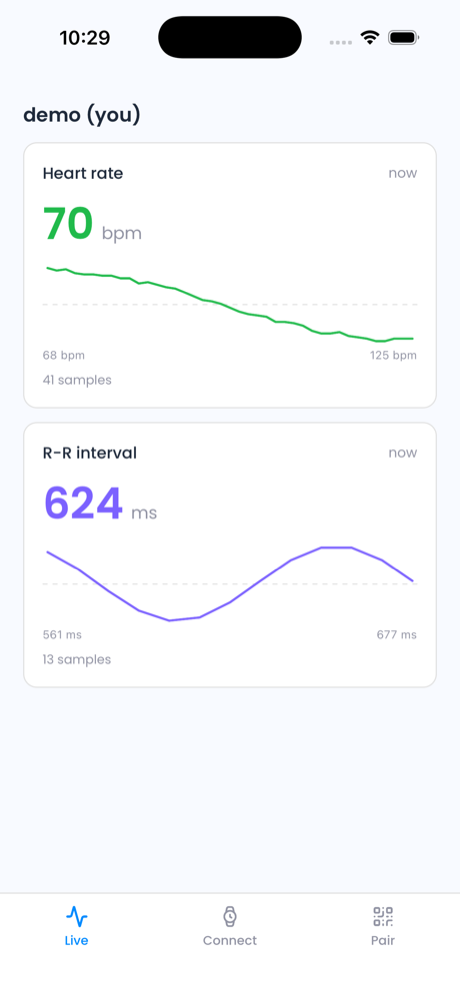
The Live tab renders readings straight from the local SDK feed
## Run it yourself
{% hint style="info" %}
**Prerequisites:** [Terra CLI](/developer-tools/terra-cli/installation.md), [Node.js](https://nodejs.org/) 18+ and Xcode or Android Studio. `terra-rt` is a native module, so the app needs a development build and Expo Go will not work. Pairing needs a physical phone; on a simulator, tap **Try the demo** instead.
{% endhint %}
{% stepper %}
{% step %}
#### Build and launch
```bash
terra examples clone streaming-mobile-app my-app
cd my-app/app
npm install
```
{% tabs %}
{% tab title="iOS" %}
```bash
npx expo run:ios
```
{% endtab %}
{% tab title="Android" %}
```bash
npx expo run:android
```
{% endtab %}
{% endtabs %}
The first compile takes a few minutes.
{% endstep %}
{% step %}
#### Add a test user
On the [streaming page](https://dashboard.tryterra.co/dashboard/streaming), click **+ Test User** and choose **Use my own wearable device**. Leave the pairing QR on screen.
{% endstep %}
{% step %}
#### Pair
Scan the QR from the app's **Pair** tab, or with your phone's camera. The app stores the `rt.` token in the keychain and shows who you are streaming as.
{% endstep %}
{% step %}
#### Stream
On **Connect**, pick a BLE device, phone sensors, or Apple Watch. Streaming starts automatically. Open **Live** to see the readings, then check the dashboard streaming tester to see them arrive on Terra's side.
{% endstep %}
{% endstepper %}
## How the integration works
`ProducerController.ts` drives the sequence, then opens the stream. Because the token is reusable, `fetchSdkToken` and `fetchStreamingToken` return the same string the QR carried.
{% code title="app/src/producer/ProducerController.ts" %}
```typescript
// setup(): initTerra → rt. token → initConnection → map reference_id
await sdk.initialize(devId, referenceId);
const token = await api.fetchSdkToken();
await sdk.registerDevice(token);
const userId = await sdk.getUserId();
// startStreaming(): pass the token to open the producer connection
const streamingToken = await api.fetchStreamingToken(userId);
await sdk.startStreaming(connectionType, STREAM_DATA_TYPES, streamingToken);
```
{% endcode %}
The token is the only difference from local-only streaming. With it, `rt.startRealtime` opens the WebSocket to Terra and relays every reading.
Production integrations usually mint a short-lived token per connection from their own backend instead, which is the flow in the [React Native reference](https://docs.tryterra.co/streaming-api/your-app-greater-than-terra/react-native).
## Explore the code
View the source
Includes a Jest suite over the producer state machine.
| Path | What it holds |
| ---------------------------------------- | ------------------------------------------------- |
| `app/src/producer/terraSdk.ts` | The `terra-rt` integration surface; start here |
| `app/src/producer/ProducerController.ts` | The producer state machine |
| `app/src/auth/` | Pairing session, keychain storage, token provider |
| `app/src/datatypes/` | One entry per streaming data type |
| `wearos/` | The standalone Wear OS companion |
Streaming from a watch
On Apple Watch, a watchOS companion relays over WatchConnectivity, since Apple Watch does not broadcast standard BLE heart rate. On Wear OS, `wearos/` streams over the `terra-wearos` SDK. Both are covered in the example's [`docs/`](https://github.com/tryterra/terra-examples/tree/main/examples/streaming-mobile-app/docs).